1
A Brief History of Operating Systems:
The first operating system was created by General Motors in 1956 to run a single IBM mainframe computer.
Other IBM mainframe owners followed suit and created their own operating systems. As you can imagine,
the earliest operating systems varied wildly from one computer to the next, and while they did make it
easier to write programs, they did not allow programs to be used on more than one mainframe without a
complete rewrite.
In the 1960s, IBM was the first computer manufacturer to take on the task of operating system
development and began distributing operating systems with their computers. However, IBM wasn't the
only vendor creating operating systems during this time. Control Data Corporation, Computer Sciences
Corporation, Burroughs Corporation, GE, Digital Equipment Corporation, and Xerox all released mainframe
operating systems in the 1960s as well.
In the late 1960s, the first version of the Unix operating system was developed. Written in C, and freely
available during it's earliest years, Unix was easily ported to new systems and rapidly achieved broad
acceptance. Many modern operating systems, including Apple OS X and all Linux flavors, trace their roots
back to Unix.
Microsoft Windows was developed in response to a request from IBM for an operating system to run its
range of personal computers. The first OS built by Microsoft wasn't called Windows, it was called MS-DOS
and was built in 1981 by purchasing the 86-DOS operating system from Seattle Computer Products and
modifying it to meet IBM's requirements. The name Windows was first used in 1985 when a graphical user
interface was created and paired with MS-DOS.
Apple OS X, Microsoft Windows, and the various forms of Linux (including Android) now command the vast
majority of the modern operating system market.
Definition:
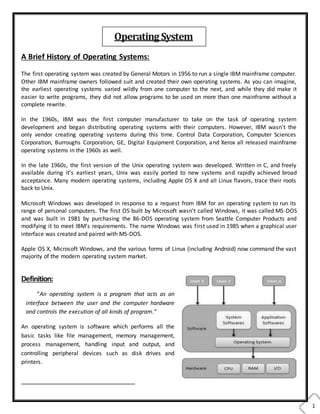
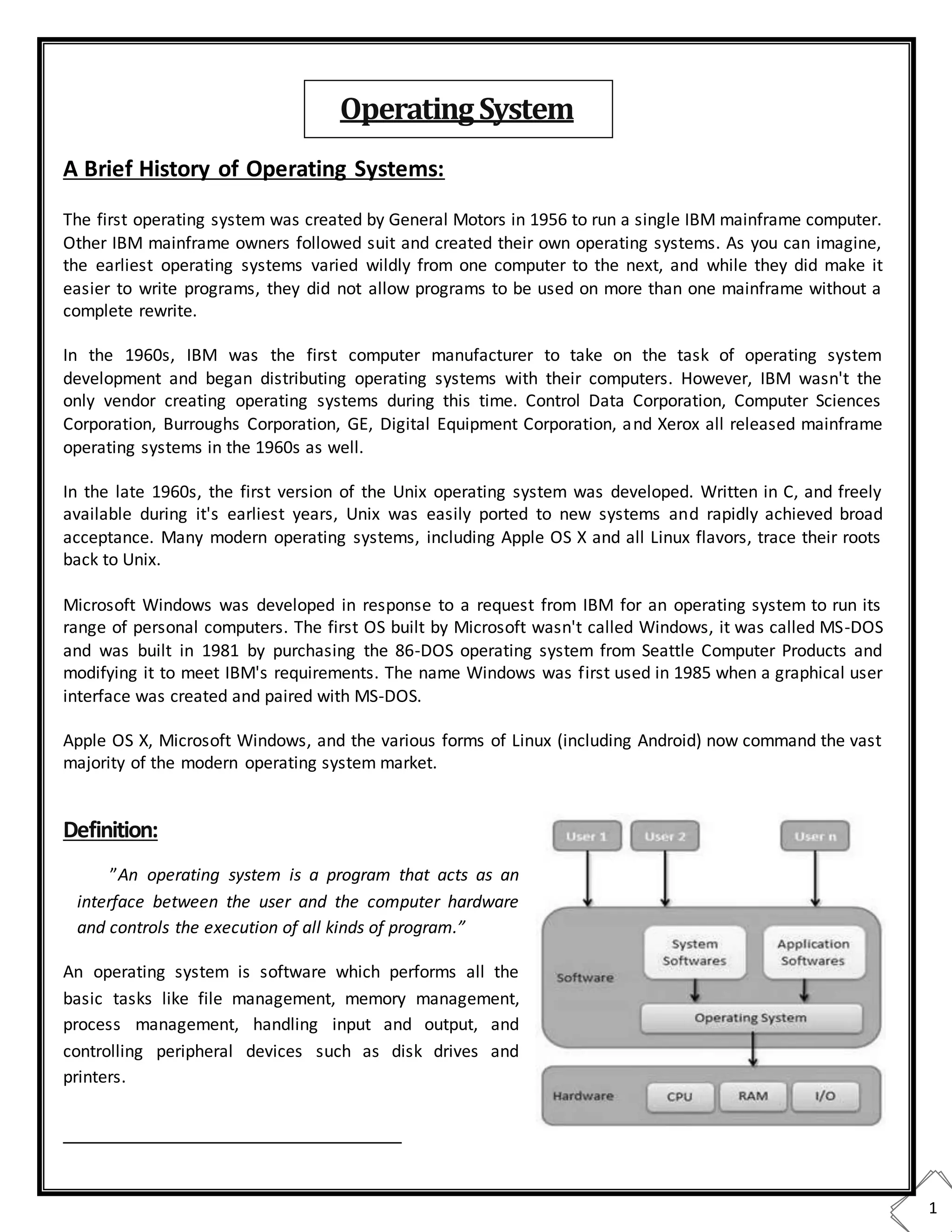
”An operating system is a program that acts as an
interface between the user and the computer hardware
and controls the execution of all kinds of program.”
An operating system is software which performs all the
basic tasks like file management, memory management,
process management, handling input and output, and
controlling peripheral devices such as disk drives and
printers.
OperatingSystem
2
Two Views of Operating System
1. User's View
2. System View
Operating System: User View
The user view of the computer refers to the interface being used. Such systems are designed for one user to
monopolize its resources, to maximize the work that the user is performing. In these cases, the operating
system is designed mostly for ease of use, with some attention paid to performance, and none paid to
resource utilization.
Operating System: System View
Operating system can be viewed as a resource allocator also. A computer system consists of many
resources like - hardware and software - that must be managed efficiently. The operating system acts as the
manager of the resources, decides between conflicting requests, controls execution of programs etc.
Operating System Management Tasks
1. Processor management which involves putting the tasks into order and pairing them into manageable
size before they go to the CPU.
2. Memory management which coordinates data to and from RAM (random-access memory) and
determines the necessity for virtual memory.
3. Device management which provides interface between connected devices.
4. Storage management which directs permanent data storage.
5. Application which allows standard communication between software and your computer.
6. User interface which allows you to communicate with your computer.
Functions of an operating System:
Following are some of important functions of an operating System:
1. It boots the computer
2. It performs basic computer tasks e.g. managing the various peripheral devices e.g. mouse, keyboard
3. It provides a user interface, e.g. command line, graphical user interface (GUI)
4. It handles system resources such as computer's memory and sharing of the central processing unit(CPU)
time by various applications or peripheral devices.
5. It provides file management which refers to the way that the operating system manipulates, stores,
retrieves and saves data.
6. Error Handling is done by the operating system. It takes preventive measures whenever required to
avoid errors.
3
Goals of Operating System:
 The primary goals of an operating system are a convenience for the user. Operating system exit
because they are used to supposed to make it easier to compute with an operating system than
without an operating system. This is particularly clear when you look at operating system for small
personal computer.
 A secondary goal is a efficient operation of an operating system. This goal is particularly important for
large, shared multi-user systems. Operating systems can solve this goal. It is known that sometimes
these two goals, convenience and efficiency, are contradictory.
Evolution of Operating System:
• Early Systems (1950)
• Simple Batch Systems (1960)
• Multi-programmed Batch Systems (1970)
• Time-Sharing and Real-Time Systems (1970)
• Personal/Desktop Computers (1980)
• Multiprocessor Systems (1980)
• Networked/Distributed Systems (1980)
• Web-based Systems (1990)
 Time-Sharing System:
• Batch multiprogramming does not support interaction with users.
• Time-sharing extends Batch Multiprogramming to handle multiple interactive jobs –
it’s Interactive Multiprogramming.
• Multiple users simultaneously access the system through commands entered at terminals.
• Processor’s time is shared among multiple users.
 Real-Sharing System:
• Note that not all Operating Systems are general-purpose systems.
• Real-Time (RT) systems are dedicated systems that need to adhere to deadlines , i.e., time
constraints.
• Correctness of the computation depends not only on the logical result but also on the time
at which the results are produced.
 Hard Real-Time Systems:
• Hard real-time system must meet its deadline.
• Conflicts with time-sharing systems, not supported by general-purpose OSs.
• Often used as a control device in a dedicated application:
o Industrial control
o Robotics
• Secondary storage limited or absent, data/program is stored in short term memory,
or Read-Only Memory (ROM).
4
 Soft Real-Time Systems:
• Soft real-time system:
o Deadlines desirable but not mandatory.
o Limited utility in industrial control or robotics.
o Useful in modern applications (multimedia, video conference, virtual reality) requiring
advanced operating-system features.
 Personal/Desktop Computers:
• Personal computers – computer system dedicated to a single user.
• I/O devices: keyboards, mice, display screens, small printers.
• User convenience and responsiveness.
• Can adopt technology developed for larger operating system; often individuals have sole use
of computer and do not need advanced CPU utilization of protection features.
• May run several different types of operating systems (Windows, MacOS, UNIX, Linux)
• Traditional personal computer blurring over time.
• Office environment:
o PCs connected to a network, terminals attached to mainframe or minicomputers
providing batch and timesharing.
o Now portals allowing networked and remote systems access to same resources.
• Home networks:
o Used to be single system, then modems
o Now firewalled, networked.
Two categories of Computer Systems:
• Single Instruction Single Data (SISD) –
• single processor executes a single instruction sequence to operate on data stored in a single
memory.
• This is a Uniprocessor.
• Multiple Instruction Multiple Data (MIMD) -
• a set of processors simultaneously execute different instruction sequences on different data
sets.
• This is a Multiprocessor.
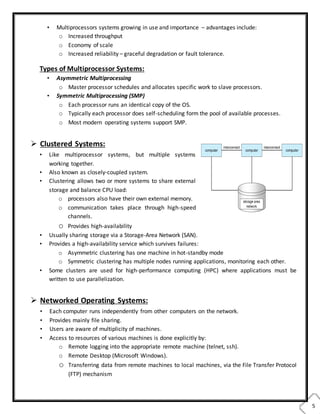
 Multiprocessor Systems:
• System with several CPUs in close communication:
o Processors share memory and a clock.
o Communication usually takes place through
the shared memory.
• Also known as parallel systems, tightly-coupled systems.
Multiprocessor Architecture
5
• Multiprocessors systems growing in use and importance – advantages include:
o Increased throughput
o Economy of scale
o Increased reliability – graceful degradation or fault tolerance.
Types of Multiprocessor Systems:
• Asymmetric Multiprocessing
o Master processor schedules and allocates specific work to slave processors.
• Symmetric Multiprocessing (SMP)
o Each processor runs an identical copy of the OS.
o Typically each processor does self-scheduling form the pool of available processes.
o Most modern operating systems support SMP.
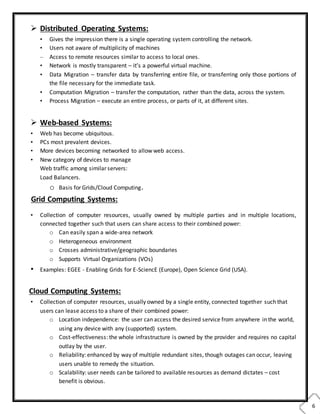
 Clustered Systems:
• Like multiprocessor systems, but multiple systems
working together.
• Also known as closely-coupled system.
• Clustering allows two or more systems to share external
storage and balance CPU load:
o processors also have their own external memory.
o communication takes place through high-speed
channels.
o Provides high-availability
• Usually sharing storage via a Storage-Area Network (SAN).
• Provides a high-availability service which survives failures:
o Asymmetric clustering has one machine in hot-standby mode
o Symmetric clustering has multiple nodes running applications, monitoring each other.
• Some clusters are used for high-performance computing (HPC) where applications must be
written to use parallelization.
 Networked Operating Systems:
• Each computer runs independently from other computers on the network.
• Provides mainly file sharing.
• Users are aware of multiplicity of machines.
• Access to resources of various machines is done explicitly by:
o Remote logging into the appropriate remote machine (telnet, ssh).
o Remote Desktop (Microsoft Windows).
o Transferring data from remote machines to local machines, via the File Transfer Protocol
(FTP) mechanism
6
 Distributed Operating Systems:
• Gives the impression there is a single operating system controlling the network.
• Users not aware of multiplicity of machines
– Access to remote resources similar to access to local ones.
• Network is mostly transparent – it’s a powerful virtual machine.
• Data Migration – transfer data by transferring entire file, or transferring only those portions of
the file necessary for the immediate task.
• Computation Migration – transfer the computation, rather than the data, across the system.
• Process Migration – execute an entire process, or parts of it, at different sites.
 Web-based Systems:
• Web has become ubiquitous.
• PCs most prevalent devices.
• More devices becoming networked to allow web access.
• New category of devices to manage
Web traffic among similar servers:
Load Balancers.
o Basis for Grids/Cloud Computing.
Grid Computing Systems:
• Collection of computer resources, usually owned by multiple parties and in multiple locations,
connected together such that users can share access to their combined power:
o Can easily span a wide-area network
o Heterogeneous environment
o Crosses administrative/geographic boundaries
o Supports Virtual Organizations (VOs)
• Examples: EGEE - Enabling Grids for E-SciencE (Europe), Open Science Grid (USA).
Cloud Computing Systems:
• Collection of computer resources, usually owned by a single entity, connected together such that
users can lease access to a share of their combined power:
o Location independence: the user can access the desired service from anywhere in the world,
using any device with any (supported) system.
o Cost-effectiveness: the whole infrastructure is owned by the provider and requires no capital
outlay by the user.
o Reliability: enhanced by way of multiple redundant sites, though outages can occur, leaving
users unable to remedy the situation.
o Scalability: user needs can be tailored to available resources as demand dictates – cost
benefit is obvious.
7
o Security: low risk of data loss thanks to centralization, though problems with control over
sensitive data need to be solved.
o Readily consumable: the user usually does not
need to do much deployment or customization,
as the provided services are easy to adopt and ready-to-use.
• Examples: Amazon EC2 (Elastic Compute Cloud), Google App Engine, IBM Enterprise Data Center,
MS Windows Azure, SUN Cloud Computing

Introduction to Operating System

  • 1.
    1 A Brief Historyof Operating Systems: The first operating system was created by General Motors in 1956 to run a single IBM mainframe computer. Other IBM mainframe owners followed suit and created their own operating systems. As you can imagine, the earliest operating systems varied wildly from one computer to the next, and while they did make it easier to write programs, they did not allow programs to be used on more than one mainframe without a complete rewrite. In the 1960s, IBM was the first computer manufacturer to take on the task of operating system development and began distributing operating systems with their computers. However, IBM wasn't the only vendor creating operating systems during this time. Control Data Corporation, Computer Sciences Corporation, Burroughs Corporation, GE, Digital Equipment Corporation, and Xerox all released mainframe operating systems in the 1960s as well. In the late 1960s, the first version of the Unix operating system was developed. Written in C, and freely available during it's earliest years, Unix was easily ported to new systems and rapidly achieved broad acceptance. Many modern operating systems, including Apple OS X and all Linux flavors, trace their roots back to Unix. Microsoft Windows was developed in response to a request from IBM for an operating system to run its range of personal computers. The first OS built by Microsoft wasn't called Windows, it was called MS-DOS and was built in 1981 by purchasing the 86-DOS operating system from Seattle Computer Products and modifying it to meet IBM's requirements. The name Windows was first used in 1985 when a graphical user interface was created and paired with MS-DOS. Apple OS X, Microsoft Windows, and the various forms of Linux (including Android) now command the vast majority of the modern operating system market. Definition: ”An operating system is a program that acts as an interface between the user and the computer hardware and controls the execution of all kinds of program.” An operating system is software which performs all the basic tasks like file management, memory management, process management, handling input and output, and controlling peripheral devices such as disk drives and printers. OperatingSystem
  • 2.
    2 Two Views ofOperating System 1. User's View 2. System View Operating System: User View The user view of the computer refers to the interface being used. Such systems are designed for one user to monopolize its resources, to maximize the work that the user is performing. In these cases, the operating system is designed mostly for ease of use, with some attention paid to performance, and none paid to resource utilization. Operating System: System View Operating system can be viewed as a resource allocator also. A computer system consists of many resources like - hardware and software - that must be managed efficiently. The operating system acts as the manager of the resources, decides between conflicting requests, controls execution of programs etc. Operating System Management Tasks 1. Processor management which involves putting the tasks into order and pairing them into manageable size before they go to the CPU. 2. Memory management which coordinates data to and from RAM (random-access memory) and determines the necessity for virtual memory. 3. Device management which provides interface between connected devices. 4. Storage management which directs permanent data storage. 5. Application which allows standard communication between software and your computer. 6. User interface which allows you to communicate with your computer. Functions of an operating System: Following are some of important functions of an operating System: 1. It boots the computer 2. It performs basic computer tasks e.g. managing the various peripheral devices e.g. mouse, keyboard 3. It provides a user interface, e.g. command line, graphical user interface (GUI) 4. It handles system resources such as computer's memory and sharing of the central processing unit(CPU) time by various applications or peripheral devices. 5. It provides file management which refers to the way that the operating system manipulates, stores, retrieves and saves data. 6. Error Handling is done by the operating system. It takes preventive measures whenever required to avoid errors.
  • 3.
    3 Goals of OperatingSystem:  The primary goals of an operating system are a convenience for the user. Operating system exit because they are used to supposed to make it easier to compute with an operating system than without an operating system. This is particularly clear when you look at operating system for small personal computer.  A secondary goal is a efficient operation of an operating system. This goal is particularly important for large, shared multi-user systems. Operating systems can solve this goal. It is known that sometimes these two goals, convenience and efficiency, are contradictory. Evolution of Operating System: • Early Systems (1950) • Simple Batch Systems (1960) • Multi-programmed Batch Systems (1970) • Time-Sharing and Real-Time Systems (1970) • Personal/Desktop Computers (1980) • Multiprocessor Systems (1980) • Networked/Distributed Systems (1980) • Web-based Systems (1990)  Time-Sharing System: • Batch multiprogramming does not support interaction with users. • Time-sharing extends Batch Multiprogramming to handle multiple interactive jobs – it’s Interactive Multiprogramming. • Multiple users simultaneously access the system through commands entered at terminals. • Processor’s time is shared among multiple users.  Real-Sharing System: • Note that not all Operating Systems are general-purpose systems. • Real-Time (RT) systems are dedicated systems that need to adhere to deadlines , i.e., time constraints. • Correctness of the computation depends not only on the logical result but also on the time at which the results are produced.  Hard Real-Time Systems: • Hard real-time system must meet its deadline. • Conflicts with time-sharing systems, not supported by general-purpose OSs. • Often used as a control device in a dedicated application: o Industrial control o Robotics • Secondary storage limited or absent, data/program is stored in short term memory, or Read-Only Memory (ROM).
  • 4.
    4  Soft Real-TimeSystems: • Soft real-time system: o Deadlines desirable but not mandatory. o Limited utility in industrial control or robotics. o Useful in modern applications (multimedia, video conference, virtual reality) requiring advanced operating-system features.  Personal/Desktop Computers: • Personal computers – computer system dedicated to a single user. • I/O devices: keyboards, mice, display screens, small printers. • User convenience and responsiveness. • Can adopt technology developed for larger operating system; often individuals have sole use of computer and do not need advanced CPU utilization of protection features. • May run several different types of operating systems (Windows, MacOS, UNIX, Linux) • Traditional personal computer blurring over time. • Office environment: o PCs connected to a network, terminals attached to mainframe or minicomputers providing batch and timesharing. o Now portals allowing networked and remote systems access to same resources. • Home networks: o Used to be single system, then modems o Now firewalled, networked. Two categories of Computer Systems: • Single Instruction Single Data (SISD) – • single processor executes a single instruction sequence to operate on data stored in a single memory. • This is a Uniprocessor. • Multiple Instruction Multiple Data (MIMD) - • a set of processors simultaneously execute different instruction sequences on different data sets. • This is a Multiprocessor.  Multiprocessor Systems: • System with several CPUs in close communication: o Processors share memory and a clock. o Communication usually takes place through the shared memory. • Also known as parallel systems, tightly-coupled systems. Multiprocessor Architecture
  • 5.
    5 • Multiprocessors systemsgrowing in use and importance – advantages include: o Increased throughput o Economy of scale o Increased reliability – graceful degradation or fault tolerance. Types of Multiprocessor Systems: • Asymmetric Multiprocessing o Master processor schedules and allocates specific work to slave processors. • Symmetric Multiprocessing (SMP) o Each processor runs an identical copy of the OS. o Typically each processor does self-scheduling form the pool of available processes. o Most modern operating systems support SMP.  Clustered Systems: • Like multiprocessor systems, but multiple systems working together. • Also known as closely-coupled system. • Clustering allows two or more systems to share external storage and balance CPU load: o processors also have their own external memory. o communication takes place through high-speed channels. o Provides high-availability • Usually sharing storage via a Storage-Area Network (SAN). • Provides a high-availability service which survives failures: o Asymmetric clustering has one machine in hot-standby mode o Symmetric clustering has multiple nodes running applications, monitoring each other. • Some clusters are used for high-performance computing (HPC) where applications must be written to use parallelization.  Networked Operating Systems: • Each computer runs independently from other computers on the network. • Provides mainly file sharing. • Users are aware of multiplicity of machines. • Access to resources of various machines is done explicitly by: o Remote logging into the appropriate remote machine (telnet, ssh). o Remote Desktop (Microsoft Windows). o Transferring data from remote machines to local machines, via the File Transfer Protocol (FTP) mechanism
  • 6.
    6  Distributed OperatingSystems: • Gives the impression there is a single operating system controlling the network. • Users not aware of multiplicity of machines – Access to remote resources similar to access to local ones. • Network is mostly transparent – it’s a powerful virtual machine. • Data Migration – transfer data by transferring entire file, or transferring only those portions of the file necessary for the immediate task. • Computation Migration – transfer the computation, rather than the data, across the system. • Process Migration – execute an entire process, or parts of it, at different sites.  Web-based Systems: • Web has become ubiquitous. • PCs most prevalent devices. • More devices becoming networked to allow web access. • New category of devices to manage Web traffic among similar servers: Load Balancers. o Basis for Grids/Cloud Computing. Grid Computing Systems: • Collection of computer resources, usually owned by multiple parties and in multiple locations, connected together such that users can share access to their combined power: o Can easily span a wide-area network o Heterogeneous environment o Crosses administrative/geographic boundaries o Supports Virtual Organizations (VOs) • Examples: EGEE - Enabling Grids for E-SciencE (Europe), Open Science Grid (USA). Cloud Computing Systems: • Collection of computer resources, usually owned by a single entity, connected together such that users can lease access to a share of their combined power: o Location independence: the user can access the desired service from anywhere in the world, using any device with any (supported) system. o Cost-effectiveness: the whole infrastructure is owned by the provider and requires no capital outlay by the user. o Reliability: enhanced by way of multiple redundant sites, though outages can occur, leaving users unable to remedy the situation. o Scalability: user needs can be tailored to available resources as demand dictates – cost benefit is obvious.
  • 7.
    7 o Security: lowrisk of data loss thanks to centralization, though problems with control over sensitive data need to be solved. o Readily consumable: the user usually does not need to do much deployment or customization, as the provided services are easy to adopt and ready-to-use. • Examples: Amazon EC2 (Elastic Compute Cloud), Google App Engine, IBM Enterprise Data Center, MS Windows Azure, SUN Cloud Computing