R12 Receivables Enhancement - Overview
Agenda

R12 AR Enhancement Details
  –   Late Charges
  –   Line Level Cash Application
  –   Balance Forward Billing
  –   New Accounting Rules
  –   Refund Process Automated
  –   Customer Enhancement
R12 AR Enhancement Details – Late Charges
Late Charges - Market Drives


• Global Compliance
    – Late charges and Penalty fees based on government requirements


• Improve Collections
    – Multi-Format Later Charge support
    – Flexible, multi-level Late Charge Policy definitions and assessments
R12 AR Enhancement Details - Late Charges

•   Flexible charge transaction formats
     – Invoice, Debit memo, Adjustment
•   Preview Mode & Corrections
•   Expanded assessment and calculation capabilities
     – More control over the Assessment
          • System Options
          • Profile Class / Customer Account Profile
          • Transaction Type
     – Tiered charge schedules
          • Rates dependent on length of time overdue
          • Effective dates for charge schedule changes
     – Calculation performed independent of Dunning and Statement processing
•   Integration with Balance Forward Billing
          • Average Daily Balance calculation
•   Leverages MOAC
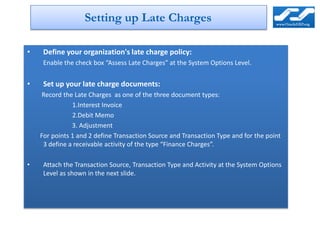
Setting up Late Charges

•    Define your organization's late charge policy:
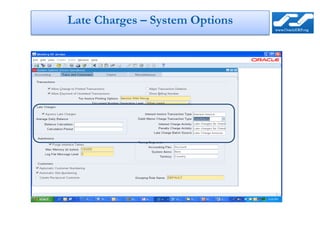
     Enable the check box “Assess Late Charges” at the System Options Level.


•    Set up your late charge documents:
     Record the Late Charges as one of the three document types:
               1.Interest Invoice
               2.Debit Memo
               3. Adjustment
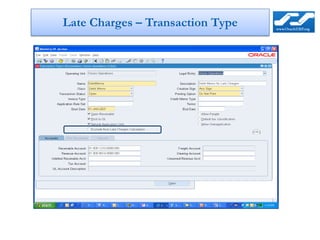
    For points 1 and 2 define Transaction Source and Transaction Type and for the point
     3 define a receivable activity of the type “Finance Charges”.

•    Attach the Transaction Source, Transaction Type and Activity at the System Options
     Level as shown in the next slide.
Late Charges – System Options
Late Charges – Transaction Type
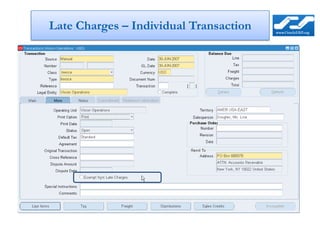
Late Charges – Individual Transaction
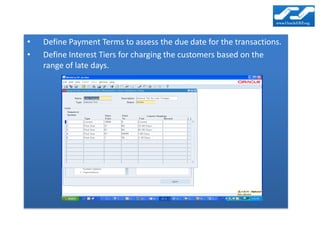
•   Define Payment Terms to assess the due date for the transactions.
•   Define Interest Tiers for charging the customers based on the
    range of late days.
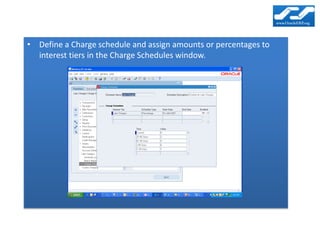
• Define a Charge schedule and assign amounts or percentages to
  interest tiers in the Charge Schedules window.
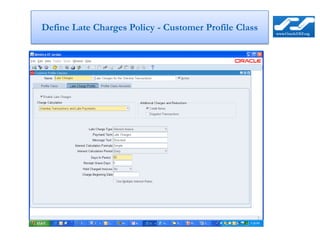
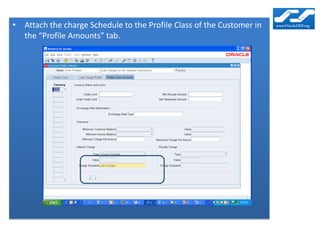
Define Late Charges Policy - Customer Profile Class
• Attach the charge Schedule to the Profile Class of the Customer in
  the “Profile Amounts” tab.
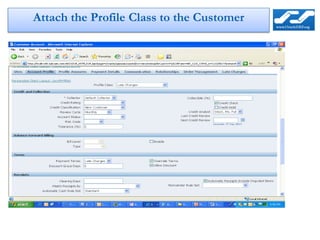
Attach the Profile Class to the Customer
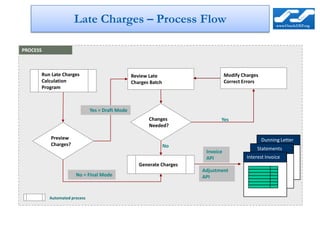
Late Charges – Process Flow

PROCESS


      Run Late Charges                           Review Late                      Modify Charges
      Calculation                                Charges Batch                    Correct Errors
      Program


                              Yes = Draft Mode
                                                        Changes               Yes
                                                        Needed?

          Preview                                                                                  Dunning Letter
          Charges?                                               No
                                                                                                Statements
                                                                        Invoice
                                                                        API                Interest Invoice
                                                    Generate Charges
                                                                       Adjustment
                      No = Final Mode                                  API


          Automated process
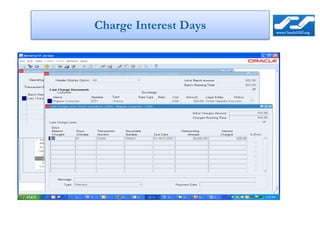
Charge Interest Days
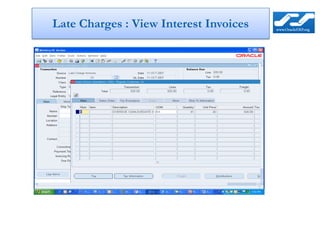
Late Charges : View Interest Invoices


                   1
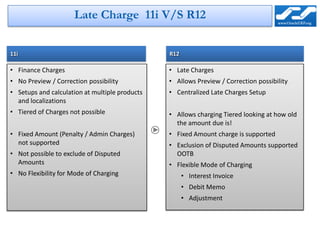
Late Charge 11i V/S R12


11i                                             R12

• Finance Charges                               • Late Charges
• No Preview / Correction possibility           • Allows Preview / Correction possibility
• Setups and calculation at multiple products   • Centralized Late Charges Setup
  and localizations
• Tiered of Charges not possible                • Allows charging Tiered looking at how old
                                                  the amount due is!
• Fixed Amount (Penalty / Admin Charges)        • Fixed Amount charge is supported
  not supported                                 • Exclusion of Disputed Amounts supported
• Not possible to exclude of Disputed             OOTB
  Amounts                                       • Flexible Mode of Charging
• No Flexibility for Mode of Charging                 • Interest Invoice
                                                      • Debit Memo
                                                      • Adjustment
R12 AR Enhancement Details
  Line Level Cash Application
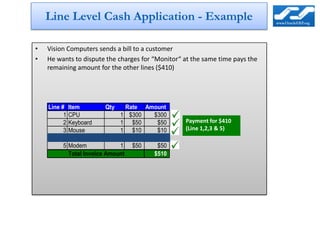
Line Level Cash Application - Example

•   Vision Computers sends a bill to a customer
•   He wants to dispute the charges for “Monitor“ at the same time pays the
    remaining amount for the other lines ($410)


    Line #    Item          Qty    Rate Amount
          1   CPU               1 $300    $300
          2   Keyboard          1 $50      $50    Payment for $410
          3   Mouse             1 $10      $10    (Line 1,2,3 & 5)
          4   Monitor           1 $100    $100
          5   Modem             1 $50      $50
              Total Invoice Amount        $510
Line Level Cash Application - New Features


• Manual Receipt Application in Detail
    – Apply specific lines,
    – Group of lines
    – Type (Line, Tax, Freight)
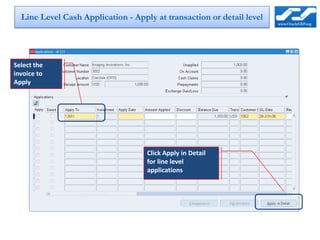
Line Level Cash Application - Apply at transaction or detail level


Select the
invoice to
Apply


                                    Click Apply in Detail
                                    for line level
                                    applications
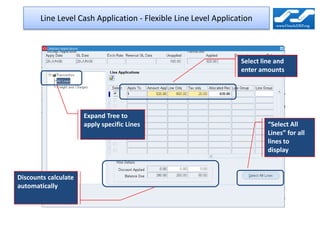
Line Level Cash Application - Flexible Line Level Application


                                                                Select line and
                                                                enter amounts


                      Expand Tree to
                      apply specific Lines                               “Select All
                                                                         Lines” for all
                                                                         lines to
                                                                         display


Discounts calculate
automatically
R12 AR Enhancement Details
  Balance Forward Billing
Balance Forward Billing - Market Drivers

• Enhanced consolidated billing for those industries that bill their
  customers on a regular, cyclical basis.

• Enable billing policies consistent with organizational needs

• Improved communication with Customer

• Enhanced viewing and printing of bills

• Better integration with feeder systems

• Fewer processes to manage

• Synchronize bills with Aging
Balance Forward Billing - Steps Required

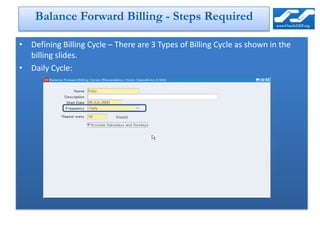
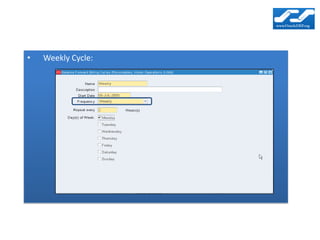
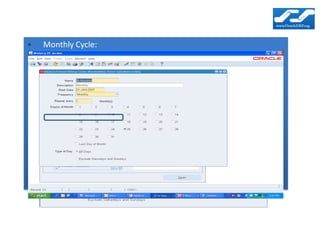
• Defining Billing Cycle – There are 3 Types of Billing Cycle as shown in the
  billing slides.
• Daily Cycle:
•   Weekly Cycle:
•   Monthly Cycle:
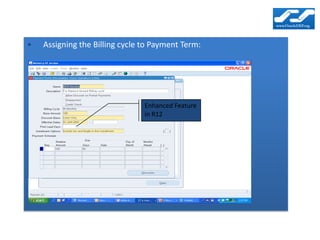
•   Assigning the Billing cycle to Payment Term:

•   Monthly Cycle:


                                Enhanced Feature
                                in R12
Balance Forward Billing - External Billing Cycle


• Billing can be done in legacy system, without predefined cycles, and
  imported
    – Bill date cannot be determined by payment term with external cycle
    – So, billing date must populated because it is required for due date calculation
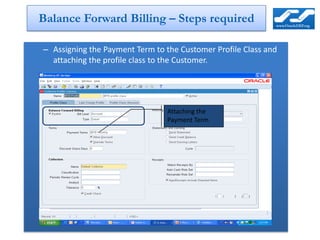
Balance Forward Billing – Steps required

– Assigning the Payment Term to the Customer Profile Class and
  attaching the profile class to the Customer.


                                Attaching the
                                Payment Term
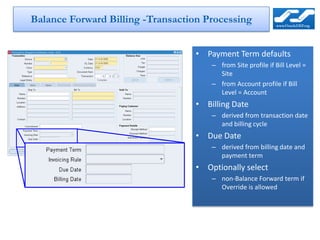
Balance Forward Billing -Transaction Processing


                                   • Payment Term defaults
                                       – from Site profile if Bill Level =
                                         Site
                                       – from Account profile if Bill
                                         Level = Account
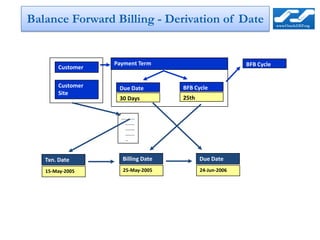
                                   • Billing Date
                                       – derived from transaction date
                                         and billing cycle
                                   • Due Date
                                       – derived from billing date and
                                         payment term
                                   • Optionally select
                                       – non-Balance Forward term if
                                         Override is allowed
Balance Forward Billing - Derivation of Date


                  Payment Term                           BFB Cycle
       Customer

       Customer    Due Date         BFB Cycle
       Site
                   30 Days          25th


                    ----------
                       -------
                       -------
                       -------
                       --


   Txn. Date         Billing Date          Due Date
   15-May-2005       25-May-2005           24-Jun-2006
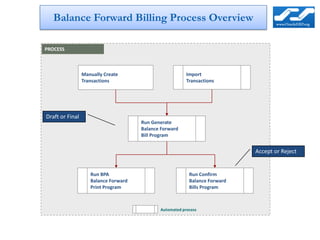
Balance Forward Billing Process Overview

PROCESS


                 Manually Create                         Import
                 Transactions                            Transactions


Draft or Final
                                      Run Generate
                                      Balance Forward
                                      Bill Program


                                                                            Accept or Reject


                    Run BPA                               Run Confirm
                    Balance Forward                       Balance Forward
                    Print Program                         Bills Program


                                             Automated process
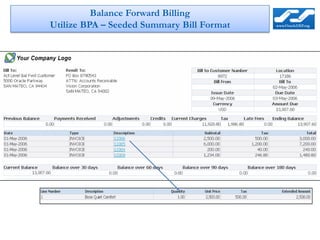
Balance Forward Billing
Utilize BPA – Seeded Summary Bill Format
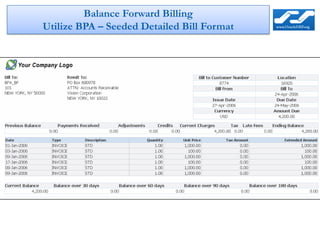
Balance Forward Billing
Utilize BPA – Seeded Detailed Bill Format
R12 AR Enhancement Details
 Daily Revenue Recognition
Daily Revenue Recognition--Market Drivers

• Distribute revenue in a more granular fashion including full and
  partial periods.
• Accurate revenue distribution for service and subscription
  industries
    – Accuracy to the number of days in the accounting period
    – Support of partial period revenue recognition
• Compliance
    – Fulfill stringent accounting standards introduced by the US GAAP and
      SOX for recognizing revenue Enhanced Revenue Contingencies
Daily Revenue Recognition -New Features


• Two new types of Accounting Rules Introduced
    – Daily Revenue Rates, All Periods
    – Daily Revenue Rates, Fully Period
• Allows accurate calculation of Periodic Revenue based on just
  “Start” and “End” dates.
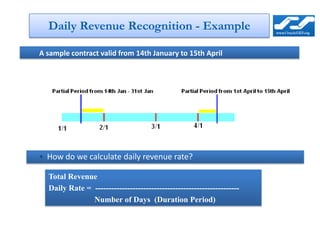
Daily Revenue Recognition - Example

A sample contract valid from 14th January to 15th April


• How do we calculate daily revenue rate?

  Total Revenue
  Daily Rate = ------------------------------------------------------
               Number of Days (Duration Period)
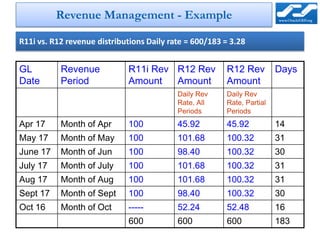
Revenue Management - Example

R11i vs. R12 revenue distributions Daily rate = 600/183 = 3.28


GL         Revenue           R11i Rev R12 Rev           R12 Rev         Days
Date       Period            Amount   Amount            Amount
                                           Daily Rev    Daily Rev
                                           Rate, All    Rate, Partial
                                           Periods      Periods
Apr 17     Month of Apr      100           45.92        45.92           14
May 17     Month of May      100           101.68       100.32          31
June 17    Month of Jun      100           98.40        100.32          30
July 17    Month of July     100           101.68       100.32          31
Aug 17     Month of Aug      100           101.68       100.32          31
Sept 17    Month of Sept     100           98.40        100.32          30
Oct 16     Month of Oct      -----         52.24        52.48           16
                             600           600          600             183
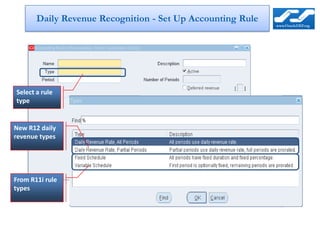
Daily Revenue Recognition - Set Up Accounting Rule


Select a rule
type


New R12 daily
revenue types


From R11i rule
types
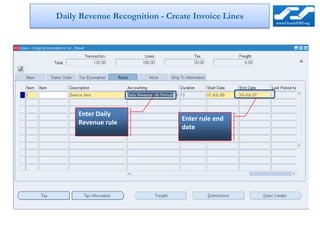
Daily Revenue Recognition - Create Invoice Lines


     Enter Daily
                             Enter rulerule end
                                Enter
     Revenue rule
                             enddate
                                 date
R12 AR Enhancements
Refund Process Automated
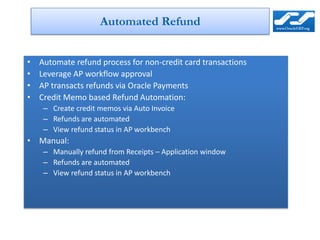
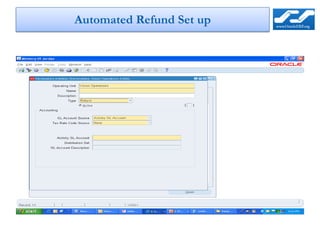
Automated Refund


•   Automate refund process for non-credit card transactions
•   Leverage AP workflow approval
•   AP transacts refunds via Oracle Payments
•   Credit Memo based Refund Automation:
     – Create credit memos via Auto Invoice
     – Refunds are automated
     – View refund status in AP workbench
• Manual:
     – Manually refund from Receipts – Application window
     – Refunds are automated
     – View refund status in AP workbench
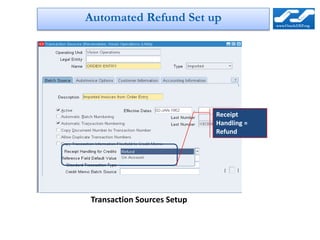
Automated Refund Set up


                            Receipt
                            Handling =
                            Refund


Transaction Sources Setup
Automated Refund Set up
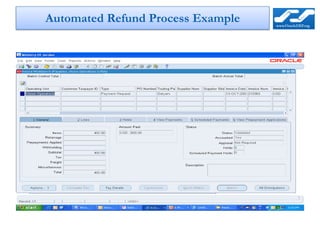
Automated Refund Process Example


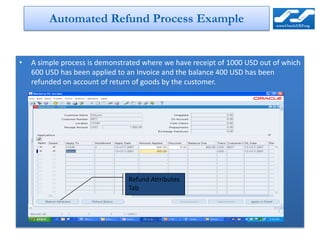
•   A simple process is demonstrated where we have receipt of 1000 USD out of which
    600 USD has been applied to an Invoice and the balance 400 USD has been
    refunded on account of return of goods by the customer.


                                Refund Attributes
                                Tab
Automated Refund Process Example


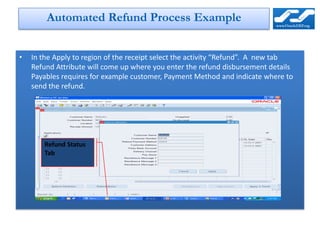
•   In the Apply to region of the receipt select the activity “Refund”. A new tab
    Refund Attribute will come up where you enter the refund disbursement details
    Payables requires for example customer, Payment Method and indicate where to
    send the refund.


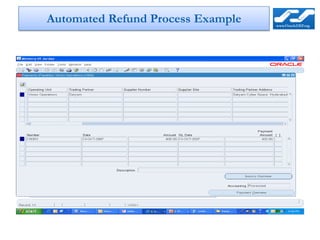
       Refund Status
       Tab
Automated Refund Process Example

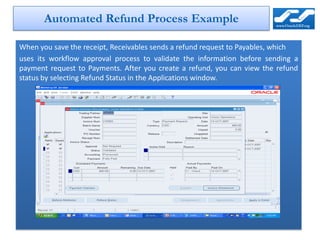
When you save the receipt, Receivables sends a refund request to Payables, which
uses its workflow approval process to validate the information before sending a
payment request to Payments. After you create a refund, you can view the refund
status by selecting Refund Status in the Applications window.
Automated Refund Process Example
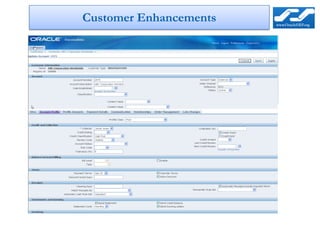
Customer Enhancements

The standard customer form has been replaced with a new HTML form for
creation and updates to customer information.

• Addresses usability concerns
• Backwards compatible with standard customer form
• Includes personalization features
Customer Enhancements

Oracle R12 AR Enhancement Overview

  • 1.
  • 2.
    Agenda R12 AR EnhancementDetails – Late Charges – Line Level Cash Application – Balance Forward Billing – New Accounting Rules – Refund Process Automated – Customer Enhancement
  • 3.
    R12 AR EnhancementDetails – Late Charges
  • 4.
    Late Charges -Market Drives • Global Compliance – Late charges and Penalty fees based on government requirements • Improve Collections – Multi-Format Later Charge support – Flexible, multi-level Late Charge Policy definitions and assessments
  • 5.
    R12 AR EnhancementDetails - Late Charges • Flexible charge transaction formats – Invoice, Debit memo, Adjustment • Preview Mode & Corrections • Expanded assessment and calculation capabilities – More control over the Assessment • System Options • Profile Class / Customer Account Profile • Transaction Type – Tiered charge schedules • Rates dependent on length of time overdue • Effective dates for charge schedule changes – Calculation performed independent of Dunning and Statement processing • Integration with Balance Forward Billing • Average Daily Balance calculation • Leverages MOAC
  • 6.
    Setting up LateCharges • Define your organization's late charge policy: Enable the check box “Assess Late Charges” at the System Options Level. • Set up your late charge documents: Record the Late Charges as one of the three document types: 1.Interest Invoice 2.Debit Memo 3. Adjustment For points 1 and 2 define Transaction Source and Transaction Type and for the point 3 define a receivable activity of the type “Finance Charges”. • Attach the Transaction Source, Transaction Type and Activity at the System Options Level as shown in the next slide.
  • 7.
    Late Charges –System Options
  • 8.
    Late Charges –Transaction Type
  • 9.
    Late Charges –Individual Transaction
  • 10.
    Define Payment Terms to assess the due date for the transactions. • Define Interest Tiers for charging the customers based on the range of late days.
  • 11.
    • Define aCharge schedule and assign amounts or percentages to interest tiers in the Charge Schedules window.
  • 12.
    Define Late ChargesPolicy - Customer Profile Class
  • 13.
    • Attach thecharge Schedule to the Profile Class of the Customer in the “Profile Amounts” tab.
  • 14.
    Attach the ProfileClass to the Customer
  • 15.
    Late Charges –Process Flow PROCESS Run Late Charges Review Late Modify Charges Calculation Charges Batch Correct Errors Program Yes = Draft Mode Changes Yes Needed? Preview Dunning Letter Charges? No Statements Invoice API Interest Invoice Generate Charges Adjustment No = Final Mode API Automated process
  • 16.
  • 17.
    Late Charges :View Interest Invoices 1
  • 18.
    Late Charge 11iV/S R12 11i R12 • Finance Charges • Late Charges • No Preview / Correction possibility • Allows Preview / Correction possibility • Setups and calculation at multiple products • Centralized Late Charges Setup and localizations • Tiered of Charges not possible • Allows charging Tiered looking at how old the amount due is! • Fixed Amount (Penalty / Admin Charges) • Fixed Amount charge is supported not supported • Exclusion of Disputed Amounts supported • Not possible to exclude of Disputed OOTB Amounts • Flexible Mode of Charging • No Flexibility for Mode of Charging • Interest Invoice • Debit Memo • Adjustment
  • 19.
    R12 AR EnhancementDetails Line Level Cash Application
  • 20.
    Line Level CashApplication - Example • Vision Computers sends a bill to a customer • He wants to dispute the charges for “Monitor“ at the same time pays the remaining amount for the other lines ($410) Line # Item Qty Rate Amount 1 CPU 1 $300 $300 2 Keyboard 1 $50 $50 Payment for $410 3 Mouse 1 $10 $10 (Line 1,2,3 & 5) 4 Monitor 1 $100 $100 5 Modem 1 $50 $50 Total Invoice Amount $510
  • 21.
    Line Level CashApplication - New Features • Manual Receipt Application in Detail – Apply specific lines, – Group of lines – Type (Line, Tax, Freight)
  • 22.
    Line Level CashApplication - Apply at transaction or detail level Select the invoice to Apply Click Apply in Detail for line level applications
  • 23.
    Line Level CashApplication - Flexible Line Level Application Select line and enter amounts Expand Tree to apply specific Lines “Select All Lines” for all lines to display Discounts calculate automatically
  • 24.
    R12 AR EnhancementDetails Balance Forward Billing
  • 25.
    Balance Forward Billing- Market Drivers • Enhanced consolidated billing for those industries that bill their customers on a regular, cyclical basis. • Enable billing policies consistent with organizational needs • Improved communication with Customer • Enhanced viewing and printing of bills • Better integration with feeder systems • Fewer processes to manage • Synchronize bills with Aging
  • 26.
    Balance Forward Billing- Steps Required • Defining Billing Cycle – There are 3 Types of Billing Cycle as shown in the billing slides. • Daily Cycle:
  • 27.
    Weekly Cycle:
  • 28.
    Monthly Cycle:
  • 29.
    Assigning the Billing cycle to Payment Term: • Monthly Cycle: Enhanced Feature in R12
  • 30.
    Balance Forward Billing- External Billing Cycle • Billing can be done in legacy system, without predefined cycles, and imported – Bill date cannot be determined by payment term with external cycle – So, billing date must populated because it is required for due date calculation
  • 31.
    Balance Forward Billing– Steps required – Assigning the Payment Term to the Customer Profile Class and attaching the profile class to the Customer. Attaching the Payment Term
  • 32.
    Balance Forward Billing-Transaction Processing • Payment Term defaults – from Site profile if Bill Level = Site – from Account profile if Bill Level = Account • Billing Date – derived from transaction date and billing cycle • Due Date – derived from billing date and payment term • Optionally select – non-Balance Forward term if Override is allowed
  • 33.
    Balance Forward Billing- Derivation of Date Payment Term BFB Cycle Customer Customer Due Date BFB Cycle Site 30 Days 25th ---------- ------- ------- ------- -- Txn. Date Billing Date Due Date 15-May-2005 25-May-2005 24-Jun-2006
  • 34.
    Balance Forward BillingProcess Overview PROCESS Manually Create Import Transactions Transactions Draft or Final Run Generate Balance Forward Bill Program Accept or Reject Run BPA Run Confirm Balance Forward Balance Forward Print Program Bills Program Automated process
  • 35.
    Balance Forward Billing UtilizeBPA – Seeded Summary Bill Format
  • 36.
    Balance Forward Billing UtilizeBPA – Seeded Detailed Bill Format
  • 37.
    R12 AR EnhancementDetails Daily Revenue Recognition
  • 38.
    Daily Revenue Recognition--MarketDrivers • Distribute revenue in a more granular fashion including full and partial periods. • Accurate revenue distribution for service and subscription industries – Accuracy to the number of days in the accounting period – Support of partial period revenue recognition • Compliance – Fulfill stringent accounting standards introduced by the US GAAP and SOX for recognizing revenue Enhanced Revenue Contingencies
  • 39.
    Daily Revenue Recognition-New Features • Two new types of Accounting Rules Introduced – Daily Revenue Rates, All Periods – Daily Revenue Rates, Fully Period • Allows accurate calculation of Periodic Revenue based on just “Start” and “End” dates.
  • 40.
    Daily Revenue Recognition- Example A sample contract valid from 14th January to 15th April • How do we calculate daily revenue rate? Total Revenue Daily Rate = ------------------------------------------------------ Number of Days (Duration Period)
  • 41.
    Revenue Management -Example R11i vs. R12 revenue distributions Daily rate = 600/183 = 3.28 GL Revenue R11i Rev R12 Rev R12 Rev Days Date Period Amount Amount Amount Daily Rev Daily Rev Rate, All Rate, Partial Periods Periods Apr 17 Month of Apr 100 45.92 45.92 14 May 17 Month of May 100 101.68 100.32 31 June 17 Month of Jun 100 98.40 100.32 30 July 17 Month of July 100 101.68 100.32 31 Aug 17 Month of Aug 100 101.68 100.32 31 Sept 17 Month of Sept 100 98.40 100.32 30 Oct 16 Month of Oct ----- 52.24 52.48 16 600 600 600 183
  • 42.
    Daily Revenue Recognition- Set Up Accounting Rule Select a rule type New R12 daily revenue types From R11i rule types
  • 43.
    Daily Revenue Recognition- Create Invoice Lines Enter Daily Enter rulerule end Enter Revenue rule enddate date
  • 44.
    R12 AR Enhancements RefundProcess Automated
  • 45.
    Automated Refund • Automate refund process for non-credit card transactions • Leverage AP workflow approval • AP transacts refunds via Oracle Payments • Credit Memo based Refund Automation: – Create credit memos via Auto Invoice – Refunds are automated – View refund status in AP workbench • Manual: – Manually refund from Receipts – Application window – Refunds are automated – View refund status in AP workbench
  • 46.
    Automated Refund Setup Receipt Handling = Refund Transaction Sources Setup
  • 47.
  • 48.
    Automated Refund ProcessExample • A simple process is demonstrated where we have receipt of 1000 USD out of which 600 USD has been applied to an Invoice and the balance 400 USD has been refunded on account of return of goods by the customer. Refund Attributes Tab
  • 49.
    Automated Refund ProcessExample • In the Apply to region of the receipt select the activity “Refund”. A new tab Refund Attribute will come up where you enter the refund disbursement details Payables requires for example customer, Payment Method and indicate where to send the refund. Refund Status Tab
  • 50.
    Automated Refund ProcessExample When you save the receipt, Receivables sends a refund request to Payables, which uses its workflow approval process to validate the information before sending a payment request to Payments. After you create a refund, you can view the refund status by selecting Refund Status in the Applications window.
  • 51.
  • 52.
  • 53.
    Customer Enhancements The standardcustomer form has been replaced with a new HTML form for creation and updates to customer information. • Addresses usability concerns • Backwards compatible with standard customer form • Includes personalization features
  • 54.