FIXED ASSETS:

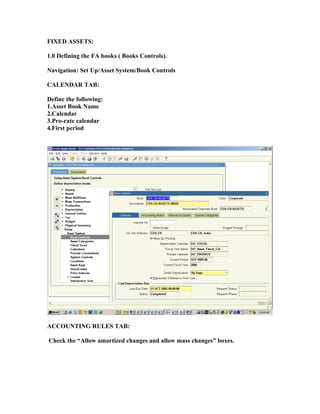
1.0 Defining the FA books ( Books Controls).

Navigation: Set Up/Asset System/Book Controls

CALENDAR TAB:

Define the following:
1.Asset Book Name
2.Calendar
3.Pro-rate calendar
4.First period


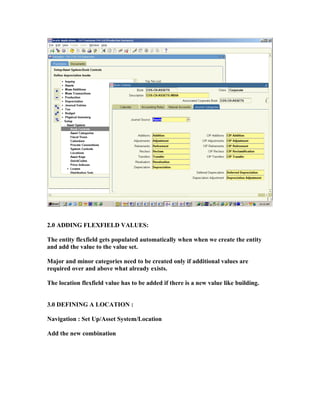
ACCOUNTING RULES TAB:

Check the “Allow amortized changes and allow mass changes” boxes.
Natural Accounts tab:
Journal Categories tab:

As below:
2.0 ADDING FLEXFIELD VALUES:

The entity flexfield gets populated automatically when when we create the entity
and add the value to the value set.

Major and minor categories need to be created only if additional values are
required over and above what already exists.

The location flexfield value has to be added if there is a new value like building.


3.0 DEFINING A LOCATION :

Navigation : Set Up/Asset System/Location

Add the new combination
DEFINE BLOCK OF ASSETS:

Navigation: Block Of Assets/define Block of Assets.

Use data loader to upload the block name, rate, start date and opening balance.
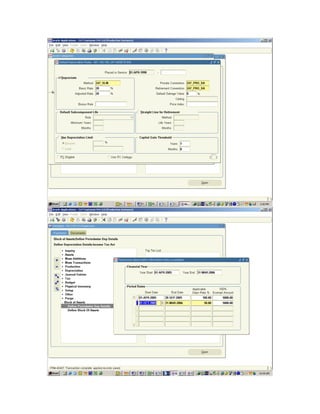
DEFINING PERIOD-WISE DEPRECIATION DETAILS:

Navigation: Block of Assets/Define period-wise depreciation details

Enter the rate for the period range for the latest year.


CREATING ASSET CATEGORIES:

Navigation: Set Up/Asset System/Asset Categories

Create the category combination
Choose the books and the asset and depreciation accounts.
Click on “Default Rules” and enter the depreciation method, rate and pro-rate
convention.
Fixed assets-set-up

Fixed assets-set-up

  • 1.
    FIXED ASSETS: 1.0 Definingthe FA books ( Books Controls). Navigation: Set Up/Asset System/Book Controls CALENDAR TAB: Define the following: 1.Asset Book Name 2.Calendar 3.Pro-rate calendar 4.First period ACCOUNTING RULES TAB: Check the “Allow amortized changes and allow mass changes” boxes.
  • 2.
  • 3.
  • 4.
    2.0 ADDING FLEXFIELDVALUES: The entity flexfield gets populated automatically when when we create the entity and add the value to the value set. Major and minor categories need to be created only if additional values are required over and above what already exists. The location flexfield value has to be added if there is a new value like building. 3.0 DEFINING A LOCATION : Navigation : Set Up/Asset System/Location Add the new combination
  • 5.
    DEFINE BLOCK OFASSETS: Navigation: Block Of Assets/define Block of Assets. Use data loader to upload the block name, rate, start date and opening balance.
  • 6.
    DEFINING PERIOD-WISE DEPRECIATIONDETAILS: Navigation: Block of Assets/Define period-wise depreciation details Enter the rate for the period range for the latest year. CREATING ASSET CATEGORIES: Navigation: Set Up/Asset System/Asset Categories Create the category combination Choose the books and the asset and depreciation accounts.
  • 7.
    Click on “DefaultRules” and enter the depreciation method, rate and pro-rate convention.