Oracle Cash Management – R12 Del a
                                t
Context – Objectives of the Training

• This training will help Associates in understanding Oracle Cash Management in Financials area.

• This training will help Associates in understanding the R12 features in Cash management
considering the real life case studies.


                                                                                                   2
Agenda


•   General Introduction to Oracle CM Module
•   Run Through End to End Business Processes
•   Delta Features of Oracle CM Module
•   Setup sequence
•   Business Case Study


                                                3
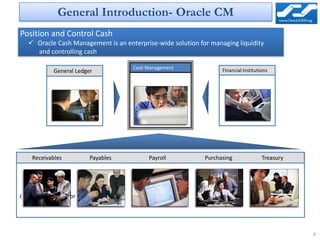
General Introduction- Oracle CM
Position and Control Cash
    Oracle Cash Management is an enterprise-wide solution for managing liquidity
     and controlling cash

                                          Cash Management
             General Ledger                                        Financial Institutions


    Receivables            Payables            Payroll       Purchasing               Treasury


Oracle Applications or external sources


                                                                                                 4
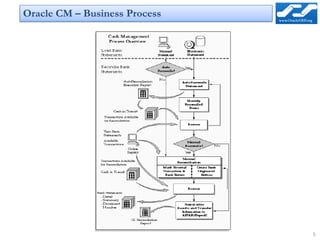
Oracle CM – Business Process


                               5
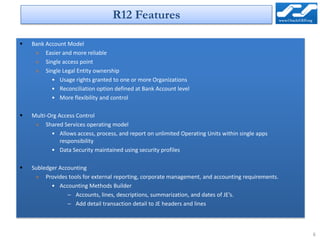
R12 Features

   Bank Account Model
     » Easier and more reliable
     » Single access point
     » Single Legal Entity ownership
           • Usage rights granted to one or more Organizations
           • Reconciliation option defined at Bank Account level
           • More flexibility and control

   Multi-Org Access Control
     » Shared Services operating model
           • Allows access, process, and report on unlimited Operating Units within single apps
               responsibility
           • Data Security maintained using security profiles

   Subledger Accounting
     » Provides tools for external reporting, corporate management, and accounting requirements.
           • Accounting Methods Builder
                 – Accounts, lines, descriptions, summarization, and dates of JE’s.
                 – Add detail transaction detail to JE headers and lines


                                                                                                   6
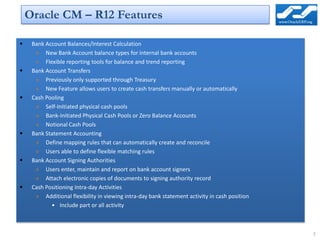
Oracle CM – R12 Features

    Bank Account Balances/Interest Calculation
      » New Bank Account balance types for internal bank accounts
      » Flexible reporting tools for balance and trend reporting
    Bank Account Transfers
      » Previously only supported through Treasury
      » New Feature allows users to create cash transfers manually or automatically
    Cash Pooling
      » Self-Initiated physical cash pools
      » Bank-Initiated Physical Cash Pools or Zero Balance Accounts
      » Notional Cash Pools
    Bank Statement Accounting
      » Define mapping rules that can automatically create and reconcile
      » Users able to define flexible matching rules
    Bank Account Signing Authorities
      » Users enter, maintain and report on bank account signers
      » Attach electronic copies of documents to signing authority record
    Cash Positioning Intra-day Activities
      » Additional flexibility in viewing intra-day bank statement activity in cash position
            • Include part or all activity


                                                                                               7
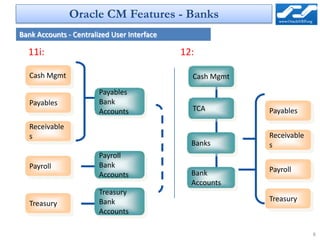
Oracle CM Features - Banks
Bank Accounts - Centralized User Interface

  11i:                                       12:

   Cash Mgmt                                   Cash Mgmt
                        Payables
   Payables             Bank
                        Accounts               TCA         Payables
   Receivable
   s                                                       Receivable
                                               Banks       s
                        Payroll
   Payroll              Bank
                                               Bank        Payroll
                        Accounts
                                               Accounts
                        Treasury
                        Bank                               Treasury
   Treasury
                        Accounts

                                                                        8
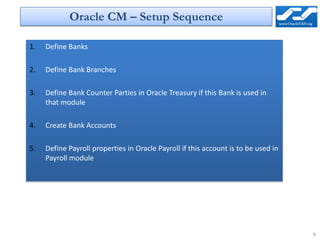
Oracle CM – Setup Sequence

1.   Define Banks

2.   Define Bank Branches

3.   Define Bank Counter Parties in Oracle Treasury if this Bank is used in
     that module

4.   Create Bank Accounts

5.   Define Payroll properties in Oracle Payroll if this account is to be used in
     Payroll module


                                                                                    9
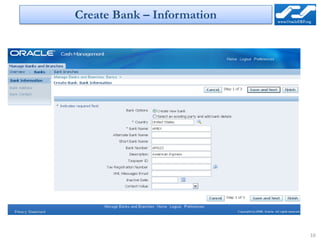
Create Bank – Information


                            10
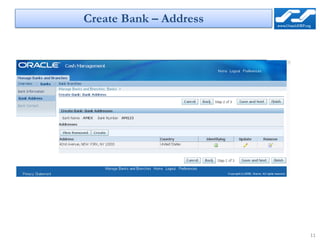
Create Bank – Address


                        11
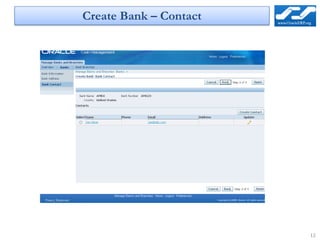
Create Bank – Contact


                        12
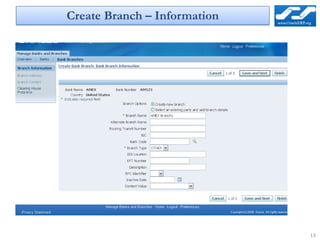
Create Branch – Information


                              13
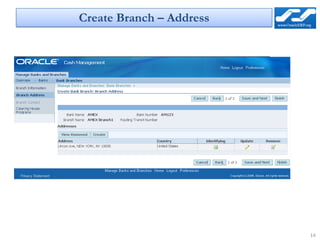
Create Branch – Address


                          14
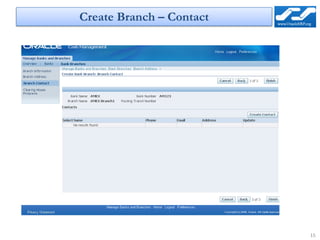
Create Branch – Contact


                          15
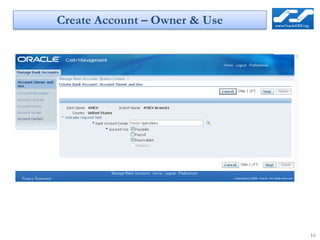
Create Account – Owner & Use


                               16
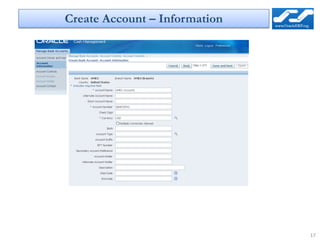
Create Account – Information


                               17
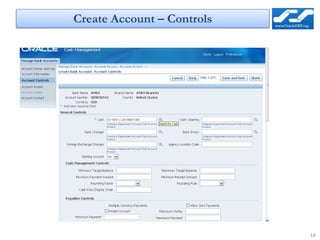
Create Account – Controls


                            18
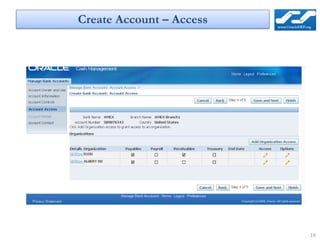
Create Account – Access


                          19
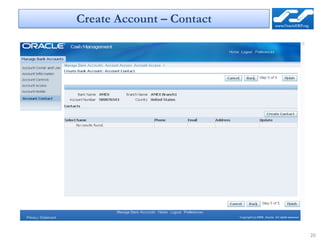
Create Account – Contact


                           20
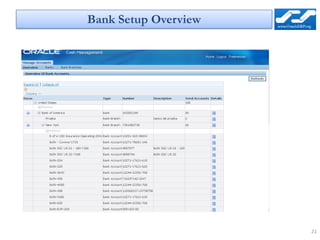
Bank Setup Overview


                      21
Oracle R12 Cash Management New Features

Oracle R12 Cash Management New Features

  • 1.
    Oracle Cash Management– R12 Del a t
  • 2.
    Context – Objectivesof the Training • This training will help Associates in understanding Oracle Cash Management in Financials area. • This training will help Associates in understanding the R12 features in Cash management considering the real life case studies. 2
  • 3.
    Agenda • General Introduction to Oracle CM Module • Run Through End to End Business Processes • Delta Features of Oracle CM Module • Setup sequence • Business Case Study 3
  • 4.
    General Introduction- OracleCM Position and Control Cash  Oracle Cash Management is an enterprise-wide solution for managing liquidity and controlling cash Cash Management General Ledger Financial Institutions Receivables Payables Payroll Purchasing Treasury Oracle Applications or external sources 4
  • 5.
    Oracle CM –Business Process 5
  • 6.
    R12 Features  Bank Account Model » Easier and more reliable » Single access point » Single Legal Entity ownership • Usage rights granted to one or more Organizations • Reconciliation option defined at Bank Account level • More flexibility and control  Multi-Org Access Control » Shared Services operating model • Allows access, process, and report on unlimited Operating Units within single apps responsibility • Data Security maintained using security profiles  Subledger Accounting » Provides tools for external reporting, corporate management, and accounting requirements. • Accounting Methods Builder – Accounts, lines, descriptions, summarization, and dates of JE’s. – Add detail transaction detail to JE headers and lines 6
  • 7.
    Oracle CM –R12 Features  Bank Account Balances/Interest Calculation » New Bank Account balance types for internal bank accounts » Flexible reporting tools for balance and trend reporting  Bank Account Transfers » Previously only supported through Treasury » New Feature allows users to create cash transfers manually or automatically  Cash Pooling » Self-Initiated physical cash pools » Bank-Initiated Physical Cash Pools or Zero Balance Accounts » Notional Cash Pools  Bank Statement Accounting » Define mapping rules that can automatically create and reconcile » Users able to define flexible matching rules  Bank Account Signing Authorities » Users enter, maintain and report on bank account signers » Attach electronic copies of documents to signing authority record  Cash Positioning Intra-day Activities » Additional flexibility in viewing intra-day bank statement activity in cash position • Include part or all activity 7
  • 8.
    Oracle CM Features- Banks Bank Accounts - Centralized User Interface 11i: 12: Cash Mgmt Cash Mgmt Payables Payables Bank Accounts TCA Payables Receivable s Receivable Banks s Payroll Payroll Bank Bank Payroll Accounts Accounts Treasury Bank Treasury Treasury Accounts 8
  • 9.
    Oracle CM –Setup Sequence 1. Define Banks 2. Define Bank Branches 3. Define Bank Counter Parties in Oracle Treasury if this Bank is used in that module 4. Create Bank Accounts 5. Define Payroll properties in Oracle Payroll if this account is to be used in Payroll module 9
  • 10.
    Create Bank –Information 10
  • 11.
    Create Bank –Address 11
  • 12.
    Create Bank –Contact 12
  • 13.
    Create Branch –Information 13
  • 14.
  • 15.
  • 16.
    Create Account –Owner & Use 16
  • 17.
    Create Account –Information 17
  • 18.
    Create Account –Controls 18
  • 19.
  • 20.
  • 21.