Optical and Non optical low
vision devices
Asra Warees
Bachelors of Optometry
Paramedical College
Faculty of Medicine
Aligarh Muslim University
Low Vision Devices
• LVDs are devices that enhance the residual visual function by increasing
the visual information available to the person with low vision.
•Optical devices, Low Vision Devices (LVD), consist of one or more lenses
placed between the eye and the object to be viewed, which increase the
size of the object on the retina.
• Non-optical devices are supplementary devices that do not use optical
lenses, while optical LVDs incorporate lenses, resulting in optical
magnification.
Two types of optical devices
DISTANCE
•Telescopic devices (sometimes intermediate distances)
•Intraocular LVAs (IO-LVAs)
NEAR
•Spectacle magnifiers
•Hand-held magnifiers
•Stand magnifiers
•Telescope system for near (telemicroscope)
7 categories
Optical
Distance
Non-optical
Near
LVD
• Spectacle
magnifiers
• Hand-held
magnifiers
• Stand magnifiers
• Telescope system
for near
(telemicroscope)
• Galilean
telescope
• Keplerian
telescope
• Relative size and larger assistive device
• Glare, contrast and lighting control device
• Posture and comfort maintenance devices
• Handwriting and written communication
devices
• Orientation and mobility techniques and
devices
• Sensory substitution devices
• Medical management and life skill devices
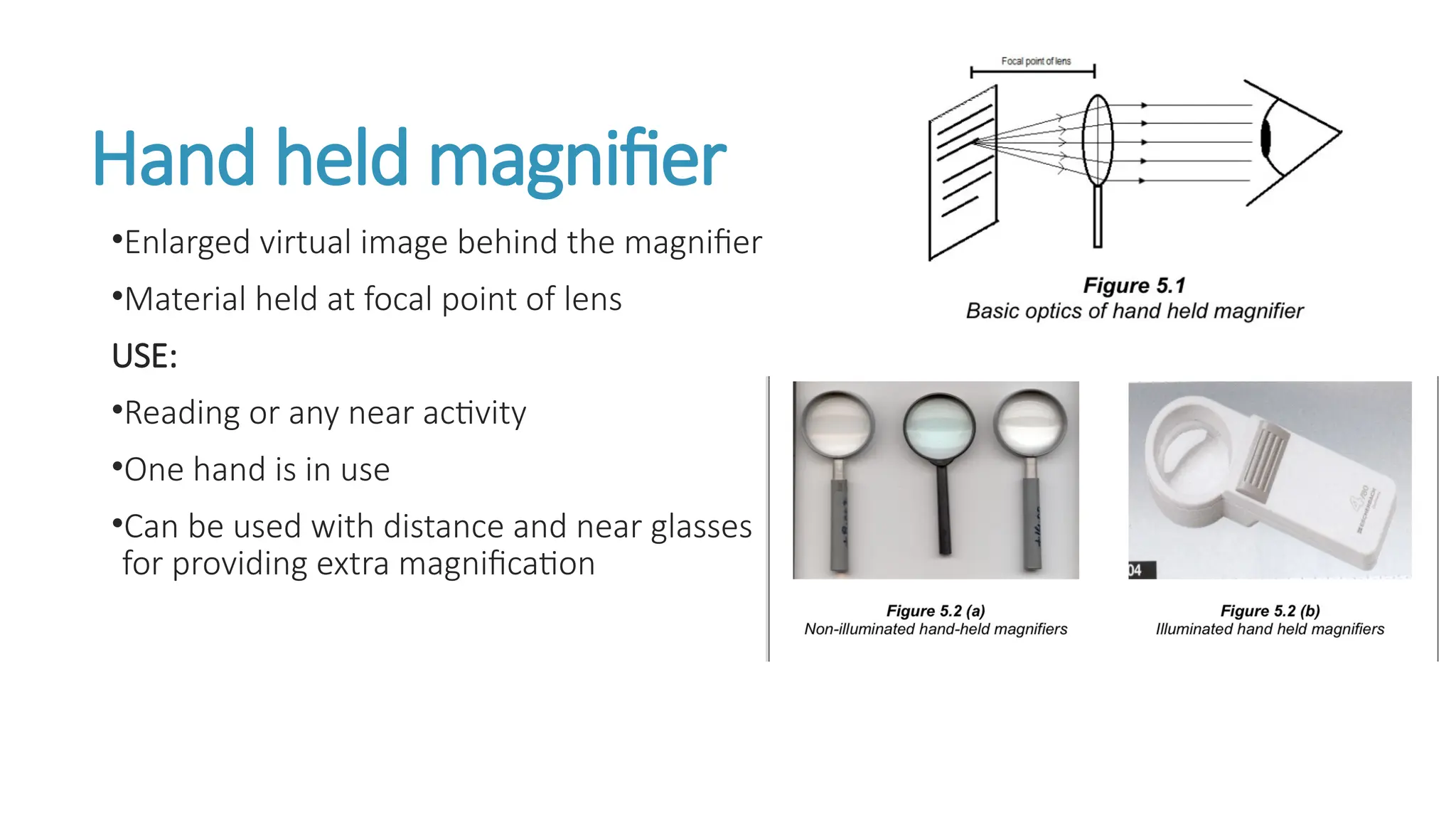
Hand held magnifier
•Enlarged virtual image behind the magnifier
•Material held at focal point of lens
USE:
•Reading or any near activity
•One hand is in use
•Can be used with distance and near glasses
for providing extra magnification
Advantages and Disadvantages
Advantage
•Convenient for short-term tasks
•Fairly inexpensive
• Devices have their light source, thereby improving contrast
•Portable
Disadvantage
•Decrease the field of view
•One hand is occupied
•Tricky handling is required
•The lens is always held at the correct focal distance in order to obtain the maximum power.
Stand magnifiers
•The stand magnifier produces an enlarged
virtual image in front of the eye (Fig. 5.3) and
therefore patients require their near
prescription to view the resultant image.
•The material is placed within the focal length
of the lens.
Use
•For near
•For school aged children
•Used in high magnification
•Image is always in sharp focus
Advantages
•Device of choice for tremors, arthritis ,constricted field
•Have your own light source
•Portable
Disadvantages
•Image distortion
•Reduce the field of view
•Requires flat surface to place reading material
Spectacle magnifier
•An erect , virtual , and magnified image is produced
•Magnification by a convex lens is obtained by bringing the object within its focal
distance.
•Full field
•Half eye (use for prolong reading)
Advantages and Disadvantage
Advantages
•cosmetically acceptable
•Easy to use
•Both hands are free
•Large field of vision
•Near and distance
Disadvantage
•Spherical abberation
•Short working distance
•Reduce illumination
Telescopic devices
1.Galilean telescope
2.Keplerian telescope (Astronomical)
•Distance- telescopic lens system
•Two elements- objective lens(+ve lens) and eye piece(+-ve)
1.Galilean Telescope
•Convergent objective lens and divergent eyepiece
•Virtual and erect image formed
•Parallel rays of light strike the convergent objective lens and image formed at second
focal point of the lens.
•Eyepiece (position)— primary focal point is coincident with the image formed by the
objective lens.
Advantages and disadvantage
Advantages
•Small compact light unit
•Easy to produce
•Upright image
Disadvantage
•Low magnification 2x – 3x
•Restricted field of view
2. Kaplerian telescope
•Comprises of convergent objective and eyepiece lenses.
•Parallel rays of light strike the convergent objective lens and image formed at second
focal point of the lens .
•Eyepiece (position)— primary focal point is coincident with the image formed by the
objective lens.
•Inverted and real image.
Advantages and Disadvantages
Advantages
•Large field of vision
•High magnification 6x to 8x
Disadvantage
•Inverted image
•Heavy
•Complicated
•Difficult to use
Circuit television (CCTV)
•Electronic device used for near work
•Camera— focus reading material and project on TV screen
•40 times enlarge
•Reasonable field of view
•Good for near task (patient has severe visual impairment)
•Can be found as portable device
Disadvantages
Typically not portable
Expensive
Takes time to learn
Non – optical device
#Commonly used non-optical devices can be classified under 7 categories as
follows
•Relative size and larger assistive device
•Glare, contrast and lighting control device
•Posture and comfort maintenance devices
•Hand writing and written communication devices
•Orientation and mobility techniques and devices
•Sensory substitution devices
•Medical management and life skill devices.
Relative size/Larger assistive devices
•Large print material( enlarged photocopy, computer printouts of large font
size)
•18 font size recommended
Advantages
•Cosmesis— the individual is able to read looking like a person with normal
vision
Disadvantages
•Books are too heavy
•Less availability
Glare, contrast and lighting control
devices
•RP patient — requires high illumination—recommended flash light
•Glaucoma and cataract— glare —use different tinted lenses
•Albinism—indirect lighting— proper seating arrangements against direct sun or use of
curtains
Control devices are
1. Adjustable table lamp
2. Adjustable wall lamp
3. Adjustable clip lamp
4. Halogen lamps
Posture and comfort maintenance
devices
•Adjustable reading stands encourage a comfortable body posture to the patient
Hand writing and written communication
devices
Writing guides
•Piece of black cardboard which has slit cut into it.
•Black colour— enhance contrast— reading writing
material
•Eg: letter writer, cheque guides and signature guides
helpful in written communication.
Bold line notebook
•Notebook with black bold line
•Makes reading easier
Cont..
Felt tip pen and 3B pencil
•Bold pen and pencil (Eg: 3B, 4B)
•Increase contrast —reading easy
Devices for reading
•Typoscope reading guide
•Fixed reading stand
•A talking calculator
•Tape recorder
•Flash card
•Talking book
•Talking dictionary
Orientation and mobility devices
•Orientation—use remaining sense to establish one’s local in one’s environment
•Mobility—art of moving from one place to another independently, safely
•Cost effective
•Easily available
•Folding and unfolding models
•Training is needed
Sensory substitution devices
•Hearing , olfactory and tactual clue
•Hearing and tactual— academic purpose
• Olfactory sense—skill and mini
Medical management and life skill device
1. Needle threader —has a tiny iron string help in threading a needle
2. Colour identifier —Tactual identifier—different shape of button and
embroidery pattern.
3. Talking clock and watch —Raised button for no with speech output option.
Devices for Domestic activity
•High contrast stove
•High contrast vegetable cutting board
•Bright colour rack
•Whistling kettle
•Kitchen tool—bright colour and high contrast handle
Devices for recreation
•Large ludo
•A large chess set
•A TV with large screen
•Large and colourful football
•High contrast playing card
Devices for self care activities
•A magnifying mirror with extra illumination
Device for healthcare
•Digital thermometer
•A talking body thermometer
•Insulin units measuring device
Devices for computer tasks
•Talking appliances, enlarged and high contrast screens, and enlarged or tactile keyboard
•A zoom text ( special low vision software)
Optical and non optical devices used in low vision

Optical and non optical devices used in low vision

  • 1.
    Optical and Nonoptical low vision devices Asra Warees Bachelors of Optometry Paramedical College Faculty of Medicine Aligarh Muslim University
  • 2.
    Low Vision Devices •LVDs are devices that enhance the residual visual function by increasing the visual information available to the person with low vision. •Optical devices, Low Vision Devices (LVD), consist of one or more lenses placed between the eye and the object to be viewed, which increase the size of the object on the retina. • Non-optical devices are supplementary devices that do not use optical lenses, while optical LVDs incorporate lenses, resulting in optical magnification.
  • 3.
    Two types ofoptical devices DISTANCE •Telescopic devices (sometimes intermediate distances) •Intraocular LVAs (IO-LVAs) NEAR •Spectacle magnifiers •Hand-held magnifiers •Stand magnifiers •Telescope system for near (telemicroscope)
  • 4.
    7 categories Optical Distance Non-optical Near LVD • Spectacle magnifiers •Hand-held magnifiers • Stand magnifiers • Telescope system for near (telemicroscope) • Galilean telescope • Keplerian telescope • Relative size and larger assistive device • Glare, contrast and lighting control device • Posture and comfort maintenance devices • Handwriting and written communication devices • Orientation and mobility techniques and devices • Sensory substitution devices • Medical management and life skill devices
  • 5.
    Hand held magnifier •Enlargedvirtual image behind the magnifier •Material held at focal point of lens USE: •Reading or any near activity •One hand is in use •Can be used with distance and near glasses for providing extra magnification
  • 6.
    Advantages and Disadvantages Advantage •Convenientfor short-term tasks •Fairly inexpensive • Devices have their light source, thereby improving contrast •Portable Disadvantage •Decrease the field of view •One hand is occupied •Tricky handling is required •The lens is always held at the correct focal distance in order to obtain the maximum power.
  • 7.
    Stand magnifiers •The standmagnifier produces an enlarged virtual image in front of the eye (Fig. 5.3) and therefore patients require their near prescription to view the resultant image. •The material is placed within the focal length of the lens.
  • 8.
    Use •For near •For schoolaged children •Used in high magnification •Image is always in sharp focus Advantages •Device of choice for tremors, arthritis ,constricted field •Have your own light source •Portable Disadvantages •Image distortion •Reduce the field of view •Requires flat surface to place reading material
  • 9.
    Spectacle magnifier •An erect, virtual , and magnified image is produced •Magnification by a convex lens is obtained by bringing the object within its focal distance. •Full field •Half eye (use for prolong reading)
  • 10.
    Advantages and Disadvantage Advantages •cosmeticallyacceptable •Easy to use •Both hands are free •Large field of vision •Near and distance Disadvantage •Spherical abberation •Short working distance •Reduce illumination
  • 11.
    Telescopic devices 1.Galilean telescope 2.Kepleriantelescope (Astronomical) •Distance- telescopic lens system •Two elements- objective lens(+ve lens) and eye piece(+-ve) 1.Galilean Telescope •Convergent objective lens and divergent eyepiece •Virtual and erect image formed •Parallel rays of light strike the convergent objective lens and image formed at second focal point of the lens. •Eyepiece (position)— primary focal point is coincident with the image formed by the objective lens.
  • 12.
    Advantages and disadvantage Advantages •Smallcompact light unit •Easy to produce •Upright image Disadvantage •Low magnification 2x – 3x •Restricted field of view
  • 13.
    2. Kaplerian telescope •Comprisesof convergent objective and eyepiece lenses. •Parallel rays of light strike the convergent objective lens and image formed at second focal point of the lens . •Eyepiece (position)— primary focal point is coincident with the image formed by the objective lens. •Inverted and real image.
  • 14.
    Advantages and Disadvantages Advantages •Largefield of vision •High magnification 6x to 8x Disadvantage •Inverted image •Heavy •Complicated •Difficult to use
  • 15.
    Circuit television (CCTV) •Electronicdevice used for near work •Camera— focus reading material and project on TV screen •40 times enlarge •Reasonable field of view •Good for near task (patient has severe visual impairment) •Can be found as portable device Disadvantages Typically not portable Expensive Takes time to learn
  • 16.
    Non – opticaldevice #Commonly used non-optical devices can be classified under 7 categories as follows •Relative size and larger assistive device •Glare, contrast and lighting control device •Posture and comfort maintenance devices •Hand writing and written communication devices •Orientation and mobility techniques and devices •Sensory substitution devices •Medical management and life skill devices.
  • 17.
    Relative size/Larger assistivedevices •Large print material( enlarged photocopy, computer printouts of large font size) •18 font size recommended Advantages •Cosmesis— the individual is able to read looking like a person with normal vision Disadvantages •Books are too heavy •Less availability
  • 18.
    Glare, contrast andlighting control devices •RP patient — requires high illumination—recommended flash light •Glaucoma and cataract— glare —use different tinted lenses •Albinism—indirect lighting— proper seating arrangements against direct sun or use of curtains Control devices are 1. Adjustable table lamp 2. Adjustable wall lamp 3. Adjustable clip lamp 4. Halogen lamps
  • 19.
    Posture and comfortmaintenance devices •Adjustable reading stands encourage a comfortable body posture to the patient
  • 20.
    Hand writing andwritten communication devices Writing guides •Piece of black cardboard which has slit cut into it. •Black colour— enhance contrast— reading writing material •Eg: letter writer, cheque guides and signature guides helpful in written communication. Bold line notebook •Notebook with black bold line •Makes reading easier
  • 21.
    Cont.. Felt tip penand 3B pencil •Bold pen and pencil (Eg: 3B, 4B) •Increase contrast —reading easy Devices for reading •Typoscope reading guide •Fixed reading stand •A talking calculator •Tape recorder •Flash card •Talking book •Talking dictionary
  • 22.
    Orientation and mobilitydevices •Orientation—use remaining sense to establish one’s local in one’s environment •Mobility—art of moving from one place to another independently, safely •Cost effective •Easily available •Folding and unfolding models •Training is needed
  • 23.
    Sensory substitution devices •Hearing, olfactory and tactual clue •Hearing and tactual— academic purpose • Olfactory sense—skill and mini Medical management and life skill device 1. Needle threader —has a tiny iron string help in threading a needle 2. Colour identifier —Tactual identifier—different shape of button and embroidery pattern. 3. Talking clock and watch —Raised button for no with speech output option.
  • 24.
    Devices for Domesticactivity •High contrast stove •High contrast vegetable cutting board •Bright colour rack •Whistling kettle •Kitchen tool—bright colour and high contrast handle Devices for recreation •Large ludo •A large chess set •A TV with large screen •Large and colourful football •High contrast playing card
  • 25.
    Devices for selfcare activities •A magnifying mirror with extra illumination Device for healthcare •Digital thermometer •A talking body thermometer •Insulin units measuring device Devices for computer tasks •Talking appliances, enlarged and high contrast screens, and enlarged or tactile keyboard •A zoom text ( special low vision software)