Operating Systems
Process Management
Dr.M.Sivakumar
AP,NWC, SRMIST
Process Management
• Process Concept - Process Scheduling
• Operations on Processes - Interprocess Communication
• Communication in Client– Server Systems
• Threads: Multicore Programming, Multithreading Models,
• Thread Libraries, Implicit Threading, Threading Issues.
• Process Synchronization: The Critical-Section Problem
• Peterson’s Solution
• Synchronization Hardware, Mutex Locks,
• Semaphores, Classic Problems of Synchronization, Monitors
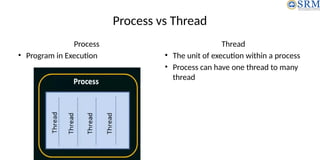
Process vs Thread
Process
• Program in Execution
Thread
• The unit of execution within a process
• Process can have one thread to many
thread
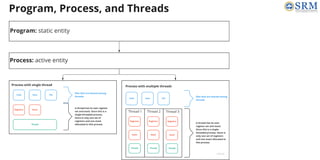
Program
Process
Thread
Process Concept: The Process
• A process is a program in execution
• Text Section
– A process is more than the program code
• Current activity
– represented by the value of the program counter and the contents of the
processor’s registers
• Process Stack
– contains temporary data (such as function parameters, return addresses, and
local variables)
• Data Section
– contains global variables
• Heap
– memory that is dynamically allocated during process run time
Process Concept: Process State
New The process is being created.
Running
Instructions are being
executed.
Waiting
The process is waiting for some
event to occur (such as an I/O
completion or reception of a
signal).
Ready
The process is waiting to be
assigned to a processor.
Terminated
The process has finished
execution.
• As a process executes, it changes state.
• The state of a process is defined in part by the current activity of that process.
A process may be in one of the following states:
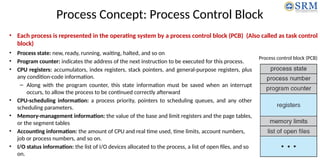
Process Concept: Process Control Block
• Process state: new, ready, running, waiting, halted, and so on
• Program counter: indicates the address of the next instruction to be executed for this process.
• CPU registers: accumulators, index registers, stack pointers, and general-purpose registers, plus
any condition-code information.
– Along with the program counter, this state information must be saved when an interrupt
occurs, to allow the process to be continued correctly afterward
• CPU-scheduling information: a process priority, pointers to scheduling queues, and any other
scheduling parameters.
• Memory-management information: the value of the base and limit registers and the page tables,
or the segment tables
• Accounting information: the amount of CPU and real time used, time limits, account numbers,
job or process numbers, and so on.
• I/O status information: the list of I/O devices allocated to the process, a list of open files, and so
on.
Process control block (PCB)
• Each process is represented in the operating system by a process control block (PCB) (Also called as task control
block)
CPU switch from process to process
Along with the program counter,
this state information must be
saved when an interrupt occurs, to
allow the process to be continued
correctly afterward
Process Concept: Thread
• A process is a program that performs a single thread of execution
• For example,
– when a process is running a word-processor program, a single thread of
instructions is being executed.
• Most modern operating systems have extended the process concept to
allow a process to have multiple threads of execution and thus to
perform more than one task at a time.
• beneficial on multicore systems
Process Scheduling
• Scheduling Queues
• Schedulers
• Context Switch
Process Scheduling: Scheduling Queues
• As processes enter the system, they are put into a job
queue, which consists of all processes in the system
• The processes that are residing in main memory and are
ready and waiting to execute are kept on a list called the
ready queue.
• This queue is generally stored as a linked list.
• A ready-queue header contains pointers to the first and
final PCBs in the list.
• Each PCB includes a pointer field that points to the next
PCB in the ready queue.
The ready queue and various I/O device queues
Process Scheduling: Scheduling Queues
• Once the process is allocated the CPU and is
executing, one of several events could occur:
– The process could issue an I/O request and then
be placed in an I/O queue.
– The process could create a new child process and
wait for the child’s termination
– The process could be removed forcibly from the
CPU, as a result of an interrupt, and be put back in
the ready queue.
Queueing-diagram representation of process scheduling
• A new process is initially put in the ready queue.
• It waits there until it is selected for execution, or dispatched.
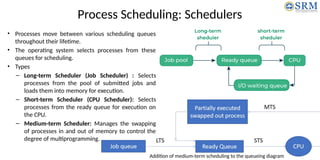
Process Scheduling: Schedulers
• Processes move between various scheduling queues
throughout their lifetime.
• The operating system selects processes from these
queues for scheduling.
• Types
– Long-term Scheduler (Job Scheduler) : Selects
processes from the pool of submitted jobs and
loads them into memory for execution.
– Short-term Scheduler (CPU Scheduler): Selects
processes from the ready queue for execution on
the CPU.
– Medium-term Scheduler: Manages the swapping
of processes in and out of memory to control the
degree of multiprogramming.
Addition of medium-term scheduling to the queueing diagram
Process Scheduling: Schedulers
• I/O-bound Processes: Spend more time performing I/O operations
than computations.
• CPU-bound Processes: Spend more time performing computations
than I/O operations.
• A mix of I/O-bound and CPU-bound processes is necessary for optimal
system performance. An imbalance can lead to inefficiencies, such as
idle CPU or unused I/O devices.
Process Scheduling: Context Switch
• Interrupts are signals that cause the operating system to halt the current CPU task and execute a kernel routine.
• When an interrupt occurs, the system saves the current context (the state of a process or thread at any given time) of
the running process to ensure it can be resumed later.
• The context is stored in the PCB, which includes:
• CPU register values
• Process state
• Memory-management information
• Context Switching
• The operation of switching the CPU from one process to
another.
• State Save and Restore
• Saving the current state of the CPU, whether in kernel
or user mode.
• Loading the saved state of another process
scheduled to run.
• Procedure:
• Save the context of the old process in its PCB.
• Load the saved context of the new process from its
PCB.
Operations on Processes
• The processes in most systems can execute concurrently
• It may be created and deleted dynamically
• Operations
– Process Creation
– Process Termination
• Process Creation
– During the course of execution, a process may create several new processes
– Creating process  Parent process; New processes  Child process
Process Creation
• During the execution, a process may create several new processes
• Creating process  Parent process;
• New processes  Child process
• Process Identifier (pid)
– OS identify processes according to a unique process identifier (an integer number)
– provides a unique value for each process in the system
– used as an index to access various attributes of a process within the kernel
Process Creation
A tree of processes on a
typical Linux system
• kthreadd process  creates additional processes (khelper and pdf
lush) that perform tasks on behalf of the kernel
• sshd process  manages clients that connect to the system by using
ssh
• login process  manages clients that directly log onto the system.
• User runs bash command-line interface (CLI)
• Using bash CLI, user runs ps and emacs editor
• The init process (which always has a pid of 1)  the root parent process for all user processes
• Once the system has booted, the init process  create various user processes (a web or print server, an
ssh server)
• ps –el command  list complete information for
all processes currently active in the system
Process Creation
• When a process creates a child process, that child process will need certain
resources (CPU time, memory, files, I/O devices) to accomplish its task
• A child process obtain its resources
– directly from the operating system, or
– it may be constrained to a subset of the resources of the parent process
• The parent partition its resources among its children, or it share some resources
(such as memory or files) among several of its children
• Restricting a child process to a subset of the parent’s resources prevents any
process from overloading the system by creating too many child processes
• The parent process pass along initialization data (input) to the child process
Process Creation
• When a process creates a new process, two possibilities for execution exist:
1. The parent continues to execute concurrently with its children.
2. The parent waits until some or all of its children have terminated.
• There are also two address-space possibilities for the new process:
1. The child process is a duplicate of the parent process (it has the same program and data as
the parent)
2. The child process has a new program loaded into it.
• Unix Example
– fork() system call creates new process
– exec() system call used after a fork() to replace the process memory space with a new
program
Process Creation
Creating a separate process using the UNIX fork() system call
#include <sys/types.h>
#include <stdio.h>
#include <unistd.h>
int main()
{
int pid;
/* fork a child process */
pid = fork();
if (pid < 0)
{ /* error occurred */
fprintf(stderr, "Fork Failed");
return 1;
}
else if (pid == 0)
{ /* child process */
execlp("/bin/ls","ls",NULL);
}
else
{ /* parent process */
/* parent will wait for the child to complete */
wait(NULL);
printf("Child Complete");
}
return 0;
}
Process Creation
Creating a separate process using the Windows API
#include <stdio.h>
#include <windows.h>
int main(VOID)
{
STARTUPINFO si;
PROCESS INFORMATION pi;
/* allocate memory */
ZeroMemory(&si, sizeof(si));
si.cb = sizeof(si);
ZeroMemory(&pi, sizeof(pi));
/* create child process */
if (!CreateProcess(NULL, /* use command line */
"C:WINDOWSsystem32mspaint.exe", /* command */
NULL, /* don’t inherit process handle */
NULL, /* don’t inherit thread handle */
FALSE, /* disable handle inheritance */
0, /* no creation flags */
NULL, /* use parent’s environment block */
NULL, /* use parent’s existing directory */
&si, &pi))
{
fprintf(stderr, "Create Process Failed");
return -1;
}/* parent will wait for the child to complete */
WaitForSingleObject(pi.hProcess, INFINITE);
printf("Child Complete");
/* close handles */
CloseHandle(pi.hProcess);
CloseHandle(pi.hThread);
}
Process Termination
• Some operating systems do not allow child to exists if its parent has terminated.
If a process terminates, then all its children must also be terminated.
– cascading termination : All children, grandchildren, etc. are terminated.
– The termination is initiated by the operating system.
• The parent process may wait for termination of a child process by using the wait()
system call. The call returns status information and the pid of the terminated
process
pid = wait(&status);
• If no parent waiting (did not invoke wait()) process is a zombie
• If parent terminated without invoking wait , process is an orphan
INTER PROCESS COMMUNICATION (IPC)
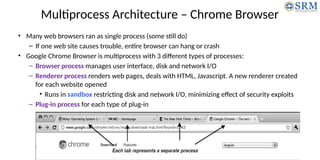
Multiprocess Architecture – Chrome Browser
• Many web browsers ran as single process (some still do)
– If one web site causes trouble, entire browser can hang or crash
• Google Chrome Browser is multiprocess with 3 different types of processes:
– Browser process manages user interface, disk and network I/O
– Renderer process renders web pages, deals with HTML, Javascript. A new renderer created
for each website opened
• Runs in sandbox restricting disk and network I/O, minimizing effect of security exploits
– Plug-in process for each type of plug-in
Interprocess Communication
• What is IPC?
• Shared-Memory Systems
• Message-Passing Systems
• Examples of IPC Systems
What is IPC
• IPC in OS refers to the mechanisms and techniques that allow processes to communicate with
each other.
• It is essential because modern operating systems often run multiple processes simultaneously,
and these processes need to share data, synchronize actions, or notify each other of events.
• Example: Web Server Handling Multiple Client Requests
• A web server needs to handle multiple client requests
simultaneously.
• Each request is processed by a separate worker process.
• These processes need to communicate with the main server
process to share information like logging requests, accessing
shared resources like a database, or coordinating tasks.
Interprocess Communication (IPC)
• Reasons for allowing process cooperation:
– Information sharing : a shared file
– Computation speedup: break task into subtasks, each
of which will be executing in parallel
– Modularity: dividing the system functions into
separate processes or threads
– Convenience: editing, listening to music, and
compiling in parallel
• IPC: A mechanism that will allow them to exchange data and information
• Independent Process - cannot affect or be affected by the other processes (Text Editor, Calculator Application)
• Cooperative Process - affect or be affected by the other processes (Client-Server Architecture)
• Two Models: shared memory and message passing.
Shared memory
Message passing
Shared-Memory Systems
• It is memory segment that can be accessed by multiple processes for IPC
• Communicating processes establish a region of shared memory
• The shared-memory region resides in the address space of creating process
• Shared memory requires that two or more processes agree to remove the
restriction of preventing one process from accessing another process’s
Memory by OS
• Processes exchange information by reading and writing data in the shared
areas
• The processes
• Processes are responsible for ensuring that they are not writing to the same
location simultaneously
Shared-Memory Systems
Producer-Consumer Problem
• A common paradigm for illustrating cooperating processes
• A producer process produces information that is consumed by a consumer
process
• Example-1
• A compiler (Producer) may produce assembly code
that is consumed by an assembler (Consumer)
• The assembler (Producer), in turn, may produce object
modules that are consumed by the loader (Consumer)
• Example-2
• A server as a producer and a client as a consumer
• Web server produces HTML files and images, which are
consumed by the client web browser
Shared-Memory Systems
Producer-Consumer Problem
• A producer can produce one item while the consumer is consuming another item.
• The producer and consumer must be synchronized, so that the consumer does not try to
consume an item that has not yet been produced.
• Two types of buffer
– unbounded buffer
– bounded buffer
• The unbounded buffer places no practical limit on the size of the buffer. The consumer may
have to wait for new items, but the producer can always produce new items
• The bounded buffer assumes a fixed buffer size. In this case, the consumer must wait if the
buffer is empty, and the producer must wait if the buffer is full
Shared-Memory Systems
Producer-Consumer Problem
item next produced;
while (true)
{
/* produce an item in next produced */
while (((in + 1) % BUFFER SIZE) == out)
; /* do nothing */
buffer[in] = next produced;
in = (in + 1) % BUFFER SIZE;
}
item next consumed;
while (true)
{
while (in == out)
; /* do nothing */
next consumed = buffer[out];
out = (out + 1) % BUFFER SIZE;
/* consume the item in next consumed */
}
Producer
Consumer
Message-Passing Systems
• Message passing provides a mechanism to allow processes to communicate and to synchronize
their actions without sharing the same address space
• Useful in a distributed environment (communicating processes may reside on different
computers)
• Example: Chat Application
• It provides at least two operations:
– send(message)
– receive(message)
• Messages sent by a process can be either fixed or variable in size
• If processes P and Q wish to communicate, they need to:
– Establish a communication link between them
– Exchange messages via send/receive
Message-Passing Systems
• Implementation issues:
– How are links established?
– Can a link be associated with more than two processes?
– How many links can there be between every pair of communicating processes?
– What is the capacity of a link?
– Is the size of a message that the link can accommodate fixed or variable?
– Is a link unidirectional or bi-directional?
• Implementation of communication link
– Physical:
• Shared memory
• Hardware bus
• Network
– Logical:
• Direct or indirect
• Synchronous or asynchronous
• Automatic or explicit buffering
Direct or indirect communication
• Direct communication
– explicitly name the recipient or sender of the
communication
– send(P, message)—Send a message to process P
– receive(Q, message)—Receive a message from
process Q
– Properties of communication link
• Links are established automatically
• A link is associated with exactly one pair of
communicating processes
• Between each pair there exists exactly one
link
• The link may be unidirectional, but is usually
bi-directional
• Indirect communication
• Messages are directed and received from
mailboxes (also referred to as ports)
• Each mailbox has a unique id
• Processes can communicate only if they share a
mailbox
• send(A, message)—Send a message to mailbox A.
• receive(A, message)—Receive a message from
mailbox A.
• Properties of communication link
• Link established only if processes share a
common mailbox
• A link may be associated with many
processes
• Each pair of processes may share several
communication links
• Link may be unidirectional or bi-directional
Indirect Communication
• Suppose that processes P1, P2, and P3 all share mailbox A. Process P1 sends a message to A,
while both P2 and P3 execute a receive() from A. Which process will receive the message sent
by P1?
• Solutions
– Allow a link to be associated with at most two processes
– Allow only one process at a time to execute a receive operation
– Allow the system to select arbitrarily the receiver. Sender is notified who the receiver was
• The operating system then must provide a mechanism that allows a process to do the
following:
– Create a new mailbox.
– Send and receive messages through the mailbox.
– Delete a mailbox.
Synchronous or asynchronous communication
• Message passing may be either blocking or non-blocking
• Blocking is considered synchronous
– Blocking send -- the sender is blocked until the message is received
– Blocking receive -- the receiver is blocked until a message is available
• Non-blocking is considered asynchronous
– Non-blocking send -- the sender sends the message and continue
– Non-blocking receive -- the receiver receives:
• A valid message, or
• Null message
• Different combinations possible
– If both send and receive are blocking, we have a rendezvous
Automatic or explicit buffering
• Queue of messages attached to the link.
• implemented in one of three ways
1.Zero capacity – no messages are queued on a link. Sender must wait for
receiver (rendezvous)
2.Bounded capacity – finite length of n messages. Sender must wait if link full
3.Unbounded capacity – infinite length. Sender never waits
Communication in Client– Server Systems
• Sockets
• Remote Procedure Calls
• Pipes
• Remote Method Invocation (Java)
Sockets
• A socket is defined as an endpoint for communication
• Concatenation of IP address and port – a number included at
start of message packet to differentiate network services on
a host
• The socket 161.25.19.8:1625 refers to port 1625 on host
161.25.19.8
• Communication consists between a pair of sockets
• All ports below 1024 are well known, used for standard
services
• Special IP address 127.0.0.1 (loopback) to refer to system on
which process is running
Remote Procedure Calls
• Remote procedure call (RPC) abstracts procedure calls between processes on networked
systems
– Again uses ports for service differentiation
• Stubs – client-side proxy for the actual procedure on the server
• The client-side stub locates the server and marshalls the parameters
• The server-side stub receives this message, unpacks the marshalled parameters, and performs
the procedure on the server
• On Windows, stub code compile from
specification written in Microsoft Interface
Definition Language (MIDL)
Remote Procedure Calls
• Data representation handled via External Data
Representation (XDL) format to account for
different architectures
– Big-endian and little-endian
• Remote communication has more failure scenarios
than local
– Messages can be delivered exactly once rather
than at most once
• OS typically provides a rendezvous (or
matchmaker) service to connect client and server
Pipes
• Acts as a conduit allowing two processes to communicate
• Issues:
– Is communication unidirectional or bidirectional?
– In the case of two-way communication, is it half or full-duplex?
– Must there exist a relationship (i.e., parent-child) between the communicating processes?
– Can the pipes be used over a network?
• Ordinary pipes – cannot be accessed from outside the process that created it. Typically, a
parent process creates a pipe and uses it to communicate with a child process that it created.
• Named pipes – can be accessed without a parent-child relationship
Use Cases of Pipes
• Shell Commands
ls | grep ".txt“
• Parent-Child Process Communication
– A parent process creates a pipe and forks a child process
• Producer-Consumer Problem
– One process (the producer) writes data to a pipe, and another process (the
consumer) reads that data
• Client-Server Communication (Named Pipes)
– A server process creates a named pipe, and client processes connect to this pipe to
send requests or receive responses
Ordinary Pipes
• Ordinary Pipes allow communication in standard producer-
consumer style
• Producer writes to one end (the write-end of the pipe)
• Consumer reads from the other end (the read-end of the
pipe)
• Ordinary pipes are therefore unidirectional
• Require parent-child relationship between communicating
processes
• Windows calls these anonymous pipes
• See Unix and Windows code samples in textbook
• Named Pipes are more powerful
than ordinary pipes
• Communication is bidirectional
• No parent-child relationship is
necessary between the
communicating processes
• Several processes can use the
named pipe for communication
• Provided on both UNIX and
Windows systems
Named Pipes
Threads
• Overview
• Multicore Programming
• Multithreading Models
• Thread Libraries
• Implicit Threading
• Threading Issues
• Operating System Examples
Threads
• In an operating system (OS), threads are the smallest unit of processing that can be scheduled by an
operating system.
• A thread is a basic unit of CPU utilization
• It consists of thread ID, a program counter, a register set, and a stack
• It shares its code section, data section, and
other operating-system resources, such as
open files and signals with other threads
belonging to the same process
• If a process has multiple threads of control, it
can perform more than one task at a time.
• Single-threaded process (Traditional)
• Multithreaded process (Modern)
Process vs Threads
Process Thread
• A process is an independent program in
execution.
• Each process has its own memory space and
resource
• A thread is a subdivision of a process.
• All threads within a process share the same
memory space and resources,
• But, each thread has its own execution
context, including a unique program
counter, stack, and set of registers.
Threads
• Most modern applications are multithreaded
• Threads run within application
• Multiple tasks with the application can be
implemented by separate threads
– Update display
– Fetch data
– Spell checking
– Answer a network request
• Process creation is heavy-weight while thread
creation is light-weight
• Can simplify code, increase efficiency
• Kernels are generally multithreaded
Benefits
• Responsiveness – may allow continued execution if
part of process is blocked, especially important for
user interfaces
• Resource Sharing – threads share resources of
process, easier than shared memory or message
passing
• Economy – cheaper than process creation, thread
switching lower overhead than context switching
• Scalability – process can take advantage of
multiprocessor architectures
Multicore Programming
• Multicore or multiprocessor systems putting pressure on programmers, challenges include:
– Dividing activities
– Balance
– Data splitting
– Data dependency
– Testing and debugging
• Parallelism implies a system can perform more than one task simultaneously
• Concurrency supports more than one task making progress
– Single processor / core, scheduler providing concurrency
Multicore Programming
• Types of parallelism
– Data parallelism – distributes subsets of the same data across multiple cores,
same operation on each
– Task parallelism – distributing threads across cores, each thread performing
unique operation
• As # of threads grows, so does architectural support for threading
– CPUs have cores as well as hardware threads
– Consider Oracle SPARC T4 with 8 cores, and 8 hardware threads per core
Concurrency vs. Parallelism
 Concurrent execution on single-core system:
 Parallelism on a multi-core system:
Amdahl’s Law
• Identifies performance gains from adding additional cores to an application that has both serial
and parallel components
• S is serial portion
• N processing cores
• That is, if application is 75% parallel / 25% serial, moving from 1 to 2 cores results in speedup of
1.6 times
• As N approaches infinity, speedup approaches 1 / S
Serial portion of an application has disproportionate effect on performance gained by adding
additional cores
• But does the law take into account contemporary multicore systems?
User Threads and Kernel Threads
• User threads
– management done by user-level threads
library or application itself
– User threads are created, scheduled, and
managed by a user-level thread library
– Three primary thread libraries:
• POSIX Pthreads
• Windows threads
• Java threads
• Kernel threads
• Managed directly by OS
• Handles the scheduling, creation, and
management of kernel threads
• Examples – virtually all general purpose
operating systems, including:
• Windows
• Solaris
• Linux
• Tru64 UNIX
• Mac OS X
Multithreading Models
• Many-to-One
• One-to-One
• Many-to-Many
Many-to-One
• Many user-level threads mapped to single kernel
thread
• One thread blocking causes all to block
• Multiple threads may not run in parallel on muticore
system because only one may be in kernel at a time
• Few systems currently use this model
• Examples:
– Solaris Green Threads
– GNU Portable Threads
One-to-One
• Each user-level thread maps to kernel thread
• Creating a user-level thread creates a kernel thread
• More concurrency than many-to-one
• Number of threads per process sometimes restricted due to overhead
• Examples
– Windows
– Linux
– Solaris 9 and later
Many-to-Many Model
• Allows many user level threads to be mapped
to many kernel threads
• Allows the operating system to create a
sufficient number of kernel threads
• Solaris prior to version 9
• Windows with the ThreadFiber package
Thread Libraries
• Thread library provides programmer with API for creating and
managing threads
• Two primary ways of implementing
– Library entirely in user space
– Kernel-level library supported by the OS
Thread Libraries
POSIX Pthreads Windows
thread library
Java Thread
• Three main thread libraries are in use today
• POSIX Pthreads: the threads extension of the POSIX standard, may be provided as either a
user-level or a kernel-level library
• Windows thread library: is a kernel-level library available on Windows systems
• Java Thread: API allows threads to be created andmanaged directly in Java programs
Pthreads Example
Pthreads Example (Cont.)
Pthreads Code for Joining 10 Threads
4.21 Silberschatz, Galvin and Gagne ©2013
Operating System Concepts – 9th Edition
Pthreads Code for Joining 10 Threads
Windows Multithreaded C Program
Java Threads
• Java threads are managed by the JVM
• Typically implemented using the threads model provided by underlying OS
• Java threads may be created by:
– Extending Thread class
– Implementing the Runnable interface
Java Multithreaded Program
Implicit Threading
• Growing in popularity as numbers of threads increase, program correctness
more difficult with explicit threads
• Creation and management of threads done by compilers and run-time
libraries rather than programmers
• Three methods explored
– Thread Pools
– OpenMP
– Grand Central Dispatch
• Other methods include Microsoft Threading Building Blocks (TBB),
java.util.concurrent package
Thread Pools
• Create a number of threads in a pool where they await work
• Advantages:
– Usually slightly faster to service a request with an existing thread than create a new thread
– Allows the number of threads in the application(s) to be bound to the size of the pool
– Separating task to be performed from mechanics of creating task allows different strategies
for running task
• i.e.Tasks could be scheduled to run periodically
• Windows API supports thread pools:
Threading Issues
• Semantics of fork() and exec() system calls
• Signal handling
– Synchronous and asynchronous
• Thread cancellation of target thread
– Asynchronous or deferred
• Thread-local storage
• Scheduler Activations
Process Synchronization
• Concepts
– Race Condition
– Critical Section
– Mutual Exclusion
• Synchronization Mechanisms
– Locks
– Semaphores
– Monitors
– Peterson’s algorithm
• Synchronization Problems
– The producer-consumer problem
– The Readers-writers problem
– The Dining Philosophers Problem
Process Synchronization
Cooperating
Process
that can affect or be affected by other processes executing in the system
Cooperating Process
directly share a logical address
space
be allowed to share data only
through files or messages
Concurrent access to shared data may result in data inconsistency!
Process Synchronization ensures the orderly execution of cooperating processes that
share a logical address space, so that data consistency is maintained
Dr.M.Sivakumar, AP/NWC, SRMIST 73
Producer-Consumer Problem
• Counter=0
• Counter is incremented when a new item is added to the buffer  counter++
• Counter is decremented when a new item is removed to the buffer  counter --
• Example
– Let counter=5
– The produce and consumer processes executes the statements counter++ and counter–
concurrently
– The following execution of the statements, the value of counter may be 4, 5 or 6
– The only correct results is counter =5 which is generated correctly if producer and consumer
executes separately
Dr.M.Sivakumar, AP/NWC, SRMIST 74
• The code for the producer process can be modified as follows:
• The code for the consumer process can be modified as follows:
Dr.M.Sivakumar, AP/NWC, SRMIST 75
• the statement “counter++” may be implemented in machine language (on a typical machine) as
follows:
where register1 is one of the local CPU registers
• the statement “counter--” is implemented as follows:
where again register2 is one of the local CPU registers
Dr.M.Sivakumar, AP/NWC, SRMIST 76
• The concurrent execution of “counter++” and “counter--”
• we have arrived at the incorrect state “counter == 4”
• this incorrect state because both processes are allowed to manipulate the variable counter
concurrently
• race condition
– A situation like this, where several processes access and manipulate the same data
concurrently and the outcome of the execution depends on the particular order in which
the access takes place
only correct results is counter =5
Dr.M.Sivakumar, AP/NWC, SRMIST 77
To guard against the race condition above, we
need to ensure that only one process at a time
can be manipulating the variable counter
The processes be synchronized
What is critical Section?
• a section of code that accesses shared resources, such as shared
memory or I/O devices, that are accessed by multiple processes or
threads
• The section of code implementing this request is
the entry section
• The critical section may be followed by an exit
section
• The remaining code is the remainder section
Dr.M.Sivakumar, AP/NWC, SRMIST 79
Critical Section Problem
• Consider system of n processes {p0, p1, … pn-1}
• Each process has critical section segment of code
– Process may be changing common variables, updating
table, writing file, etc
– When one process in critical section, no other may be in its
critical section
• When one process is executing in its critical section, no other
process is allowed to execute in its critical section
• The critical-section problem is to design a protocol that the
processes can use to cooperate
• Each process must request permission to enter its critical
section
do {
while (turn == j);
critical section
turn = j;
remainder section
}while (true);
Algorithm for Process Pi
Dr.M.Sivakumar, AP/NWC, SRMIST 80
Solutions to the critical-section problem
• Peterson’s Solution
• Synchronization Hardware
• Mutex Locks
• Semaphores
Dr.M.Sivakumar, AP/NWC, SRMIST 81
A solution to the critical-section problem must satisfy the
following Three Requirements
1. Mutual Exclusion
– If process Pi is executing in its critical section, then no other processes can be executing in
their critical sections
2. Progress
– If no process is executing in its critical section and there exist some processes that wish to
enter their critical section, then the selection of the processes that will enter the critical
section next cannot be postponed indefinitely
3. Bounded Waiting
– A bound must exist on the number of times that other processes are allowed to enter their
critical sections after a process has made a request to enter its critical section and before
that request is granted
Assume that each process executes at a nonzero speed
No assumption concerning relative speed of the N processes
Peterson’s Solution
• A classical software based solution to the critical section problem
• May not work correctly on modern computer architectures
• Peterson's solution is a classic algorithm for solving the critical section problem
• Named after computer scientist Gary Peterson
• It provides a good algorithmic description of solving the critical-section problem and illustrates
some of the complexities involved in designing software that addresses the requirements of
mutual exclusion, progress, and bounded waiting
• The solution is used to synchronize access to a shared resource between two processes or
threads, and it uses two shared variables, turn and flag, to achieve mutual exclusion.
• Peterson’s Solution is restricted to two processes that alternate execution between their
critical sections and remainder sections
• Address the requirements of mutual exclusion, progress and bounded wait
Peterson’s Solution
• The processes are numbered Pi and Pj.
• Peterson’s solution requires the two processes to share two data items:
int turn;
boolean flag[2];
• turn indicates whose turn it is to enter its critical section
• flag array indicates if a process is ready to enter its critical section
• if turn == i, then process Pi is allowed to execute in its critical section
• if flag[i] == true, this value indicates that Pi is ready to enter its critical
section
Peterson’s Solution
do {
flag[j] = true;
turn = i;
while (flag[i] && turn == i);
critical section
flag[j] = false;
remainder section
} while (true);
The structure of process Pi
The structure of process Pj
Peterson’s Solution
• To prove that this solution is correct, show three requirement that:
1. Mutual exclusion is preserved
If process Pi is executing critical section, other process is not allowed to execute critical
section
2. The progress requirement is satisfied.
If no process is executing in its critical section and some processes wish to enter their
critical sections, then only those processes that are not executing in their remainder
sections can participate in the decision on which will enter its critical section next, and this
selection cannot be postponed indefinitely.
3. The bounded-waiting requirement is met
There exists a bound, or limit, on the number of times that other processes are allowed to
enter their critical sections after a process has made a request to enter its critical section
and before that request is granted.
Peterson’s are not guaranteed to work on modern computer architectures
Synchronization Hardware
• The critical-section problem could be solved simply in a single-processor
environment if we could prevent interrupts from occurring while a shared variable
was being modified.
• Based on the premise of locking —that is, protecting critical regions through the
use of locks
• A hardware solution to the synchronization problem.
• There is a shared lock variable which can take either of the two values, 0 or 1.
• Before entering into the critical section, a process inquires about the lock.
• If it is locked, it keeps on waiting till it becomes free.
• If it is not locked, it takes the lock and executes the critical section.
Dr.M.Sivakumar, AP/NWC, SRMIST 87
Synchronization Hardware
• Many systems provide hardware support for critical section code
• Uniprocessors – could disable interrupts
– Currently running code would execute without preemption
– Generally too inefficient on multiprocessor systems
• Operating systems using this not broadly scalable
• Modern machines provide special atomic hardware instructions
• Atomic = non-interruptable
– Either test memory word and set value
– Or swap contents of two memory words
Dr.M.Sivakumar, AP/NWC, SRMIST 88
test_and_set() Lock
• Hardware solution to the synchronization problem
• Shared lock variable which takes either 0 or 1
• 0  unlock and 1  lock
• Test
– Before entering critical section, a process enquire about the lock
– If it is locked, it will wait until free
• Set
– If it is not locked, it sets lock=1 and enters critical section
Dr.M.Sivakumar, AP/NWC, SRMIST 89
test_and_set() Lock
By default lock = false
P1 P2
Atomic
Dr.M.Sivakumar, AP/NWC, SRMIST 90
compare_and_swap()
P1 P2
Atomic
By default
lock = 0
Dr.M.Sivakumar, AP/NWC, SRMIST 91
Synchronization Hardware
• It satisfies mutual exclusion
• It does not satisfies bounded waiting
• The hardware-based solutions to the critical-section problem are
complicated as well as generally inaccessible to application
programmers
Bounded-waiting mutual
exclusion with test and set()
Dr.M.Sivakumar, AP/NWC, SRMIST 93
Mutex Locks
• Mutex is a short form of mutual exclusion
• Simple Software tool to critical section problem
• acuquire() and release()
• A mutex lock has a boolean variable available whose value indicates if the
lock is available or not
• If the lock is available, a call to acquire() succeeds, and the lock is then
considered unavailable
• A process that attempts to acquire an unavailable lock is blocked until the
lock is released
Dr.M.Sivakumar, AP/NWC, SRMIST 94
Mutex Locks
Dr.M.Sivakumar, AP/NWC, SRMIST 95
Semaphores
• Semaphore is a more robust tool that can behave similarly to a mutex lock but can also
provide more sophisticated ways for processes to synchronize their activities
• A semaphore S is an integer variable that is accessed only through two standard
atomic operations: wait() and signal()
• The wait() operation was originally termed P (from the Dutch proberen, “to test”);
• signal() was originally called V (from verhogen, “to increment”).
Dr.M.Sivakumar, AP/NWC, SRMIST 96
Semaphores
do
{
wait();
Critical Section
signal();
remainder section
}while(true);
Dr.M.Sivakumar, AP/NWC, SRMIST 97
Semaphore Usage
• Types of Semaphore
–Binary Semaphore
–Counting Semaphore
Dr.M.Sivakumar, AP/NWC, SRMIST 98
Semaphore Usage
• Binary Semaphore
– range only between 0 and 1
– behave similarly to mutex locks
– on systems that do not provide mutex locks, binary semaphores can be used
– Initial value of S=1
Dr.M.Sivakumar, AP/NWC, SRMIST 99
Semaphore Usage
• Counting Semaphore
– used to control access to a given resource consisting of a finite number of instances
– The semaphore is initialized to the number of resources available
– Each process that wishes to use a resource performs a wait() operation on the semaphore
(decrementing the count  S--)
– When a process releases a resource, it performs a signal() operation (incrementing the
count  S++)
– When the count for the semaphore goes to 0 (S==0), all resources are being used
– processes that wish to use a resource will block until the count becomes greater than 0.
Dr.M.Sivakumar, AP/NWC, SRMIST 100
Semaphore Implementation with no busy waiting
• When a process executes the wait() operation and finds that the semaphore value is
not positive, it must wait.
• Rather than engaging in busy waiting, the process can block itself
• The block operation places a process into a waiting queue associated with the
semaphore, and the state of the process is switched to the waiting state
• Then control is transferred to the CPU scheduler, which selects another process to
execute
• A process that is blocked, waiting on a semaphore S, should be restarted when some
other process executes a signal() operation
• The process is restarted by a wakeup() operation, which changes the process from the
waiting state to the ready state.
• The process is then placed in the ready queue
Dr.M.Sivakumar, AP/NWC, SRMIST 101
Semaphore Implementation
with no busy waiting
Dr.M.Sivakumar, AP/NWC, SRMIST 102
Semaphore Implementation
with no busy waiting
• Two operations (System calls):
– block – place the process invoking the operation on the appropriate
waiting queue.
– wakeup – remove one of processes in the waiting queue and place it in
the ready queue.
Classic Problems of Synchronization
• Bounded-Buffer Problem
• Readers and Writers Problem
• Dining-Philosophers Problem
Dr.M.Sivakumar, AP/NWC, SRMIST 104
Bounded-Buffer Problem
• Also called producer consumer problem
• N buffers, each can hold one item
• Semaphore mutex initialized to the value 1
• Semaphore full initialized to the value 0
• Semaphore empty initialized to the value N.
Dr.M.Sivakumar, AP/NWC, SRMIST 105
Bounded Buffer Problem (Cont.)
• The structure of the producer process
while (true) {
// produce an item
wait (empty); //wait until empty > 0 and
decrement empty
wait (mutex); //acquire lock
// add the item to the buffer
signal (mutex); //release lock
signal (full); //increment full
}
• The structure of the consumer process
while (true) {
wait (full); ); //wait until full > 0 and
decrement full
wait (mutex); //acquire lock
// remove an item from buffer
signal (mutex); //release lock
signal (empty); //increment empty
// consume the removed item
}
Dr.M.Sivakumar, AP/NWC, SRMIST 106
Readers-Writers Problem
• A data set is shared among a number of concurrent processes
– Readers – only read the data set; they do not perform any updates
– Writers – can both read and write
• Problem – allow multiple readers to read at the same time. Only one single
writer can access the shared data at the same time.
• Shared Data
– Data set
– Semaphore mutex initialized to 1.
– Semaphore wrt initialized to 1.
– Integer readcount initialized to 0.
Dr.M.Sivakumar, AP/NWC, SRMIST 107
Readers-Writers Problem (Cont.)
• The structure of a writer process
while (true) {
wait (wrt) ;
// writing is performed
signal (wrt) ;
}
Dr.M.Sivakumar, AP/NWC, SRMIST 108
Readers-Writers Problem (Cont.)
• The structure of a reader process
while (true) {
wait (mutex) ;
readcount ++ ;
if (readcount == 1) wait (wrt) ;
signal (mutex)
// reading is performed
wait (mutex) ;
readcount - - ;
if (readcount == 0) signal (wrt) ;
signal (mutex) ;
}
Dr.M.Sivakumar, AP/NWC, SRMIST 109
Dining-Philosophers Problem
• Philosopher either think or eat
• When Philosopher is hungry he tries to pickup the folks that are
close (left & right) to him
• Philosopher may pickup only one fork at a time
• When he finish eating, he puts down folks and starts thinking
• Simple solution is to represent folk with a semaphore
• Philosopher tries to grab the folk by executing wait() operation
• Philosopher releases the folk by executing signal() operation
• Shared data
– Semaphore folk [5] initialized to 1
1
2
3
4
5
Dr.M.Sivakumar, AP/NWC, SRMIST 110
Dining-Philosophers Problem (Cont.)
• The structure of Philosopheri:
While (true) {
wait ( chopstick[i] );
wait ( chopStick[ (i + 1) % 5] );
// eat
signal ( chopstick[i] );
signal (chopstick[ (i + 1) % 5] );
// think
}
Dr.M.Sivakumar, AP/NWC, SRMIST 111
Solutions to Dining-Philosophers Problem
• Allow at most four philosophers to be sitting
simultaneously at the table
• Allow philosophers to pickup chopsticks only if both
available
• Odd philosophers to pickup left chopstick first and then
right
Even philosophers to pickup right chopstick first and then
left
Monitors
• A high-level abstraction that provides a convenient and effective mechanism for process
synchronization
• Abstract data type, internal variables only accessible by code within the procedure
• Only one process may be active within the monitor at a time
• But not powerful enough to model some synchronization schemes
monitor monitor-name
{
// shared variable declarations
procedure P1 (…) { …. }
procedure Pn (…) {……}
Initialization code (…) { … }
}
}
Schematic view of a Monitor
END

Operating Systems Process Management.pptx

  • 1.
  • 2.
    Process Management • ProcessConcept - Process Scheduling • Operations on Processes - Interprocess Communication • Communication in Client– Server Systems • Threads: Multicore Programming, Multithreading Models, • Thread Libraries, Implicit Threading, Threading Issues. • Process Synchronization: The Critical-Section Problem • Peterson’s Solution • Synchronization Hardware, Mutex Locks, • Semaphores, Classic Problems of Synchronization, Monitors
  • 3.
    Process vs Thread Process •Program in Execution Thread • The unit of execution within a process • Process can have one thread to many thread
  • 4.
  • 6.
    Process Concept: TheProcess • A process is a program in execution • Text Section – A process is more than the program code • Current activity – represented by the value of the program counter and the contents of the processor’s registers • Process Stack – contains temporary data (such as function parameters, return addresses, and local variables) • Data Section – contains global variables • Heap – memory that is dynamically allocated during process run time
  • 7.
    Process Concept: ProcessState New The process is being created. Running Instructions are being executed. Waiting The process is waiting for some event to occur (such as an I/O completion or reception of a signal). Ready The process is waiting to be assigned to a processor. Terminated The process has finished execution. • As a process executes, it changes state. • The state of a process is defined in part by the current activity of that process. A process may be in one of the following states:
  • 8.
    Process Concept: ProcessControl Block • Process state: new, ready, running, waiting, halted, and so on • Program counter: indicates the address of the next instruction to be executed for this process. • CPU registers: accumulators, index registers, stack pointers, and general-purpose registers, plus any condition-code information. – Along with the program counter, this state information must be saved when an interrupt occurs, to allow the process to be continued correctly afterward • CPU-scheduling information: a process priority, pointers to scheduling queues, and any other scheduling parameters. • Memory-management information: the value of the base and limit registers and the page tables, or the segment tables • Accounting information: the amount of CPU and real time used, time limits, account numbers, job or process numbers, and so on. • I/O status information: the list of I/O devices allocated to the process, a list of open files, and so on. Process control block (PCB) • Each process is represented in the operating system by a process control block (PCB) (Also called as task control block)
  • 9.
    CPU switch fromprocess to process Along with the program counter, this state information must be saved when an interrupt occurs, to allow the process to be continued correctly afterward
  • 10.
    Process Concept: Thread •A process is a program that performs a single thread of execution • For example, – when a process is running a word-processor program, a single thread of instructions is being executed. • Most modern operating systems have extended the process concept to allow a process to have multiple threads of execution and thus to perform more than one task at a time. • beneficial on multicore systems
  • 11.
    Process Scheduling • SchedulingQueues • Schedulers • Context Switch
  • 12.
    Process Scheduling: SchedulingQueues • As processes enter the system, they are put into a job queue, which consists of all processes in the system • The processes that are residing in main memory and are ready and waiting to execute are kept on a list called the ready queue. • This queue is generally stored as a linked list. • A ready-queue header contains pointers to the first and final PCBs in the list. • Each PCB includes a pointer field that points to the next PCB in the ready queue. The ready queue and various I/O device queues
  • 13.
    Process Scheduling: SchedulingQueues • Once the process is allocated the CPU and is executing, one of several events could occur: – The process could issue an I/O request and then be placed in an I/O queue. – The process could create a new child process and wait for the child’s termination – The process could be removed forcibly from the CPU, as a result of an interrupt, and be put back in the ready queue. Queueing-diagram representation of process scheduling • A new process is initially put in the ready queue. • It waits there until it is selected for execution, or dispatched.
  • 14.
    Process Scheduling: Schedulers •Processes move between various scheduling queues throughout their lifetime. • The operating system selects processes from these queues for scheduling. • Types – Long-term Scheduler (Job Scheduler) : Selects processes from the pool of submitted jobs and loads them into memory for execution. – Short-term Scheduler (CPU Scheduler): Selects processes from the ready queue for execution on the CPU. – Medium-term Scheduler: Manages the swapping of processes in and out of memory to control the degree of multiprogramming. Addition of medium-term scheduling to the queueing diagram
  • 15.
    Process Scheduling: Schedulers •I/O-bound Processes: Spend more time performing I/O operations than computations. • CPU-bound Processes: Spend more time performing computations than I/O operations. • A mix of I/O-bound and CPU-bound processes is necessary for optimal system performance. An imbalance can lead to inefficiencies, such as idle CPU or unused I/O devices.
  • 16.
    Process Scheduling: ContextSwitch • Interrupts are signals that cause the operating system to halt the current CPU task and execute a kernel routine. • When an interrupt occurs, the system saves the current context (the state of a process or thread at any given time) of the running process to ensure it can be resumed later. • The context is stored in the PCB, which includes: • CPU register values • Process state • Memory-management information • Context Switching • The operation of switching the CPU from one process to another. • State Save and Restore • Saving the current state of the CPU, whether in kernel or user mode. • Loading the saved state of another process scheduled to run. • Procedure: • Save the context of the old process in its PCB. • Load the saved context of the new process from its PCB.
  • 17.
    Operations on Processes •The processes in most systems can execute concurrently • It may be created and deleted dynamically • Operations – Process Creation – Process Termination • Process Creation – During the course of execution, a process may create several new processes – Creating process  Parent process; New processes  Child process
  • 18.
    Process Creation • Duringthe execution, a process may create several new processes • Creating process  Parent process; • New processes  Child process • Process Identifier (pid) – OS identify processes according to a unique process identifier (an integer number) – provides a unique value for each process in the system – used as an index to access various attributes of a process within the kernel
  • 19.
    Process Creation A treeof processes on a typical Linux system • kthreadd process  creates additional processes (khelper and pdf lush) that perform tasks on behalf of the kernel • sshd process  manages clients that connect to the system by using ssh • login process  manages clients that directly log onto the system. • User runs bash command-line interface (CLI) • Using bash CLI, user runs ps and emacs editor • The init process (which always has a pid of 1)  the root parent process for all user processes • Once the system has booted, the init process  create various user processes (a web or print server, an ssh server) • ps –el command  list complete information for all processes currently active in the system
  • 20.
    Process Creation • Whena process creates a child process, that child process will need certain resources (CPU time, memory, files, I/O devices) to accomplish its task • A child process obtain its resources – directly from the operating system, or – it may be constrained to a subset of the resources of the parent process • The parent partition its resources among its children, or it share some resources (such as memory or files) among several of its children • Restricting a child process to a subset of the parent’s resources prevents any process from overloading the system by creating too many child processes • The parent process pass along initialization data (input) to the child process
  • 21.
    Process Creation • Whena process creates a new process, two possibilities for execution exist: 1. The parent continues to execute concurrently with its children. 2. The parent waits until some or all of its children have terminated. • There are also two address-space possibilities for the new process: 1. The child process is a duplicate of the parent process (it has the same program and data as the parent) 2. The child process has a new program loaded into it. • Unix Example – fork() system call creates new process – exec() system call used after a fork() to replace the process memory space with a new program
  • 22.
    Process Creation Creating aseparate process using the UNIX fork() system call #include <sys/types.h> #include <stdio.h> #include <unistd.h> int main() { int pid; /* fork a child process */ pid = fork(); if (pid < 0) { /* error occurred */ fprintf(stderr, "Fork Failed"); return 1; } else if (pid == 0) { /* child process */ execlp("/bin/ls","ls",NULL); } else { /* parent process */ /* parent will wait for the child to complete */ wait(NULL); printf("Child Complete"); } return 0; }
  • 23.
    Process Creation Creating aseparate process using the Windows API #include <stdio.h> #include <windows.h> int main(VOID) { STARTUPINFO si; PROCESS INFORMATION pi; /* allocate memory */ ZeroMemory(&si, sizeof(si)); si.cb = sizeof(si); ZeroMemory(&pi, sizeof(pi)); /* create child process */ if (!CreateProcess(NULL, /* use command line */ "C:WINDOWSsystem32mspaint.exe", /* command */ NULL, /* don’t inherit process handle */ NULL, /* don’t inherit thread handle */ FALSE, /* disable handle inheritance */ 0, /* no creation flags */ NULL, /* use parent’s environment block */ NULL, /* use parent’s existing directory */ &si, &pi)) { fprintf(stderr, "Create Process Failed"); return -1; }/* parent will wait for the child to complete */ WaitForSingleObject(pi.hProcess, INFINITE); printf("Child Complete"); /* close handles */ CloseHandle(pi.hProcess); CloseHandle(pi.hThread); }
  • 24.
    Process Termination • Someoperating systems do not allow child to exists if its parent has terminated. If a process terminates, then all its children must also be terminated. – cascading termination : All children, grandchildren, etc. are terminated. – The termination is initiated by the operating system. • The parent process may wait for termination of a child process by using the wait() system call. The call returns status information and the pid of the terminated process pid = wait(&status); • If no parent waiting (did not invoke wait()) process is a zombie • If parent terminated without invoking wait , process is an orphan
  • 25.
  • 26.
    Multiprocess Architecture –Chrome Browser • Many web browsers ran as single process (some still do) – If one web site causes trouble, entire browser can hang or crash • Google Chrome Browser is multiprocess with 3 different types of processes: – Browser process manages user interface, disk and network I/O – Renderer process renders web pages, deals with HTML, Javascript. A new renderer created for each website opened • Runs in sandbox restricting disk and network I/O, minimizing effect of security exploits – Plug-in process for each type of plug-in
  • 27.
    Interprocess Communication • Whatis IPC? • Shared-Memory Systems • Message-Passing Systems • Examples of IPC Systems
  • 28.
    What is IPC •IPC in OS refers to the mechanisms and techniques that allow processes to communicate with each other. • It is essential because modern operating systems often run multiple processes simultaneously, and these processes need to share data, synchronize actions, or notify each other of events. • Example: Web Server Handling Multiple Client Requests • A web server needs to handle multiple client requests simultaneously. • Each request is processed by a separate worker process. • These processes need to communicate with the main server process to share information like logging requests, accessing shared resources like a database, or coordinating tasks.
  • 29.
    Interprocess Communication (IPC) •Reasons for allowing process cooperation: – Information sharing : a shared file – Computation speedup: break task into subtasks, each of which will be executing in parallel – Modularity: dividing the system functions into separate processes or threads – Convenience: editing, listening to music, and compiling in parallel • IPC: A mechanism that will allow them to exchange data and information • Independent Process - cannot affect or be affected by the other processes (Text Editor, Calculator Application) • Cooperative Process - affect or be affected by the other processes (Client-Server Architecture) • Two Models: shared memory and message passing. Shared memory Message passing
  • 30.
    Shared-Memory Systems • Itis memory segment that can be accessed by multiple processes for IPC • Communicating processes establish a region of shared memory • The shared-memory region resides in the address space of creating process • Shared memory requires that two or more processes agree to remove the restriction of preventing one process from accessing another process’s Memory by OS • Processes exchange information by reading and writing data in the shared areas • The processes • Processes are responsible for ensuring that they are not writing to the same location simultaneously
  • 31.
    Shared-Memory Systems Producer-Consumer Problem •A common paradigm for illustrating cooperating processes • A producer process produces information that is consumed by a consumer process • Example-1 • A compiler (Producer) may produce assembly code that is consumed by an assembler (Consumer) • The assembler (Producer), in turn, may produce object modules that are consumed by the loader (Consumer) • Example-2 • A server as a producer and a client as a consumer • Web server produces HTML files and images, which are consumed by the client web browser
  • 32.
    Shared-Memory Systems Producer-Consumer Problem •A producer can produce one item while the consumer is consuming another item. • The producer and consumer must be synchronized, so that the consumer does not try to consume an item that has not yet been produced. • Two types of buffer – unbounded buffer – bounded buffer • The unbounded buffer places no practical limit on the size of the buffer. The consumer may have to wait for new items, but the producer can always produce new items • The bounded buffer assumes a fixed buffer size. In this case, the consumer must wait if the buffer is empty, and the producer must wait if the buffer is full
  • 33.
    Shared-Memory Systems Producer-Consumer Problem itemnext produced; while (true) { /* produce an item in next produced */ while (((in + 1) % BUFFER SIZE) == out) ; /* do nothing */ buffer[in] = next produced; in = (in + 1) % BUFFER SIZE; } item next consumed; while (true) { while (in == out) ; /* do nothing */ next consumed = buffer[out]; out = (out + 1) % BUFFER SIZE; /* consume the item in next consumed */ } Producer Consumer
  • 34.
    Message-Passing Systems • Messagepassing provides a mechanism to allow processes to communicate and to synchronize their actions without sharing the same address space • Useful in a distributed environment (communicating processes may reside on different computers) • Example: Chat Application • It provides at least two operations: – send(message) – receive(message) • Messages sent by a process can be either fixed or variable in size • If processes P and Q wish to communicate, they need to: – Establish a communication link between them – Exchange messages via send/receive
  • 35.
    Message-Passing Systems • Implementationissues: – How are links established? – Can a link be associated with more than two processes? – How many links can there be between every pair of communicating processes? – What is the capacity of a link? – Is the size of a message that the link can accommodate fixed or variable? – Is a link unidirectional or bi-directional? • Implementation of communication link – Physical: • Shared memory • Hardware bus • Network – Logical: • Direct or indirect • Synchronous or asynchronous • Automatic or explicit buffering
  • 36.
    Direct or indirectcommunication • Direct communication – explicitly name the recipient or sender of the communication – send(P, message)—Send a message to process P – receive(Q, message)—Receive a message from process Q – Properties of communication link • Links are established automatically • A link is associated with exactly one pair of communicating processes • Between each pair there exists exactly one link • The link may be unidirectional, but is usually bi-directional • Indirect communication • Messages are directed and received from mailboxes (also referred to as ports) • Each mailbox has a unique id • Processes can communicate only if they share a mailbox • send(A, message)—Send a message to mailbox A. • receive(A, message)—Receive a message from mailbox A. • Properties of communication link • Link established only if processes share a common mailbox • A link may be associated with many processes • Each pair of processes may share several communication links • Link may be unidirectional or bi-directional
  • 37.
    Indirect Communication • Supposethat processes P1, P2, and P3 all share mailbox A. Process P1 sends a message to A, while both P2 and P3 execute a receive() from A. Which process will receive the message sent by P1? • Solutions – Allow a link to be associated with at most two processes – Allow only one process at a time to execute a receive operation – Allow the system to select arbitrarily the receiver. Sender is notified who the receiver was • The operating system then must provide a mechanism that allows a process to do the following: – Create a new mailbox. – Send and receive messages through the mailbox. – Delete a mailbox.
  • 38.
    Synchronous or asynchronouscommunication • Message passing may be either blocking or non-blocking • Blocking is considered synchronous – Blocking send -- the sender is blocked until the message is received – Blocking receive -- the receiver is blocked until a message is available • Non-blocking is considered asynchronous – Non-blocking send -- the sender sends the message and continue – Non-blocking receive -- the receiver receives: • A valid message, or • Null message • Different combinations possible – If both send and receive are blocking, we have a rendezvous
  • 39.
    Automatic or explicitbuffering • Queue of messages attached to the link. • implemented in one of three ways 1.Zero capacity – no messages are queued on a link. Sender must wait for receiver (rendezvous) 2.Bounded capacity – finite length of n messages. Sender must wait if link full 3.Unbounded capacity – infinite length. Sender never waits
  • 40.
    Communication in Client–Server Systems • Sockets • Remote Procedure Calls • Pipes • Remote Method Invocation (Java)
  • 41.
    Sockets • A socketis defined as an endpoint for communication • Concatenation of IP address and port – a number included at start of message packet to differentiate network services on a host • The socket 161.25.19.8:1625 refers to port 1625 on host 161.25.19.8 • Communication consists between a pair of sockets • All ports below 1024 are well known, used for standard services • Special IP address 127.0.0.1 (loopback) to refer to system on which process is running
  • 42.
    Remote Procedure Calls •Remote procedure call (RPC) abstracts procedure calls between processes on networked systems – Again uses ports for service differentiation • Stubs – client-side proxy for the actual procedure on the server • The client-side stub locates the server and marshalls the parameters • The server-side stub receives this message, unpacks the marshalled parameters, and performs the procedure on the server • On Windows, stub code compile from specification written in Microsoft Interface Definition Language (MIDL)
  • 44.
    Remote Procedure Calls •Data representation handled via External Data Representation (XDL) format to account for different architectures – Big-endian and little-endian • Remote communication has more failure scenarios than local – Messages can be delivered exactly once rather than at most once • OS typically provides a rendezvous (or matchmaker) service to connect client and server
  • 45.
    Pipes • Acts asa conduit allowing two processes to communicate • Issues: – Is communication unidirectional or bidirectional? – In the case of two-way communication, is it half or full-duplex? – Must there exist a relationship (i.e., parent-child) between the communicating processes? – Can the pipes be used over a network? • Ordinary pipes – cannot be accessed from outside the process that created it. Typically, a parent process creates a pipe and uses it to communicate with a child process that it created. • Named pipes – can be accessed without a parent-child relationship
  • 46.
    Use Cases ofPipes • Shell Commands ls | grep ".txt“ • Parent-Child Process Communication – A parent process creates a pipe and forks a child process • Producer-Consumer Problem – One process (the producer) writes data to a pipe, and another process (the consumer) reads that data • Client-Server Communication (Named Pipes) – A server process creates a named pipe, and client processes connect to this pipe to send requests or receive responses
  • 47.
    Ordinary Pipes • OrdinaryPipes allow communication in standard producer- consumer style • Producer writes to one end (the write-end of the pipe) • Consumer reads from the other end (the read-end of the pipe) • Ordinary pipes are therefore unidirectional • Require parent-child relationship between communicating processes • Windows calls these anonymous pipes • See Unix and Windows code samples in textbook • Named Pipes are more powerful than ordinary pipes • Communication is bidirectional • No parent-child relationship is necessary between the communicating processes • Several processes can use the named pipe for communication • Provided on both UNIX and Windows systems Named Pipes
  • 48.
    Threads • Overview • MulticoreProgramming • Multithreading Models • Thread Libraries • Implicit Threading • Threading Issues • Operating System Examples
  • 49.
    Threads • In anoperating system (OS), threads are the smallest unit of processing that can be scheduled by an operating system. • A thread is a basic unit of CPU utilization • It consists of thread ID, a program counter, a register set, and a stack • It shares its code section, data section, and other operating-system resources, such as open files and signals with other threads belonging to the same process • If a process has multiple threads of control, it can perform more than one task at a time. • Single-threaded process (Traditional) • Multithreaded process (Modern)
  • 50.
    Process vs Threads ProcessThread • A process is an independent program in execution. • Each process has its own memory space and resource • A thread is a subdivision of a process. • All threads within a process share the same memory space and resources, • But, each thread has its own execution context, including a unique program counter, stack, and set of registers.
  • 51.
    Threads • Most modernapplications are multithreaded • Threads run within application • Multiple tasks with the application can be implemented by separate threads – Update display – Fetch data – Spell checking – Answer a network request • Process creation is heavy-weight while thread creation is light-weight • Can simplify code, increase efficiency • Kernels are generally multithreaded Benefits • Responsiveness – may allow continued execution if part of process is blocked, especially important for user interfaces • Resource Sharing – threads share resources of process, easier than shared memory or message passing • Economy – cheaper than process creation, thread switching lower overhead than context switching • Scalability – process can take advantage of multiprocessor architectures
  • 52.
    Multicore Programming • Multicoreor multiprocessor systems putting pressure on programmers, challenges include: – Dividing activities – Balance – Data splitting – Data dependency – Testing and debugging • Parallelism implies a system can perform more than one task simultaneously • Concurrency supports more than one task making progress – Single processor / core, scheduler providing concurrency
  • 53.
    Multicore Programming • Typesof parallelism – Data parallelism – distributes subsets of the same data across multiple cores, same operation on each – Task parallelism – distributing threads across cores, each thread performing unique operation • As # of threads grows, so does architectural support for threading – CPUs have cores as well as hardware threads – Consider Oracle SPARC T4 with 8 cores, and 8 hardware threads per core
  • 54.
    Concurrency vs. Parallelism Concurrent execution on single-core system:  Parallelism on a multi-core system:
  • 55.
    Amdahl’s Law • Identifiesperformance gains from adding additional cores to an application that has both serial and parallel components • S is serial portion • N processing cores • That is, if application is 75% parallel / 25% serial, moving from 1 to 2 cores results in speedup of 1.6 times • As N approaches infinity, speedup approaches 1 / S Serial portion of an application has disproportionate effect on performance gained by adding additional cores • But does the law take into account contemporary multicore systems?
  • 56.
    User Threads andKernel Threads • User threads – management done by user-level threads library or application itself – User threads are created, scheduled, and managed by a user-level thread library – Three primary thread libraries: • POSIX Pthreads • Windows threads • Java threads • Kernel threads • Managed directly by OS • Handles the scheduling, creation, and management of kernel threads • Examples – virtually all general purpose operating systems, including: • Windows • Solaris • Linux • Tru64 UNIX • Mac OS X
  • 58.
    Multithreading Models • Many-to-One •One-to-One • Many-to-Many
  • 59.
    Many-to-One • Many user-levelthreads mapped to single kernel thread • One thread blocking causes all to block • Multiple threads may not run in parallel on muticore system because only one may be in kernel at a time • Few systems currently use this model • Examples: – Solaris Green Threads – GNU Portable Threads
  • 60.
    One-to-One • Each user-levelthread maps to kernel thread • Creating a user-level thread creates a kernel thread • More concurrency than many-to-one • Number of threads per process sometimes restricted due to overhead • Examples – Windows – Linux – Solaris 9 and later
  • 61.
    Many-to-Many Model • Allowsmany user level threads to be mapped to many kernel threads • Allows the operating system to create a sufficient number of kernel threads • Solaris prior to version 9 • Windows with the ThreadFiber package
  • 62.
    Thread Libraries • Threadlibrary provides programmer with API for creating and managing threads • Two primary ways of implementing – Library entirely in user space – Kernel-level library supported by the OS Thread Libraries POSIX Pthreads Windows thread library Java Thread • Three main thread libraries are in use today • POSIX Pthreads: the threads extension of the POSIX standard, may be provided as either a user-level or a kernel-level library • Windows thread library: is a kernel-level library available on Windows systems • Java Thread: API allows threads to be created andmanaged directly in Java programs
  • 63.
  • 64.
    Pthreads Code forJoining 10 Threads 4.21 Silberschatz, Galvin and Gagne ©2013 Operating System Concepts – 9th Edition Pthreads Code for Joining 10 Threads
  • 65.
  • 66.
    Java Threads • Javathreads are managed by the JVM • Typically implemented using the threads model provided by underlying OS • Java threads may be created by: – Extending Thread class – Implementing the Runnable interface
  • 67.
  • 68.
    Implicit Threading • Growingin popularity as numbers of threads increase, program correctness more difficult with explicit threads • Creation and management of threads done by compilers and run-time libraries rather than programmers • Three methods explored – Thread Pools – OpenMP – Grand Central Dispatch • Other methods include Microsoft Threading Building Blocks (TBB), java.util.concurrent package
  • 69.
    Thread Pools • Createa number of threads in a pool where they await work • Advantages: – Usually slightly faster to service a request with an existing thread than create a new thread – Allows the number of threads in the application(s) to be bound to the size of the pool – Separating task to be performed from mechanics of creating task allows different strategies for running task • i.e.Tasks could be scheduled to run periodically • Windows API supports thread pools:
  • 70.
    Threading Issues • Semanticsof fork() and exec() system calls • Signal handling – Synchronous and asynchronous • Thread cancellation of target thread – Asynchronous or deferred • Thread-local storage • Scheduler Activations
  • 71.
    Process Synchronization • Concepts –Race Condition – Critical Section – Mutual Exclusion • Synchronization Mechanisms – Locks – Semaphores – Monitors – Peterson’s algorithm • Synchronization Problems – The producer-consumer problem – The Readers-writers problem – The Dining Philosophers Problem
  • 72.
    Process Synchronization Cooperating Process that canaffect or be affected by other processes executing in the system Cooperating Process directly share a logical address space be allowed to share data only through files or messages Concurrent access to shared data may result in data inconsistency! Process Synchronization ensures the orderly execution of cooperating processes that share a logical address space, so that data consistency is maintained
  • 73.
    Dr.M.Sivakumar, AP/NWC, SRMIST73 Producer-Consumer Problem • Counter=0 • Counter is incremented when a new item is added to the buffer  counter++ • Counter is decremented when a new item is removed to the buffer  counter -- • Example – Let counter=5 – The produce and consumer processes executes the statements counter++ and counter– concurrently – The following execution of the statements, the value of counter may be 4, 5 or 6 – The only correct results is counter =5 which is generated correctly if producer and consumer executes separately
  • 74.
    Dr.M.Sivakumar, AP/NWC, SRMIST74 • The code for the producer process can be modified as follows: • The code for the consumer process can be modified as follows:
  • 75.
    Dr.M.Sivakumar, AP/NWC, SRMIST75 • the statement “counter++” may be implemented in machine language (on a typical machine) as follows: where register1 is one of the local CPU registers • the statement “counter--” is implemented as follows: where again register2 is one of the local CPU registers
  • 76.
    Dr.M.Sivakumar, AP/NWC, SRMIST76 • The concurrent execution of “counter++” and “counter--” • we have arrived at the incorrect state “counter == 4” • this incorrect state because both processes are allowed to manipulate the variable counter concurrently • race condition – A situation like this, where several processes access and manipulate the same data concurrently and the outcome of the execution depends on the particular order in which the access takes place only correct results is counter =5
  • 77.
    Dr.M.Sivakumar, AP/NWC, SRMIST77 To guard against the race condition above, we need to ensure that only one process at a time can be manipulating the variable counter The processes be synchronized
  • 78.
    What is criticalSection? • a section of code that accesses shared resources, such as shared memory or I/O devices, that are accessed by multiple processes or threads • The section of code implementing this request is the entry section • The critical section may be followed by an exit section • The remaining code is the remainder section
  • 79.
    Dr.M.Sivakumar, AP/NWC, SRMIST79 Critical Section Problem • Consider system of n processes {p0, p1, … pn-1} • Each process has critical section segment of code – Process may be changing common variables, updating table, writing file, etc – When one process in critical section, no other may be in its critical section • When one process is executing in its critical section, no other process is allowed to execute in its critical section • The critical-section problem is to design a protocol that the processes can use to cooperate • Each process must request permission to enter its critical section do { while (turn == j); critical section turn = j; remainder section }while (true); Algorithm for Process Pi
  • 80.
    Dr.M.Sivakumar, AP/NWC, SRMIST80 Solutions to the critical-section problem • Peterson’s Solution • Synchronization Hardware • Mutex Locks • Semaphores
  • 81.
    Dr.M.Sivakumar, AP/NWC, SRMIST81 A solution to the critical-section problem must satisfy the following Three Requirements 1. Mutual Exclusion – If process Pi is executing in its critical section, then no other processes can be executing in their critical sections 2. Progress – If no process is executing in its critical section and there exist some processes that wish to enter their critical section, then the selection of the processes that will enter the critical section next cannot be postponed indefinitely 3. Bounded Waiting – A bound must exist on the number of times that other processes are allowed to enter their critical sections after a process has made a request to enter its critical section and before that request is granted Assume that each process executes at a nonzero speed No assumption concerning relative speed of the N processes
  • 82.
    Peterson’s Solution • Aclassical software based solution to the critical section problem • May not work correctly on modern computer architectures • Peterson's solution is a classic algorithm for solving the critical section problem • Named after computer scientist Gary Peterson • It provides a good algorithmic description of solving the critical-section problem and illustrates some of the complexities involved in designing software that addresses the requirements of mutual exclusion, progress, and bounded waiting • The solution is used to synchronize access to a shared resource between two processes or threads, and it uses two shared variables, turn and flag, to achieve mutual exclusion. • Peterson’s Solution is restricted to two processes that alternate execution between their critical sections and remainder sections • Address the requirements of mutual exclusion, progress and bounded wait
  • 83.
    Peterson’s Solution • Theprocesses are numbered Pi and Pj. • Peterson’s solution requires the two processes to share two data items: int turn; boolean flag[2]; • turn indicates whose turn it is to enter its critical section • flag array indicates if a process is ready to enter its critical section • if turn == i, then process Pi is allowed to execute in its critical section • if flag[i] == true, this value indicates that Pi is ready to enter its critical section
  • 84.
    Peterson’s Solution do { flag[j]= true; turn = i; while (flag[i] && turn == i); critical section flag[j] = false; remainder section } while (true); The structure of process Pi The structure of process Pj
  • 85.
    Peterson’s Solution • Toprove that this solution is correct, show three requirement that: 1. Mutual exclusion is preserved If process Pi is executing critical section, other process is not allowed to execute critical section 2. The progress requirement is satisfied. If no process is executing in its critical section and some processes wish to enter their critical sections, then only those processes that are not executing in their remainder sections can participate in the decision on which will enter its critical section next, and this selection cannot be postponed indefinitely. 3. The bounded-waiting requirement is met There exists a bound, or limit, on the number of times that other processes are allowed to enter their critical sections after a process has made a request to enter its critical section and before that request is granted. Peterson’s are not guaranteed to work on modern computer architectures
  • 86.
    Synchronization Hardware • Thecritical-section problem could be solved simply in a single-processor environment if we could prevent interrupts from occurring while a shared variable was being modified. • Based on the premise of locking —that is, protecting critical regions through the use of locks • A hardware solution to the synchronization problem. • There is a shared lock variable which can take either of the two values, 0 or 1. • Before entering into the critical section, a process inquires about the lock. • If it is locked, it keeps on waiting till it becomes free. • If it is not locked, it takes the lock and executes the critical section.
  • 87.
    Dr.M.Sivakumar, AP/NWC, SRMIST87 Synchronization Hardware • Many systems provide hardware support for critical section code • Uniprocessors – could disable interrupts – Currently running code would execute without preemption – Generally too inefficient on multiprocessor systems • Operating systems using this not broadly scalable • Modern machines provide special atomic hardware instructions • Atomic = non-interruptable – Either test memory word and set value – Or swap contents of two memory words
  • 88.
    Dr.M.Sivakumar, AP/NWC, SRMIST88 test_and_set() Lock • Hardware solution to the synchronization problem • Shared lock variable which takes either 0 or 1 • 0  unlock and 1  lock • Test – Before entering critical section, a process enquire about the lock – If it is locked, it will wait until free • Set – If it is not locked, it sets lock=1 and enters critical section
  • 89.
    Dr.M.Sivakumar, AP/NWC, SRMIST89 test_and_set() Lock By default lock = false P1 P2 Atomic
  • 90.
    Dr.M.Sivakumar, AP/NWC, SRMIST90 compare_and_swap() P1 P2 Atomic By default lock = 0
  • 91.
    Dr.M.Sivakumar, AP/NWC, SRMIST91 Synchronization Hardware • It satisfies mutual exclusion • It does not satisfies bounded waiting • The hardware-based solutions to the critical-section problem are complicated as well as generally inaccessible to application programmers
  • 92.
  • 93.
    Dr.M.Sivakumar, AP/NWC, SRMIST93 Mutex Locks • Mutex is a short form of mutual exclusion • Simple Software tool to critical section problem • acuquire() and release() • A mutex lock has a boolean variable available whose value indicates if the lock is available or not • If the lock is available, a call to acquire() succeeds, and the lock is then considered unavailable • A process that attempts to acquire an unavailable lock is blocked until the lock is released
  • 94.
  • 95.
    Dr.M.Sivakumar, AP/NWC, SRMIST95 Semaphores • Semaphore is a more robust tool that can behave similarly to a mutex lock but can also provide more sophisticated ways for processes to synchronize their activities • A semaphore S is an integer variable that is accessed only through two standard atomic operations: wait() and signal() • The wait() operation was originally termed P (from the Dutch proberen, “to test”); • signal() was originally called V (from verhogen, “to increment”).
  • 96.
    Dr.M.Sivakumar, AP/NWC, SRMIST96 Semaphores do { wait(); Critical Section signal(); remainder section }while(true);
  • 97.
    Dr.M.Sivakumar, AP/NWC, SRMIST97 Semaphore Usage • Types of Semaphore –Binary Semaphore –Counting Semaphore
  • 98.
    Dr.M.Sivakumar, AP/NWC, SRMIST98 Semaphore Usage • Binary Semaphore – range only between 0 and 1 – behave similarly to mutex locks – on systems that do not provide mutex locks, binary semaphores can be used – Initial value of S=1
  • 99.
    Dr.M.Sivakumar, AP/NWC, SRMIST99 Semaphore Usage • Counting Semaphore – used to control access to a given resource consisting of a finite number of instances – The semaphore is initialized to the number of resources available – Each process that wishes to use a resource performs a wait() operation on the semaphore (decrementing the count  S--) – When a process releases a resource, it performs a signal() operation (incrementing the count  S++) – When the count for the semaphore goes to 0 (S==0), all resources are being used – processes that wish to use a resource will block until the count becomes greater than 0.
  • 100.
    Dr.M.Sivakumar, AP/NWC, SRMIST100 Semaphore Implementation with no busy waiting • When a process executes the wait() operation and finds that the semaphore value is not positive, it must wait. • Rather than engaging in busy waiting, the process can block itself • The block operation places a process into a waiting queue associated with the semaphore, and the state of the process is switched to the waiting state • Then control is transferred to the CPU scheduler, which selects another process to execute • A process that is blocked, waiting on a semaphore S, should be restarted when some other process executes a signal() operation • The process is restarted by a wakeup() operation, which changes the process from the waiting state to the ready state. • The process is then placed in the ready queue
  • 101.
    Dr.M.Sivakumar, AP/NWC, SRMIST101 Semaphore Implementation with no busy waiting
  • 102.
    Dr.M.Sivakumar, AP/NWC, SRMIST102 Semaphore Implementation with no busy waiting • Two operations (System calls): – block – place the process invoking the operation on the appropriate waiting queue. – wakeup – remove one of processes in the waiting queue and place it in the ready queue.
  • 103.
    Classic Problems ofSynchronization • Bounded-Buffer Problem • Readers and Writers Problem • Dining-Philosophers Problem
  • 104.
    Dr.M.Sivakumar, AP/NWC, SRMIST104 Bounded-Buffer Problem • Also called producer consumer problem • N buffers, each can hold one item • Semaphore mutex initialized to the value 1 • Semaphore full initialized to the value 0 • Semaphore empty initialized to the value N.
  • 105.
    Dr.M.Sivakumar, AP/NWC, SRMIST105 Bounded Buffer Problem (Cont.) • The structure of the producer process while (true) { // produce an item wait (empty); //wait until empty > 0 and decrement empty wait (mutex); //acquire lock // add the item to the buffer signal (mutex); //release lock signal (full); //increment full } • The structure of the consumer process while (true) { wait (full); ); //wait until full > 0 and decrement full wait (mutex); //acquire lock // remove an item from buffer signal (mutex); //release lock signal (empty); //increment empty // consume the removed item }
  • 106.
    Dr.M.Sivakumar, AP/NWC, SRMIST106 Readers-Writers Problem • A data set is shared among a number of concurrent processes – Readers – only read the data set; they do not perform any updates – Writers – can both read and write • Problem – allow multiple readers to read at the same time. Only one single writer can access the shared data at the same time. • Shared Data – Data set – Semaphore mutex initialized to 1. – Semaphore wrt initialized to 1. – Integer readcount initialized to 0.
  • 107.
    Dr.M.Sivakumar, AP/NWC, SRMIST107 Readers-Writers Problem (Cont.) • The structure of a writer process while (true) { wait (wrt) ; // writing is performed signal (wrt) ; }
  • 108.
    Dr.M.Sivakumar, AP/NWC, SRMIST108 Readers-Writers Problem (Cont.) • The structure of a reader process while (true) { wait (mutex) ; readcount ++ ; if (readcount == 1) wait (wrt) ; signal (mutex) // reading is performed wait (mutex) ; readcount - - ; if (readcount == 0) signal (wrt) ; signal (mutex) ; }
  • 109.
    Dr.M.Sivakumar, AP/NWC, SRMIST109 Dining-Philosophers Problem • Philosopher either think or eat • When Philosopher is hungry he tries to pickup the folks that are close (left & right) to him • Philosopher may pickup only one fork at a time • When he finish eating, he puts down folks and starts thinking • Simple solution is to represent folk with a semaphore • Simple solution is to represent folk with a semaphore • Philosopher tries to grab the folk by executing wait() operation • Philosopher releases the folk by executing signal() operation • Shared data – Semaphore folk [5] initialized to 1 1 2 3 4 5
  • 110.
    Dr.M.Sivakumar, AP/NWC, SRMIST110 Dining-Philosophers Problem (Cont.) • The structure of Philosopheri: While (true) { wait ( chopstick[i] ); wait ( chopStick[ (i + 1) % 5] ); // eat signal ( chopstick[i] ); signal (chopstick[ (i + 1) % 5] ); // think }
  • 111.
    Dr.M.Sivakumar, AP/NWC, SRMIST111 Solutions to Dining-Philosophers Problem • Allow at most four philosophers to be sitting simultaneously at the table • Allow philosophers to pickup chopsticks only if both available • Odd philosophers to pickup left chopstick first and then right Even philosophers to pickup right chopstick first and then left
  • 112.
    Monitors • A high-levelabstraction that provides a convenient and effective mechanism for process synchronization • Abstract data type, internal variables only accessible by code within the procedure • Only one process may be active within the monitor at a time • But not powerful enough to model some synchronization schemes monitor monitor-name { // shared variable declarations procedure P1 (…) { …. } procedure Pn (…) {……} Initialization code (…) { … } } }
  • 113.
  • 114.