*
Objectives
• Refine the first program
- Alter the default values
- Introduce a standard program structure

• Simple viewing
- Two-dimensional viewing as a special case of
three-dimensional viewing

• Fundamental OpenGL primitives
• Attributes

*
Program Structure
• Most OpenGL programs have a similar structure
that consists of the following functions
-main():
• defines the callback functions
• opens one or more windows with the required properties
• enters event loop (last executable statement)

-init(): sets the state variables
• Viewing
• Attributes

- callbacks
• Display function
• Input and window functions
*
C structure revisited
• In this version, we shall see the same output
but we have defined all the relevant state
values through function calls using the
default values
• In particular, we set
- Colors
- Viewing conditions
- Window properties
*
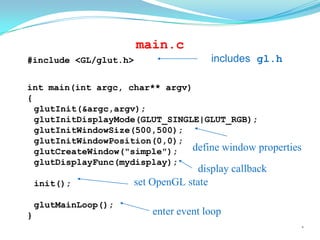
main.c
#include <GL/glut.h>

includes gl.h

int main(int argc, char** argv)
{
glutInit(&argc,argv);
glutInitDisplayMode(GLUT_SINGLE|GLUT_RGB);
glutInitWindowSize(500,500);
glutInitWindowPosition(0,0);
define window properties
glutCreateWindow("simple");
glutDisplayFunc(mydisplay);
init();
glutMainLoop();
}

display callback
set OpenGL state
enter event loop

*
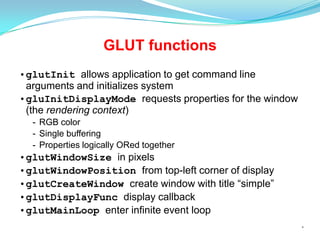
GLUT functions
•glutInit allows application to get command line
arguments and initializes system
•gluInitDisplayMode requests properties for the window
(the rendering context)
- RGB color
- Single buffering
- Properties logically ORed together

•glutWindowSize in pixels
•glutWindowPosition from top-left corner of display
•glutCreateWindow create window with title “simple”
•glutDisplayFunc display callback
•glutMainLoop enter infinite event loop
*
init.c
black clear color
opaque window

void init()
{
glClearColor (0.0, 0.0, 0.0, 1.0);

fill/draw with white
glColor3f(1.0, 1.0, 1.0);
glMatrixMode (GL_PROJECTION);
glLoadIdentity ();
glOrtho(-1.0, 1.0, -1.0, 1.0, -1.0, 1.0);
}

viewing volume
*
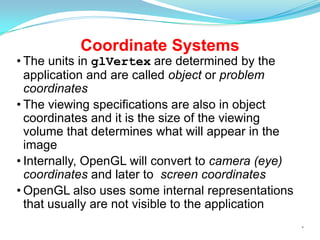
Coordinate Systems

• The units in glVertex are determined by the
application and are called object or problem
coordinates
• The viewing specifications are also in object
coordinates and it is the size of the viewing
volume that determines what will appear in the
image
• Internally, OpenGL will convert to camera (eye)
coordinates and later to screen coordinates
• OpenGL also uses some internal representations
that usually are not visible to the application
*
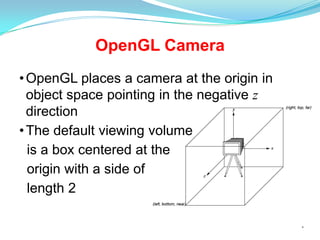
OpenGL Camera
• OpenGL places a camera at the origin in
object space pointing in the negative z
direction
• The default viewing volume
is a box centered at the
origin with a side of
length 2
*
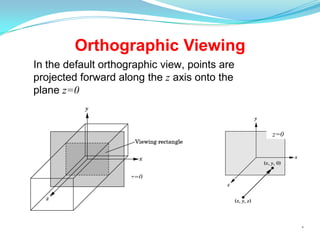
Orthographic Viewing
In the default orthographic view, points are
projected forward along the z axis onto the
plane z=0

z=0

z=0

*
Transformations and Viewing
• In OpenGL, projection is carried out by a projection
matrix (transformation)
• There is only one set of transformation functions so
we must set the matrix mode first
glMatrixMode (GL_PROJECTION)

• Transformation functions are incremental so we
start with an identity matrix and alter it with a
projection matrix that gives the view volume
glLoadIdentity();
glOrtho(-1.0, 1.0, -1.0, 1.0, -1.0, 1.0);
*
Two- and three-dimensional
viewing
• In glOrtho(left, right, bottom, top,
near, far) the near and far distances are
measured from the camera
• Two-dimensional vertex commands place all vertices
in the plane z=0
• If the application is in two dimensions, we can use the
function
gluOrtho2D(left, right,bottom,top)
• In two dimensions, the view or clipping volume
becomes a clipping window
*
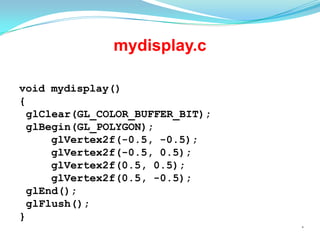
mydisplay.c
void mydisplay()
{
glClear(GL_COLOR_BUFFER_BIT);
glBegin(GL_POLYGON);
glVertex2f(-0.5, -0.5);
glVertex2f(-0.5, 0.5);
glVertex2f(0.5, 0.5);
glVertex2f(0.5, -0.5);
glEnd();
glFlush();
}
*
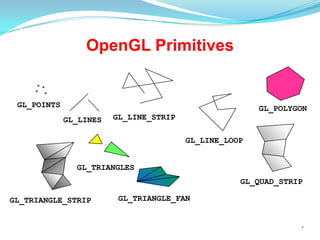
OpenGL Primitives

GL_POINTS

GL_POLYGON
GL_LINES

GL_LINE_STRIP

GL_LINE_LOOP
GL_TRIANGLES
GL_QUAD_STRIP
GL_TRIANGLE_STRIP

GL_TRIANGLE_FAN

*
Polygon Issues
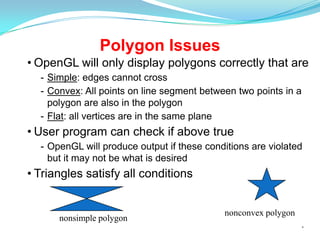
• OpenGL will only display polygons correctly that are
- Simple: edges cannot cross
- Convex: All points on line segment between two points in a
polygon are also in the polygon
- Flat: all vertices are in the same plane

• User program can check if above true
- OpenGL will produce output if these conditions are violated
but it may not be what is desired

• Triangles satisfy all conditions

nonsimple polygon

nonconvex polygon
*
Attributes
• Attributes are part of the OpenGL state and
determine the appearance of objects
- Color (points, lines, polygons)
- Size and width (points, lines)
- Stipple pattern (lines, polygons)
- Polygon mode
• Display as filled: solid color or stipple pattern
• Display edges
• Display vertices
*
RGB color
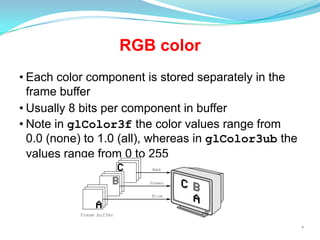
• Each color component is stored separately in the
frame buffer
• Usually 8 bits per component in buffer
• Note in glColor3f the color values range from
0.0 (none) to 1.0 (all), whereas in glColor3ub the
values range from 0 to 255

*
Indexed Color
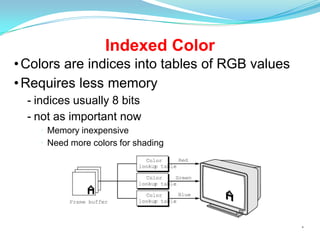
• Colors are indices into tables of RGB values
• Requires less memory
- indices usually 8 bits
- not as important now
• Memory inexpensive
• Need more colors for shading

*
Color and State

• The color as set by glColor becomes part of the
state and will be used until changed
- Colors and other attributes are not part of the
object but are assigned when the object is
rendered
• We can create conceptual vertex colors by code
such as
glColor
glVertex
glColor
glVertex
*
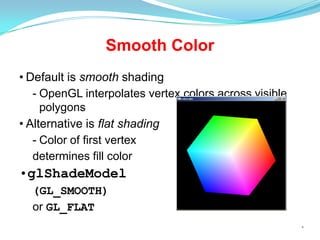
Smooth Color
• Default is smooth shading
- OpenGL interpolates vertex colors across visible
polygons
• Alternative is flat shading
- Color of first vertex
determines fill color

•glShadeModel
(GL_SMOOTH)
or GL_FLAT
*
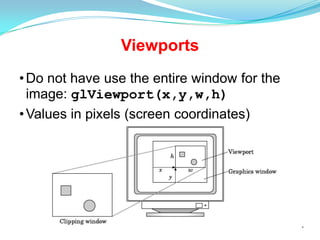
Viewports
• Do not have use the entire window for the
image: glViewport(x,y,w,h)
• Values in pixels (screen coordinates)

*

Open gl basics

  • 1.
  • 2.
    Objectives • Refine thefirst program - Alter the default values - Introduce a standard program structure • Simple viewing - Two-dimensional viewing as a special case of three-dimensional viewing • Fundamental OpenGL primitives • Attributes *
  • 3.
    Program Structure • MostOpenGL programs have a similar structure that consists of the following functions -main(): • defines the callback functions • opens one or more windows with the required properties • enters event loop (last executable statement) -init(): sets the state variables • Viewing • Attributes - callbacks • Display function • Input and window functions *
  • 4.
    C structure revisited •In this version, we shall see the same output but we have defined all the relevant state values through function calls using the default values • In particular, we set - Colors - Viewing conditions - Window properties *
  • 5.
    main.c #include <GL/glut.h> includes gl.h intmain(int argc, char** argv) { glutInit(&argc,argv); glutInitDisplayMode(GLUT_SINGLE|GLUT_RGB); glutInitWindowSize(500,500); glutInitWindowPosition(0,0); define window properties glutCreateWindow("simple"); glutDisplayFunc(mydisplay); init(); glutMainLoop(); } display callback set OpenGL state enter event loop *
  • 6.
    GLUT functions •glutInit allowsapplication to get command line arguments and initializes system •gluInitDisplayMode requests properties for the window (the rendering context) - RGB color - Single buffering - Properties logically ORed together •glutWindowSize in pixels •glutWindowPosition from top-left corner of display •glutCreateWindow create window with title “simple” •glutDisplayFunc display callback •glutMainLoop enter infinite event loop *
  • 7.
    init.c black clear color opaquewindow void init() { glClearColor (0.0, 0.0, 0.0, 1.0); fill/draw with white glColor3f(1.0, 1.0, 1.0); glMatrixMode (GL_PROJECTION); glLoadIdentity (); glOrtho(-1.0, 1.0, -1.0, 1.0, -1.0, 1.0); } viewing volume *
  • 8.
    Coordinate Systems • Theunits in glVertex are determined by the application and are called object or problem coordinates • The viewing specifications are also in object coordinates and it is the size of the viewing volume that determines what will appear in the image • Internally, OpenGL will convert to camera (eye) coordinates and later to screen coordinates • OpenGL also uses some internal representations that usually are not visible to the application *
  • 9.
    OpenGL Camera • OpenGLplaces a camera at the origin in object space pointing in the negative z direction • The default viewing volume is a box centered at the origin with a side of length 2 *
  • 10.
    Orthographic Viewing In thedefault orthographic view, points are projected forward along the z axis onto the plane z=0 z=0 z=0 *
  • 11.
    Transformations and Viewing •In OpenGL, projection is carried out by a projection matrix (transformation) • There is only one set of transformation functions so we must set the matrix mode first glMatrixMode (GL_PROJECTION) • Transformation functions are incremental so we start with an identity matrix and alter it with a projection matrix that gives the view volume glLoadIdentity(); glOrtho(-1.0, 1.0, -1.0, 1.0, -1.0, 1.0); *
  • 12.
    Two- and three-dimensional viewing •In glOrtho(left, right, bottom, top, near, far) the near and far distances are measured from the camera • Two-dimensional vertex commands place all vertices in the plane z=0 • If the application is in two dimensions, we can use the function gluOrtho2D(left, right,bottom,top) • In two dimensions, the view or clipping volume becomes a clipping window *
  • 13.
  • 14.
  • 15.
    Polygon Issues • OpenGLwill only display polygons correctly that are - Simple: edges cannot cross - Convex: All points on line segment between two points in a polygon are also in the polygon - Flat: all vertices are in the same plane • User program can check if above true - OpenGL will produce output if these conditions are violated but it may not be what is desired • Triangles satisfy all conditions nonsimple polygon nonconvex polygon *
  • 16.
    Attributes • Attributes arepart of the OpenGL state and determine the appearance of objects - Color (points, lines, polygons) - Size and width (points, lines) - Stipple pattern (lines, polygons) - Polygon mode • Display as filled: solid color or stipple pattern • Display edges • Display vertices *
  • 17.
    RGB color • Eachcolor component is stored separately in the frame buffer • Usually 8 bits per component in buffer • Note in glColor3f the color values range from 0.0 (none) to 1.0 (all), whereas in glColor3ub the values range from 0 to 255 *
  • 18.
    Indexed Color • Colorsare indices into tables of RGB values • Requires less memory - indices usually 8 bits - not as important now • Memory inexpensive • Need more colors for shading *
  • 19.
    Color and State •The color as set by glColor becomes part of the state and will be used until changed - Colors and other attributes are not part of the object but are assigned when the object is rendered • We can create conceptual vertex colors by code such as glColor glVertex glColor glVertex *
  • 20.
    Smooth Color • Defaultis smooth shading - OpenGL interpolates vertex colors across visible polygons • Alternative is flat shading - Color of first vertex determines fill color •glShadeModel (GL_SMOOTH) or GL_FLAT *
  • 21.
    Viewports • Do nothave use the entire window for the image: glViewport(x,y,w,h) • Values in pixels (screen coordinates) *