1E. Angel and D. Shreiner: Interactive Computer Graphics 6E © Addison-Wesley 2012
Programming with OpenGL
Part 2: Complete Programs
Ed Angel
Professor of Emeritus of Computer Science
University of New Mexico
2E. Angel and D. Shreiner: Interactive Computer Graphics 6E © Addison-Wesley 2012
Objectives
•Build a complete first program
­ Introduce shaders
­ Introduce a standard program structure
•Simple viewing
­ Two­dimensional viewing as a special case of
three­dimensional viewing
•Initialization steps and program structure
3E. Angel and D. Shreiner: Interactive Computer Graphics 6E © Addison-Wesley 2012
Program Structure
• Most OpenGL programs have a similar structure
that consists of the following functions
­main():
• specifies the callback functions
• opens one or more windows with the required properties
• enters event loop (last executable statement)
­init(): sets the state variables
• Viewing
• Attributes
­initShader():read, compile and link shaders
­ callbacks
• Display function
• Input and window functions
4E. Angel and D. Shreiner: Interactive Computer Graphics 6E © Addison-Wesley 2012
simple.c revisited
•main() function similar to last lecture
­ Mostly GLUT functions
•init() will allow more flexible colors
•initShader() will hides details of setting up
shaders for now
•Key issue is that we must form a data
array to send to GPU and then render it
5E. Angel and D. Shreiner: Interactive Computer Graphics 6E © Addison-Wesley 2012
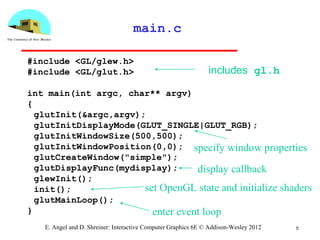
main.c
#include <GL/glew.h>
#include <GL/glut.h>
int main(int argc, char** argv)
{
glutInit(&argc,argv);
glutInitDisplayMode(GLUT_SINGLE|GLUT_RGB);
glutInitWindowSize(500,500);
glutInitWindowPosition(0,0);
glutCreateWindow("simple");
glutDisplayFunc(mydisplay);
glewInit();
init();
glutMainLoop();
}
includes gl.h
specify window properties
set OpenGL state and initialize shaders
enter event loop
display callback
6E. Angel and D. Shreiner: Interactive Computer Graphics 6E © Addison-Wesley 2012
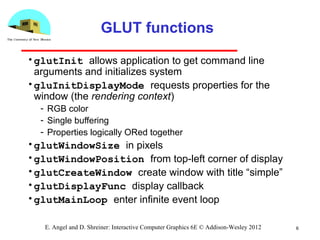
GLUT functions
•glutInit allows application to get command line
arguments and initializes system
•gluInitDisplayMode requests properties for the
window (the rendering context)
­ RGB color
­ Single buffering
­ Properties logically ORed together
•glutWindowSize in pixels
•glutWindowPosition from top­left corner of display
•glutCreateWindow create window with title “simple”
•glutDisplayFunc display callback
•glutMainLoop enter infinite event loop
Immediate Mode Graphics
•Geometry specified by vertices
­ Locations in space( 2 or 3 dimensional)
­ Points, lines, circles, polygons, curves, surfaces
•Immediate mode
­ Each time a vertex is specified in application, its
location is sent to the GPU
­ Old style uses glVertex
­ Creates bottleneck between CPU and GPU
­ Removed from OpenGL 3.1
7E. Angel and D. Shreiner: Interactive Computer Graphics 6E © Addison-Wesley 2012
Retained Mode Graphics
•Put all vertex and attribute data in array
•Send array to GPU to be rendered
immediately
•Almost OK but problem is we would have
to send array over each time we need
another render of it
•Better to send array over and store on
GPU for multiple renderings
8E. Angel and D. Shreiner: Interactive Computer Graphics 6E © Addison-Wesley 2012
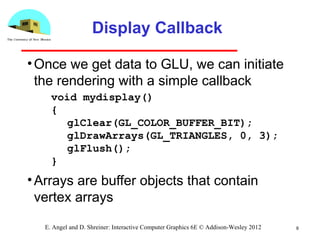
Display Callback
•Once we get data to GLU, we can initiate
the rendering with a simple callback
•Arrays are buffer objects that contain
vertex arrays
9E. Angel and D. Shreiner: Interactive Computer Graphics 6E © Addison-Wesley 2012
void mydisplay()
{
glClear(GL_COLOR_BUFFER_BIT);
glDrawArrays(GL_TRIANGLES, 0, 3);
glFlush();
}
Vertex Arrays
•Vertices can have many attributes
­ Position
­ Color
­ Texture Coordinates
­ Application data
•A vertex array holds these data
•Using types in vec.h
10E. Angel and D. Shreiner: Interactive Computer Graphics 6E © Addison-Wesley 2012
point2 vertices[3] = {point2(0.0, 0.0),
point2( 0.0, 1.0), point2(1.0, 1.0)};
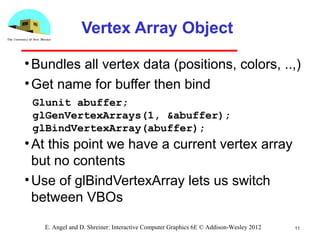
Vertex Array Object
•Bundles all vertex data (positions, colors, ..,)
•Get name for buffer then bind
•At this point we have a current vertex array
but no contents
•Use of glBindVertexArray lets us switch
between VBOs
11E. Angel and D. Shreiner: Interactive Computer Graphics 6E © Addison-Wesley 2012
Glunit abuffer;
glGenVertexArrays(1, &abuffer);
glBindVertexArray(abuffer);
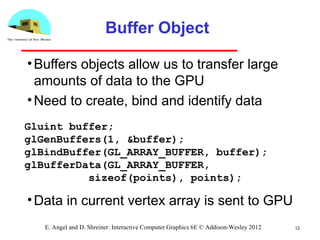
Buffer Object
•Buffers objects allow us to transfer large
amounts of data to the GPU
•Need to create, bind and identify data
•Data in current vertex array is sent to GPU
12E. Angel and D. Shreiner: Interactive Computer Graphics 6E © Addison-Wesley 2012
Gluint buffer;
glGenBuffers(1, &buffer);
glBindBuffer(GL_ARRAY_BUFFER, buffer);
glBufferData(GL_ARRAY_BUFFER,
sizeof(points), points);
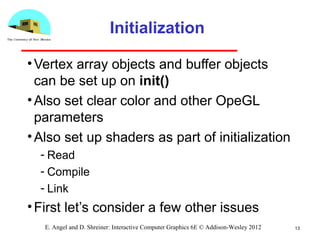
Initialization
•Vertex array objects and buffer objects
can be set up on init()
•Also set clear color and other OpeGL
parameters
•Also set up shaders as part of initialization
­ Read
­ Compile
­ Link
•First let’s consider a few other issues
13E. Angel and D. Shreiner: Interactive Computer Graphics 6E © Addison-Wesley 2012
14E. Angel and D. Shreiner: Interactive Computer Graphics 6E © Addison-Wesley 2012
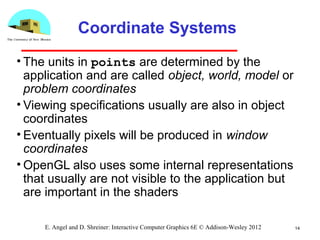
Coordinate Systems
• The units in points are determined by the
application and are called object, world, model or
problem coordinates
• Viewing specifications usually are also in object
coordinates
• Eventually pixels will be produced in window
coordinates
• OpenGL also uses some internal representations
that usually are not visible to the application but
are important in the shaders
15E. Angel and D. Shreiner: Interactive Computer Graphics 6E © Addison-Wesley 2012
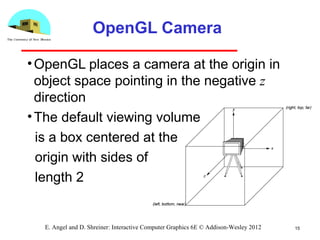
OpenGL Camera
•OpenGL places a camera at the origin in
object space pointing in the negative z
direction
•The default viewing volume
is a box centered at the
origin with sides of
length 2
16E. Angel and D. Shreiner: Interactive Computer Graphics 6E © Addison-Wesley 2012
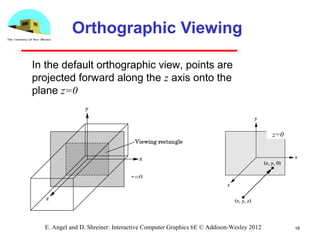
Orthographic Viewing
z=0
z=0
In the default orthographic view, points are
projected forward along the z axis onto the
plane z=0
17E. Angel and D. Shreiner: Interactive Computer Graphics 6E © Addison-Wesley 2012
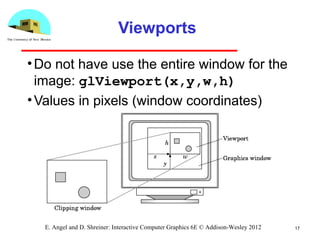
Viewports
•Do not have use the entire window for the
image: glViewport(x,y,w,h)
•Values in pixels (window coordinates)
18E. Angel and D. Shreiner: Interactive Computer Graphics 6E © Addison-Wesley 2012
Transformations and Viewing
• In OpenGL, projection is carried out by a
projection matrix (transformation)
• Transformation functions are also used for
changes in coordinate systems
• Pre 3.0 OpenGL had a set of transformation
functions which have been deprecated
• Three choices
­ Application code
­ GLSL functions
­ vec.h and mat.h

Angel6 e05

  • 1.
    1E. Angel andD. Shreiner: Interactive Computer Graphics 6E © Addison-Wesley 2012 Programming with OpenGL Part 2: Complete Programs Ed Angel Professor of Emeritus of Computer Science University of New Mexico
  • 2.
    2E. Angel andD. Shreiner: Interactive Computer Graphics 6E © Addison-Wesley 2012 Objectives •Build a complete first program ­ Introduce shaders ­ Introduce a standard program structure •Simple viewing ­ Two­dimensional viewing as a special case of three­dimensional viewing •Initialization steps and program structure
  • 3.
    3E. Angel andD. Shreiner: Interactive Computer Graphics 6E © Addison-Wesley 2012 Program Structure • Most OpenGL programs have a similar structure that consists of the following functions ­main(): • specifies the callback functions • opens one or more windows with the required properties • enters event loop (last executable statement) ­init(): sets the state variables • Viewing • Attributes ­initShader():read, compile and link shaders ­ callbacks • Display function • Input and window functions
  • 4.
    4E. Angel andD. Shreiner: Interactive Computer Graphics 6E © Addison-Wesley 2012 simple.c revisited •main() function similar to last lecture ­ Mostly GLUT functions •init() will allow more flexible colors •initShader() will hides details of setting up shaders for now •Key issue is that we must form a data array to send to GPU and then render it
  • 5.
    5E. Angel andD. Shreiner: Interactive Computer Graphics 6E © Addison-Wesley 2012 main.c #include <GL/glew.h> #include <GL/glut.h> int main(int argc, char** argv) { glutInit(&argc,argv); glutInitDisplayMode(GLUT_SINGLE|GLUT_RGB); glutInitWindowSize(500,500); glutInitWindowPosition(0,0); glutCreateWindow("simple"); glutDisplayFunc(mydisplay); glewInit(); init(); glutMainLoop(); } includes gl.h specify window properties set OpenGL state and initialize shaders enter event loop display callback
  • 6.
    6E. Angel andD. Shreiner: Interactive Computer Graphics 6E © Addison-Wesley 2012 GLUT functions •glutInit allows application to get command line arguments and initializes system •gluInitDisplayMode requests properties for the window (the rendering context) ­ RGB color ­ Single buffering ­ Properties logically ORed together •glutWindowSize in pixels •glutWindowPosition from top­left corner of display •glutCreateWindow create window with title “simple” •glutDisplayFunc display callback •glutMainLoop enter infinite event loop
  • 7.
    Immediate Mode Graphics •Geometryspecified by vertices ­ Locations in space( 2 or 3 dimensional) ­ Points, lines, circles, polygons, curves, surfaces •Immediate mode ­ Each time a vertex is specified in application, its location is sent to the GPU ­ Old style uses glVertex ­ Creates bottleneck between CPU and GPU ­ Removed from OpenGL 3.1 7E. Angel and D. Shreiner: Interactive Computer Graphics 6E © Addison-Wesley 2012
  • 8.
    Retained Mode Graphics •Putall vertex and attribute data in array •Send array to GPU to be rendered immediately •Almost OK but problem is we would have to send array over each time we need another render of it •Better to send array over and store on GPU for multiple renderings 8E. Angel and D. Shreiner: Interactive Computer Graphics 6E © Addison-Wesley 2012
  • 9.
    Display Callback •Once weget data to GLU, we can initiate the rendering with a simple callback •Arrays are buffer objects that contain vertex arrays 9E. Angel and D. Shreiner: Interactive Computer Graphics 6E © Addison-Wesley 2012 void mydisplay() { glClear(GL_COLOR_BUFFER_BIT); glDrawArrays(GL_TRIANGLES, 0, 3); glFlush(); }
  • 10.
    Vertex Arrays •Vertices canhave many attributes ­ Position ­ Color ­ Texture Coordinates ­ Application data •A vertex array holds these data •Using types in vec.h 10E. Angel and D. Shreiner: Interactive Computer Graphics 6E © Addison-Wesley 2012 point2 vertices[3] = {point2(0.0, 0.0), point2( 0.0, 1.0), point2(1.0, 1.0)};
  • 11.
    Vertex Array Object •Bundlesall vertex data (positions, colors, ..,) •Get name for buffer then bind •At this point we have a current vertex array but no contents •Use of glBindVertexArray lets us switch between VBOs 11E. Angel and D. Shreiner: Interactive Computer Graphics 6E © Addison-Wesley 2012 Glunit abuffer; glGenVertexArrays(1, &abuffer); glBindVertexArray(abuffer);
  • 12.
    Buffer Object •Buffers objectsallow us to transfer large amounts of data to the GPU •Need to create, bind and identify data •Data in current vertex array is sent to GPU 12E. Angel and D. Shreiner: Interactive Computer Graphics 6E © Addison-Wesley 2012 Gluint buffer; glGenBuffers(1, &buffer); glBindBuffer(GL_ARRAY_BUFFER, buffer); glBufferData(GL_ARRAY_BUFFER, sizeof(points), points);
  • 13.
    Initialization •Vertex array objectsand buffer objects can be set up on init() •Also set clear color and other OpeGL parameters •Also set up shaders as part of initialization ­ Read ­ Compile ­ Link •First let’s consider a few other issues 13E. Angel and D. Shreiner: Interactive Computer Graphics 6E © Addison-Wesley 2012
  • 14.
    14E. Angel andD. Shreiner: Interactive Computer Graphics 6E © Addison-Wesley 2012 Coordinate Systems • The units in points are determined by the application and are called object, world, model or problem coordinates • Viewing specifications usually are also in object coordinates • Eventually pixels will be produced in window coordinates • OpenGL also uses some internal representations that usually are not visible to the application but are important in the shaders
  • 15.
    15E. Angel andD. Shreiner: Interactive Computer Graphics 6E © Addison-Wesley 2012 OpenGL Camera •OpenGL places a camera at the origin in object space pointing in the negative z direction •The default viewing volume is a box centered at the origin with sides of length 2
  • 16.
    16E. Angel andD. Shreiner: Interactive Computer Graphics 6E © Addison-Wesley 2012 Orthographic Viewing z=0 z=0 In the default orthographic view, points are projected forward along the z axis onto the plane z=0
  • 17.
    17E. Angel andD. Shreiner: Interactive Computer Graphics 6E © Addison-Wesley 2012 Viewports •Do not have use the entire window for the image: glViewport(x,y,w,h) •Values in pixels (window coordinates)
  • 18.
    18E. Angel andD. Shreiner: Interactive Computer Graphics 6E © Addison-Wesley 2012 Transformations and Viewing • In OpenGL, projection is carried out by a projection matrix (transformation) • Transformation functions are also used for changes in coordinate systems • Pre 3.0 OpenGL had a set of transformation functions which have been deprecated • Three choices ­ Application code ­ GLSL functions ­ vec.h and mat.h