


{Open} MPI, Parallel Computing, Life, the
Universe, and Everything
November 7, 2013
Dr. Jeffrey M. Squyres
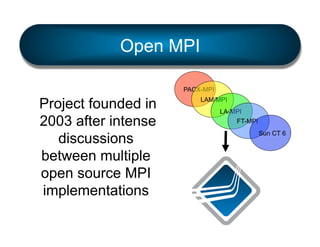
Open MPI
PACX-MPI

Project founded in
2003 after intense
discussions
between multiple
open source MPI
implementations

LAM/MPI
LA-MPI
FT-MPI
Sun CT 6
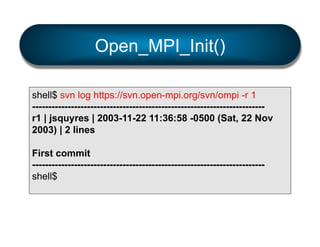
Open_MPI_Init()
shell$ svn log https://svn.open-mpi.org/svn/ompi -r 1
-----------------------------------------------------------------------r1 | jsquyres | 2003-11-22 11:36:58 -0500 (Sat, 22 Nov
2003) | 2 lines
First commit
-----------------------------------------------------------------------shell$
Open_MPI_Current_status()
shell$ svn log https://svn.open-mpi.org/svn/ompi -r HEAD
-----------------------------------------------------------------------r29619 | brbarret | 2013-11-06 09:14:24 -0800 (Wed, 06
Nov 2013) | 2 lines
update ignore file
-----------------------------------------------------------------------shell$
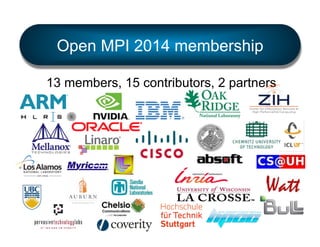
Open MPI 2014 membership
13 members, 15 contributors, 2 partners
Fun stats
•  ohloh.net says:
§  819,741 lines of code
§  Average 10-20
committers at a time
§  “Well-commented
source code”

•  I rank in top-25 ohloh
stats for:
§ 
§ 
§ 
§ 

C
Automake
Shell script
Fortran (…ouch)
Current status
•  Version 1.6.5 / stable series
§  Unlikely to see another release

•  Version 1.7.3 / feature series
§  v1.7.4 due (hopefully) by end of 2013
§  Plan to transition to v1.8 in Q1 2014
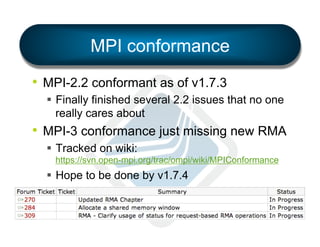
MPI conformance
•  MPI-2.2 conformant as of v1.7.3
§  Finally finished several 2.2 issues that no one
really cares about

•  MPI-3 conformance just missing new RMA
§  Tracked on wiki:
https://svn.open-mpi.org/trac/ompi/wiki/MPIConformance

§  Hope to be done by v1.7.4
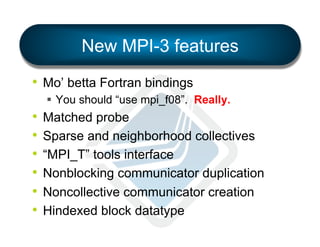
New MPI-3 features
•  Mo’ betta Fortran bindings
§  You should “use mpi_f08”. Really.

•  Matched probe
•  Sparse and neighborhood collectives
•  “MPI_T” tools interface
•  Nonblocking communicator duplication
•  Noncollective communicator creation
•  Hindexed block datatype
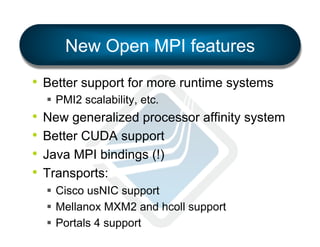
New Open MPI features
•  Better support for more runtime systems
§  PMI2 scalability, etc.

•  New generalized processor affinity system
•  Better CUDA support
•  Java MPI bindings (!)
•  Transports:
§  Cisco usNIC support
§  Mellanox MXM2 and hcoll support
§  Portals 4 support
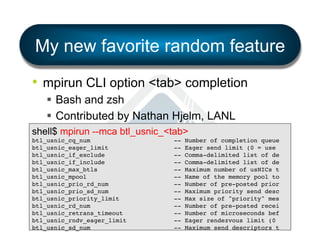
My new favorite random feature
•  mpirun CLI option <tab> completion
§  Bash and zsh
§  Contributed by Nathan Hjelm, LANL
shell$ mpirun --mca btl_usnic_<tab>
btl_usnic_cq_num
btl_usnic_eager_limit
btl_usnic_if_exclude
btl_usnic_if_include
btl_usnic_max_btls
btl_usnic_mpool
btl_usnic_prio_rd_num
btl_usnic_prio_sd_num
btl_usnic_priority_limit
btl_usnic_rd_num
btl_usnic_retrans_timeout
btl_usnic_rndv_eager_limit
btl_usnic_sd_num

--------------

Number of completion queue!
Eager send limit (0 = use !
Comma-delimited list of de!
Maximum number of usNICs t!
Name of the memory pool to!
Number of pre-posted prior!
Maximum priority send desc!
Max size of "priority" mes!
Number of pre-posted recei!
Number of microseconds bef!
Eager rendezvous limit (0 !
Maximum send descriptors t!
Two features to discuss
in detail…
1.  “MPI_T” interface
2.  Flexible process affinity system
MPI_T interface
MPI_T interface
•  Added in MPI-3.0
•  So-called “MPI_T” because all the
functions start with that prefix
§  T = tools

•  APIs to get/set MPI implementation values
§  Control variables (e.g., implementation
tunables)
§  Performance variables (e.g., run-time stats)
MPI_T control variables (“cvar”)
•  Another interface to MCA param values
•  In addition to existing methods:
§  mpirun CLI options
§  Environment variables
§  Config file(s)

•  Allows tools / applications to
programmatically list all OMPI MCA params
MPI_T cvar example
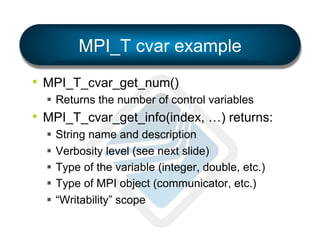
•  MPI_T_cvar_get_num()
§  Returns the number of control variables

•  MPI_T_cvar_get_info(index, …) returns:
§  String name and description
§  Verbosity level (see next slide)
§  Type of the variable (integer, double, etc.)
§  Type of MPI object (communicator, etc.)
§  “Writability” scope
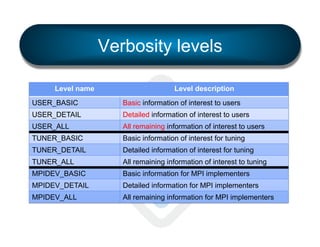
Verbosity levels
Level name

Level description

USER_BASIC

Basic information of interest to users

USER_DETAIL

Detailed information of interest to users

USER_ALL

All remaining information of interest to users

TUNER_BASIC

Basic information of interest for tuning

TUNER_DETAIL

Detailed information of interest for tuning

TUNER_ALL

All remaining information of interest to tuning

MPIDEV_BASIC

Basic information for MPI implementers

MPIDEV_DETAIL

Detailed information for MPI implementers

MPIDEV_ALL

All remaining information for MPI implementers
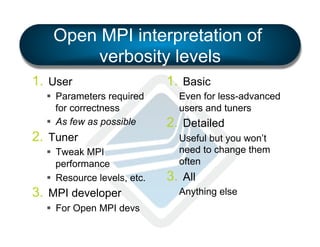
Open MPI interpretation of
verbosity levels
1.  User
§  Parameters required
for correctness
§  As few as possible

2.  Tuner
§  Tweak MPI
performance
§  Resource levels, etc.

3.  MPI developer
§  For Open MPI devs

1.  Basic
Even for less-advanced
users and tuners

2.  Detailed
Useful but you won’t
need to change them
often

3.  All
Anything else
“Writeability” scope
Level name

Level description

CONSTANT

Read-only, constant value

READONLY

Read-only, but the value may change

LOCAL

Writing is local operation

GROUP

Writing must be done as a group, and all values
must be consistent

GROUP_EQ

Writing must be done as a group, and all values
must be exactly the same

ALL

Writing must be done by all processes, and all
values must be consistent

ALL_EQ

Writing must be done by all processes, and all
values must be exactly the same
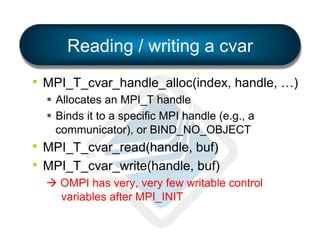
Reading / writing a cvar
•  MPI_T_cvar_handle_alloc(index, handle, …)
§  Allocates an MPI_T handle
§  Binds it to a specific MPI handle (e.g., a
communicator), or BIND_NO_OBJECT

•  MPI_T_cvar_read(handle, buf)
•  MPI_T_cvar_write(handle, buf)
à OMPI has very, very few writable control
variables after MPI_INIT
MPI_T Performance variables (“pvar”)
•  New information available from OMPI
§  Run-time statistics of implementation details
§  Similar interface to control variables

•  Not many available in OMPI yet
•  Cisco usnic BTL exports 24 pvars
§  Per usNIC interface
§  Stats about underlying network
(more details to be provided in usNIC talk)
Process affinity system
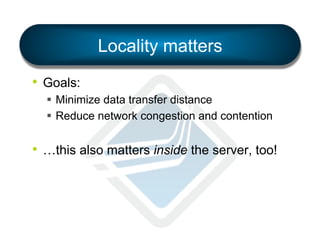
Locality matters
•  Goals:
§  Minimize data transfer distance
§  Reduce network congestion and contention

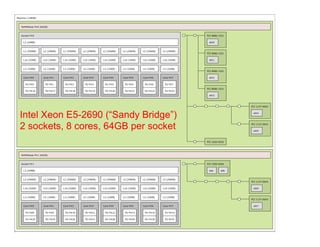
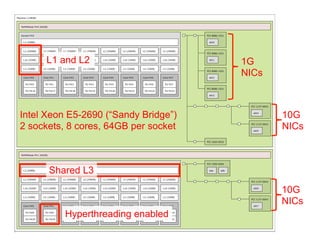
•  …this also matters inside the server, too!
Machine (128GB)

NUMANode P#0 (64GB)

Socket P#0

PCI 8086:1521

L3 (20MB)

eth0

L2 (256KB)

L2 (256KB)

L2 (256KB)

L2 (256KB)

L2 (256KB)

L2 (256KB)

L2 (256KB)

L2 (256KB)

L1d (32KB)

L1d (32KB)

L1d (32KB)

L1d (32KB)

L1d (32KB)

L1d (32KB)

L1d (32KB)

L1d (32KB)

L1i (32KB)

L1i (32KB)

L1i (32KB)

L1i (32KB)

L1i (32KB)

L1i (32KB)

L1i (32KB)

L1i (32KB)

Core P#0

Core P#1

Core P#2

Core P#3

Core P#4

Core P#5

Core P#6

Core P#7

PU P#0

PU P#1

PU P#2

PU P#3

PU P#4

PU P#5

PU P#6

PU P#7

PU P#16

PU P#17

PU P#18

PU P#19

PU P#20

PU P#21

PU P#22

PU P#23

PCI 8086:1521
eth1

PCI 8086:1521
eth2

PCI 8086:1521
eth3

PCI 1137:0043

Intel Xeon E5-2690 (“Sandy Bridge”)
2 sockets, 8 cores, 64GB per socket

eth4

PCI 1137:0043
eth5

PCI 102b:0522

NUMANode P#1 (64GB)

Socket P#1

PCI 1000:005b

L3 (20MB)

sda

L2 (256KB)

L2 (256KB)

L2 (256KB)

L2 (256KB)

L2 (256KB)

L2 (256KB)

L2 (256KB)

L2 (256KB)

L1d (32KB)

L1d (32KB)

L1d (32KB)

L1d (32KB)

L1d (32KB)

L1d (32KB)

L1d (32KB)

L1d (32KB)

L1i (32KB)

L1i (32KB)

L1i (32KB)

L1i (32KB)

L1i (32KB)

L1i (32KB)

L1i (32KB)

L1i (32KB)

Core P#0

Core P#1

Core P#2

Core P#3

Core P#4

Core P#5

Core P#6

Core P#7

PU P#8

PU P#9

PU P#10

PU P#11

PU P#12

PU P#13

PU P#14

PU P#15

PU P#24

PU P#25

PU P#26

PU P#27

PU P#28

PU P#29

PU P#30

PU P#31

Indexes: physical
Date: Mon Jan 28 10:51:26 2013

sdb

PCI 1137:0043
eth6

PCI 1137:0043
eth7
Machine (128GB)

NUMANode P#0 (64GB)

Socket P#0

PCI 8086:1521

L3 (20MB)

eth0

L2 (256KB)

L2 (256KB)

L2 (256KB)

L1d (32KB)

L1d (32KB)

L1d (32KB)

L1i (32KB)

L1i (32KB)

Core P#0

L2 (256KB)

L2 (256KB)

L2 (256KB)

L2 (256KB)

L2 (256KB)

L1d (32KB)

L1d (32KB)

L1d (32KB)

L1d (32KB)

L1d (32KB)

L1i (32KB)

L1i (32KB)

L1i (32KB)

L1i (32KB)

L1i (32KB)

L1i (32KB)

Core P#1

Core P#2

Core P#3

Core P#4

Core P#5

Core P#6

Core P#7

PU P#0

PU P#1

PU P#2

PU P#3

PU P#4

PU P#5

PU P#6

PU P#7

PU P#16

PU P#17

PU P#18

PU P#19

PU P#20

PU P#21

PU P#22

PU P#23

L1 and L2

PCI 8086:1521
eth1

PCI 8086:1521
eth2

1G
NICs

PCI 8086:1521
eth3

PCI 1137:0043

Intel Xeon E5-2690 (“Sandy Bridge”)
2 sockets, 8 cores, 64GB per socket

eth4

PCI 1137:0043
eth5

10G
NICs

PCI 102b:0522

NUMANode P#1 (64GB)

Socket P#1
L3 (20MB)

PCI 1000:005b

Shared L3

sda

L2 (256KB)

L2 (256KB)

L2 (256KB)

L2 (256KB)

L2 (256KB)

L2 (256KB)

L2 (256KB)

L2 (256KB)

L1d (32KB)

L1d (32KB)

L1d (32KB)

L1d (32KB)

L1d (32KB)

L1d (32KB)

L1d (32KB)

L1d (32KB)

L1i (32KB)

L1i (32KB)

L1i (32KB)

L1i (32KB)

L1i (32KB)

L1i (32KB)

L1i (32KB)

L1i (32KB)

Core P#0

Core P#1

Core P#2

Core P#3

Core P#4

Core P#5

Core P#6

Core P#7

PU P#8

PU P#9

PU P#24

PU P#25

Indexes: physical
Date: Mon Jan 28 10:51:26 2013

Hyperthreading enabled
PU P#10

PU P#11

PU P#12

PU P#13

PU P#14

PU P#15

PU P#26

PU P#27

PU P#28

PU P#29

PU P#30

PU P#31

sdb

PCI 1137:0043
eth6

PCI 1137:0043
eth7

10G
NICs
A user’s playground

The intent of this work is to provide a mechanism that
allows users to explore the process-placement space
within the scope of their own applications.
Two complimentary systems
•  Simple
§  mpirun --bind-to [ core | socket | … ] …
§  mpirun --by[ node | slot | … ] …
§  …etc.

•  Flexible
§  LAMA: Locality Aware Mapping Algorithm
LAMA
•  Supports a wide range of regular mapping
patterns
§  Drawn from much prior work
§  Most notably, heavily inspired by BlueGene/P
and /Q mapping systems
Launching MPI applications
•  Three steps in MPI process placement
1.  Mapping
2.  Ordering
3.  Binding

•  Let's discuss how these work in Open MPI
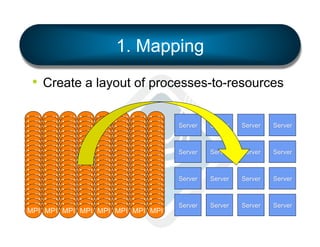
1. Mapping
•  Create a layout of processes-to-resources
MPI
MPI
MPI
MPI
MPI
MPI
MPI
MPI
MPI
MPI
MPI
MPI
MPI
MPI
MPI
MPI
MPI
MPI
MPI
MPI

MPI
MPI
MPI
MPI
MPI
MPI
MPI
MPI
MPI
MPI
MPI
MPI
MPI
MPI
MPI
MPI
MPI
MPI
MPI
MPI

MPI
MPI
MPI
MPI
MPI
MPI
MPI
MPI
MPI
MPI
MPI
MPI
MPI
MPI
MPI
MPI
MPI
MPI
MPI
MPI

MPI
MPI
MPI
MPI
MPI
MPI
MPI
MPI
MPI
MPI
MPI
MPI
MPI
MPI
MPI
MPI
MPI
MPI
MPI
MPI

MPI
MPI
MPI
MPI
MPI
MPI
MPI
MPI
MPI
MPI
MPI
MPI
MPI
MPI
MPI
MPI
MPI
MPI
MPI
MPI

MPI
MPI
MPI
MPI
MPI
MPI
MPI
MPI
MPI
MPI
MPI
MPI
MPI
MPI
MPI
MPI
MPI
MPI
MPI
MPI

MPI
MPI
MPI
MPI
MPI
MPI
MPI
MPI
MPI
MPI
MPI
MPI
MPI
MPI
MPI
MPI
MPI
MPI
MPI
MPI

MPI
MPI
MPI
MPI
MPI
MPI
MPI
MPI
MPI
MPI
MPI
MPI
MPI
MPI
MPI
MPI
MPI
MPI
MPI
MPI

Server

Server

Server

Server

Server

Server

Server

Server

Server

Server

Server

Server

Server

Server

Server

Server
Mapping
•  MPI's runtime must create a map, pairing
processes-to-processors (and memory).
•  Basic technique:
§  Gather hwloc topologies from allocated nodes.
§  Mapping agent then makes a plan for which
resources are assigned to processes
Mapping agent
•  Act of planning mappings:
§  Specify which process will be launched on
each server
§  Identify if any hardware resource will be
oversubscribed

•  Processes are mapped to the resolution of
a single processing unit (PU)
§  Smallest unit of allocation: hardware thread
§  In HPC, usually the same as a processor core
Oversubscription
•  Common / usual definition:
§  When a single PU is assigned more than one
process

•  Complicating the definition:
§  Some application may need more than one PU
per process (multithreaded applications)

•  How can the user express what their
application means by “oversubscription”?
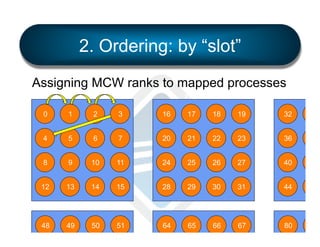
2. Ordering: by “slot”
Assigning MCW ranks to mapped processes
0

1

2

3

16

17

18

19

32

33

4

5

6

7

20

21

22

23

36

37

8

9

10

11

24

25

26

27

40

41

12

13

14

15

28

29

30

31

44

45

48

49

50

51

64

65

66

67

80

81
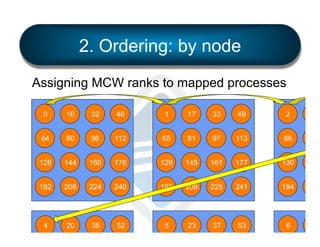
2. Ordering: by node
Assigning MCW ranks to mapped processes
0

16

32

48

1

17

33

49

2

18

64

80

96

112

65

81

97

113

66

82

128

144

160

176

129

145

161

177

130

146

192

208

224

240

193

209

225

241

194

210

4

20

36

52

5

23

37

53

6

81
Ordering
•  Each process must be assigned a unique
rank in MPI_COMM_WORLD
•  Two common types of ordering:
§  natural
•  The order in which processes are mapped
determines their rank in MCW

§  sequential
•  The processes are sequentially numbered starting
at the first processing unit, and continuing until the
last processing unit
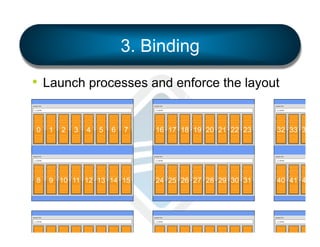
3. Binding
•  Launch processes and enforce the layout
Machine (128GB)

Machine (128GB)

NUMANode P#0 (64GB)

Machine (128GB)

NUMANode P#0 (64GB)

Socket P#0

NUMANode P#0 (64GB)

PCI 8086:1521
Socket P#0

L3 (20MB)

PCI 8086:1521
Socket P#0

eth0 L3 (20MB)

eth0 L3 (20MB)

L2 (256KB)

L2 (256KB)

L2 (256KB)

L2 (256KB)

L2 (256KB)

L2 (256KB)

L2 (256KB)

L2 (256KB)

L2 (256KB)
PCI 8086:1521

L2 (256KB)

L2 (256KB)

L2 (256KB)

L2 (256KB)

L2 (256KB)

L2 (256KB)

L2 (256KB)

L2 (256KB)
PCI 8086:1521

L2 (256KB)

L2 (256KB)

L2 (256K

L1d (32KB)

L1d (32KB)

L1d (32KB)

L1d (32KB)

L1d (32KB)

L1d (32KB)

L1d (32KB)

L1d (32KB)

eth1 L1d (32KB)

L1d (32KB)

L1d (32KB)

L1d (32KB)

L1d (32KB)

L1d (32KB)

L1d (32KB)

L1d (32KB)

eth1 L1d (32KB)

L1d (32KB)

L1d (32KB)

L1d (32K

L1i (32KB)

0

L1i (32KB)

1

L1i (32KB)

L1i (32KB)

L1i (32KB)

L1i (32KB)

L1i (32KB)

L1i (32KB)

L1i (32KB)

L1i (32KB)

L1i (32KB)

L1i (32KB)

L1i (32K

Core P#5

6

L1i (32KB)

Core P#4

5

L1i (32KB)

Core P#3

4

L1i (32KB)

Core P#2

3

L1i (32KB)

Core P#1

2

L1i (32KB)

Core P#0

Core P#6

Core P#7

eth2 Core P#0

Core P#1

Core P#2

Core P#3

Core P#4

Core P#5

Core P#6

Core P#7

eth2 Core P#0

Core P#1

Core P#2

Core P#

PU P#0

PU P#1

PU P#2

PU P#3

PU P#4

PU P#5

PU P#6

PU P#7

PU P#0

PU P#1

PU P#2

PU P#3

PU P#4

PU P#5

PU P#6

PU P#7

PU P#0

PU P#1

PU P#2

PU P#

PU P#16

PU P#17

PU P#18

PU P#19

PU P#20

PU P#21

PU P#22

PU P#23

PU P#17

PU P#18

PU P#19

PU P#20

PU P#21

PU P#22

PU P#23

PU P#17

PU P#18

PU P#

7

16 17 18 19 20 21 22 23

L1i (32KB)
PCI 8086:1521

PCI 8086:1521
PU P#16
eth3
Machine (128GB)

Machine (128GB)

NUMANode P#0 (64GB)

32 33 34 3

L1i (32KB)
PCI 8086:1521

PCI 8086:1521
PU P#16
eth3
Machine (128GB)

NUMANode P#0 (64GB)

PCI 1137:0043

NUMANode P#0 (64GB)

eth4
Socket P#0

eth4

PCI 8086:1521
Socket P#0

L3 (20MB)

PCI 1137:0043

PCI 8086:1521
Socket P#0

eth0 L3 (20MB)

eth0 L3 (20MB)

PCI 1137:0043

PCI 1137:0043

L2 (256KB)

L2 (256KB)

L2 (256KB)

L2 (256KB)

L2 (256KB)

L2 (256KB)

L2 (256KB)

L2 (256KB)

L2 (256KB)
PCI 8086:1521

L2 (256KB)

eth5 (256KB)
L2

L2 (256KB)

L2 (256KB)

L2 (256KB)

L2 (256KB)

L2 (256KB)

L2 (256KB)
PCI 8086:1521

L2 (256KB)

eth5 (256KB)
L2

L2 (256K

L1d (32KB)

L1d (32KB)

L1d (32KB)

L1d (32KB)

L1d (32KB)

L1d (32KB)

L1d (32KB)

L1d (32KB)

eth1 L1d (32KB)
PCI 102b:0522

L1d (32KB)

L1d (32KB)

L1d (32KB)

L1d (32KB)

L1d (32KB)

L1d (32KB)

L1d (32KB)

eth1 L1d (32KB)
PCI 102b:0522

L1d (32KB)

L1d (32KB)

L1d (32K

8

L1i (32KB)

L1i (32KB)

9 10 11 12 13 14 15

Socket P#0
PU P#1
L3PU P#16
(20MB)

24 25 26 27 28 29 30 31

L1i (32KB)

L1i (32KB)

L1i (32KB)

L1i (32KB)

L1i (32KB)

L1i (32KB)

Core P#2

Core P#3

Core P#4

Core P#5

Core P#6

Core P#7

PU P#1

PU P#2

PU P#3

PU P#4

PU P#5

PU P#6

PU P#7

PCI 1000:005b
Socket P#0
PU P#1

PU P#17

PU P#18

PU P#19

PU P#20

PU P#21

PU P#22

PU P#23

PCI 8086:1521
sda L3PU P#16
(20MB)
sdb

NUMANode P#1 (64GB)
Core P#0
Core P#1

L1i (32KB)
PCI 8086:1521

L1i (32KB)

L1i (32KB)

L1i (32KB)

L1i (32KB)

L1i (32KB)

L1i (32KB)

Core P#2

Core P#3

Core P#4

Core P#5

Core P#6

Core P#7

PU P#1

PU P#2

PU P#3

PU P#4

PU P#5

PU P#6

PU P#7

PCI 1000:005b
Socket P#0
PU P#1

PU P#17

PU P#18

PU P#19

PU P#20

PU P#21

PU P#22

PU P#23

PCI 8086:1521
sda L3PU P#16
(20MB)
sdb

eth3
L2 (256KB)

L2 (256KB)

L2 (256KB)

L2 (256KB)

L2 (256KB)

L2 (256KB)

L2 (256KB)

L2 (256KB)

L2 (256KB)

L1d (32KB)

L1d (32KB)

L1d (32KB)

L1d (32KB)

L1d (32KB)

L1d (32KB)

L1d (32KB)

L1d (32KB)

L1d (32KB)

L1d (32KB)

L1i (32KB)

L1i (32KB)

L1i (32KB)

L1i (32KB)

L1i (32KB)

L1i (32KB)

L1i (32KB)

NUMANode P#0 (64GB)
Core P#0
Core P#1
PU P#0
Socket P#8
L3PU P#24
(20MB)

L2 (256KB)

Core P#2

Core P#3

Core P#4

Core P#5

Core P#6

Core P#7

PU P#12

PU P#13

PU P#14

PU P#15

PU P#0
PCI 8086:1521
Socket P#8

PU P#9

PU P#25

PU P#26

PU P#27

PU P#28

PU P#29

PU P#30

PU P#31

eth0 L3PU P#24
(20MB)
PCI 102b:0522

PU P#25

L2 (256KB)

L2 (256KB)

L2 (256KB)

L2 (256KB)

L2 (256KB)

L1d (32KB)

L1d (32KB)

L1d (32KB)

L1d (32KB)

L1d (32KB)

L1d (32KB)

0

L3 (20MB)
Core P#0

NUMANode P#0 (64GB)
Core P#0
Core P#1

PU P#11

L2 (256KB)

1

2

3

4

5

6

7

L1i (32KB)

L1i (32KB)

L1i (32KB)

L1i (32KB)

L1i (32KB)

L1i (32KB)

L1i (32KB)

Core P#1

Core P#2

Core P#3

Core P#4

Core P#5

Core P#6

Core P#7

L2 (256KB)
PCI 8086:1521

L2 (256KB)
PCI 1137:0043
PCI 1137:0043
eth6 (32KB)
L1d

L1i (32KB)

L1i (32KB)

L1i (32K

Core P#2

Core P#

PU P#1

PU P#2

PU P#

PU P#17

PU P#18

PU P#

NUMANode P#1 (64GB)
eth2 Core P#0
Core P#1

L2 (256KB)

L2 (256KB)

L2 (256KB)

L2 (256KB)

L2 (256KB)

L2 (256KB)

L2 (256KB)

L1d (32KB)

L1d (32KB)

L1d (32KB)

L1d (32KB)

L1d (32KB)

L1d (32KB)

L1d (32KB)

L1i (32KB)

L1i (32KB)

L1i (32KB)

L1i (32KB)

L1i (32KB)

eth4
L1i (32KB)

PU P#10

L2 (256KB)

Socket P#1
L1i (32KB)

Machine (128GB)
L1i (32KB)

PU P#9

Indexes: physical
NUMANode P#1 (64GB)
L1d (32KB)
L1d (32KB)
Date: Mon Jan 28 10:51:26 2013

L1i (32KB)
PCI 8086:1521

eth3

L2 (256KB)

Machine (128GB)
L1i (32KB)

40 41 42 11

L1i (32KB)

NUMANode P#1 (64GB)
eth2 Core P#0
Core P#1

L1i (32KB)
PCI 1137:0043
PCI 1137:0043
eth7
Core P#2

Core P#3

Core P#4

Core P#5

Core P#6

Core P#7

PU P#12

PU P#13

PU P#14

PU P#15

PU P#0
PCI 8086:1521
Socket P#8

PU P#9

PU P#26

PU P#27

PU P#28

PU P#29

PU P#30

PU P#31

eth0 L3PU P#24
(20MB)
PCI 102b:0522

PU P#25

L2 (256KB)

L2 (256KB)

L2 (256KB)

L2 (256KB)

L2 (256KB)

L2 (256KB)

L1d (32KB)

L1d (32KB)

L1d (32KB)

L1d (32KB)

L1d (32KB)

L1d (32KB)

0

eth2 Core P#0

1

NUMANode P#0 (64GB)
Core P#0
Core P#1

PU P#11

L2 (256KB)

2

3

4

5

6

7

L1i (32KB)

L1i (32KB)

L1i (32KB)

L1i (32KB)

L1i (32KB)

L1i (32KB)

L1i (32KB)

Core P#1

Core P#2

Core P#3

Core P#4

Core P#5

Core P#6

Core P#7

L2 (256KB)
PCI 8086:1521

PCI 1137:0043
eth6 (32KB)
L1d

L2 (256K

L1d (32K

eth4
L1i (32KB)

eth5
PU P#10

Indexes: physical
NUMANode P#1 (64GB)
eth1 L1d (32KB)
L1d (32KB)
Date: Mon Jan 28 10:51:26 2013
PCI 1000:005b
Socket P#1
L1i (32KB)
PCI 8086:1521
sda L3 (20MB)
sdb

Machine (128GB)
L1i (32KB)

L2 (256KB)
PCI 1137:0043

L1i (32KB)
PCI 1137:0043

L1i (32K

PCI 1137:0043
eth7
Core P#2

Core P#

eth5
PU P#10

PU P#

PU P#26

PU P#

L2 (256KB)

L2 (256KB)

L2 (256K

Indexes: physical
NUMANode P#1 (64GB)
eth1 L1d (32KB)
L1d (32KB)
Date: Mon Jan 28 10:51:26 2013

L1d (32KB)

L1d (32K

2

PCI 1000:005b
Socket P#1
L1i (32KB)
PCI 8086:1521
sda L3 (20MB)
sdb

0

eth2 Core P#0

1

3

L1i (32KB)

L1i (32KB)

L1i (32K

Core P#1

Core P#2

Core P#
Binding
•  Process-launching agent working with the
OS to limit where each process can run:
1.  No restrictions
2.  Limited set of restrictions
3.  Specific resource restrictions

•  “Binding width”
§  The number of PUs to which a process is
bound
Command Line Interface (CLI)
•  4 levels of abstraction for the user
§  Level 1: None
§  Level 2: Simple, common patterns
§  Level 3: LAMA process layout regular patterns
§  Level 4: Irregular patterns (not described in
this talk)
CLI: Level 1 (none)
•  No mapping or binding options specified
§  May or may not specify the number of
processes to launch (-np)
§  If not specified, default to the number of cores
available in the allocation
§  One process is mapped to each core in the
system in a "by-core" style
§  Processes are not bound
•  …for backwards compatibility reasons L
CLI: Level 2 (common)
•  Simple, common patterns for mapping and
binding
§  Specify mapping pattern with
•  --map-by X (e.g., --map-by socket)

§  Specify binding option with:
•  --bind-to Y (e.g., --bind-to core)

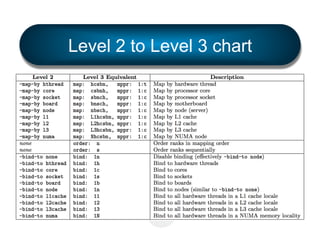
§  All of these options are translated to Level 3
options for processing by LAMA
(full list of X / Y values shown later)
CLI: Level 3 (regular patterns)
•  LAMA process layout regular patterns
§  Power users wanting something unique for
their application
§  Four MCA run-time parameters
•  rmaps_lama_map: Mapping process layout
•  rmaps_lama_bind: Binding width
•  rmaps_lama_order: Ordering of MCW ranks
•  rmaps_lama_mppr: Maximum allowable number of
processes per resource (oversubscription)
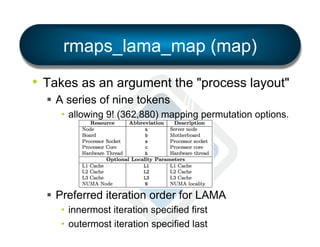
rmaps_lama_map (map)
•  Takes as an argument the "process layout"
§  A series of nine tokens
•  allowing 9! (362,880) mapping permutation options.

§  Preferred iteration order for LAMA
•  innermost iteration specified first
•  outermost iteration specified last
Example system
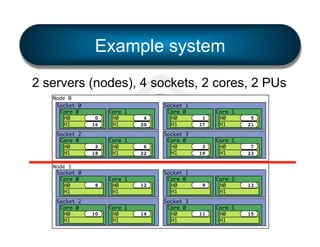
2 servers (nodes), 4 sockets, 2 cores, 2 PUs
Node 0
Socket 0
Core 0
H0
H1
Socket 2
Core 0
H0
H1
Node 1
Socket 0
Core 0
H0
H1
Socket 2
Core 0
H0
H1

0
16

2
18

8

10

Core 1
H0
H1
Core 1
H0
H1

Core 1
H0
H1
Core 1
H0
H1

4
20

Socket 1
Core 0
H0
H1

6
22

Socket 3
Core 0
H0
H1

12

14

Socket 1
Core 0
H0
H1
Socket 3
Core 0
H0
H1

1
17

Core 1
H0
H1

5
21

3
19

Core 1
H0
H1

7
23

9

Core 1
H0
H1

13

11

Core 1
H0
H1

15
rmaps_lama_map (map)
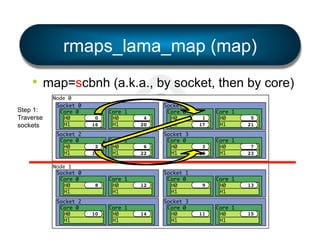
•  map=scbnh (a.k.a., by socket, then by core)
Step 1:
Traverse
sockets

Node 0
Socket 0
Core 0
H0
H1
Socket 2
Core 0
H0
H1
Node 1
Socket 0
Core 0
H0
H1
Socket 2
Core 0
H0
H1

0
16

2
18

8

10

Core 1
H0
H1
Core 1
H0
H1

Core 1
H0
H1
Core 1
H0
H1

4
20

Socket 1
Core 0
H0
H1

6
22

Socket 3
Core 0
H0
H1

12

14

Socket 1
Core 0
H0
H1
Socket 3
Core 0
H0
H1

1
17

Core 1
H0
H1

5
21

3
19

Core 1
H0
H1

7
23

9

Core 1
H0
H1

13

11

Core 1
H0
H1

15
rmaps_lama_map (map)
•  map=scbnh (a.k.a., by socket, then by core)
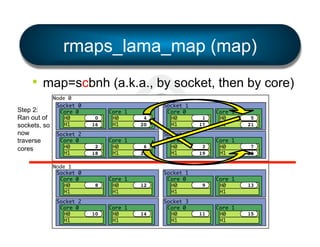
Step 2:
Ran out of
sockets, so
now
traverse
cores

Node 0
Socket 0
Core 0
H0
H1
Socket 2
Core 0
H0
H1
Node 1
Socket 0
Core 0
H0
H1
Socket 2
Core 0
H0
H1

0
16

2
18

8

10

Core 1
H0
H1
Core 1
H0
H1

Core 1
H0
H1
Core 1
H0
H1

4
20

Socket 1
Core 0
H0
H1

6
22

Socket 3
Core 0
H0
H1

12

14

Socket 1
Core 0
H0
H1
Socket 3
Core 0
H0
H1

1
17

Core 1
H0
H1

5
21

3
19

Core 1
H0
H1

7
23

9

Core 1
H0
H1

13

11

Core 1
H0
H1

15
rmaps_lama_map (map)
•  map=scbnh (a.k.a., by socket, then by core)
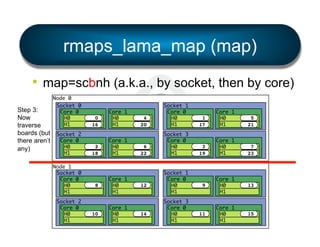
Step 3:
Now
traverse
boards (but
there aren’t
any)

Node 0
Socket 0
Core 0
H0
H1
Socket 2
Core 0
H0
H1
Node 1
Socket 0
Core 0
H0
H1
Socket 2
Core 0
H0
H1

0
16

2
18

8

10

Core 1
H0
H1
Core 1
H0
H1

Core 1
H0
H1
Core 1
H0
H1

4
20

Socket 1
Core 0
H0
H1

6
22

Socket 3
Core 0
H0
H1

12

14

Socket 1
Core 0
H0
H1
Socket 3
Core 0
H0
H1

1
17

Core 1
H0
H1

5
21

3
19

Core 1
H0
H1

7
23

9

Core 1
H0
H1

13

11

Core 1
H0
H1

15
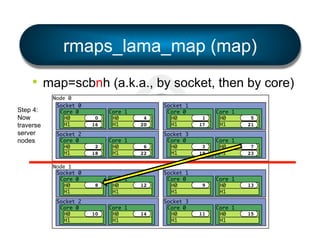
rmaps_lama_map (map)
•  map=scbnh (a.k.a., by socket, then by core)
Step 4:
Now
traverse
server
nodes

Node 0
Socket 0
Core 0
H0
H1
Socket 2
Core 0
H0
H1
Node 1
Socket 0
Core 0
H0
H1
Socket 2
Core 0
H0
H1

0
16

2
18

8

10

Core 1
H0
H1
Core 1
H0
H1

Core 1
H0
H1
Core 1
H0
H1

4
20

Socket 1
Core 0
H0
H1

6
22

Socket 3
Core 0
H0
H1

12

14

Socket 1
Core 0
H0
H1
Socket 3
Core 0
H0
H1

1
17

Core 1
H0
H1

5
21

3
19

Core 1
H0
H1

7
23

9

Core 1
H0
H1

13

11

Core 1
H0
H1

15
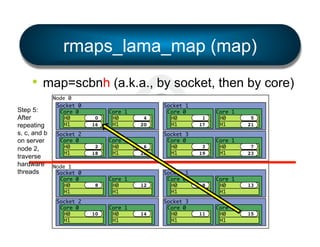
rmaps_lama_map (map)
•  map=scbnh (a.k.a., by socket, then by core)
Step 5:
After
repeating
s, c, and b
on server
node 2,
traverse
hardware
threads

Node 0
Socket 0
Core 0
H0
H1
Socket 2
Core 0
H0
H1
Node 1
Socket 0
Core 0
H0
H1
Socket 2
Core 0
H0
H1

0
16

2
18

8

10

Core 1
H0
H1
Core 1
H0
H1

Core 1
H0
H1
Core 1
H0
H1

4
20

Socket 1
Core 0
H0
H1

6
22

Socket 3
Core 0
H0
H1

12

14

Socket 1
Core 0
H0
H1
Socket 3
Core 0
H0
H1

1
17

Core 1
H0
H1

5
21

3
19

Core 1
H0
H1

7
23

9

Core 1
H0
H1

13

11

Core 1
H0
H1

15
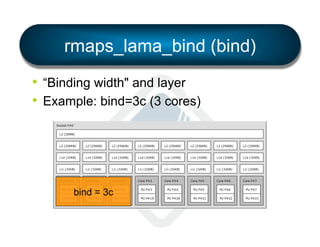
rmaps_lama_bind (bind)
•  “Binding width" and layer
•  Example: bind=3c (3 cores)
Machine (128GB)

NUMANode P#0 (64GB)

Socket P#0

PCI 8086:152

L3 (20MB)

eth0

L2 (256KB)

L2 (256KB)

L2 (256KB)

L2 (256KB)

L2 (256KB)

L2 (256KB)

L2 (256KB)

L2 (256KB)

L1d (32KB)

L1d (32KB)

L1d (32KB)

L1d (32KB)

L1d (32KB)

L1d (32KB)

L1d (32KB)

L1d (32KB)

L1i (32KB)

L1i (32KB)

L1i (32KB)

L1i (32KB)

L1i (32KB)

L1i (32KB)

L1i (32KB)

L1i (32KB)

Core P#0

Core P#1

Core P#2

Core P#3

Core P#4

Core P#5

Core P#6

Core P#7

PU P#0

bind = 3c

PU P#16

PU P#1

PU P#2

PU P#3

PU P#4

PU P#5

PU P#6

PU P#18

PU P#19

PU P#20

PU P#21

PU P#22

PU P#23

eth1

PCI 8086:152
eth2

PU P#7

PU P#17

PCI 8086:152

PCI 8086:152
eth3
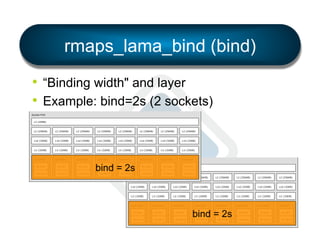
rmaps_lama_bind (bind)
•  “Binding width" and layer
•  Example: bind=2s (2 sockets)

Machine (128GB)

NUMANode P#0 (64GB)

Socket P#0

PCI 8086:1521

L3 (20MB)

eth0

L2 (256KB)

L2 (256KB)

L2 (256KB)

L2 (256KB)

L2 (256KB)

L2 (256KB)

L2 (256KB)

L2 (256KB)

L1d (32KB)

L1d (32KB)

L1d (32KB)

L1d (32KB)

L1d (32KB)
L1d (32KB)
Machine (128GB)

L1d (32KB)

L1d (32KB)

L1i (32KB)

L1i (32KB)

L1i (32KB)

L1i (32KB)

L1i (32KB)
L1i (32KB)
NUMANode P#0 (64GB)

L1i (32KB)

L1i (32KB)

Core P#0

Core P#1

Core P#2

Core P#3

Core P#4
Core P#5
Socket P#0

Core P#6

Core P#7

PU P#0

PU P#1

PU P#2

PU P#6

PU P#7

PU P#16

PU P#17

PU P#18

PU P#22

PU P#23

bind = 2s
PU P#3

PU P#4

PU P#5
L3 (20MB)

PU P#19

PU P#20

PU P#21

PCI 8086:1521
eth1

PCI 8086:1521
eth2

PCI 8086:1521

L2 (256KB)

L2 (256KB)

L2 (256KB)

L2 (256KB)

L2 (256KB)

eth3L2 (256KB)

L2 (256KB)

L1d (32KB)

L1d (32KB)

L1d (32KB)

L1d (32KB)

L1d (32KB)

L1d (32KB)

L1d (32KB)

L1d (32KB)
PCI 1137:0043

L1i (32KB)

L1i (32KB)

L1i (32KB)

L1i (32KB)

L1i (32KB)

L1i (32KB)

L1i (32KB)

L1i
eth4(32KB)

Core P#0

Core P#1

Core P#2

Core P#3

Core P#4

Core P#5

Core P#6

PU P#0

PU P#1

PU P#2

PU P#16

PU P#17

PU P#18

bind = 2s
PU P#3

PU P#4

PU P#5

PU P#6

PU P#19

PU P#20

PU P#21

PU P#22

PCI 102b:0522

NUMANode P#1 (64GB)

L2 (256KB)

Core P#7
PCI 1137:0043
PU P#7
eth5
PU P#23
rmaps_lama_bind (bind)
•  “Binding width" and layer
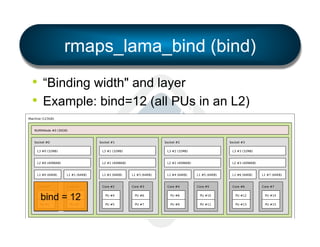
•  Example: bind=12 (all PUs in an L2)






























































bind = 12







































rmaps_lama_bind (bind)
•  “Binding width" and layer
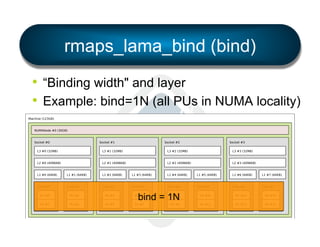
•  Example: bind=1N (all PUs in NUMA locality)




























































































bind = 1N










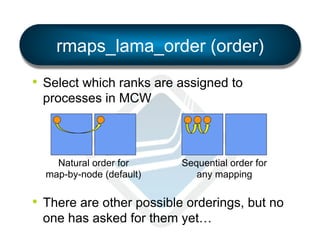
rmaps_lama_order (order)
•  Select which ranks are assigned to
processes in MCW

Natural order for
map-by-node (default)

Sequential order for
any mapping

•  There are other possible orderings, but no
one has asked for them yet…
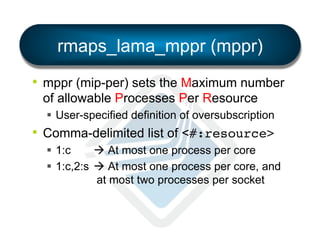
rmaps_lama_mppr (mppr)
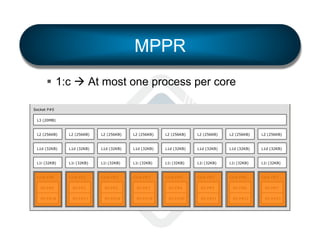
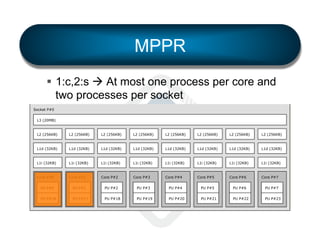
•  mppr (mip-per) sets the Maximum number
of allowable Processes Per Resource
§  User-specified definition of oversubscription

•  Comma-delimited list of <#:resource>!
§  1:c
à At most one process per core
§  1:c,2:s à At most one process per core, and
at most two processes per socket
MPPR
§  1:c à At most one process per core

Machine (128GB)

NUMANode P#0 (64GB)

Socket P#0
L3 (20MB)

L2 (256KB)

L2 (256KB)

L2 (256KB)

L2 (256KB)

L2 (256KB)

L2 (256KB)

L2 (256KB)

L2 (256KB)

L1d (32KB)

L1d (32KB)

L1d (32KB)

L1d (32KB)

L1d (32KB)

L1d (32KB)

L1d (32KB)

L1d (32KB)

L1i (32KB)

L1i (32KB)

L1i (32KB)

L1i (32KB)

L1i (32KB)

L1i (32KB)

L1i (32KB)

L1i (32KB)

Core P#0

Core P#1

Core P#2

Core P#3

Core P#4

Core P#5

Core P#6

Core P#7

PU P#0

PU P#1

PU P#2

PU P#3

PU P#4

PU P#5

PU P#6

PU P#7

PU P#16

PU P#17

PU P#18

PU P#19

PU P#20

PU P#21

PU P#22

PU P#23
MPPR
§  1:c,2:s à At most one process per core and
two processes per socket

Machine (128GB)

NUMANode P#0 (64GB)

Socket P#0
L3 (20MB)

L2 (256KB)

L2 (256KB)

L2 (256KB)

L2 (256KB)

L2 (256KB)

L2 (256KB)

L2 (256KB)

L2 (256KB)

L1d (32KB)

L1d (32KB)

L1d (32KB)

L1d (32KB)

L1d (32KB)

L1d (32KB)

L1d (32KB)

L1d (32KB)

L1i (32KB)

L1i (32KB)

L1i (32KB)

L1i (32KB)

L1i (32KB)

L1i (32KB)

L1i (32KB)

L1i (32KB)

Core P#0

Core P#1

Core P#2

Core P#3

Core P#4

Core P#5

Core P#6

Core P#7

PU P#0

PU P#1

PU P#2

PU P#3

PU P#4

PU P#5

PU P#6

PU P#7

PU P#16

PU P#17

PU P#18

PU P#19

PU P#20

PU P#21

PU P#22

PU P#23
Level 2 to Level 3 chart
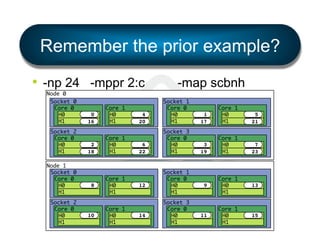
Remember the prior example?
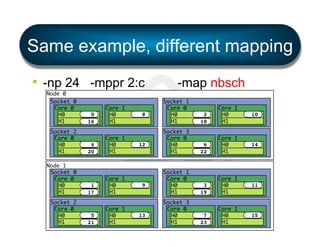
•  -np 24 -mppr 2:c
Node 0
Socket 0
Core 0
H0
H1
Socket 2
Core 0
H0
H1
Node 1
Socket 0
Core 0
H0
H1
Socket 2
Core 0
H0
H1

0
16

2
18

8

10

Core 1
H0
H1
Core 1
H0
H1

Core 1
H0
H1
Core 1
H0
H1

-map scbnh

4
20

Socket 1
Core 0
H0
H1

6
22

Socket 3
Core 0
H0
H1

12

14

Socket 1
Core 0
H0
H1
Socket 3
Core 0
H0
H1

1
17

Core 1
H0
H1

5
21

3
19

Core 1
H0
H1

7
23

9

Core 1
H0
H1

13

11

Core 1
H0
H1

15
Same example, different mapping
•  -np 24 -mppr 2:c
Node 0
Socket 0
Core 0
H0
H1
Socket 2
Core 0
H0
H1
Node 1
Socket 0
Core 0
H0
H1
Socket 2
Core 0
H0
H1

0
16

4
20

1
17

5
21

Core 1
H0
H1
Core 1
H0
H1

Core 1
H0
H1
Core 1
H0
H1

8

12

9

13

-map nbsch
Socket 1
Core 0
H0
H1
Socket 3
Core 0
H0
H1

Socket 1
Core 0
H0
H1
Socket 3
Core 0
H0
H1

2
18

Core 1
H0
H1

10

6
22

Core 1
H0
H1

14

3
19

Core 1
H0
H1

11

7
23

Core 1
H0
H1

15
Report bindings
•  Displays prettyprint representation of the
binding actually used for each process.
§  Visual feedback = quite helpful when exploring
mpirun -np 4 --mca rmaps lama --mca rmaps_lama_bind
1c --mca rmaps_lama_map nbsch --mca rmaps_lama_mppr
1:c --report-bindings hello_world!
MCW
MCW
MCW
MCW

rank
rank
rank
rank

0
1
2
3

bound
bound
bound
bound

to
to
to
to

socket
socket
socket
socket

0[core
1[core
0[core
1[core

0[hwt
8[hwt
1[hwt
9[hwt

0-1]]:
0-1]]:
0-1]]:
0-1]]:

[BB/../../../../../../..][../../../../../../../..]!
[../../../../../../../..][BB/../../../../../../..]!
[../BB/../../../../../..][../../../../../../../..]!
[../../../../../../../..][../BB/../../../../../..]!
Feedback
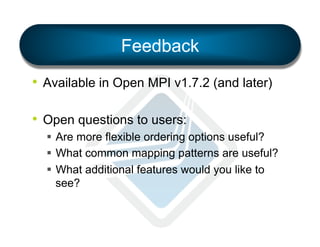
•  Available in Open MPI v1.7.2 (and later)
•  Open questions to users:
§  Are more flexible ordering options useful?
§  What common mapping patterns are useful?
§  What additional features would you like to
see?
Thank you

(Open) MPI, Parallel Computing, Life, the Universe, and Everything

  • 1.
    {Open} MPI, ParallelComputing, Life, the Universe, and Everything November 7, 2013 Dr. Jeffrey M. Squyres
  • 2.
    Open MPI PACX-MPI Project foundedin 2003 after intense discussions between multiple open source MPI implementations LAM/MPI LA-MPI FT-MPI Sun CT 6
  • 3.
    Open_MPI_Init() shell$ svn loghttps://svn.open-mpi.org/svn/ompi -r 1 -----------------------------------------------------------------------r1 | jsquyres | 2003-11-22 11:36:58 -0500 (Sat, 22 Nov 2003) | 2 lines First commit -----------------------------------------------------------------------shell$
  • 4.
    Open_MPI_Current_status() shell$ svn loghttps://svn.open-mpi.org/svn/ompi -r HEAD -----------------------------------------------------------------------r29619 | brbarret | 2013-11-06 09:14:24 -0800 (Wed, 06 Nov 2013) | 2 lines update ignore file -----------------------------------------------------------------------shell$
  • 5.
    Open MPI 2014membership 13 members, 15 contributors, 2 partners
  • 6.
    Fun stats •  ohloh.netsays: §  819,741 lines of code §  Average 10-20 committers at a time §  “Well-commented source code” •  I rank in top-25 ohloh stats for: §  §  §  §  C Automake Shell script Fortran (…ouch)
  • 7.
    Current status •  Version1.6.5 / stable series §  Unlikely to see another release •  Version 1.7.3 / feature series §  v1.7.4 due (hopefully) by end of 2013 §  Plan to transition to v1.8 in Q1 2014
  • 8.
    MPI conformance •  MPI-2.2conformant as of v1.7.3 §  Finally finished several 2.2 issues that no one really cares about •  MPI-3 conformance just missing new RMA §  Tracked on wiki: https://svn.open-mpi.org/trac/ompi/wiki/MPIConformance §  Hope to be done by v1.7.4
  • 9.
    New MPI-3 features • Mo’ betta Fortran bindings §  You should “use mpi_f08”. Really. •  Matched probe •  Sparse and neighborhood collectives •  “MPI_T” tools interface •  Nonblocking communicator duplication •  Noncollective communicator creation •  Hindexed block datatype
  • 10.
    New Open MPIfeatures •  Better support for more runtime systems §  PMI2 scalability, etc. •  New generalized processor affinity system •  Better CUDA support •  Java MPI bindings (!) •  Transports: §  Cisco usNIC support §  Mellanox MXM2 and hcoll support §  Portals 4 support
  • 11.
    My new favoriterandom feature •  mpirun CLI option <tab> completion §  Bash and zsh §  Contributed by Nathan Hjelm, LANL shell$ mpirun --mca btl_usnic_<tab> btl_usnic_cq_num btl_usnic_eager_limit btl_usnic_if_exclude btl_usnic_if_include btl_usnic_max_btls btl_usnic_mpool btl_usnic_prio_rd_num btl_usnic_prio_sd_num btl_usnic_priority_limit btl_usnic_rd_num btl_usnic_retrans_timeout btl_usnic_rndv_eager_limit btl_usnic_sd_num -------------- Number of completion queue! Eager send limit (0 = use ! Comma-delimited list of de! Comma-delimited list of de! Maximum number of usNICs t! Name of the memory pool to! Number of pre-posted prior! Maximum priority send desc! Max size of "priority" mes! Number of pre-posted recei! Number of microseconds bef! Eager rendezvous limit (0 ! Maximum send descriptors t!
  • 12.
    Two features todiscuss in detail… 1.  “MPI_T” interface 2.  Flexible process affinity system
  • 13.
  • 14.
    MPI_T interface •  Addedin MPI-3.0 •  So-called “MPI_T” because all the functions start with that prefix §  T = tools •  APIs to get/set MPI implementation values §  Control variables (e.g., implementation tunables) §  Performance variables (e.g., run-time stats)
  • 15.
    MPI_T control variables(“cvar”) •  Another interface to MCA param values •  In addition to existing methods: §  mpirun CLI options §  Environment variables §  Config file(s) •  Allows tools / applications to programmatically list all OMPI MCA params
  • 16.
    MPI_T cvar example • MPI_T_cvar_get_num() §  Returns the number of control variables •  MPI_T_cvar_get_info(index, …) returns: §  String name and description §  Verbosity level (see next slide) §  Type of the variable (integer, double, etc.) §  Type of MPI object (communicator, etc.) §  “Writability” scope
  • 17.
    Verbosity levels Level name Leveldescription USER_BASIC Basic information of interest to users USER_DETAIL Detailed information of interest to users USER_ALL All remaining information of interest to users TUNER_BASIC Basic information of interest for tuning TUNER_DETAIL Detailed information of interest for tuning TUNER_ALL All remaining information of interest to tuning MPIDEV_BASIC Basic information for MPI implementers MPIDEV_DETAIL Detailed information for MPI implementers MPIDEV_ALL All remaining information for MPI implementers
  • 18.
    Open MPI interpretationof verbosity levels 1.  User §  Parameters required for correctness §  As few as possible 2.  Tuner §  Tweak MPI performance §  Resource levels, etc. 3.  MPI developer §  For Open MPI devs 1.  Basic Even for less-advanced users and tuners 2.  Detailed Useful but you won’t need to change them often 3.  All Anything else
  • 19.
    “Writeability” scope Level name Leveldescription CONSTANT Read-only, constant value READONLY Read-only, but the value may change LOCAL Writing is local operation GROUP Writing must be done as a group, and all values must be consistent GROUP_EQ Writing must be done as a group, and all values must be exactly the same ALL Writing must be done by all processes, and all values must be consistent ALL_EQ Writing must be done by all processes, and all values must be exactly the same
  • 20.
    Reading / writinga cvar •  MPI_T_cvar_handle_alloc(index, handle, …) §  Allocates an MPI_T handle §  Binds it to a specific MPI handle (e.g., a communicator), or BIND_NO_OBJECT •  MPI_T_cvar_read(handle, buf) •  MPI_T_cvar_write(handle, buf) à OMPI has very, very few writable control variables after MPI_INIT
  • 21.
    MPI_T Performance variables(“pvar”) •  New information available from OMPI §  Run-time statistics of implementation details §  Similar interface to control variables •  Not many available in OMPI yet •  Cisco usnic BTL exports 24 pvars §  Per usNIC interface §  Stats about underlying network (more details to be provided in usNIC talk)
  • 22.
  • 23.
    Locality matters •  Goals: § Minimize data transfer distance §  Reduce network congestion and contention •  …this also matters inside the server, too!
  • 24.
    Machine (128GB) NUMANode P#0(64GB) Socket P#0 PCI 8086:1521 L3 (20MB) eth0 L2 (256KB) L2 (256KB) L2 (256KB) L2 (256KB) L2 (256KB) L2 (256KB) L2 (256KB) L2 (256KB) L1d (32KB) L1d (32KB) L1d (32KB) L1d (32KB) L1d (32KB) L1d (32KB) L1d (32KB) L1d (32KB) L1i (32KB) L1i (32KB) L1i (32KB) L1i (32KB) L1i (32KB) L1i (32KB) L1i (32KB) L1i (32KB) Core P#0 Core P#1 Core P#2 Core P#3 Core P#4 Core P#5 Core P#6 Core P#7 PU P#0 PU P#1 PU P#2 PU P#3 PU P#4 PU P#5 PU P#6 PU P#7 PU P#16 PU P#17 PU P#18 PU P#19 PU P#20 PU P#21 PU P#22 PU P#23 PCI 8086:1521 eth1 PCI 8086:1521 eth2 PCI 8086:1521 eth3 PCI 1137:0043 Intel Xeon E5-2690 (“Sandy Bridge”) 2 sockets, 8 cores, 64GB per socket eth4 PCI 1137:0043 eth5 PCI 102b:0522 NUMANode P#1 (64GB) Socket P#1 PCI 1000:005b L3 (20MB) sda L2 (256KB) L2 (256KB) L2 (256KB) L2 (256KB) L2 (256KB) L2 (256KB) L2 (256KB) L2 (256KB) L1d (32KB) L1d (32KB) L1d (32KB) L1d (32KB) L1d (32KB) L1d (32KB) L1d (32KB) L1d (32KB) L1i (32KB) L1i (32KB) L1i (32KB) L1i (32KB) L1i (32KB) L1i (32KB) L1i (32KB) L1i (32KB) Core P#0 Core P#1 Core P#2 Core P#3 Core P#4 Core P#5 Core P#6 Core P#7 PU P#8 PU P#9 PU P#10 PU P#11 PU P#12 PU P#13 PU P#14 PU P#15 PU P#24 PU P#25 PU P#26 PU P#27 PU P#28 PU P#29 PU P#30 PU P#31 Indexes: physical Date: Mon Jan 28 10:51:26 2013 sdb PCI 1137:0043 eth6 PCI 1137:0043 eth7
  • 25.
    Machine (128GB) NUMANode P#0(64GB) Socket P#0 PCI 8086:1521 L3 (20MB) eth0 L2 (256KB) L2 (256KB) L2 (256KB) L1d (32KB) L1d (32KB) L1d (32KB) L1i (32KB) L1i (32KB) Core P#0 L2 (256KB) L2 (256KB) L2 (256KB) L2 (256KB) L2 (256KB) L1d (32KB) L1d (32KB) L1d (32KB) L1d (32KB) L1d (32KB) L1i (32KB) L1i (32KB) L1i (32KB) L1i (32KB) L1i (32KB) L1i (32KB) Core P#1 Core P#2 Core P#3 Core P#4 Core P#5 Core P#6 Core P#7 PU P#0 PU P#1 PU P#2 PU P#3 PU P#4 PU P#5 PU P#6 PU P#7 PU P#16 PU P#17 PU P#18 PU P#19 PU P#20 PU P#21 PU P#22 PU P#23 L1 and L2 PCI 8086:1521 eth1 PCI 8086:1521 eth2 1G NICs PCI 8086:1521 eth3 PCI 1137:0043 Intel Xeon E5-2690 (“Sandy Bridge”) 2 sockets, 8 cores, 64GB per socket eth4 PCI 1137:0043 eth5 10G NICs PCI 102b:0522 NUMANode P#1 (64GB) Socket P#1 L3 (20MB) PCI 1000:005b Shared L3 sda L2 (256KB) L2 (256KB) L2 (256KB) L2 (256KB) L2 (256KB) L2 (256KB) L2 (256KB) L2 (256KB) L1d (32KB) L1d (32KB) L1d (32KB) L1d (32KB) L1d (32KB) L1d (32KB) L1d (32KB) L1d (32KB) L1i (32KB) L1i (32KB) L1i (32KB) L1i (32KB) L1i (32KB) L1i (32KB) L1i (32KB) L1i (32KB) Core P#0 Core P#1 Core P#2 Core P#3 Core P#4 Core P#5 Core P#6 Core P#7 PU P#8 PU P#9 PU P#24 PU P#25 Indexes: physical Date: Mon Jan 28 10:51:26 2013 Hyperthreading enabled PU P#10 PU P#11 PU P#12 PU P#13 PU P#14 PU P#15 PU P#26 PU P#27 PU P#28 PU P#29 PU P#30 PU P#31 sdb PCI 1137:0043 eth6 PCI 1137:0043 eth7 10G NICs
  • 26.
    A user’s playground Theintent of this work is to provide a mechanism that allows users to explore the process-placement space within the scope of their own applications.
  • 27.
    Two complimentary systems • Simple §  mpirun --bind-to [ core | socket | … ] … §  mpirun --by[ node | slot | … ] … §  …etc. •  Flexible §  LAMA: Locality Aware Mapping Algorithm
  • 28.
    LAMA •  Supports awide range of regular mapping patterns §  Drawn from much prior work §  Most notably, heavily inspired by BlueGene/P and /Q mapping systems
  • 29.
    Launching MPI applications • Three steps in MPI process placement 1.  Mapping 2.  Ordering 3.  Binding •  Let's discuss how these work in Open MPI
  • 30.
    1. Mapping •  Createa layout of processes-to-resources MPI MPI MPI MPI MPI MPI MPI MPI MPI MPI MPI MPI MPI MPI MPI MPI MPI MPI MPI MPI MPI MPI MPI MPI MPI MPI MPI MPI MPI MPI MPI MPI MPI MPI MPI MPI MPI MPI MPI MPI MPI MPI MPI MPI MPI MPI MPI MPI MPI MPI MPI MPI MPI MPI MPI MPI MPI MPI MPI MPI MPI MPI MPI MPI MPI MPI MPI MPI MPI MPI MPI MPI MPI MPI MPI MPI MPI MPI MPI MPI MPI MPI MPI MPI MPI MPI MPI MPI MPI MPI MPI MPI MPI MPI MPI MPI MPI MPI MPI MPI MPI MPI MPI MPI MPI MPI MPI MPI MPI MPI MPI MPI MPI MPI MPI MPI MPI MPI MPI MPI MPI MPI MPI MPI MPI MPI MPI MPI MPI MPI MPI MPI MPI MPI MPI MPI MPI MPI MPI MPI MPI MPI MPI MPI MPI MPI MPI MPI MPI MPI MPI MPI MPI MPI MPI MPI MPI MPI MPI MPI Server Server Server Server Server Server Server Server Server Server Server Server Server Server Server Server
  • 31.
    Mapping •  MPI's runtimemust create a map, pairing processes-to-processors (and memory). •  Basic technique: §  Gather hwloc topologies from allocated nodes. §  Mapping agent then makes a plan for which resources are assigned to processes
  • 32.
    Mapping agent •  Actof planning mappings: §  Specify which process will be launched on each server §  Identify if any hardware resource will be oversubscribed •  Processes are mapped to the resolution of a single processing unit (PU) §  Smallest unit of allocation: hardware thread §  In HPC, usually the same as a processor core
  • 33.
    Oversubscription •  Common /usual definition: §  When a single PU is assigned more than one process •  Complicating the definition: §  Some application may need more than one PU per process (multithreaded applications) •  How can the user express what their application means by “oversubscription”?
  • 34.
    2. Ordering: by“slot” Assigning MCW ranks to mapped processes 0 1 2 3 16 17 18 19 32 33 4 5 6 7 20 21 22 23 36 37 8 9 10 11 24 25 26 27 40 41 12 13 14 15 28 29 30 31 44 45 48 49 50 51 64 65 66 67 80 81
  • 35.
    2. Ordering: bynode Assigning MCW ranks to mapped processes 0 16 32 48 1 17 33 49 2 18 64 80 96 112 65 81 97 113 66 82 128 144 160 176 129 145 161 177 130 146 192 208 224 240 193 209 225 241 194 210 4 20 36 52 5 23 37 53 6 81
  • 36.
    Ordering •  Each processmust be assigned a unique rank in MPI_COMM_WORLD •  Two common types of ordering: §  natural •  The order in which processes are mapped determines their rank in MCW §  sequential •  The processes are sequentially numbered starting at the first processing unit, and continuing until the last processing unit
  • 37.
    3. Binding •  Launchprocesses and enforce the layout Machine (128GB) Machine (128GB) NUMANode P#0 (64GB) Machine (128GB) NUMANode P#0 (64GB) Socket P#0 NUMANode P#0 (64GB) PCI 8086:1521 Socket P#0 L3 (20MB) PCI 8086:1521 Socket P#0 eth0 L3 (20MB) eth0 L3 (20MB) L2 (256KB) L2 (256KB) L2 (256KB) L2 (256KB) L2 (256KB) L2 (256KB) L2 (256KB) L2 (256KB) L2 (256KB) PCI 8086:1521 L2 (256KB) L2 (256KB) L2 (256KB) L2 (256KB) L2 (256KB) L2 (256KB) L2 (256KB) L2 (256KB) PCI 8086:1521 L2 (256KB) L2 (256KB) L2 (256K L1d (32KB) L1d (32KB) L1d (32KB) L1d (32KB) L1d (32KB) L1d (32KB) L1d (32KB) L1d (32KB) eth1 L1d (32KB) L1d (32KB) L1d (32KB) L1d (32KB) L1d (32KB) L1d (32KB) L1d (32KB) L1d (32KB) eth1 L1d (32KB) L1d (32KB) L1d (32KB) L1d (32K L1i (32KB) 0 L1i (32KB) 1 L1i (32KB) L1i (32KB) L1i (32KB) L1i (32KB) L1i (32KB) L1i (32KB) L1i (32KB) L1i (32KB) L1i (32KB) L1i (32KB) L1i (32K Core P#5 6 L1i (32KB) Core P#4 5 L1i (32KB) Core P#3 4 L1i (32KB) Core P#2 3 L1i (32KB) Core P#1 2 L1i (32KB) Core P#0 Core P#6 Core P#7 eth2 Core P#0 Core P#1 Core P#2 Core P#3 Core P#4 Core P#5 Core P#6 Core P#7 eth2 Core P#0 Core P#1 Core P#2 Core P# PU P#0 PU P#1 PU P#2 PU P#3 PU P#4 PU P#5 PU P#6 PU P#7 PU P#0 PU P#1 PU P#2 PU P#3 PU P#4 PU P#5 PU P#6 PU P#7 PU P#0 PU P#1 PU P#2 PU P# PU P#16 PU P#17 PU P#18 PU P#19 PU P#20 PU P#21 PU P#22 PU P#23 PU P#17 PU P#18 PU P#19 PU P#20 PU P#21 PU P#22 PU P#23 PU P#17 PU P#18 PU P# 7 16 17 18 19 20 21 22 23 L1i (32KB) PCI 8086:1521 PCI 8086:1521 PU P#16 eth3 Machine (128GB) Machine (128GB) NUMANode P#0 (64GB) 32 33 34 3 L1i (32KB) PCI 8086:1521 PCI 8086:1521 PU P#16 eth3 Machine (128GB) NUMANode P#0 (64GB) PCI 1137:0043 NUMANode P#0 (64GB) eth4 Socket P#0 eth4 PCI 8086:1521 Socket P#0 L3 (20MB) PCI 1137:0043 PCI 8086:1521 Socket P#0 eth0 L3 (20MB) eth0 L3 (20MB) PCI 1137:0043 PCI 1137:0043 L2 (256KB) L2 (256KB) L2 (256KB) L2 (256KB) L2 (256KB) L2 (256KB) L2 (256KB) L2 (256KB) L2 (256KB) PCI 8086:1521 L2 (256KB) eth5 (256KB) L2 L2 (256KB) L2 (256KB) L2 (256KB) L2 (256KB) L2 (256KB) L2 (256KB) PCI 8086:1521 L2 (256KB) eth5 (256KB) L2 L2 (256K L1d (32KB) L1d (32KB) L1d (32KB) L1d (32KB) L1d (32KB) L1d (32KB) L1d (32KB) L1d (32KB) eth1 L1d (32KB) PCI 102b:0522 L1d (32KB) L1d (32KB) L1d (32KB) L1d (32KB) L1d (32KB) L1d (32KB) L1d (32KB) eth1 L1d (32KB) PCI 102b:0522 L1d (32KB) L1d (32KB) L1d (32K 8 L1i (32KB) L1i (32KB) 9 10 11 12 13 14 15 Socket P#0 PU P#1 L3PU P#16 (20MB) 24 25 26 27 28 29 30 31 L1i (32KB) L1i (32KB) L1i (32KB) L1i (32KB) L1i (32KB) L1i (32KB) Core P#2 Core P#3 Core P#4 Core P#5 Core P#6 Core P#7 PU P#1 PU P#2 PU P#3 PU P#4 PU P#5 PU P#6 PU P#7 PCI 1000:005b Socket P#0 PU P#1 PU P#17 PU P#18 PU P#19 PU P#20 PU P#21 PU P#22 PU P#23 PCI 8086:1521 sda L3PU P#16 (20MB) sdb NUMANode P#1 (64GB) Core P#0 Core P#1 L1i (32KB) PCI 8086:1521 L1i (32KB) L1i (32KB) L1i (32KB) L1i (32KB) L1i (32KB) L1i (32KB) Core P#2 Core P#3 Core P#4 Core P#5 Core P#6 Core P#7 PU P#1 PU P#2 PU P#3 PU P#4 PU P#5 PU P#6 PU P#7 PCI 1000:005b Socket P#0 PU P#1 PU P#17 PU P#18 PU P#19 PU P#20 PU P#21 PU P#22 PU P#23 PCI 8086:1521 sda L3PU P#16 (20MB) sdb eth3 L2 (256KB) L2 (256KB) L2 (256KB) L2 (256KB) L2 (256KB) L2 (256KB) L2 (256KB) L2 (256KB) L2 (256KB) L1d (32KB) L1d (32KB) L1d (32KB) L1d (32KB) L1d (32KB) L1d (32KB) L1d (32KB) L1d (32KB) L1d (32KB) L1d (32KB) L1i (32KB) L1i (32KB) L1i (32KB) L1i (32KB) L1i (32KB) L1i (32KB) L1i (32KB) NUMANode P#0 (64GB) Core P#0 Core P#1 PU P#0 Socket P#8 L3PU P#24 (20MB) L2 (256KB) Core P#2 Core P#3 Core P#4 Core P#5 Core P#6 Core P#7 PU P#12 PU P#13 PU P#14 PU P#15 PU P#0 PCI 8086:1521 Socket P#8 PU P#9 PU P#25 PU P#26 PU P#27 PU P#28 PU P#29 PU P#30 PU P#31 eth0 L3PU P#24 (20MB) PCI 102b:0522 PU P#25 L2 (256KB) L2 (256KB) L2 (256KB) L2 (256KB) L2 (256KB) L1d (32KB) L1d (32KB) L1d (32KB) L1d (32KB) L1d (32KB) L1d (32KB) 0 L3 (20MB) Core P#0 NUMANode P#0 (64GB) Core P#0 Core P#1 PU P#11 L2 (256KB) 1 2 3 4 5 6 7 L1i (32KB) L1i (32KB) L1i (32KB) L1i (32KB) L1i (32KB) L1i (32KB) L1i (32KB) Core P#1 Core P#2 Core P#3 Core P#4 Core P#5 Core P#6 Core P#7 L2 (256KB) PCI 8086:1521 L2 (256KB) PCI 1137:0043 PCI 1137:0043 eth6 (32KB) L1d L1i (32KB) L1i (32KB) L1i (32K Core P#2 Core P# PU P#1 PU P#2 PU P# PU P#17 PU P#18 PU P# NUMANode P#1 (64GB) eth2 Core P#0 Core P#1 L2 (256KB) L2 (256KB) L2 (256KB) L2 (256KB) L2 (256KB) L2 (256KB) L2 (256KB) L1d (32KB) L1d (32KB) L1d (32KB) L1d (32KB) L1d (32KB) L1d (32KB) L1d (32KB) L1i (32KB) L1i (32KB) L1i (32KB) L1i (32KB) L1i (32KB) eth4 L1i (32KB) PU P#10 L2 (256KB) Socket P#1 L1i (32KB) Machine (128GB) L1i (32KB) PU P#9 Indexes: physical NUMANode P#1 (64GB) L1d (32KB) L1d (32KB) Date: Mon Jan 28 10:51:26 2013 L1i (32KB) PCI 8086:1521 eth3 L2 (256KB) Machine (128GB) L1i (32KB) 40 41 42 11 L1i (32KB) NUMANode P#1 (64GB) eth2 Core P#0 Core P#1 L1i (32KB) PCI 1137:0043 PCI 1137:0043 eth7 Core P#2 Core P#3 Core P#4 Core P#5 Core P#6 Core P#7 PU P#12 PU P#13 PU P#14 PU P#15 PU P#0 PCI 8086:1521 Socket P#8 PU P#9 PU P#26 PU P#27 PU P#28 PU P#29 PU P#30 PU P#31 eth0 L3PU P#24 (20MB) PCI 102b:0522 PU P#25 L2 (256KB) L2 (256KB) L2 (256KB) L2 (256KB) L2 (256KB) L2 (256KB) L1d (32KB) L1d (32KB) L1d (32KB) L1d (32KB) L1d (32KB) L1d (32KB) 0 eth2 Core P#0 1 NUMANode P#0 (64GB) Core P#0 Core P#1 PU P#11 L2 (256KB) 2 3 4 5 6 7 L1i (32KB) L1i (32KB) L1i (32KB) L1i (32KB) L1i (32KB) L1i (32KB) L1i (32KB) Core P#1 Core P#2 Core P#3 Core P#4 Core P#5 Core P#6 Core P#7 L2 (256KB) PCI 8086:1521 PCI 1137:0043 eth6 (32KB) L1d L2 (256K L1d (32K eth4 L1i (32KB) eth5 PU P#10 Indexes: physical NUMANode P#1 (64GB) eth1 L1d (32KB) L1d (32KB) Date: Mon Jan 28 10:51:26 2013 PCI 1000:005b Socket P#1 L1i (32KB) PCI 8086:1521 sda L3 (20MB) sdb Machine (128GB) L1i (32KB) L2 (256KB) PCI 1137:0043 L1i (32KB) PCI 1137:0043 L1i (32K PCI 1137:0043 eth7 Core P#2 Core P# eth5 PU P#10 PU P# PU P#26 PU P# L2 (256KB) L2 (256KB) L2 (256K Indexes: physical NUMANode P#1 (64GB) eth1 L1d (32KB) L1d (32KB) Date: Mon Jan 28 10:51:26 2013 L1d (32KB) L1d (32K 2 PCI 1000:005b Socket P#1 L1i (32KB) PCI 8086:1521 sda L3 (20MB) sdb 0 eth2 Core P#0 1 3 L1i (32KB) L1i (32KB) L1i (32K Core P#1 Core P#2 Core P#
  • 38.
    Binding •  Process-launching agentworking with the OS to limit where each process can run: 1.  No restrictions 2.  Limited set of restrictions 3.  Specific resource restrictions •  “Binding width” §  The number of PUs to which a process is bound
  • 39.
    Command Line Interface(CLI) •  4 levels of abstraction for the user §  Level 1: None §  Level 2: Simple, common patterns §  Level 3: LAMA process layout regular patterns §  Level 4: Irregular patterns (not described in this talk)
  • 40.
    CLI: Level 1(none) •  No mapping or binding options specified §  May or may not specify the number of processes to launch (-np) §  If not specified, default to the number of cores available in the allocation §  One process is mapped to each core in the system in a "by-core" style §  Processes are not bound •  …for backwards compatibility reasons L
  • 41.
    CLI: Level 2(common) •  Simple, common patterns for mapping and binding §  Specify mapping pattern with •  --map-by X (e.g., --map-by socket) §  Specify binding option with: •  --bind-to Y (e.g., --bind-to core) §  All of these options are translated to Level 3 options for processing by LAMA (full list of X / Y values shown later)
  • 42.
    CLI: Level 3(regular patterns) •  LAMA process layout regular patterns §  Power users wanting something unique for their application §  Four MCA run-time parameters •  rmaps_lama_map: Mapping process layout •  rmaps_lama_bind: Binding width •  rmaps_lama_order: Ordering of MCW ranks •  rmaps_lama_mppr: Maximum allowable number of processes per resource (oversubscription)
  • 43.
    rmaps_lama_map (map) •  Takesas an argument the "process layout" §  A series of nine tokens •  allowing 9! (362,880) mapping permutation options. §  Preferred iteration order for LAMA •  innermost iteration specified first •  outermost iteration specified last
  • 44.
    Example system 2 servers(nodes), 4 sockets, 2 cores, 2 PUs Node 0 Socket 0 Core 0 H0 H1 Socket 2 Core 0 H0 H1 Node 1 Socket 0 Core 0 H0 H1 Socket 2 Core 0 H0 H1 0 16 2 18 8 10 Core 1 H0 H1 Core 1 H0 H1 Core 1 H0 H1 Core 1 H0 H1 4 20 Socket 1 Core 0 H0 H1 6 22 Socket 3 Core 0 H0 H1 12 14 Socket 1 Core 0 H0 H1 Socket 3 Core 0 H0 H1 1 17 Core 1 H0 H1 5 21 3 19 Core 1 H0 H1 7 23 9 Core 1 H0 H1 13 11 Core 1 H0 H1 15
  • 45.
    rmaps_lama_map (map) •  map=scbnh(a.k.a., by socket, then by core) Step 1: Traverse sockets Node 0 Socket 0 Core 0 H0 H1 Socket 2 Core 0 H0 H1 Node 1 Socket 0 Core 0 H0 H1 Socket 2 Core 0 H0 H1 0 16 2 18 8 10 Core 1 H0 H1 Core 1 H0 H1 Core 1 H0 H1 Core 1 H0 H1 4 20 Socket 1 Core 0 H0 H1 6 22 Socket 3 Core 0 H0 H1 12 14 Socket 1 Core 0 H0 H1 Socket 3 Core 0 H0 H1 1 17 Core 1 H0 H1 5 21 3 19 Core 1 H0 H1 7 23 9 Core 1 H0 H1 13 11 Core 1 H0 H1 15
  • 46.
    rmaps_lama_map (map) •  map=scbnh(a.k.a., by socket, then by core) Step 2: Ran out of sockets, so now traverse cores Node 0 Socket 0 Core 0 H0 H1 Socket 2 Core 0 H0 H1 Node 1 Socket 0 Core 0 H0 H1 Socket 2 Core 0 H0 H1 0 16 2 18 8 10 Core 1 H0 H1 Core 1 H0 H1 Core 1 H0 H1 Core 1 H0 H1 4 20 Socket 1 Core 0 H0 H1 6 22 Socket 3 Core 0 H0 H1 12 14 Socket 1 Core 0 H0 H1 Socket 3 Core 0 H0 H1 1 17 Core 1 H0 H1 5 21 3 19 Core 1 H0 H1 7 23 9 Core 1 H0 H1 13 11 Core 1 H0 H1 15
  • 47.
    rmaps_lama_map (map) •  map=scbnh(a.k.a., by socket, then by core) Step 3: Now traverse boards (but there aren’t any) Node 0 Socket 0 Core 0 H0 H1 Socket 2 Core 0 H0 H1 Node 1 Socket 0 Core 0 H0 H1 Socket 2 Core 0 H0 H1 0 16 2 18 8 10 Core 1 H0 H1 Core 1 H0 H1 Core 1 H0 H1 Core 1 H0 H1 4 20 Socket 1 Core 0 H0 H1 6 22 Socket 3 Core 0 H0 H1 12 14 Socket 1 Core 0 H0 H1 Socket 3 Core 0 H0 H1 1 17 Core 1 H0 H1 5 21 3 19 Core 1 H0 H1 7 23 9 Core 1 H0 H1 13 11 Core 1 H0 H1 15
  • 48.
    rmaps_lama_map (map) •  map=scbnh(a.k.a., by socket, then by core) Step 4: Now traverse server nodes Node 0 Socket 0 Core 0 H0 H1 Socket 2 Core 0 H0 H1 Node 1 Socket 0 Core 0 H0 H1 Socket 2 Core 0 H0 H1 0 16 2 18 8 10 Core 1 H0 H1 Core 1 H0 H1 Core 1 H0 H1 Core 1 H0 H1 4 20 Socket 1 Core 0 H0 H1 6 22 Socket 3 Core 0 H0 H1 12 14 Socket 1 Core 0 H0 H1 Socket 3 Core 0 H0 H1 1 17 Core 1 H0 H1 5 21 3 19 Core 1 H0 H1 7 23 9 Core 1 H0 H1 13 11 Core 1 H0 H1 15
  • 49.
    rmaps_lama_map (map) •  map=scbnh(a.k.a., by socket, then by core) Step 5: After repeating s, c, and b on server node 2, traverse hardware threads Node 0 Socket 0 Core 0 H0 H1 Socket 2 Core 0 H0 H1 Node 1 Socket 0 Core 0 H0 H1 Socket 2 Core 0 H0 H1 0 16 2 18 8 10 Core 1 H0 H1 Core 1 H0 H1 Core 1 H0 H1 Core 1 H0 H1 4 20 Socket 1 Core 0 H0 H1 6 22 Socket 3 Core 0 H0 H1 12 14 Socket 1 Core 0 H0 H1 Socket 3 Core 0 H0 H1 1 17 Core 1 H0 H1 5 21 3 19 Core 1 H0 H1 7 23 9 Core 1 H0 H1 13 11 Core 1 H0 H1 15
  • 50.
    rmaps_lama_bind (bind) •  “Bindingwidth" and layer •  Example: bind=3c (3 cores) Machine (128GB) NUMANode P#0 (64GB) Socket P#0 PCI 8086:152 L3 (20MB) eth0 L2 (256KB) L2 (256KB) L2 (256KB) L2 (256KB) L2 (256KB) L2 (256KB) L2 (256KB) L2 (256KB) L1d (32KB) L1d (32KB) L1d (32KB) L1d (32KB) L1d (32KB) L1d (32KB) L1d (32KB) L1d (32KB) L1i (32KB) L1i (32KB) L1i (32KB) L1i (32KB) L1i (32KB) L1i (32KB) L1i (32KB) L1i (32KB) Core P#0 Core P#1 Core P#2 Core P#3 Core P#4 Core P#5 Core P#6 Core P#7 PU P#0 bind = 3c PU P#16 PU P#1 PU P#2 PU P#3 PU P#4 PU P#5 PU P#6 PU P#18 PU P#19 PU P#20 PU P#21 PU P#22 PU P#23 eth1 PCI 8086:152 eth2 PU P#7 PU P#17 PCI 8086:152 PCI 8086:152 eth3
  • 51.
    rmaps_lama_bind (bind) •  “Bindingwidth" and layer •  Example: bind=2s (2 sockets) Machine (128GB) NUMANode P#0 (64GB) Socket P#0 PCI 8086:1521 L3 (20MB) eth0 L2 (256KB) L2 (256KB) L2 (256KB) L2 (256KB) L2 (256KB) L2 (256KB) L2 (256KB) L2 (256KB) L1d (32KB) L1d (32KB) L1d (32KB) L1d (32KB) L1d (32KB) L1d (32KB) Machine (128GB) L1d (32KB) L1d (32KB) L1i (32KB) L1i (32KB) L1i (32KB) L1i (32KB) L1i (32KB) L1i (32KB) NUMANode P#0 (64GB) L1i (32KB) L1i (32KB) Core P#0 Core P#1 Core P#2 Core P#3 Core P#4 Core P#5 Socket P#0 Core P#6 Core P#7 PU P#0 PU P#1 PU P#2 PU P#6 PU P#7 PU P#16 PU P#17 PU P#18 PU P#22 PU P#23 bind = 2s PU P#3 PU P#4 PU P#5 L3 (20MB) PU P#19 PU P#20 PU P#21 PCI 8086:1521 eth1 PCI 8086:1521 eth2 PCI 8086:1521 L2 (256KB) L2 (256KB) L2 (256KB) L2 (256KB) L2 (256KB) eth3L2 (256KB) L2 (256KB) L1d (32KB) L1d (32KB) L1d (32KB) L1d (32KB) L1d (32KB) L1d (32KB) L1d (32KB) L1d (32KB) PCI 1137:0043 L1i (32KB) L1i (32KB) L1i (32KB) L1i (32KB) L1i (32KB) L1i (32KB) L1i (32KB) L1i eth4(32KB) Core P#0 Core P#1 Core P#2 Core P#3 Core P#4 Core P#5 Core P#6 PU P#0 PU P#1 PU P#2 PU P#16 PU P#17 PU P#18 bind = 2s PU P#3 PU P#4 PU P#5 PU P#6 PU P#19 PU P#20 PU P#21 PU P#22 PCI 102b:0522 NUMANode P#1 (64GB) L2 (256KB) Core P#7 PCI 1137:0043 PU P#7 eth5 PU P#23
  • 52.
    rmaps_lama_bind (bind) •  “Bindingwidth" and layer •  Example: bind=12 (all PUs in an L2)                                bind = 12                    
  • 53.
    rmaps_lama_bind (bind) •  “Bindingwidth" and layer •  Example: bind=1N (all PUs in NUMA locality)                                               bind = 1N     
  • 54.
    rmaps_lama_order (order) •  Selectwhich ranks are assigned to processes in MCW Natural order for map-by-node (default) Sequential order for any mapping •  There are other possible orderings, but no one has asked for them yet…
  • 55.
    rmaps_lama_mppr (mppr) •  mppr(mip-per) sets the Maximum number of allowable Processes Per Resource §  User-specified definition of oversubscription •  Comma-delimited list of <#:resource>! §  1:c à At most one process per core §  1:c,2:s à At most one process per core, and at most two processes per socket
  • 56.
    MPPR §  1:c àAt most one process per core Machine (128GB) NUMANode P#0 (64GB) Socket P#0 L3 (20MB) L2 (256KB) L2 (256KB) L2 (256KB) L2 (256KB) L2 (256KB) L2 (256KB) L2 (256KB) L2 (256KB) L1d (32KB) L1d (32KB) L1d (32KB) L1d (32KB) L1d (32KB) L1d (32KB) L1d (32KB) L1d (32KB) L1i (32KB) L1i (32KB) L1i (32KB) L1i (32KB) L1i (32KB) L1i (32KB) L1i (32KB) L1i (32KB) Core P#0 Core P#1 Core P#2 Core P#3 Core P#4 Core P#5 Core P#6 Core P#7 PU P#0 PU P#1 PU P#2 PU P#3 PU P#4 PU P#5 PU P#6 PU P#7 PU P#16 PU P#17 PU P#18 PU P#19 PU P#20 PU P#21 PU P#22 PU P#23
  • 57.
    MPPR §  1:c,2:s àAt most one process per core and two processes per socket Machine (128GB) NUMANode P#0 (64GB) Socket P#0 L3 (20MB) L2 (256KB) L2 (256KB) L2 (256KB) L2 (256KB) L2 (256KB) L2 (256KB) L2 (256KB) L2 (256KB) L1d (32KB) L1d (32KB) L1d (32KB) L1d (32KB) L1d (32KB) L1d (32KB) L1d (32KB) L1d (32KB) L1i (32KB) L1i (32KB) L1i (32KB) L1i (32KB) L1i (32KB) L1i (32KB) L1i (32KB) L1i (32KB) Core P#0 Core P#1 Core P#2 Core P#3 Core P#4 Core P#5 Core P#6 Core P#7 PU P#0 PU P#1 PU P#2 PU P#3 PU P#4 PU P#5 PU P#6 PU P#7 PU P#16 PU P#17 PU P#18 PU P#19 PU P#20 PU P#21 PU P#22 PU P#23
  • 58.
    Level 2 toLevel 3 chart
  • 59.
    Remember the priorexample? •  -np 24 -mppr 2:c Node 0 Socket 0 Core 0 H0 H1 Socket 2 Core 0 H0 H1 Node 1 Socket 0 Core 0 H0 H1 Socket 2 Core 0 H0 H1 0 16 2 18 8 10 Core 1 H0 H1 Core 1 H0 H1 Core 1 H0 H1 Core 1 H0 H1 -map scbnh 4 20 Socket 1 Core 0 H0 H1 6 22 Socket 3 Core 0 H0 H1 12 14 Socket 1 Core 0 H0 H1 Socket 3 Core 0 H0 H1 1 17 Core 1 H0 H1 5 21 3 19 Core 1 H0 H1 7 23 9 Core 1 H0 H1 13 11 Core 1 H0 H1 15
  • 60.
    Same example, differentmapping •  -np 24 -mppr 2:c Node 0 Socket 0 Core 0 H0 H1 Socket 2 Core 0 H0 H1 Node 1 Socket 0 Core 0 H0 H1 Socket 2 Core 0 H0 H1 0 16 4 20 1 17 5 21 Core 1 H0 H1 Core 1 H0 H1 Core 1 H0 H1 Core 1 H0 H1 8 12 9 13 -map nbsch Socket 1 Core 0 H0 H1 Socket 3 Core 0 H0 H1 Socket 1 Core 0 H0 H1 Socket 3 Core 0 H0 H1 2 18 Core 1 H0 H1 10 6 22 Core 1 H0 H1 14 3 19 Core 1 H0 H1 11 7 23 Core 1 H0 H1 15
  • 61.
    Report bindings •  Displaysprettyprint representation of the binding actually used for each process. §  Visual feedback = quite helpful when exploring mpirun -np 4 --mca rmaps lama --mca rmaps_lama_bind 1c --mca rmaps_lama_map nbsch --mca rmaps_lama_mppr 1:c --report-bindings hello_world! MCW MCW MCW MCW rank rank rank rank 0 1 2 3 bound bound bound bound to to to to socket socket socket socket 0[core 1[core 0[core 1[core 0[hwt 8[hwt 1[hwt 9[hwt 0-1]]: 0-1]]: 0-1]]: 0-1]]: [BB/../../../../../../..][../../../../../../../..]! [../../../../../../../..][BB/../../../../../../..]! [../BB/../../../../../..][../../../../../../../..]! [../../../../../../../..][../BB/../../../../../..]!
  • 62.
    Feedback •  Available inOpen MPI v1.7.2 (and later) •  Open questions to users: §  Are more flexible ordering options useful? §  What common mapping patterns are useful? §  What additional features would you like to see?
  • 63.