Talk Python to Me
Stream Processing in Your Favourite Language with Beam on Flink
Apache Beam
Slides by Aljoscha Krettek, September 2017, Flink Forward 2017
Apache Flink
Based on work and slides by Frances Perry, Tyler Akidau, Kenneth
Knowles & Sourabh Bajaj
2
Agenda
1. What is Beam?
2. The Beam Portability APIs (Fn / Pipeline)
3. Executing Pythonic Beam Jobs on Flink
4. The Future
33
What is Beam?
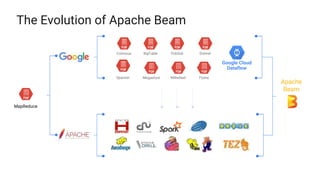
The Evolution of Apache Beam
MapReduce
BigTable DremelColossus
FlumeMegastoreSpanner
PubSub
Millwheel
Apache
Beam
Google Cloud
Dataflow
5
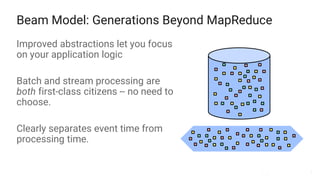
Beam Model: Generations Beyond MapReduce
Improved abstractions let you focus
on your application logic
Batch and stream processing are
both first-class citizens -- no need to
choose.
Clearly separates event time from
processing time.
6
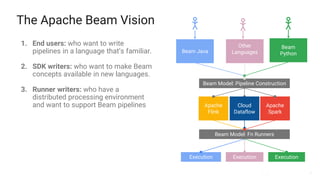
The Apache Beam Vision
1. End users: who want to write
pipelines in a language that’s familiar.
2. SDK writers: who want to make Beam
concepts available in new languages.
3. Runner writers: who have a
distributed processing environment
and want to support Beam pipelines
Beam Model: Fn Runners
Apache
Flink
Apache
Spark
Beam Model: Pipeline Construction
Other
LanguagesBeam Java
Beam
Python
Execution Execution
Cloud
Dataflow
Execution
7
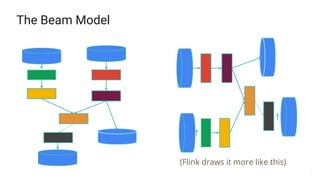
The Beam Model
(Flink draws it more like this)
8
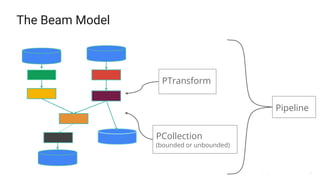
The Beam Model
Pipeline
PTransform
PCollection
(bounded or unbounded)
9
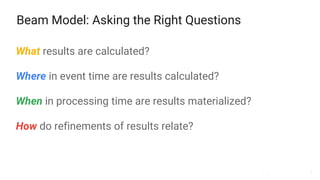
Beam Model: Asking the Right Questions
What results are calculated?
Where in event time are results calculated?
When in processing time are results materialized?
How do refinements of results relate?
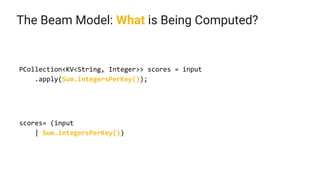
The Beam Model: What is Being Computed?
PCollection<KV<String, Integer>> scores = input
.apply(Sum.integersPerKey());
scores= (input
| Sum.integersPerKey())
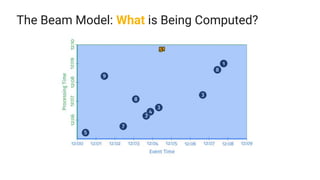
The Beam Model: What is Being Computed?
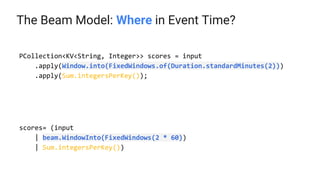
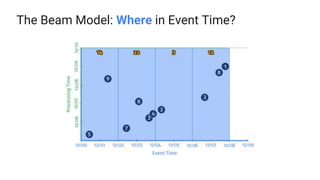
The Beam Model: Where in Event Time?
PCollection<KV<String, Integer>> scores = input
.apply(Window.into(FixedWindows.of(Duration.standardMinutes(2)))
.apply(Sum.integersPerKey());
scores= (input
| beam.WindowInto(FixedWindows(2 * 60))
| Sum.integersPerKey())
The Beam Model: Where in Event Time?
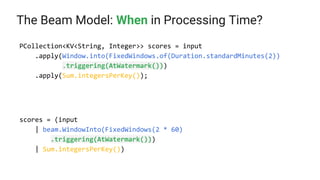
The Beam Model: When in Processing Time?
PCollection<KV<String, Integer>> scores = input
.apply(Window.into(FixedWindows.of(Duration.standardMinutes(2))
.triggering(AtWatermark()))
.apply(Sum.integersPerKey());
scores = (input
| beam.WindowInto(FixedWindows(2 * 60)
.triggering(AtWatermark()))
| Sum.integersPerKey())
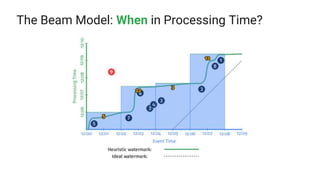
The Beam Model: When in Processing Time?
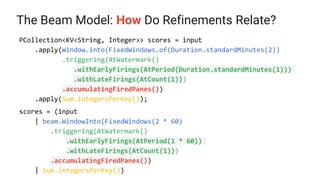
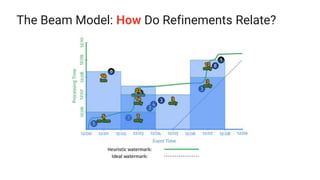
The Beam Model: How Do Refinements Relate?
PCollection<KV<String, Integer>> scores = input
.apply(Window.into(FixedWindows.of(Duration.standardMinutes(2))
.triggering(AtWatermark()
.withEarlyFirings(AtPeriod(Duration.standardMinutes(1)))
.withLateFirings(AtCount(1)))
.accumulatingFiredPanes())
.apply(Sum.integersPerKey());
scores = (input
| beam.WindowInto(FixedWindows(2 * 60)
.triggering(AtWatermark()
.withEarlyFirings(AtPeriod(1 * 60))
.withLateFirings(AtCount(1)))
.accumulatingFiredPanes())
| Sum.integersPerKey())
The Beam Model: How Do Refinements Relate?
18
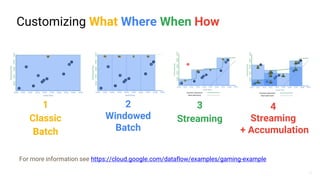
Customizing What Where When How
3
Streaming
4
Streaming
+ Accumulation
1
Classic
Batch
For more information see https://cloud.google.com/dataflow/examples/gaming-example
2
Windowed
Batch
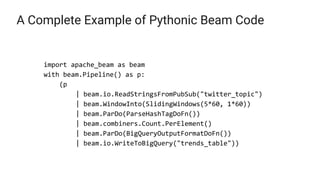
A Complete Example of Pythonic Beam Code
import apache_beam as beam
with beam.Pipeline() as p:
(p
| beam.io.ReadStringsFromPubSub("twitter_topic")
| beam.WindowInto(SlidingWindows(5*60, 1*60))
| beam.ParDo(ParseHashTagDoFn())
| beam.combiners.Count.PerElement()
| beam.ParDo(BigQueryOutputFormatDoFn())
| beam.io.WriteToBigQuery("trends_table"))
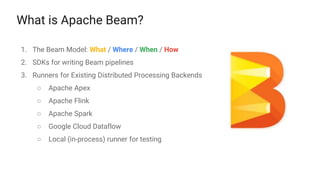
What is Apache Beam?
1. The Beam Model: What / Where / When / How
2. SDKs for writing Beam pipelines
3. Runners for Existing Distributed Processing Backends
○ Apache Apex
○ Apache Flink
○ Apache Spark
○ Google Cloud Dataflow
○ Local (in-process) runner for testing
2121
Beam Portability APIs (Pipeline / Job / Fn)
22
What are we trying to solve?
● Executing user code written in an arbitrary language (Python) on a Runner
written in a different language (Java)
● Mixing user functions written in different languages (Connectors, Sources,
Sinks, …)
23
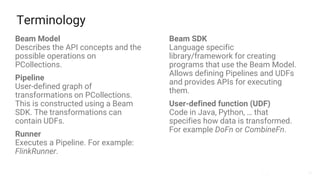
Terminology
Beam Model
Describes the API concepts and the
possible operations on
PCollections.
Pipeline
User-defined graph of
transformations on PCollections.
This is constructed using a Beam
SDK. The transformations can
contain UDFs.
Runner
Executes a Pipeline. For example:
FlinkRunner.
Beam SDK
Language specific
library/framework for creating
programs that use the Beam Model.
Allows defining Pipelines and UDFs
and provides APIs for executing
them.
User-defined function (UDF)
Code in Java, Python, … that
specifies how data is transformed.
For example DoFn or CombineFn.
24
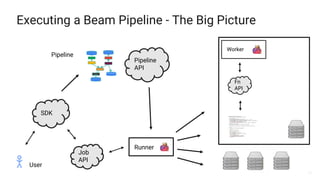
Executing a Beam Pipeline - The Big Picture
SDK
User
Pipeline
Pipeline
API
Runner
Worker
Fn
API
Job
API
25
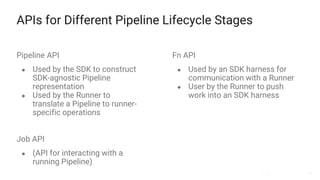
APIs for Different Pipeline Lifecycle Stages
Pipeline API
● Used by the SDK to construct
SDK-agnostic Pipeline
representation
● Used by the Runner to
translate a Pipeline to runner-
specific operations
Fn API
● Used by an SDK harness for
communication with a Runner
● User by the Runner to push
work into an SDK harness
Job API
● (API for interacting with a
running Pipeline)
26
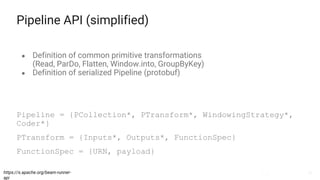
Pipeline API (simplified)
● Definition of common primitive transformations
(Read, ParDo, Flatten, Window.into, GroupByKey)
● Definition of serialized Pipeline (protobuf)
https://s.apache.org/beam-runner-
api
Pipeline = {PCollection*, PTransform*, WindowingStrategy*,
Coder*}
PTransform = {Inputs*, Outputs*, FunctionSpec}
FunctionSpec = {URN, payload}
27
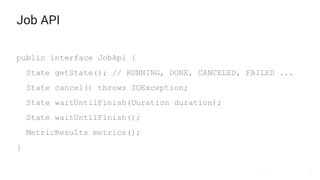
Job API
public interface JobApi {
State getState(); // RUNNING, DONE, CANCELED, FAILED ...
State cancel() throws IOException;
State waitUntilFinish(Duration duration);
State waitUntilFinish();
MetricResults metrics();
}
28
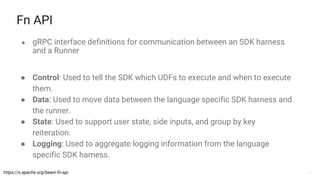
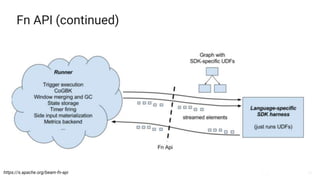
Fn API
● gRPC interface definitions for communication between an SDK harness
and a Runner
https://s.apache.org/beam-fn-api
● Control: Used to tell the SDK which UDFs to execute and when to execute
them.
● Data: Used to move data between the language specific SDK harness and
the runner.
● State: Used to support user state, side inputs, and group by key
reiteration.
● Logging: Used to aggregate logging information from the language
specific SDK harness.
29
Fn API (continued)
https://s.apache.org/beam-fn-api
30
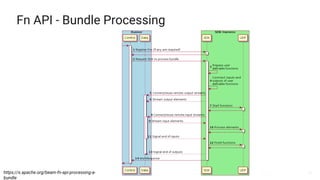
Fn API - Bundle Processing
https://s.apache.org/beam-fn-api-processing-a-
bundle
31
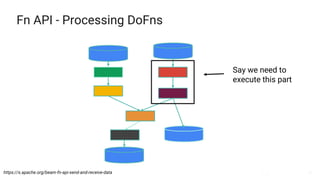
Fn API - Processing DoFns
https://s.apache.org/beam-fn-api-send-and-receive-data
Say we need to
execute this part
32
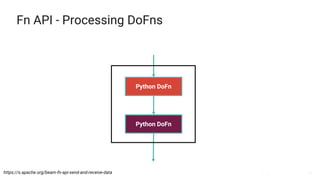
Fn API - Processing DoFns
https://s.apache.org/beam-fn-api-send-and-receive-data
Python DoFn
Python DoFn
33
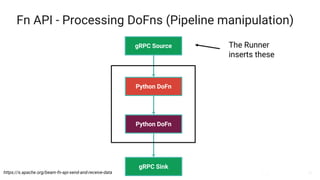
Fn API - Processing DoFns (Pipeline manipulation)
https://s.apache.org/beam-fn-api-send-and-receive-data
Python DoFn
Python DoFn
gRPC Source
gRPC Sink
The Runner
inserts these
34
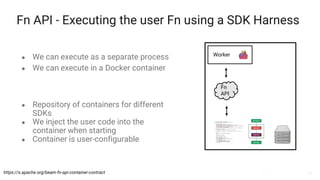
Fn API - Executing the user Fn using a SDK Harness
● We can execute as a separate process
● We can execute in a Docker container
Worker
Fn
API
https://s.apache.org/beam-fn-api-container-contract
● Repository of containers for different
SDKs
● We inject the user code into the
container when starting
● Container is user-configurable
3535
Executing Pythonic* Beam Jobs on Fink
*or other languages
36
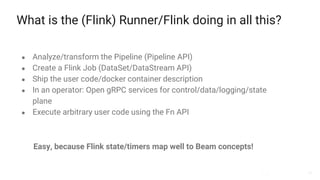
What is the (Flink) Runner/Flink doing in all this?
● Analyze/transform the Pipeline (Pipeline API)
● Create a Flink Job (DataSet/DataStream API)
● Ship the user code/docker container description
● In an operator: Open gRPC services for control/data/logging/state
plane
● Execute arbitrary user code using the Fn API
Easy, because Flink state/timers map well to Beam concepts!
37
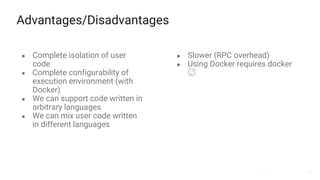
Advantages/Disadvantages
● Complete isolation of user
code
● Complete configurability of
execution environment (with
Docker)
● We can support code written in
arbitrary languages
● We can mix user code written
in different languages
● Slower (RPC overhead)
● Using Docker requires docker
😉
3838
The Future
39
Future work
● Finish what I just talked about
● Finalize the different APIs (not Flink-specific)
● Mixing and matching connectors written in different languages
● Wait for new SDKs in other languages, they will just work 😉
40
Learn More!
Apache Beam/Apache Flink
https://flink.apache.org / https://beam.apache.org
Beam Fn API design documents
https://s.apache.org/beam-runner-api
https://s.apache.org/beam-fn-api
https://s.apache.org/beam-fn-api-processing-a-bundle
https://s.apache.org/beam-fn-state-api-and-bundle-processing
https://s.apache.org/beam-fn-api-send-and-receive-data
https://s.apache.org/beam-fn-api-container-contract
Join the mailing lists!
user-subscribe@flink.apache.org / dev-subscribe@flink.apache.org
user-subscribe@beam.apache.org / dev-subscribe@beam.apache.org
Follow @ApacheFlink / @ApacheBeam on Twitter
41
Thank you!
4242
Backup Slides
43
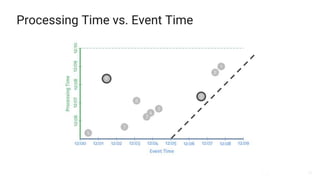
Processing Time vs. Event Time

Talk Python To Me: Stream Processing in your favourite Language with Beam on Flink

  • 1.
    Talk Python toMe Stream Processing in Your Favourite Language with Beam on Flink Apache Beam Slides by Aljoscha Krettek, September 2017, Flink Forward 2017 Apache Flink Based on work and slides by Frances Perry, Tyler Akidau, Kenneth Knowles & Sourabh Bajaj
  • 2.
    2 Agenda 1. What isBeam? 2. The Beam Portability APIs (Fn / Pipeline) 3. Executing Pythonic Beam Jobs on Flink 4. The Future
  • 3.
  • 4.
    The Evolution ofApache Beam MapReduce BigTable DremelColossus FlumeMegastoreSpanner PubSub Millwheel Apache Beam Google Cloud Dataflow
  • 5.
    5 Beam Model: GenerationsBeyond MapReduce Improved abstractions let you focus on your application logic Batch and stream processing are both first-class citizens -- no need to choose. Clearly separates event time from processing time.
  • 6.
    6 The Apache BeamVision 1. End users: who want to write pipelines in a language that’s familiar. 2. SDK writers: who want to make Beam concepts available in new languages. 3. Runner writers: who have a distributed processing environment and want to support Beam pipelines Beam Model: Fn Runners Apache Flink Apache Spark Beam Model: Pipeline Construction Other LanguagesBeam Java Beam Python Execution Execution Cloud Dataflow Execution
  • 7.
    7 The Beam Model (Flinkdraws it more like this)
  • 8.
  • 9.
    9 Beam Model: Askingthe Right Questions What results are calculated? Where in event time are results calculated? When in processing time are results materialized? How do refinements of results relate?
  • 10.
    The Beam Model:What is Being Computed? PCollection<KV<String, Integer>> scores = input .apply(Sum.integersPerKey()); scores= (input | Sum.integersPerKey())
  • 11.
    The Beam Model:What is Being Computed?
  • 12.
    The Beam Model:Where in Event Time? PCollection<KV<String, Integer>> scores = input .apply(Window.into(FixedWindows.of(Duration.standardMinutes(2))) .apply(Sum.integersPerKey()); scores= (input | beam.WindowInto(FixedWindows(2 * 60)) | Sum.integersPerKey())
  • 13.
    The Beam Model:Where in Event Time?
  • 14.
    The Beam Model:When in Processing Time? PCollection<KV<String, Integer>> scores = input .apply(Window.into(FixedWindows.of(Duration.standardMinutes(2)) .triggering(AtWatermark())) .apply(Sum.integersPerKey()); scores = (input | beam.WindowInto(FixedWindows(2 * 60) .triggering(AtWatermark())) | Sum.integersPerKey())
  • 15.
    The Beam Model:When in Processing Time?
  • 16.
    The Beam Model:How Do Refinements Relate? PCollection<KV<String, Integer>> scores = input .apply(Window.into(FixedWindows.of(Duration.standardMinutes(2)) .triggering(AtWatermark() .withEarlyFirings(AtPeriod(Duration.standardMinutes(1))) .withLateFirings(AtCount(1))) .accumulatingFiredPanes()) .apply(Sum.integersPerKey()); scores = (input | beam.WindowInto(FixedWindows(2 * 60) .triggering(AtWatermark() .withEarlyFirings(AtPeriod(1 * 60)) .withLateFirings(AtCount(1))) .accumulatingFiredPanes()) | Sum.integersPerKey())
  • 17.
    The Beam Model:How Do Refinements Relate?
  • 18.
    18 Customizing What WhereWhen How 3 Streaming 4 Streaming + Accumulation 1 Classic Batch For more information see https://cloud.google.com/dataflow/examples/gaming-example 2 Windowed Batch
  • 19.
    A Complete Exampleof Pythonic Beam Code import apache_beam as beam with beam.Pipeline() as p: (p | beam.io.ReadStringsFromPubSub("twitter_topic") | beam.WindowInto(SlidingWindows(5*60, 1*60)) | beam.ParDo(ParseHashTagDoFn()) | beam.combiners.Count.PerElement() | beam.ParDo(BigQueryOutputFormatDoFn()) | beam.io.WriteToBigQuery("trends_table"))
  • 20.
    What is ApacheBeam? 1. The Beam Model: What / Where / When / How 2. SDKs for writing Beam pipelines 3. Runners for Existing Distributed Processing Backends ○ Apache Apex ○ Apache Flink ○ Apache Spark ○ Google Cloud Dataflow ○ Local (in-process) runner for testing
  • 21.
    2121 Beam Portability APIs(Pipeline / Job / Fn)
  • 22.
    22 What are wetrying to solve? ● Executing user code written in an arbitrary language (Python) on a Runner written in a different language (Java) ● Mixing user functions written in different languages (Connectors, Sources, Sinks, …)
  • 23.
    23 Terminology Beam Model Describes theAPI concepts and the possible operations on PCollections. Pipeline User-defined graph of transformations on PCollections. This is constructed using a Beam SDK. The transformations can contain UDFs. Runner Executes a Pipeline. For example: FlinkRunner. Beam SDK Language specific library/framework for creating programs that use the Beam Model. Allows defining Pipelines and UDFs and provides APIs for executing them. User-defined function (UDF) Code in Java, Python, … that specifies how data is transformed. For example DoFn or CombineFn.
  • 24.
    24 Executing a BeamPipeline - The Big Picture SDK User Pipeline Pipeline API Runner Worker Fn API Job API
  • 25.
    25 APIs for DifferentPipeline Lifecycle Stages Pipeline API ● Used by the SDK to construct SDK-agnostic Pipeline representation ● Used by the Runner to translate a Pipeline to runner- specific operations Fn API ● Used by an SDK harness for communication with a Runner ● User by the Runner to push work into an SDK harness Job API ● (API for interacting with a running Pipeline)
  • 26.
    26 Pipeline API (simplified) ●Definition of common primitive transformations (Read, ParDo, Flatten, Window.into, GroupByKey) ● Definition of serialized Pipeline (protobuf) https://s.apache.org/beam-runner- api Pipeline = {PCollection*, PTransform*, WindowingStrategy*, Coder*} PTransform = {Inputs*, Outputs*, FunctionSpec} FunctionSpec = {URN, payload}
  • 27.
    27 Job API public interfaceJobApi { State getState(); // RUNNING, DONE, CANCELED, FAILED ... State cancel() throws IOException; State waitUntilFinish(Duration duration); State waitUntilFinish(); MetricResults metrics(); }
  • 28.
    28 Fn API ● gRPCinterface definitions for communication between an SDK harness and a Runner https://s.apache.org/beam-fn-api ● Control: Used to tell the SDK which UDFs to execute and when to execute them. ● Data: Used to move data between the language specific SDK harness and the runner. ● State: Used to support user state, side inputs, and group by key reiteration. ● Logging: Used to aggregate logging information from the language specific SDK harness.
  • 29.
  • 30.
    30 Fn API -Bundle Processing https://s.apache.org/beam-fn-api-processing-a- bundle
  • 31.
    31 Fn API -Processing DoFns https://s.apache.org/beam-fn-api-send-and-receive-data Say we need to execute this part
  • 32.
    32 Fn API -Processing DoFns https://s.apache.org/beam-fn-api-send-and-receive-data Python DoFn Python DoFn
  • 33.
    33 Fn API -Processing DoFns (Pipeline manipulation) https://s.apache.org/beam-fn-api-send-and-receive-data Python DoFn Python DoFn gRPC Source gRPC Sink The Runner inserts these
  • 34.
    34 Fn API -Executing the user Fn using a SDK Harness ● We can execute as a separate process ● We can execute in a Docker container Worker Fn API https://s.apache.org/beam-fn-api-container-contract ● Repository of containers for different SDKs ● We inject the user code into the container when starting ● Container is user-configurable
  • 35.
    3535 Executing Pythonic* BeamJobs on Fink *or other languages
  • 36.
    36 What is the(Flink) Runner/Flink doing in all this? ● Analyze/transform the Pipeline (Pipeline API) ● Create a Flink Job (DataSet/DataStream API) ● Ship the user code/docker container description ● In an operator: Open gRPC services for control/data/logging/state plane ● Execute arbitrary user code using the Fn API Easy, because Flink state/timers map well to Beam concepts!
  • 37.
    37 Advantages/Disadvantages ● Complete isolationof user code ● Complete configurability of execution environment (with Docker) ● We can support code written in arbitrary languages ● We can mix user code written in different languages ● Slower (RPC overhead) ● Using Docker requires docker 😉
  • 38.
  • 39.
    39 Future work ● Finishwhat I just talked about ● Finalize the different APIs (not Flink-specific) ● Mixing and matching connectors written in different languages ● Wait for new SDKs in other languages, they will just work 😉
  • 40.
    40 Learn More! Apache Beam/ApacheFlink https://flink.apache.org / https://beam.apache.org Beam Fn API design documents https://s.apache.org/beam-runner-api https://s.apache.org/beam-fn-api https://s.apache.org/beam-fn-api-processing-a-bundle https://s.apache.org/beam-fn-state-api-and-bundle-processing https://s.apache.org/beam-fn-api-send-and-receive-data https://s.apache.org/beam-fn-api-container-contract Join the mailing lists! user-subscribe@flink.apache.org / dev-subscribe@flink.apache.org user-subscribe@beam.apache.org / dev-subscribe@beam.apache.org Follow @ApacheFlink / @ApacheBeam on Twitter
  • 41.
  • 42.
  • 43.

Editor's Notes

  • #2 These slides provide a brief introduction to the Apache Beam model. You are welcome to reuse all or some of these slides when discussing Apache Beam, but please give credit to the original authors when appropriate. ;-) Frances Perry (fjp@google.com) Tyler Akidau (takidau@google.com) Please comment if you have suggestions or see things that are out of date -- we’d like to keep these fresh and usable for everyone. These slides were adapted in part from a talk at GCP Next in March 2016: https://www.youtube.com/watch?v=mJ5lNaLX5Bg Depending on your audience, you may want to adjust or augment this material with other Beam talks.
  • #5 Google published the original paper on MapReduce in 2004, which fundamentally change the way we do distributed processing. This paper described a generalized solution for specifying logic that runs in parallel across multiple machines while shielding the author from dealing with low level details like moving data between machines and handling fault tolerance. <animate> At this point, things diverge a little bit. Inside Google, engineers kept innovating but within a relatively homogeneous environment. In this environment there were limited file formats to deal with, only a handful of languages, and standardized tooling. This meant Googlers were able to focus on refining the core methodology. Google continued to publish papers about these new ideas -- which meant non-Googlers got lots of pdfs to read, but not much concrete to play with. <animate> Outside Google, the open source community created it’s own MapReduce implementation in Hadoop. An entire data processing ecosystem developed, and occasionally some of this was influenced by those Google papers. <animate> In 2014, Google announced Google Cloud Dataflow, which was based on technology that evolved from MapReduce, but included newer ideas like FlumeJava’s improved abstractions and Millwheel’s focus on streaming and realtime execution. Google Cloud Dataflow included both a new programming model for writing both batch and streaming data processing pipelines, as well as a fully managed service for executing them. <animate> In January 2016, Google, along with a handful of partners donated this programming model to the Apache Software Foundation, as the incubating project Apache Beam. In December 2016, Apache Beam graduated as a top-level project at the Apache Software Foundation.
  • #6 Apache Beam’s programming model uses higher level abstractions that let you focus on your application logic -- not how to cram your application logic into an underlying framework. Instead you build a pipeline as an arbitrary graph that mixes custom element-wise processing with aggregations and library functions. Beam pipelines can process both bounded, fixed size data sets as well as infinite streams of elements. And when you write your application logic you don’t need to worry which type of collection you’ll be processing. This makes your pipeline and logic very flexible and reusable. Now, to truly unify batch and stream processing we need to separate the notion of event time from processing time. Event time is the time an event happened -- so for example, if we were processing scores from a mobile gaming application, that would be the time the user popped the balloons or crushed the candy or whatever it is they are so frantically doing. But that event time may differ from the time the element is processed, even in a real time system.
  • #7 Our goal in Beam is to fully support three different categories of users End users who are just interested in writing data processing pipelines. They want to use the language that they want to use and choose the runtime that works for them, whether it’s on premise, on a hand tuned cloud cluster, or on a fully managed service. In addition, we want to develop stable APIs and documentation to allow others in the open source community to create Beam SDKs in other languages and to provide runners for alternate distributed processing environments.
  • #10 The Beam model is based on four key questions: What results are calculated? Are you doing computing sums, joins, histograms, machine learning models? Where in event time are results calculated? How does the time each event originally occurred affect results? Are results aggregated for all time, in fixed windows, or as user activity sessions? When in processing time are results materialized? Does the time each element arrives in the system affect results? How do we know when to emit a result? What do we do about data that comes in late from those pesky users playing on transatlantic flights? And finally, how do refinements relate? If we choose to emit results multiple times, is each result independent and distinct, do they build upon one another? Let’s take a quick look at how we can use this questions to build a pipeline.
  • #11 Here’s a snippet from a pipeline that processes scoring results from that mobile gaming application. In yellow, you can see the computation that we’re performing -- the what -- in this case taking team-score pairs and summing them per team. So now let’s see what happens to our sample data if we execute this in traditional batch style.
  • #12 In this looping animation, the grey line represents processing time. As the pipeline executes and processes elements, they’re accumulated into the intermediate state, just under the processing time line. When processing completes, the system emits the result in yellow. This is pretty standard batch processing. But let’s see how answering the remaining three questions can make this more expressive.
  • #13 Let’s start by playing with event time. By specifying a windowing function, we can calculate independent results for different slices of event time. For example every minute, every hour, or every day. In this case, we will calculate an independent sum for every two minute window.
  • #14 Now if we look at how things execute, you can see that we are calculating a independent answer for every two minute period of event time. But we’re still waiting until the entire computation completes to emit any results. That might work fine for bounded data sets, when we’ll eventually finish processing. But it’s not going to work if we’re trying to process an infinite amount of data!
  • #15 So what we need to do is reduce the latency of individual results. We do that by asking for results to be emitted, or triggered, based on the system’s best estimate of when it has all the input data. We call this estimate the watermark.
  • #16 Now the graph contains the watermark drawn in green. And by triggering at the watermark, the result for each window is emitted as soon as we roughly think we’re done seeing data for that slice of time. But again, the watermark is often just a heuristic -- it’s the system’s best guess about data completeness. Right now, the watermark is too fast -- and so in some cases we’re moving on without all the data. So that user who scored 9 points in the elevator is just plain out of luck. Those 9 points don’t get included in their team’s score. But we don’t want to be too slow either -- it’s no good if we wait to emit anything until all the flights everywhere had landed just in case someone in seat 16B is playing our game somewhere over the Atlantic.
  • #17 So let’s use a more sophisticated trigger to request both speculative, early firings as data is still trickling in -- and also update results if late elements arrive. Once we do this though, we might get multiple results for the same window of event time. So we have answer the fourth question about how refined results relate. Here we choose to just continually accumulate the score.
  • #18 Now, there are multiple results for each window. Some windows, like the second, produce early, incomplete results as data arrives. There’s one on time result per window when we think we’ve pretty much got all the data. And there are late results if additional data comes in behind the watermark, like in the first window. And because we chose to accumulate, each result includes all the elements in the window, even if they have already been part of an earlier result.
  • #19 So we started with an algorithm -- what we wanted to compute. In this case it happened to be a simple integer summation, just so that it’d be reasonable to animate. But it could a much more complex computation. And just by tweaking just a line here or there, we went through a number of use cases -- from the simple traditional batch style through to advanced streaming situations. Just like the MapReduce model fundamentally changed the way we do distributed processing by providing the right set of abstractions, we hope that this model will change the way we unify batch and streaming processing in the future.
  • #20 Here’s a snippet from a pipeline that processes scoring results from that mobile gaming application. In yellow, you can see the computation that we’re performing -- the what -- in this case taking team-score pairs and summing them per team. So now let’s see what happens to our sample data if we execute this in traditional batch style.
  • #21 Today, Apache Beam includes the core unified programming model revolving around the what/where/when/how questions the initial Java SDK that we developed as part of Cloud Dataflow, with others, including Python, to follow and, most important for portability, multiple runners that can execute Beam pipelines on existing distributed process backends.
  • #42 [Thank you for using this slide deck and sharing your enthusiasm about Beam! If you receive any interesting questions, please consider adding the to the community driven Talk FAQ. And feel free to add comments to the deck or contact the authors directly.]
  • #44 This graph shows a sample data set of points scored for a specific team in our hypothetical mobile gaming application. On the x-axis we’ve got event time, and the y access is processing time. <animate> If everything was perfect, elements would arrive in our system immediately, and so we’d see things along this dashed line. But distributed systems often don’t cooperate. <animate> Sometimes it’s not so bad. So here this event from just before 12:07 maybe just encountered a small network delay and arrives almost immediately after 12:07. <animate> But this one over here was more like 7 minutes delayed. Perhaps our user was playing in an elevator or in a subway -- so the score is delayed by a temporary lack of network connectivity. And the margins of this graph can’t even contain what we’d see if our game supports an offline mode. If a user is playing on a transatlantic flight in airplane mode, it might be hours until that flight lands and we get those scores for processing. These types of infinite, out of order data sources can be really tricky to reason about… unless you know what questions to ask.