The Role of Occupational Therapy
in Assistive Technology
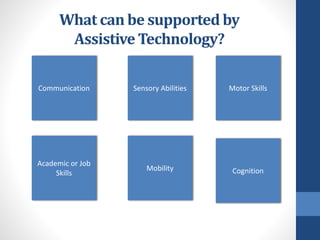
What can be supported by
Assistive Technology?
Motor SkillsCommunication
Mobility
Sensory Abilities
Cognition
Academic or Job
Skills
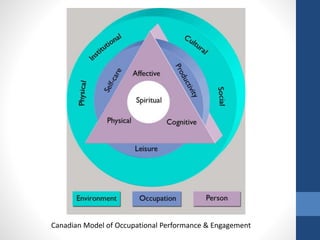
Canadian Model of Occupational Performance & Engagement
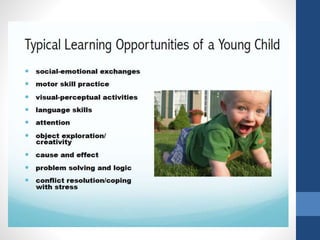
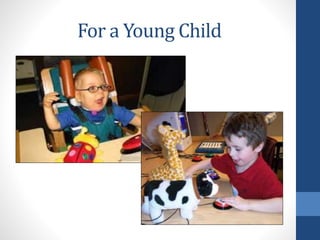
For a Young Child
Role of Occupational Therapist
• Evaluate and provide input regarding patient needs related to A.T.
within areas of occupation being addressed by the team.
• Motor Skills – The OT may work with physical therapist to evaluation
seating/positioning for optimal control. (Point of Access – or POA – is
often a specialty of OT.)
• Develop goals, anticipated outcomes, and intervention plans,
incorporating assistive technology materials and environmental
applications as appropriate
• Include data collection as part of the intervention plan to assure that
the A.T. recommended is “the right fit” for the client.
• Train the patient and caregiver(s) – and sometimes others on the
treatment team – as needed for optimal carry-over.
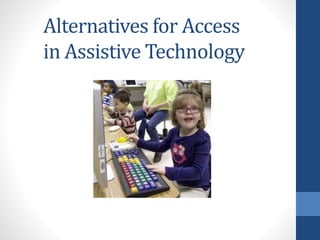
Alternatives for Access
in Assistive Technology
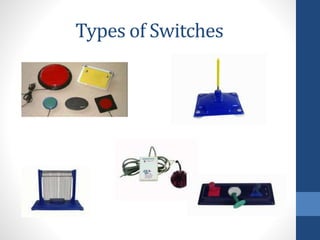
Types of Switches
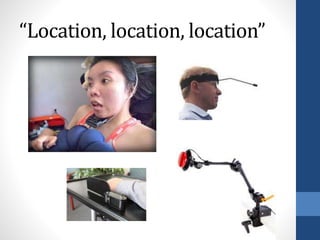
“Location, location, location”
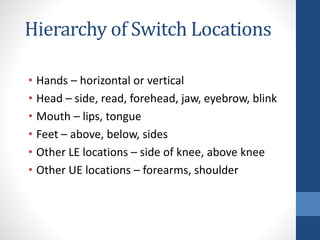
Hierarchy of Switch Locations
• Hands – horizontal or vertical
• Head – side, read, forehead, jaw, eyebrow, blink
• Mouth – lips, tongue
• Feet – above, below, sides
• Other LE locations – side of knee, above knee
• Other UE locations – forearms, shoulder
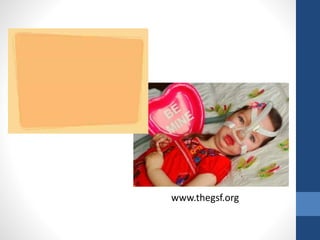
www.thegsf.org
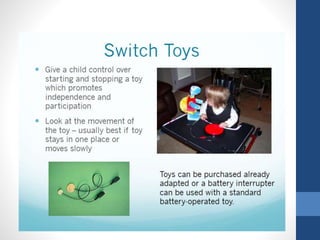
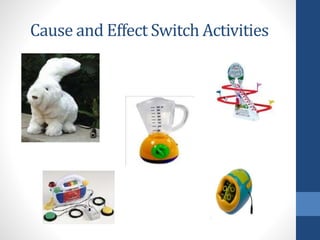
Cause and Effect Switch Activities
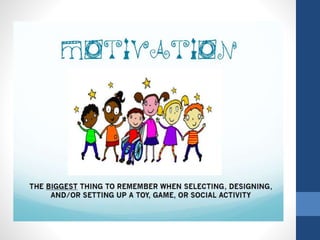
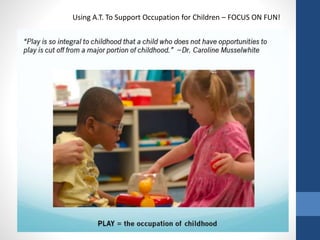
Using A.T. To Support Occupation for Children – FOCUS ON FUN!

Occupational therapy and assistive technology

  • 1.
    The Role ofOccupational Therapy in Assistive Technology
  • 2.
    What can besupported by Assistive Technology? Motor SkillsCommunication Mobility Sensory Abilities Cognition Academic or Job Skills
  • 3.
    Canadian Model ofOccupational Performance & Engagement
  • 5.
  • 6.
    Role of OccupationalTherapist • Evaluate and provide input regarding patient needs related to A.T. within areas of occupation being addressed by the team. • Motor Skills – The OT may work with physical therapist to evaluation seating/positioning for optimal control. (Point of Access – or POA – is often a specialty of OT.) • Develop goals, anticipated outcomes, and intervention plans, incorporating assistive technology materials and environmental applications as appropriate • Include data collection as part of the intervention plan to assure that the A.T. recommended is “the right fit” for the client. • Train the patient and caregiver(s) – and sometimes others on the treatment team – as needed for optimal carry-over.
  • 7.
    Alternatives for Access inAssistive Technology
  • 8.
  • 9.
  • 10.
    Hierarchy of SwitchLocations • Hands – horizontal or vertical • Head – side, read, forehead, jaw, eyebrow, blink • Mouth – lips, tongue • Feet – above, below, sides • Other LE locations – side of knee, above knee • Other UE locations – forearms, shoulder
  • 12.
  • 14.
    Cause and EffectSwitch Activities
  • 16.
    Using A.T. ToSupport Occupation for Children – FOCUS ON FUN!

Editor's Notes

  • #2 Today I want to tell about how I came to specialize in assistive technology and share ten things I think every OT and SLT practitioner should know about A.T. Technology-Related Assistance for Individuals with Disabilities Act of 1988 (referred to as “The Tech Act of 2004”) – Reauthorized in 1994, specifically defined an Assistive Technology device as an item, piece of equipment, set of materials, or product system, whether acquired commercially, modified, or custom-made, that is used to increase, maintain, or improve functional capabilities of a person with a disability, and the knowledge and use of specifically targeted strategies in the selection, design, implementation, and/or use of an assistive technology device
  • #3 AT can be used to help a person of any age – with any diagnosis – at any functional level. A.T. - a collaborative effort between members of an interdisciplinary team
  • #4 OT philosophy – centered on occupation CMOP Model of Practice – updated in 2007 by Polatajko, Townsend & Craik Assumption/focus: Occupational therapy (OT) values are essential to this theory: client-centered, occupation-centered, and evidence-based. Occupational performance and engagement is the outcome of the interdependent and dynamic interaction between Person, Environment, & Occupation. Compare to HAAT Model (Human, Activity, A.T.) in context: Activities categorized within 3 basic performance areas: ADLs Work/productive activities Play/leisure. The meaning an individual gives to an occupation determines in which performance area it is placed. (ex. gardening: work or leisure?) Role Occupation  Activities  Tasks Activity Analysis – performance components Holistic and client-centered approach: Environmental context is a support/barrier and can be adapted to promote success In 2007, the Canadian Model of Occupational Performance was expanded to the Canadian Model of Occupational Performance & Engagement (CMOP-E) CMOP-E focuses on occupational performance, but in addition encompasses engagement A change in one area automatically affects the others.
  • #5 THE ROLE OF O.T. IN THE A.T. ARENA: As an occupational therapist specializing in assistive technology, I see a lot of parallels between the fields of OT and AT, things that seem to make the two go hand in hand in many ways. One of the things that initially drew me to a career in OT is the holistic view taken by practitioners in the field that considers all of the factors that play a role in the challenges faced by an individual with a disability or an illness, from the mental health issues grief and self-image to social factors such as support systems and community involvement to the physical symptoms experienced by an individual. Another thing about OT that I love is the practice of considering one’s strengths as well as the deficit areas, which encourages the viewing of the person as an individual, not a patient and not a disease or condition. And yet another thing is the focus on occupation and on client-centered function; OT’s as a whole tend to strive for engagement of those with whom they work by centering intervention around things that are important to the client, which serves to create an atmosphere of respect and motivation. OT’s in general seem to abide by a whatever-it-takes type of philosophy, and we typically have quite an assortment of materials and strategies to employ as needed to assist a client in meeting his or her goals. AT focuses on function for the individuals who use it as well; the appropriate use of AT materials and strategies can contribute to the independence of an individual, thus facilitating his or her ability to participate in activities that are important to him or her. Another similarity between OT and AT is the consideration in each field of the tasks that are required as part of the roles in which the client serves as well as the environments in which those roles are carried out. The overarching goal of the use of AT is to support function in that individual, which is also in alignment with the principles of OT intervention. Many people who benefit from the use of AT have improved their functional skills, independence, productivity, social participation, and/or overall health through the use of equipment and through tactics that have been carefully selected to meet their needs based on their specific situation, thus improving the lives of each client in an intimate yet comprehensive way.
  • #6 Research is showing that use of AT with young children can contribute to improving self-esteem, reducing frustration and resulting behavior problems, increasing communication and social skills, and enabling independence and participation in daily life. In addition, AT can change the expectations of others by shedding light on a child’s abilities and enable active rather than passive play, which is crucial to child development. As stated in the AOTA article on switches, “in order for technology to be useful, the user must be able to access it” (Lange, 2011)
  • #7 There are many unique contributions that OT’s can make in the AT process – from the assessment to implementation and training, as well as in the selection, modification, and fabrication of AT materials. Functional ROM – reach and dexterity Strength – especially related to UE/hands Finger isolation Sensory Cognition Coordination WATI – Wisconsin AT Initiative – free AT eval form (37 pages) and other online materials – www.wati.org SETT online form by Joy Zabala – http://sweb.uky/~jszaba0/ATConsidGuideADJZcomp.doc FEAT – Functional Eval for AT When considering a need for accessing A.T. devices, typical uses include support of client in performing these activities: Control of environmental features in the home – lamps, blender, etc. Written communication “Spoken” communication
  • #8 In most cases, OT’s enter the work force with generalist-level knowledge about AT. While some therapists complete further training and some earn specialty certifications in the field of AT, some practitioners stay at that level and may choose to refer out cases involving AT or to consult with another clinician who can fill in the gaps in that advanced practice area when needed. Those with specialist knowledge are well versed in standard practices of the AT assessment process and have experience and specialized training in things like seating & mobility, positioning devices, environmental control units, switch access, mounting systems, writing assistance tools and software. In general, as a therapist gains more expertise in AT, the roles between disciplines begin to blur. For example, I have done quite a bit of AAC consultations over the years. INPUT METHODS- Direct access – buttons on SGD or keyboard  Indirect selection methods – typically not as efficient (measured in terms of speed, accuracy, and effort) unless needed to compensate for physical limitations Include joysticks, computer mice/accessories, and voice activation CASE STUDY: Chelsea
  • #9 Another type of indirect methods of access: switches Potential for use determined through consumer’s ability to reach, adhere to timing demands, reliably activate, maintain pressure, release, and repeatedly carry out these functions as needed. Single switch – many available commercially or can be made, various sizes and shapes. Trial is critical. Mechanical – most common type – activated by application of force Example: paddle (wobble), plate (Big Red or Jelly Bean), button (Saltillo), lever (bend in any direction to activate) Also includes pneumatic (sip/puff) and mercury (tilt-switch) Electronic – used with power w/c in a multi-switch array Proximity (capacity) – activated by a body part coming within an adjustable range Fiber-optic – activated when an object interrupts the beam of light and reflects it back. For detecting very small mvmts. Infrared – invisible light that activates switch when beam is broken. Designed for larger mvmts Eye-gaze – hover-selection or move-away selection Touch – conducted by skin, activated by touch to complete the circuit Sensor – activated through electrical impulses from small muscle mvmts Sound activated – increased sound/volume activates Vibration-activated Bio-electrical – “mind switch” – activated via combination of muscle mvmts and EEG readings (worn on forehead)  
  • #10 Once a switch is chosen for access, the location and type of switch must be determined. “Location, location, location” – how to determine what’s optimal? Ideally – one that uses small, volitional movement that doesn’t use reflexive movements, lead to increased muscle tone, or use excessive energy Client must be able to access, sustain contact, and release in a controlled way over a period of time Consider how client’s positioning is in context of daily routine – may involve adjusting seating system and/or mounting in different ways Scanning – Compensates for less physical range but requires more control of “wait” (anticipation) time. Example of a situation in which this can improve function: Decreased demand of client (ex. – move head to head-mounted switch rather than reaching UE to depress)
  • #11 Hierarchy of switch locations: In scanning or multi-switch array arrangements, may place switches close together or further apart May scan automatically or by user-control (inverse scanning) In some cases, client may only have control of one body part – thus requiring the same control interface to be used for multiple functions (ex. w/c control also for aug comm and EADL’s – integrated control system). May also be used due to cognitive status (confusion of multiple types) or user preference.
  • #12 Case Study #2: Katelynn   What do you think we tried, based on her abilities and barriers/needs: Modified (expanded) keyboard with keyguard Touch screen On-screen keyboard with word prediction and read-outloud “ “ with scanning (controlled by using space bar for switch activation) Headpointing device – infrared, static Voice recognition – not an option
  • #13 Case Study #3
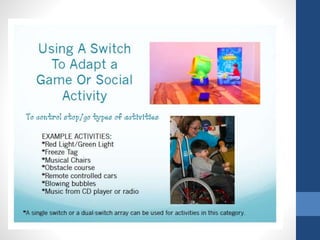
  • #16 Ways Switches Can Be Used to Adapt Games 1 – rolling the dice – calling out numbers 2 – my turn, your turn indicators 3 – as a substitute for drawing a card 4 – compliment/interact with other players – scripted conversation 5 – make choices –game pieces, decisions during the game 6 – be The Leader – musical chairs, Simon Says 7 – activate a timer or spinner or other game piece (Hungry Hippo) 8 – “read” the directions 9 – direct others, call out other kids’ names - (to move for him, etc.) 10 – access in make-believe play – playing house, post office, school