Savannah Emment
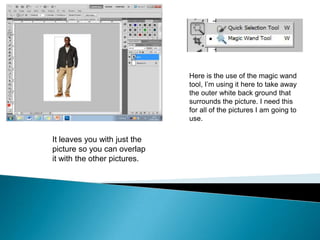
Here is the use of the magic wand
                              tool, I’m using it here to take away
                              the outer white back ground that
                              surrounds the picture. I need this
                              for all of the pictures I am going to
                              use.

It leaves you with just the
picture so you can overlap
it with the other pictures.
Here are the colour effects I could of
chosen from, I chose to change the
image black and white so I could play
around with the colours on the pull
quotes and my masthead.


                                                          Here is my main image after I
                                                          added the effect to it. This is
                                                          before I have positioned it or
                                                          added anything to it.
                        Here it shows that I have added
                        the effect to my main image.
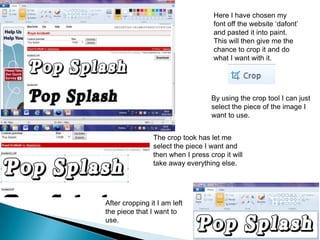
Here I have chosen my
                                    font off the website ‘dafont’
                                    and pasted it into paint.
                                    This will then give me the
                                    chance to crop it and do
                                    what I want with it.


                                   By using the crop tool I can just
                                   select the piece of the image I
                                   want to use.


                The crop took has let me
                select the piece I want and
                then when I press crop it will
                take away everything else.


After cropping it I am left
the piece that I want to
use.
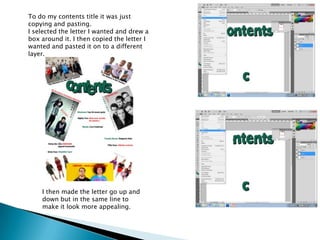
To do my contents title it was just
copying and pasting.
I selected the letter I wanted and drew a
box around it. I then copied the letter I
wanted and pasted it on to a different
layer.


    I then made the letter go up and
    down but in the same line to
    make it look more appealing.
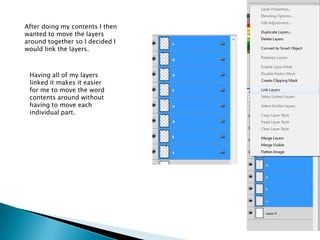
After doing my contents I then
wanted to move the layers
around together so I decided I
would link the layers.


 Having all of my layers
 linked it makes it easier
 for me to move the word
 contents around without
 having to move each
 individual part.

Norboyz skill portfolio

  • 1.
  • 2.
    Here is theuse of the magic wand tool, I’m using it here to take away the outer white back ground that surrounds the picture. I need this for all of the pictures I am going to use. It leaves you with just the picture so you can overlap it with the other pictures.
  • 3.
    Here are thecolour effects I could of chosen from, I chose to change the image black and white so I could play around with the colours on the pull quotes and my masthead. Here is my main image after I added the effect to it. This is before I have positioned it or added anything to it. Here it shows that I have added the effect to my main image.
  • 4.
    Here I havechosen my font off the website ‘dafont’ and pasted it into paint. This will then give me the chance to crop it and do what I want with it. By using the crop tool I can just select the piece of the image I want to use. The crop took has let me select the piece I want and then when I press crop it will take away everything else. After cropping it I am left the piece that I want to use.
  • 5.
    To do mycontents title it was just copying and pasting. I selected the letter I wanted and drew a box around it. I then copied the letter I wanted and pasted it on to a different layer. I then made the letter go up and down but in the same line to make it look more appealing.
  • 6.
    After doing mycontents I then wanted to move the layers around together so I decided I would link the layers. Having all of my layers linked it makes it easier for me to move the word contents around without having to move each individual part.