Experiments
Your Name
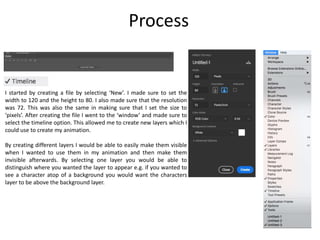
I started by creating a file by selecting ‘New’. I made sure to set the
width to 120 and the height to 80. I also made sure that the resolution
was 72. This was also the same in making sure that I set the size to
‘pixels’. After creating the file I went to the ‘window’ and made sure to
select the timeline option. This allowed me to create new layers which I
could use to create my animation.
By creating different layers I would be able to easily make them visible
when I wanted to use them in my animation and then make them
invisible afterwards. By selecting one layer you would be able to
distinguish where you wanted the layer to appear e.g. if you wanted to
see a character atop of a background you would want the characters
layer to be above the background layer.
Process
Process
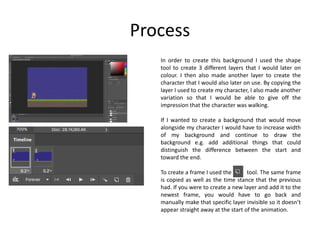
In order to create this background I used the shape
tool to create 3 different layers that I would later on
colour. I then also made another layer to create the
character that I would also later on use. By copying the
layer I used to create my character, I also made another
variation so that I would be able to give off the
impression that the character was walking.
If I wanted to create a background that would move
alongside my character I would have to increase width
of my background and continue to draw the
background e.g. add additional things that could
distinguish the difference between the start and
toward the end.
To create a frame I used the tool. The same frame
is copied as well as the time stance that the previous
had. If you were to create a new layer and add it to the
newest frame, you would have to go back and
manually make that specific layer invisible so it doesn’t
appear straight away at the start of the animation.
Reflection
• What elements of your experiments will you include in your
final product?
– I will try and use the same elements I used in my experiments in my final
product e.g. creating the same sort of similar layout, creating a background of
some sort that doesn’t move whilst the character does. I think I would do this
because I would want the focus to be on the character(s) and what they are
doing. I would also want to create a character and have them move as well as
interact with other things. Since I’m going to create a fantasy turn-based RPG I
would want to create both the main character(s) but also create enemies that
the characters could fight.

1. production experiments

  • 1.
  • 2.
    I started bycreating a file by selecting ‘New’. I made sure to set the width to 120 and the height to 80. I also made sure that the resolution was 72. This was also the same in making sure that I set the size to ‘pixels’. After creating the file I went to the ‘window’ and made sure to select the timeline option. This allowed me to create new layers which I could use to create my animation. By creating different layers I would be able to easily make them visible when I wanted to use them in my animation and then make them invisible afterwards. By selecting one layer you would be able to distinguish where you wanted the layer to appear e.g. if you wanted to see a character atop of a background you would want the characters layer to be above the background layer. Process
  • 3.
    Process In order tocreate this background I used the shape tool to create 3 different layers that I would later on colour. I then also made another layer to create the character that I would also later on use. By copying the layer I used to create my character, I also made another variation so that I would be able to give off the impression that the character was walking. If I wanted to create a background that would move alongside my character I would have to increase width of my background and continue to draw the background e.g. add additional things that could distinguish the difference between the start and toward the end. To create a frame I used the tool. The same frame is copied as well as the time stance that the previous had. If you were to create a new layer and add it to the newest frame, you would have to go back and manually make that specific layer invisible so it doesn’t appear straight away at the start of the animation.
  • 4.
    Reflection • What elementsof your experiments will you include in your final product? – I will try and use the same elements I used in my experiments in my final product e.g. creating the same sort of similar layout, creating a background of some sort that doesn’t move whilst the character does. I think I would do this because I would want the focus to be on the character(s) and what they are doing. I would also want to create a character and have them move as well as interact with other things. Since I’m going to create a fantasy turn-based RPG I would want to create both the main character(s) but also create enemies that the characters could fight.

Editor's Notes

  • #3 Discuss the tools and processes used in your experiments
  • #4 Discuss the tools and processes used in your experiments