Q4.


 How did I use new technologies in
    the research and planning,
construction and evaluation stages?
Q4

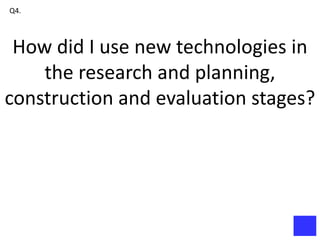
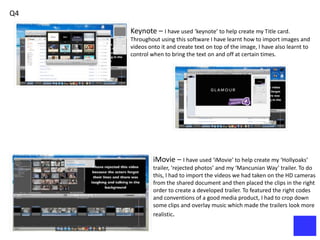
     Keynote – I have used ‘keynote’ to help create my Title card.
     Throughout using this software I have learnt how to import images and
     videos onto it and create text on top of the image, I have also learnt to
     control when to bring the text on and off at certain times.


              iMovie – I have used ‘iMovie’ to help create my ‘Hollyoaks’
              trailer, ‘rejected photos’ and my ‘Mancunian Way’ trailer. To do
              this, I had to import the videos we had taken on the HD cameras
              from the shared document and then placed the clips in the right
              order to create a developed trailer. To featured the right codes
              and conventions of a good media product, I had to crop down
              some clips and overlay music which made the trailers look more
              realistic.
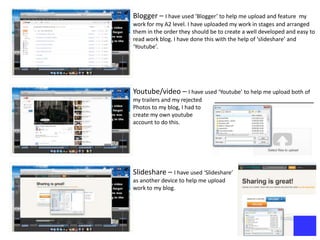
Blogger – I have used ‘Blogger’ to help me upload and feature      my
work for my A2 level. I have uploaded my work in stages and arranged
them in the order they should be to create a well developed and easy to
read work blog. I have done this with the help of ‘slideshare’ and
‘Youtube’.


Youtube/video – I have used ‘Youtube’ to help me upload both of
my trailers and my rejected
Photos to my blog, I had to
create my own youtube
account to do this.


Slideshare – I have used ‘Slideshare’
as another device to help me upload
work to my blog.
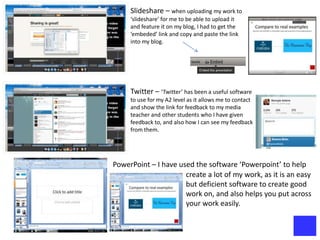
Slideshare – when uploading my work to
     ‘slideshare’ for me to be able to upload it
     and feature it on my blog, I had to get the
     ‘embeded’ link and copy and paste the link
     into my blog.


     Twitter – ‘Twitter’ has been a useful software
     to use for my A2 level as it allows me to contact
     and show the link for feedback to my media
     teacher and other students who I have given
     feedback to, and also how I can see my feedback
     from them.


PowerPoint – I have used the software ‘Powerpoint’ to help
                      create a lot of my work, as it is an easy
                      but deficient software to create good
                      work on, and also helps you put across
                      your work easily.
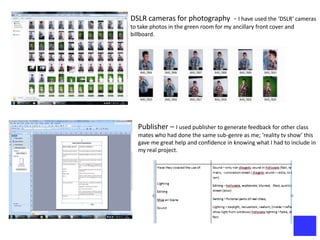
DSLR cameras for photography - I have used the ‘DSLR’ cameras
to take photos in the green room for my ancillary front cover and
billboard.


   Publisher – I used publisher to generate feedback for other class
   mates who had done the same sub-genre as me; ‘reality tv show’ this
   gave me great help and confidence in knowing what I had to include in
   my real project.
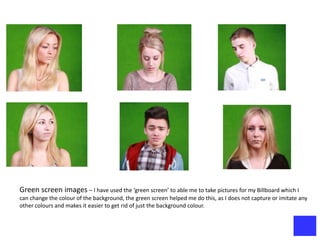
Green screen images – I have used the ‘green screen’ to able me to take pictures for my Billboard which I
can change the colour of the background, the green screen helped me do this, as I does not capture or imitate any
other colours and makes it easier to get rid of just the background colour.
Photoshop


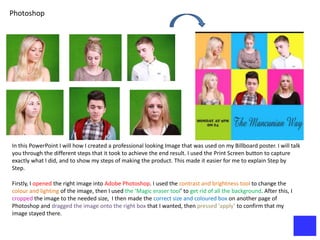
In this PowerPoint I will how I created a professional looking Image that was used on my Billboard poster. I will talk
you through the different steps that it took to achieve the end result. I used the Print Screen button to capture
exactly what I did, and to show my steps of making the product. This made it easier for me to explain Step by
Step.

Firstly, I opened the right image into Adobe Photoshop. I used the contrast and brightness tool to change the
colour and lighting of the image, then I used the ‘Magic eraser tool’ to get rid of all the background. After this, I
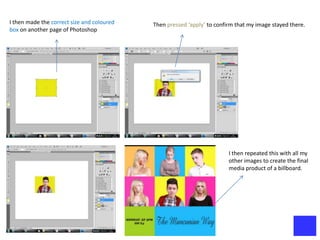
cropped the image to the needed size, I then made the correct size and coloured box on another page of
Photoshop and dragged the image onto the right box that I wanted, then pressed ‘apply’ to confirm that my
image stayed there.
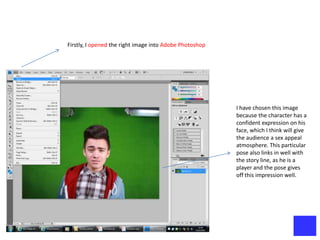
Firstly, I opened the right image into Adobe Photoshop


                                                         I have chosen this image
                                                         because the character has a
                                                         confident expression on his
                                                         face, which I think will give
                                                         the audience a sex appeal
                                                         atmosphere. This particular
                                                         pose also links in well with
                                                         the story line, as he is a
                                                         player and the pose gives
                                                         off this impression well.
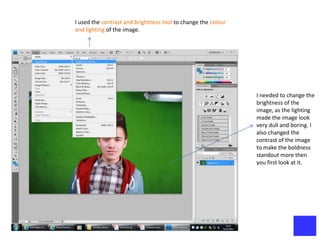
I used the contrast and brightness tool to change the colour
and lighting of the image.


                                                               I needed to change the
                                                               brightness of the
                                                               image, as the lighting
                                                               made the image look
                                                               very dull and boring. I
                                                               also changed the
                                                               contrast of the image
                                                               to make the boldness
                                                               standout more then
                                                               you first look at it.
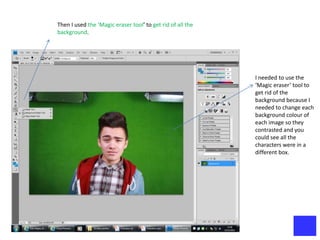
Then I used the ‘Magic eraser tool’ to get rid of all the
background.


                                                            I needed to use the
                                                            ‘Magic eraser’ tool to
                                                            get rid of the
                                                            background because I
                                                            needed to change each
                                                            background colour of
                                                            each image so they
                                                            contrasted and you
                                                            could see all the
                                                            characters were in a
                                                            different box.
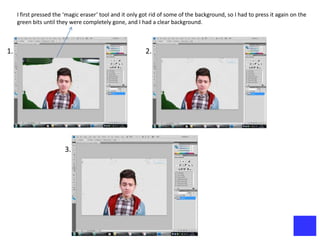
I first pressed the ‘magic eraser’ tool and it only got rid of some of the background, so I had to press it again on the
     green bits until they were completely gone, and I had a clear background.


1.                                                        2.


                        3.
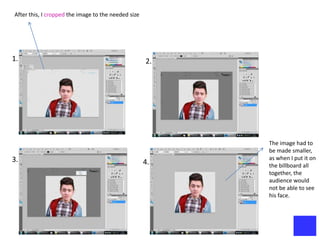
After this, I cropped the image to the needed size


1.                                                   2.


                                                          The image had to
                                                          be made smaller,
3.                                                        as when I put it on
                                                     4.   the billboard all
                                                          together, the
                                                          audience would
                                                          not be able to see
                                                          his face.
I then made the correct size and coloured   Then pressed ‘apply’ to confirm that my image stayed there.
box on another page of Photoshop


                                                                         I then repeated this with all my
                                                                         other images to create the final
                                                                         media product of a billboard.

Evaluation q4

  • 1.
    Q4. How didI use new technologies in the research and planning, construction and evaluation stages?
  • 2.
    Q4 Keynote – I have used ‘keynote’ to help create my Title card. Throughout using this software I have learnt how to import images and videos onto it and create text on top of the image, I have also learnt to control when to bring the text on and off at certain times. iMovie – I have used ‘iMovie’ to help create my ‘Hollyoaks’ trailer, ‘rejected photos’ and my ‘Mancunian Way’ trailer. To do this, I had to import the videos we had taken on the HD cameras from the shared document and then placed the clips in the right order to create a developed trailer. To featured the right codes and conventions of a good media product, I had to crop down some clips and overlay music which made the trailers look more realistic.
  • 3.
    Blogger – Ihave used ‘Blogger’ to help me upload and feature my work for my A2 level. I have uploaded my work in stages and arranged them in the order they should be to create a well developed and easy to read work blog. I have done this with the help of ‘slideshare’ and ‘Youtube’. Youtube/video – I have used ‘Youtube’ to help me upload both of my trailers and my rejected Photos to my blog, I had to create my own youtube account to do this. Slideshare – I have used ‘Slideshare’ as another device to help me upload work to my blog.
  • 4.
    Slideshare – whenuploading my work to ‘slideshare’ for me to be able to upload it and feature it on my blog, I had to get the ‘embeded’ link and copy and paste the link into my blog. Twitter – ‘Twitter’ has been a useful software to use for my A2 level as it allows me to contact and show the link for feedback to my media teacher and other students who I have given feedback to, and also how I can see my feedback from them. PowerPoint – I have used the software ‘Powerpoint’ to help create a lot of my work, as it is an easy but deficient software to create good work on, and also helps you put across your work easily.
  • 5.
    DSLR cameras forphotography - I have used the ‘DSLR’ cameras to take photos in the green room for my ancillary front cover and billboard. Publisher – I used publisher to generate feedback for other class mates who had done the same sub-genre as me; ‘reality tv show’ this gave me great help and confidence in knowing what I had to include in my real project.
  • 6.
    Green screen images– I have used the ‘green screen’ to able me to take pictures for my Billboard which I can change the colour of the background, the green screen helped me do this, as I does not capture or imitate any other colours and makes it easier to get rid of just the background colour.
  • 7.
    Photoshop In this PowerPointI will how I created a professional looking Image that was used on my Billboard poster. I will talk you through the different steps that it took to achieve the end result. I used the Print Screen button to capture exactly what I did, and to show my steps of making the product. This made it easier for me to explain Step by Step. Firstly, I opened the right image into Adobe Photoshop. I used the contrast and brightness tool to change the colour and lighting of the image, then I used the ‘Magic eraser tool’ to get rid of all the background. After this, I cropped the image to the needed size, I then made the correct size and coloured box on another page of Photoshop and dragged the image onto the right box that I wanted, then pressed ‘apply’ to confirm that my image stayed there.
  • 8.
    Firstly, I openedthe right image into Adobe Photoshop I have chosen this image because the character has a confident expression on his face, which I think will give the audience a sex appeal atmosphere. This particular pose also links in well with the story line, as he is a player and the pose gives off this impression well.
  • 9.
    I used thecontrast and brightness tool to change the colour and lighting of the image. I needed to change the brightness of the image, as the lighting made the image look very dull and boring. I also changed the contrast of the image to make the boldness standout more then you first look at it.
  • 10.
    Then I usedthe ‘Magic eraser tool’ to get rid of all the background. I needed to use the ‘Magic eraser’ tool to get rid of the background because I needed to change each background colour of each image so they contrasted and you could see all the characters were in a different box.
  • 11.
    I first pressedthe ‘magic eraser’ tool and it only got rid of some of the background, so I had to press it again on the green bits until they were completely gone, and I had a clear background. 1. 2. 3.
  • 12.
    After this, Icropped the image to the needed size 1. 2. The image had to be made smaller, 3. as when I put it on 4. the billboard all together, the audience would not be able to see his face.
  • 13.
    I then madethe correct size and coloured Then pressed ‘apply’ to confirm that my image stayed there. box on another page of Photoshop I then repeated this with all my other images to create the final media product of a billboard.