Intro to PowerApps
and Flow
APRIL DUNNAM
LEAD CONSULTANT/DEVELOPER
THRIVEFAST
Please Be Courteous!
April Dunnam
SharePoint Developer
 Partner & Lead Consultant/Developer at
ThriveFast
 SharePoint junkie since 2007
 Blogger, Speaker
 Karaoke Queen
@2017 ThriveFast | www.thrivefast.com @aprildunnam | www.sharepointsiren.com
Objectives
 High Level Understanding of PowerApps
 Features & Limitations
 Use Cases
 SharePoint integration
 Templates & Creating your first PowerApp
 High Level Understanding of Flow
 Features & Limitations
 Use Cases
 Templates & Creating your first flow
 Roadmap
 Leave you wanting more!
What is PowerApps?
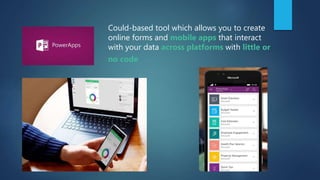
Could-based tool which allows you to create
online forms and mobile apps that interact
with your data across platforms with little or
no code
Works hand in hand with to automate business
processes
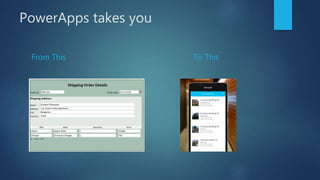
PowerApps takes you
From This To This
The Deets
 Formerly known as Project Siena
 Originally meant to spin up Windows 8 desktop enterprise-specific apps quickly
 Rebranded to PowerApps end of 2015
 Embraced Windows 10 “one software for all devices” with mobile friendliness
 Early 2016 Public beta released
 Nov 1st 2016 – Public availability
 Updates being pushed out every quarter
Why is PowerApps
important?
“
”
Going forward, it’s a mobile
first, cloud first world.
SATYA NADELLA – MICROSOFT CEO
Whether you like it or not, mobile and cloud are the future
How do I get PowerApps?
Is included in your subscription
• Business
Essentials
• Business
Premium
• Education
• Education Plus
• Enterprise E1
• 365 Enterprise
E3
• 365 Enterprise E5
**IF you have one of the following plans:
More Info : https://powerapps.microsoft.com/en-us/tutorials/pricing-billing-skus/#licenses
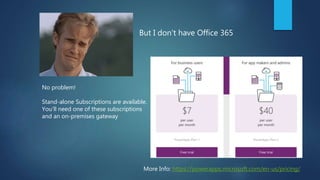
No problem!
Stand-alone Subscriptions are available.
You’ll need one of these subscriptions
and an on-premises gateway
More Info: https://powerapps.microsoft.com/en-us/pricing/
But I don’t have Office 365
Can I use this with my on-prem
systems?
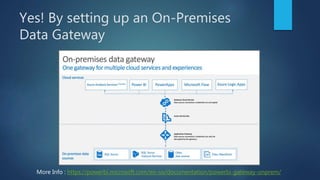
Yes! By setting up an On-Premises
Data Gateway
More Info : https://powerbi.microsoft.com/en-us/documentation/powerbi-gateway-onprem/
So the burning
question……
Is PowerApps a
replacement for
InfoPath?
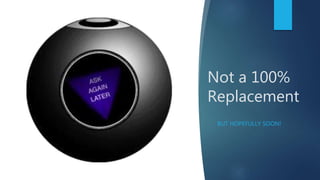
Not a 100%
Replacement
BUT HOPEFULLY SOON!
The bigger picture
WHERE DOES POWERAPPS FIT IN?
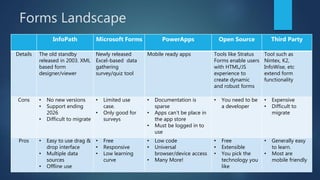
Forms Landscape
InfoPath Microsoft Forms PowerApps Open Source Third Party
Details The old standby
released in 2003. XML
based form
designer/viewer
Newly released
Excel-based data
gathering
survey/quiz tool
Mobile ready apps Tools like Stratus
Forms enable users
with HTML/JS
experience to
create dynamic
and robust forms
Tool such as
Nintex, K2,
InfoWise, etc
extend form
functionality
Cons • No new versions
• Support ending
2026
• Difficult to migrate
• Limited use
case.
• Only good for
surveys
• Documentation is
sparse
• Apps can’t be place in
the app store
• Must be logged in to
use
• You need to be
a developer
• Expensive
• Difficult to
migrate
Pros • Easy to use drag &
drop interface
• Multiple data
sources
• Offline use
• Free
• Responsive
• Low learning
curve
• Low code
• Universal
browser/device access
• Many More!
• Free
• Extensible
• You pick the
technology you
like
• Generally easy
to learn.
• Most are
mobile friendly
The Forms
Tool
Decision
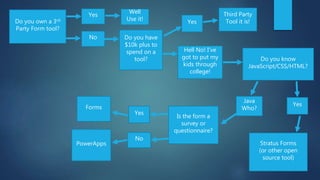
Tree
Do you know
JavaScript/CSS/HTML?
Yes
No Do you have
$10k plus to
spend on a
tool?
Is the form a
survey or
questionnaire?
Forms
PowerApps Stratus Forms
(or other open
source tool)
Third Party
Tool it is!Do you own a 3rd
Party Form tool?
Well
Use it! Yes
Hell No! I’ve
got to put my
kids through
college!
Yes
Java
Who?
Yes
No
Where PowerApps
Shines
KEY BENEFITS
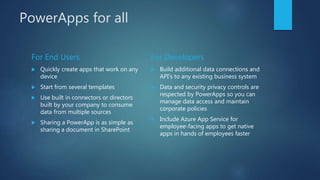
PowerApps for all
For End Users
 Quickly create apps that work on any
device
 Start from several templates
 Use built in connectors or directors
built by your company to consume
data from multiple sources
 Sharing a PowerApp is as simple as
sharing a document in SharePoint
For Developers
 Build additional data connections and
API’s to any existing business system
 Data and security privacy controls are
respected by PowerApps so you can
manage data access and maintain
corporate policies
 Include Azure App Service for
employee-facing apps to get native
apps in hands of employees faster
Where it’s still
lacking
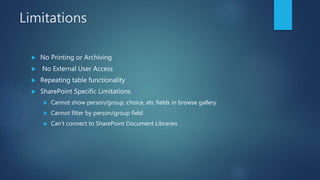
Limitations
 No Printing or Archiving
 No External User Access
 Repeating table functionality
 SharePoint Specific Limitations
 Cannot show person/group, choice, etc fields in browse gallery
 Cannot filter by person/group field
 Can’t connect to SharePoint Document Libraries
Working with PowerApps
KEY TOOLS
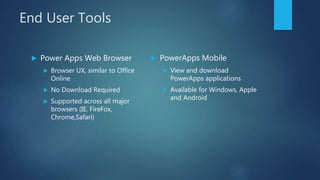
End User Tools
 Power Apps Web Browser
 Browser UX, similar to Office
Online
 No Download Required
 Supported across all major
browsers (IE, FireFox,
Chrome,Safari)
 PowerApps Mobile
 View and download
PowerApps applications
 Available for Windows, Apple
and Android
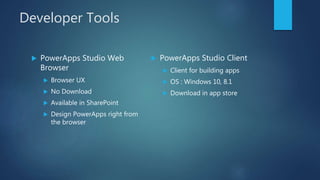
Developer Tools
 PowerApps Studio Web
Browser
 Browser UX
 No Download
 Available in SharePoint
 Design PowerApps right from
the browser
 PowerApps Studio Client
 Client for building apps
 OS : Windows 10, 8.1
 Download in app store
PowerApps DEMO
CREATE AN APP FROM A SHAREPOINT LIST
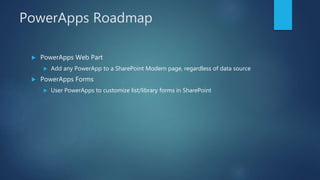
PowerApps Roadmap
 PowerApps Web Part
 Add any PowerApp to a SharePoint Modern page, regardless of data source
 PowerApps Forms
 User PowerApps to customize list/library forms in SharePoint
PowerApps seems
pretty cool….
But how do I
incorporate
business process
logic?
Microsoft
Flow
WORK LESS – DO MORE.
Flow in a Nutshell
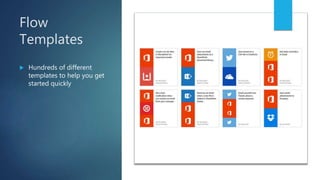
Flow
Templates
 Hundreds of different
templates to help you get
started quickly
Flow
Connectors
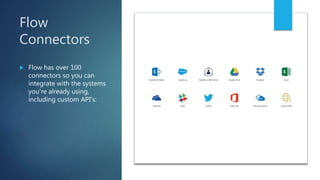
 Flow has over 100
connectors so you can
integrate with the systems
you’re already using,
including custom API’s:
Flow in SharePoint
 Pull data from external services into SharePoint lists and libraries
 Can be used for automation on top of SharePoint lists/libraries (item
added, etc)
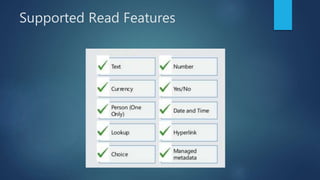
Supported Read Features
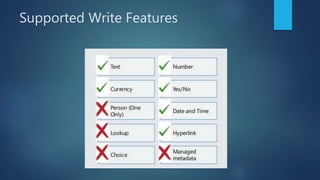
Supported Write Features
Is Flow a
SharePoint
Designer
Workflow
Replacement?
SharePoint Designer Rundown
 No new versions
 2013 Version Extended Support End of Life – 2023
 Will continue to work for SharePoint 2016/Online until EOL
Key Differences
SharePoint Designer
 Geared toward enterprise use
 Triggered from an event
 Permissions are based on list
 Requires SharePoint Designer to edit
 Tied to a given list or library so
anyone with permissions can edit
Flow
 Focus is on individual use
 Triggered by web hooks into external
systems
 Actions are intended to automate
business processes of end users
 Browser based editor
 Tied to the person who creates the
flow so only that person can edit
Flow DEMO
Thank You
@2016 ThriveFast | www.thrivefast.com @aprildunnam | www.sharepointsiren.com
Power Up your forms with PowerApps & Flow!
Additional Resources
 PowerApps Getting Started: powerapps.microsoft.com
 Feature Updates: powerapps.microsoft.com/en-us/blog/category/new-features/
 Feature Requests: powerapps.uservoice.com or flow.uservoice.com
 Office 365 Roadmap: products.office.com/en-us/business/office-365-roadmap
 Flow Getting Started: flow.microsoft.com/en-us/guided-learning/
 Slide Deck: slideshare.net/aprildunnam
 My Blog: www.sharepointsiren.com
 My Company: www.thrivefast.com
 Stratus Forms: stratusforms.com
Complete An Evaluation Form & Win
Your input is important!
You can access Evaluation Forms at:
http://TulsaTechFest.com

Intro to PowerApps and Flow

  • 1.
    Intro to PowerApps andFlow APRIL DUNNAM LEAD CONSULTANT/DEVELOPER THRIVEFAST
  • 3.
  • 4.
    April Dunnam SharePoint Developer Partner & Lead Consultant/Developer at ThriveFast  SharePoint junkie since 2007  Blogger, Speaker  Karaoke Queen @2017 ThriveFast | www.thrivefast.com @aprildunnam | www.sharepointsiren.com
  • 5.
    Objectives  High LevelUnderstanding of PowerApps  Features & Limitations  Use Cases  SharePoint integration  Templates & Creating your first PowerApp  High Level Understanding of Flow  Features & Limitations  Use Cases  Templates & Creating your first flow  Roadmap  Leave you wanting more!
  • 6.
  • 7.
    Could-based tool whichallows you to create online forms and mobile apps that interact with your data across platforms with little or no code
  • 8.
    Works hand inhand with to automate business processes
  • 9.
  • 10.
    The Deets  Formerlyknown as Project Siena  Originally meant to spin up Windows 8 desktop enterprise-specific apps quickly  Rebranded to PowerApps end of 2015  Embraced Windows 10 “one software for all devices” with mobile friendliness  Early 2016 Public beta released  Nov 1st 2016 – Public availability  Updates being pushed out every quarter
  • 11.
  • 12.
    “ ” Going forward, it’sa mobile first, cloud first world. SATYA NADELLA – MICROSOFT CEO Whether you like it or not, mobile and cloud are the future
  • 14.
    How do Iget PowerApps?
  • 15.
    Is included inyour subscription • Business Essentials • Business Premium • Education • Education Plus • Enterprise E1 • 365 Enterprise E3 • 365 Enterprise E5 **IF you have one of the following plans: More Info : https://powerapps.microsoft.com/en-us/tutorials/pricing-billing-skus/#licenses
  • 16.
    No problem! Stand-alone Subscriptionsare available. You’ll need one of these subscriptions and an on-premises gateway More Info: https://powerapps.microsoft.com/en-us/pricing/ But I don’t have Office 365
  • 17.
    Can I usethis with my on-prem systems?
  • 18.
    Yes! By settingup an On-Premises Data Gateway More Info : https://powerbi.microsoft.com/en-us/documentation/powerbi-gateway-onprem/
  • 19.
    So the burning question…… IsPowerApps a replacement for InfoPath?
  • 20.
  • 21.
    The bigger picture WHEREDOES POWERAPPS FIT IN?
  • 23.
    Forms Landscape InfoPath MicrosoftForms PowerApps Open Source Third Party Details The old standby released in 2003. XML based form designer/viewer Newly released Excel-based data gathering survey/quiz tool Mobile ready apps Tools like Stratus Forms enable users with HTML/JS experience to create dynamic and robust forms Tool such as Nintex, K2, InfoWise, etc extend form functionality Cons • No new versions • Support ending 2026 • Difficult to migrate • Limited use case. • Only good for surveys • Documentation is sparse • Apps can’t be place in the app store • Must be logged in to use • You need to be a developer • Expensive • Difficult to migrate Pros • Easy to use drag & drop interface • Multiple data sources • Offline use • Free • Responsive • Low learning curve • Low code • Universal browser/device access • Many More! • Free • Extensible • You pick the technology you like • Generally easy to learn. • Most are mobile friendly
  • 24.
  • 25.
    Do you know JavaScript/CSS/HTML? Yes NoDo you have $10k plus to spend on a tool? Is the form a survey or questionnaire? Forms PowerApps Stratus Forms (or other open source tool) Third Party Tool it is!Do you own a 3rd Party Form tool? Well Use it! Yes Hell No! I’ve got to put my kids through college! Yes Java Who? Yes No
  • 26.
  • 27.
    PowerApps for all ForEnd Users  Quickly create apps that work on any device  Start from several templates  Use built in connectors or directors built by your company to consume data from multiple sources  Sharing a PowerApp is as simple as sharing a document in SharePoint For Developers  Build additional data connections and API’s to any existing business system  Data and security privacy controls are respected by PowerApps so you can manage data access and maintain corporate policies  Include Azure App Service for employee-facing apps to get native apps in hands of employees faster
  • 30.
  • 31.
    Limitations  No Printingor Archiving  No External User Access  Repeating table functionality  SharePoint Specific Limitations  Cannot show person/group, choice, etc fields in browse gallery  Cannot filter by person/group field  Can’t connect to SharePoint Document Libraries
  • 32.
  • 33.
    End User Tools Power Apps Web Browser  Browser UX, similar to Office Online  No Download Required  Supported across all major browsers (IE, FireFox, Chrome,Safari)  PowerApps Mobile  View and download PowerApps applications  Available for Windows, Apple and Android
  • 34.
    Developer Tools  PowerAppsStudio Web Browser  Browser UX  No Download  Available in SharePoint  Design PowerApps right from the browser  PowerApps Studio Client  Client for building apps  OS : Windows 10, 8.1  Download in app store
  • 35.
    PowerApps DEMO CREATE ANAPP FROM A SHAREPOINT LIST
  • 36.
    PowerApps Roadmap  PowerAppsWeb Part  Add any PowerApp to a SharePoint Modern page, regardless of data source  PowerApps Forms  User PowerApps to customize list/library forms in SharePoint
  • 37.
    PowerApps seems pretty cool…. Buthow do I incorporate business process logic?
  • 38.
  • 40.
    Flow in aNutshell
  • 41.
    Flow Templates  Hundreds ofdifferent templates to help you get started quickly
  • 42.
    Flow Connectors  Flow hasover 100 connectors so you can integrate with the systems you’re already using, including custom API’s:
  • 43.
    Flow in SharePoint Pull data from external services into SharePoint lists and libraries  Can be used for automation on top of SharePoint lists/libraries (item added, etc)
  • 44.
  • 45.
  • 46.
  • 47.
    SharePoint Designer Rundown No new versions  2013 Version Extended Support End of Life – 2023  Will continue to work for SharePoint 2016/Online until EOL
  • 48.
    Key Differences SharePoint Designer Geared toward enterprise use  Triggered from an event  Permissions are based on list  Requires SharePoint Designer to edit  Tied to a given list or library so anyone with permissions can edit Flow  Focus is on individual use  Triggered by web hooks into external systems  Actions are intended to automate business processes of end users  Browser based editor  Tied to the person who creates the flow so only that person can edit
  • 49.
  • 50.
    Thank You @2016 ThriveFast| www.thrivefast.com @aprildunnam | www.sharepointsiren.com
  • 51.
    Power Up yourforms with PowerApps & Flow!
  • 52.
    Additional Resources  PowerAppsGetting Started: powerapps.microsoft.com  Feature Updates: powerapps.microsoft.com/en-us/blog/category/new-features/  Feature Requests: powerapps.uservoice.com or flow.uservoice.com  Office 365 Roadmap: products.office.com/en-us/business/office-365-roadmap  Flow Getting Started: flow.microsoft.com/en-us/guided-learning/  Slide Deck: slideshare.net/aprildunnam  My Blog: www.sharepointsiren.com  My Company: www.thrivefast.com  Stratus Forms: stratusforms.com
  • 53.
    Complete An EvaluationForm & Win Your input is important! You can access Evaluation Forms at: http://TulsaTechFest.com

Editor's Notes

  • #6 First thing to note is this is a 101 level course. PowerApps and Flow are fairly new tools so this session is intended to give you a basic understanding of what you can do with these tools so that you can go back and do some more research and see if you can use them for your next form/business process need. There are some elements that I will touch on that even I haven’t had hands-on experience with.
  • #8 The short and sweet Wikipeia blurb about Power apps is (read slide).
  • #9 PowerApps works hand in hand with Microsoft Flow to provide you the ability to build mobile friendly applications and automate business processes. We will briefly touch on Flow a little later.
  • #10 I’m going to pick on InfoPath a lot during this session. So in short, PowerApps takes you from ugly desktop-only InfoPath to a beautify mobile friendly app
  • #11 As you can see PowerApps is fairly new to the public, it’s still an infant about 8months old. There is a very active PowerApps community and Microsoft appears to be doing a good job with pushing out updates fairly regularly.
  • #13 We all know it whether we want to accept it or not. And the head of Microsoft even said it. It’s mobile first, cloud first. And unfortunately your millions of InfoPath forms are not going to take you into the mobile first, cloud first future. Which is why it is important to start looking into other options such as PowerApps.
  • #14 Bridgers the developer end user gap. How many of you are developers? So if you are a developer and your company has the time and budget for custom software development then that’s great. But what about that gap? What about the situation where you need a simple time off request form with an approval workflow? And you don’t have the budget to build some monolithic app and an off-the shelf app just doesn’t cut it? There has always been this gap where it doesn’t make sense to build something with custom code or to purcahse a product. Commonly end users turn to basic SharePoint forms or InfoPath to fill that gap. But as we just learned in the previous slide, the future is mobile and cloud first and frankly InfoPath isn’t going to get you there. What if you could empower your end users to create their own mobile friendly apps to solve these common business needs? This is why PowerApps is important. PowerApps is important because it eases the strain on developers and company budget and puts the power into the hand of end users to create responsive and intuitive apps to solve business processes.
  • #16 If you have any of these O365 subscriptions, you’re in luck, you already have PowerApps!
  • #19 I am not an expect whatsoever when it comes to the hybrid set up for PowerApps. I know it is possible and I can point you to the resource to learn more.

  • #21 It’s too early to tell right now if PowerApps is for sure going to be the end all beat all replacement for InfoPath. I don’t want to speak too soon. When they first announcement InfoPath was being discontinued they announced Fossil as the big replacement but as we all know nothing ever came of that. I’m hopeful that PowerApps will be a different story. They have a very active community with over 300 ideas that have been submitted, 129 of which are in the “planned” status so that has me a little optimistic. So to answer your question, I wouldn’t go re-building all of your InfoPath forms in PowerApps quite yet. But if you have some forms that make sense to move over or if you have the need for new forms development I’d definitely review PowerApps and see if it might be a fit. They are releasing new features every quarter. They just released some big improvements to the SharePoint integration piece a couple months ago.

  • #23 It’s important to step back and think of the bigger picture with PowerApps. Rapid Application Development Tool Empowers Power Users who may not know how to code but have a good understanding of the business needs and what they want to accomplish It’s also friendly for developers because it allows developers to write custom api’s, azure functions, etc for their power users to consume within PowerApps Isn’t limited to getting your data from just SharePoint, you can connect to a number of different data sources.
  • #24 So if we look at the general landscape of forms within the Microsoft stack we see several options. I didn’t list it here but you also have you basic out-of-the-box SharePoint forms as an option in here as well. The old standby is InfoPath but as we said before, that isn’t going to bring you into the mobile first future so while it was good while it lasted you will need to phase that out sooner rather than later. Microsoft Forms is a fairly new tool that Microsoft released in their quest to beat Google in the Education space. It’s really just a survey/questionaire tool so definitely not a true forms replacement. But if you do have a need for a survey or questionnaire I’d definitely check Forms out first. There are a lot of Open Source options available for building forms. My personal favorite and the one I’ve used the most for forms development within SharePoint is Stratus Forms. It’s a lightweight library that allows you to create rich/powerful/responsive forms using HTML/CSS/JavaScript. The main negative with solutions such as these is it requires a developer or someone with at least some knowledge in JS to build them out. And lastly there are your third party tools. They can be cool but they are very costly.
  • #26 Here’s my rough attempt at a decision chart.
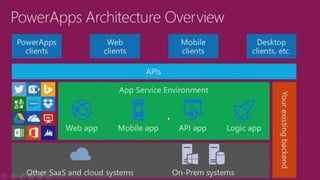
  • #28 PowerApps is really geared toward empowering the end user to create powerful mobile enabled applications. But the beauty of it is that it is also extensible. Developers can build out custom API’s to existing business systems for PowerApps to consume as well as create Azure functions to work within PowerApps.
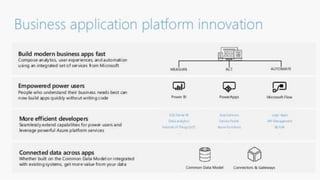
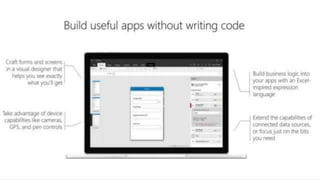
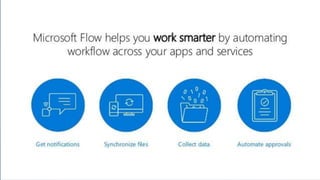
  • #29 This is a great InfoGraphic that really summarizes what powerapps is and it’s main benefits. PowerApps empowers end users to make applications to evolve their business processes in this mobile first world. A visual interface Low learning curve if you are familiar with Excel as it uses Excel inspired expression language Can connect to multiple data sources Use device capabilities like camera, gps, pen control
  • #32 PowerApps i
  • #36 Do a simple demo of creating a vacation request app. SortByColumns(Filter(Vacation, Requestor.Email = User().Email), “To”, If(SortDescending1, Descending, Ascending)) SortByColumns(Filter(Vacation, Requestor.Email = User().Email,StartsWith(Title, TextSearchBox1.Text)), "ID", If(SortDescending1, Descending, Ascending))
  • #41 Flow is very similar to IFFITT.
  • #50 Do basic demo of a flow. Go to ThriveFast Proposals Library. Click the Flow Button. Go to more templates. Use “when an item in a sharepoint list is modified send an email” template