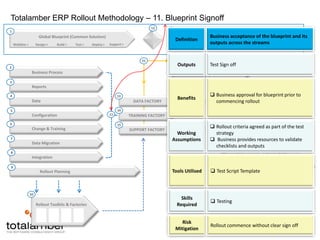
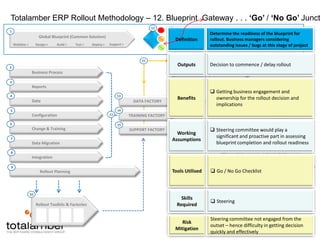
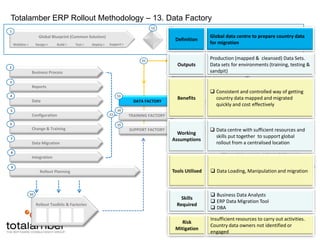
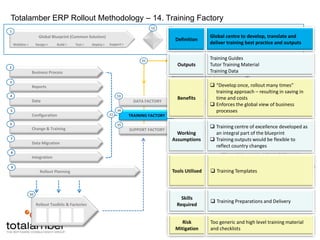
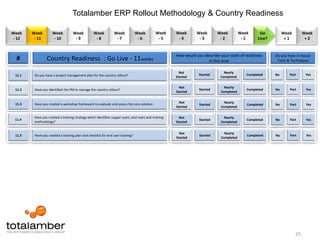
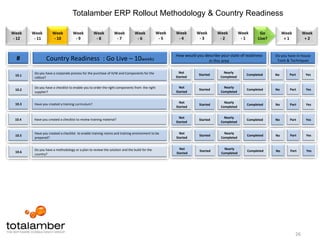
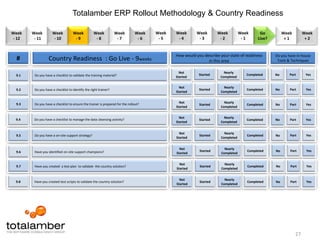
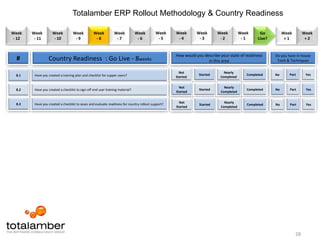
High Performance. Guaranteed.Totalamber ERP Rollout Methodology& Country Readiness Toolkit
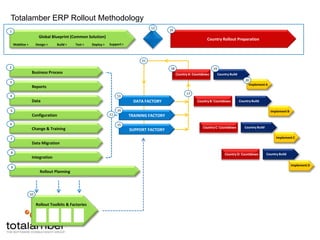
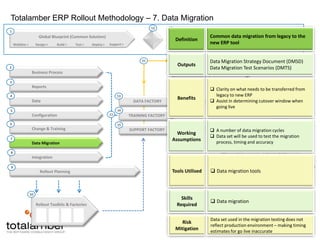
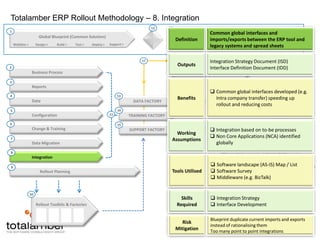
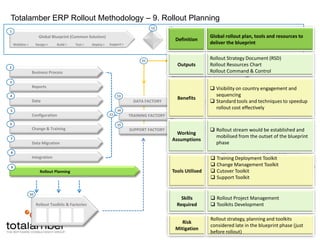
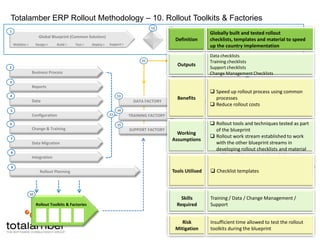
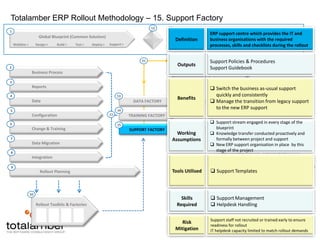
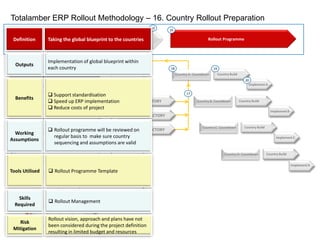
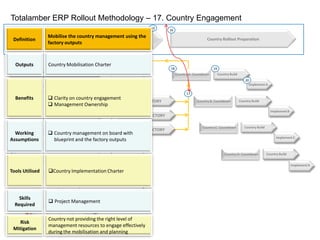
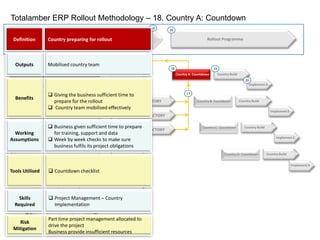
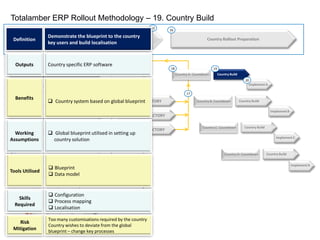
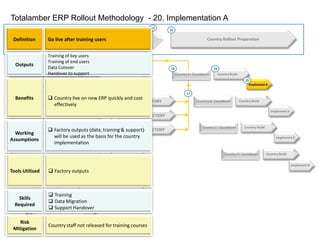
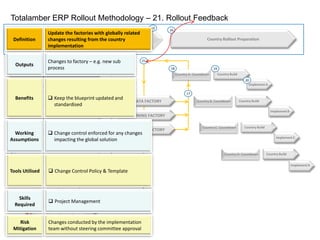
Totalamber ERP Rollout Methodology1Global Blueprint (Common Solution)Business ProcessReportsDataConfigurationChange & TrainingData MigrationIntegrationRollout PlanningDATA FACTORYTRAINING FACTORYSUPPORT FACTORYCountry BuildCountry BuildCountry BuildCountry BuildRollout Toolkits & FactoriesSupport >Deploy >Test >Build >Design >Mobilise >Country Rollout Preparation2Country A: Countdown 3Implement A4Country B: Countdown 5Implement B1113141517181920121621106Country C: Countdown Implement C78Country D: Countdown Implement D9
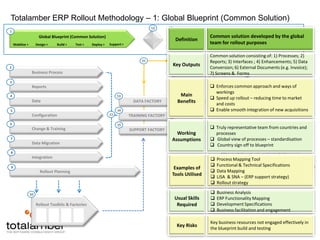
Totalamber ERP Rollout Methodology – 1: Global Blueprint (Common Solution)1Global Blueprint (Common Solution)Support >Deploy >Test >Build >Design >Mobilise >Country Rollout Preparation21819Business ProcessCountry BuildCountry A: Countdown DefinitionCommon solution developed by the global team for rollout purposes203Implement AReports21134DataDATA FACTORYCountry BuildCountry B: Countdown Key OutputsCommon solution consisting of: 1) Processes; 2) Reports; 3) Interfaces ; 4) Enhancements; 5) Data Conversion; 6) External Documents (e.g. Invoice); 7) Screens &  Forms145Implement B11121621ConfigurationTRAINING FACTORY615Country BuildCountry C: Countdown Change & TrainingSUPPORT FACTORYMain BenefitsEnforces common approach and ways of workings
Speed up rollout – reducing time to market and costs
Enable smooth integration of new acquisitionsImplement C7Data Migration8Country BuildCountry D: Countdown IntegrationImplement D9Rollout PlanningWorking AssumptionsTruly representative team from countries and processes
Global view of processes – standardisation
Country sign off to blueprint 10Rollout Toolkits & FactoriesExamples of Tools UtilisedProcess Mapping Tool
Functional & Technical Specifications
Data Mapping
LiSA  & SNA – (ERP support strategy)
Rollout strategyUsual Skills RequiredBusiness Analysis
ERP Functionality Mapping
Development Specifications
Business facilitation and engagementKey RisksKey business resources not engaged effectively in the blueprint build and testing
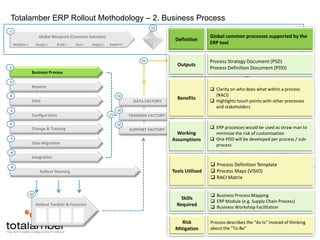
Totalamber ERP Rollout Methodology – 2. Business Process1Global Blueprint (Common Solution)Support >Deploy >Test >Build >Design >Mobilise >Country Rollout Preparation21819Business ProcessCountry BuildCountry A: Countdown DefinitionGlobal common processes supported by the ERP tool203Implement AReports21134DataDATA FACTORYCountry BuildCountry B: Countdown OutputsProcess Strategy Document (PSD)Process Definition Document (PDD)145Implement B11121621ConfigurationTRAINING FACTORY615Country BuildCountry C: Countdown Change & TrainingSUPPORT FACTORYBenefitsClarity on who does what within a process (RACI)
Highlights touch points with other processes and stakeholdersImplement C7Data Migration8Country BuildCountry D: Countdown IntegrationImplement D9Rollout PlanningWorking AssumptionsERP processes would be used as straw man to minimise the risk of customisation
One PDD will be developed per process / sub-process10Rollout Toolkits & FactoriesTools UtilisedProcess Definition Template
Process Maps (VISIO)
RACI MatrixSkills RequiredBusiness Process Mapping
ERP Module (e.g. Supply Chain Process)
Business Workshop FacilitationRisk MitigationProcess describes the “As-Is” instead of thinking about the “To-Be”
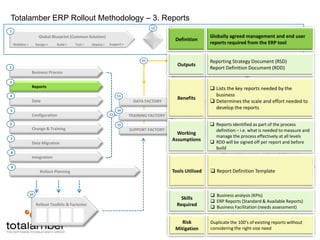
Totalamber ERP Rollout Methodology – 3. Reports1Global Blueprint (Common Solution)Support >Deploy >Test >Build >Design >Mobilise >Country Rollout Preparation21819Business ProcessCountry BuildCountry A: Countdown DefinitionGlobally agreed management and end user reports required from the ERP tool203Implement AReports21134DataDATA FACTORYCountry BuildCountry B: Countdown OutputsReporting Strategy Document (RSD)Report Definition Document (RDD)145Implement B11121621ConfigurationTRAINING FACTORY615Country BuildCountry C: Countdown Change & TrainingSUPPORT FACTORYBenefitsLists the key reports needed by the business
Determines the scale and effort needed to develop the reportsImplement C7Data Migration8Country BuildCountry D: Countdown IntegrationImplement D9Rollout PlanningWorking AssumptionsReports identified as part of the process definition – i.e. what is needed to measure and manage the process effectively at all levels
RDD will be signed off per report and before build10Rollout Toolkits & FactoriesTools UtilisedReport Definition TemplateSkills RequiredBusiness analysis(KPIs)
ERP Reports (Standard & Available Reports)
Business Facilitation (needs assessment)Risk MitigationDuplicate the 100’s of existing reports without considering the right-size need
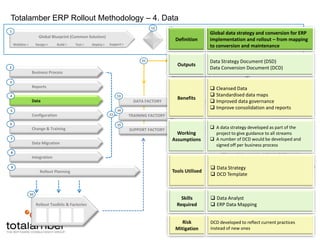
Totalamber ERP Rollout Methodology – 4. Data1Global Blueprint (Common Solution)Support >Deploy >Test >Build >Design >Mobilise >Country Rollout Preparation21819Business ProcessCountry BuildCountry A: Countdown DefinitionGlobal data strategy and conversion for ERP implementation and rollout – from mapping to conversion and maintenance203Implement AReports21134DataDATA FACTORYCountry BuildCountry B: Countdown OutputsData Strategy Document (DSD)Data Conversion Document (DCD)145Implement B11121621ConfigurationTRAINING FACTORY615Country BuildCountry C: Countdown Change & TrainingSUPPORT FACTORYBenefitsCleansed Data
Standardised data maps
Improved data governance
Improve consolidation and reportsImplement C7Data Migration8Country BuildCountry D: Countdown IntegrationImplement D9Rollout PlanningWorking AssumptionsA data strategy developed as part of the project to give guidance to all streams
A number of DCD would be developed and signed off per business process 10Rollout Toolkits & FactoriesTools UtilisedData Strategy
DCD TemplateSkills RequiredData Analyst
ERP Data MappingRisk MitigationDCD developed to reflect current practices instead of new ones
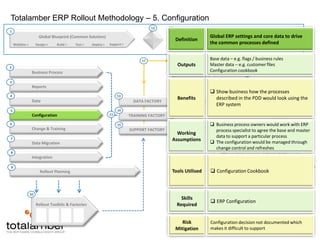
Totalamber ERP Rollout Methodology – 5. Configuration1Global Blueprint (Common Solution)Support >Deploy >Test >Build >Design >Mobilise >Country Rollout Preparation21819Business ProcessCountry BuildCountry A: Countdown DefinitionGlobal ERP settings and core data to drive the common processes defined203Implement AReports21134DataDATA FACTORYCountry BuildCountry B: Countdown OutputsBase data – e.g. flags / business rulesMaster data – e.g. customer filesConfiguration cookbook145Implement B11121617ConfigurationTRAINING FACTORY615Country BuildCountry C: Countdown Change & TrainingSUPPORT FACTORYBenefitsShow business how the processes described in the PDD would look using the ERP systemImplement C7Data Migration8Country BuildCountry D: Countdown IntegrationImplement D9Rollout PlanningWorking AssumptionsBusiness process owners would work with ERP process specialist to agree the base and master data to support a particular process
The configuration would be managed through change control and refreshes10Rollout Toolkits & FactoriesTools UtilisedConfiguration CookbookSkills RequiredERP ConfigurationRisk MitigationConfiguration decision not documented which makes it difficult to support
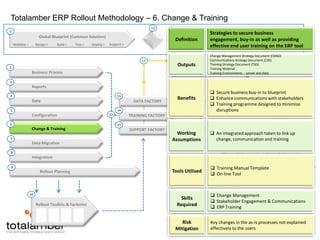
Totalamber ERP Rollout Methodology – 6. Change & Training1Global Blueprint (Common Solution)Support >Deploy >Test >Build >Design >Mobilise >Country Rollout Preparation21819Business ProcessCountry BuildCountry A: Countdown DefinitionStrategies to secure business engagement, buy-in as well as providing effective end user training on the ERP tool203Implement AReports21134DataDATA FACTORYCountry BuildCountry B: Countdown OutputsChange Management Strategy Document (CMSD)Communications Strategy Document (CSD)Training Strategy Document (TSD)Training MaterialTraining Environments  - server and data145Implement B11121617ConfigurationTRAINING FACTORY615Country BuildCountry C: Countdown Change & TrainingSUPPORT FACTORYBenefitsSecure business buy-in to blueprint

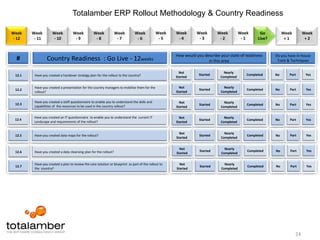
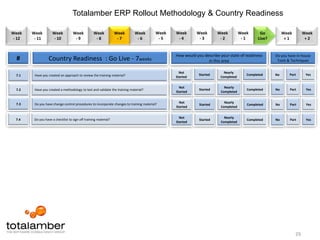
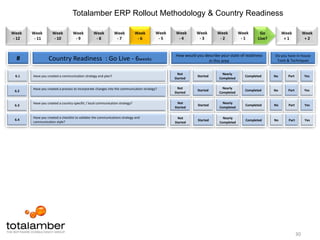
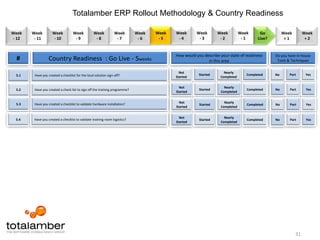
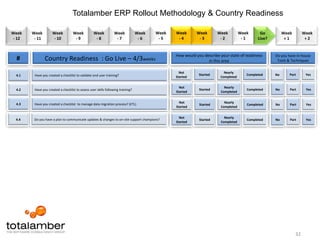
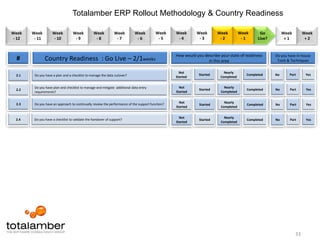
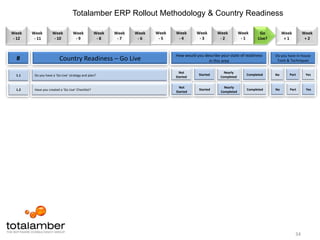
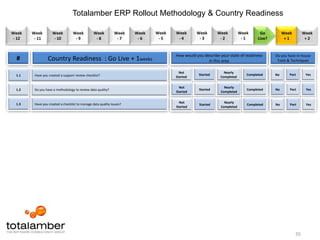
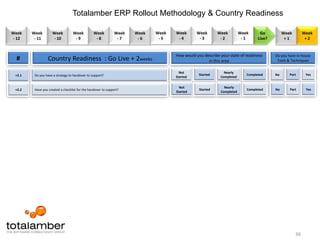
Country Readiness Tool-kit

  • 1.
    High Performance. Guaranteed.TotalamberERP Rollout Methodology& Country Readiness Toolkit
  • 2.
    Totalamber ERP RolloutMethodology1Global Blueprint (Common Solution)Business ProcessReportsDataConfigurationChange & TrainingData MigrationIntegrationRollout PlanningDATA FACTORYTRAINING FACTORYSUPPORT FACTORYCountry BuildCountry BuildCountry BuildCountry BuildRollout Toolkits & FactoriesSupport >Deploy >Test >Build >Design >Mobilise >Country Rollout Preparation2Country A: Countdown 3Implement A4Country B: Countdown 5Implement B1113141517181920121621106Country C: Countdown Implement C78Country D: Countdown Implement D9
  • 3.
    Totalamber ERP RolloutMethodology – 1: Global Blueprint (Common Solution)1Global Blueprint (Common Solution)Support >Deploy >Test >Build >Design >Mobilise >Country Rollout Preparation21819Business ProcessCountry BuildCountry A: Countdown DefinitionCommon solution developed by the global team for rollout purposes203Implement AReports21134DataDATA FACTORYCountry BuildCountry B: Countdown Key OutputsCommon solution consisting of: 1) Processes; 2) Reports; 3) Interfaces ; 4) Enhancements; 5) Data Conversion; 6) External Documents (e.g. Invoice); 7) Screens & Forms145Implement B11121621ConfigurationTRAINING FACTORY615Country BuildCountry C: Countdown Change & TrainingSUPPORT FACTORYMain BenefitsEnforces common approach and ways of workings
  • 4.
    Speed up rollout– reducing time to market and costs
  • 5.
    Enable smooth integrationof new acquisitionsImplement C7Data Migration8Country BuildCountry D: Countdown IntegrationImplement D9Rollout PlanningWorking AssumptionsTruly representative team from countries and processes
  • 6.
    Global view ofprocesses – standardisation
  • 7.
    Country sign offto blueprint 10Rollout Toolkits & FactoriesExamples of Tools UtilisedProcess Mapping Tool
  • 8.
  • 9.
  • 10.
    LiSA &SNA – (ERP support strategy)
  • 11.
    Rollout strategyUsual SkillsRequiredBusiness Analysis
  • 12.
  • 13.
  • 14.
    Business facilitation andengagementKey RisksKey business resources not engaged effectively in the blueprint build and testing
  • 15.
    Totalamber ERP RolloutMethodology – 2. Business Process1Global Blueprint (Common Solution)Support >Deploy >Test >Build >Design >Mobilise >Country Rollout Preparation21819Business ProcessCountry BuildCountry A: Countdown DefinitionGlobal common processes supported by the ERP tool203Implement AReports21134DataDATA FACTORYCountry BuildCountry B: Countdown OutputsProcess Strategy Document (PSD)Process Definition Document (PDD)145Implement B11121621ConfigurationTRAINING FACTORY615Country BuildCountry C: Countdown Change & TrainingSUPPORT FACTORYBenefitsClarity on who does what within a process (RACI)
  • 16.
    Highlights touch pointswith other processes and stakeholdersImplement C7Data Migration8Country BuildCountry D: Countdown IntegrationImplement D9Rollout PlanningWorking AssumptionsERP processes would be used as straw man to minimise the risk of customisation
  • 17.
    One PDD willbe developed per process / sub-process10Rollout Toolkits & FactoriesTools UtilisedProcess Definition Template
  • 18.
  • 19.
  • 20.
    ERP Module (e.g.Supply Chain Process)
  • 21.
    Business Workshop FacilitationRiskMitigationProcess describes the “As-Is” instead of thinking about the “To-Be”
  • 22.
    Totalamber ERP RolloutMethodology – 3. Reports1Global Blueprint (Common Solution)Support >Deploy >Test >Build >Design >Mobilise >Country Rollout Preparation21819Business ProcessCountry BuildCountry A: Countdown DefinitionGlobally agreed management and end user reports required from the ERP tool203Implement AReports21134DataDATA FACTORYCountry BuildCountry B: Countdown OutputsReporting Strategy Document (RSD)Report Definition Document (RDD)145Implement B11121621ConfigurationTRAINING FACTORY615Country BuildCountry C: Countdown Change & TrainingSUPPORT FACTORYBenefitsLists the key reports needed by the business
  • 23.
    Determines the scaleand effort needed to develop the reportsImplement C7Data Migration8Country BuildCountry D: Countdown IntegrationImplement D9Rollout PlanningWorking AssumptionsReports identified as part of the process definition – i.e. what is needed to measure and manage the process effectively at all levels
  • 24.
    RDD will besigned off per report and before build10Rollout Toolkits & FactoriesTools UtilisedReport Definition TemplateSkills RequiredBusiness analysis(KPIs)
  • 25.
    ERP Reports (Standard& Available Reports)
  • 26.
    Business Facilitation (needsassessment)Risk MitigationDuplicate the 100’s of existing reports without considering the right-size need
  • 27.
    Totalamber ERP RolloutMethodology – 4. Data1Global Blueprint (Common Solution)Support >Deploy >Test >Build >Design >Mobilise >Country Rollout Preparation21819Business ProcessCountry BuildCountry A: Countdown DefinitionGlobal data strategy and conversion for ERP implementation and rollout – from mapping to conversion and maintenance203Implement AReports21134DataDATA FACTORYCountry BuildCountry B: Countdown OutputsData Strategy Document (DSD)Data Conversion Document (DCD)145Implement B11121621ConfigurationTRAINING FACTORY615Country BuildCountry C: Countdown Change & TrainingSUPPORT FACTORYBenefitsCleansed Data
  • 28.
  • 29.
  • 30.
    Improve consolidation andreportsImplement C7Data Migration8Country BuildCountry D: Countdown IntegrationImplement D9Rollout PlanningWorking AssumptionsA data strategy developed as part of the project to give guidance to all streams
  • 31.
    A number ofDCD would be developed and signed off per business process 10Rollout Toolkits & FactoriesTools UtilisedData Strategy
  • 32.
  • 33.
    ERP Data MappingRiskMitigationDCD developed to reflect current practices instead of new ones
  • 34.
    Totalamber ERP RolloutMethodology – 5. Configuration1Global Blueprint (Common Solution)Support >Deploy >Test >Build >Design >Mobilise >Country Rollout Preparation21819Business ProcessCountry BuildCountry A: Countdown DefinitionGlobal ERP settings and core data to drive the common processes defined203Implement AReports21134DataDATA FACTORYCountry BuildCountry B: Countdown OutputsBase data – e.g. flags / business rulesMaster data – e.g. customer filesConfiguration cookbook145Implement B11121617ConfigurationTRAINING FACTORY615Country BuildCountry C: Countdown Change & TrainingSUPPORT FACTORYBenefitsShow business how the processes described in the PDD would look using the ERP systemImplement C7Data Migration8Country BuildCountry D: Countdown IntegrationImplement D9Rollout PlanningWorking AssumptionsBusiness process owners would work with ERP process specialist to agree the base and master data to support a particular process
  • 35.
    The configuration wouldbe managed through change control and refreshes10Rollout Toolkits & FactoriesTools UtilisedConfiguration CookbookSkills RequiredERP ConfigurationRisk MitigationConfiguration decision not documented which makes it difficult to support
  • 36.
    Totalamber ERP RolloutMethodology – 6. Change & Training1Global Blueprint (Common Solution)Support >Deploy >Test >Build >Design >Mobilise >Country Rollout Preparation21819Business ProcessCountry BuildCountry A: Countdown DefinitionStrategies to secure business engagement, buy-in as well as providing effective end user training on the ERP tool203Implement AReports21134DataDATA FACTORYCountry BuildCountry B: Countdown OutputsChange Management Strategy Document (CMSD)Communications Strategy Document (CSD)Training Strategy Document (TSD)Training MaterialTraining Environments - server and data145Implement B11121617ConfigurationTRAINING FACTORY615Country BuildCountry C: Countdown Change & TrainingSUPPORT FACTORYBenefitsSecure business buy-in to blueprint