Automating Your Tasks With
Microsoft Flow
Who is She ?
 Senior Consultant at CapGemini,Mumbai
 8 years of SharePoint experience
 MCSD,MCSE,MCSA
 Speaker at SharePoint Events
 Book – Reporting in TFS
 Love Cooking, Dancing and Singing
145
countries160,000 +
creators
71,000 +
organizations
Secured
Integrated
Fast
Iterative
Easy
Cross-
platform
Agenda
Overview Building Blocks Demo
Administration Pricing and Future References
Application Platform (PowerApps, Power BI Embedded, Microsoft Flow) & Common Data Model
Microsoft AppSource
Field Service
Sales
Customer
Service
Project
Service
Automation
Marketing Operations
Azure
Brilliant Cloud Components
Business Application Platform
May 2016
June 2016
July 2016
August 2016
September 2016
October 2016
November 2016
Yeah, Flows in the cloud works smart for your tasks,
Like a FLOWer in the farm, refreshes your soul !
The Journey - April 29th !
May 2016
June 2016
July 2016
August 2016
September 2016
October 2016
November 2016
Ways to Use ?
Get Notification Synchronize files Collect data Automate Approvals
Get highly important
email notification in
your mobile sent by
your Boss.
Copy files from one
drive business to
SharePoint team sites.
Integrating tweets with
Excel or SQL tables.
Automate the approval
process such as moving
the document to final
folder if its approved.
74 Services to
be connected !
And The Template !
 New templates are being added every week
 Description about template functions
 Services require to be signed in
 Template statistics
 Sharable options
Flow
in
Designer !
441 Available Templates !
Approval
Flows
Button Flows
Collecting
Data Flows
Email Flows
Events and
Calendar
Flows
Mobile Flows
Notification
Flows
Productivity
Flows
Social Media
Flows
Sync Flows
Approval Flows
Button Flows
Collecting Data Flows
Email Flows
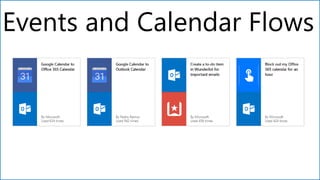
Events and Calendar Flows
Building Blocks !
Connectors
Triggers
Actions
Conditions
Loops
Connectors
Triggers
Actions
Conditions
Yes, not finished yet !
 Nested conditionals
 Apply To Each
 Do-Until
 Compose string
variables
 Add comments to
steps
 Scopes
Nested Conditions
Apply to Each
Do-until Loop
ConnectionsConnections
Connections
Gateways
G
a
t
e
w
a
y
s
1. Choose
Existing
Template OR
Blank
Template
2. Connect
With Services
3.Configure
Your Flow
Three Easy Steps !
Demo – Collect SPFest Contributions
“SharePointFest”
1. When new tweet is posted about the your project contribution – Add data in Excel file
under One Drive for Business.
2. Excel file called “SharePointFestContributions.xlsx” having predefined columns to store
tweets data and team leads mailing list to be used to sent an emails later.
Part 1
1. Tweeted by
2. User Description
3. User Location
4. Tweet Text
5. Retweet count
6. Link Item
7. Mailing list
Store Data
SharePoint Fest
Contributions.xlsx
Flow in Designer –
Collect SPFest Contributions:
Demo – Inspirations Of The Week
Approved
Rejected
Entity
Popular Inspirations
Mailing List
From Excel Sheet
Inform Team
Leaders
Store Data
tweet count > 5
1. Every Week Flow sends popular tweets that have re tweet count greater than or equal to 5 to manager
for his/her opinion.
2. If approved, then add data ( popular tweets ) into Common Model Data else send the information about
rejection to team leaders using mailing list stored in excel file.
Part 2
Flow in Designer –
Inspirations Of The Week
Demo – Promote Inspiration
1. View Popular inspirations in App from Power Apps connected via CDM Entity.
2. Store popular data into SharePoint list and post to yammer to convey the inspiration you like within the
organization in specific yammer group “Inspiration of the Week” to promote the contribution.
Part 3
Flow in Designer – Promote Inspiration
Supported for iPhone and Android devices.
Single Sign-on implementation.
Create, Monitor and Manage the Flow.
Button Flows for repetitive tasks.
Turn on/Off flows.
Mobile Flow
Embed Flow templates to your website/App
Integrate Flow with Power Apps and Power BI
Call Flow on trigger of RESTAPI
Build Flow using custom API
What’s
More ?
Embedded
Flow Templates
Flow, PowerApps and Power BI Integrations
Call Flow on trigger of RESTAPI
Custom API to use own service
Flow Business Cases
Admin Center
Environments
b
Contoso Australia
Apps Flows CDM
 Easily manage enterprise scale-out of applications and data.
 Move solutions across environments with packages.
b
Contoso Canada
Contoso Corp.
b
Contoso Australia
Apps Flows CDM
b
Contoso Australia
Apps Flows CDM
Contoso Australia
Apps Flows CDM
b
Contoso Australia
Apps Flows CDM
Contoso Canada
Apps Flows CDM
b
Contoso Australia
Apps Flows CDM
Contoso Canada
b
Contoso Australia
Apps Flows CDM
Contoso USA
Apps Flows CDM
Deployments
Environment can be created by Environment administrator.
Use Default environment to connect with on
premises data.
Keep resources to be used in the same
environment.
Select the same environment where Common Data
Service database resides to connect with the same.
Be a maker or pick a different environment to create a
flow.
Key factors to
create an
Environment
Data
Groups and
Policies
I am a “Business Data Only”
And I am “No
Business Data
Allowed”
 Categorize these services into one of two data groups, "Business data only" and "No business data
allowed".
 Users will be prevented from creating flows and apps that combine services from the "Business data
only" and "No business data allowed" data groups.
Data Groups Categories
Integration Service ?
Flow is built upon Logic Apps !
 Flow is powered by Logic Apps
 They have the same workflow designer
 Connectors that work in one can also work in the other.
 Logic Apps can always do everything that Flow can do
 Flow has additional UX / experiences to simplify experience
 Uses the public APIs and standard runtime
 Flow and Logic apps can be connected to each other via HTTP card.
Flow
Logic apps
Managed APIs
or Custom APIs
Uses the Public REST
APIs for management
Calls into at runtime
Differences
Flow Logic Apps Functions and Web jobs
Built upon Logic Apps Azure App Service Azure App Service
Audience office workers, business users IT pros, developers developers
Scenarios Self-service Mission-critical Background Service Creation
Design Tool In-browser, UI only In-browser and Visual Studio In-browser and Visual Studio
DevOps Ad-hoc, develop in production source control, testing, support,
and automation and
manageability in Azure Resource
Management
Source control, authentication,
and monitoring, NuGet and NPM
support and manageability
in Azure Resource Management
Admin Experience https://flow.microsoft.com https://portal.azure.com https://portal.azure.com
Security Standard practices: data
sovereignty, encryption at
rest for sensitive data, etc.
Security assurance of
Azure: Azure Security, Security
Center, audit logs, and more.
Security assurance of Azure: Azure
Security, Security Center, audit
logs, and more.
Billing and Pricing ?
Flow Free
Flow for Office 365
and
Flow for Dynamics 365 Flow Plan 1
Flow Plan 2
Generel Features
Flow Free Flow for Office
365 and Flow for
Dynamics 365
Flow Plan 1 -
$5.00/user/mo
Flow Plan 2 -
$15.00/user/mo
Create unlimited automated workflows and
powerful multi-step processes
Maximum number of runs per month (per
user)
750 2,000 4,500 15,000
Maximum flow frequency 15 minutes 5 minutes 3 minutes 1 minute
Access your flows on native apps for iOS
and Android
Create flows from thousands of templates
available in the public gallery
Publish flows to the public gallery
SLA
Not
available
99.9% 99.9% 99.9%
Connectivity Features
Flow
Free
Flow for Office
365 and Flow for
Dynamics 365
Flow Plan 1 -
$5.00/user/mo
Flow Plan 2 -
$15.00/user/mo
Connect to cloud-based services like
Dropbox, Twitter, and Excel
Use premium services like Salesforce
and Common Data Service
Access on-premises data using on-
premises data gateway
Create custom APIs to connect to your
own systems (per user)
1 1 Unlimited Unlimited
Management Features
Flow Free Flow for Office
365 and Flow for
Dynamics 365
Flow Plan 1 -
$5.00/user/mo
Flow Plan 2 -
$15.00/user/mo
Create environments to deploy your
flows (per user)
2
Collaborate with co-workers on flows
(coming soon)
View flow usage across your company
(coming soon)
Establish company policies regarding the
usage of different connections and flows
Microsoft Flow accounts may have up to 50 flows each,15
custom APIs, 20 connections per API and 100 connections total.
External Connection throttling may fail the flow
Too many environments are difficult for users
across your organization to share resources.
Flows cannot write to Lookup, Choice, People and
Groups, and Taxonomy fields in SharePoint lists.
It does not currently support email addresses ending in
.gov and .mil.
Limitations
Support for images, attachments, and multi-value fields
Flow integration for document libraries
Flows for selected items in SharePoint
Enhanced mobile Flow integration
Windows Phone support
Publishing the flow within the organization, co-author the
flow and custom groups in DLP
Coming
Soon !
SharePoint Workflow Microsoft Flow
 Complex Business Logic
 SharePoint Context
 Daily Business Process
 Cloud Context
References - I
Description Link
Getting Started
https://flow.microsoft.com/en-us/documentation/getting-started/
Webinars
https://flow.microsoft.com/en-us/blog/category/webinars/
Channel 9
1. https://channel9.msdn.com/Events/Ignite/2016/BRK3311
2. https://channel9.msdn.com/Events/Ignite/2016/BRK2160
YouTube Channel
https://www.youtube.com/watch?v=B1QUo3GiO9Y&index=1&list=PL8nfc9haGeb55I9wL9Q
nWyHp3ctU2_ThF
Flow Updates https://flow.microsoft.com/en-us/blog/category/product-updates/
Mobile App https://www.youtube.com/watch?v=XN5FpyAhbc0&feature=youtu.be
More Help https://flow.microsoft.com/en-us/support/
References - II
Description Link
Embed Flow Templates https://flow.microsoft.com/en-us/blog/extend-web-site-application/
Call REST API https://flow.microsoft.com/en-us/blog/call-flow-restapi/
Power BI Integration
1. https://blogs.msdn.microsoft.com/charles_sterling/2016/10/17/how-to-create-and-
customize-applications-with-powerapps-with-laura-onu-webinar-1020-10am-pst/
2. https://powerbi.microsoft.com/en-us/documentation/powerbi-service-flow-integration/
Custom API
1. https://flow.microsoft.com/en-us/blog/customapi-walkthrough/
2. https://flow.microsoft.com/en-us/documentation/customapi-web-api-tutorial/
Install and Manage Gateways https://flow.microsoft.com/en-us/documentation/gateway-manage/
Environment Regions
1. https://flow.microsoft.com/en-us/documentation/regions-overview/
2. http://o365datacentermap.azurewebsites.net/
Flow T-Shirt to flow with
the best question 
THANK
YOU !
diptichhatrapati@gmail.com
@dips84
http://sharepointrun.com

Automating your tasks with microsoft flow

  • 1.
    Automating Your TasksWith Microsoft Flow
  • 2.
    Who is She?  Senior Consultant at CapGemini,Mumbai  8 years of SharePoint experience  MCSD,MCSE,MCSA  Speaker at SharePoint Events  Book – Reporting in TFS  Love Cooking, Dancing and Singing
  • 3.
  • 4.
  • 5.
    Agenda Overview Building BlocksDemo Administration Pricing and Future References
  • 6.
    Application Platform (PowerApps,Power BI Embedded, Microsoft Flow) & Common Data Model Microsoft AppSource Field Service Sales Customer Service Project Service Automation Marketing Operations Azure Brilliant Cloud Components
  • 7.
  • 8.
    May 2016 June 2016 July2016 August 2016 September 2016 October 2016 November 2016 Yeah, Flows in the cloud works smart for your tasks, Like a FLOWer in the farm, refreshes your soul !
  • 9.
    The Journey -April 29th ! May 2016 June 2016 July 2016 August 2016 September 2016 October 2016 November 2016
  • 10.
    Ways to Use? Get Notification Synchronize files Collect data Automate Approvals Get highly important email notification in your mobile sent by your Boss. Copy files from one drive business to SharePoint team sites. Integrating tweets with Excel or SQL tables. Automate the approval process such as moving the document to final folder if its approved.
  • 11.
    74 Services to beconnected !
  • 12.
    And The Template!  New templates are being added every week  Description about template functions  Services require to be signed in  Template statistics  Sharable options
  • 13.
  • 14.
    441 Available Templates! Approval Flows Button Flows Collecting Data Flows Email Flows Events and Calendar Flows Mobile Flows Notification Flows Productivity Flows Social Media Flows Sync Flows
  • 15.
  • 16.
  • 17.
  • 18.
  • 19.
  • 20.
  • 21.
  • 22.
  • 23.
  • 24.
  • 25.
    Yes, not finishedyet !  Nested conditionals  Apply To Each  Do-Until  Compose string variables  Add comments to steps  Scopes
  • 26.
  • 27.
  • 28.
  • 29.
  • 30.
  • 31.
  • 32.
    1. Choose Existing Template OR Blank Template 2.Connect With Services 3.Configure Your Flow Three Easy Steps !
  • 33.
    Demo – CollectSPFest Contributions “SharePointFest” 1. When new tweet is posted about the your project contribution – Add data in Excel file under One Drive for Business. 2. Excel file called “SharePointFestContributions.xlsx” having predefined columns to store tweets data and team leads mailing list to be used to sent an emails later. Part 1 1. Tweeted by 2. User Description 3. User Location 4. Tweet Text 5. Retweet count 6. Link Item 7. Mailing list Store Data SharePoint Fest Contributions.xlsx
  • 34.
    Flow in Designer– Collect SPFest Contributions:
  • 35.
    Demo – InspirationsOf The Week Approved Rejected Entity Popular Inspirations Mailing List From Excel Sheet Inform Team Leaders Store Data tweet count > 5 1. Every Week Flow sends popular tweets that have re tweet count greater than or equal to 5 to manager for his/her opinion. 2. If approved, then add data ( popular tweets ) into Common Model Data else send the information about rejection to team leaders using mailing list stored in excel file. Part 2
  • 36.
    Flow in Designer– Inspirations Of The Week
  • 37.
    Demo – PromoteInspiration 1. View Popular inspirations in App from Power Apps connected via CDM Entity. 2. Store popular data into SharePoint list and post to yammer to convey the inspiration you like within the organization in specific yammer group “Inspiration of the Week” to promote the contribution. Part 3
  • 38.
    Flow in Designer– Promote Inspiration
  • 39.
    Supported for iPhoneand Android devices. Single Sign-on implementation. Create, Monitor and Manage the Flow. Button Flows for repetitive tasks. Turn on/Off flows. Mobile Flow
  • 40.
    Embed Flow templatesto your website/App Integrate Flow with Power Apps and Power BI Call Flow on trigger of RESTAPI Build Flow using custom API What’s More ?
  • 41.
  • 42.
    Flow, PowerApps andPower BI Integrations
  • 43.
    Call Flow ontrigger of RESTAPI
  • 44.
    Custom API touse own service
  • 45.
  • 46.
  • 47.
  • 48.
    b Contoso Australia Apps FlowsCDM  Easily manage enterprise scale-out of applications and data.  Move solutions across environments with packages. b Contoso Canada Contoso Corp. b Contoso Australia Apps Flows CDM b Contoso Australia Apps Flows CDM Contoso Australia Apps Flows CDM b Contoso Australia Apps Flows CDM Contoso Canada Apps Flows CDM b Contoso Australia Apps Flows CDM Contoso Canada b Contoso Australia Apps Flows CDM Contoso USA Apps Flows CDM Deployments
  • 49.
    Environment can becreated by Environment administrator. Use Default environment to connect with on premises data. Keep resources to be used in the same environment. Select the same environment where Common Data Service database resides to connect with the same. Be a maker or pick a different environment to create a flow. Key factors to create an Environment
  • 50.
    Data Groups and Policies I ama “Business Data Only” And I am “No Business Data Allowed”
  • 51.
     Categorize theseservices into one of two data groups, "Business data only" and "No business data allowed".  Users will be prevented from creating flows and apps that combine services from the "Business data only" and "No business data allowed" data groups. Data Groups Categories
  • 52.
  • 53.
    Flow is builtupon Logic Apps !  Flow is powered by Logic Apps  They have the same workflow designer  Connectors that work in one can also work in the other.  Logic Apps can always do everything that Flow can do  Flow has additional UX / experiences to simplify experience  Uses the public APIs and standard runtime  Flow and Logic apps can be connected to each other via HTTP card. Flow Logic apps Managed APIs or Custom APIs Uses the Public REST APIs for management Calls into at runtime
  • 54.
    Differences Flow Logic AppsFunctions and Web jobs Built upon Logic Apps Azure App Service Azure App Service Audience office workers, business users IT pros, developers developers Scenarios Self-service Mission-critical Background Service Creation Design Tool In-browser, UI only In-browser and Visual Studio In-browser and Visual Studio DevOps Ad-hoc, develop in production source control, testing, support, and automation and manageability in Azure Resource Management Source control, authentication, and monitoring, NuGet and NPM support and manageability in Azure Resource Management Admin Experience https://flow.microsoft.com https://portal.azure.com https://portal.azure.com Security Standard practices: data sovereignty, encryption at rest for sensitive data, etc. Security assurance of Azure: Azure Security, Security Center, audit logs, and more. Security assurance of Azure: Azure Security, Security Center, audit logs, and more.
  • 55.
    Billing and Pricing? Flow Free Flow for Office 365 and Flow for Dynamics 365 Flow Plan 1 Flow Plan 2
  • 56.
    Generel Features Flow FreeFlow for Office 365 and Flow for Dynamics 365 Flow Plan 1 - $5.00/user/mo Flow Plan 2 - $15.00/user/mo Create unlimited automated workflows and powerful multi-step processes Maximum number of runs per month (per user) 750 2,000 4,500 15,000 Maximum flow frequency 15 minutes 5 minutes 3 minutes 1 minute Access your flows on native apps for iOS and Android Create flows from thousands of templates available in the public gallery Publish flows to the public gallery SLA Not available 99.9% 99.9% 99.9%
  • 57.
    Connectivity Features Flow Free Flow forOffice 365 and Flow for Dynamics 365 Flow Plan 1 - $5.00/user/mo Flow Plan 2 - $15.00/user/mo Connect to cloud-based services like Dropbox, Twitter, and Excel Use premium services like Salesforce and Common Data Service Access on-premises data using on- premises data gateway Create custom APIs to connect to your own systems (per user) 1 1 Unlimited Unlimited
  • 58.
    Management Features Flow FreeFlow for Office 365 and Flow for Dynamics 365 Flow Plan 1 - $5.00/user/mo Flow Plan 2 - $15.00/user/mo Create environments to deploy your flows (per user) 2 Collaborate with co-workers on flows (coming soon) View flow usage across your company (coming soon) Establish company policies regarding the usage of different connections and flows
  • 59.
    Microsoft Flow accountsmay have up to 50 flows each,15 custom APIs, 20 connections per API and 100 connections total. External Connection throttling may fail the flow Too many environments are difficult for users across your organization to share resources. Flows cannot write to Lookup, Choice, People and Groups, and Taxonomy fields in SharePoint lists. It does not currently support email addresses ending in .gov and .mil. Limitations
  • 60.
    Support for images,attachments, and multi-value fields Flow integration for document libraries Flows for selected items in SharePoint Enhanced mobile Flow integration Windows Phone support Publishing the flow within the organization, co-author the flow and custom groups in DLP Coming Soon !
  • 61.
    SharePoint Workflow MicrosoftFlow  Complex Business Logic  SharePoint Context  Daily Business Process  Cloud Context
  • 62.
    References - I DescriptionLink Getting Started https://flow.microsoft.com/en-us/documentation/getting-started/ Webinars https://flow.microsoft.com/en-us/blog/category/webinars/ Channel 9 1. https://channel9.msdn.com/Events/Ignite/2016/BRK3311 2. https://channel9.msdn.com/Events/Ignite/2016/BRK2160 YouTube Channel https://www.youtube.com/watch?v=B1QUo3GiO9Y&index=1&list=PL8nfc9haGeb55I9wL9Q nWyHp3ctU2_ThF Flow Updates https://flow.microsoft.com/en-us/blog/category/product-updates/ Mobile App https://www.youtube.com/watch?v=XN5FpyAhbc0&feature=youtu.be More Help https://flow.microsoft.com/en-us/support/
  • 63.
    References - II DescriptionLink Embed Flow Templates https://flow.microsoft.com/en-us/blog/extend-web-site-application/ Call REST API https://flow.microsoft.com/en-us/blog/call-flow-restapi/ Power BI Integration 1. https://blogs.msdn.microsoft.com/charles_sterling/2016/10/17/how-to-create-and- customize-applications-with-powerapps-with-laura-onu-webinar-1020-10am-pst/ 2. https://powerbi.microsoft.com/en-us/documentation/powerbi-service-flow-integration/ Custom API 1. https://flow.microsoft.com/en-us/blog/customapi-walkthrough/ 2. https://flow.microsoft.com/en-us/documentation/customapi-web-api-tutorial/ Install and Manage Gateways https://flow.microsoft.com/en-us/documentation/gateway-manage/ Environment Regions 1. https://flow.microsoft.com/en-us/documentation/regions-overview/ 2. http://o365datacentermap.azurewebsites.net/
  • 64.
    Flow T-Shirt toflow with the best question 
  • 65.