

Building Your Own Solution
with Power Apps and Flow
Steve Knutson
2017
About me
Managing Director of Stratos Technology Partners
Microsoft MVP for Office Servers & Services
25+ years IT industry experience
Mountain biker and climber
One-eyed Cantabrian
@nztechtweet
www.stp.co.nz
Agenda
 Overview of Flow
 Security and Policies
 Flow Demo
 Overview of PowerApps
 PowerApps Demo
 Advanced features
 Coming soon
 Q&A
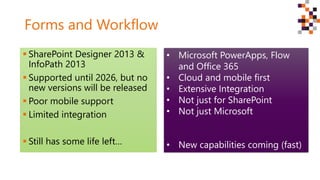
Forms and Workflow
 SharePoint Designer 2013 &
InfoPath 2013
 Supported until 2026, but no
new versions will be released
 Poor mobile support
 Limited integration
 Still has some life left…
• Microsoft PowerApps, Flow
and Office 365
• Cloud and mobile first
• Extensive Integration
• Not just for SharePoint
• Not just Microsoft
• New capabilities coming (fast)
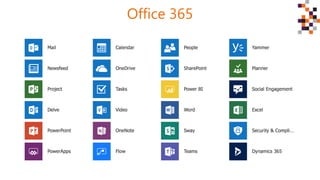
Office 365
Microsoft Flow
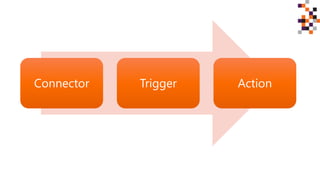
Connector Trigger Action
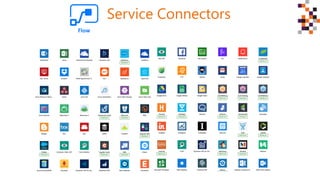
Service Connectors
Security
 All actions are performed in the context of the logged in user
 Users can only see items they already have permission to see in
SharePoint (security trimmed)
 Permissions are managed by the system being integrated with
e.g. SharePoint, Dynamics 365, Facebook, Wordpress etc
[?] Question: Can you use impersonation (like SPD)?
Policies
 Policies can be added to control where your data flows to.
 You can configure ‘compliance boundaries’. For example:
‒ Prevent users creating Flows that Tweet, Instagram or Facebook 
‒ Prevent updates to Slack (but allow Teams)
 Managed via the Flow and PowerApps Admin Portals in Office
365
[#] TIP: Check the default policy makes sense!
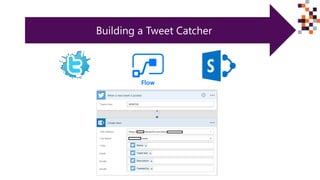
Building a Tweet Catcher
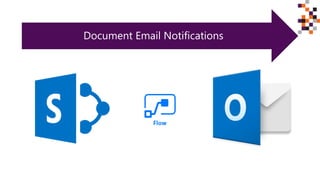
Document Email Notifications
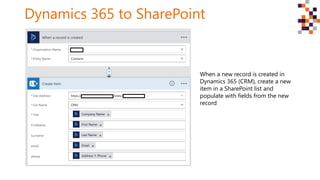
Dynamics 365 to SharePoint
When a new record is created in
Dynamics 365 (CRM), create a new
item in a SharePoint list and
populate with fields from the new
record
Flow possibilities (a few examples)
 Generate a PDF version of a document
 Pull timesheet data from Harvest into a SharePoint list for project
management
 Capture Twitter data to listen to the community
 Copy files from OneDrive or Dropbox to SharePoint (or vice versa)
 Send an email when new items are added to a list
 Create a SharePoint list item when a new entity is created in CRM
 Create a SharePoint list item when someone subscribes to Mailchimp
[#] TIP: Check the SharePoint Templates list for new actions
• Generate a PDF version of a document
• Capture Twitter data to listen to the community
• Copy files from OneDrive or Dropbox to SharePoint (or vice versa)
• Create a SharePoint list item when a new entity is created in
Dynamics 365
• Create a SharePoint list item when someone subscribes to Mailchimp
• Pull timesheet data from Harvest into a SharePoint list
• Draft blog posts in SharePoint and post to Wordpress
• FTP documents to a web site
• Approvals
PowerApps turn your expertise
into custom applications
Use PowerApps when
 You have time consuming manual processes
 You can’t find off the shelf apps or services to meet you needs
 You don’t have the budget to develop a custom mobile app
 You have a short timeframe to create a solution
PowerApps help you solve your unique business problem, without
needing a huge developer budget and long lead times.
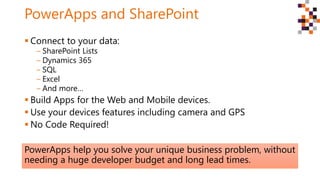
PowerApps and SharePoint
 Connect to your data:
‒ SharePoint Lists
‒ Dynamics 365
‒ SQL
‒ Excel
‒ And more…
 Build Apps for the Web and Mobile devices.
 Use your devices features including camera and GPS
 No Code Required!
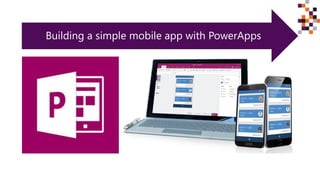
Building a simple mobile app with PowerApps
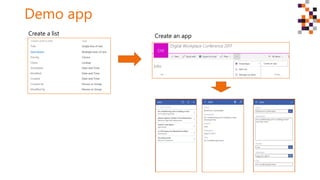
Demo app
Create a list Create an app
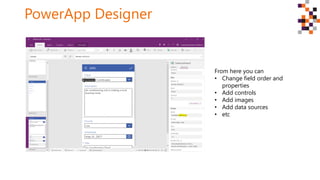
PowerApp Designer
From here you can
• Change field order and
properties
• Add controls
• Add images
• Add data sources
• etc
Advanced
feature:
Sometime you do need a
rocket scientist
Advanced capabilities
 Common Data Service
‒ A prebuild data model and service provided by Microsoft
‒ Saves time and provides consistency
‒ Supported by PowerApps, Flow and PowerBI
 Entity Control Form (preview)
‒ View, navigate and edit relational data from the Common Data Service
 Azure Functions for Common Data Service (preview)
‒ Combine data across services
‒ Add more advanced logic
‒ Pay as you go usage
SharePoint Virtual Summit Announcements
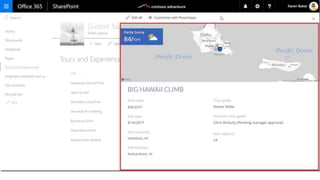
 Rich Forms embedded in SharePoint lists
‒ Conditional field display
‒ Display additional info from other data sources e.g. maps, weather,
Dynamics365, etc
‒ Different control types e.g. sliders, drop downs
‒ Connect Flows to buttons (actions)
 Embed PowerApps in SharePoint pages
‒ Provide seamless access to your PowerApps
‒ Mix with other web-parts and page content (Modern pages)
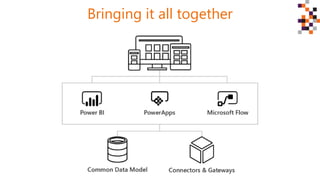
Bringing it all together
Feature Pack 2 for SharePoint 2016 includes
support for Flow and PowerApps
Available later this year
Summary
 InfoPath and SharePoint Designer are now legacy technologies
 Flow and PowerApps are the next generation
 Build integrated web and mobile without code
 SharePoint integration for cloud and on-premise
 Policies and security trimming are baked in
 You’ll need to think different
 New features coming. Fast!
Questions and Answers
 Steve Knutson
 Microsoft MVP for Office Servers and Services
 SharePoint Consultant
 @nztechtweet
 steve@stp.co.nz
 www.stp.co.nz
Resources
 https://flow.microsoft.com/en-us/blog/build-advanced-flows/
 https://powerapps.microsoft.com/en-us/guided-
learning/learning-common-data-service/
 https://powerapps.microsoft.com/hr-hr/blog/preview-of-azure-
functions-for-the-common-data-service/
 https://powerapps.microsoft.com/en-us/blog/new-entity-form-
control-experimental-feature-for-common-data-service/
Thank
you
to our
sponsors!

Microsoft PowerApps and Flow

  • 1.
    Building Your OwnSolution with Power Apps and Flow Steve Knutson 2017
  • 2.
    About me Managing Directorof Stratos Technology Partners Microsoft MVP for Office Servers & Services 25+ years IT industry experience Mountain biker and climber One-eyed Cantabrian @nztechtweet www.stp.co.nz
  • 3.
    Agenda  Overview ofFlow  Security and Policies  Flow Demo  Overview of PowerApps  PowerApps Demo  Advanced features  Coming soon  Q&A
  • 4.
    Forms and Workflow SharePoint Designer 2013 & InfoPath 2013  Supported until 2026, but no new versions will be released  Poor mobile support  Limited integration  Still has some life left… • Microsoft PowerApps, Flow and Office 365 • Cloud and mobile first • Extensive Integration • Not just for SharePoint • Not just Microsoft • New capabilities coming (fast)
  • 5.
  • 6.
  • 7.
  • 8.
  • 9.
    Security  All actionsare performed in the context of the logged in user  Users can only see items they already have permission to see in SharePoint (security trimmed)  Permissions are managed by the system being integrated with e.g. SharePoint, Dynamics 365, Facebook, Wordpress etc [?] Question: Can you use impersonation (like SPD)?
  • 10.
    Policies  Policies canbe added to control where your data flows to.  You can configure ‘compliance boundaries’. For example: ‒ Prevent users creating Flows that Tweet, Instagram or Facebook  ‒ Prevent updates to Slack (but allow Teams)  Managed via the Flow and PowerApps Admin Portals in Office 365 [#] TIP: Check the default policy makes sense!
  • 11.
  • 12.
  • 13.
    Dynamics 365 toSharePoint When a new record is created in Dynamics 365 (CRM), create a new item in a SharePoint list and populate with fields from the new record
  • 14.
    Flow possibilities (afew examples)  Generate a PDF version of a document  Pull timesheet data from Harvest into a SharePoint list for project management  Capture Twitter data to listen to the community  Copy files from OneDrive or Dropbox to SharePoint (or vice versa)  Send an email when new items are added to a list  Create a SharePoint list item when a new entity is created in CRM  Create a SharePoint list item when someone subscribes to Mailchimp [#] TIP: Check the SharePoint Templates list for new actions • Generate a PDF version of a document • Capture Twitter data to listen to the community • Copy files from OneDrive or Dropbox to SharePoint (or vice versa) • Create a SharePoint list item when a new entity is created in Dynamics 365 • Create a SharePoint list item when someone subscribes to Mailchimp • Pull timesheet data from Harvest into a SharePoint list • Draft blog posts in SharePoint and post to Wordpress • FTP documents to a web site • Approvals
  • 15.
    PowerApps turn yourexpertise into custom applications
  • 16.
    Use PowerApps when You have time consuming manual processes  You can’t find off the shelf apps or services to meet you needs  You don’t have the budget to develop a custom mobile app  You have a short timeframe to create a solution
  • 17.
    PowerApps help yousolve your unique business problem, without needing a huge developer budget and long lead times. PowerApps and SharePoint  Connect to your data: ‒ SharePoint Lists ‒ Dynamics 365 ‒ SQL ‒ Excel ‒ And more…  Build Apps for the Web and Mobile devices.  Use your devices features including camera and GPS  No Code Required!
  • 18.
    Building a simplemobile app with PowerApps
  • 19.
    Demo app Create alist Create an app
  • 20.
    PowerApp Designer From hereyou can • Change field order and properties • Add controls • Add images • Add data sources • etc
  • 21.
    Advanced feature: Sometime you doneed a rocket scientist
  • 22.
    Advanced capabilities  CommonData Service ‒ A prebuild data model and service provided by Microsoft ‒ Saves time and provides consistency ‒ Supported by PowerApps, Flow and PowerBI  Entity Control Form (preview) ‒ View, navigate and edit relational data from the Common Data Service  Azure Functions for Common Data Service (preview) ‒ Combine data across services ‒ Add more advanced logic ‒ Pay as you go usage
  • 24.
    SharePoint Virtual SummitAnnouncements  Rich Forms embedded in SharePoint lists ‒ Conditional field display ‒ Display additional info from other data sources e.g. maps, weather, Dynamics365, etc ‒ Different control types e.g. sliders, drop downs ‒ Connect Flows to buttons (actions)  Embed PowerApps in SharePoint pages ‒ Provide seamless access to your PowerApps ‒ Mix with other web-parts and page content (Modern pages)
  • 26.
  • 27.
    Feature Pack 2for SharePoint 2016 includes support for Flow and PowerApps Available later this year
  • 28.
    Summary  InfoPath andSharePoint Designer are now legacy technologies  Flow and PowerApps are the next generation  Build integrated web and mobile without code  SharePoint integration for cloud and on-premise  Policies and security trimming are baked in  You’ll need to think different  New features coming. Fast!
  • 29.
    Questions and Answers Steve Knutson  Microsoft MVP for Office Servers and Services  SharePoint Consultant  @nztechtweet  steve@stp.co.nz  www.stp.co.nz
  • 30.
    Resources  https://flow.microsoft.com/en-us/blog/build-advanced-flows/  https://powerapps.microsoft.com/en-us/guided- learning/learning-common-data-service/ https://powerapps.microsoft.com/hr-hr/blog/preview-of-azure- functions-for-the-common-data-service/  https://powerapps.microsoft.com/en-us/blog/new-entity-form- control-experimental-feature-for-common-data-service/
  • 31.