Introducing
Apache Nifi
Yifeng Jiang
Solutions Engineer, Hortonworks
© Hortonworks Inc. 2011 – 2015. All Rights Reserved
About Me
Yifeng Jiang
•  Solutions Engineer, Hortonworks
•  Apache HBase book author
•  I like hiking
•  Twitter: @uprush
Page 3 © Hortonworks Inc. 2011 – 2015. All Rights Reserved
Agenda
•  Introduction to Nifi
•  Nifi Demo
•  Nifi Use Case
Page 4 © Hortonworks Inc. 2011 – 2015. All Rights Reserved
Introduction to Apache NiFi
Page 5 © Hortonworks Inc. 2011 – 2015. All Rights Reserved
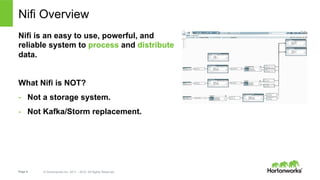
Nifi Overview
Nifi is an easy to use, powerful, and
reliable system to process and distribute
data.
Page 6 © Hortonworks Inc. 2011 – 2015. All Rights Reserved
NiFi Terminology
FlowFile
•  Unit of data moving through the system
•  Content + Attributes (key/value pairs)
Processor
•  Performs the work, can access FlowFiles
Connection
•  Links between processors
•  Queues that can be dynamically prioritized
Process Group
•  Set of processors and their connections
•  Receive data via input ports, send data via output ports
Page 7 © Hortonworks Inc. 2011 – 2015. All Rights Reserved
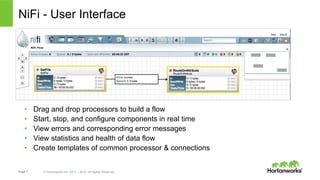
NiFi - User Interface
•  Drag and drop processors to build a flow
•  Start, stop, and configure components in real time
•  View errors and corresponding error messages
•  View statistics and health of data flow
•  Create templates of common processor & connections
Page 8 © Hortonworks Inc. 2011 – 2015. All Rights Reserved
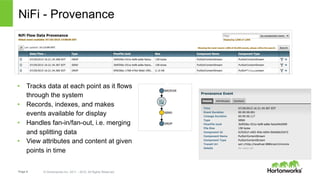
NiFi - Provenance
•  Tracks data at each point as it flows
through the system
•  Records, indexes, and makes
events available for display
•  Handles fan-in/fan-out, i.e. merging
and splitting data
•  View attributes and content at given
points in time
Page 9 © Hortonworks Inc. 2011 – 2015. All Rights Reserved
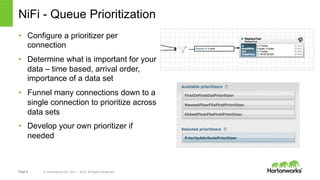
NiFi - Queue Prioritization
•  Configure a prioritizer per
connection
•  Determine what is important for your
data – time based, arrival order,
importance of a data set
•  Funnel many connections down to a
single connection to prioritize across
data sets
•  Develop your own prioritizer if
needed
Page 10 © Hortonworks Inc. 2011 – 2015. All Rights Reserved
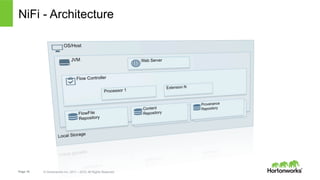
NiFi - Architecture
Page 11 © Hortonworks Inc. 2011 – 2015. All Rights Reserved
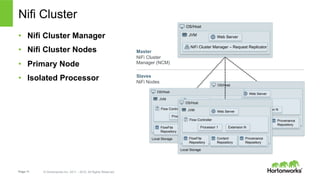
Nifi Cluster
•  Nifi Cluster Manager
•  Nifi Cluster Nodes
•  Primary Node
•  Isolated Processor
OS/Host
JVM
Flow Controller
Web Server
Processor 1 Extension N
FlowFile
Repository
Content
Repository
Provenance
Repository
Local Storage
OS/Host
JVM
Flow Controller
Web Server
Processor 1 Extension N
FlowFile
Repository
Content
Repository
Provenance
Repository
Local Storage
OS/Host
JVM
NiFi Cluster Manager – Request Replicator
Web Server
Master
NiFi Cluster
Manager (NCM)
OS/Host
JVM
Flow Controller
Web Server
Processor 1 Extension N
FlowFile
Repository
Content
Repository
Provenance
Repository
Local Storage
Slaves
NiFi Nodes
Page 12 © Hortonworks Inc. 2011 – 2015. All Rights Reserved
NiFi Demo
Page 13 © Hortonworks Inc. 2011 – 2015. All Rights Reserved
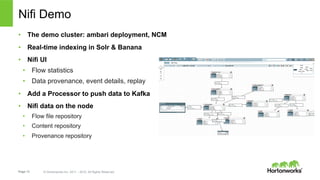
Nifi Demo
•  The demo cluster: ambari deployment, NCM
•  Real-time indexing in Solr & Banana
•  Nifi UI
•  Flow statistics
•  Data provenance, event details, replay
•  Add a Processor to push data to Kafka
•  Nifi data on the node
•  Flow file repository
•  Content repository
•  Provenance repository
Page 14 © Hortonworks Inc. 2011 – 2015. All Rights Reserved
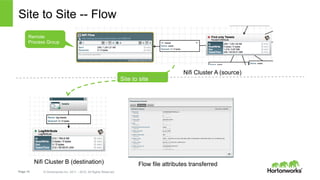
Site to Site -- Flow
Nifi Cluster A (source)
Nifi Cluster B (destination)
Site to site
Remote
Process Group
Flow file attributes transferred
Page 15 © Hortonworks Inc. 2011 – 2015. All Rights Reserved
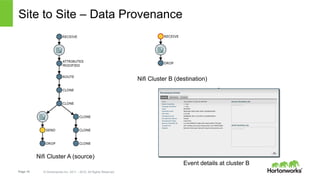
Site to Site – Data Provenance
Nifi Cluster A (source)
Nifi Cluster B (destination)
Event details at cluster B
Page 16 © Hortonworks Inc. 2011 – 2015. All Rights Reserved
NiFi Use Cases
Page 17 © Hortonworks Inc. 2011 – 2015. All Rights Reserved
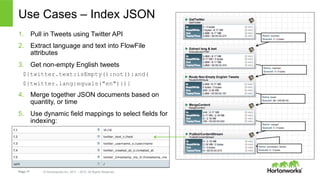
Use Cases – Index JSON
1.  Pull in Tweets using Twitter API
2.  Extract language and text into FlowFile
attributes
3.  Get non-empty English tweets
${twitter.text:isEmpty():not():and(
${twitter.lang:equals("en")})}
4.  Merge together JSON documents based on
quantity, or time
5.  Use dynamic field mappings to select fields for
indexing:
Page 18 © Hortonworks Inc. 2011 – 2015. All Rights Reserved
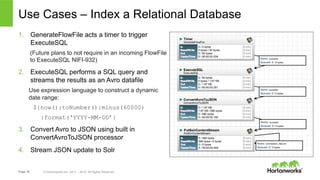
Use Cases – Index a Relational Database
1.  GenerateFlowFile acts a timer to trigger
ExecuteSQL
(Future plans to not require in an incoming FlowFile
to ExecuteSQL NIFI-932)
2.  ExecuteSQL performs a SQL query and
streams the results as an Avro datafile
Use expression language to construct a dynamic
date range:
${now():toNumber():minus(60000)
:format(‘YYYY-MM-DD’}
3.  Convert Avro to JSON using built in
ConvertAvroToJSON processor
4.  Stream JSON update to Solr
Page 19 © Hortonworks Inc. 2011 – 2015. All Rights Reserved
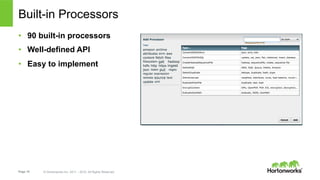
Built-in Processors
•  90 built-in processors
•  Well-defined API
•  Easy to implement
Page 20 © Hortonworks Inc. 2011 – 2015. All Rights Reserved
Page 21 © Hortonworks Inc. 2011 – 2015. All Rights Reserved
Thank You

Nifi workshop

  • 1.
    Introducing Apache Nifi Yifeng Jiang SolutionsEngineer, Hortonworks © Hortonworks Inc. 2011 – 2015. All Rights Reserved
  • 2.
    About Me Yifeng Jiang • Solutions Engineer, Hortonworks •  Apache HBase book author •  I like hiking •  Twitter: @uprush
  • 3.
    Page 3 ©Hortonworks Inc. 2011 – 2015. All Rights Reserved Agenda •  Introduction to Nifi •  Nifi Demo •  Nifi Use Case
  • 4.
    Page 4 ©Hortonworks Inc. 2011 – 2015. All Rights Reserved Introduction to Apache NiFi
  • 5.
    Page 5 ©Hortonworks Inc. 2011 – 2015. All Rights Reserved Nifi Overview Nifi is an easy to use, powerful, and reliable system to process and distribute data.
  • 6.
    Page 6 ©Hortonworks Inc. 2011 – 2015. All Rights Reserved NiFi Terminology FlowFile •  Unit of data moving through the system •  Content + Attributes (key/value pairs) Processor •  Performs the work, can access FlowFiles Connection •  Links between processors •  Queues that can be dynamically prioritized Process Group •  Set of processors and their connections •  Receive data via input ports, send data via output ports
  • 7.
    Page 7 ©Hortonworks Inc. 2011 – 2015. All Rights Reserved NiFi - User Interface •  Drag and drop processors to build a flow •  Start, stop, and configure components in real time •  View errors and corresponding error messages •  View statistics and health of data flow •  Create templates of common processor & connections
  • 8.
    Page 8 ©Hortonworks Inc. 2011 – 2015. All Rights Reserved NiFi - Provenance •  Tracks data at each point as it flows through the system •  Records, indexes, and makes events available for display •  Handles fan-in/fan-out, i.e. merging and splitting data •  View attributes and content at given points in time
  • 9.
    Page 9 ©Hortonworks Inc. 2011 – 2015. All Rights Reserved NiFi - Queue Prioritization •  Configure a prioritizer per connection •  Determine what is important for your data – time based, arrival order, importance of a data set •  Funnel many connections down to a single connection to prioritize across data sets •  Develop your own prioritizer if needed
  • 10.
    Page 10 ©Hortonworks Inc. 2011 – 2015. All Rights Reserved NiFi - Architecture
  • 11.
    Page 11 ©Hortonworks Inc. 2011 – 2015. All Rights Reserved Nifi Cluster •  Nifi Cluster Manager •  Nifi Cluster Nodes •  Primary Node •  Isolated Processor OS/Host JVM Flow Controller Web Server Processor 1 Extension N FlowFile Repository Content Repository Provenance Repository Local Storage OS/Host JVM Flow Controller Web Server Processor 1 Extension N FlowFile Repository Content Repository Provenance Repository Local Storage OS/Host JVM NiFi Cluster Manager – Request Replicator Web Server Master NiFi Cluster Manager (NCM) OS/Host JVM Flow Controller Web Server Processor 1 Extension N FlowFile Repository Content Repository Provenance Repository Local Storage Slaves NiFi Nodes
  • 12.
    Page 12 ©Hortonworks Inc. 2011 – 2015. All Rights Reserved NiFi Demo
  • 13.
    Page 13 ©Hortonworks Inc. 2011 – 2015. All Rights Reserved Nifi Demo •  The demo cluster: ambari deployment, NCM •  Real-time indexing in Solr & Banana •  Nifi UI •  Flow statistics •  Data provenance, event details, replay •  Add a Processor to push data to Kafka •  Nifi data on the node •  Flow file repository •  Content repository •  Provenance repository
  • 14.
    Page 14 ©Hortonworks Inc. 2011 – 2015. All Rights Reserved Site to Site -- Flow Nifi Cluster A (source) Nifi Cluster B (destination) Site to site Remote Process Group Flow file attributes transferred
  • 15.
    Page 15 ©Hortonworks Inc. 2011 – 2015. All Rights Reserved Site to Site – Data Provenance Nifi Cluster A (source) Nifi Cluster B (destination) Event details at cluster B
  • 16.
    Page 16 ©Hortonworks Inc. 2011 – 2015. All Rights Reserved NiFi Use Cases
  • 17.
    Page 17 ©Hortonworks Inc. 2011 – 2015. All Rights Reserved Use Cases – Index JSON 1.  Pull in Tweets using Twitter API 2.  Extract language and text into FlowFile attributes 3.  Get non-empty English tweets ${twitter.text:isEmpty():not():and( ${twitter.lang:equals("en")})} 4.  Merge together JSON documents based on quantity, or time 5.  Use dynamic field mappings to select fields for indexing:
  • 18.
    Page 18 ©Hortonworks Inc. 2011 – 2015. All Rights Reserved Use Cases – Index a Relational Database 1.  GenerateFlowFile acts a timer to trigger ExecuteSQL (Future plans to not require in an incoming FlowFile to ExecuteSQL NIFI-932) 2.  ExecuteSQL performs a SQL query and streams the results as an Avro datafile Use expression language to construct a dynamic date range: ${now():toNumber():minus(60000) :format(‘YYYY-MM-DD’} 3.  Convert Avro to JSON using built in ConvertAvroToJSON processor 4.  Stream JSON update to Solr
  • 19.
    Page 19 ©Hortonworks Inc. 2011 – 2015. All Rights Reserved Built-in Processors •  90 built-in processors •  Well-defined API •  Easy to implement
  • 20.
    Page 20 ©Hortonworks Inc. 2011 – 2015. All Rights Reserved
  • 21.
    Page 21 ©Hortonworks Inc. 2011 – 2015. All Rights Reserved Thank You