25127
Migrating to Apache
Iceberg
1
Presented by Alex Merced - Dremio Developer Advocate - Follow @amdatalakehouse
25127
What will we
learn?
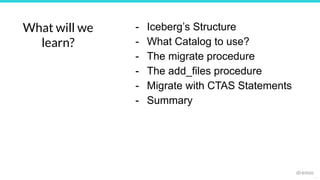
- Iceberg’s Structure
- What Catalog to use?
- The migrate procedure
- The add_files procedure
- Migrate with CTAS Statements
- Summary
25127
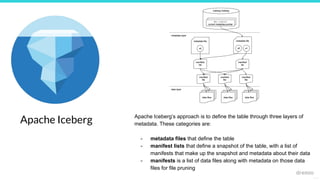
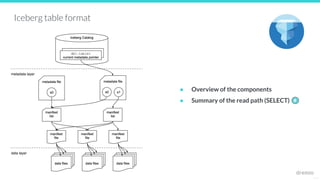
Apache Iceberg Apache Iceberg’s approach is to define the table through three layers of
metadata. These categories are:
- metadata files that define the table
- manifest lists that define a snapshot of the table, with a list of
manifests that make up the snapshot and metadata about their data
- manifests is a list of data files along with metadata on those data
files for file pruning
25127
Iceberg table format
● Overview of the components
● Summary of the read path (SELECT) #
metadata layer
data layer
25127
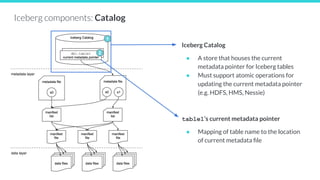
Iceberg Catalog
● A store that houses the current
metadata pointer for Iceberg tables
● Must support atomic operations for
updating the current metadata pointer
(e.g. HDFS, HMS, Nessie)
table1’s current metadata pointer
● Mapping of table name to the location
of current metadata file
Iceberg components: Catalog
1
2
metadata layer
data layer
25127
Metadata file - stores metadata about a
table at a certain point in time
{
"table-uuid" : "<uuid>",
"location" : "/path/to/table/dir",
"schema": {...},
"partition-spec": [ {<partition-details>}, ...],
"current-snapshot-id": <snapshot-id>,
"snapshots": [ {
"snapshot-id": <snapshot-id>
"manifest-list": "/path/to/manifest/list.avro"
}, ...],
...
}
Iceberg components: Metadata File
3
5
4
metadata layer
data layer
25127
Iceberg components: Manifest List
Manifest list file - a list of manifest files
{
"manifest-path" : "/path/to/manifest/file.avro",
"added-snapshot-id": <snapshot-id>,
"partition-spec-id": <partition-spec-id>,
"partitions": [ {partition-info}, ...],
...
}
{
"manifest-path" : "/path/to/manifest/file2.avro",
"added-snapshot-id": <snapshot-id>,
"partition-spec-id": <partition-spec-id>,
"partitions": [ {partition-info}, ...],
...
}
6
metadata layer
data layer
25127
Manifest file - a list of data files, along with
details and stats about each data file
{
"data-file": {
"file-path": "/path/to/data/file.parquet",
"file-format": "PARQUET",
"partition":
{"<part-field>":{"<data-type>":<value>}},
"record-count": <num-records>,
"null-value-counts": [{
"column-index": "1", "value": 4
}, ...],
"lower-bounds": [{
"column-index": "1", "value": "aaa"
}, ...],
"upper-bounds": [{
"column-index": "1", "value": "eee"
}, ...],
}
...
}
{
...
}
Iceberg components: Manifest file
7
8
metadata layer
data layer
25127
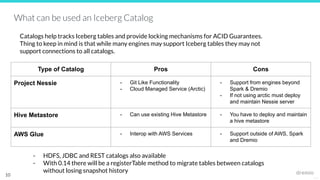
Iceberg Catalogs
9
25127
10
Type of Catalog Pros Cons
Project Nessie - Git Like Functionality
- Cloud Managed Service (Arctic)
- Support from engines beyond
Spark & Dremio
- If not using arctic must deploy
and maintain Nessie server
Hive Metastore - Can use existing Hive Metastore - You have to deploy and maintain
a hive metastore
AWS Glue - Interop with AWS Services - Support outside of AWS, Spark
and Dremio
What can be used an Iceberg Catalog
Catalogs help tracks Iceberg tables and provide locking mechanisms for ACID Guarantees.
Thing to keep in mind is that while many engines may support Iceberg tables they may not
support connections to all catalogs.
- HDFS, JDBC and REST catalogs also available
- With 0.14 there will be a registerTable method to migrate tables between catalogs
without losing snapshot history
25127
Migrating to Iceberg
11
25127
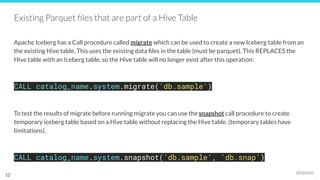
Existing Parquet files that are part of a Hive Table
Apache Iceberg has a Call procedure called migrate which can be used to create a new Iceberg table from an
the existing Hive table. This uses the existing data files in the table (must be parquet). This REPLACES the
Hive table with an Iceberg table, so the Hive table will no longer exist after this operation:
CALL catalog_name.system.migrate('db.sample')
To test the results of migrate before running migrate you can use the snapshot call procedure to create
temporary iceberg table based on a Hive table without replacing the Hive table. (temporary tables have
limitations).
CALL catalog_name.system.snapshot('db.sample', 'db.snap')
12
25127
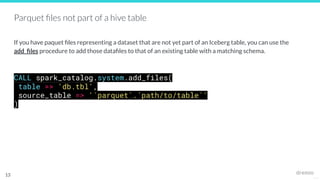
Parquet files not part of a hive table
If you have paquet files representing a dataset that are not yet part of an Iceberg table, you can use the
add_files procedure to add those datafiles to that of an existing table with a matching schema.
CALL spark_catalog.system.add_files(
table => 'db.tbl',
source_table => '`parquet`.`path/to/table`'
)
13
25127
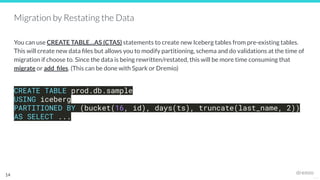
Migration by Restating the Data
You can use CREATE TABLE…AS (CTAS) statements to create new Iceberg tables from pre-existing tables.
This will create new data files but allows you to modify partitioning, schema and do validations at the time of
migration if choose to. Since the data is being rewritten/restated, this will be more time consuming that
migrate or add_files. (This can be done with Spark or Dremio)
CREATE TABLE prod.db.sample
USING iceberg
PARTITIONED BY (bucket(16, id), days(ts), truncate(last_name, 2))
AS SELECT ...
14
25127
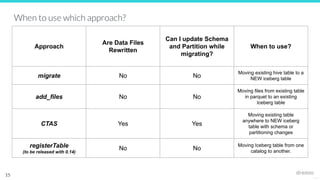
When to use which approach?
15
Approach
Are Data Files
Rewritten
Can I update Schema
and Partition while
migrating?
When to use?
migrate No No
Moving existing hive table to a
NEW iceberg table
add_files No No
Moving files from existing table
in parquet to an existing
Iceberg table
CTAS Yes Yes
Moving existing table
anywhere to NEW iceberg
table with schema or
partitioning changes
registerTable
(to be released with 0.14)
No No
Moving Iceberg table from one
catalog to another.
25127
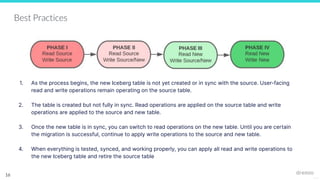
Best Practices
1. As the process begins, the new Iceberg table is not yet created or in sync with the source. User-facing
read and write operations remain operating on the source table.
2. The table is created but not fully in sync. Read operations are applied on the source table and write
operations are applied to the source and new table.
3. Once the new table is in sync, you can switch to read operations on the new table. Until you are certain
the migration is successful, continue to apply write operations to the source and new table.
4. When everything is tested, synced, and working properly, you can apply all read and write operations to
the new Iceberg table and retire the source table
16
25127
Q&A
17

Data Engineer's Lunch #83: Strategies for Migration to Apache Iceberg

  • 1.
    25127 Migrating to Apache Iceberg 1 Presentedby Alex Merced - Dremio Developer Advocate - Follow @amdatalakehouse
  • 2.
    25127 What will we learn? -Iceberg’s Structure - What Catalog to use? - The migrate procedure - The add_files procedure - Migrate with CTAS Statements - Summary
  • 3.
    25127 Apache Iceberg ApacheIceberg’s approach is to define the table through three layers of metadata. These categories are: - metadata files that define the table - manifest lists that define a snapshot of the table, with a list of manifests that make up the snapshot and metadata about their data - manifests is a list of data files along with metadata on those data files for file pruning
  • 4.
    25127 Iceberg table format ●Overview of the components ● Summary of the read path (SELECT) # metadata layer data layer
  • 5.
    25127 Iceberg Catalog ● Astore that houses the current metadata pointer for Iceberg tables ● Must support atomic operations for updating the current metadata pointer (e.g. HDFS, HMS, Nessie) table1’s current metadata pointer ● Mapping of table name to the location of current metadata file Iceberg components: Catalog 1 2 metadata layer data layer
  • 6.
    25127 Metadata file -stores metadata about a table at a certain point in time { "table-uuid" : "<uuid>", "location" : "/path/to/table/dir", "schema": {...}, "partition-spec": [ {<partition-details>}, ...], "current-snapshot-id": <snapshot-id>, "snapshots": [ { "snapshot-id": <snapshot-id> "manifest-list": "/path/to/manifest/list.avro" }, ...], ... } Iceberg components: Metadata File 3 5 4 metadata layer data layer
  • 7.
    25127 Iceberg components: ManifestList Manifest list file - a list of manifest files { "manifest-path" : "/path/to/manifest/file.avro", "added-snapshot-id": <snapshot-id>, "partition-spec-id": <partition-spec-id>, "partitions": [ {partition-info}, ...], ... } { "manifest-path" : "/path/to/manifest/file2.avro", "added-snapshot-id": <snapshot-id>, "partition-spec-id": <partition-spec-id>, "partitions": [ {partition-info}, ...], ... } 6 metadata layer data layer
  • 8.
    25127 Manifest file -a list of data files, along with details and stats about each data file { "data-file": { "file-path": "/path/to/data/file.parquet", "file-format": "PARQUET", "partition": {"<part-field>":{"<data-type>":<value>}}, "record-count": <num-records>, "null-value-counts": [{ "column-index": "1", "value": 4 }, ...], "lower-bounds": [{ "column-index": "1", "value": "aaa" }, ...], "upper-bounds": [{ "column-index": "1", "value": "eee" }, ...], } ... } { ... } Iceberg components: Manifest file 7 8 metadata layer data layer
  • 9.
  • 10.
    25127 10 Type of CatalogPros Cons Project Nessie - Git Like Functionality - Cloud Managed Service (Arctic) - Support from engines beyond Spark & Dremio - If not using arctic must deploy and maintain Nessie server Hive Metastore - Can use existing Hive Metastore - You have to deploy and maintain a hive metastore AWS Glue - Interop with AWS Services - Support outside of AWS, Spark and Dremio What can be used an Iceberg Catalog Catalogs help tracks Iceberg tables and provide locking mechanisms for ACID Guarantees. Thing to keep in mind is that while many engines may support Iceberg tables they may not support connections to all catalogs. - HDFS, JDBC and REST catalogs also available - With 0.14 there will be a registerTable method to migrate tables between catalogs without losing snapshot history
  • 11.
  • 12.
    25127 Existing Parquet filesthat are part of a Hive Table Apache Iceberg has a Call procedure called migrate which can be used to create a new Iceberg table from an the existing Hive table. This uses the existing data files in the table (must be parquet). This REPLACES the Hive table with an Iceberg table, so the Hive table will no longer exist after this operation: CALL catalog_name.system.migrate('db.sample') To test the results of migrate before running migrate you can use the snapshot call procedure to create temporary iceberg table based on a Hive table without replacing the Hive table. (temporary tables have limitations). CALL catalog_name.system.snapshot('db.sample', 'db.snap') 12
  • 13.
    25127 Parquet files notpart of a hive table If you have paquet files representing a dataset that are not yet part of an Iceberg table, you can use the add_files procedure to add those datafiles to that of an existing table with a matching schema. CALL spark_catalog.system.add_files( table => 'db.tbl', source_table => '`parquet`.`path/to/table`' ) 13
  • 14.
    25127 Migration by Restatingthe Data You can use CREATE TABLE…AS (CTAS) statements to create new Iceberg tables from pre-existing tables. This will create new data files but allows you to modify partitioning, schema and do validations at the time of migration if choose to. Since the data is being rewritten/restated, this will be more time consuming that migrate or add_files. (This can be done with Spark or Dremio) CREATE TABLE prod.db.sample USING iceberg PARTITIONED BY (bucket(16, id), days(ts), truncate(last_name, 2)) AS SELECT ... 14
  • 15.
    25127 When to usewhich approach? 15 Approach Are Data Files Rewritten Can I update Schema and Partition while migrating? When to use? migrate No No Moving existing hive table to a NEW iceberg table add_files No No Moving files from existing table in parquet to an existing Iceberg table CTAS Yes Yes Moving existing table anywhere to NEW iceberg table with schema or partitioning changes registerTable (to be released with 0.14) No No Moving Iceberg table from one catalog to another.
  • 16.
    25127 Best Practices 1. Asthe process begins, the new Iceberg table is not yet created or in sync with the source. User-facing read and write operations remain operating on the source table. 2. The table is created but not fully in sync. Read operations are applied on the source table and write operations are applied to the source and new table. 3. Once the new table is in sync, you can switch to read operations on the new table. Until you are certain the migration is successful, continue to apply write operations to the source and new table. 4. When everything is tested, synced, and working properly, you can apply all read and write operations to the new Iceberg table and retire the source table 16
  • 17.