Apache flink
By pranay
Contents
2
❏ What is Flink?
❏ Why Flink
❏ Flink Ecosystem
❏ Sources and sinks
❏ Flink Program structure
❏ Dataset API and DataStream API
❏ Windowing in flink
❏ Fault tolerance & Availability
❏ Use cases
❏ Limitations
3
Big Data
● We define big data as huge amount of data.
● Structured, semi-structured and unstructured format
● This led to emergence of certain tools & frameworks that help in
storage and processing of data
● Processing part - 1. Batch Processing
2. Stream Processing
Batch processing
Vs
Stream processing
4
STREAM PROCESSING
5
Stream processing challenges
➢ Data is unbounded, means no start and end
➢ Unpredictable and inconsistent intervals of new data
➢ Data can be Out of order with different timestamps
➢ Latency factor impacts accuracy of results
6
What is APache FLink?
7
distributed-Stream processing
framework
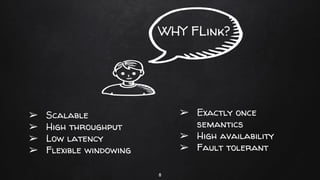
WHY FLink?
8
➢ Scalable
➢ High throughput
➢ Low latency
➢ Flexible windowing
➢ Exactly once
semantics
➢ High availability
➢ Fault tolerant
9
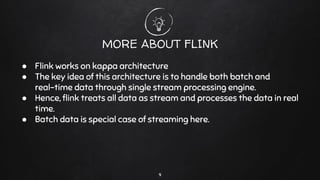
MORE ABOUT FLINK
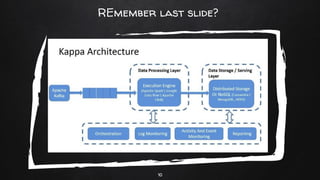
● Flink works on kappa architecture
● The key idea of this architecture is to handle both batch and
real-time data through single stream processing engine.
● Hence, flink treats all data as stream and processes the data in real
time.
● Batch data is special case of streaming here.
10
REmember last slide?
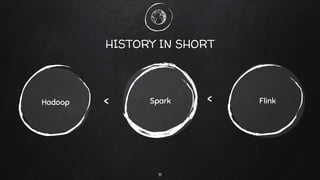
HISTORY IN SHORT
SparkHadoop Flink
11
< <
12
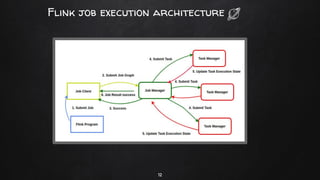
Flink job execution architecture
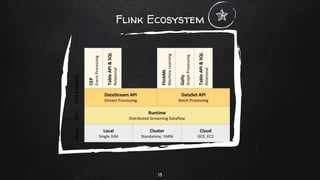
Flink Ecosystem
13
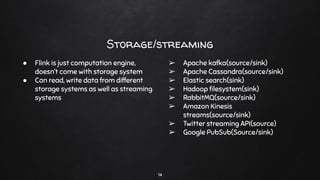
Storage/streaming
14
● Flink is just computation engine,
doesn’t come with storage system
● Can read, write data from different
storage systems as well as streaming
systems
➢ Apache kafka(source/sink)
➢ Apache Cassandra(source/sink)
➢ Elastic search(sink)
➢ Hadoop filesystem(sink)
➢ RabbitMQ(source/sink)
➢ Amazon Kinesis
streams(source/sink)
➢ Twitter streaming API(source)
➢ Google PubSub(Source/sink)
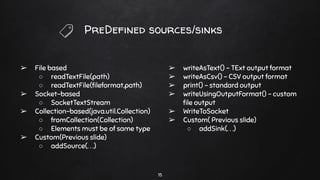
PreDefined sources/sinks
➢ File based
○ readTextFile(path)
○ readTextFile(fileformat,path)
➢ Socket-based
○ SocketTextStream
➢ Collection-based(java.util.Collection)
○ fromCollection(Collection)
○ Elements must be of same type
➢ Custom(Previous slide)
○ addSource(. . .)
➢ writeAsText() - TExt output format
➢ writeAsCsv() - CSV output format
➢ print() - standard output
➢ writeUsingOutputFormat() - custom
file output
➢ WriteToSocket
➢ Custom( Previous slide)
○ addSink(. . .)
15
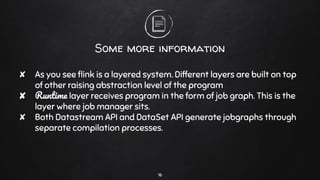
Some more information
✘ As you see flink is a layered system. Different layers are built on top
of other raising abstraction level of the program
✘ Runtime layer receives program in the form of job graph. This is the
layer where job manager sits.
✘ Both Datastream API and DataSet API generate jobgraphs through
separate compilation processes.
16
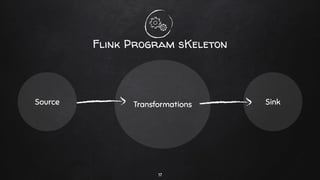
Flink Program sKeleton
Source Transformations Sink
17
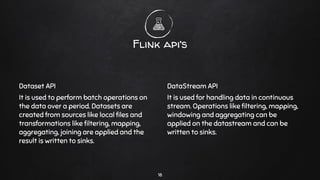
Dataset API
It is used to perform batch operations on
the data over a period. Datasets are
created from sources like local files and
transformations like filtering, mapping,
aggregating, joining are applied and the
result is written to sinks.
Flink api’s
DataStream API
It is used for handling data in continuous
stream. Operations like filtering, mapping,
windowing and aggregating can be
applied on the datastream and can be
written to sinks.
18
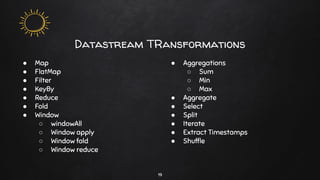
Datastream TRansformations
19
● Map
● FlatMap
● Filter
● KeyBy
● Reduce
● Fold
● Window
○ windowAll
○ Window apply
○ Window fold
○ Window reduce
● Aggregations
○ Sum
○ Min
○ Max
● Aggregate
● Select
● Split
● Iterate
● Extract Timestamps
● Shuffle
HOw it works?
EXAMPLE PLEASE . . .
20
21
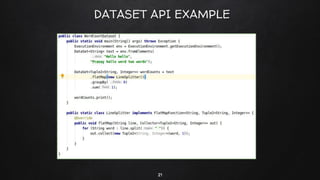
DATASET API EXAMPLE
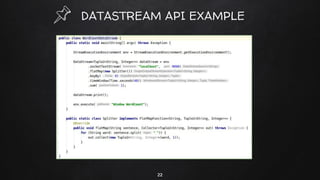
DATASTREAM API EXAMPLE
22
Windows In Flink
23
● Windows are the heart of processing infinite streams.
● Windows split the stream into fixed sized buckets over which we can
apply computations.
● It is a mechanism to take snapshot of the stream based on time or
other variables
● Need of windowing - in case we need some kind of aggregation on
the incoming data
24
MORE INFO . . .
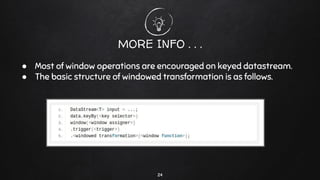
● Most of window operations are encouraged on keyed datastream.
● The basic structure of windowed transformation is as follows.
25
Window Assigners . . .
❏ Tumbling Windows
❏ Sliding Windows
A window assigner defines how elements are assigned to
windows
❏ Sessions Windows
❏ Global Windows
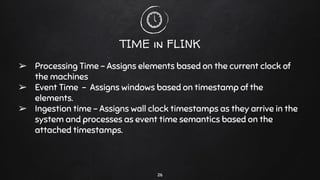
TIME in FLINK
➢ Processing Time - Assigns elements based on the current clock of
the machines
➢ Event Time - Assigns windows based on timestamp of the
elements.
➢ Ingestion time - Assigns wall clock timestamps as they arrive in the
system and processes as event time semantics based on the
attached timestamps.
26
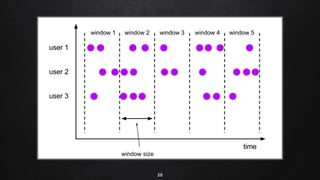
Tumbling windows
✘ Here window size is specified and elements are assigned to non
overlapping windows.
✘ Eg. If window size is specified as 2 minutes, all elements in 2 minutes
would come in one window for processing.
✘ It is useful in dividing the stream into multiple discrete batches.
27
28
29
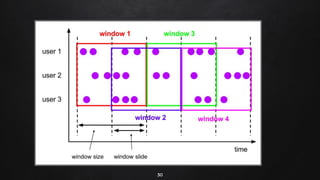
Sliding windows
➢ Here windows can overlap unlike tumbling windows
➢ Overlap is user specified. Here one element can be assigned to
multiple windows
➢ Eg. 10 minutes window with a slide of 5 minutes.
30
31
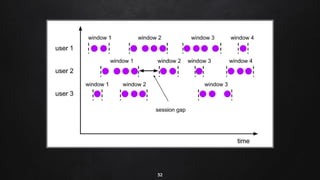
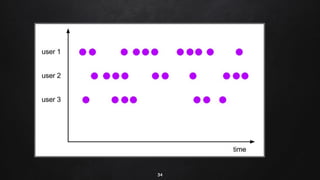
Session Windows
➢ This is applicable cases where window boundaries needs to be
adjusted as per incoming data.
➢ Here we specify session gap or inactivity period before marking a
session closed.
➢ Refer next slide for example.
32
33
Global Windows
➢ Sub-division of elements into windows is not done. Instead, we
assign each element to 1 single key per global window.
➢ There is no end to this window, so triggers should be used if any
computation needs to be done.
➢ Flink also has count windows. For eg. a tumbling count window of
100 will add 100 elements to the window and will evaluate upon
receiving 100th element.
34
35
Evictors & Triggers
➢ A trigger determines when window is ready for processing. Except
Global windows, all windows come with a default trigger.
➢ We can define a custom trigger which tells when to fire elements for
processing .
➢ Evictors are used to evict some elements from the window. After the
window is completed, it is purged
Fault Tolerance
➢ Before diving in, let’s define stateful computing. Most of the
computational tasks require stateful data.
➢ We already came across this in previous slides.
➢ In word count example, word count is an output that accumulates
new objects into existing word count. It is a stateful variable.
➢ Here fault tolerance is achieved with checkpointing. Flink maintains
state locally per task.
➢ State is periodically checkpointed to durable storage. A checkpoint
is consistent snapshot of the state of all tasks.
36
More on Checkpointing . . .
➢ Flink backs up state at a certain interval
➢ In case of a failure, flink recovers all tasks to the state of last
checkpoint and starts running the tasks from that checkpoint.
➢ The application continues as the failure never happened.
➢ Flink guarantees exactly once semantics which means all data is
processed exactly once regardless of any failures.
37
Stopping and resuming jobs . . .
➢ The running jobs must be stopped before upgrading a component
and resumed after the upgrade.
➢ There are 2 modes to resume the jobs.
➢ Savepoint - unlike checkpoint which is periodically triggered by the
system, savepoint is triggered by running commands.
➢ Even the storage format is different from checkpoints.
➢ External checkpoint - Extension of existing internal checkpoint.
After storing internal checkpoint, it is stored specific directory.
38
Savepoints vs checkpoints . . .
➢ The primary purpose of checkpoints is to provide a recovery
mechanism in case of unexpected job failures. Checkpoint’s lifecycle
is managed by flink. Checkpoints are dropped after job was
terminated by user. They are lightweight.
➢ Savepoints are created, owned and deleted by user. Their use-case
is for planned manual backup and resume. They are bit of
expensive. Mostly used for flink version upgrade, changing job graph
and for changing parallelism.
39
More on checkpoints. . .
➢ We already know state is persisted upon checkpoints to avoid data
loss and recover consistently. How the state is stored internally and
how it is persisted upon checkpoints depends on state backend.
➢ 3 state backends available
○ Memory state backend
○ Fs state backend
○ Rocksdb state backend
40
High Availability for standalone cluster
➢ Job manager coordinates flink deployment and it is responsible for
scheduling the jobs and resource management.
➢ However, there is only one job manager per flink cluster creating a
single point of failure.
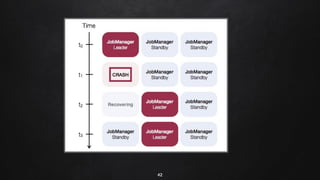
➢ There will be a single leading job manager at any time and multiple
standby job managers to take leadership incase leader fails.
➢ Flink uses zookeeper for distributed coordination between all
running instances of job manager and leader election.
41
42
43
Limitations
➢ Maturity and community support is less in the industry than its
predecessors but it is growing fastly.
➢ No known adaptation of Flink batch, only popular for streaming
Use Cases
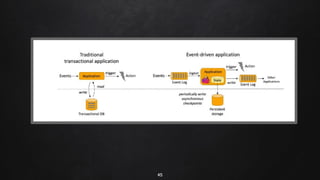
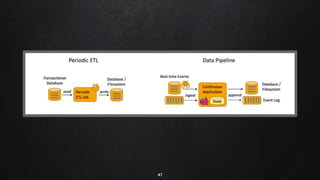
❏ Event driven Applications
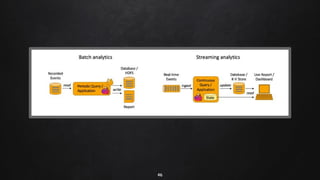
❏ Data Analytics Applications
❏ Data Pipeline Applications
44
45
46
47
48
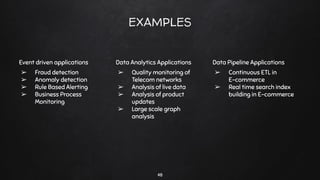
EXAMPLES
Event driven applications
➢ Fraud detection
➢ Anomaly detection
➢ Rule Based Alerting
➢ Business Process
Monitoring
Data Analytics Applications
➢ Quality monitoring of
Telecom networks
➢ Analysis of live data
➢ Analysis of product
updates
➢ Large scale graph
analysis
Data Pipeline Applications
➢ Continuous ETL in
E-commerce
➢ Real time search index
building in E-commerce
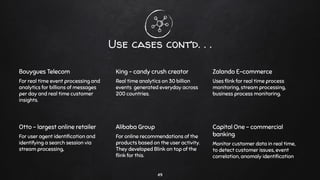
Use cases cont’d. . .
Bouygues Telecom
For real time event processing and
analytics for billions of messages
per day and real time customer
insights.
King - candy crush creator
Real time analytics on 30 billion
events generated everyday across
200 countries.
Zalando E-commerce
Uses flink for real time process
monitoring, stream processing,
business process monitoring.
Otto - largest online retailer
For user agent identification and
identifying a search session via
stream processing,
Alibaba Group
For online recommendations of the
products based on the user activity.
They developed Blink on top of the
flink for this.
Capital One - commercial
banking
Monitor customer data in real time,
to detect customer issues, event
correlation, anomaly identification
49
Thank You!
Keep Learning . . .
50

Apache flink

  • 1.
  • 2.
    Contents 2 ❏ What isFlink? ❏ Why Flink ❏ Flink Ecosystem ❏ Sources and sinks ❏ Flink Program structure ❏ Dataset API and DataStream API ❏ Windowing in flink ❏ Fault tolerance & Availability ❏ Use cases ❏ Limitations
  • 3.
    3 Big Data ● Wedefine big data as huge amount of data. ● Structured, semi-structured and unstructured format ● This led to emergence of certain tools & frameworks that help in storage and processing of data ● Processing part - 1. Batch Processing 2. Stream Processing
  • 4.
  • 5.
  • 6.
    Stream processing challenges ➢Data is unbounded, means no start and end ➢ Unpredictable and inconsistent intervals of new data ➢ Data can be Out of order with different timestamps ➢ Latency factor impacts accuracy of results 6
  • 7.
    What is APacheFLink? 7 distributed-Stream processing framework
  • 8.
    WHY FLink? 8 ➢ Scalable ➢High throughput ➢ Low latency ➢ Flexible windowing ➢ Exactly once semantics ➢ High availability ➢ Fault tolerant
  • 9.
    9 MORE ABOUT FLINK ●Flink works on kappa architecture ● The key idea of this architecture is to handle both batch and real-time data through single stream processing engine. ● Hence, flink treats all data as stream and processes the data in real time. ● Batch data is special case of streaming here.
  • 10.
  • 11.
  • 12.
  • 13.
  • 14.
    Storage/streaming 14 ● Flink isjust computation engine, doesn’t come with storage system ● Can read, write data from different storage systems as well as streaming systems ➢ Apache kafka(source/sink) ➢ Apache Cassandra(source/sink) ➢ Elastic search(sink) ➢ Hadoop filesystem(sink) ➢ RabbitMQ(source/sink) ➢ Amazon Kinesis streams(source/sink) ➢ Twitter streaming API(source) ➢ Google PubSub(Source/sink)
  • 15.
    PreDefined sources/sinks ➢ Filebased ○ readTextFile(path) ○ readTextFile(fileformat,path) ➢ Socket-based ○ SocketTextStream ➢ Collection-based(java.util.Collection) ○ fromCollection(Collection) ○ Elements must be of same type ➢ Custom(Previous slide) ○ addSource(. . .) ➢ writeAsText() - TExt output format ➢ writeAsCsv() - CSV output format ➢ print() - standard output ➢ writeUsingOutputFormat() - custom file output ➢ WriteToSocket ➢ Custom( Previous slide) ○ addSink(. . .) 15
  • 16.
    Some more information ✘As you see flink is a layered system. Different layers are built on top of other raising abstraction level of the program ✘ Runtime layer receives program in the form of job graph. This is the layer where job manager sits. ✘ Both Datastream API and DataSet API generate jobgraphs through separate compilation processes. 16
  • 17.
    Flink Program sKeleton SourceTransformations Sink 17
  • 18.
    Dataset API It isused to perform batch operations on the data over a period. Datasets are created from sources like local files and transformations like filtering, mapping, aggregating, joining are applied and the result is written to sinks. Flink api’s DataStream API It is used for handling data in continuous stream. Operations like filtering, mapping, windowing and aggregating can be applied on the datastream and can be written to sinks. 18
  • 19.
    Datastream TRansformations 19 ● Map ●FlatMap ● Filter ● KeyBy ● Reduce ● Fold ● Window ○ windowAll ○ Window apply ○ Window fold ○ Window reduce ● Aggregations ○ Sum ○ Min ○ Max ● Aggregate ● Select ● Split ● Iterate ● Extract Timestamps ● Shuffle
  • 20.
    HOw it works? EXAMPLEPLEASE . . . 20
  • 21.
  • 22.
  • 23.
    Windows In Flink 23 ●Windows are the heart of processing infinite streams. ● Windows split the stream into fixed sized buckets over which we can apply computations. ● It is a mechanism to take snapshot of the stream based on time or other variables ● Need of windowing - in case we need some kind of aggregation on the incoming data
  • 24.
    24 MORE INFO .. . ● Most of window operations are encouraged on keyed datastream. ● The basic structure of windowed transformation is as follows.
  • 25.
    25 Window Assigners .. . ❏ Tumbling Windows ❏ Sliding Windows A window assigner defines how elements are assigned to windows ❏ Sessions Windows ❏ Global Windows
  • 26.
    TIME in FLINK ➢Processing Time - Assigns elements based on the current clock of the machines ➢ Event Time - Assigns windows based on timestamp of the elements. ➢ Ingestion time - Assigns wall clock timestamps as they arrive in the system and processes as event time semantics based on the attached timestamps. 26
  • 27.
    Tumbling windows ✘ Herewindow size is specified and elements are assigned to non overlapping windows. ✘ Eg. If window size is specified as 2 minutes, all elements in 2 minutes would come in one window for processing. ✘ It is useful in dividing the stream into multiple discrete batches. 27
  • 28.
  • 29.
    29 Sliding windows ➢ Herewindows can overlap unlike tumbling windows ➢ Overlap is user specified. Here one element can be assigned to multiple windows ➢ Eg. 10 minutes window with a slide of 5 minutes.
  • 30.
  • 31.
    31 Session Windows ➢ Thisis applicable cases where window boundaries needs to be adjusted as per incoming data. ➢ Here we specify session gap or inactivity period before marking a session closed. ➢ Refer next slide for example.
  • 32.
  • 33.
    33 Global Windows ➢ Sub-divisionof elements into windows is not done. Instead, we assign each element to 1 single key per global window. ➢ There is no end to this window, so triggers should be used if any computation needs to be done. ➢ Flink also has count windows. For eg. a tumbling count window of 100 will add 100 elements to the window and will evaluate upon receiving 100th element.
  • 34.
  • 35.
    35 Evictors & Triggers ➢A trigger determines when window is ready for processing. Except Global windows, all windows come with a default trigger. ➢ We can define a custom trigger which tells when to fire elements for processing . ➢ Evictors are used to evict some elements from the window. After the window is completed, it is purged
  • 36.
    Fault Tolerance ➢ Beforediving in, let’s define stateful computing. Most of the computational tasks require stateful data. ➢ We already came across this in previous slides. ➢ In word count example, word count is an output that accumulates new objects into existing word count. It is a stateful variable. ➢ Here fault tolerance is achieved with checkpointing. Flink maintains state locally per task. ➢ State is periodically checkpointed to durable storage. A checkpoint is consistent snapshot of the state of all tasks. 36
  • 37.
    More on Checkpointing. . . ➢ Flink backs up state at a certain interval ➢ In case of a failure, flink recovers all tasks to the state of last checkpoint and starts running the tasks from that checkpoint. ➢ The application continues as the failure never happened. ➢ Flink guarantees exactly once semantics which means all data is processed exactly once regardless of any failures. 37
  • 38.
    Stopping and resumingjobs . . . ➢ The running jobs must be stopped before upgrading a component and resumed after the upgrade. ➢ There are 2 modes to resume the jobs. ➢ Savepoint - unlike checkpoint which is periodically triggered by the system, savepoint is triggered by running commands. ➢ Even the storage format is different from checkpoints. ➢ External checkpoint - Extension of existing internal checkpoint. After storing internal checkpoint, it is stored specific directory. 38
  • 39.
    Savepoints vs checkpoints. . . ➢ The primary purpose of checkpoints is to provide a recovery mechanism in case of unexpected job failures. Checkpoint’s lifecycle is managed by flink. Checkpoints are dropped after job was terminated by user. They are lightweight. ➢ Savepoints are created, owned and deleted by user. Their use-case is for planned manual backup and resume. They are bit of expensive. Mostly used for flink version upgrade, changing job graph and for changing parallelism. 39

  • 40.
    More on checkpoints.. . ➢ We already know state is persisted upon checkpoints to avoid data loss and recover consistently. How the state is stored internally and how it is persisted upon checkpoints depends on state backend. ➢ 3 state backends available ○ Memory state backend ○ Fs state backend ○ Rocksdb state backend 40
  • 41.
    High Availability forstandalone cluster ➢ Job manager coordinates flink deployment and it is responsible for scheduling the jobs and resource management. ➢ However, there is only one job manager per flink cluster creating a single point of failure. ➢ There will be a single leading job manager at any time and multiple standby job managers to take leadership incase leader fails. ➢ Flink uses zookeeper for distributed coordination between all running instances of job manager and leader election. 41
  • 42.
  • 43.
    43 Limitations ➢ Maturity andcommunity support is less in the industry than its predecessors but it is growing fastly. ➢ No known adaptation of Flink batch, only popular for streaming
  • 44.
    Use Cases ❏ Eventdriven Applications ❏ Data Analytics Applications ❏ Data Pipeline Applications 44
  • 45.
  • 46.
  • 47.
  • 48.
    48 EXAMPLES Event driven applications ➢Fraud detection ➢ Anomaly detection ➢ Rule Based Alerting ➢ Business Process Monitoring Data Analytics Applications ➢ Quality monitoring of Telecom networks ➢ Analysis of live data ➢ Analysis of product updates ➢ Large scale graph analysis Data Pipeline Applications ➢ Continuous ETL in E-commerce ➢ Real time search index building in E-commerce
  • 49.
    Use cases cont’d.. . Bouygues Telecom For real time event processing and analytics for billions of messages per day and real time customer insights. King - candy crush creator Real time analytics on 30 billion events generated everyday across 200 countries. Zalando E-commerce Uses flink for real time process monitoring, stream processing, business process monitoring. Otto - largest online retailer For user agent identification and identifying a search session via stream processing, Alibaba Group For online recommendations of the products based on the user activity. They developed Blink on top of the flink for this. Capital One - commercial banking Monitor customer data in real time, to detect customer issues, event correlation, anomaly identification 49
  • 50.