Computer Literacy - II

Lecture #12
Physical Topology in Network Design
What is Physical Topology?
The physical topology of a network refers to
the arrangement or physical layout of the
cables, computers, and other peripherals,
connected to the network.
"Topology" is the standard term that most
network professionals use when they refer
to the network's basic design.
There are two types of topologies






1.
2.

Physical
Logical
We discuss only physical topologies
Virtual Structure






A topology is a network's virtual shape or
structure.
This shape does not necessarily correspond
to the actual physical layout of the devices on
the network.
For example, the computers on a home LAN
may be arranged in a circle in a family room,
but it would be highly unlikely to find a ring
topology there.
Main Types of Physical Topologies
1.

2.
3.
4.

5.

Bus
Star
Ring
Tree/ Hybrid
Mesh
1. Bus Topology









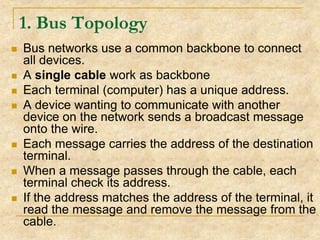
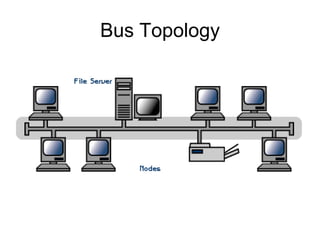
Bus networks use a common backbone to connect
all devices.
A single cable work as backbone
Each terminal (computer) has a unique address.
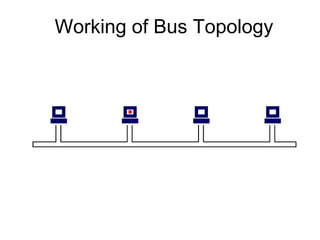
A device wanting to communicate with another
device on the network sends a broadcast message
onto the wire.
Each message carries the address of the destination
terminal.
When a message passes through the cable, each
terminal check its address.
If the address matches the address of the terminal, it
read the message and remove the message from the
cable.
Working of Bus Topology
Cont…








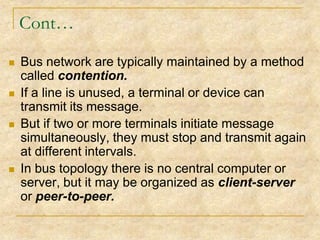
Bus network are typically maintained by a method
called contention.
If a line is unused, a terminal or device can
transmit its message.
But if two or more terminals initiate message
simultaneously, they must stop and transmit again
at different intervals.
In bus topology there is no central computer or
server, but it may be organized as client-server
or peer-to-peer.
Bus Topology
Advantages
Simple, easy to connect a computer or additional
peripheral to a bus.
2. Requires less cable length than a star topology.
3. Failure of a terminal does not effects the network and
all the other terminals keep on working.
Disadvantages
1. Entire network shuts down if there is a break in the
main cable.
2. Difficult to identify the problem if the entire network
shuts down.
3. If the terminals are closed, there signal interfere. The
minimum distance maintained between terminals to
avoid this problem.
1.
2. Star Topology










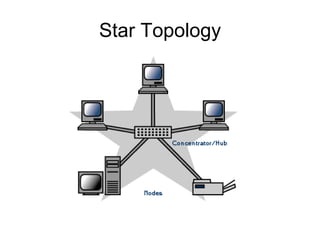
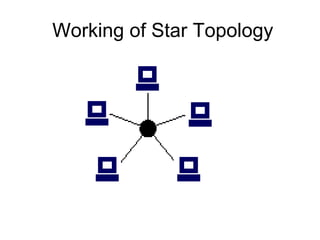
In a star network topology each terminal is directly
connected to the central unit through an individual
cable.
This means a central unit provides a link through
which a group of smaller computers and devices is
connected.
This central unit may be hub, switch, router or
computer.
If the central unit is a computer then it is called a host
computer.
A host computer is usually a large computer such as
a minicomputer or a mainframe or a file server.
Star Topology
Cont…










In the star network, all interactions between
different computers in the network travel through
the host computer.
Star network are typically maintained by a method
called poling system.
Poling means that central computer “polls” or asks
each device in the network if it has a message to
send and then allows each in turn to transmit a
message.
The star network is appropriate for systems that
demand centralized control.
Also it represent a very popular form of
configuration for time-sharing systems.
Working of Star Topology
Advantages
1.
Easy to install and wire.
2.
No disruptions to the network then connecting or
removing devices.
3.
Easy to detect faults and to remove parts.
4.
If any terminal become defective it has no effect on any
other terminal.
5.
Data security is high because central computer control
flow of data.
Disadvantages
1.
Requires more cable length than a bus topology.
2.
If the central unit shutdown, the whole network come to
disabled.
3.
More expensive because each terminal is connected
with a separate cable to the central unit.
3. Ring Topology








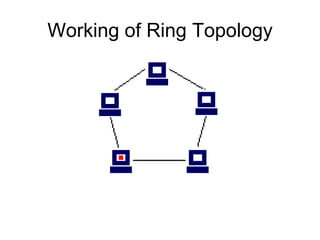
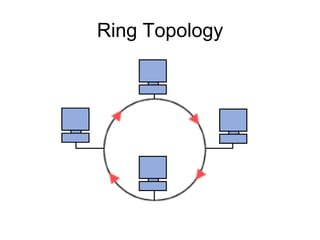
In a ring topology network each computer is
connected to the next two other computers in
a closed loop.
No single central computer exists in the ring
configuration.
Ring network are typically maintained by a
method called token passing.
Electronic messages are passed around the
ring until they reach the right destination.
Working of Ring Topology
Advantages
1.

2.

3.
4.

5.

Message flow in only one direction that’s why no
danger of data collision.
Performs better than a star topology under heavy
network load.
Can create much larger network using Token Ring
If a terminal becomes defective, it can be bypassed
without effecting the network.
Can span larger distance than other types of network.

Disadvantages
1.

Much slower than the other network topologies.
Ring Topology
4. Tree/Hybrid Topology






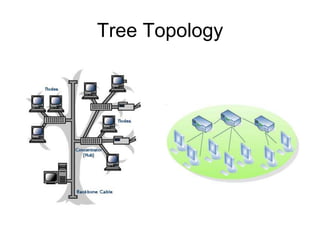
Tree topology is a combination of star, ring,
and bus network.
Groups of star-configured networks are
connected to a linear bus backbone.
This bus/star hybrid approach supports future
expandability of the network much better than
a bus (limited in the number of devices due to
the broadcast traffic it generates) or a star
(limited by the number of hub connection
points) alone.
Tree Topology
Advantages
1.
2.
3.

Point-to-point wiring for individual segments.
Supported by several hardware and software venders.
Tree topologies allow for the expansion of an existing
network, and enable organizations to configure a
network to meet their needs.

Disadvantages
1.

2.

3.

Overall length of each segment is limited by the type of
cabling used.
If the backbone line breaks, the entire segment goes
down.
More difficult to configure and wire than other
topologies.
5. Mesh Topology








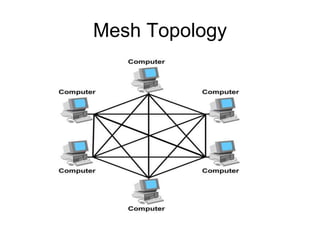
In mesh topology there are at least two pathways to
each terminal.
In a mesh topology, computers are connected to
each other by point-to-point circuits.
messages sent on a mesh network can take any of
several possible paths from source to destination.
One or more computers usually become switching
centers, means interlink computers with others.
Mesh Topology
Advantages
1.

Highly reliable. If a computer or cable become
defective it create no effect on other terminals
and network remain operative.

Disadvantages
1.

2.

A the number of terminals in the network
increases, this topology become more and
more complicated.
It is more expensive than any other topology.

Networking notes2

  • 1.
    Computer Literacy -II Lecture #12 Physical Topology in Network Design
  • 2.
    What is PhysicalTopology? The physical topology of a network refers to the arrangement or physical layout of the cables, computers, and other peripherals, connected to the network. "Topology" is the standard term that most network professionals use when they refer to the network's basic design. There are two types of topologies    1. 2. Physical Logical We discuss only physical topologies
  • 3.
    Virtual Structure    A topologyis a network's virtual shape or structure. This shape does not necessarily correspond to the actual physical layout of the devices on the network. For example, the computers on a home LAN may be arranged in a circle in a family room, but it would be highly unlikely to find a ring topology there.
  • 4.
    Main Types ofPhysical Topologies 1. 2. 3. 4. 5. Bus Star Ring Tree/ Hybrid Mesh
  • 5.
    1. Bus Topology        Busnetworks use a common backbone to connect all devices. A single cable work as backbone Each terminal (computer) has a unique address. A device wanting to communicate with another device on the network sends a broadcast message onto the wire. Each message carries the address of the destination terminal. When a message passes through the cable, each terminal check its address. If the address matches the address of the terminal, it read the message and remove the message from the cable.
  • 6.
  • 7.
    Cont…     Bus network aretypically maintained by a method called contention. If a line is unused, a terminal or device can transmit its message. But if two or more terminals initiate message simultaneously, they must stop and transmit again at different intervals. In bus topology there is no central computer or server, but it may be organized as client-server or peer-to-peer.
  • 8.
  • 9.
    Advantages Simple, easy toconnect a computer or additional peripheral to a bus. 2. Requires less cable length than a star topology. 3. Failure of a terminal does not effects the network and all the other terminals keep on working. Disadvantages 1. Entire network shuts down if there is a break in the main cable. 2. Difficult to identify the problem if the entire network shuts down. 3. If the terminals are closed, there signal interfere. The minimum distance maintained between terminals to avoid this problem. 1.
  • 10.
    2. Star Topology      Ina star network topology each terminal is directly connected to the central unit through an individual cable. This means a central unit provides a link through which a group of smaller computers and devices is connected. This central unit may be hub, switch, router or computer. If the central unit is a computer then it is called a host computer. A host computer is usually a large computer such as a minicomputer or a mainframe or a file server.
  • 11.
  • 12.
    Cont…      In the starnetwork, all interactions between different computers in the network travel through the host computer. Star network are typically maintained by a method called poling system. Poling means that central computer “polls” or asks each device in the network if it has a message to send and then allows each in turn to transmit a message. The star network is appropriate for systems that demand centralized control. Also it represent a very popular form of configuration for time-sharing systems.
  • 13.
  • 14.
    Advantages 1. Easy to installand wire. 2. No disruptions to the network then connecting or removing devices. 3. Easy to detect faults and to remove parts. 4. If any terminal become defective it has no effect on any other terminal. 5. Data security is high because central computer control flow of data. Disadvantages 1. Requires more cable length than a bus topology. 2. If the central unit shutdown, the whole network come to disabled. 3. More expensive because each terminal is connected with a separate cable to the central unit.
  • 15.
    3. Ring Topology     Ina ring topology network each computer is connected to the next two other computers in a closed loop. No single central computer exists in the ring configuration. Ring network are typically maintained by a method called token passing. Electronic messages are passed around the ring until they reach the right destination.
  • 16.
  • 17.
    Advantages 1. 2. 3. 4. 5. Message flow inonly one direction that’s why no danger of data collision. Performs better than a star topology under heavy network load. Can create much larger network using Token Ring If a terminal becomes defective, it can be bypassed without effecting the network. Can span larger distance than other types of network. Disadvantages 1. Much slower than the other network topologies.
  • 18.
  • 19.
    4. Tree/Hybrid Topology    Treetopology is a combination of star, ring, and bus network. Groups of star-configured networks are connected to a linear bus backbone. This bus/star hybrid approach supports future expandability of the network much better than a bus (limited in the number of devices due to the broadcast traffic it generates) or a star (limited by the number of hub connection points) alone.
  • 20.
  • 21.
    Advantages 1. 2. 3. Point-to-point wiring forindividual segments. Supported by several hardware and software venders. Tree topologies allow for the expansion of an existing network, and enable organizations to configure a network to meet their needs. Disadvantages 1. 2. 3. Overall length of each segment is limited by the type of cabling used. If the backbone line breaks, the entire segment goes down. More difficult to configure and wire than other topologies.
  • 22.
    5. Mesh Topology     Inmesh topology there are at least two pathways to each terminal. In a mesh topology, computers are connected to each other by point-to-point circuits. messages sent on a mesh network can take any of several possible paths from source to destination. One or more computers usually become switching centers, means interlink computers with others.
  • 23.
  • 24.
    Advantages 1. Highly reliable. Ifa computer or cable become defective it create no effect on other terminals and network remain operative. Disadvantages 1. 2. A the number of terminals in the network increases, this topology become more and more complicated. It is more expensive than any other topology.