CONNECTION CHECK….
Network Topologies
Presented By:-
Mithun Kumar Yadav
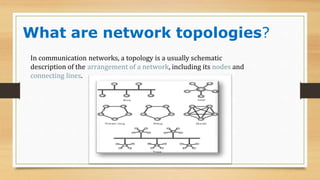
What are network topologies?
In communication networks, a topology is a usually schematic
description of the arrangement of a network, including its nodes and
connecting lines.
Why we use network topologies?
• Network topology is used initially for planning the best
way to design your network to get maximum
performance.
Types of Network Topologies
1.Logical Network Topology
2.Physical Network Topology
Logical Network Topology
• Logical topology means how information is passed between
two nodes in a network.
• This topology is bound to the network protocols and define
how data is moved through out the network
Physical Network Topology
• Physical topology is the physical layout of nodes ,
workstations and cables in the network
• It is the arrangement of the various elements (or
components) of a network , include device location and
cable installation.
Physical Network Topologies
▶ Mesh T
opology
▶ Star Topology
▶ Bus Topology
▶ Ring Topology
▶ T
ree T
opology
Mesh Topology
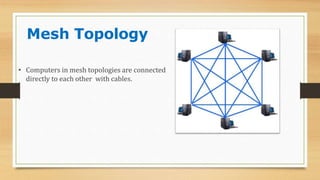
• Computers in mesh topologies are connected
directly to each other with cables.
Mesh Topology
Advantages
• Data can be transmitted from
different devices simultaneously.
This topology can withstand high
traffic.
• Even if one of the components fails
there is always an alternative
present. So data transfer doesn’t get
affected.
• Expansion and modification in
topology can be done without
disrupting other nodes.
Disadvantages
• Connections not fully utilized.
• Overall cost of this network is way too high
as compared to other network topologies.
• Set-up and maintenance of this topology
is very difficult. Even administration of
the network is tough.
Star
Topology
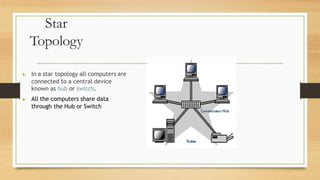
▶ In a star topology all computers are
connected to a central device
known as hub or switch.
▶ All the computers share data
through the Hub or Switch
Star Topology
• If Hub or switch get faulty, all
computer connected to it will be get
affected.
• Traffic increased when computers are
simultaneously sending data to each
other.
• A new node can be easily connected
to the existing network by connecting
it with unused port of hub.
• If there is fault in cable connected
with computer, only the particular
computer get affected.
• Less cables required than Mesh
Topology. That’s why it is affordable
by small organisations also.
ADVANTAGES DISADVANTAGES
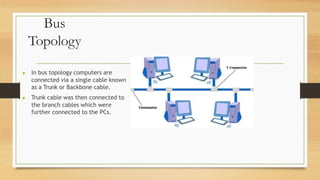
Bus
Topology
▶ In bus topology computers are
connected via a single cable known
as a Trunk or Backbone cable.
▶ Trunk cable was then connected to
the branch cables which were
further connected to the PCs.
Bus Topology
Advantage
• Uses less cables than star or
mesh topology
• Don’t need any special device like
Hub or Switch.
• It works efficiently very well when there
is a small network.fficiently well when
there is
Disadvantage
• Main disadvantage is the difficulty of
troubleshooting it.
• Bus topology is not scalable. New
node attaching to network is not
easy.
• Backbone cable become faulty all
computer connected to it get
affected.
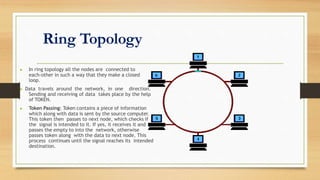
Ring Topology
▶ In ring topology all the nodes are connected to
each-other in such a way that they make a closed
loop.
▶ Data travels around the network, in one direction.
Sending and receiving of data takes place by the help
of TOKEN.
▶ Token Passing: Token contains a piece of information
which along with data is sent by the source computer.
This token then passes to next node, which checks if
the signal is intended to it. If yes, it receives it and
passes the empty to into the network, otherwise
passes token along with the data to next node. This
process continues until the signal reaches its intended
destination.
Ring Topology
Advantage
• All the traffics flows in one direction only
at a very high speed.
• No need for network server to control the
connectivity between workstations.
• Each computer has equal access to
resources.
• Receiver and repeater boost the signal
and send it to the next node along with
the token and data.
Disadvantage
• Each packet of data must pass through all
the computers between source
and destination. This makes it slower.
• If one workstation or port goes down, the
entire network gets affected
• Difficult to add and remove devices once
the network has been set up.
Tree
Topology
▶ Integrates the characteristics of
star and bus topology.
▶ In tree topology number of star
network connected using bus. The
backbone cable is called as Bus.
Summary
• What is Network topology
• Mesh T
opology
• Star Topology
• Bus Topology
• Ring Topology
• T
ree T
opology
Mithun Network topology .pptx

Mithun Network topology .pptx

  • 1.
  • 2.
  • 3.
    What are networktopologies? In communication networks, a topology is a usually schematic description of the arrangement of a network, including its nodes and connecting lines.
  • 4.
    Why we usenetwork topologies? • Network topology is used initially for planning the best way to design your network to get maximum performance.
  • 5.
    Types of NetworkTopologies 1.Logical Network Topology 2.Physical Network Topology
  • 6.
    Logical Network Topology •Logical topology means how information is passed between two nodes in a network. • This topology is bound to the network protocols and define how data is moved through out the network
  • 7.
    Physical Network Topology •Physical topology is the physical layout of nodes , workstations and cables in the network • It is the arrangement of the various elements (or components) of a network , include device location and cable installation.
  • 8.
    Physical Network Topologies ▶Mesh T opology ▶ Star Topology ▶ Bus Topology ▶ Ring Topology ▶ T ree T opology
  • 9.
    Mesh Topology • Computersin mesh topologies are connected directly to each other with cables.
  • 10.
    Mesh Topology Advantages • Datacan be transmitted from different devices simultaneously. This topology can withstand high traffic. • Even if one of the components fails there is always an alternative present. So data transfer doesn’t get affected. • Expansion and modification in topology can be done without disrupting other nodes. Disadvantages • Connections not fully utilized. • Overall cost of this network is way too high as compared to other network topologies. • Set-up and maintenance of this topology is very difficult. Even administration of the network is tough.
  • 11.
    Star Topology ▶ In astar topology all computers are connected to a central device known as hub or switch. ▶ All the computers share data through the Hub or Switch
  • 12.
    Star Topology • IfHub or switch get faulty, all computer connected to it will be get affected. • Traffic increased when computers are simultaneously sending data to each other. • A new node can be easily connected to the existing network by connecting it with unused port of hub. • If there is fault in cable connected with computer, only the particular computer get affected. • Less cables required than Mesh Topology. That’s why it is affordable by small organisations also. ADVANTAGES DISADVANTAGES
  • 13.
    Bus Topology ▶ In bustopology computers are connected via a single cable known as a Trunk or Backbone cable. ▶ Trunk cable was then connected to the branch cables which were further connected to the PCs.
  • 14.
    Bus Topology Advantage • Usesless cables than star or mesh topology • Don’t need any special device like Hub or Switch. • It works efficiently very well when there is a small network.fficiently well when there is Disadvantage • Main disadvantage is the difficulty of troubleshooting it. • Bus topology is not scalable. New node attaching to network is not easy. • Backbone cable become faulty all computer connected to it get affected.
  • 15.
    Ring Topology ▶ Inring topology all the nodes are connected to each-other in such a way that they make a closed loop. ▶ Data travels around the network, in one direction. Sending and receiving of data takes place by the help of TOKEN. ▶ Token Passing: Token contains a piece of information which along with data is sent by the source computer. This token then passes to next node, which checks if the signal is intended to it. If yes, it receives it and passes the empty to into the network, otherwise passes token along with the data to next node. This process continues until the signal reaches its intended destination.
  • 16.
    Ring Topology Advantage • Allthe traffics flows in one direction only at a very high speed. • No need for network server to control the connectivity between workstations. • Each computer has equal access to resources. • Receiver and repeater boost the signal and send it to the next node along with the token and data. Disadvantage • Each packet of data must pass through all the computers between source and destination. This makes it slower. • If one workstation or port goes down, the entire network gets affected • Difficult to add and remove devices once the network has been set up.
  • 17.
    Tree Topology ▶ Integrates thecharacteristics of star and bus topology. ▶ In tree topology number of star network connected using bus. The backbone cable is called as Bus.
  • 18.
    Summary • What isNetwork topology • Mesh T opology • Star Topology • Bus Topology • Ring Topology • T ree T opology