Network packet analyzer
Wireshark
Antonio Cianfrani
Dipartimento DIET
Università “Sapienza” di Roma
E-mail: cianfrani@diet.uniroma1.it
What is a packet analyzer?
• A network packet analyzer is a tool that
captures the packets in a network and shows
packets details
– Wireshark (ex Ethereal) is the most famous open
source packet analyzer
– Download at www.wireshark.org
Features
• Available for UNIX and Windows.
• It captures packets ″on flight″ from a network interface.
• It shows very detailed information on protocols.
• Captured packets can be saved and uploaded.
• Import and Export of packets from/to other programs.
• Use of filters.
• Packets search.
• It collects statistics.
How does Wireshark work?
• Wireshark
– captures packets,
– analyzes packets,
– extracts information on protocols;
• The capture of packets is performed by
libpcap (Winpcap on windows)
How does libpcap work?
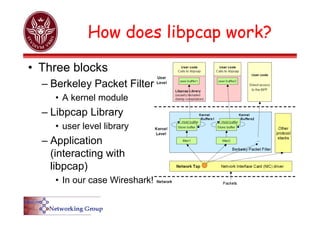
• Three blocks
– Berkeley Packet Filter
• A kernel module
– Libpcap Library
• user level library
– Application
(interacting with
libpcap)
• In our case Wireshark!
Media supported by
libpcap/Winpcap
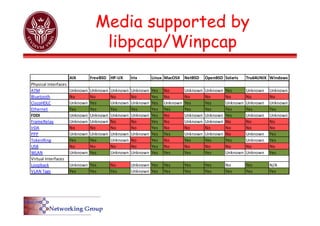
AIX FreeBSD HP‐UX Irix Linux MacOSX NetBSD OpenBSD Solaris Tru64UNIX Windows
Physical Interfaces
ATM Unknown Unknown Unknown Unknown Yes No Unknown Unknown Yes Unknown Unknown
Bluetooth No No No No Yes No No No No No No
CiscoHDLC Unknown Yes Unknown Unknown Yes Unknown Yes Yes Unknown Unknown Unknown
Ethernet Yes Yes Yes Yes Yes Yes Yes Yes Yes Yes Yes
FDDI Unknown Unknown Unknown Unknown Yes No Unknown Unknown Yes Unknown Unknown
FrameRelay Unknown Unknown No No Yes No Unknown Unknown No No No
IrDA No No No No Yes No No No No No No
PPP Unknown Unknown Unknown Unknown Yes Yes Unknown Unknown No Unknown Yes
TokenRing Yes Yes Unknown No Yes No Yes Yes Yes Unknown Yes
USB No No No No Yes No No No No No No
WLAN Unknown Yes Unknown Unknown Yes Yes Yes Yes Unknown Unknown Yes
Virtual Interfaces
Loopback Unknown Yes No Unknown Yes Yes Yes Yes No Yes N/A
VLAN Tags Yes Yes Yes Unknown Yes Yes Yes Yes Yes Yes Yes
Payload
IP
Header
IP
Payload
Ethernet
Header
Ethernet
Header
ICMP
Payload
ICMP
ICMP Type
08
ping request
Destination
IP Address
c0a8cd01
191.168.205.1
002219df27bb
MAC
Source
MAC
Destination
0012d9d8d734
Wireshark
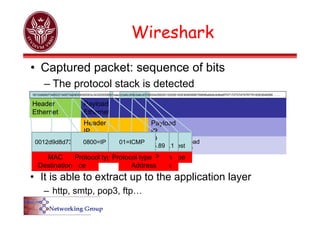
• Captured packet: sequence of bits
– The protocol stack is detected
Protocol type
0800=IP
Source IP
Address
c0a8cd59
192.168.205.89
Protocol type
01=ICMP
0012d9d8d734002219df27bb08004500003c343200008001eae2c0a8cd59c0a8cd0108004d56000100056162636465666768696a6b6c6d6e6f7071727374757677616263646566……..
• It is able to extract up to the application layer
– http, smtp, pop3, ftp…
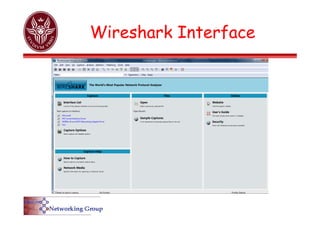
Wireshark Interface
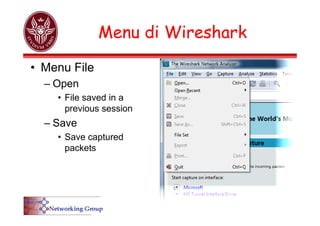
Menu di Wireshark
• Menu File
– Open
• File saved in a
previous session
– Save
• Save captured
packets
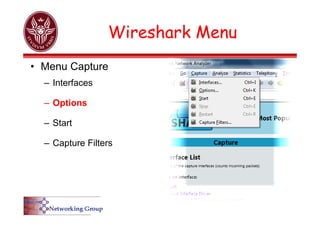
Wireshark Menu
• Menu Capture
– Interfaces
– Options
– Start
– Capture Filters
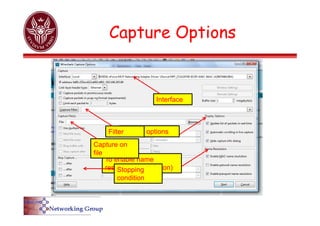
Capture Options
Interface
Display options
To enable name
resolution (translation)
Stopping
condition
Filter
Capture on
file
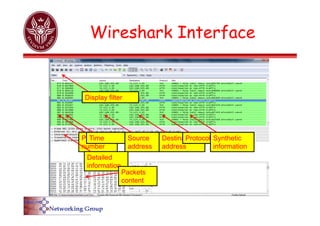
Wireshark Interface
Packet
number
Time Source
address
Destination
address
Protocol Synthetic
information
Detailed
information
Packets
content
Display filter
Filters
• Capture filters
– To capture only traffic of interest
– Allow to reduce the amount of captured traffic
• Display filters
– To show only part of the captured packets
– More powerful than capturing filters, but the
amount of captured packets is not reduced
Capture filters
• [not] primitive [and|or [not] primitive ...]
– [src|dst] host <host>
• Filter on IP address
– Source or destination is an option
– ether [src|dst] host <ehost>
• Filter on MAC address
– Source or destination is an option
– [tcp|udp] [src|dst] port <port>
• Filter on port number
– Source or destination is an option
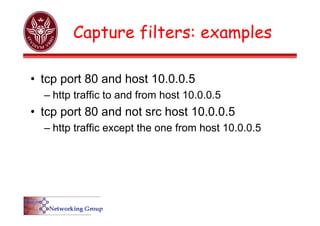
Capture filters: examples
• tcp port 80 and host 10.0.0.5
– http traffic to and from host 10.0.0.5
• tcp port 80 and not src host 10.0.0.5
– http traffic except the one from host 10.0.0.5
Capture filters again….
01=ICMP
0012d9d8d734002219df27bb08004500003c343200008001eae2c0a8cd59c0a8cd0108004d56000100056162636465666768696a6b6c6d6e6f7071727374757677616263646566676869
The “icmp” filter can
be defined:
ether[0x17]==0x01
0x17
Customized filters
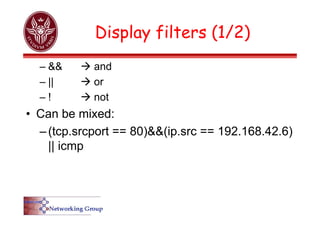
Display filters (1/2)
– &&  and
– ||  or
– !  not
• Can be mixed:
–(tcp.srcport == 80)&&(ip.src == 192.168.42.6)
|| icmp
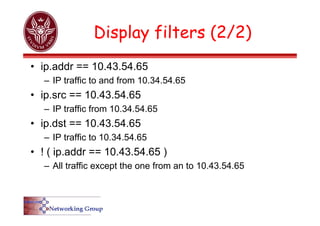
Display filters (2/2)
• ip.addr == 10.43.54.65
– IP traffic to and from 10.34.54.65
• ip.src == 10.43.54.65
– IP traffic from 10.34.54.65
• ip.dst == 10.43.54.65
– IP traffic to 10.34.54.65
• ! ( ip.addr == 10.43.54.65 )
– All traffic except the one from an to 10.43.54.65
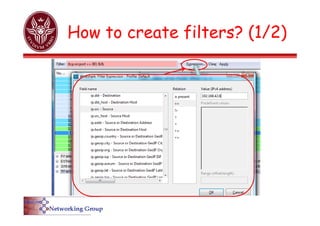
How to create filters? (1/2)
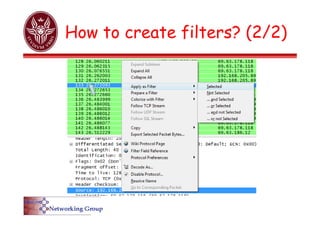
How to create filters? (2/2)
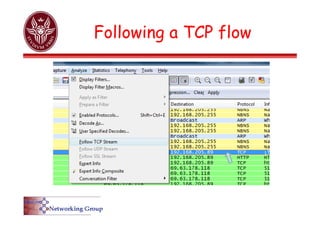
Following a TCP flow
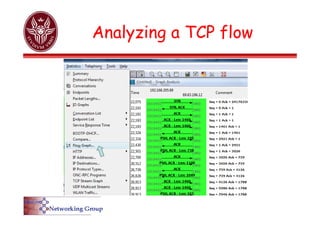
Analyzing a TCP flow
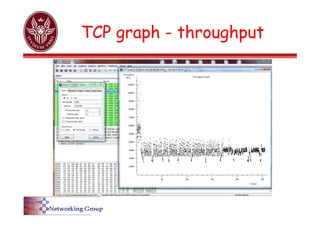
TCP graph - throughput
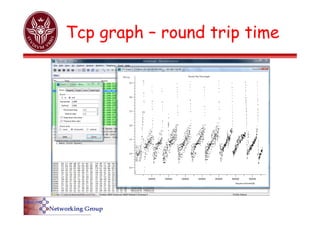
Tcp graph – round trip time
Documentation
• Display filters:
– http://www.wireshark.org/docs/dfref/
• man pages
– tshark: http://www.wireshark.org/docs/man-pages/tshark.html
– wireshark:http://www.wireshark.org/docs/man-pages/wireshark.html
– wireshark filter: http://www.wireshark.org/docs/man-pages/wireshark-filter.html
• wireshark user guide:
– http://www.wireshark.org/download/docs/user-guide-a4.pdf
– http://www.wireshark.org/docs/wsug_html_chunked/

Ferramenta de análise de rede para windows e linux

  • 1.
    Network packet analyzer Wireshark AntonioCianfrani Dipartimento DIET Università “Sapienza” di Roma E-mail: cianfrani@diet.uniroma1.it
  • 2.
    What is apacket analyzer? • A network packet analyzer is a tool that captures the packets in a network and shows packets details – Wireshark (ex Ethereal) is the most famous open source packet analyzer – Download at www.wireshark.org
  • 3.
    Features • Available forUNIX and Windows. • It captures packets ″on flight″ from a network interface. • It shows very detailed information on protocols. • Captured packets can be saved and uploaded. • Import and Export of packets from/to other programs. • Use of filters. • Packets search. • It collects statistics.
  • 4.
    How does Wiresharkwork? • Wireshark – captures packets, – analyzes packets, – extracts information on protocols; • The capture of packets is performed by libpcap (Winpcap on windows)
  • 5.
    How does libpcapwork? • Three blocks – Berkeley Packet Filter • A kernel module – Libpcap Library • user level library – Application (interacting with libpcap) • In our case Wireshark!
  • 6.
    Media supported by libpcap/Winpcap AIXFreeBSD HP‐UX Irix Linux MacOSX NetBSD OpenBSD Solaris Tru64UNIX Windows Physical Interfaces ATM Unknown Unknown Unknown Unknown Yes No Unknown Unknown Yes Unknown Unknown Bluetooth No No No No Yes No No No No No No CiscoHDLC Unknown Yes Unknown Unknown Yes Unknown Yes Yes Unknown Unknown Unknown Ethernet Yes Yes Yes Yes Yes Yes Yes Yes Yes Yes Yes FDDI Unknown Unknown Unknown Unknown Yes No Unknown Unknown Yes Unknown Unknown FrameRelay Unknown Unknown No No Yes No Unknown Unknown No No No IrDA No No No No Yes No No No No No No PPP Unknown Unknown Unknown Unknown Yes Yes Unknown Unknown No Unknown Yes TokenRing Yes Yes Unknown No Yes No Yes Yes Yes Unknown Yes USB No No No No Yes No No No No No No WLAN Unknown Yes Unknown Unknown Yes Yes Yes Yes Unknown Unknown Yes Virtual Interfaces Loopback Unknown Yes No Unknown Yes Yes Yes Yes No Yes N/A VLAN Tags Yes Yes Yes Unknown Yes Yes Yes Yes Yes Yes Yes
  • 7.
    Payload IP Header IP Payload Ethernet Header Ethernet Header ICMP Payload ICMP ICMP Type 08 ping request Destination IPAddress c0a8cd01 191.168.205.1 002219df27bb MAC Source MAC Destination 0012d9d8d734 Wireshark • Captured packet: sequence of bits – The protocol stack is detected Protocol type 0800=IP Source IP Address c0a8cd59 192.168.205.89 Protocol type 01=ICMP 0012d9d8d734002219df27bb08004500003c343200008001eae2c0a8cd59c0a8cd0108004d56000100056162636465666768696a6b6c6d6e6f7071727374757677616263646566…….. • It is able to extract up to the application layer – http, smtp, pop3, ftp…
  • 8.
  • 9.
    Menu di Wireshark •Menu File – Open • File saved in a previous session – Save • Save captured packets
  • 10.
    Wireshark Menu • MenuCapture – Interfaces – Options – Start – Capture Filters
  • 11.
    Capture Options Interface Display options Toenable name resolution (translation) Stopping condition Filter Capture on file
  • 12.
    Wireshark Interface Packet number Time Source address Destination address ProtocolSynthetic information Detailed information Packets content Display filter
  • 13.
    Filters • Capture filters –To capture only traffic of interest – Allow to reduce the amount of captured traffic • Display filters – To show only part of the captured packets – More powerful than capturing filters, but the amount of captured packets is not reduced
  • 14.
    Capture filters • [not]primitive [and|or [not] primitive ...] – [src|dst] host <host> • Filter on IP address – Source or destination is an option – ether [src|dst] host <ehost> • Filter on MAC address – Source or destination is an option – [tcp|udp] [src|dst] port <port> • Filter on port number – Source or destination is an option
  • 15.
    Capture filters: examples •tcp port 80 and host 10.0.0.5 – http traffic to and from host 10.0.0.5 • tcp port 80 and not src host 10.0.0.5 – http traffic except the one from host 10.0.0.5
  • 16.
  • 17.
    Display filters (1/2) –&&  and – ||  or – !  not • Can be mixed: –(tcp.srcport == 80)&&(ip.src == 192.168.42.6) || icmp
  • 18.
    Display filters (2/2) •ip.addr == 10.43.54.65 – IP traffic to and from 10.34.54.65 • ip.src == 10.43.54.65 – IP traffic from 10.34.54.65 • ip.dst == 10.43.54.65 – IP traffic to 10.34.54.65 • ! ( ip.addr == 10.43.54.65 ) – All traffic except the one from an to 10.43.54.65
  • 19.
    How to createfilters? (1/2)
  • 20.
    How to createfilters? (2/2)
  • 21.
  • 22.
  • 23.
    TCP graph -throughput
  • 24.
    Tcp graph –round trip time
  • 25.
    Documentation • Display filters: –http://www.wireshark.org/docs/dfref/ • man pages – tshark: http://www.wireshark.org/docs/man-pages/tshark.html – wireshark:http://www.wireshark.org/docs/man-pages/wireshark.html – wireshark filter: http://www.wireshark.org/docs/man-pages/wireshark-filter.html • wireshark user guide: – http://www.wireshark.org/download/docs/user-guide-a4.pdf – http://www.wireshark.org/docs/wsug_html_chunked/