OPERATING TIPS FOR HUMBOLDT NUCLEAR DENSITY MOISTURE GAUGE (HS 5001 EZ)
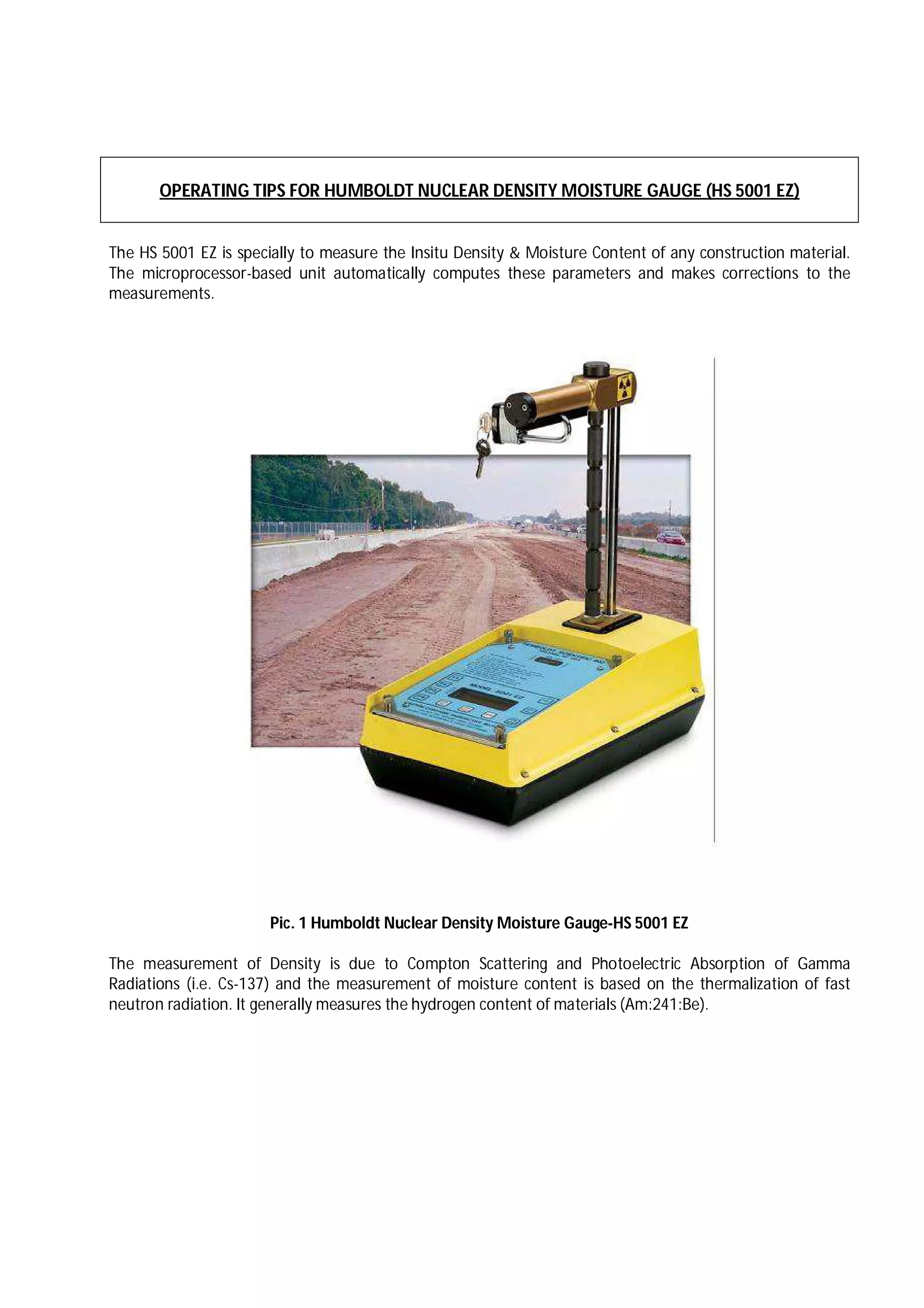
The HS 5001 EZ is specially to measure the Insitu Density & Moisture Content of any construction material.
The microprocessor-based unit automatically computes these parameters and makes corrections to the
measurements.
Pic. 1 Humboldt Nuclear Density Moisture Gauge-HS 5001 EZ
The measurement of Density is due to Compton Scattering and Photoelectric Absorption of Gamma
Radiations (i.e. Cs-137) and the measurement of moisture content is based on the thermalization of fast
neutron radiation. It generally measures the hydrogen content of materials (Am:241:Be).
Methods of Testing by Nuclear Density Moisture Gauge
 Direct Transmission Method (DT)
 Back Scatter Method (BAC)
Different Testing Time for measuring Density & Moisture Content
 Fast - 15 Seconds - For Quick Check. Not recommended for testing.
 Normal- 1 Minute - For Direct Transmission Methods
 Slow - 4 Minutes - For Back Scatter Methods.
Standardization Time in Nuclear Density Moisture Gauge
 Standard Test - 4 Minutes
 Stat Test - 16 Minutes
Different Modes of testing in Nuclear Density Moisture Gauge
 Asphalt - For testing of Asphaltic Materials.
 Soils - For Embankment Material, Sub-Grade Material, GSB Material, WMM Material and also for
Concrete Testing
 Thin Layer Testing - For testing of Asphaltic Materials (In case to find out the Density of some
particular thickness)
Short Terms displayed in LCD after testing by Nuclear Density Moisture Gauge
 WD - Wet Density
 DD - Dry Density
 % M - Percentage Moisture Content
 % PR - Percentage Compaction in case of Soils.
 AC - Approximate Asphalt Content of material.
 % MA - Percentage Compaction in case of Asphalt.
 MAX D - Maximum Dry Density of Material.
 LWD - Density of Underlying material (Used in case of Thin Layer)
 SPG - Specific Gravity of material.
OPERATING PROCEDURE FOR NUCLEAR DENSITY MOISTURE GAUGE
The Nuclear Density Gauge operation is completed in three different steps.
 Standardization
 Site Preparation
 Testing
 STANDARDIZATION
This is the most important step that should be carried out daily once before testing with the Nuclear Density
Moisture Gauge at site.
Pic 2: Standardization in progress
Procedure for Standardization
 Switch on by pressing PWR key.
 Place the Reference Block on level surface
 Set the Standardization time as 4 minutes as mentioned in page 10.
 Take a Standard Count by placing the gauge on the block with the rods facing the handle of the block.
Ensure there should be no trench, wall within a range 3-4 mt. and any other nuclear density gauge
within a range of 10 mt. from where we are taking a Standard Count. (Refer Pic. 2)
 With Handle in the safe position, press STD/STAT key
 Press F3 to take a new count.
 Move 3-4 mt. away from the gauge. Wait for 4 min. till the STD count is over and note down the
values of MS & DS.
 Sometimes the gauge may show an error. Check, the standard test has been conducted as explained
above. If not, reject the standard count. If the standard test has been conducted properly accept
these errors and take new count. Repeat the procedure till time there is no error & gauge is showing
the display as under:
STD. TEST RESULTS.
MS :………….................
DS: ………….................
SITE PREPERATION
A. For Soil/ Embankment/ Sub Grade /GSB/ WMM etc.
 Place the Scraper Plate over the desired site to make a levelled surface & hold it in place with one
foot, drive the drill rod (supplied with the gauge) to a desired depth. The Scraper Plate is used as a
guide for the Drill Rod to facilitate making a vertical hole. (Refer Pic. 3 & 4)
 With the help of extraction tool remove the rod from the hole (Refer Pic. 5)
 Make boundary around the Scraper Plate with a sharp edge while it is still placed over the hole. It will
make it easier to place the Gauge such that the source rod will extend into the hole without difficulty.
(Refer Pic. 6)
Pic 3. Surface Preparation Pic. 4. Punching a Rod
Pic 5: Drill Rod extraction Pic. 6. Marking a boundary
TESTING IN CASE OF SOILS
 Press the Key Max D to input the Value of MDD in the Gauge.
 Place the gauge over the prepared site carefully. Press the trigger into the handle to release the
LATCH and push the handle down until the approximate correct measuring position is obtained. The
depth of the source rod can be verified from the LCD display. At the correct depth, release the trigger
and lift the handle just above the notch then push the handle one more time until hearing the sound
“CLICK” as the INDEXER accurately position the gauge. Re-verify the depth from the display. Slightly
push the gauge towards yourself so that the source rod is in contact with the material. Refer Pic. 7)
 Finally, the measurement can be taken by simply pressing the MEAS key. Wait for the measuring
countdown (usually set to one minute). After the end of the countdown all the parameters such as
WD, DD, %PR (Compaction) %M etc. (Refer Pic 8)
Pic 7. Adjusting Depth Pic. 8. Taking a test by MEAS Key
SITE PREPERATION IN CASE OF ASPHALT
Fill the surface voids of the asphalt with thin layer of cement or fine sand.
Be Ensure that the cement or sand should not create any kind of layer thickness. The function of cement or
sand is to fill air voids only. (Refer Pic 9)
Pic. 9: Laying of Cement on Surface Pic. 10. Putting a gauge on Prepared Site
TESTING IN CASE OF ASPHALT
 Press the Key (Max D) to input the Marshall Density Value in the Gauge. Ensure that the test time is
set to SLOW and type as ASPHALT.
 Place the gauge over the prepared site carefully. Release the LATCH by pressing the trigger into the
handle; push the handle down until the approximate correct position (BAC) displays. (Refer Pic.10)
 Lastly, the measurement can be taken by simply pressing the MEAS key. Measurements will be made,
by using the “SLOW” in measure mode, which takes an exact four –minute count.
SITE PREPERATION IN CASE OF THIN LAYER TESTING
Fill the voids of the surface material with thin layer of cement or fine sand.
Be ensure that the cement or sand should not create any kind of layer thickness. The function of cement or
sand is to fill air voids only. (Refer Pic. 9)
TESTING IN CASE OF THIN LAYER TESTING
 Feed the Value of MDD (Marshall Value) in the Gauge and set the measuring time at SLOW and type
as THIN. (refer the instructions on page )
 Feed the Value of LWD (Density of Underlying Material) in Set Targets (Refer Page No.11), also the
layer Thickness in main menu. Place the gauge over the prepared site carefully. Release the LATCH by
pressing the trigger into the handle; push the handle down until the approximate correct position
(BAC) displays. (Refer Pic. 10)
 Lastly, the measurement can be taken by simply pressing the MEAS key. Measurements will be made,
by using the “SLOW” in measure mode, which takes an exact four –minute count.
HOW TO INPUT / SET REFERENCE VALUES IN NUCLEAR DENSITY MOISTURE GAUGE
Q.1. How to input Max. Density (Proctor/Marshall Value) in Nuclear Density Gauge?
 Press the key MAX. D at Panel Board
 Increase the value displayed in LCD by pressing F3
 Decrease the value displayed in LCD by Pressing F4
Q. 2. How to set the Date/Month in Nuclear Density Moisture Gauge?
 Press F2 (Set Up)
 Press F1 (Set Up2)
 Press F1 (Set Date)
 Set the Date By pressing F3 (increase) OR F4 (Decrease)
 Press F1
 Set the Month by Pressing F3 (increase) OR F4 (Decrease)
 Press F1
 Set the Year by pressing F3 (increase) OR F4 (Decrease)
Q. 3. How to set the Time in Nuclear Density Moisture Gauge?
 Press F2 (Set Up)
 Press F1 (Set Up2)
 Press F2 (Set Time)
 Set the Hours By pressing F3 (increase) OR F4 (Decrease)
 Press F1
 Set the Minutes by Pressing F3 (increase) OR F4 (Decrease)
 Press F1
 Set the Seconds by pressing F3 (increase) OR F4 (Decrease)
Q. 4. How to set the Units in Nuclear Density Moisture Gauge?
 Press F2 (Set Up)
 Press F1 (Set Up2)
 Press F3 (Units)
 Press F3 for PCF (Pound Cubic Foot) OR SI (Indian Standard)
 Always set the SI Units.
Q.5. How to set the Testing Time in Nuclear Density Moisture Gauge?
 Press F2 (Set Up)
 Press F2 (Set Measuring Mode)
 Press F1
 0nce for 15 Seconds test,
 Twice for 1 Minute test,
 Thrice for 4 Minute test
Q. 6. How to set the Standardization Time in Nuclear Density Gauge?
 Press F2 (Set Up)
 Press F2 (Set Measuring Mode)
 Press F2
 0nce for 4 Minute test, (Standard Test)
 Twice for 16 Minute test (Stat Test)
 Always set the 4 Min. Test
Q. 7. How to set Mode (Material to be tested) in Nuclear Density Gauge?
 Press F2 (Set Up)
 Press F2 (Set Measuring Mode)
 Press F3
 0nce for Asphalt (DBM, BC, Solid Concrete)
 Twice for Soil (Embankments, Sub Grade, GSB, WMM, DLC (While Laying),etc
 Thrice for Thin Layer Measurement (To get the density of known thickness in Asphaltic
Measurements)
Q. 8. If Sometimes, the Depth Index Mechanism creates any problem, How to set the Depth Manually?
 Press F2 (Set Up)
 Press F2 (Set Measuring Mode)
 Press F4
 Once for Automatic
 Twice for Manually
Q. 9. How to input value of LWD (Density of Underlying Material) in Nuclear Density Gauge?
Set the gauge to Thin layer mode as mentioned in page 6
 Press F2 (Set Up)
 Press F4 (Set Targets)
 Press F1 Twice, Value of LWD Blinks
 Press F3 to increase the value
 Press F4 to decrease the Value
Q. 10. How to Input value of Specific Gravity of materials in Nuclear Density Gauge?
 Press F2 (Set Up)
 Press F4 (Set Targets)
 Press F2 twice, Value of SPG Blinks
 Press F3 to increase the value
 Press F4 to decrease the Value
Q. 11. How to input K-Value (Moisture Correction Factor) & CAL Value (Wet Density Correction Factor)?
MOISTURE CORRECTION FACTOR (K VALUE)
KVAL is a correction factor to be applied to a moisture measurement to account for hydrogen in the material
that is not water or is water not removed by normal oven drying methods.
EQUATION FOR COMPUTING KVAL.
KVAL = % M (OVEN) - % M (GAUGE)
% M (GAUGE) + 100
 Press F2 (Set Up)
 Press F4 (Set Targets)
 Press F2 Once, Value of K Value Blinks
 Press F3 to increase the value
 Press F4 to decrease the Value
WET DENSITY CORRECTION FACTOR (CAL VALUE)
Cal Value is the density correction factor. If there is a difference in wet densities between the two different
methods.
EQUATION FOR COMPUTING CAL VALUE
CAL VALUE = WD (Conventional Method) - WD (NDG) x 100
WD (NDG)
HOW TO FEED CAL VALUE
 Press Engineering (F3)
 Press Calibrate (F1)
 Press Field Calibration (F1)
 Feed the Password ( F1 + F1 + F1 + F2 + F3)
 Press F1 unless the first digit of 0 blinks.
 Feed the value by Increase (F2) or Decrease (F3)
 Press F1 unless BS Blinks
 Press F2 (Increase) or F3 (Decrease), Not gauge will be displaying DT.
 Press F1 unless the first digit of 0 blinks.
 Feed the value by Increase (F2) or Decrease (F3)
 Press F4 to ENABLE or DISABLE the value.
Do’s & Dont’s of Nucleonic Gauge
 Please do not touch or expose the radioactive source.
 Place the handle always in safe position (when not in use)
 Always lock the latch/handle during transportation.
 Always carry the nucleonic gauge through handle only. Don’t carry the same on your head, shoulders,
etc
 Please move away from the gauge at 2-3 feets at the time of testing.
 Always place the handle in safe position before note down the readings.
 The nuclonic gauge can be stored under the safe slab in your laboratory else can be stored in
separate room. Always put the symbol of radioactive at storage place.
 Please write the note to your layman’s for proper handling and storage of nucleonic gauge

Ndg operating tips new

  • 1.
    OPERATING TIPS FORHUMBOLDT NUCLEAR DENSITY MOISTURE GAUGE (HS 5001 EZ) The HS 5001 EZ is specially to measure the Insitu Density & Moisture Content of any construction material. The microprocessor-based unit automatically computes these parameters and makes corrections to the measurements. Pic. 1 Humboldt Nuclear Density Moisture Gauge-HS 5001 EZ The measurement of Density is due to Compton Scattering and Photoelectric Absorption of Gamma Radiations (i.e. Cs-137) and the measurement of moisture content is based on the thermalization of fast neutron radiation. It generally measures the hydrogen content of materials (Am:241:Be).
  • 2.
    Methods of Testingby Nuclear Density Moisture Gauge  Direct Transmission Method (DT)  Back Scatter Method (BAC) Different Testing Time for measuring Density & Moisture Content  Fast - 15 Seconds - For Quick Check. Not recommended for testing.  Normal- 1 Minute - For Direct Transmission Methods  Slow - 4 Minutes - For Back Scatter Methods. Standardization Time in Nuclear Density Moisture Gauge  Standard Test - 4 Minutes  Stat Test - 16 Minutes Different Modes of testing in Nuclear Density Moisture Gauge  Asphalt - For testing of Asphaltic Materials.  Soils - For Embankment Material, Sub-Grade Material, GSB Material, WMM Material and also for Concrete Testing  Thin Layer Testing - For testing of Asphaltic Materials (In case to find out the Density of some particular thickness) Short Terms displayed in LCD after testing by Nuclear Density Moisture Gauge  WD - Wet Density  DD - Dry Density  % M - Percentage Moisture Content  % PR - Percentage Compaction in case of Soils.  AC - Approximate Asphalt Content of material.  % MA - Percentage Compaction in case of Asphalt.  MAX D - Maximum Dry Density of Material.  LWD - Density of Underlying material (Used in case of Thin Layer)  SPG - Specific Gravity of material.
  • 3.
    OPERATING PROCEDURE FORNUCLEAR DENSITY MOISTURE GAUGE The Nuclear Density Gauge operation is completed in three different steps.  Standardization  Site Preparation  Testing  STANDARDIZATION This is the most important step that should be carried out daily once before testing with the Nuclear Density Moisture Gauge at site. Pic 2: Standardization in progress Procedure for Standardization  Switch on by pressing PWR key.  Place the Reference Block on level surface  Set the Standardization time as 4 minutes as mentioned in page 10.  Take a Standard Count by placing the gauge on the block with the rods facing the handle of the block. Ensure there should be no trench, wall within a range 3-4 mt. and any other nuclear density gauge within a range of 10 mt. from where we are taking a Standard Count. (Refer Pic. 2)  With Handle in the safe position, press STD/STAT key  Press F3 to take a new count.  Move 3-4 mt. away from the gauge. Wait for 4 min. till the STD count is over and note down the values of MS & DS.  Sometimes the gauge may show an error. Check, the standard test has been conducted as explained above. If not, reject the standard count. If the standard test has been conducted properly accept these errors and take new count. Repeat the procedure till time there is no error & gauge is showing the display as under: STD. TEST RESULTS. MS :…………................. DS: ………….................
  • 4.
    SITE PREPERATION A. ForSoil/ Embankment/ Sub Grade /GSB/ WMM etc.  Place the Scraper Plate over the desired site to make a levelled surface & hold it in place with one foot, drive the drill rod (supplied with the gauge) to a desired depth. The Scraper Plate is used as a guide for the Drill Rod to facilitate making a vertical hole. (Refer Pic. 3 & 4)  With the help of extraction tool remove the rod from the hole (Refer Pic. 5)  Make boundary around the Scraper Plate with a sharp edge while it is still placed over the hole. It will make it easier to place the Gauge such that the source rod will extend into the hole without difficulty. (Refer Pic. 6) Pic 3. Surface Preparation Pic. 4. Punching a Rod Pic 5: Drill Rod extraction Pic. 6. Marking a boundary
  • 5.
    TESTING IN CASEOF SOILS  Press the Key Max D to input the Value of MDD in the Gauge.  Place the gauge over the prepared site carefully. Press the trigger into the handle to release the LATCH and push the handle down until the approximate correct measuring position is obtained. The depth of the source rod can be verified from the LCD display. At the correct depth, release the trigger and lift the handle just above the notch then push the handle one more time until hearing the sound “CLICK” as the INDEXER accurately position the gauge. Re-verify the depth from the display. Slightly push the gauge towards yourself so that the source rod is in contact with the material. Refer Pic. 7)  Finally, the measurement can be taken by simply pressing the MEAS key. Wait for the measuring countdown (usually set to one minute). After the end of the countdown all the parameters such as WD, DD, %PR (Compaction) %M etc. (Refer Pic 8) Pic 7. Adjusting Depth Pic. 8. Taking a test by MEAS Key SITE PREPERATION IN CASE OF ASPHALT Fill the surface voids of the asphalt with thin layer of cement or fine sand. Be Ensure that the cement or sand should not create any kind of layer thickness. The function of cement or sand is to fill air voids only. (Refer Pic 9) Pic. 9: Laying of Cement on Surface Pic. 10. Putting a gauge on Prepared Site
  • 6.
    TESTING IN CASEOF ASPHALT  Press the Key (Max D) to input the Marshall Density Value in the Gauge. Ensure that the test time is set to SLOW and type as ASPHALT.  Place the gauge over the prepared site carefully. Release the LATCH by pressing the trigger into the handle; push the handle down until the approximate correct position (BAC) displays. (Refer Pic.10)  Lastly, the measurement can be taken by simply pressing the MEAS key. Measurements will be made, by using the “SLOW” in measure mode, which takes an exact four –minute count. SITE PREPERATION IN CASE OF THIN LAYER TESTING Fill the voids of the surface material with thin layer of cement or fine sand. Be ensure that the cement or sand should not create any kind of layer thickness. The function of cement or sand is to fill air voids only. (Refer Pic. 9) TESTING IN CASE OF THIN LAYER TESTING  Feed the Value of MDD (Marshall Value) in the Gauge and set the measuring time at SLOW and type as THIN. (refer the instructions on page )  Feed the Value of LWD (Density of Underlying Material) in Set Targets (Refer Page No.11), also the layer Thickness in main menu. Place the gauge over the prepared site carefully. Release the LATCH by pressing the trigger into the handle; push the handle down until the approximate correct position (BAC) displays. (Refer Pic. 10)  Lastly, the measurement can be taken by simply pressing the MEAS key. Measurements will be made, by using the “SLOW” in measure mode, which takes an exact four –minute count. HOW TO INPUT / SET REFERENCE VALUES IN NUCLEAR DENSITY MOISTURE GAUGE Q.1. How to input Max. Density (Proctor/Marshall Value) in Nuclear Density Gauge?  Press the key MAX. D at Panel Board  Increase the value displayed in LCD by pressing F3  Decrease the value displayed in LCD by Pressing F4 Q. 2. How to set the Date/Month in Nuclear Density Moisture Gauge?  Press F2 (Set Up)  Press F1 (Set Up2)  Press F1 (Set Date)  Set the Date By pressing F3 (increase) OR F4 (Decrease)  Press F1  Set the Month by Pressing F3 (increase) OR F4 (Decrease)  Press F1  Set the Year by pressing F3 (increase) OR F4 (Decrease) Q. 3. How to set the Time in Nuclear Density Moisture Gauge?  Press F2 (Set Up)  Press F1 (Set Up2)  Press F2 (Set Time)  Set the Hours By pressing F3 (increase) OR F4 (Decrease)  Press F1  Set the Minutes by Pressing F3 (increase) OR F4 (Decrease)  Press F1  Set the Seconds by pressing F3 (increase) OR F4 (Decrease)
  • 7.
    Q. 4. Howto set the Units in Nuclear Density Moisture Gauge?  Press F2 (Set Up)  Press F1 (Set Up2)  Press F3 (Units)  Press F3 for PCF (Pound Cubic Foot) OR SI (Indian Standard)  Always set the SI Units. Q.5. How to set the Testing Time in Nuclear Density Moisture Gauge?  Press F2 (Set Up)  Press F2 (Set Measuring Mode)  Press F1  0nce for 15 Seconds test,  Twice for 1 Minute test,  Thrice for 4 Minute test Q. 6. How to set the Standardization Time in Nuclear Density Gauge?  Press F2 (Set Up)  Press F2 (Set Measuring Mode)  Press F2  0nce for 4 Minute test, (Standard Test)  Twice for 16 Minute test (Stat Test)  Always set the 4 Min. Test Q. 7. How to set Mode (Material to be tested) in Nuclear Density Gauge?  Press F2 (Set Up)  Press F2 (Set Measuring Mode)  Press F3  0nce for Asphalt (DBM, BC, Solid Concrete)  Twice for Soil (Embankments, Sub Grade, GSB, WMM, DLC (While Laying),etc  Thrice for Thin Layer Measurement (To get the density of known thickness in Asphaltic Measurements) Q. 8. If Sometimes, the Depth Index Mechanism creates any problem, How to set the Depth Manually?  Press F2 (Set Up)  Press F2 (Set Measuring Mode)  Press F4  Once for Automatic  Twice for Manually Q. 9. How to input value of LWD (Density of Underlying Material) in Nuclear Density Gauge? Set the gauge to Thin layer mode as mentioned in page 6  Press F2 (Set Up)  Press F4 (Set Targets)  Press F1 Twice, Value of LWD Blinks  Press F3 to increase the value  Press F4 to decrease the Value Q. 10. How to Input value of Specific Gravity of materials in Nuclear Density Gauge?  Press F2 (Set Up)  Press F4 (Set Targets)  Press F2 twice, Value of SPG Blinks  Press F3 to increase the value  Press F4 to decrease the Value
  • 8.
    Q. 11. Howto input K-Value (Moisture Correction Factor) & CAL Value (Wet Density Correction Factor)? MOISTURE CORRECTION FACTOR (K VALUE) KVAL is a correction factor to be applied to a moisture measurement to account for hydrogen in the material that is not water or is water not removed by normal oven drying methods. EQUATION FOR COMPUTING KVAL. KVAL = % M (OVEN) - % M (GAUGE) % M (GAUGE) + 100  Press F2 (Set Up)  Press F4 (Set Targets)  Press F2 Once, Value of K Value Blinks  Press F3 to increase the value  Press F4 to decrease the Value WET DENSITY CORRECTION FACTOR (CAL VALUE) Cal Value is the density correction factor. If there is a difference in wet densities between the two different methods. EQUATION FOR COMPUTING CAL VALUE CAL VALUE = WD (Conventional Method) - WD (NDG) x 100 WD (NDG) HOW TO FEED CAL VALUE  Press Engineering (F3)  Press Calibrate (F1)  Press Field Calibration (F1)  Feed the Password ( F1 + F1 + F1 + F2 + F3)  Press F1 unless the first digit of 0 blinks.  Feed the value by Increase (F2) or Decrease (F3)  Press F1 unless BS Blinks  Press F2 (Increase) or F3 (Decrease), Not gauge will be displaying DT.  Press F1 unless the first digit of 0 blinks.  Feed the value by Increase (F2) or Decrease (F3)  Press F4 to ENABLE or DISABLE the value. Do’s & Dont’s of Nucleonic Gauge  Please do not touch or expose the radioactive source.  Place the handle always in safe position (when not in use)  Always lock the latch/handle during transportation.  Always carry the nucleonic gauge through handle only. Don’t carry the same on your head, shoulders, etc  Please move away from the gauge at 2-3 feets at the time of testing.  Always place the handle in safe position before note down the readings.  The nuclonic gauge can be stored under the safe slab in your laboratory else can be stored in separate room. Always put the symbol of radioactive at storage place.  Please write the note to your layman’s for proper handling and storage of nucleonic gauge