1
Take a Trip Into the Forest - A Java Primer on
Maps, Trees, and Collections
• Certified Lotus Instructor since R3
• Co-founded TLCC in 1987
• IBM Champion
• Prior to that 12 years at IBM in the PC group
• Also…
– Certified Public Accountant
– Certified Information Systems Auditor (CISA)
– Certified Flight Instructor
2
3
• Private classes at
your location or
virtual
•XPages Development
•Support Existing Apps
•Administration
• Let us help you
become an expert
XPages developer!
• Delivered via Notes
• XPages
• Development
• Admin
• User
Self-
Paced
Courses
Mentorin
g
Instructor-
Led
Classes
Application
Developmen
t and
Consulting
Free
Demo
Courses!
• Let us help with your development needs
– Bootstrap
– Java
• Convert Notes Apps to mobile and the web!
• Modernize old Domino web applications
• Interface with backend data systems
• Skills transfer
4
• Why Use Java Objects in Xpages?
• Introduction to Managed Beans
• Scoped Variables in SSJS
• Introduction to Maps
• The DataObject Implementation
• A Reporting Example
• Questions???
5
• Performance (see my recorded webinar)
• Reporting
– Easily combine data from different sources
• Portability
– Back end
– Front end
• Code Maintenance
• Lots of code/knowledge out there
6
• The XPages runtime manages the creation of your
“managed bean”
– Request, View, Session, or Application scope
• Refer to methods on your XPages or from other Java
code
• How to:
– Create an entry in the Faces-Config file
– Create your Java code
• Getters and Setters
• No argument constructor
• Don’t have to use Managed Beans!
7
SampleBean.java
SampleBeanDemo.xsp
• sessionScope.testName
– read/write to a variable that is session scope
• Can store anything (string, Boolean, date, array, etc)
– Just don’t store Domino objects
• Why do we care???
– Scoped variables are stored as HashMaps
– Another way to access is:
• sessionScope.get(“testName”)
• sessionScope.put(“testName” , “A value”)
• Same as a Java Hash Map
– Let’s Learn more about these HashMaps!
8
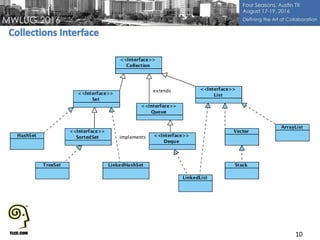
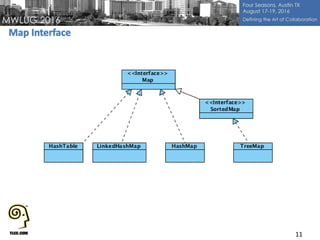
• Collections is a Framework/root interface
– Architecture for representing collections
• Has Interfaces, Implementations, Algorithms
• Interfaces
– Abstract Data Type
– Defines a base used by all the classes that implement
• An interface in Java is similar to a class, but the body of
an interface can include only abstract methods and final fields
(constants). A class implements an interface by providing code for each
method declared by the interface.
• Implementations
– A class that uses an interface (we use this!)
9
10
11
12
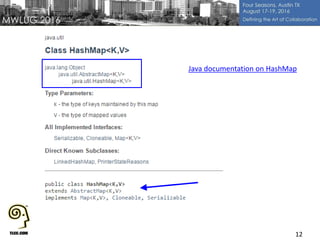
Java documentation on HashMap
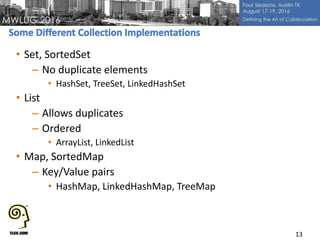
• Set, SortedSet
– No duplicate elements
• HashSet, TreeSet, LinkedHashSet
• List
– Allows duplicates
– Ordered
• ArrayList, LinkedList
• Map, SortedMap
– Key/Value pairs
• HashMap, LinkedHashMap, TreeMap
13
14
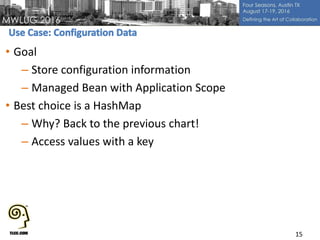
• Goal
– Store configuration information
– Managed Bean with Application Scope
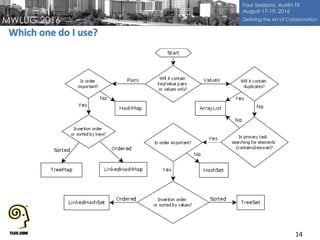
• Best choice is a HashMap
– Why? Back to the previous chart!
– Access values with a key
15
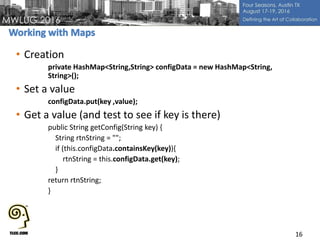
• Creation
private HashMap<String,String> configData = new HashMap<String,
String>();
• Set a value
configData.put(key ,value);
• Get a value (and test to see if key is there)
public String getConfig(String key) {
String rtnString = "";
if (this.configData.containsKey(key)){
rtnString = this.configData.get(key);
}
return rtnString;
}
16
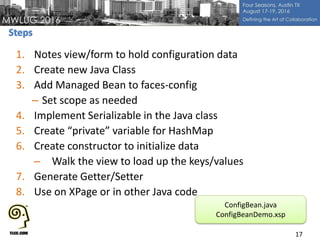
1. Notes view/form to hold configuration data
2. Create new Java Class
3. Add Managed Bean to faces-config
– Set scope as needed
4. Implement Serializable in the Java class
5. Create “private” variable for HashMap
6. Create constructor to initialize data
– Walk the view to load up the keys/values
7. Generate Getter/Setter
8. Use on XPage or in other Java code
17
ConfigBean.java
ConfigBeanDemo.xsp
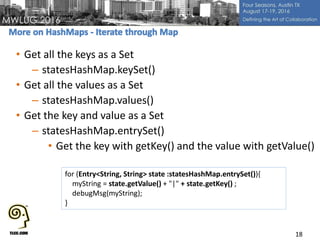
• Get all the keys as a Set
– statesHashMap.keySet()
• Get all the values as a Set
– statesHashMap.values()
• Get the key and value as a Set
– statesHashMap.entrySet()
• Get the key with getKey() and the value with getValue()
18
for (Entry<String, String> state :statesHashMap.entrySet()){
myString = state.getValue() + "|" + state.getKey() ;
debugMsg(myString);
}
• A HashMap does not keep the insertion order (random)
• Need to keeps insertion order?  LinkedHashMap
• Good when loading data from a Notes view (that is
ordered already)
– Keeps same (insertion) order
• Otherwise basically the same as HashMap
19
• A list of objects (like an Array)
– Hold any data type/object
– Can search the values
– Can access an element in a certain position
• Perfect for feeding to:
– Values in a combo box, list box, etc.
– Repeats
– Data Tables
• To add at end:
– rtnList.add(stateLine);
20
• Stop doing @DbColumns
– Slow!
• Load values from a view, store in memory
– FAST!
• Use Expression Language
– configBean.statesHashMap
• Use same ConfigBean as before (application scope)
– Method in Java is getStatesHashMap()
– Returns a List
21
ConfigBean.java
ConfigBeanDemo.xsp
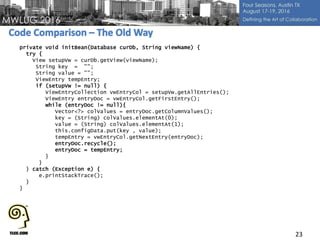
• Do you Recycle?
– View looping
– NotesDateTime?
– columnValues with a Date creates NotesDateTime objects
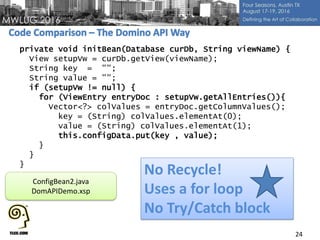
• Instead use the Domino API
– Simpler code patterns
– Never have to worry about recycle
– Try/Catch block not required
– Support for logging
– Lots of cool new stuff
• Available on OpenNTF – Link to version 3
– Get help via Slack/Stack Overflow
22
23
private void initBean(Database curDb, String viewName) {
try {
View setupVw = curDb.getView(viewName);
String key = "";
String value = "";
ViewEntry tempEntry;
if (setupVw != null) {
ViewEntryCollection vwEntryCol = setupVw.getAllEntries();
ViewEntry entryDoc = vwEntryCol.getFirstEntry();
while (entryDoc != null){
Vector<?> colValues = entryDoc.getColumnValues();
key = (String) colValues.elementAt(0);
value = (String) colValues.elementAt(1);
this.configData.put(key , value);
tempEntry = vwEntryCol.getNextEntry(entryDoc);
entryDoc.recycle();
entryDoc = tempEntry;
}
}
} catch (Exception e) {
e.printStackTrace();
}
}
24
private void initBean(Database curDb, String viewName) {
View setupVw = curDb.getView(viewName);
String key = "";
String value = "";
if (setupVw != null) {
for (ViewEntry entryDoc : setupVw.getAllEntries()){
Vector<?> colValues = entryDoc.getColumnValues();
key = (String) colValues.elementAt(0);
value = (String) colValues.elementAt(1);
this.configData.put(key , value);
}
}
}
No Recycle!
Uses a for loop
No Try/Catch block
ConfigBean2.java
DomAPIDemo.xsp
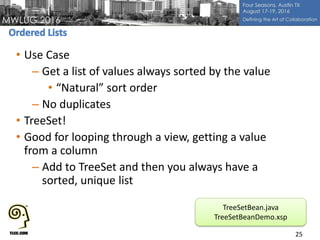
• Use Case
– Get a list of values always sorted by the value
• “Natural” sort order
– No duplicates
• TreeSet!
• Good for looping through a view, getting a value
from a column
– Add to TreeSet and then you always have a
sorted, unique list
25
TreeSetBean.java
TreeSetBeanDemo.xsp
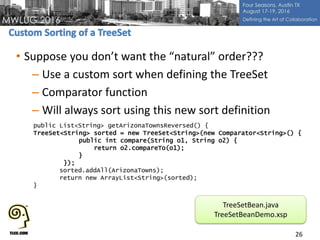
• Suppose you don’t want the “natural” order???
– Use a custom sort when defining the TreeSet
– Comparator function
– Will always sort using this new sort definition
26
public List<String> getArizonaTownsReversed() {
TreeSet<String> sorted = new TreeSet<String>(new Comparator<String>() {
public int compare(String o1, String o2) {
return o2.compareTo(o1);
}
});
sorted.addAll(ArizonaTowns);
return new ArrayList<String>(sorted);
}
TreeSetBean.java
TreeSetBeanDemo.xsp
• Use a TreeMap
– Key,Value pair
• In this case, a state is the key, a list of towns
(TreeSet) is the value
– Sorted on the Key value, natural order
27
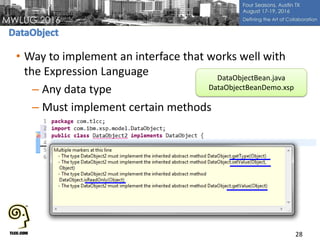
• Way to implement an interface that works well with
the Expression Language
– Any data type
– Must implement certain methods
28
DataObjectBean.java
DataObjectBeanDemo.xsp
• Goal is to store information in the bean to allow fast
filtering and sorting
• Base storage is a LinkedHashMap
– Key is the city name
– Values are an ArrayList
• The ArrayList holds a Person object
–First and last name, city, state, email, etc.
–Universal doc id to retrieve Notes document
29
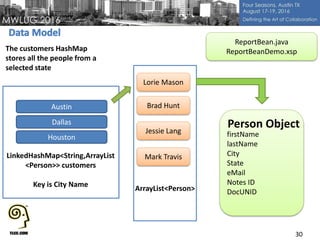
30
Houston
LinkedHashMap<String,ArrayList
<Person>> customers
Key is City Name
Lorie Mason
Brad Hunt
Jessie Lang
Mark Travis
firstName
lastName
City
State
eMail
Notes ID
DocUNID
Person ObjectDallas
Austin
ArrayList<Person>
The customers HashMap
stores all the people from a
selected state
ReportBean.java
ReportBeanDemo.xsp
• Methods of the Bean are used to:
– Return data as an ArrayList to a Repeat
• Sorted (last name, city, email)
• Filter on a city or show all
– Switch to a different state
– Get the cities for the selected state (unique, ordered)
– Store information like:
• City filter
• Desired sorting
• Ascending or Descending sorting
31
• TLCC’s Java Classes (two)
http://www.tlcc.com/admin/tlccsite.nsf/coursedetails.xsp?ccode=ND9XJVKPG
• My Session on Xpages Performance (recorded)
– October, 2015
http://www.tlcc.com/admin/tlccsite.nsf/pages/recorded-xpages-
webinars?opendocument
• List of Collections with a summary of features
– http://www.janeve.me/articles/which-java-collection-to-use
• The Sun Java documentation (version 6, aka 1.6)
• StackOverflow
• Google!!!
32
33
 Email: howardg@tlcc.com
 Twitter: @TLCCLtd
 Web: www.tlcc.com
Special Offer!!!
Save 20% on any TLCC course or package until 9/30
To take advantage of this offer or to download the demonstration databases
www.tlcc.com/mwlug

MWLUG Session- AD112 - Take a Trip Into the Forest - A Java Primer on Maps, Trees, and Collections

  • 1.
    1 Take a TripInto the Forest - A Java Primer on Maps, Trees, and Collections
  • 2.
    • Certified LotusInstructor since R3 • Co-founded TLCC in 1987 • IBM Champion • Prior to that 12 years at IBM in the PC group • Also… – Certified Public Accountant – Certified Information Systems Auditor (CISA) – Certified Flight Instructor 2
  • 3.
    3 • Private classesat your location or virtual •XPages Development •Support Existing Apps •Administration • Let us help you become an expert XPages developer! • Delivered via Notes • XPages • Development • Admin • User Self- Paced Courses Mentorin g Instructor- Led Classes Application Developmen t and Consulting Free Demo Courses!
  • 4.
    • Let ushelp with your development needs – Bootstrap – Java • Convert Notes Apps to mobile and the web! • Modernize old Domino web applications • Interface with backend data systems • Skills transfer 4
  • 5.
    • Why UseJava Objects in Xpages? • Introduction to Managed Beans • Scoped Variables in SSJS • Introduction to Maps • The DataObject Implementation • A Reporting Example • Questions??? 5
  • 6.
    • Performance (seemy recorded webinar) • Reporting – Easily combine data from different sources • Portability – Back end – Front end • Code Maintenance • Lots of code/knowledge out there 6
  • 7.
    • The XPagesruntime manages the creation of your “managed bean” – Request, View, Session, or Application scope • Refer to methods on your XPages or from other Java code • How to: – Create an entry in the Faces-Config file – Create your Java code • Getters and Setters • No argument constructor • Don’t have to use Managed Beans! 7 SampleBean.java SampleBeanDemo.xsp
  • 8.
    • sessionScope.testName – read/writeto a variable that is session scope • Can store anything (string, Boolean, date, array, etc) – Just don’t store Domino objects • Why do we care??? – Scoped variables are stored as HashMaps – Another way to access is: • sessionScope.get(“testName”) • sessionScope.put(“testName” , “A value”) • Same as a Java Hash Map – Let’s Learn more about these HashMaps! 8
  • 9.
    • Collections isa Framework/root interface – Architecture for representing collections • Has Interfaces, Implementations, Algorithms • Interfaces – Abstract Data Type – Defines a base used by all the classes that implement • An interface in Java is similar to a class, but the body of an interface can include only abstract methods and final fields (constants). A class implements an interface by providing code for each method declared by the interface. • Implementations – A class that uses an interface (we use this!) 9
  • 10.
  • 11.
  • 12.
  • 13.
    • Set, SortedSet –No duplicate elements • HashSet, TreeSet, LinkedHashSet • List – Allows duplicates – Ordered • ArrayList, LinkedList • Map, SortedMap – Key/Value pairs • HashMap, LinkedHashMap, TreeMap 13
  • 14.
  • 15.
    • Goal – Storeconfiguration information – Managed Bean with Application Scope • Best choice is a HashMap – Why? Back to the previous chart! – Access values with a key 15
  • 16.
    • Creation private HashMap<String,String>configData = new HashMap<String, String>(); • Set a value configData.put(key ,value); • Get a value (and test to see if key is there) public String getConfig(String key) { String rtnString = ""; if (this.configData.containsKey(key)){ rtnString = this.configData.get(key); } return rtnString; } 16
  • 17.
    1. Notes view/formto hold configuration data 2. Create new Java Class 3. Add Managed Bean to faces-config – Set scope as needed 4. Implement Serializable in the Java class 5. Create “private” variable for HashMap 6. Create constructor to initialize data – Walk the view to load up the keys/values 7. Generate Getter/Setter 8. Use on XPage or in other Java code 17 ConfigBean.java ConfigBeanDemo.xsp
  • 18.
    • Get allthe keys as a Set – statesHashMap.keySet() • Get all the values as a Set – statesHashMap.values() • Get the key and value as a Set – statesHashMap.entrySet() • Get the key with getKey() and the value with getValue() 18 for (Entry<String, String> state :statesHashMap.entrySet()){ myString = state.getValue() + "|" + state.getKey() ; debugMsg(myString); }
  • 19.
    • A HashMapdoes not keep the insertion order (random) • Need to keeps insertion order?  LinkedHashMap • Good when loading data from a Notes view (that is ordered already) – Keeps same (insertion) order • Otherwise basically the same as HashMap 19
  • 20.
    • A listof objects (like an Array) – Hold any data type/object – Can search the values – Can access an element in a certain position • Perfect for feeding to: – Values in a combo box, list box, etc. – Repeats – Data Tables • To add at end: – rtnList.add(stateLine); 20
  • 21.
    • Stop doing@DbColumns – Slow! • Load values from a view, store in memory – FAST! • Use Expression Language – configBean.statesHashMap • Use same ConfigBean as before (application scope) – Method in Java is getStatesHashMap() – Returns a List 21 ConfigBean.java ConfigBeanDemo.xsp
  • 22.
    • Do youRecycle? – View looping – NotesDateTime? – columnValues with a Date creates NotesDateTime objects • Instead use the Domino API – Simpler code patterns – Never have to worry about recycle – Try/Catch block not required – Support for logging – Lots of cool new stuff • Available on OpenNTF – Link to version 3 – Get help via Slack/Stack Overflow 22
  • 23.
    23 private void initBean(DatabasecurDb, String viewName) { try { View setupVw = curDb.getView(viewName); String key = ""; String value = ""; ViewEntry tempEntry; if (setupVw != null) { ViewEntryCollection vwEntryCol = setupVw.getAllEntries(); ViewEntry entryDoc = vwEntryCol.getFirstEntry(); while (entryDoc != null){ Vector<?> colValues = entryDoc.getColumnValues(); key = (String) colValues.elementAt(0); value = (String) colValues.elementAt(1); this.configData.put(key , value); tempEntry = vwEntryCol.getNextEntry(entryDoc); entryDoc.recycle(); entryDoc = tempEntry; } } } catch (Exception e) { e.printStackTrace(); } }
  • 24.
    24 private void initBean(DatabasecurDb, String viewName) { View setupVw = curDb.getView(viewName); String key = ""; String value = ""; if (setupVw != null) { for (ViewEntry entryDoc : setupVw.getAllEntries()){ Vector<?> colValues = entryDoc.getColumnValues(); key = (String) colValues.elementAt(0); value = (String) colValues.elementAt(1); this.configData.put(key , value); } } } No Recycle! Uses a for loop No Try/Catch block ConfigBean2.java DomAPIDemo.xsp
  • 25.
    • Use Case –Get a list of values always sorted by the value • “Natural” sort order – No duplicates • TreeSet! • Good for looping through a view, getting a value from a column – Add to TreeSet and then you always have a sorted, unique list 25 TreeSetBean.java TreeSetBeanDemo.xsp
  • 26.
    • Suppose youdon’t want the “natural” order??? – Use a custom sort when defining the TreeSet – Comparator function – Will always sort using this new sort definition 26 public List<String> getArizonaTownsReversed() { TreeSet<String> sorted = new TreeSet<String>(new Comparator<String>() { public int compare(String o1, String o2) { return o2.compareTo(o1); } }); sorted.addAll(ArizonaTowns); return new ArrayList<String>(sorted); } TreeSetBean.java TreeSetBeanDemo.xsp
  • 27.
    • Use aTreeMap – Key,Value pair • In this case, a state is the key, a list of towns (TreeSet) is the value – Sorted on the Key value, natural order 27
  • 28.
    • Way toimplement an interface that works well with the Expression Language – Any data type – Must implement certain methods 28 DataObjectBean.java DataObjectBeanDemo.xsp
  • 29.
    • Goal isto store information in the bean to allow fast filtering and sorting • Base storage is a LinkedHashMap – Key is the city name – Values are an ArrayList • The ArrayList holds a Person object –First and last name, city, state, email, etc. –Universal doc id to retrieve Notes document 29
  • 30.
    30 Houston LinkedHashMap<String,ArrayList <Person>> customers Key isCity Name Lorie Mason Brad Hunt Jessie Lang Mark Travis firstName lastName City State eMail Notes ID DocUNID Person ObjectDallas Austin ArrayList<Person> The customers HashMap stores all the people from a selected state ReportBean.java ReportBeanDemo.xsp
  • 31.
    • Methods ofthe Bean are used to: – Return data as an ArrayList to a Repeat • Sorted (last name, city, email) • Filter on a city or show all – Switch to a different state – Get the cities for the selected state (unique, ordered) – Store information like: • City filter • Desired sorting • Ascending or Descending sorting 31
  • 32.
    • TLCC’s JavaClasses (two) http://www.tlcc.com/admin/tlccsite.nsf/coursedetails.xsp?ccode=ND9XJVKPG • My Session on Xpages Performance (recorded) – October, 2015 http://www.tlcc.com/admin/tlccsite.nsf/pages/recorded-xpages- webinars?opendocument • List of Collections with a summary of features – http://www.janeve.me/articles/which-java-collection-to-use • The Sun Java documentation (version 6, aka 1.6) • StackOverflow • Google!!! 32
  • 33.
    33  Email: howardg@tlcc.com Twitter: @TLCCLtd  Web: www.tlcc.com Special Offer!!! Save 20% on any TLCC course or package until 9/30 To take advantage of this offer or to download the demonstration databases www.tlcc.com/mwlug