OPENNTF WEBINARS
October Webinar - XPages Flexible View Control with
Michael G. Smith
AGENDA
• Welcome – Howard Greenberg
• Michael Smith
• Questions – Graham Acres
ASKING QUESTIONS
• First Question – Will this be recorded?
• Yes, view on YouTube!!!
• https://www.youtube.com/user/OpenNTF
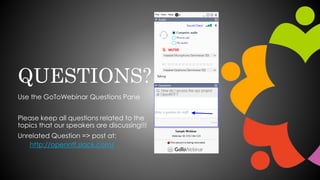
• Use the Questions Pane in GoToWebinar
• We will get to your questions at the end of
the webinar
• The speakers will respond to your questions
verbally
• (not in the Questions pane)
• Please keep all questions related to the
topics that our speakers are discussing!!!
• Unrelated Question => post at:
• http://openntf.slack.com/
THANKS TO THE OPENNTF SPONSORS
• HCL made a significant contribution to help our
organization
• Funds these webinars!
• Contests like Hackathons
• Running the organization
• Prominic donates all IT related services
• Cloud Hosting for OpenNTF
• Infrastructure management for HCL Domino and Atlassian
Servers
• System Administration for day-to-day operation
THIS IS OUR COMMUNITY
• Join us and get involved!
• We are all volunteers
• No effort is too small
• If your idea is bigger than you can do on your own, we
can connect you to a team to work on it
• Test or help or modify an existing project
• Write guides or documentation
• Add reviews on projects / stars on Snippets
Flexible View
Control for XPages
OpenNTF Webinar
Michael G. Smith
October 22nd, 2020
HELLO!
I am Michael G. Smith
Senior Developer/Analyst
Mutual Boiler Re
Blog: Xpage.me
Twitter: @michaelgsmith
Email: smithmg@gmail.com
LinkedIn: linkedin.com/in/smithmichaelgarrett
2
What problem
are we trying
to solve?
3
“The Flexible View Control
was born out of frustration
with the out-of-the-box
tools available in XPages
for displaying View data.
4
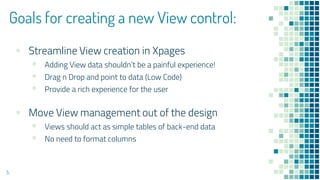
Goals for creating a new View control:
▪ Streamline View creation in Xpages
▪ Adding View data shouldn’t be a painful experience!
▪ Drag n Drop and point to data (Low Code)
▪ Provide a rich experience for the user
▪ Move View management out of the design
▪ Views should act as simple tables of back-end data
▪ No need to format columns
5
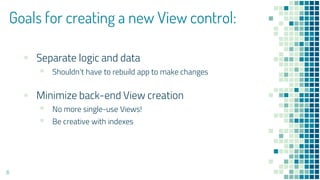
Goals for creating a new View control:
▪ Separate logic and data
▪ Shouldn’t have to rebuild app to make changes
▪ Minimize back-end View creation
▪ No more single-use Views!
▪ Be creative with indexes
6
Goals for creating a new View control:
▪ Which JavaScript table framework to use?
▪ Had started using DataTables and was very impressed
with the range of functionality
▪ Which UI framework to use?
▫ Try to keep it as generic as possible
7
The Flexible View
Control for XPages
is the result.
8
9
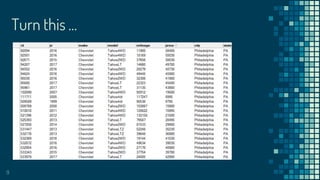
Turn this …
10
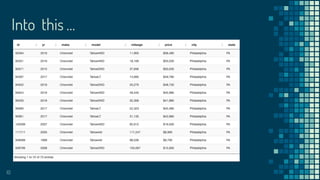
Into this …
11
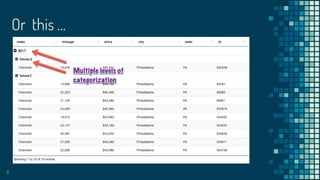
Or this …
12
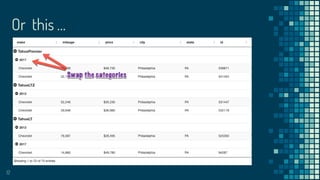
Or this …
13
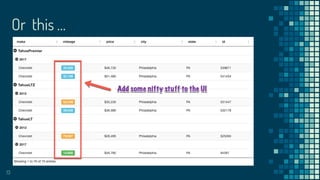
Or this …
Getting Started
What is The Flexible View Control?
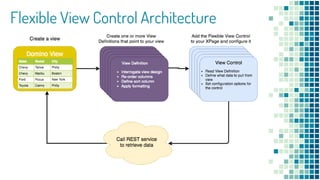
Flexible View Control Architecture
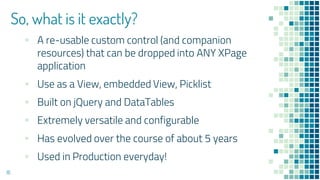
So, what is it exactly?
▪ A re-usable custom control (and companion
resources) that can be dropped into ANY XPage
application
▪ Use as a View, embedded View, Picklist
▪ Built on jQuery and DataTables
▪ Extremely versatile and configurable
▪ Has evolved over the course of about 5 years
▪ Used in Production everyday!
16
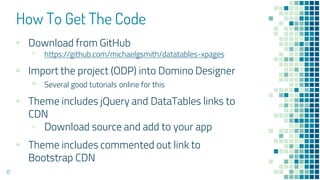
How To Get The Code
▪ Download from GitHub
▫ https://github.com/michaelgsmith/datatables-xpages
▪ Import the project (ODP) into Domino Designer
▪ Several good tutorials online for this
▪ Theme includes jQuery and DataTables links to
CDN
▫ Download source and add to your app
▪ Theme includes commented out link to
Bootstrap CDN
17
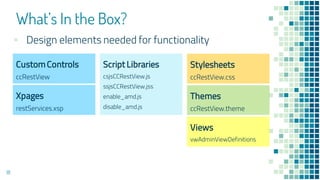
What’s In the Box?
18
CustomControls
ccRestView
Script Libraries
csjsCCRestView.js
ssjsCCRestView.jss
enable_amd.js
disable_amd.js
Stylesheets
ccRestView.css
Themes
ccRestView.theme
Xpages
restServices.xsp
Views
vwAdminViewDefinitions
▪ Design elements needed for functionality
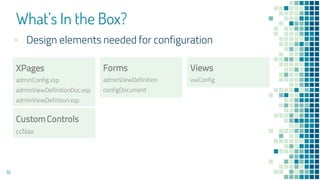
What’s In the Box?
19
XPages
adminConfig.xsp
adminViewDefinitionDoc.xsp
adminViewDefintion.xsp
Forms
adminViewDefinition
configDocument
Views
vwConfig
▪ Design elements needed for configuration
CustomControls
ccNav
Configuration
Import project into Designer and setup
the configuration parameters
Configuration
21
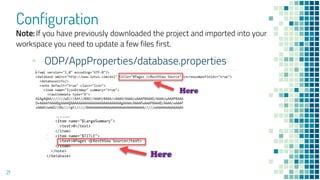
▪ ODP/AppProperties/database.properties
Note: If you have previously downloaded the project and imported into your
workspace you need to update a few files first.
Configuration
22
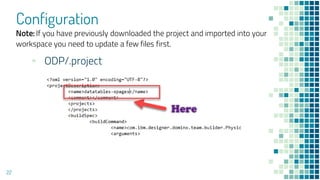
▪ ODP/.project
Note: If you have previously downloaded the project and imported into your
workspace you need to update a few files first.
Configuration
23
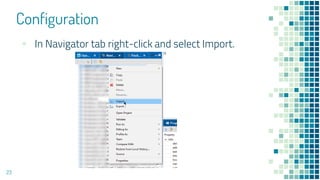
▪ In Navigator tab right-click and select Import.
Configuration
24
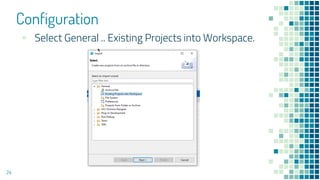
▪ Select General .. Existing Projects into Workspace.
Configuration
25
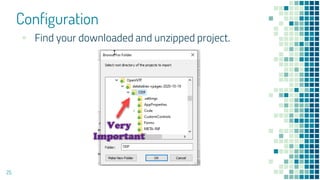
▪ Find your downloaded and unzipped project.
Configuration
26
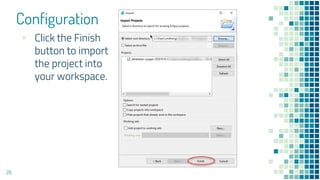
▪ Click the Finish
button to import
the project into
your workspace.
Configuration
27
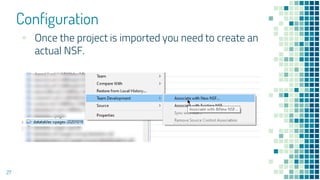
▪ Once the project is imported you need to create an
actual NSF.
Configuration
28
▪ Now that the NSF is created….
▫ Update the ACL
▫ Build the project
▫ Open adminConfig.xsp in your browser
▫ THIS MUST BE DONE 1st !!!
▫ Create the first View Definition (view-definitions)
▫ THIS MUST BE DONE 2nd !!!
Configuration
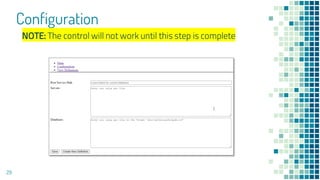
29
NOTE: The control will not work until this step is complete
Configuration
30
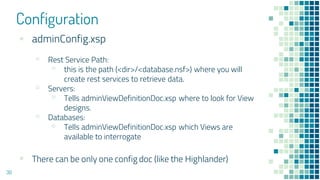
▪ adminConfig.xsp
▫ Rest Service Path:
▫ this is the path (<dir>/<database.nsf>) where you will
create rest services to retrieve data.
▫ Servers:
▫ Tells adminViewDefinitionDoc.xsp where to look for View
designs.
▫ Databases:
▫ Tells adminViewDefinitionDoc.xsp which Views are
available to interrogate
▪ There can be only one config doc (like the Highlander)
Configuration
31
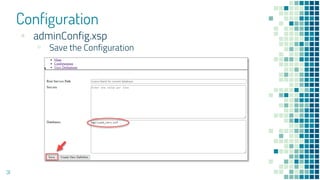
▪ adminConfig.xsp
▫ Save the Configuration
Configuration
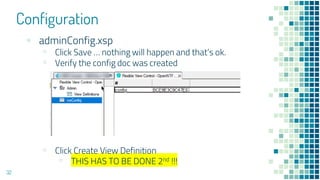
32
▪ adminConfig.xsp
▫ Click Save … nothing will happen and that’s ok.
▫ Verify the config doc was created
▫ Click Create View Definition
▫ THIS HAS TO BE DONE 2nd !!!
Configuration
33
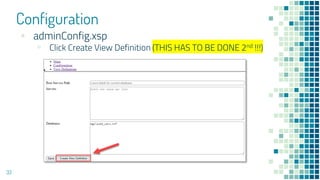
▪ adminConfig.xsp
▫ Click Create View Definition (THIS HAS TO BE DONE 2nd !!!)
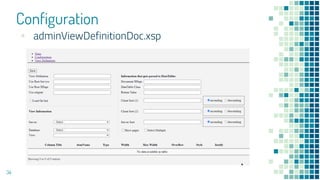
Configuration
34
▪ adminViewDefinitionDoc.xsp
View Definitions
Put the “Flexible” in Flexible View Control
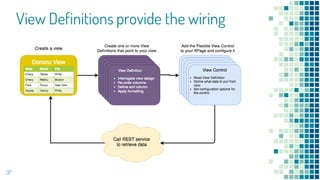
“View Definitions act as the
“wiring” for the Flexible
View Control, instructing it
where to retrieve data
from and how that data
should be formatted and
displayed.
36
View Definitions provide the wiring
37
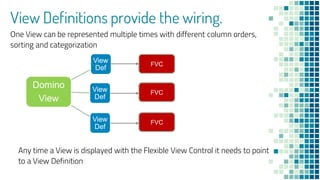
View Definitions provide the wiring.
Domino
View
View
Def
View
Def
View
Def
One View can be represented multiple times with different column orders,
sorting and categorization
Any time a View is displayed with the Flexible View Control it needs to point
to a View Definition
FVC
FVC
FVC
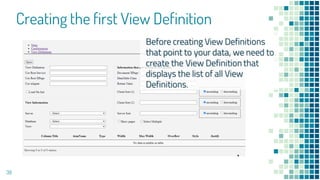
Creating the first View Definition
39
Before creating View Definitions
that point to your data, we need to
create the View Definition that
displays the list of all View
Definitions.
Creating the first View Definition
40
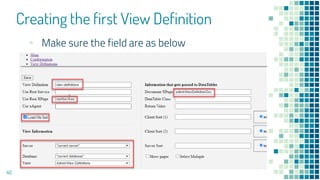
▪ Make sure the field are as below
Creating the first View Definition
41
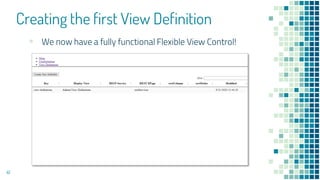
▪ We now have a fully functional Flexible View Control!
About the UI
About the UI
43
▪ Out-of-the-box UI left intentionally generic to
make it easier to integrate into existing apps
▪ Uses the “default” DataTables styling
▫ See DataTables.net for other styling options
▪ Easy to integrate with Bootstrap 3
▫ Commented out links to CDN in theme
▪ Easy to incorporate Font Awesome
About the UI
44
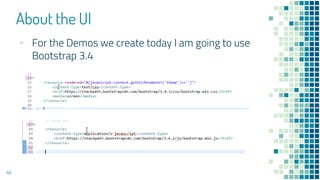
▪ For the Demos we create today I am going to use
Bootstrap 3.4
About the UI
45
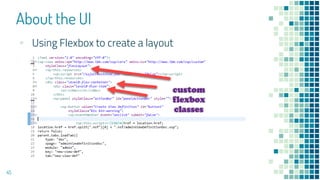
▪ Using Flexbox to create a layout
About the UI
46
▪ Using Flexbox to create a layout
▫ For a deeper dive into this topic see my blog
post:
https://xpage.me/2020/04/15/a-flexible-view-control-
for-xpages-part-8-putting-the-flex-in-flexible/
How Does It Work?
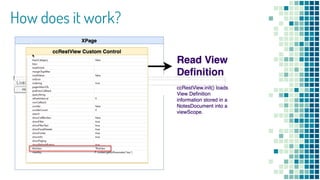
How does it work?
How does it work?
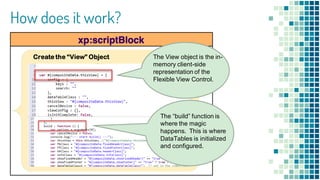
Create the “View” Object The View object is the in-
memory client-side
representation of the
Flexible View Control.
The “build” function is
where the magic
happens. This is where
DataTables is initialized
and configured.
How does it work?
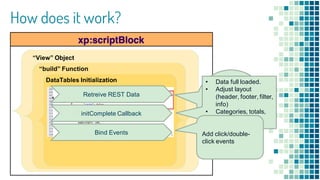
“View” Object
“build” Function
DataTables Initialization
Data retrieved
from Domino
REST Services
or XAgents
Retreive REST Data
initComplete Callback
Bind Events
• Data full loaded.
• Adjust layout
(header, footer, filter,
info)
• Categories, totals,
averages.
Add click/double-
click events
DataTables Primer
DataTables Primer
52
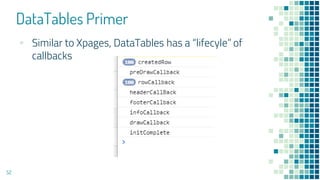
▪ Similar to Xpages, DataTables has a “lifecyle” of
callbacks
DataTables Primer
53
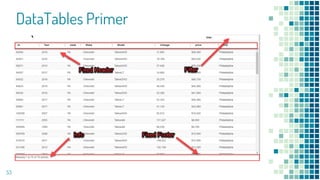
DataTables Primer
54
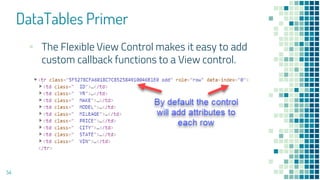
▪ The Flexible View Control makes it easy to add
custom callback functions to a View control.
DataTables Primer
55
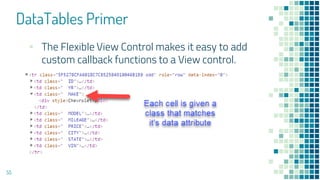
▪ The Flexible View Control makes it easy to add
custom callback functions to a View control.
Let’s Build Some Demos!
… and work with some real data
Future Plans
57
▪ Retrieve non-Domino data
▪ Add renderer function to View Def column
▪ Ability to make individual columns non-sortable
▪ Ability to sort by more than two columns and more
than two levels of categorization
▪ Custom columns
▪ Squash bugs!
Future Plans
58
▪ What would you like to see?
THANKS!
Any questions?
You can find me at:
Twitter: @michaelgsmith
Email: smithmg@gmail.com
LinkedIn: linkedin.com/in/smithmichaelgarrett
59
NEXT WEBINAR
• TBD
• Will be announced at https://openntf.org/webinars
UPCOMING EVENTS
• Collabsphere – October 27-29
• https://collabsphere.org/ug/cs2020.nsf/index.html
• DNUG – monthly online events
• https://dnug.de/en/dnug47online-2/
• HCL Digital Week – November 9-13 (APG is 12/1-4)
• https://www.hcltechsw.com/events/digital-week
QUESTIONS?
Use the GoToWebinar Questions Pane
Please keep all questions related to the
topics that our speakers are discussing!!!
Unrelated Question => post at:
http://openntf.slack.com/

OpenNTF Webinar, October 2020

  • 1.
    OPENNTF WEBINARS October Webinar- XPages Flexible View Control with Michael G. Smith
  • 2.
    AGENDA • Welcome –Howard Greenberg • Michael Smith • Questions – Graham Acres
  • 3.
    ASKING QUESTIONS • FirstQuestion – Will this be recorded? • Yes, view on YouTube!!! • https://www.youtube.com/user/OpenNTF • Use the Questions Pane in GoToWebinar • We will get to your questions at the end of the webinar • The speakers will respond to your questions verbally • (not in the Questions pane) • Please keep all questions related to the topics that our speakers are discussing!!! • Unrelated Question => post at: • http://openntf.slack.com/
  • 4.
    THANKS TO THEOPENNTF SPONSORS • HCL made a significant contribution to help our organization • Funds these webinars! • Contests like Hackathons • Running the organization • Prominic donates all IT related services • Cloud Hosting for OpenNTF • Infrastructure management for HCL Domino and Atlassian Servers • System Administration for day-to-day operation
  • 5.
    THIS IS OURCOMMUNITY • Join us and get involved! • We are all volunteers • No effort is too small • If your idea is bigger than you can do on your own, we can connect you to a team to work on it • Test or help or modify an existing project • Write guides or documentation • Add reviews on projects / stars on Snippets
  • 6.
    Flexible View Control forXPages OpenNTF Webinar Michael G. Smith October 22nd, 2020
  • 7.
    HELLO! I am MichaelG. Smith Senior Developer/Analyst Mutual Boiler Re Blog: Xpage.me Twitter: @michaelgsmith Email: smithmg@gmail.com LinkedIn: linkedin.com/in/smithmichaelgarrett 2
  • 8.
    What problem are wetrying to solve? 3
  • 9.
    “The Flexible ViewControl was born out of frustration with the out-of-the-box tools available in XPages for displaying View data. 4
  • 10.
    Goals for creatinga new View control: ▪ Streamline View creation in Xpages ▪ Adding View data shouldn’t be a painful experience! ▪ Drag n Drop and point to data (Low Code) ▪ Provide a rich experience for the user ▪ Move View management out of the design ▪ Views should act as simple tables of back-end data ▪ No need to format columns 5
  • 11.
    Goals for creatinga new View control: ▪ Separate logic and data ▪ Shouldn’t have to rebuild app to make changes ▪ Minimize back-end View creation ▪ No more single-use Views! ▪ Be creative with indexes 6
  • 12.
    Goals for creatinga new View control: ▪ Which JavaScript table framework to use? ▪ Had started using DataTables and was very impressed with the range of functionality ▪ Which UI framework to use? ▫ Try to keep it as generic as possible 7
  • 13.
    The Flexible View Controlfor XPages is the result. 8
  • 14.
  • 15.
  • 16.
  • 17.
  • 18.
  • 19.
    Getting Started What isThe Flexible View Control?
  • 20.
  • 21.
    So, what isit exactly? ▪ A re-usable custom control (and companion resources) that can be dropped into ANY XPage application ▪ Use as a View, embedded View, Picklist ▪ Built on jQuery and DataTables ▪ Extremely versatile and configurable ▪ Has evolved over the course of about 5 years ▪ Used in Production everyday! 16
  • 22.
    How To GetThe Code ▪ Download from GitHub ▫ https://github.com/michaelgsmith/datatables-xpages ▪ Import the project (ODP) into Domino Designer ▪ Several good tutorials online for this ▪ Theme includes jQuery and DataTables links to CDN ▫ Download source and add to your app ▪ Theme includes commented out link to Bootstrap CDN 17
  • 23.
    What’s In theBox? 18 CustomControls ccRestView Script Libraries csjsCCRestView.js ssjsCCRestView.jss enable_amd.js disable_amd.js Stylesheets ccRestView.css Themes ccRestView.theme Xpages restServices.xsp Views vwAdminViewDefinitions ▪ Design elements needed for functionality
  • 24.
    What’s In theBox? 19 XPages adminConfig.xsp adminViewDefinitionDoc.xsp adminViewDefintion.xsp Forms adminViewDefinition configDocument Views vwConfig ▪ Design elements needed for configuration CustomControls ccNav
  • 25.
    Configuration Import project intoDesigner and setup the configuration parameters
  • 26.
    Configuration 21 ▪ ODP/AppProperties/database.properties Note: Ifyou have previously downloaded the project and imported into your workspace you need to update a few files first.
  • 27.
    Configuration 22 ▪ ODP/.project Note: Ifyou have previously downloaded the project and imported into your workspace you need to update a few files first.
  • 28.
    Configuration 23 ▪ In Navigatortab right-click and select Import.
  • 29.
    Configuration 24 ▪ Select General.. Existing Projects into Workspace.
  • 30.
    Configuration 25 ▪ Find yourdownloaded and unzipped project.
  • 31.
    Configuration 26 ▪ Click theFinish button to import the project into your workspace.
  • 32.
    Configuration 27 ▪ Once theproject is imported you need to create an actual NSF.
  • 33.
    Configuration 28 ▪ Now thatthe NSF is created…. ▫ Update the ACL ▫ Build the project ▫ Open adminConfig.xsp in your browser ▫ THIS MUST BE DONE 1st !!! ▫ Create the first View Definition (view-definitions) ▫ THIS MUST BE DONE 2nd !!!
  • 34.
    Configuration 29 NOTE: The controlwill not work until this step is complete
  • 35.
    Configuration 30 ▪ adminConfig.xsp ▫ RestService Path: ▫ this is the path (<dir>/<database.nsf>) where you will create rest services to retrieve data. ▫ Servers: ▫ Tells adminViewDefinitionDoc.xsp where to look for View designs. ▫ Databases: ▫ Tells adminViewDefinitionDoc.xsp which Views are available to interrogate ▪ There can be only one config doc (like the Highlander)
  • 36.
  • 37.
    Configuration 32 ▪ adminConfig.xsp ▫ ClickSave … nothing will happen and that’s ok. ▫ Verify the config doc was created ▫ Click Create View Definition ▫ THIS HAS TO BE DONE 2nd !!!
  • 38.
    Configuration 33 ▪ adminConfig.xsp ▫ ClickCreate View Definition (THIS HAS TO BE DONE 2nd !!!)
  • 39.
  • 40.
    View Definitions Put the“Flexible” in Flexible View Control
  • 41.
    “View Definitions actas the “wiring” for the Flexible View Control, instructing it where to retrieve data from and how that data should be formatted and displayed. 36
  • 42.
  • 43.
    View Definitions providethe wiring. Domino View View Def View Def View Def One View can be represented multiple times with different column orders, sorting and categorization Any time a View is displayed with the Flexible View Control it needs to point to a View Definition FVC FVC FVC
  • 44.
    Creating the firstView Definition 39 Before creating View Definitions that point to your data, we need to create the View Definition that displays the list of all View Definitions.
  • 45.
    Creating the firstView Definition 40 ▪ Make sure the field are as below
  • 46.
    Creating the firstView Definition 41 ▪ We now have a fully functional Flexible View Control!
  • 47.
  • 48.
    About the UI 43 ▪Out-of-the-box UI left intentionally generic to make it easier to integrate into existing apps ▪ Uses the “default” DataTables styling ▫ See DataTables.net for other styling options ▪ Easy to integrate with Bootstrap 3 ▫ Commented out links to CDN in theme ▪ Easy to incorporate Font Awesome
  • 49.
    About the UI 44 ▪For the Demos we create today I am going to use Bootstrap 3.4
  • 50.
    About the UI 45 ▪Using Flexbox to create a layout
  • 51.
    About the UI 46 ▪Using Flexbox to create a layout ▫ For a deeper dive into this topic see my blog post: https://xpage.me/2020/04/15/a-flexible-view-control- for-xpages-part-8-putting-the-flex-in-flexible/
  • 52.
  • 53.
  • 54.
    How does itwork? Create the “View” Object The View object is the in- memory client-side representation of the Flexible View Control. The “build” function is where the magic happens. This is where DataTables is initialized and configured.
  • 55.
    How does itwork? “View” Object “build” Function DataTables Initialization Data retrieved from Domino REST Services or XAgents Retreive REST Data initComplete Callback Bind Events • Data full loaded. • Adjust layout (header, footer, filter, info) • Categories, totals, averages. Add click/double- click events
  • 56.
  • 57.
    DataTables Primer 52 ▪ Similarto Xpages, DataTables has a “lifecyle” of callbacks
  • 58.
  • 59.
    DataTables Primer 54 ▪ TheFlexible View Control makes it easy to add custom callback functions to a View control.
  • 60.
    DataTables Primer 55 ▪ TheFlexible View Control makes it easy to add custom callback functions to a View control.
  • 61.
    Let’s Build SomeDemos! … and work with some real data
  • 62.
    Future Plans 57 ▪ Retrievenon-Domino data ▪ Add renderer function to View Def column ▪ Ability to make individual columns non-sortable ▪ Ability to sort by more than two columns and more than two levels of categorization ▪ Custom columns ▪ Squash bugs!
  • 63.
    Future Plans 58 ▪ Whatwould you like to see?
  • 64.
    THANKS! Any questions? You canfind me at: Twitter: @michaelgsmith Email: smithmg@gmail.com LinkedIn: linkedin.com/in/smithmichaelgarrett 59
  • 65.
    NEXT WEBINAR • TBD •Will be announced at https://openntf.org/webinars
  • 66.
    UPCOMING EVENTS • Collabsphere– October 27-29 • https://collabsphere.org/ug/cs2020.nsf/index.html • DNUG – monthly online events • https://dnug.de/en/dnug47online-2/ • HCL Digital Week – November 9-13 (APG is 12/1-4) • https://www.hcltechsw.com/events/digital-week
  • 67.
    QUESTIONS? Use the GoToWebinarQuestions Pane Please keep all questions related to the topics that our speakers are discussing!!! Unrelated Question => post at: http://openntf.slack.com/