OPENNTF WEBINARS
Spotlight on OpenNTF Projects - Make the most of Domino!
AGENDA
‱ Welcome – Howard Greenberg
‱ About OpenNTF – Graham Acres
‱ Wine Tasting App - Theo Heselmans
‱ DQL Explorer - Luis Guirigay
‱ OpenLog - Paul Withers
‱ NSF ODP Tooling - Jesse Gallagher
‱ OpenNTF Domino API - Jesse Gallagher
‱ Closing and what’s next – Howard Greenberg
ASKING QUESTIONS
‱ First Question – Will this be recorded?
‱ Yes, view on YouTube!!!
‱ https://www.youtube.com/user/OpenNTF
‱ Use the Questions Pane in GoToWebinar
‱ We will get to your questions at the end
of the webinar
‱ The speakers will respond to your
questions verbally
‱ (not in the Questions pane)
THANKS TO THE OPENNTF SPONSORS
‱ HCL contributed $25,000 to help our organization
‱ Funds these webinars!
‱ Contests like Hackathons
‱ Running the organization
‱ Prominic donates all IT related services
‱ Cloud Hosting for OpenNTF
‱ Infrastructure management for HCL Domino and Atlassian
Servers
‱ System Administration for day-to-day operation
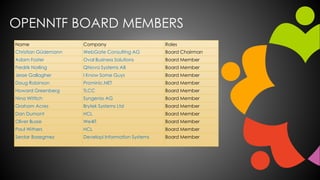
OPENNTF BOARD MEMBERS
Name Company Roles
Christian GĂŒdemann WebGate Consulting AG Board Chairman
Adam Foster Oval Business Solutions Board Member
Fredrik Norling QNova Systems AB Board Member
Jesse Gallagher I Know Some Guys Board Member
Doug Robinson Prominic.NET Board Member
Howard Greenberg TLCC Board Member
Nina Wittich Syngenio AG Board Member
Graham Acres Brytek Systems Ltd Board Member
Dan Dumont HCL Board Member
Oliver Busse We4IT Board Member
Paul Withers HCL Board Member
Serdar Basegmez Developi Information Systems Board Member
HISTORY OF OPENNTF
‱ OpenNTF is a strong brand
‱ OpenNTF is well known to developers in the
Collaboration / XPages / Domino / Notes Community
‱ GitHub
‱ Very active on Stack Overflow
‱ Slack as a support forum for many years
‱ Many different initiatives including Snippets,
CollaborationToday.org
‱ Guides and Documentation
OPENNTF 2020
‱ HCL Strategic Partnership with OpenNTF
‱ Expand into new areas of HCL Digital Solutions portfolio
‱ Volt
‱ Continue our history of supporting community events
‱ Continue our history of supporting community contests
‱ Continue to host trusted solutions but with an expanded view
‱ Developers, Admins, End Users
‱ More options for access to solutions
‱ Traditional sites
‱ HCL Solutions Factory
‱ Wiki
‱ Project to raise the profile of the projects most used by the
community – and you will be able to vote for your favorites
‱ Coming Soon: sandbox.openntf.org
THIS IS OUR COMMUNITY
‱ Join us and get involved!
‱ We are all volunteers
‱ No effort is too small
‱ If your idea is bigger than you can do on your own, we
can connect you to a team to work on it
‱ Test or help or modify an existing project
‱ Write guides or documentation
‱ Add reviews on projects / stars on Snippets
Make your Notes Client apps
look great on a mobile device
using HCL Nomad
1
Theo Heselmans, Xceed
About Theo Heselmans
â–ȘDoing IBMÂź NotesÂź Development &
Project Mgt. for more than 20 years!
â–ȘIndependent consultant since 2001 for Xceed
â–ȘCoordinator of the Engage User Group
for over 10 years
â–Ș
â–ȘI like wine and other beverages too
â–Ș Twitter: @theoheselmans
â–Ș Email: theo@xceed.be
2
@theoheselmans
Agenda
â–ȘWhy developing for a Touch Device ?
(like the iPad, iPhone or Android Tablet)
â–ȘMain Advantages
â–Ș'Classic' Notes apps work (unmodified) in Nomad, but...
â–ȘWe can do better than this!
â–ȘHow did we do it?
3
@theoheselmans
Mobile Devices
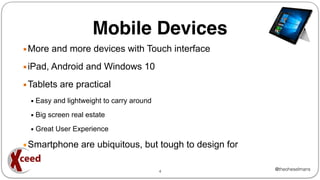
â–ȘMore and more devices with Touch interface
â–ȘiPad, Android and Windows 10
â–ȘTablets are practical
â–Ș Easy and lightweight to carry around
â–Ș Big screen real estate
â–Ș Great User Experience
â–ȘSmartphone are ubiquitous, but tough to design for
4
@theoheselmans
HCL Nomad
â–ȘRun any Notes App on your Tablet or Phone unmodified
â–ȘEmbed images from Library or Camera, use GPS
â–ȘSupports @Formulas and LotusScript unmodified
â–ȘComplex forms and Logic works
â–ȘBuilt-in Replication for offline use
â–ȘUses the user's ID, so easy security/policy
5
@theoheselmans
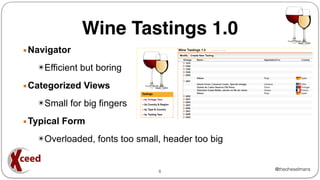
Wine Tastings 1.0
â–ȘNavigator
✮Efficient but boring
â–ȘCategorized Views
✮Small for big fingers
â–ȘTypical Form
✮Overloaded, fonts too small, header too big
6
@theoheselmans
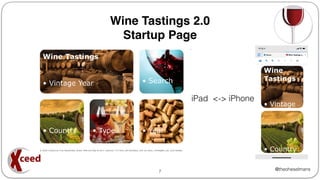
Wine Tastings 2.0
Startup Page
7
iPad <-> iPhone
@theoheselmans
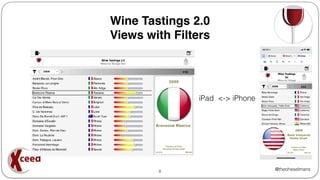
Wine Tastings 2.0
Views with Filters
8
iPad <-> iPhone
@theoheselmans
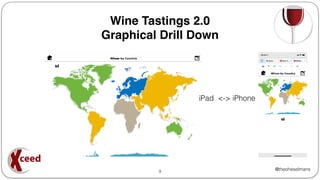
Wine Tastings 2.0
Graphical Drill Down
9
iPad <-> iPhone
@theoheselmans
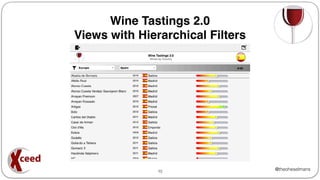
Wine Tastings 2.0
Views with Hierarchical Filters
10
@theoheselmans
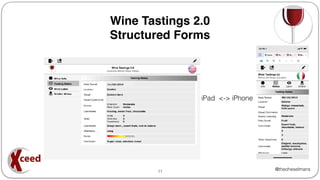
Wine Tastings 2.0
Structured Forms
11
iPad <-> iPhone
@theoheselmans
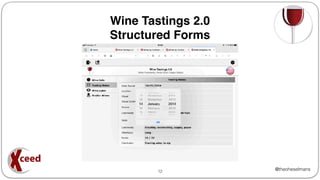
Wine Tastings 2.0
Structured Forms
12
@theoheselmans
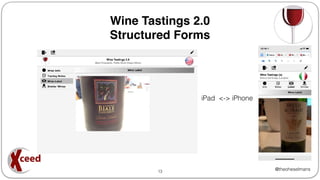
Wine Tastings 2.0
Structured Forms
13
iPad <-> iPhone
@theoheselmans
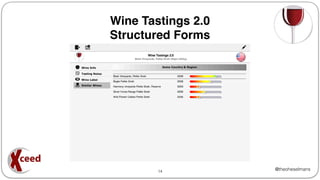
Wine Tastings 2.0
Structured Forms
14
@theoheselmans
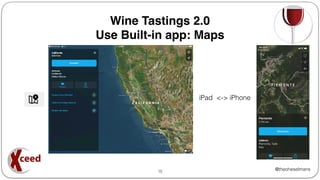
Wine Tastings 2.0
Use Built-in app: Maps
15
iPad <-> iPhone
@theoheselmans
â–Ș Use @Platform for the OS: e.g. "iOS", "Windows/32"
â–Ș Use @Platform([Specific]) as it returns:
OS : OS version : Device : DeviceType
on iPad:
"iOS" : "13.1" : "iPad" : "iPad11,4"
on iPhone
"iOS" : "13.1" : "iPhone" : "iPhone10,6"
on Windows 10
"Windows/NT" : "6.2" : "Tablet PC Edition" : "ServicePack 0"
Example: @Platform([Specific]) = "iPhone"
â–Ș Use specific forms / subforms / views per device (or OS)
16
Wine Tastings 2.0
How to distinguish between devices
@theoheselmans
Wine Tastings 2.0
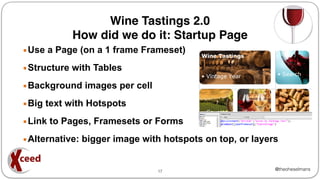
How did we do it: Startup Page
â–ȘUse a Page (on a 1 frame Frameset)
â–ȘStructure with Tables
â–ȘBackground images per cell
â–ȘBig text with Hotspots
â–ȘLink to Pages, Framesets or Forms
â–ȘAlternative: bigger image with hotspots on top, or layers
17
@theoheselmans
Wine Tastings 2.0
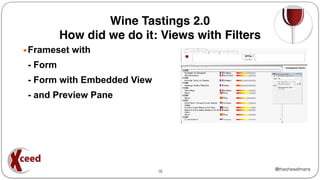
How did we do it: Views with Filters
â–ȘFrameset with
- Form
- Form with Embedded View
- and Preview Pane
18
@theoheselmans
Wine Tastings 2.0
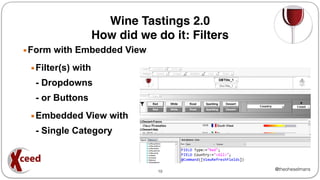
How did we do it: Filters
â–ȘForm with Embedded View
â–ȘFilter(s) with
- Dropdowns
- or Buttons
â–ȘEmbedded View with
- Single Category
19
@theoheselmans
Wine Tastings 2.0
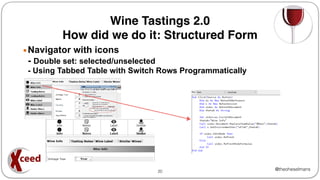
How did we do it: Structured Form
â–ȘNavigator with icons
- Double set: selected/unselected
- Using Tabbed Table with Switch Rows Programmatically
20
@theoheselmans
Wine Tastings 2.0
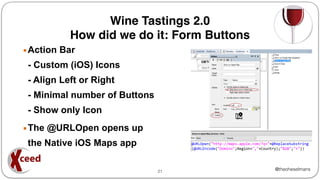
How did we do it: Form Buttons
â–ȘAction Bar
- Custom (iOS) Icons
- Align Left or Right
- Minimal number of Buttons
- Show only Icon
â–ȘThe @URLOpen opens up
the Native iOS Maps app
21
@theoheselmans
Wine Tastings 2.0
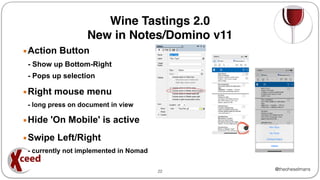
New in Notes/Domino v11
â–ȘAction Button
- Show up Bottom-Right
- Pops up selection
â–ȘRight mouse menu
- long press on document in view
â–ȘHide 'On Mobile' is active
â–ȘSwipe Left/Right
- currently not implemented in Nomad
22
@theoheselmans
That's it
Thanks for Joining In
Download the App & Extended Presentation from OpenNTF
23
Copyright © 2019 HCL Technologies Limited | www.hcltechsw.com
DQL Explorer
Copyright © 2019 HCL Technologies Limited | www.hcltechsw.com
DQL Explorer
2
Why 
.. (Original intent)
- Data reporting and charting capabilities
- Test your DQL code on the fly
- Export your data
- Take advantage of JavaScript Reporting mechanisms
Copyright © 2019 HCL Technologies Limited | www.hcltechsw.com
DQL Explorer
3
Where
- https://openntf.org/main.nsf/project.xsp?r=project/DQL%20Explor
er/summary
Copyright © 2019 HCL Technologies Limited | www.hcltechsw.com
DQL Explorer
4
Future
- DQL Explorer to remain an Open Source utility
- You’re the future
$8.4 BILLION ENTERPRISE | 132,000 IDEAPRENEURS | 44 COUNTRIES
WATCH THE FILM
Jesse Gallagher, May 2020
NSF ODP TOOLING
@Gidgerby — http://frostillic.us
JESSE GALLAGHER
I have a large client project that involves OSGi plugins, deployment instructions, and a dozen NSFs
Maven allows me to create a distribution ZIP

but this required making binary copies of the NSFs each time they’re updated
It’s time-intensive, it’s error-prone, and binary blobs make Git angry
I set out to automate the whole process
THE ORIGINS
“Headless Designer” mode has shipped with Designer for a while now
Christian GĂŒdemann wrote a Maven wrapper
However:
Windows-only
UI automation is extremely fault-prone
Fiddliness of plugin installation means dedicating an active-UI Windows VM
THE ORIGINS
ODP -> NSF Compilation
NSF -> ODP Export
NTF Deployment (Experimental)
IDE Support
Designer-esque project layout in Eclipse
Code/Java editing with full classpath in Eclipse
DXL and XSP auto-complete in Eclipse and Visual Studio Code
WHAT IT DOES
ODP COMPILATION
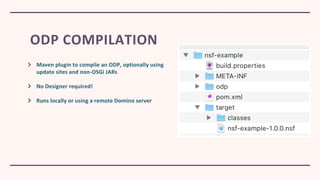
Maven plugin to compile an ODP, optionally using
update sites and non-OSGi JARs
No Designer required!
Runs locally or using a remote Domino server
Equivalent to Designer’s “Associate with on-disk project” export
Maven plugin that exports from a local or remote database
Also no Designer required!
Runs locally or using a remote Domino server
ODP EXPORT
Deploys an NTF (usually a build result) to a remote Domino server
Still in progress, but works in certain setups
Will get better with work or with HCL making the replace-design API available
NTF DEPLOYMENT
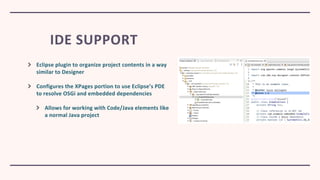
IDE SUPPORT
Eclipse plugin to organize project contents in a way
similar to Designer
Configures the XPages portion to use Eclipse’s PDE
to resolve OSGi and embedded dependencies
Allows for working with Code/Java elements like
a normal Java project
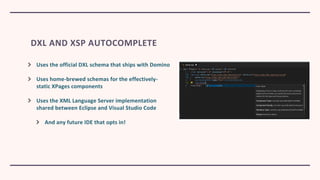
DXL AND XSP AUTOCOMPLETE
Uses the official DXL schema that ships with Domino
Uses home-brewed schemas for the effectively-
static XPages components
Uses the XML Language Server implementation
shared between Eclipse and Visual Studio Code
And any future IDE that opts in!
Jesse Gallagher, May 2020
OPENNTF DOMINO API
Still chugging along
We switched to a “match the Domino release” strategy starting with R10
We release an update for the handful of new methods added each release
We also work in some bug fixes and improvements here and there
For the time being, it achieved its core goal and is intended to be slow-moving
ODA STATUS
NEXT WEBINAR
‱ June, 2020
‱ HCL’s Richard Jefts will provide an update on product
directions and strategy
‱ More details to come
‱ Stay informed at https://openntf.org/webinars
QUESTIONS?
Use the GoToWebinar Questions Pane

OpenNTF Webinar, May 19, 2020

  • 1.
    OPENNTF WEBINARS Spotlight onOpenNTF Projects - Make the most of Domino!
  • 2.
    AGENDA ‱ Welcome –Howard Greenberg ‱ About OpenNTF – Graham Acres ‱ Wine Tasting App - Theo Heselmans ‱ DQL Explorer - Luis Guirigay ‱ OpenLog - Paul Withers ‱ NSF ODP Tooling - Jesse Gallagher ‱ OpenNTF Domino API - Jesse Gallagher ‱ Closing and what’s next – Howard Greenberg
  • 3.
    ASKING QUESTIONS ‱ FirstQuestion – Will this be recorded? ‱ Yes, view on YouTube!!! ‱ https://www.youtube.com/user/OpenNTF ‱ Use the Questions Pane in GoToWebinar ‱ We will get to your questions at the end of the webinar ‱ The speakers will respond to your questions verbally ‱ (not in the Questions pane)
  • 4.
    THANKS TO THEOPENNTF SPONSORS ‱ HCL contributed $25,000 to help our organization ‱ Funds these webinars! ‱ Contests like Hackathons ‱ Running the organization ‱ Prominic donates all IT related services ‱ Cloud Hosting for OpenNTF ‱ Infrastructure management for HCL Domino and Atlassian Servers ‱ System Administration for day-to-day operation
  • 5.
    OPENNTF BOARD MEMBERS NameCompany Roles Christian GĂŒdemann WebGate Consulting AG Board Chairman Adam Foster Oval Business Solutions Board Member Fredrik Norling QNova Systems AB Board Member Jesse Gallagher I Know Some Guys Board Member Doug Robinson Prominic.NET Board Member Howard Greenberg TLCC Board Member Nina Wittich Syngenio AG Board Member Graham Acres Brytek Systems Ltd Board Member Dan Dumont HCL Board Member Oliver Busse We4IT Board Member Paul Withers HCL Board Member Serdar Basegmez Developi Information Systems Board Member
  • 6.
    HISTORY OF OPENNTF ‱OpenNTF is a strong brand ‱ OpenNTF is well known to developers in the Collaboration / XPages / Domino / Notes Community ‱ GitHub ‱ Very active on Stack Overflow ‱ Slack as a support forum for many years ‱ Many different initiatives including Snippets, CollaborationToday.org ‱ Guides and Documentation
  • 7.
    OPENNTF 2020 ‱ HCLStrategic Partnership with OpenNTF ‱ Expand into new areas of HCL Digital Solutions portfolio ‱ Volt ‱ Continue our history of supporting community events ‱ Continue our history of supporting community contests ‱ Continue to host trusted solutions but with an expanded view ‱ Developers, Admins, End Users ‱ More options for access to solutions ‱ Traditional sites ‱ HCL Solutions Factory ‱ Wiki ‱ Project to raise the profile of the projects most used by the community – and you will be able to vote for your favorites ‱ Coming Soon: sandbox.openntf.org
  • 8.
    THIS IS OURCOMMUNITY ‱ Join us and get involved! ‱ We are all volunteers ‱ No effort is too small ‱ If your idea is bigger than you can do on your own, we can connect you to a team to work on it ‱ Test or help or modify an existing project ‱ Write guides or documentation ‱ Add reviews on projects / stars on Snippets
  • 9.
    Make your NotesClient apps look great on a mobile device using HCL Nomad 1 Theo Heselmans, Xceed
  • 10.
    About Theo Heselmans â–ȘDoingIBMÂź NotesÂź Development & Project Mgt. for more than 20 years! â–ȘIndependent consultant since 2001 for Xceed â–ȘCoordinator of the Engage User Group for over 10 years â–Ș â–ȘI like wine and other beverages too â–Ș Twitter: @theoheselmans â–Ș Email: theo@xceed.be 2
  • 11.
    @theoheselmans Agenda â–ȘWhy developing fora Touch Device ? (like the iPad, iPhone or Android Tablet) â–ȘMain Advantages â–Ș'Classic' Notes apps work (unmodified) in Nomad, but... â–ȘWe can do better than this! â–ȘHow did we do it? 3
  • 12.
    @theoheselmans Mobile Devices â–ȘMore andmore devices with Touch interface â–ȘiPad, Android and Windows 10 â–ȘTablets are practical â–Ș Easy and lightweight to carry around â–Ș Big screen real estate â–Ș Great User Experience â–ȘSmartphone are ubiquitous, but tough to design for 4
  • 13.
    @theoheselmans HCL Nomad â–ȘRun anyNotes App on your Tablet or Phone unmodified â–ȘEmbed images from Library or Camera, use GPS â–ȘSupports @Formulas and LotusScript unmodified â–ȘComplex forms and Logic works â–ȘBuilt-in Replication for offline use â–ȘUses the user's ID, so easy security/policy 5
  • 14.
    @theoheselmans Wine Tastings 1.0 â–ȘNavigator ✮Efficientbut boring â–ȘCategorized Views ✮Small for big fingers â–ȘTypical Form ✮Overloaded, fonts too small, header too big 6
  • 15.
  • 16.
    @theoheselmans Wine Tastings 2.0 Viewswith Filters 8 iPad <-> iPhone
  • 17.
    @theoheselmans Wine Tastings 2.0 GraphicalDrill Down 9 iPad <-> iPhone
  • 18.
    @theoheselmans Wine Tastings 2.0 Viewswith Hierarchical Filters 10
  • 19.
  • 20.
  • 21.
  • 22.
  • 23.
    @theoheselmans Wine Tastings 2.0 UseBuilt-in app: Maps 15 iPad <-> iPhone
  • 24.
    @theoheselmans â–Ș Use @Platformfor the OS: e.g. "iOS", "Windows/32" â–Ș Use @Platform([Specific]) as it returns: OS : OS version : Device : DeviceType on iPad: "iOS" : "13.1" : "iPad" : "iPad11,4" on iPhone "iOS" : "13.1" : "iPhone" : "iPhone10,6" on Windows 10 "Windows/NT" : "6.2" : "Tablet PC Edition" : "ServicePack 0" Example: @Platform([Specific]) = "iPhone" â–Ș Use specific forms / subforms / views per device (or OS) 16 Wine Tastings 2.0 How to distinguish between devices
  • 25.
    @theoheselmans Wine Tastings 2.0 Howdid we do it: Startup Page â–ȘUse a Page (on a 1 frame Frameset) â–ȘStructure with Tables â–ȘBackground images per cell â–ȘBig text with Hotspots â–ȘLink to Pages, Framesets or Forms â–ȘAlternative: bigger image with hotspots on top, or layers 17
  • 26.
    @theoheselmans Wine Tastings 2.0 Howdid we do it: Views with Filters â–ȘFrameset with - Form - Form with Embedded View - and Preview Pane 18
  • 27.
    @theoheselmans Wine Tastings 2.0 Howdid we do it: Filters â–ȘForm with Embedded View â–ȘFilter(s) with - Dropdowns - or Buttons â–ȘEmbedded View with - Single Category 19
  • 28.
    @theoheselmans Wine Tastings 2.0 Howdid we do it: Structured Form â–ȘNavigator with icons - Double set: selected/unselected - Using Tabbed Table with Switch Rows Programmatically 20
  • 29.
    @theoheselmans Wine Tastings 2.0 Howdid we do it: Form Buttons â–ȘAction Bar - Custom (iOS) Icons - Align Left or Right - Minimal number of Buttons - Show only Icon â–ȘThe @URLOpen opens up the Native iOS Maps app 21
  • 30.
    @theoheselmans Wine Tastings 2.0 Newin Notes/Domino v11 â–ȘAction Button - Show up Bottom-Right - Pops up selection â–ȘRight mouse menu - long press on document in view â–ȘHide 'On Mobile' is active â–ȘSwipe Left/Right - currently not implemented in Nomad 22
  • 31.
    @theoheselmans That's it Thanks forJoining In Download the App & Extended Presentation from OpenNTF 23
  • 32.
    Copyright © 2019HCL Technologies Limited | www.hcltechsw.com DQL Explorer
  • 33.
    Copyright © 2019HCL Technologies Limited | www.hcltechsw.com DQL Explorer 2 Why 
.. (Original intent) - Data reporting and charting capabilities - Test your DQL code on the fly - Export your data - Take advantage of JavaScript Reporting mechanisms
  • 34.
    Copyright © 2019HCL Technologies Limited | www.hcltechsw.com DQL Explorer 3 Where - https://openntf.org/main.nsf/project.xsp?r=project/DQL%20Explor er/summary
  • 35.
    Copyright © 2019HCL Technologies Limited | www.hcltechsw.com DQL Explorer 4 Future - DQL Explorer to remain an Open Source utility - You’re the future
  • 36.
    $8.4 BILLION ENTERPRISE| 132,000 IDEAPRENEURS | 44 COUNTRIES WATCH THE FILM
  • 37.
    Jesse Gallagher, May2020 NSF ODP TOOLING
  • 38.
  • 39.
    I have alarge client project that involves OSGi plugins, deployment instructions, and a dozen NSFs Maven allows me to create a distribution ZIP 
but this required making binary copies of the NSFs each time they’re updated It’s time-intensive, it’s error-prone, and binary blobs make Git angry I set out to automate the whole process THE ORIGINS
  • 40.
    “Headless Designer” modehas shipped with Designer for a while now Christian GĂŒdemann wrote a Maven wrapper However: Windows-only UI automation is extremely fault-prone Fiddliness of plugin installation means dedicating an active-UI Windows VM THE ORIGINS
  • 41.
    ODP -> NSFCompilation NSF -> ODP Export NTF Deployment (Experimental) IDE Support Designer-esque project layout in Eclipse Code/Java editing with full classpath in Eclipse DXL and XSP auto-complete in Eclipse and Visual Studio Code WHAT IT DOES
  • 42.
    ODP COMPILATION Maven pluginto compile an ODP, optionally using update sites and non-OSGi JARs No Designer required! Runs locally or using a remote Domino server
  • 43.
    Equivalent to Designer’s“Associate with on-disk project” export Maven plugin that exports from a local or remote database Also no Designer required! Runs locally or using a remote Domino server ODP EXPORT
  • 44.
    Deploys an NTF(usually a build result) to a remote Domino server Still in progress, but works in certain setups Will get better with work or with HCL making the replace-design API available NTF DEPLOYMENT
  • 45.
    IDE SUPPORT Eclipse pluginto organize project contents in a way similar to Designer Configures the XPages portion to use Eclipse’s PDE to resolve OSGi and embedded dependencies Allows for working with Code/Java elements like a normal Java project
  • 46.
    DXL AND XSPAUTOCOMPLETE Uses the official DXL schema that ships with Domino Uses home-brewed schemas for the effectively- static XPages components Uses the XML Language Server implementation shared between Eclipse and Visual Studio Code And any future IDE that opts in!
  • 47.
    Jesse Gallagher, May2020 OPENNTF DOMINO API
  • 48.
    Still chugging along Weswitched to a “match the Domino release” strategy starting with R10 We release an update for the handful of new methods added each release We also work in some bug fixes and improvements here and there For the time being, it achieved its core goal and is intended to be slow-moving ODA STATUS
  • 49.
    NEXT WEBINAR ‱ June,2020 ‱ HCL’s Richard Jefts will provide an update on product directions and strategy ‱ More details to come ‱ Stay informed at https://openntf.org/webinars
  • 50.