MUSIC VIDEO ANALYSIS 
By: Daniyal Sattar
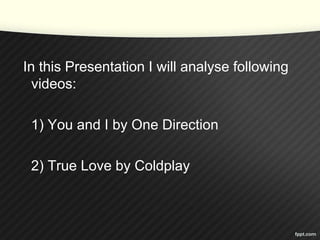
In this Presentation I will analyse following 
videos: 
1) You and I by One Direction 
2) True Love by Coldplay
In these videos I will discuss about: 
1) Camera Angles and Shots 
2) Mise en Scene 
3) Editing
YOU AND I 
(Camera Angles and Shots) 
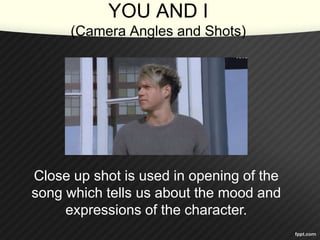
Close up shot is used in opening of the 
song which tells us about the mood and 
expressions of the character.
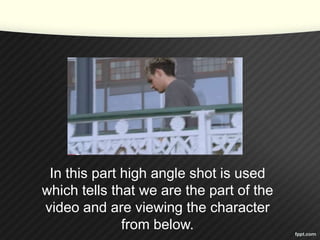
In this part high angle shot is used 
which tells that we are the part of the 
video and are viewing the character 
from below.
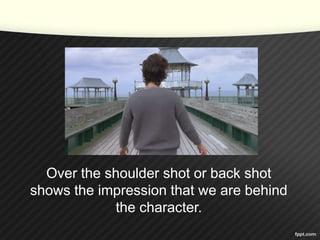
Over the shoulder shot or back shot 
shows the impression that we are behind 
the character.
Extreme Close up shows the 
emotions and expressions of the 
character in the video.
This is the establishing shot which 
shows that now all the characters are in 
one frame.
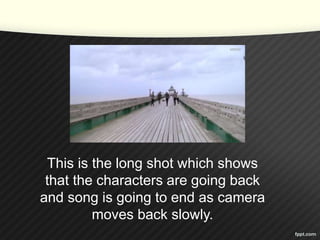
This is the long shot which shows 
that the characters are going back 
and song is going to end as camera 
moves back slowly.
(Mise-en-Scene) 
First screen short 
shows that the 
character comes 
out from the door in 
the field and second 
one shows the 
background which 
shows that video is 
set on a beach or 
on an island.
Clothing of all the characters of 
band is decent and innocent which 
reflects the music genre.
There are many 
props used in 
this video e.g 
that wooden box 
to jump high and 
pink ball to play. 
The lighting in 
whole video 
remains natural 
and same.
(Editing) 
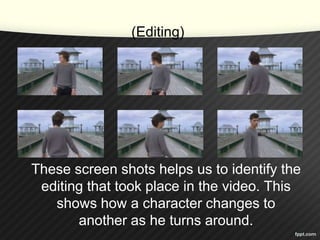
These screen shots helps us to identify the 
editing that took place in the video. This 
shows how a character changes to 
another as he turns around.
This screen shot also shows the 
editing effects in the video as there 
we can see same character in more 
than one positions.
TRUE LOVE 
(Camera Angles and Shots) 
This long shot at the start of the video 
shows the set of the music video. 
Camera goes closer to the set to 
express the start of the music.
This is mid shot which introduces the 
main character of the video, as he trys 
to enter in the bus.
These screen shots 
describes the establishing 
shots in the video. This 
shows the overview of the 
scene that follows.
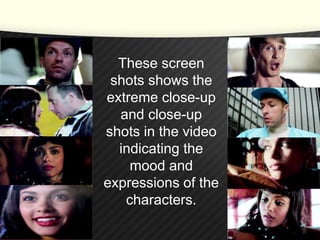
These screen 
shots shows the 
extreme close-up 
and close-up 
shots in the video 
indicating the 
mood and 
expressions of the 
characters.
These are the over 
the shoulder shots. 
These shots 
pretends that 
viewer is in the 
video and standing 
behind a character 
and observing 
other person.
This shows low and high angle shots which 
indicated camera as character’s eye or 
make us feel that we are the part of the 
video.
(Mise-en-Scene) 
These screen shots shows the clothing of 
the characters. They have used simple 
clothing to show a decent sound of music
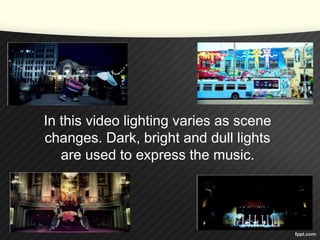
In this video lighting varies as scene 
changes. Dark, bright and dull lights 
are used to express the music.
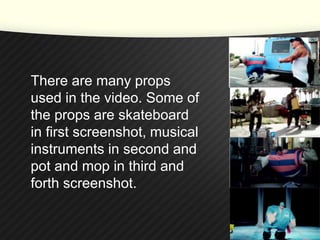
There are many props 
used in the video. Some of 
the props are skateboard 
in first screenshot, musical 
instruments in second and 
pot and mop in third and 
forth screenshot.
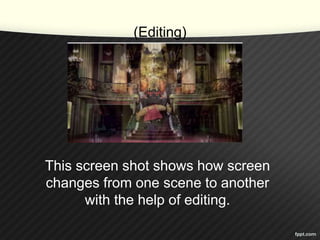
(Editing) 
This screen shot shows how screen 
changes from one scene to another 
with the help of editing.
THE END

Music video analysis

  • 1.
    MUSIC VIDEO ANALYSIS By: Daniyal Sattar
  • 2.
    In this PresentationI will analyse following videos: 1) You and I by One Direction 2) True Love by Coldplay
  • 3.
    In these videosI will discuss about: 1) Camera Angles and Shots 2) Mise en Scene 3) Editing
  • 4.
    YOU AND I (Camera Angles and Shots) Close up shot is used in opening of the song which tells us about the mood and expressions of the character.
  • 5.
    In this parthigh angle shot is used which tells that we are the part of the video and are viewing the character from below.
  • 6.
    Over the shouldershot or back shot shows the impression that we are behind the character.
  • 7.
    Extreme Close upshows the emotions and expressions of the character in the video.
  • 8.
    This is theestablishing shot which shows that now all the characters are in one frame.
  • 9.
    This is thelong shot which shows that the characters are going back and song is going to end as camera moves back slowly.
  • 10.
    (Mise-en-Scene) First screenshort shows that the character comes out from the door in the field and second one shows the background which shows that video is set on a beach or on an island.
  • 11.
    Clothing of allthe characters of band is decent and innocent which reflects the music genre.
  • 12.
    There are many props used in this video e.g that wooden box to jump high and pink ball to play. The lighting in whole video remains natural and same.
  • 13.
    (Editing) These screenshots helps us to identify the editing that took place in the video. This shows how a character changes to another as he turns around.
  • 14.
    This screen shotalso shows the editing effects in the video as there we can see same character in more than one positions.
  • 15.
    TRUE LOVE (CameraAngles and Shots) This long shot at the start of the video shows the set of the music video. Camera goes closer to the set to express the start of the music.
  • 16.
    This is midshot which introduces the main character of the video, as he trys to enter in the bus.
  • 17.
    These screen shots describes the establishing shots in the video. This shows the overview of the scene that follows.
  • 18.
    These screen shotsshows the extreme close-up and close-up shots in the video indicating the mood and expressions of the characters.
  • 19.
    These are theover the shoulder shots. These shots pretends that viewer is in the video and standing behind a character and observing other person.
  • 20.
    This shows lowand high angle shots which indicated camera as character’s eye or make us feel that we are the part of the video.
  • 21.
    (Mise-en-Scene) These screenshots shows the clothing of the characters. They have used simple clothing to show a decent sound of music
  • 22.
    In this videolighting varies as scene changes. Dark, bright and dull lights are used to express the music.
  • 23.
    There are manyprops used in the video. Some of the props are skateboard in first screenshot, musical instruments in second and pot and mop in third and forth screenshot.
  • 24.
    (Editing) This screenshot shows how screen changes from one scene to another with the help of editing.
  • 25.