Using and Extending the
Alfresco Content App
Denys Vuika
ACA Tech Lead and ADF developer
@DenysVuika
Introduction
Learn. Connect. Collaborate.
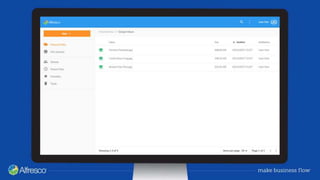
Content Application Concept
• Simple user interface which makes accessing files in the Alfresco Content
Services repository easy
• Demonstrate how the complexity of Content Management can be simplified
using the Alfresco Application Development Framework to easily and quickly
create custom solutions for specific user cases
Learn. Connect. Collaborate.
Features
• Open Source (LGPL-3.0)
• Built with ADF components
• Uses ACS v1 REST APIs
– Compatible with ACS v5.2.2 & Community
Edition 201707
• The example Content App influences the ADF
– Every new feature gets refined, tested and
contributed to ADF
• Demonstrates engaging user experience
Learn. Connect. Collaborate.
Features
• It is an Angular CLI application
– Development process is compatible with all
Angular CLI books and tutorials
• i18n support with 11 languages out of the box
• Docker support
– Create and deploy your own images
• Runs in Electron
– requires minimal changes to the configuration
– build cross-platform desktop apps with ADF
based on Example Content Application
Getting Started
Learn. Connect. Collaborate.
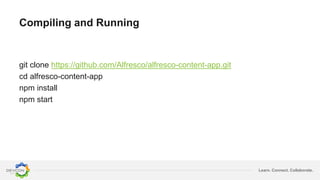
Compiling and Running
git clone https://github.com/Alfresco/alfresco-content-app.git
cd alfresco-content-app
npm install
npm start
Learn. Connect. Collaborate.
Documentation and Guides
• Introduction to Example Content Application
• Building and running
• Integrating with Docker
• Guides
– i18n and adding custom languages
– application configuration
– custom pages and sidebar
• Constantly gets new content
https://alfresco.github.io/alfresco-content-app
Demo
Deployment
Learn. Connect. Collaborate.
Docker
• Comes with a basic Dockerfile to build your
own images
– Lightweight image based on Nginx
– Recommended configuration for SPA mode
• Basic documentation on creating own images
and publishing to Docker Hub
• You can use your own settings and servers to
build an image and container
Learn. Connect. Collaborate.
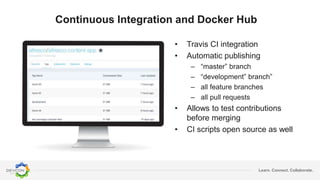
• Travis CI integration
• Automatic publishing
– “master” branch
– “development” branch”
– all feature branches
– all pull requests
• Allows to test contributions
before merging
• CI scripts open source as well
Continuous Integration and Docker Hub
Community Edition?
Learn. Connect. Collaborate.
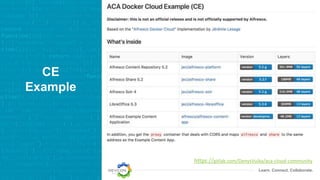
CE
Example
https://gitlab.com/DenysVuika/aca-cloud-community
Learn. Connect. Collaborate.
CE
Example
Provides examples for:
• Example Content Application (ACA) running
with APS Community Edition
• May help testing contributions to ACA
repository
– Switched to any existing PR or branch
• Real example of ACA images running within
Docker cloud stacks
• Main idea is to help you get started as fast as
possible
https://gitlab.com/DenysVuika/aca-cloud-community
Sidebar
Learn. Connect. Collaborate.
Features
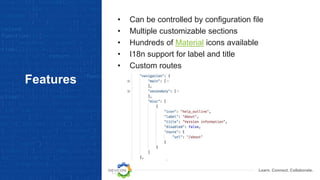
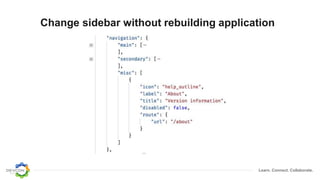
• Can be controlled by configuration file
• Multiple customizable sections
• Hundreds of Material icons available
• I18n support for label and title
• Custom routes
Learn. Connect. Collaborate.
Change sidebar without rebuilding application
Learn. Connect. Collaborate.
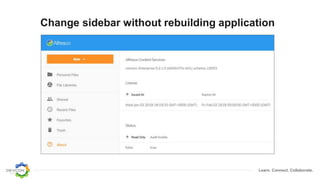
Change sidebar without rebuilding application
Quick Demo
Navigation
Learn. Connect. Collaborate.
Features
• Single configuration file for all routes
• All features have own routes and URLs
• Easy to extend or change
• Support authentication guards
• Integrates well with Sidebar component
• I18n support for all page titles
• All route URLs can be emailed and revisited
(including Viewer)
Learn. Connect. Collaborate.
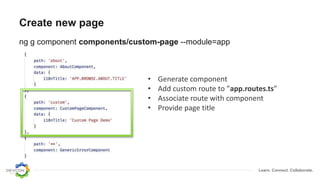
Create new page
ng g component components/custom-page --module=app
• Generate component
• Add custom route to ”app.routes.ts”
• Associate route with component
• Provide page title
Learn. Connect. Collaborate.
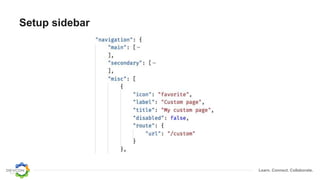
Setup sidebar
Learn. Connect. Collaborate.
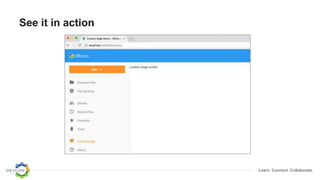
See it in action
Quick Demo
Extending Viewer
Learn. Connect. Collaborate.
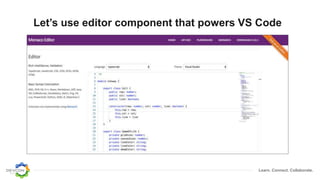
Let’s use editor component that powers VS Code
Learn. Connect. Collaborate.
Basic steps
• Generate a component to hold custom viewer
• Install 3rd party dependencies (if needed)
• Define the viewer extension
– map multiple extensions to your viewer
• Get it running within the standard ADF Viewer
component
Learn. Connect. Collaborate.
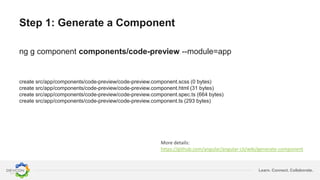
Step 1: Generate a Component
ng g component components/code-preview --module=app
create src/app/components/code-preview/code-preview.component.scss (0 bytes)
create src/app/components/code-preview/code-preview.component.html (31 bytes)
create src/app/components/code-preview/code-preview.component.spec.ts (664 bytes)
create src/app/components/code-preview/code-preview.component.ts (293 bytes)
More details:
https://github.com/angular/angular-cli/wiki/generate-component
Learn. Connect. Collaborate.
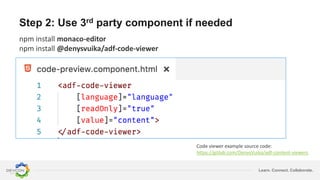
Step 2: Use 3rd party component if needed
npm install monaco-editor
npm install @denysvuika/adf-code-viewer
Update
Code viewer example source code:
https://gitlab.com/DenysVuika/adf-content-viewers
Learn. Connect. Collaborate.
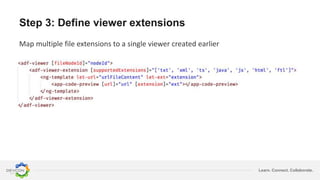
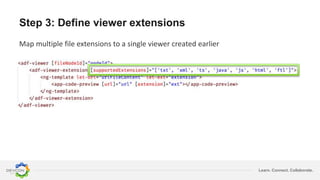
Step 3: Define viewer extensions
Map multiple file extensions to a single viewer created earlier
Learn. Connect. Collaborate.
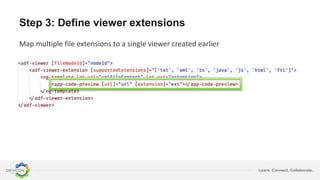
Step 3: Define viewer extensions
Map multiple file extensions to a single viewer created earlier
Learn. Connect. Collaborate.
Step 3: Define viewer extensions
Map multiple file extensions to a single viewer created earlier
Learn. Connect. Collaborate.
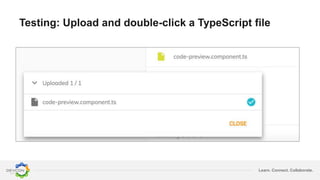
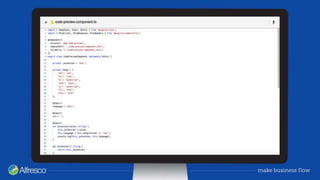
Testing: Upload and double-click a TypeScript file
Quick Demo
Q and A
Thank you!
All demos can be found at “DevCon”
branch:
https://github.com/Alfresco/alfresco-
content-app/tree/devcon

Using and extending Alfresco Content Application

  • 1.
    Using and Extendingthe Alfresco Content App Denys Vuika ACA Tech Lead and ADF developer @DenysVuika
  • 2.
  • 3.
    Learn. Connect. Collaborate. ContentApplication Concept • Simple user interface which makes accessing files in the Alfresco Content Services repository easy • Demonstrate how the complexity of Content Management can be simplified using the Alfresco Application Development Framework to easily and quickly create custom solutions for specific user cases
  • 5.
    Learn. Connect. Collaborate. Features •Open Source (LGPL-3.0) • Built with ADF components • Uses ACS v1 REST APIs – Compatible with ACS v5.2.2 & Community Edition 201707 • The example Content App influences the ADF – Every new feature gets refined, tested and contributed to ADF • Demonstrates engaging user experience
  • 6.
    Learn. Connect. Collaborate. Features •It is an Angular CLI application – Development process is compatible with all Angular CLI books and tutorials • i18n support with 11 languages out of the box • Docker support – Create and deploy your own images • Runs in Electron – requires minimal changes to the configuration – build cross-platform desktop apps with ADF based on Example Content Application
  • 7.
  • 8.
    Learn. Connect. Collaborate. Compilingand Running git clone https://github.com/Alfresco/alfresco-content-app.git cd alfresco-content-app npm install npm start
  • 9.
    Learn. Connect. Collaborate. Documentationand Guides • Introduction to Example Content Application • Building and running • Integrating with Docker • Guides – i18n and adding custom languages – application configuration – custom pages and sidebar • Constantly gets new content https://alfresco.github.io/alfresco-content-app
  • 10.
  • 11.
  • 12.
    Learn. Connect. Collaborate. Docker •Comes with a basic Dockerfile to build your own images – Lightweight image based on Nginx – Recommended configuration for SPA mode • Basic documentation on creating own images and publishing to Docker Hub • You can use your own settings and servers to build an image and container
  • 13.
    Learn. Connect. Collaborate. •Travis CI integration • Automatic publishing – “master” branch – “development” branch” – all feature branches – all pull requests • Allows to test contributions before merging • CI scripts open source as well Continuous Integration and Docker Hub
  • 14.
  • 15.
  • 16.
    Learn. Connect. Collaborate. CE Example Providesexamples for: • Example Content Application (ACA) running with APS Community Edition • May help testing contributions to ACA repository – Switched to any existing PR or branch • Real example of ACA images running within Docker cloud stacks • Main idea is to help you get started as fast as possible https://gitlab.com/DenysVuika/aca-cloud-community
  • 17.
  • 18.
    Learn. Connect. Collaborate. Features •Can be controlled by configuration file • Multiple customizable sections • Hundreds of Material icons available • I18n support for label and title • Custom routes
  • 19.
    Learn. Connect. Collaborate. Changesidebar without rebuilding application
  • 20.
    Learn. Connect. Collaborate. Changesidebar without rebuilding application
  • 21.
  • 22.
  • 23.
    Learn. Connect. Collaborate. Features •Single configuration file for all routes • All features have own routes and URLs • Easy to extend or change • Support authentication guards • Integrates well with Sidebar component • I18n support for all page titles • All route URLs can be emailed and revisited (including Viewer)
  • 24.
    Learn. Connect. Collaborate. Createnew page ng g component components/custom-page --module=app • Generate component • Add custom route to ”app.routes.ts” • Associate route with component • Provide page title
  • 25.
  • 26.
  • 27.
  • 28.
  • 29.
    Learn. Connect. Collaborate. Let’suse editor component that powers VS Code
  • 30.
    Learn. Connect. Collaborate. Basicsteps • Generate a component to hold custom viewer • Install 3rd party dependencies (if needed) • Define the viewer extension – map multiple extensions to your viewer • Get it running within the standard ADF Viewer component
  • 31.
    Learn. Connect. Collaborate. Step1: Generate a Component ng g component components/code-preview --module=app create src/app/components/code-preview/code-preview.component.scss (0 bytes) create src/app/components/code-preview/code-preview.component.html (31 bytes) create src/app/components/code-preview/code-preview.component.spec.ts (664 bytes) create src/app/components/code-preview/code-preview.component.ts (293 bytes) More details: https://github.com/angular/angular-cli/wiki/generate-component
  • 32.
    Learn. Connect. Collaborate. Step2: Use 3rd party component if needed npm install monaco-editor npm install @denysvuika/adf-code-viewer Update Code viewer example source code: https://gitlab.com/DenysVuika/adf-content-viewers
  • 33.
    Learn. Connect. Collaborate. Step3: Define viewer extensions Map multiple file extensions to a single viewer created earlier
  • 34.
    Learn. Connect. Collaborate. Step3: Define viewer extensions Map multiple file extensions to a single viewer created earlier
  • 35.
    Learn. Connect. Collaborate. Step3: Define viewer extensions Map multiple file extensions to a single viewer created earlier
  • 36.
    Learn. Connect. Collaborate. Testing:Upload and double-click a TypeScript file
  • 38.
  • 39.
  • 40.
    Thank you! All demoscan be found at “DevCon” branch: https://github.com/Alfresco/alfresco- content-app/tree/devcon