
Brian S Paskin, Senior Application Architect, R&D Services, IBM Cloud Innovations Lab
Updated 22 May 2019
Kafka and IBM Event
Streams Basics
What is Kafka
2
 Kafka was originally developed at LinkedIn in 2010 and opened sourced in 2011
 A version and extras maintained by Confluent, the original Kafka creators from LinkedIn
 A distributed publish and subscribe middleware where all records are persistent
 Used as a part in Event Driven Architectures
 Fault tolerant and scalable when running multiple brokers with multiple partitions
 Kafka runs on Java with clients in many languages
 Uses Apache Zookeeper for metadata (leader and follower setup)
 Can be used with Java Messaging Services (JMS), but does not support all features
 Kafka clients are written in many languages
– C/C++, Python, Go, Erlang, .NET, Clojure, Ruby, Node.js, Proxy (HTTP REST), Perl,
stdin/stdout, PHP, Rust, Alternative Java, Storm, Scala DSL, Clojure, Swift
What is Kafka
3
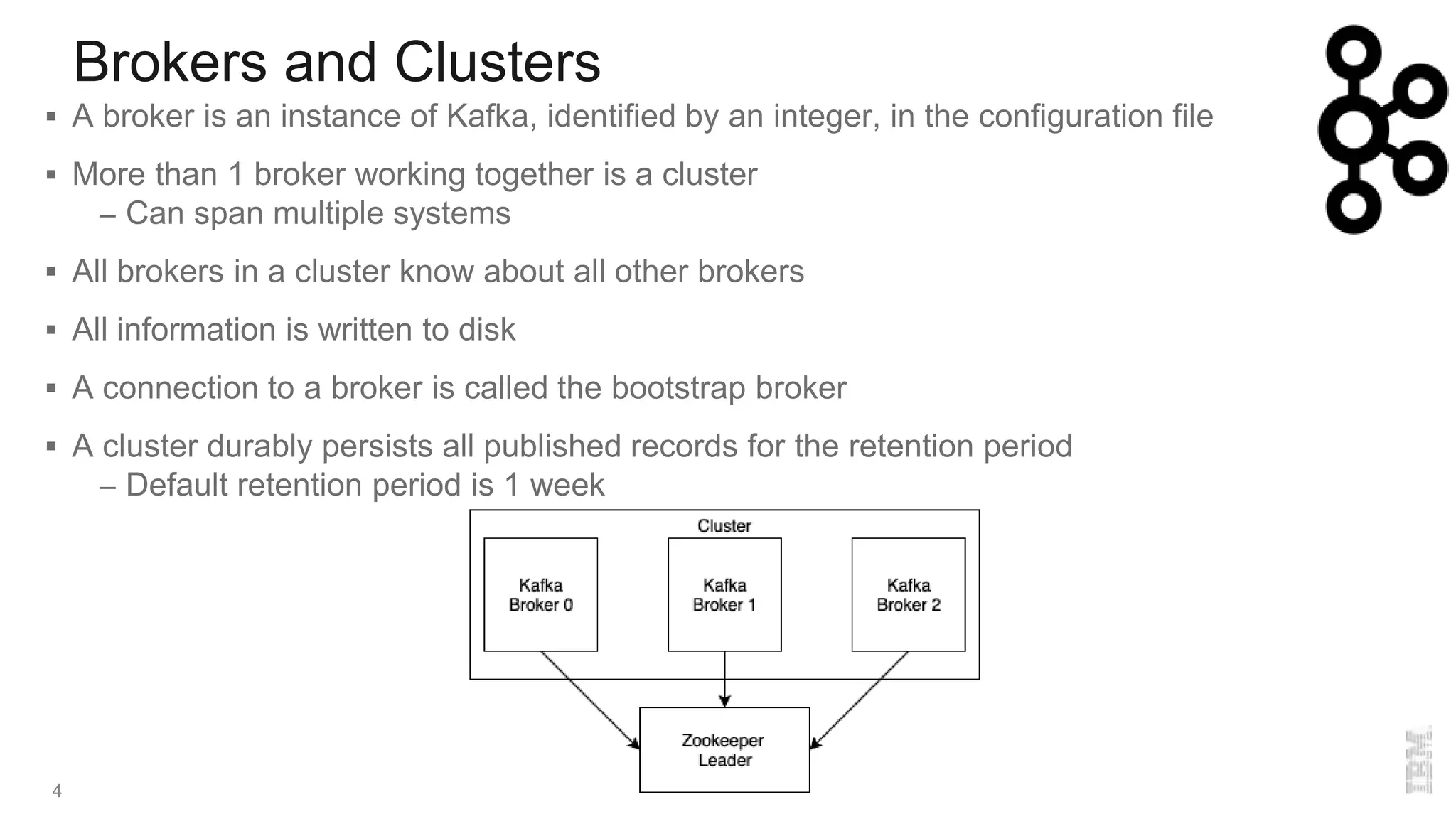
Brokers and Clusters
4
 A broker is an instance of Kafka, identified by an integer, in the configuration file
 More than 1 broker working together is a cluster
– Can span multiple systems
 All brokers in a cluster know about all other brokers
 All information is written to disk
 A connection to a broker is called the bootstrap broker
 A cluster durably persists all published records for the retention period
– Default retention period is 1 week
Topics and Partitions
5
 A topic is a category or feed name to which records are published
– Subtopics are not supported (i.e. sports/football, sports/football/ASRoma)
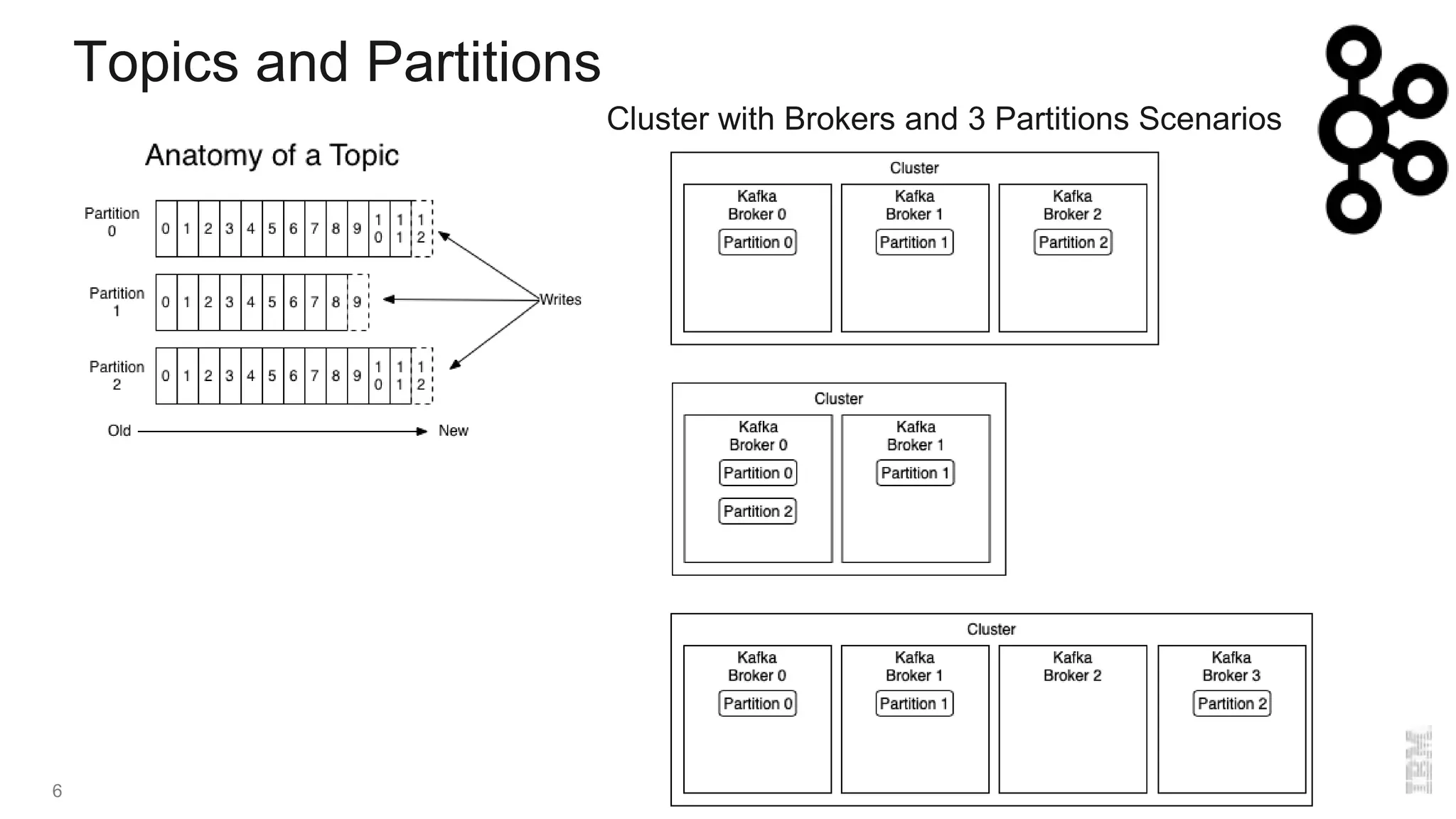
 A partition is an ordered, immutable sequence of records of a specific topic
 The records in the partitions are each assigned a sequential id number called the offset
 A topic can have multiple partitions that may span brokers in the cluster
– Allows for fault tolerance and better for consuming of messages
 Partitions can be replicated with in sync replicas (ISR) that are passive
 Partitions/Replicas have a leader that is elected
– If a partition goes down then a new leader is elected
– Cannot have more replicas than brokers
 Brokers can have more than 1 partition, and have multiple partitions for the same topic
Topics and Partitions
6
Cluster with Brokers and 3 Partitions Scenarios
Records
7
 Records consist of a key, a value, and a timestamp
– A key is not required
– Timestamp is added automatically
– The key and value can be an Objects
 Records are serialized by Producers and deserialized by Consumers
– Several serializers/deserializers are available
– Can write other serializers/deserializers
Producers
8
 A Producer writes a record to a Topic
– If there are more than 1 partition then round robin is used to each partition of the topic
– If a key is given, then the record will always be written to a single partition
 For guaranteed deliver there are three types of acknowledgments (ack)
– 0. No acknowledgment (fire and forget)
– 1. Wait for leader to acknowledge
– All. wait for leader and replicas to acknowledge
 Producer retries if acknowledgement is never received
– Can be sent out of order
– May cause duplicate records
 Producers can be idempotent, which prevents sending a message twice
 Producers can use message compression
– Compression codecs supported are Snappy, GZIP and LZ4
– Consumers will automatically know a message is compressed and decompress
Producers
9
 Producers can send messages in batches for efficiency
– By default 5 messages can be in flight at a time
– More messages are placed in batch and sent all at once
– Creating a small delay in processing can lead to better performance
– Batch waits until the delay is expired or batch size is filled
– Messages larger than the batch size will not be batched
 If Producers are sending faster than Brokers can handle then the Producers can be slowed
– Set the buffer memory for storage
– Set the blocking time (milliseconds)
– Throw an error message that the records cannot be sent
 Schema Registry is available to validate data using Confluent Schema Registry
– Uses Apache Avro
– Protects from bad data or mismatches
– Self describing
Consumers
10
 Consumers subscribe to 1 or more Topics
– Read from all partitions from the last offset and consumes records in FIFO order
– Can have multiple consumers subscribed to a topic
– Consumers can set the offset if records need to be processed again
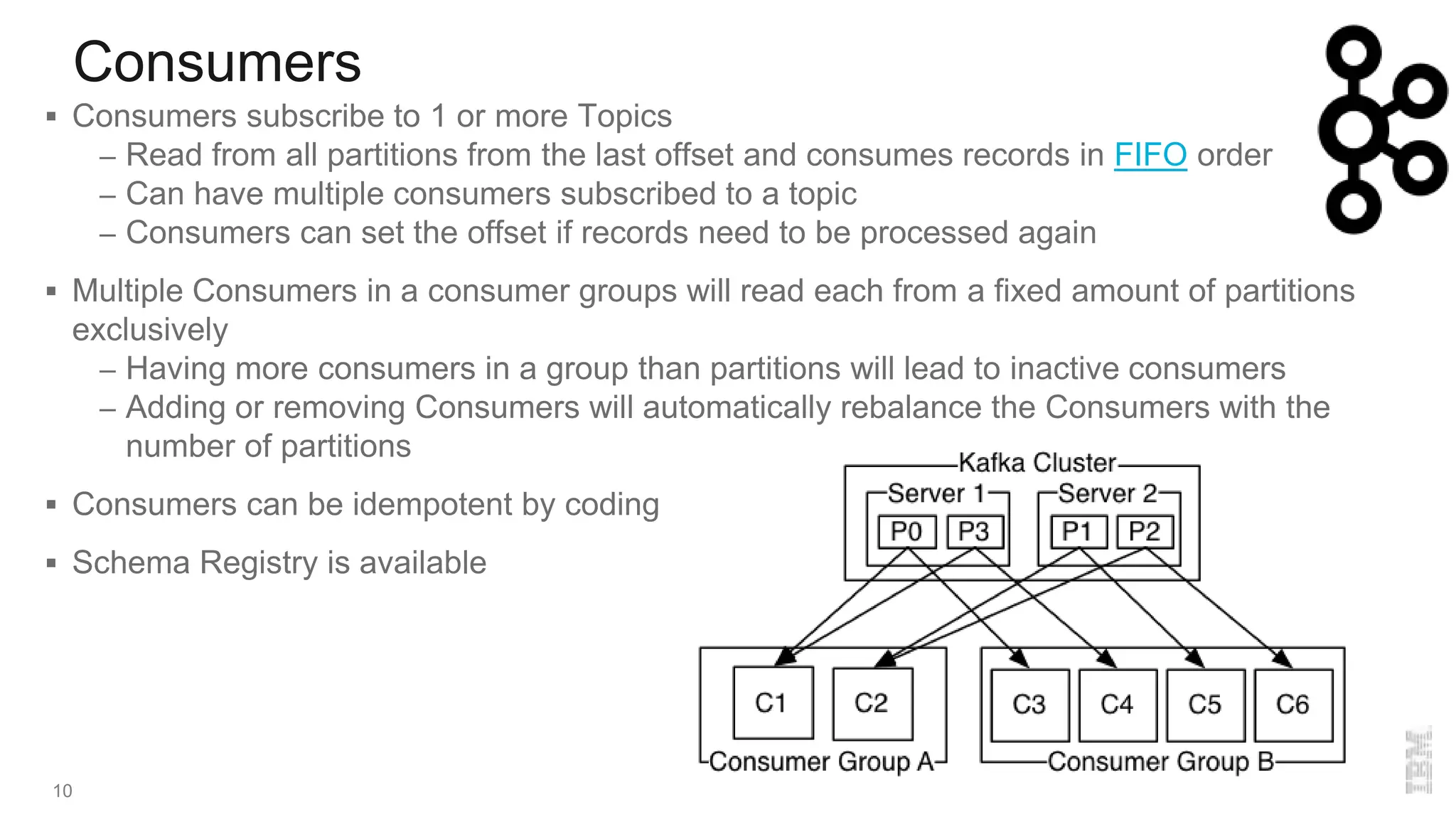
 Multiple Consumers in a consumer groups will read each from a fixed amount of partitions
exclusively
– Having more consumers in a group than partitions will lead to inactive consumers
– Adding or removing Consumers will automatically rebalance the Consumers with the
number of partitions
 Consumers can be idempotent by coding
 Schema Registry is available
Connectors
11
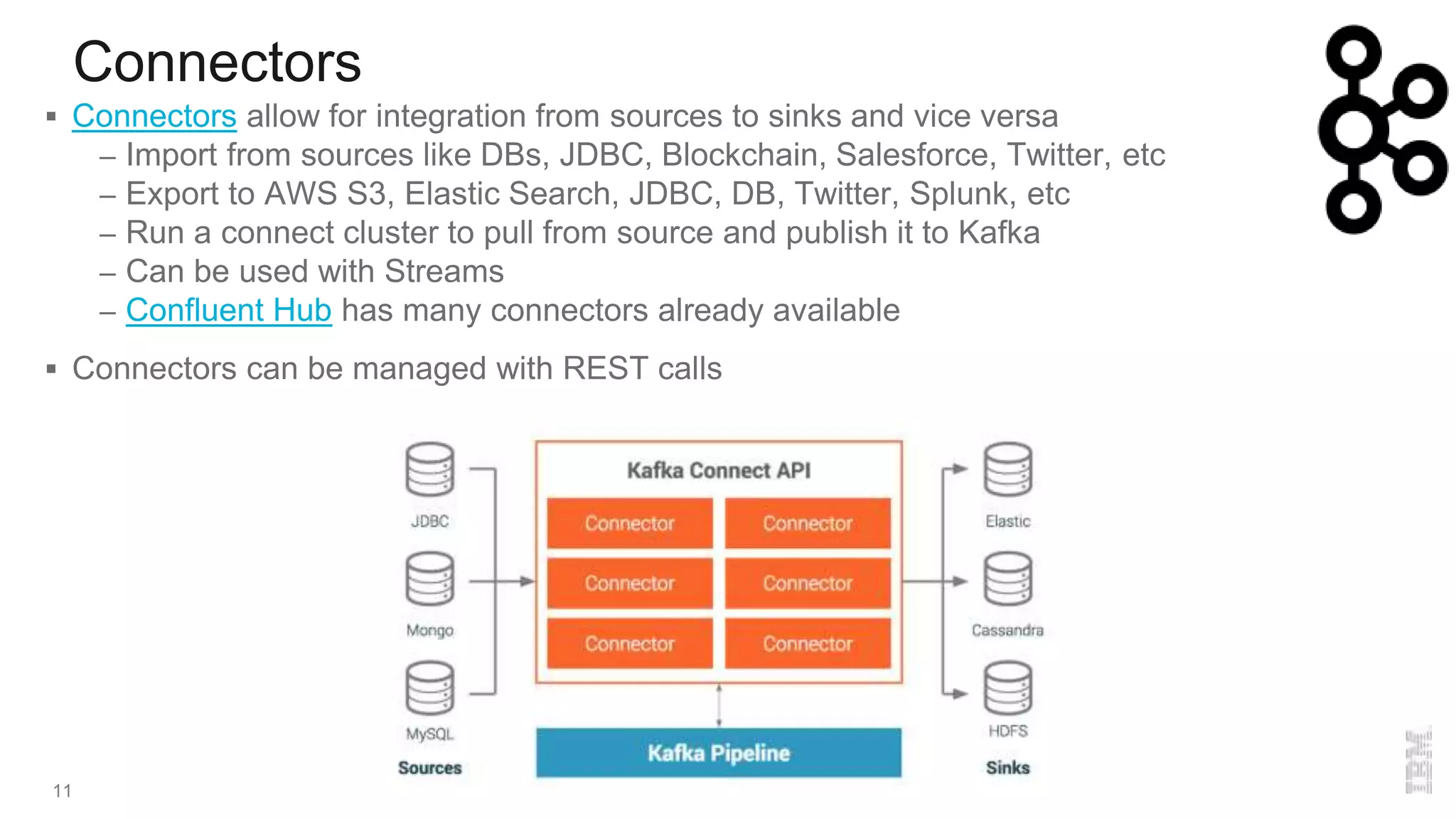
 Connectors allow for integration from sources to sinks and vice versa
– Import from sources like DBs, JDBC, Blockchain, Salesforce, Twitter, etc
– Export to AWS S3, Elastic Search, JDBC, DB, Twitter, Splunk, etc
– Run a connect cluster to pull from source and publish it to Kafka
– Can be used with Streams
– Confluent Hub has many connectors already available
 Connectors can be managed with REST calls
Streams
12
 Consumers from a Topic, processes data, and Publishes in another Topic
 Several built in functions to process or transform data
– Can create other functions
– branch, filter, filterNot, flatMap, flatMapValues, foreach, groupByKey, groupBy, join,
leftJoin, map, mapValues, merge, outerJoin, peek, print, selectKey, through, transform,
tranformFormValues
 Exactly once processing
 Event time windowing is supported
– Group of records with the same key perform stateful operations
Streams
13
Zookeeper Quick Look
14
 Open source project from Apache
 Comes in the package with Kafka
 Centralized system for maintaining configuration information in a distributed system
 There is a Leader service and follower services that exchange information
 Runs on Java
 Should always have an odd number of Zookeeper services started
 Keeps information in files
 Do not need to use the Zookeeper provided with Kafka
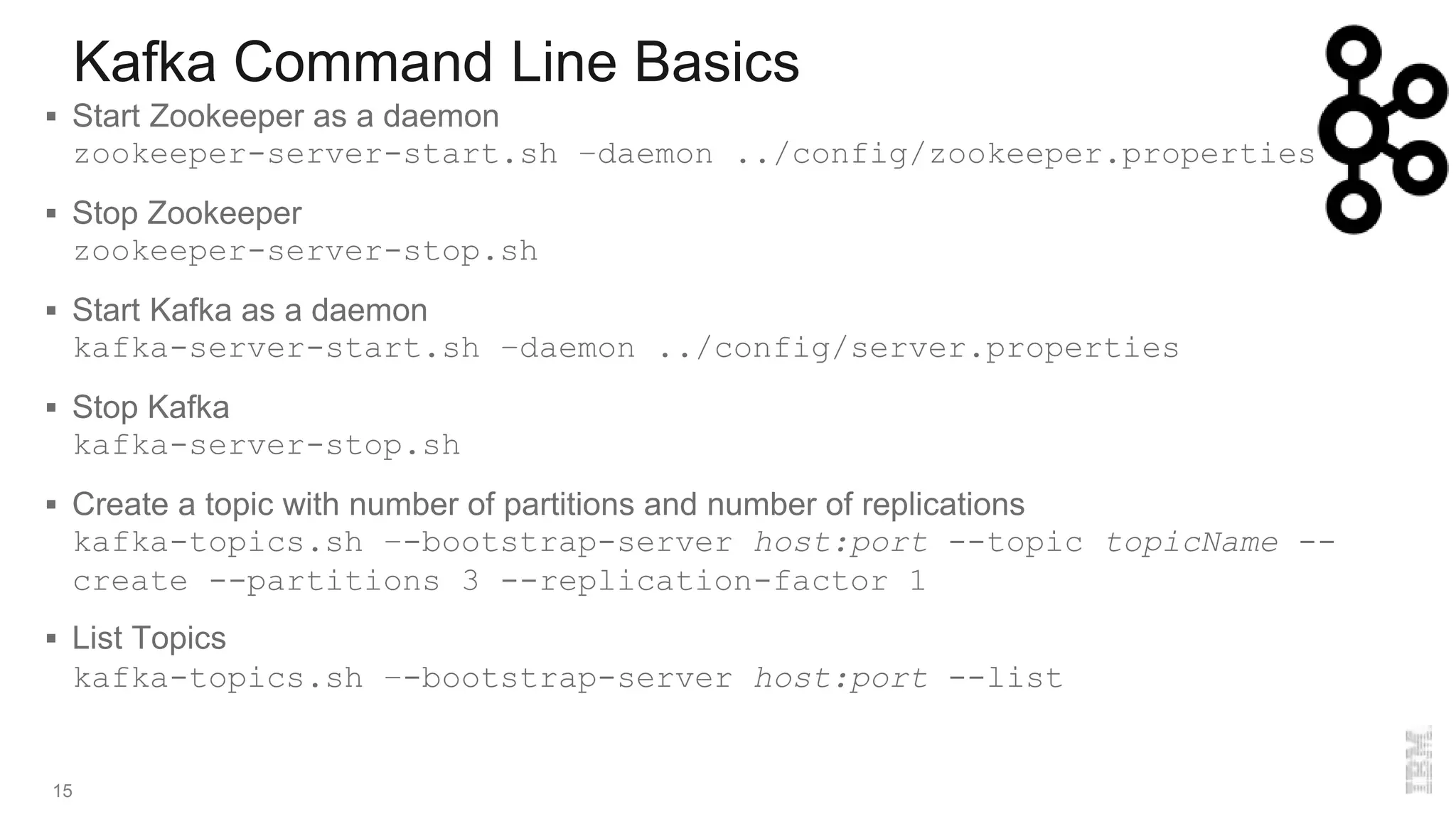
Kafka Command Line Basics
15
 Start Zookeeper as a daemon
zookeeper-server-start.sh –daemon ../config/zookeeper.properties
 Stop Zookeeper
zookeeper-server-stop.sh
 Start Kafka as a daemon
kafka-server-start.sh –daemon ../config/server.properties
 Stop Kafka
kafka-server-stop.sh
 Create a topic with number of partitions and number of replications
kafka-topics.sh –-bootstrap-server host:port --topic topicName --
create --partitions 3 --replication-factor 1
 List Topics
kafka-topics.sh –-bootstrap-server host:port --list
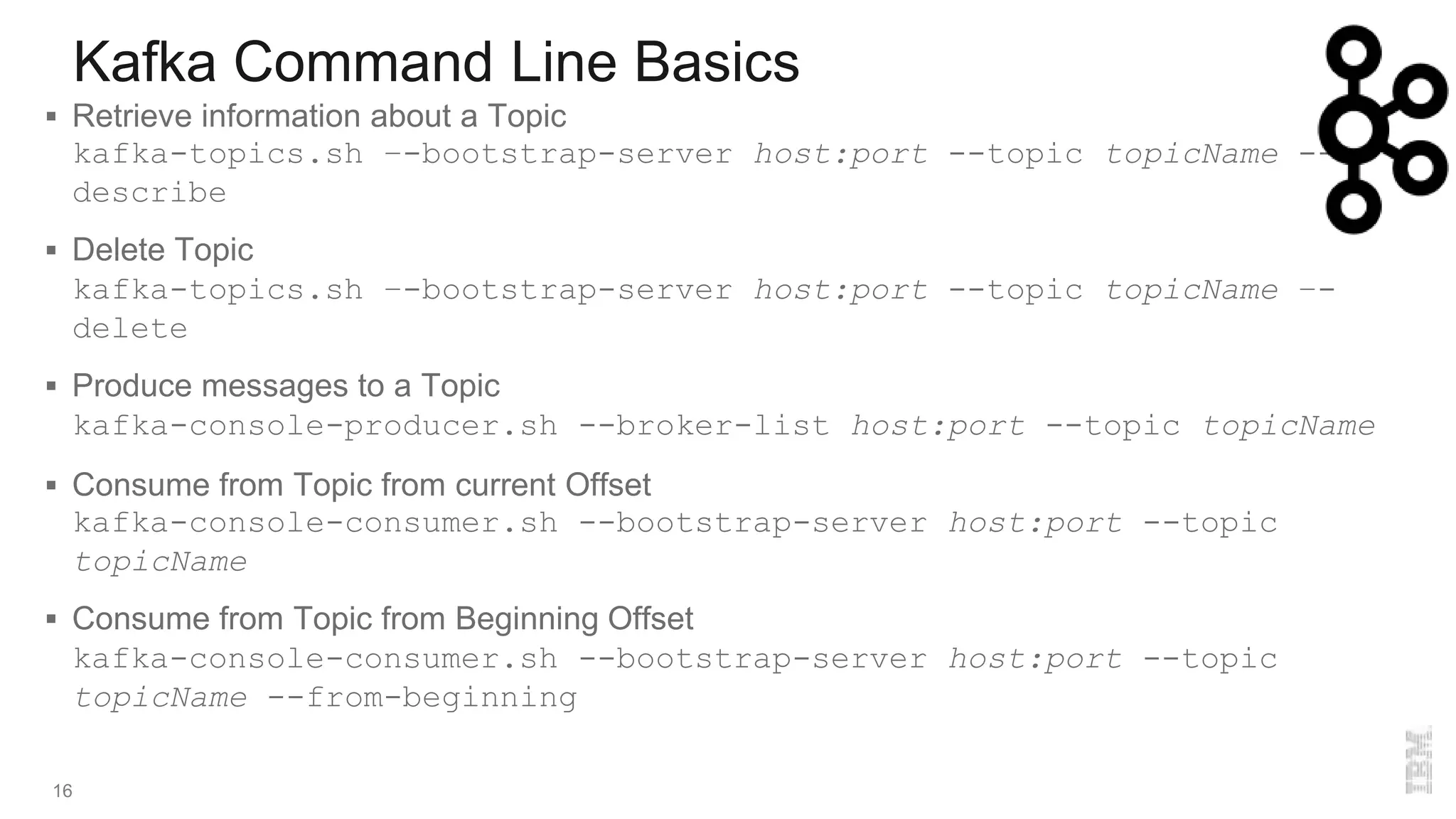
Kafka Command Line Basics
16
 Retrieve information about a Topic
kafka-topics.sh –-bootstrap-server host:port --topic topicName --
describe
 Delete Topic
kafka-topics.sh –-bootstrap-server host:port --topic topicName –-
delete
 Produce messages to a Topic
kafka-console-producer.sh --broker-list host:port --topic topicName
 Consume from Topic from current Offset
kafka-console-consumer.sh --bootstrap-server host:port --topic
topicName
 Consume from Topic from Beginning Offset
kafka-console-consumer.sh --bootstrap-server host:port --topic
topicName --from-beginning
Kafka Command Line Basics
17
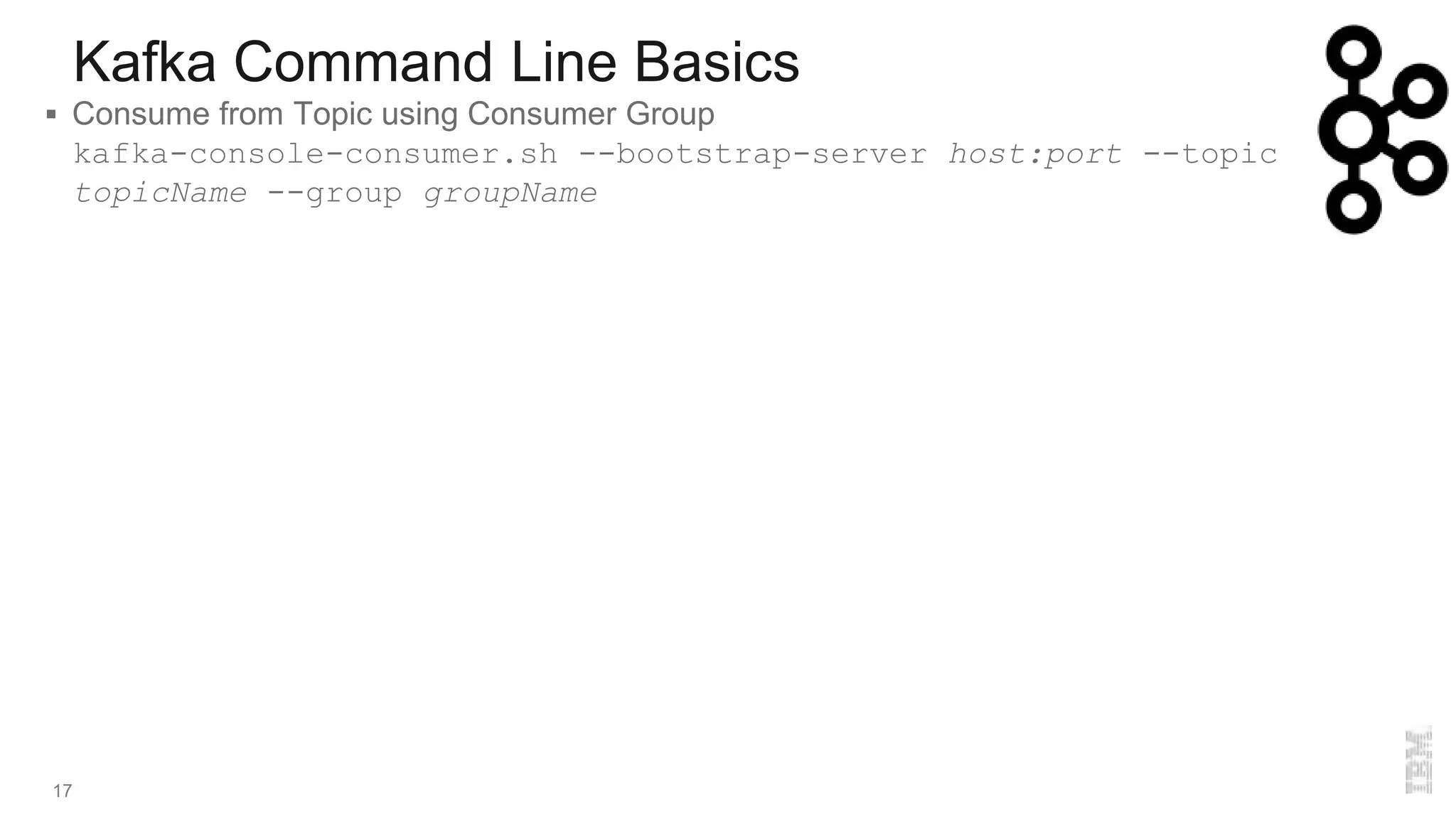
 Consume from Topic using Consumer Group
kafka-console-consumer.sh --bootstrap-server host:port --topic
topicName --group groupName
Event Streams
18
 Event Streams is IBM’s implementation of Kafka
– Several different versions and support
 IBM Event Streams is Kafka with enterprise features and IBM Support
 IBM Event Streams Community Edition is a free version for evaluation and demo use
 IBM Event Streams on IBM Cloud is Kafka as a service on the IBM Cloud
 Support on Red Hat Open Shift and IBM Cloud Private
 Contains REST Proxy Interface for the Producer
 Use external monitoring tools
 Producer Dashboard
 Health Checks for Cluster, Deployment and Topics
 Geo-replication of Topics for high availability and scalability
 Encrypted communications
Event Streams on IBM Cloud
19
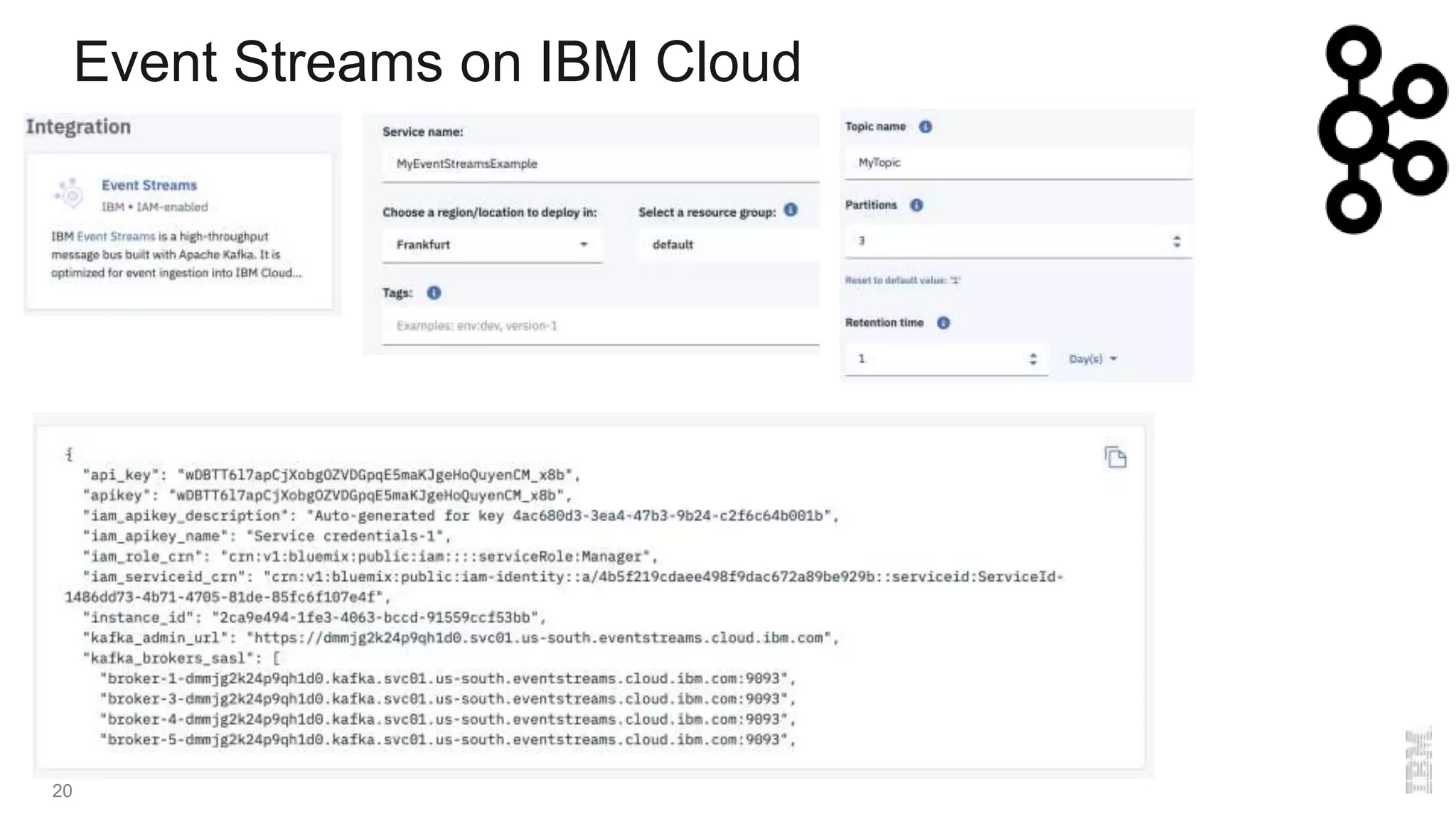
 Select Event Streams from the Catalog
 Enter details and which plan is to be used
– Classic, as a Cloud Foundry Service
– Standard, as a standard Kubernetes service
– Enterprise, dedicate
 Fill out topic information and other attributes
 Create credentials that can be used by selecting Service Credentials
 Viewing the credentials shows Brokers hosts and ports, Admin URL, userid and password
 IBM Cloud has its own ES CLI to connect
 IBM MQ Connectors are available
Event Streams on IBM Cloud
20
Kafka and IBM MQ
21
 Kafka is a pub/sub engine with streams and
connectors
 All topics are persistent
 All subscribers are durable
 Adding brokers to requires little work
(changing a configuration file)
 Topics can be spread across brokers
(partitions) with a command
 Producers and Consumers are aware of
changes made to the cluster
 Can have n number of replication partitions
 MQ is a queue, pub/sub engine with file
transfer, MQTT, AMQP and other capabilities
 Queues and topics can be persistent or non
persistent
 Subscribers can be durable or non durable
 Adding QMGRs to requires some work (Add
the QMGRs to the cluster, add cluster
channels. Queues and Topics need to be
added to the cluster.)
 Queues and topics can be spread across a
cluster by adding them to clustered QMGRs
 All MQ clients require a CCDT file to know of
changes if not using a gateway QMGR
 Can have 2 replicas (RDQM) of a QMGR,
Multi Instance QMGRs
Kafka and IBM MQ
22
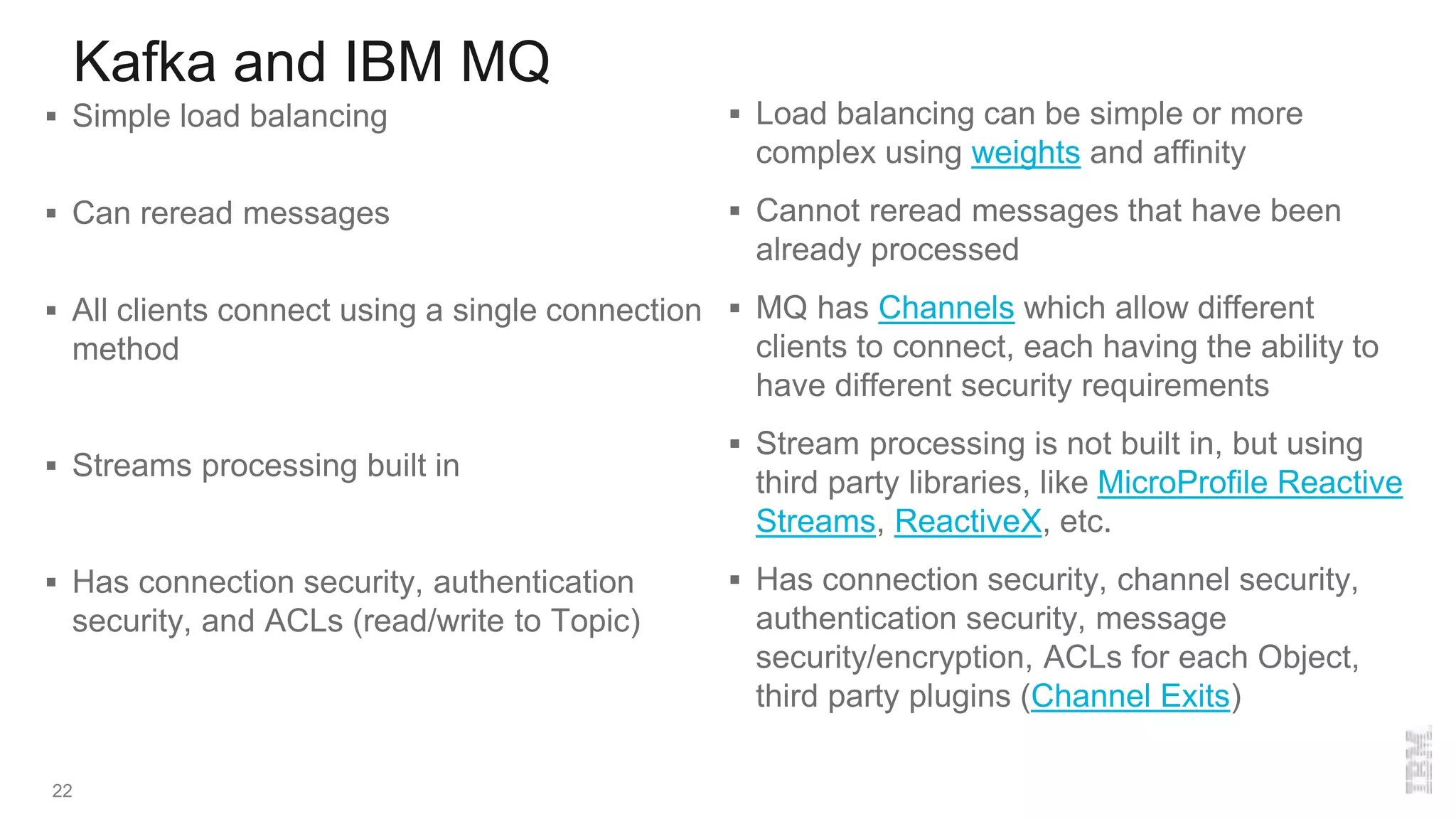
 Simple load balancing
 Can reread messages
 All clients connect using a single connection
method
 Streams processing built in
 Has connection security, authentication
security, and ACLs (read/write to Topic)
 Load balancing can be simple or more
complex using weights and affinity
 Cannot reread messages that have been
already processed
 MQ has Channels which allow different
clients to connect, each having the ability to
have different security requirements
 Stream processing is not built in, but using
third party libraries, like MicroProfile Reactive
Streams, ReactiveX, etc.
 Has connection security, channel security,
authentication security, message
security/encryption, ACLs for each Object,
third party plugins (Channel Exits)
Kafka and IBM MQ
23
 Built on Java, so can run on any platform that
support Java 8+
 Monitoring by using statistics provided by
Kafka CLI, open source tools, Confluent
Control Center
 Latest native on AIX, IBM i, Linux systems,
Solaris, Windows, z/OS.
 Much more can be monitored. Monitoring
using PCF API, MQ Explorer, MQ CLI
(runmqsc), Third Party Tools (Tivoli, CA
APM, Help Systems, Open Source, etc)
More information
24
 Sample code on GitHub
 Kafka documentation
 Event Streams documentation
 Event Streams on IBM Cloud
 Event Streams sample on GitHub
 IBM Cloud Event Driven Architecture (EDA) Reference
 IBM Cloud EDA Solution
Kafka and ibm event streams basics

Kafka and ibm event streams basics

  • 1.
    Brian S Paskin,Senior Application Architect, R&D Services, IBM Cloud Innovations Lab Updated 22 May 2019 Kafka and IBM Event Streams Basics
  • 2.
    What is Kafka 2 Kafka was originally developed at LinkedIn in 2010 and opened sourced in 2011  A version and extras maintained by Confluent, the original Kafka creators from LinkedIn  A distributed publish and subscribe middleware where all records are persistent  Used as a part in Event Driven Architectures  Fault tolerant and scalable when running multiple brokers with multiple partitions  Kafka runs on Java with clients in many languages  Uses Apache Zookeeper for metadata (leader and follower setup)  Can be used with Java Messaging Services (JMS), but does not support all features  Kafka clients are written in many languages – C/C++, Python, Go, Erlang, .NET, Clojure, Ruby, Node.js, Proxy (HTTP REST), Perl, stdin/stdout, PHP, Rust, Alternative Java, Storm, Scala DSL, Clojure, Swift
  • 3.
  • 4.
    Brokers and Clusters 4 A broker is an instance of Kafka, identified by an integer, in the configuration file  More than 1 broker working together is a cluster – Can span multiple systems  All brokers in a cluster know about all other brokers  All information is written to disk  A connection to a broker is called the bootstrap broker  A cluster durably persists all published records for the retention period – Default retention period is 1 week
  • 5.
    Topics and Partitions 5 A topic is a category or feed name to which records are published – Subtopics are not supported (i.e. sports/football, sports/football/ASRoma)  A partition is an ordered, immutable sequence of records of a specific topic  The records in the partitions are each assigned a sequential id number called the offset  A topic can have multiple partitions that may span brokers in the cluster – Allows for fault tolerance and better for consuming of messages  Partitions can be replicated with in sync replicas (ISR) that are passive  Partitions/Replicas have a leader that is elected – If a partition goes down then a new leader is elected – Cannot have more replicas than brokers  Brokers can have more than 1 partition, and have multiple partitions for the same topic
  • 6.
    Topics and Partitions 6 Clusterwith Brokers and 3 Partitions Scenarios
  • 7.
    Records 7  Records consistof a key, a value, and a timestamp – A key is not required – Timestamp is added automatically – The key and value can be an Objects  Records are serialized by Producers and deserialized by Consumers – Several serializers/deserializers are available – Can write other serializers/deserializers
  • 8.
    Producers 8  A Producerwrites a record to a Topic – If there are more than 1 partition then round robin is used to each partition of the topic – If a key is given, then the record will always be written to a single partition  For guaranteed deliver there are three types of acknowledgments (ack) – 0. No acknowledgment (fire and forget) – 1. Wait for leader to acknowledge – All. wait for leader and replicas to acknowledge  Producer retries if acknowledgement is never received – Can be sent out of order – May cause duplicate records  Producers can be idempotent, which prevents sending a message twice  Producers can use message compression – Compression codecs supported are Snappy, GZIP and LZ4 – Consumers will automatically know a message is compressed and decompress
  • 9.
    Producers 9  Producers cansend messages in batches for efficiency – By default 5 messages can be in flight at a time – More messages are placed in batch and sent all at once – Creating a small delay in processing can lead to better performance – Batch waits until the delay is expired or batch size is filled – Messages larger than the batch size will not be batched  If Producers are sending faster than Brokers can handle then the Producers can be slowed – Set the buffer memory for storage – Set the blocking time (milliseconds) – Throw an error message that the records cannot be sent  Schema Registry is available to validate data using Confluent Schema Registry – Uses Apache Avro – Protects from bad data or mismatches – Self describing
  • 10.
    Consumers 10  Consumers subscribeto 1 or more Topics – Read from all partitions from the last offset and consumes records in FIFO order – Can have multiple consumers subscribed to a topic – Consumers can set the offset if records need to be processed again  Multiple Consumers in a consumer groups will read each from a fixed amount of partitions exclusively – Having more consumers in a group than partitions will lead to inactive consumers – Adding or removing Consumers will automatically rebalance the Consumers with the number of partitions  Consumers can be idempotent by coding  Schema Registry is available
  • 11.
    Connectors 11  Connectors allowfor integration from sources to sinks and vice versa – Import from sources like DBs, JDBC, Blockchain, Salesforce, Twitter, etc – Export to AWS S3, Elastic Search, JDBC, DB, Twitter, Splunk, etc – Run a connect cluster to pull from source and publish it to Kafka – Can be used with Streams – Confluent Hub has many connectors already available  Connectors can be managed with REST calls
  • 12.
    Streams 12  Consumers froma Topic, processes data, and Publishes in another Topic  Several built in functions to process or transform data – Can create other functions – branch, filter, filterNot, flatMap, flatMapValues, foreach, groupByKey, groupBy, join, leftJoin, map, mapValues, merge, outerJoin, peek, print, selectKey, through, transform, tranformFormValues  Exactly once processing  Event time windowing is supported – Group of records with the same key perform stateful operations
  • 13.
  • 14.
    Zookeeper Quick Look 14 Open source project from Apache  Comes in the package with Kafka  Centralized system for maintaining configuration information in a distributed system  There is a Leader service and follower services that exchange information  Runs on Java  Should always have an odd number of Zookeeper services started  Keeps information in files  Do not need to use the Zookeeper provided with Kafka
  • 15.
    Kafka Command LineBasics 15  Start Zookeeper as a daemon zookeeper-server-start.sh –daemon ../config/zookeeper.properties  Stop Zookeeper zookeeper-server-stop.sh  Start Kafka as a daemon kafka-server-start.sh –daemon ../config/server.properties  Stop Kafka kafka-server-stop.sh  Create a topic with number of partitions and number of replications kafka-topics.sh –-bootstrap-server host:port --topic topicName -- create --partitions 3 --replication-factor 1  List Topics kafka-topics.sh –-bootstrap-server host:port --list
  • 16.
    Kafka Command LineBasics 16  Retrieve information about a Topic kafka-topics.sh –-bootstrap-server host:port --topic topicName -- describe  Delete Topic kafka-topics.sh –-bootstrap-server host:port --topic topicName –- delete  Produce messages to a Topic kafka-console-producer.sh --broker-list host:port --topic topicName  Consume from Topic from current Offset kafka-console-consumer.sh --bootstrap-server host:port --topic topicName  Consume from Topic from Beginning Offset kafka-console-consumer.sh --bootstrap-server host:port --topic topicName --from-beginning
  • 17.
    Kafka Command LineBasics 17  Consume from Topic using Consumer Group kafka-console-consumer.sh --bootstrap-server host:port --topic topicName --group groupName
  • 18.
    Event Streams 18  EventStreams is IBM’s implementation of Kafka – Several different versions and support  IBM Event Streams is Kafka with enterprise features and IBM Support  IBM Event Streams Community Edition is a free version for evaluation and demo use  IBM Event Streams on IBM Cloud is Kafka as a service on the IBM Cloud  Support on Red Hat Open Shift and IBM Cloud Private  Contains REST Proxy Interface for the Producer  Use external monitoring tools  Producer Dashboard  Health Checks for Cluster, Deployment and Topics  Geo-replication of Topics for high availability and scalability  Encrypted communications
  • 19.
    Event Streams onIBM Cloud 19  Select Event Streams from the Catalog  Enter details and which plan is to be used – Classic, as a Cloud Foundry Service – Standard, as a standard Kubernetes service – Enterprise, dedicate  Fill out topic information and other attributes  Create credentials that can be used by selecting Service Credentials  Viewing the credentials shows Brokers hosts and ports, Admin URL, userid and password  IBM Cloud has its own ES CLI to connect  IBM MQ Connectors are available
  • 20.
    Event Streams onIBM Cloud 20
  • 21.
    Kafka and IBMMQ 21  Kafka is a pub/sub engine with streams and connectors  All topics are persistent  All subscribers are durable  Adding brokers to requires little work (changing a configuration file)  Topics can be spread across brokers (partitions) with a command  Producers and Consumers are aware of changes made to the cluster  Can have n number of replication partitions  MQ is a queue, pub/sub engine with file transfer, MQTT, AMQP and other capabilities  Queues and topics can be persistent or non persistent  Subscribers can be durable or non durable  Adding QMGRs to requires some work (Add the QMGRs to the cluster, add cluster channels. Queues and Topics need to be added to the cluster.)  Queues and topics can be spread across a cluster by adding them to clustered QMGRs  All MQ clients require a CCDT file to know of changes if not using a gateway QMGR  Can have 2 replicas (RDQM) of a QMGR, Multi Instance QMGRs
  • 22.
    Kafka and IBMMQ 22  Simple load balancing  Can reread messages  All clients connect using a single connection method  Streams processing built in  Has connection security, authentication security, and ACLs (read/write to Topic)  Load balancing can be simple or more complex using weights and affinity  Cannot reread messages that have been already processed  MQ has Channels which allow different clients to connect, each having the ability to have different security requirements  Stream processing is not built in, but using third party libraries, like MicroProfile Reactive Streams, ReactiveX, etc.  Has connection security, channel security, authentication security, message security/encryption, ACLs for each Object, third party plugins (Channel Exits)
  • 23.
    Kafka and IBMMQ 23  Built on Java, so can run on any platform that support Java 8+  Monitoring by using statistics provided by Kafka CLI, open source tools, Confluent Control Center  Latest native on AIX, IBM i, Linux systems, Solaris, Windows, z/OS.  Much more can be monitored. Monitoring using PCF API, MQ Explorer, MQ CLI (runmqsc), Third Party Tools (Tivoli, CA APM, Help Systems, Open Source, etc)
  • 24.
    More information 24  Samplecode on GitHub  Kafka documentation  Event Streams documentation  Event Streams on IBM Cloud  Event Streams sample on GitHub  IBM Cloud Event Driven Architecture (EDA) Reference  IBM Cloud EDA Solution

Editor's Notes

  • #3 Observer Pattern - https://www.tutorialspoint.com/design_pattern/observer_pattern.htm
  • #8 Serializers: ByteArraySerializer, ByteBufferSerializer, BytesSerializer, DoubleSerializer, ExtendedSerializer.Wrapper, FloatSerializer, IntegerSerializer, LongSerializer, SessionWindowedSerializer, ShortSerializer, StringSerializer, TimeWindowedSerializer, UUIDSerializer Deserializers: ByteArrayDeserializer, ByteBufferDeserializer, BytesDeserializer, DoubleDeserializer, ExtendedDeserializer.Wrapper, FloatDeserializer, IntegerDeserializer, LongDeserializer, SessionWindowedDeserializer, ShortDeserializer, StringDeserializer, TimeWindowedDeserializer, UUIDDeserializer
  • #9 Serializers: ByteArraySerializer, ByteBufferSerializer, BytesSerializer, DoubleSerializer, ExtendedSerializer.Wrapper, FloatSerializer, IntegerSerializer, LongSerializer, SessionWindowedSerializer, ShortSerializer, StringSerializer, TimeWindowedSerializer, UUIDSerializer Deserializers: ByteArrayDeserializer, ByteBufferDeserializer, BytesDeserializer, DoubleDeserializer, ExtendedDeserializer.Wrapper, FloatDeserializer, IntegerDeserializer, LongDeserializer, SessionWindowedDeserializer, ShortDeserializer, StringDeserializer, TimeWindowedDeserializer, UUIDDeserializer When an idempotent producer is set the property producerProps.put("enable.idempitence", "true") is added. This changes the following settings: retries = MAX_INT, acks=all,
  • #10 To add a delay change the property: batch linger.ms = 5 (default 0) To change the batch size : batch.size (default 16 kb) To change the buffer memory : buffer.memory (default 32 MB) To change the blocking milliseconds: max.block.ms (default 1)