MULE RESEQUENCER FILTER
BY – ANKUSH SHARMA
MULE RESEQUENCER FILTER
The Resequencer sorts a set of received messages by their
correlation sequence property and issues them in the correct
order. It uses the timeout and failOnTimeout attributes described
in Collection Aggregator to determine when all the messages in
the set have been received.
MULE RESEQUENCER FILTER –
CONFIGURATION WIZARD (GENERAL TAB)
(CONT.)
MULE RESEQUENCER FILTER –
CONFIGURATION WIZARD (GENERAL TAB)
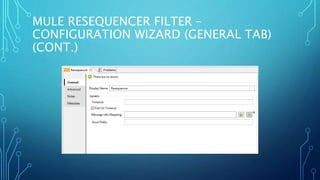
• Following are options on general tab –
• Display Name – Name of the filter to be displayed in Mule flow.
• Timeout – Timeout time in milliseconds.
• Message Info Mapping – Maps the values of current message to known
message elements.
• Store Prefix – Defines the prefix for object storing names.
MULE RESEQUENCER FILTER –
CONFIGURATION WIZARD (ADVANCED TAB)
(CONT.)
MULE RESEQUENCER FILTER –
CONFIGURATION WIZARD (ADVANCED TAB)
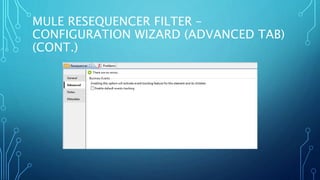
• This tab is used to enable tracking of business events during
filter process of this filter.
MULE RESEQUENCER FILTER – MESSAGE INFO
MAPPING CONFIGURATION WIZARD (ADVANCED
TAB) (CONT.)
MULE RESEQUENCER FILTER – MESSAGE INFO
MAPPING CONFIGURATION WIZARD (ADVANCED
TAB)
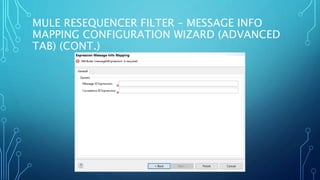
• Following are the options on general tab –
• Message ID Expression – Expression to map massage attributes to
‘messageIdExpression’.
• Correlation ID Expression – Expression to map massage attributes to
‘correlationIdExpression’.
MULE RESEQUENCER FILTER –
CONFIGURATION WIZARD (NOTES AND
META-DATA TABS)
• Notes Tab, is used to add special notes to this filter.
• Meta-Data Tab, is used to add meta-data for this filter.
THANK YOU!

Mule Resequencer Filter

  • 1.
    MULE RESEQUENCER FILTER BY– ANKUSH SHARMA
  • 2.
    MULE RESEQUENCER FILTER TheResequencer sorts a set of received messages by their correlation sequence property and issues them in the correct order. It uses the timeout and failOnTimeout attributes described in Collection Aggregator to determine when all the messages in the set have been received.
  • 3.
    MULE RESEQUENCER FILTER– CONFIGURATION WIZARD (GENERAL TAB) (CONT.)
  • 4.
    MULE RESEQUENCER FILTER– CONFIGURATION WIZARD (GENERAL TAB) • Following are options on general tab – • Display Name – Name of the filter to be displayed in Mule flow. • Timeout – Timeout time in milliseconds. • Message Info Mapping – Maps the values of current message to known message elements. • Store Prefix – Defines the prefix for object storing names.
  • 5.
    MULE RESEQUENCER FILTER– CONFIGURATION WIZARD (ADVANCED TAB) (CONT.)
  • 6.
    MULE RESEQUENCER FILTER– CONFIGURATION WIZARD (ADVANCED TAB) • This tab is used to enable tracking of business events during filter process of this filter.
  • 7.
    MULE RESEQUENCER FILTER– MESSAGE INFO MAPPING CONFIGURATION WIZARD (ADVANCED TAB) (CONT.)
  • 8.
    MULE RESEQUENCER FILTER– MESSAGE INFO MAPPING CONFIGURATION WIZARD (ADVANCED TAB) • Following are the options on general tab – • Message ID Expression – Expression to map massage attributes to ‘messageIdExpression’. • Correlation ID Expression – Expression to map massage attributes to ‘correlationIdExpression’.
  • 9.
    MULE RESEQUENCER FILTER– CONFIGURATION WIZARD (NOTES AND META-DATA TABS) • Notes Tab, is used to add special notes to this filter. • Meta-Data Tab, is used to add meta-data for this filter.
  • 10.