MULE MESSAGE
CHUNK SPLITTER
BY – ANKUSH SHARMA
MULE MESSAGE CHUNK SPLITTER
The Splitter Flow Control splits a message into separate fragments, then sends
these fragments one at a time to the next message processor in the flow. Segments
are identified based on an expression parameter, usually written in Mule Expression
Language (MEL), but other formats can be employed also.
Splitting and aggregating the message is especially useful when you intend to
process the split parts in asynchronous flows running on separate servers. Together,
the splitter and aggregator flow controls allow you to share the workload among
several servers and still be able to reassemble the message after it’s processed.
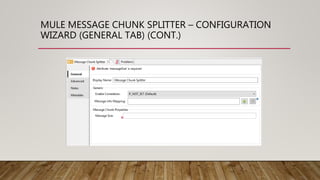
MULE MESSAGE CHUNK SPLITTER – CONFIGURATION
WIZARD (GENERAL TAB) (CONT.)
MULE MESSAGE CHUNK SPLITTER –
CONFIGURATION WIZARD (GENERAL TAB)
• Following are the options on general tab –
• Display Name – The name of the component to be displayed in Mule flow.
• Enable Correlation – Determines if Mule could add a correlation ID to outgoing
message.
• Message Info Mapping – Maps the elements of the current message to known
message elements.
• Message Size – The chunk size the current message will be splitted into.
MULE MESSAGE CHUNK SPLITTER – MESSAGE INFO
MAPPING CONFIGURATION WIZARD (GENERAL TAB) (CONT.)
MULE MESSAGE CHUNK SPLITTER – MESSAGE INFO
MAPPING CONFIGURATION WIZARD (GENERAL TAB)
• Following are the options on general tab –
• Message ID Expression – Expression for mapping message attributes to
messageIdExpression.
• Correlation ID Expression – Expression for mapping message attributes to
correlationIdExpression.
MULE MESSAGE CHUNK SPLITTER – CONFIGURATION
WIZARD (ADVANCED TAB) (CONT.)
MULE MESSAGE CHUNK SPLITTER –
CONFIGURATION WIZARD (ADVANCED TAB)
• This tab is used to add business events tracking for the whole process of splitter.
MULE MESSAGE CHUNK SPLITTER – CONFIGURATION
WIZARD (NOTES AND META-DATA TABS)
• Notes Tab, is used to add special notes for this splitter filter.
• META-DATA Tab, is used to add meta-data for this splitter filter.
THANK YOU!

Mule Message Chunk Splitter

  • 1.
  • 2.
    MULE MESSAGE CHUNKSPLITTER The Splitter Flow Control splits a message into separate fragments, then sends these fragments one at a time to the next message processor in the flow. Segments are identified based on an expression parameter, usually written in Mule Expression Language (MEL), but other formats can be employed also. Splitting and aggregating the message is especially useful when you intend to process the split parts in asynchronous flows running on separate servers. Together, the splitter and aggregator flow controls allow you to share the workload among several servers and still be able to reassemble the message after it’s processed.
  • 3.
    MULE MESSAGE CHUNKSPLITTER – CONFIGURATION WIZARD (GENERAL TAB) (CONT.)
  • 4.
    MULE MESSAGE CHUNKSPLITTER – CONFIGURATION WIZARD (GENERAL TAB) • Following are the options on general tab – • Display Name – The name of the component to be displayed in Mule flow. • Enable Correlation – Determines if Mule could add a correlation ID to outgoing message. • Message Info Mapping – Maps the elements of the current message to known message elements. • Message Size – The chunk size the current message will be splitted into.
  • 5.
    MULE MESSAGE CHUNKSPLITTER – MESSAGE INFO MAPPING CONFIGURATION WIZARD (GENERAL TAB) (CONT.)
  • 6.
    MULE MESSAGE CHUNKSPLITTER – MESSAGE INFO MAPPING CONFIGURATION WIZARD (GENERAL TAB) • Following are the options on general tab – • Message ID Expression – Expression for mapping message attributes to messageIdExpression. • Correlation ID Expression – Expression for mapping message attributes to correlationIdExpression.
  • 7.
    MULE MESSAGE CHUNKSPLITTER – CONFIGURATION WIZARD (ADVANCED TAB) (CONT.)
  • 8.
    MULE MESSAGE CHUNKSPLITTER – CONFIGURATION WIZARD (ADVANCED TAB) • This tab is used to add business events tracking for the whole process of splitter.
  • 9.
    MULE MESSAGE CHUNKSPLITTER – CONFIGURATION WIZARD (NOTES AND META-DATA TABS) • Notes Tab, is used to add special notes for this splitter filter. • META-DATA Tab, is used to add meta-data for this splitter filter.
  • 10.