MQ Infrastructure of Today & Tomorrow
     Security & High Availability
   with MQ 7.1, MQ AMS & MQ FTE
               Author: A.J. Aronoff
               Connectivity Practice Director
               Email: aj@prolifics.com
               Desk: 646-201-4943
Agenda – MQ Infrastructure
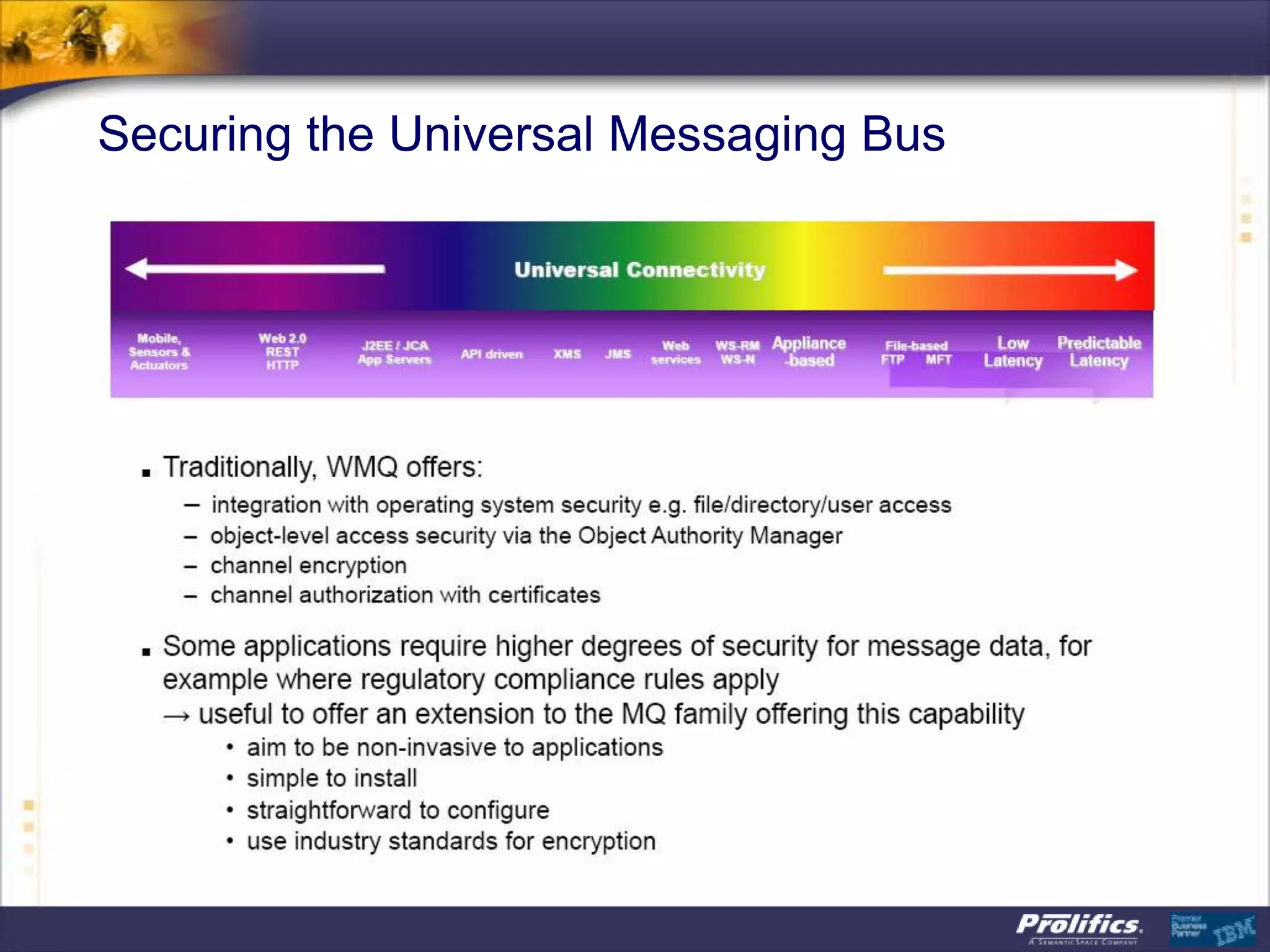
 Universal Connectivity: The Path to the Future
 MQ File Transfer Edition
 MQ Security – With MQ AMS
 MQ 7.1 – the latest MQ Infrastructure features
   Including MQ “Security Policies”


2
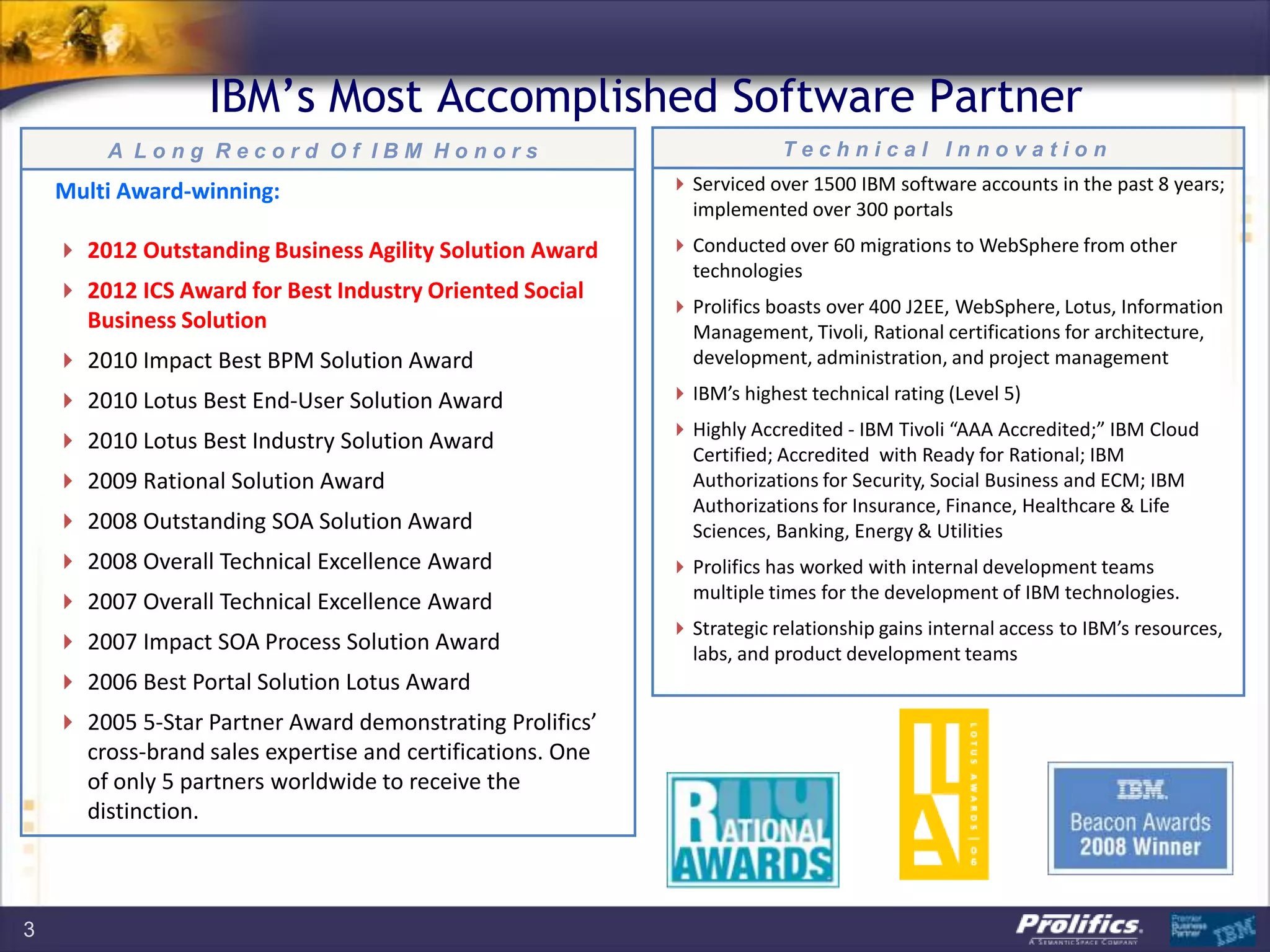
IBM‟s Most Accomplished Software Partner
         A Long Record Of IBM Honors                                     Technical Innovation

    Multi Award-winning:                                     Serviced over 1500 IBM software accounts in the past 8 years;
                                                              implemented over 300 portals
     2012 Outstanding Business Agility Solution Award       Conducted over 60 migrations to WebSphere from other
                                                              technologies
     2012 ICS Award for Best Industry Oriented Social
                                                             Prolifics boasts over 400 J2EE, WebSphere, Lotus, Information
      Business Solution                                       Management, Tivoli, Rational certifications for architecture,
     2010 Impact Best BPM Solution Award                     development, administration, and project management

     2010 Lotus Best End-User Solution Award                IBM’s highest technical rating (Level 5)
                                                             Highly Accredited - IBM Tivoli “AAA Accredited;” IBM Cloud
     2010 Lotus Best Industry Solution Award
                                                              Certified; Accredited with Ready for Rational; IBM
     2009 Rational Solution Award                            Authorizations for Security, Social Business and ECM; IBM
                                                              Authorizations for Insurance, Finance, Healthcare & Life
     2008 Outstanding SOA Solution Award                     Sciences, Banking, Energy & Utilities
     2008 Overall Technical Excellence Award                Prolifics has worked with internal development teams
     2007 Overall Technical Excellence Award                 multiple times for the development of IBM technologies.
                                                             Strategic relationship gains internal access to IBM’s resources,
     2007 Impact SOA Process Solution Award                  labs, and product development teams
     2006 Best Portal Solution Lotus Award
     2005 5-Star Partner Award demonstrating Prolifics’
      cross-brand sales expertise and certifications. One
      of only 5 partners worldwide to receive the
      distinction.


3
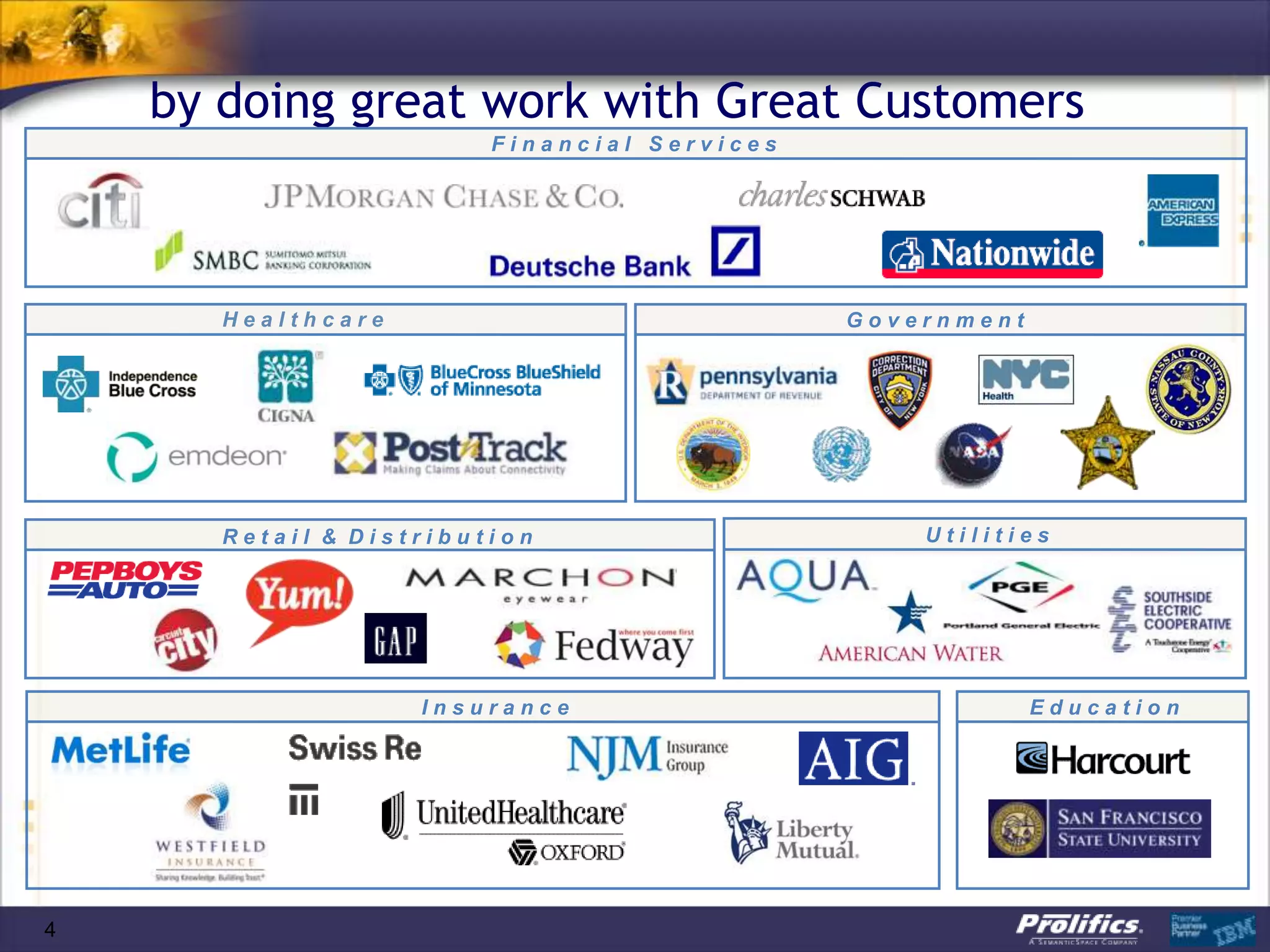
by doing great work with Great Customers
                         Financial Services


       Healthcare                             Government


       Retail & Distribution                      Utilities


                    Insurance                              Education


4
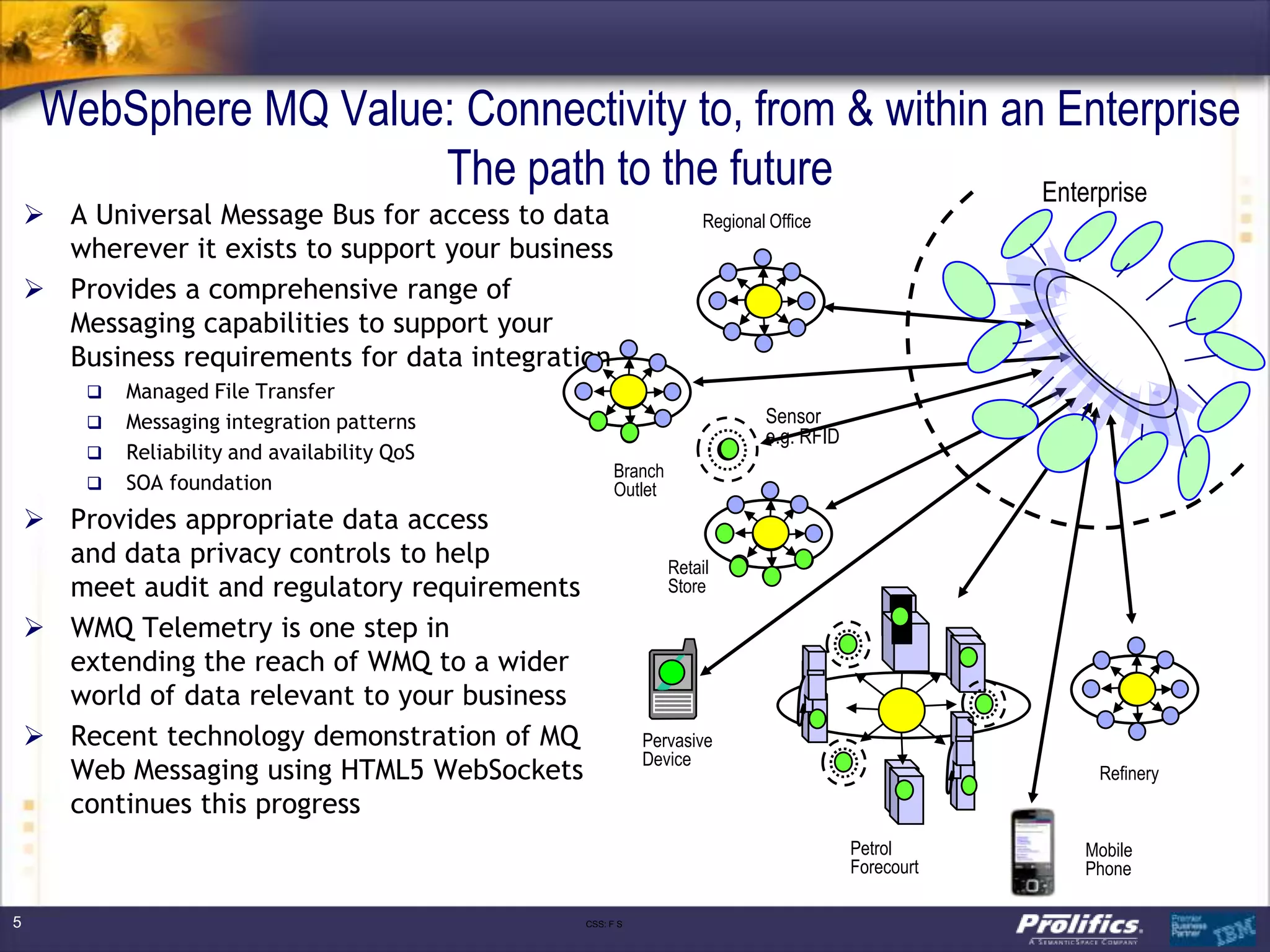
WebSphere MQ Value: Connectivity to, from & within an Enterprise
                       The path to the future             Enterprise
     A Universal Message Bus for access to data                    Regional Office
      wherever it exists to support your business
     Provides a comprehensive range of
      Messaging capabilities to support your
      Business requirements for data integration
           Managed File Transfer
           Messaging integration patterns                                  Sensor
                                                                            e.g. RFID
           Reliability and availability QoS
                                                      Branch
           SOA foundation                            Outlet
     Provides appropriate data access
      and data privacy controls to help                        Retail
      meet audit and regulatory requirements                   Store

     WMQ Telemetry is one step in
      extending the reach of WMQ to a wider
      world of data relevant to your business
     Recent technology demonstration of MQ                Pervasive
                                                           Device
      Web Messaging using HTML5 WebSockets                                                           Refinery
      continues this progress
                                                                                        Petrol      Mobile
                                                                                        Forecourt   Phone

5                                               CSS: F S
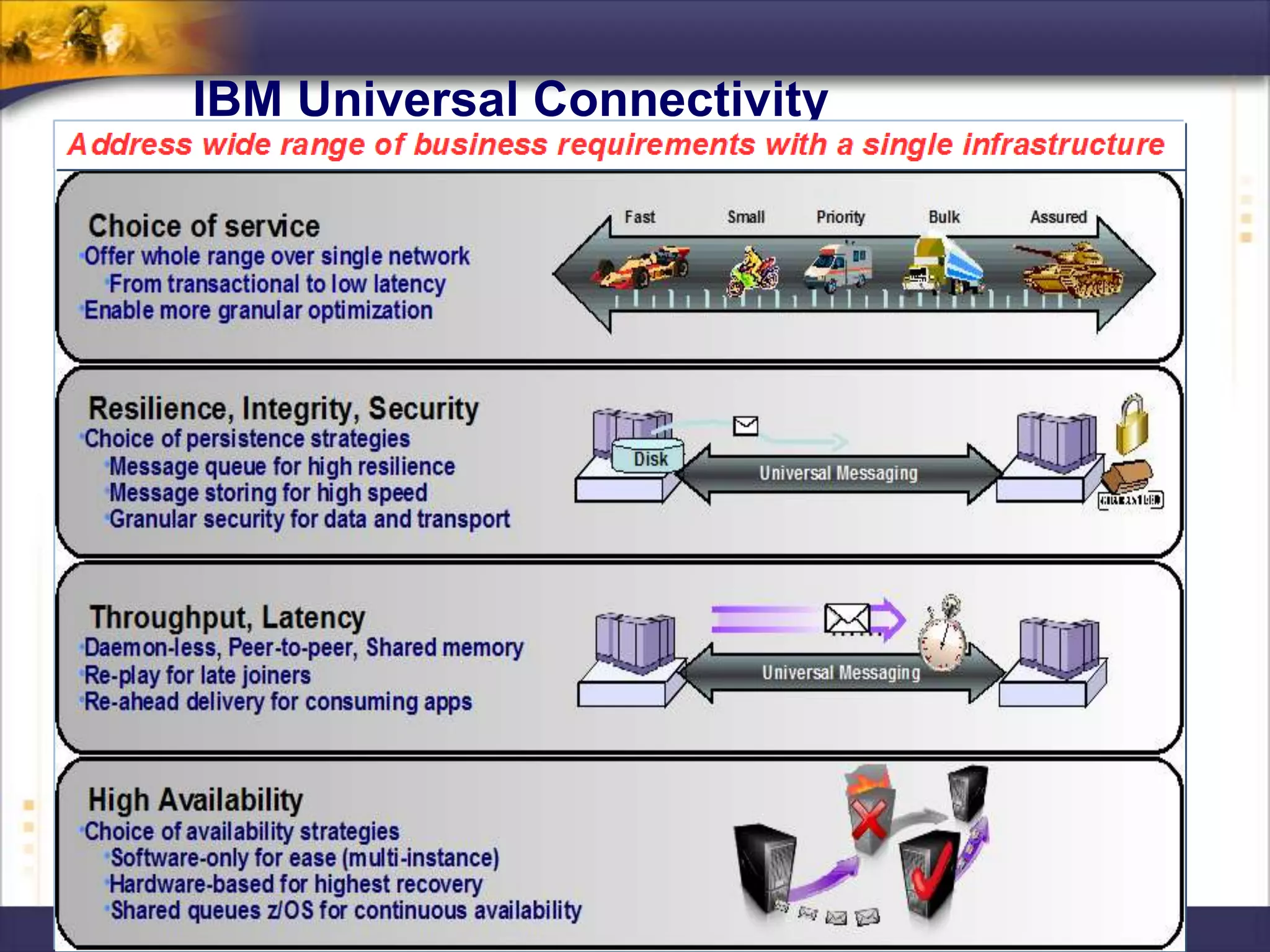
IBM Universal Connectivity
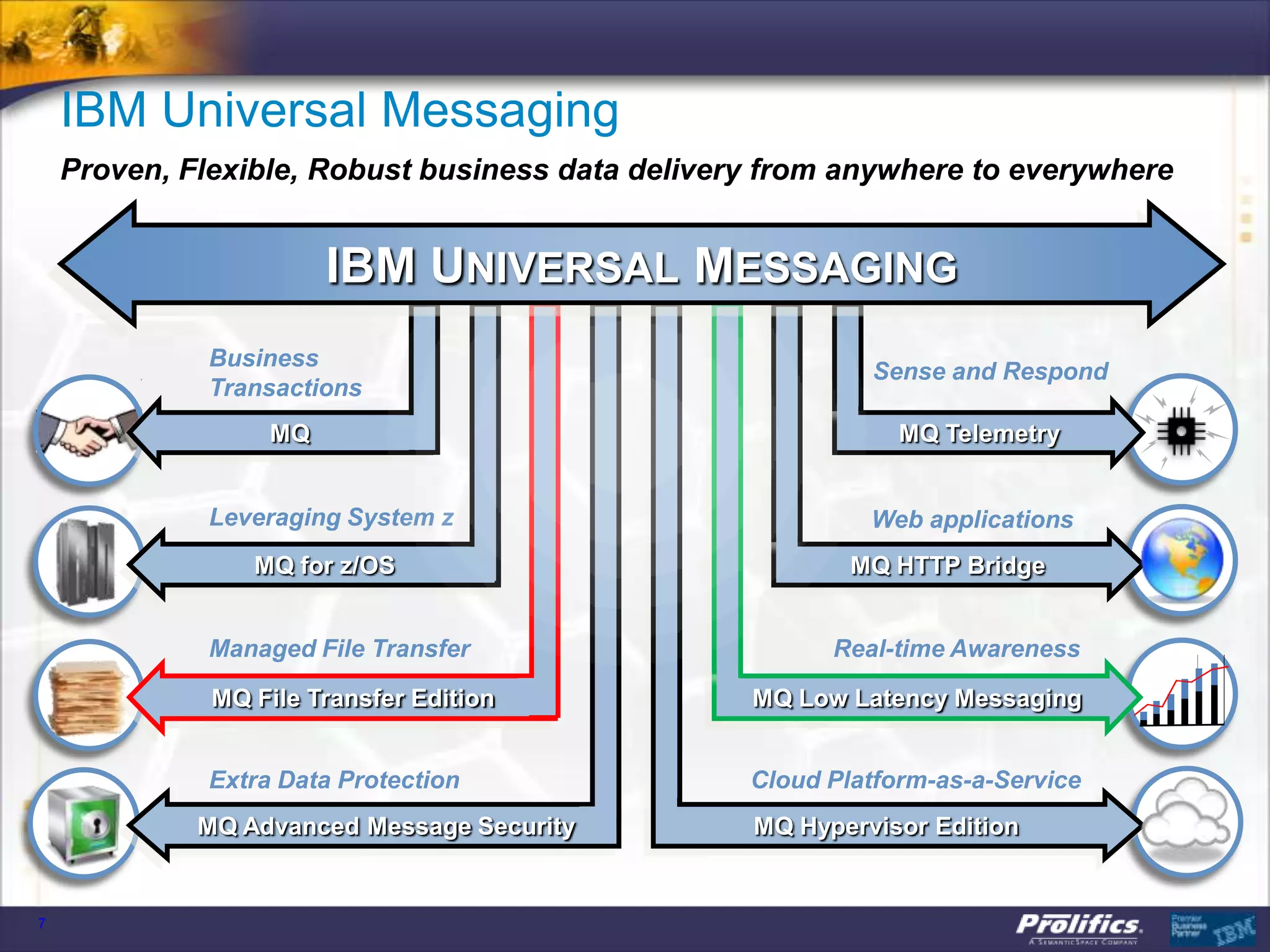
IBM Universal Messaging
    Proven, Flexible, Robust business data delivery from anywhere to everywhere


                        IBM UNIVERSAL MESSAGING
              Business
                                                           Sense and Respond
              Transactions
                   MQ                                         MQ Telemetry


              Leveraging System z                          Web applications
                 MQ for z/OS                              MQ HTTP Bridge


              Managed File Transfer                     Real-time Awareness

              MQ File Transfer Edition            MQ Low Latency Messaging


              Extra Data Protection               Cloud Platform-as-a-Service
             MQ Advanced Message Security         MQ Hypervisor Edition


7
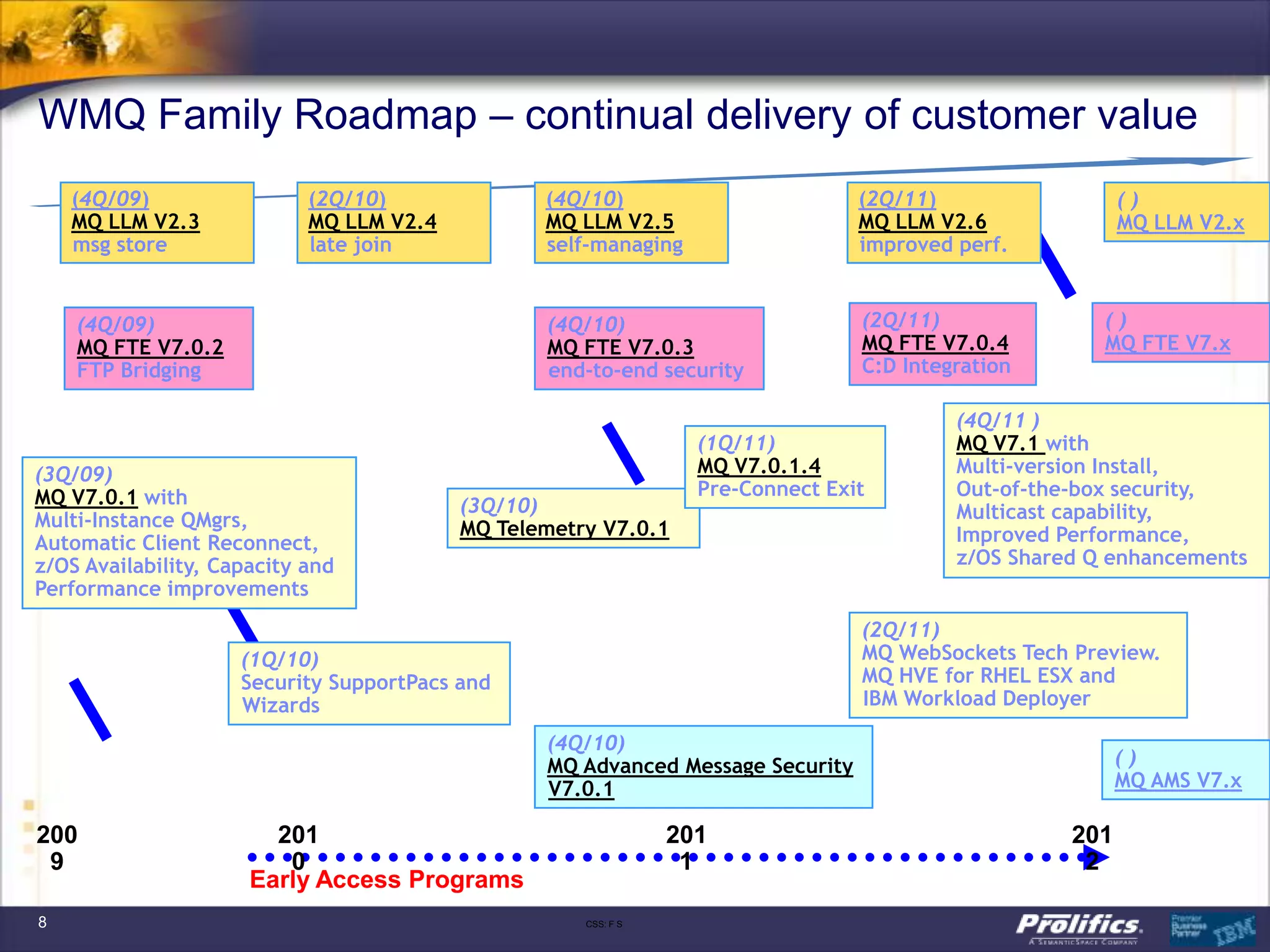
WMQ Family Roadmap – continual delivery of customer value
    (4Q/09)                 (2Q/10)              (4Q/10)                         (2Q/11)                  ()
    MQ LLM V2.3             MQ LLM V2.4          MQ LLM V2.5                     MQ LLM V2.6              MQ LLM V2.x
    msg store               late join            self-managing                   improved perf.


    (4Q/09)                                      (4Q/10)                         (2Q/11)               ()
    MQ FTE V7.0.2                                MQ FTE V7.0.3                   MQ FTE V7.0.4         MQ FTE V7.x
    FTP Bridging                                 end-to-end security             C:D Integration

                                                                                          (4Q/11 )
                                                                  (1Q/11)                 MQ V7.1 with
(3Q/09)                                                           MQ V7.0.1.4             Multi-version Install,
MQ V7.0.1 with                                                    Pre-Connect Exit        Out-of-the-box security,
                                          (3Q/10)                                         Multicast capability,
Multi-Instance QMgrs,                     MQ Telemetry V7.0.1
Automatic Client Reconnect,                                                               Improved Performance,
z/OS Availability, Capacity and                                                           z/OS Shared Q enhancements
Performance improvements
                                                                                 (2Q/11)
                     (1Q/10)                                                     MQ WebSockets Tech Preview.
                     Security SupportPacs and                                    MQ HVE for RHEL ESX and
                     Wizards                                                     IBM Workload Deployer

                                                 (4Q/10)
                                                 MQ Advanced Message Security                             ()
                                                 V7.0.1                                                   MQ AMS V7.x

200                     201                                     201                                 201
 9                       0                                       1                                   2
                      Early Access Programs
8                                                    CSS: F S
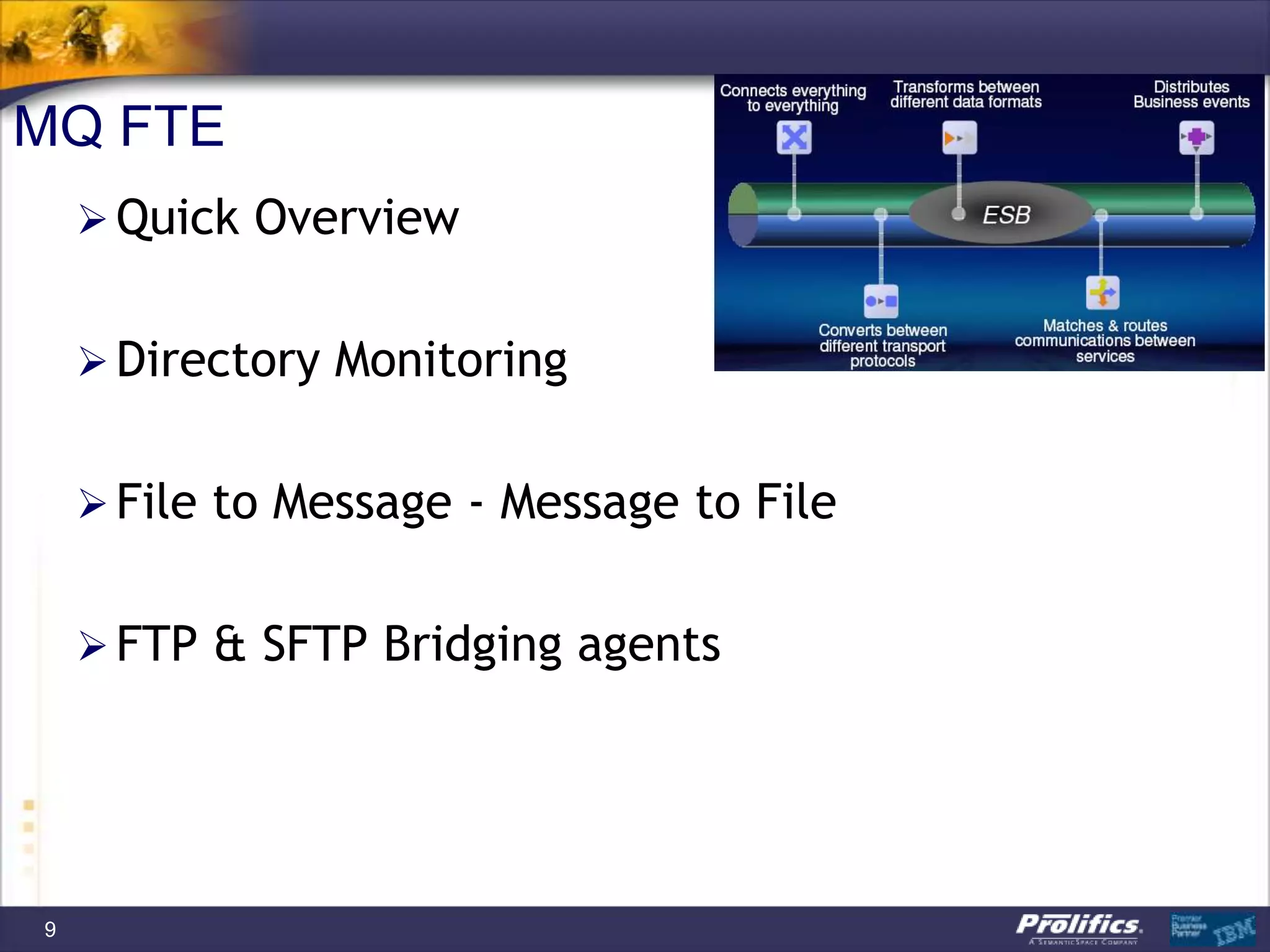
MQ FTE
     Quick Overview


     Directory Monitoring


     File to Message - Message to File


     FTP & SFTP Bridging agents


9
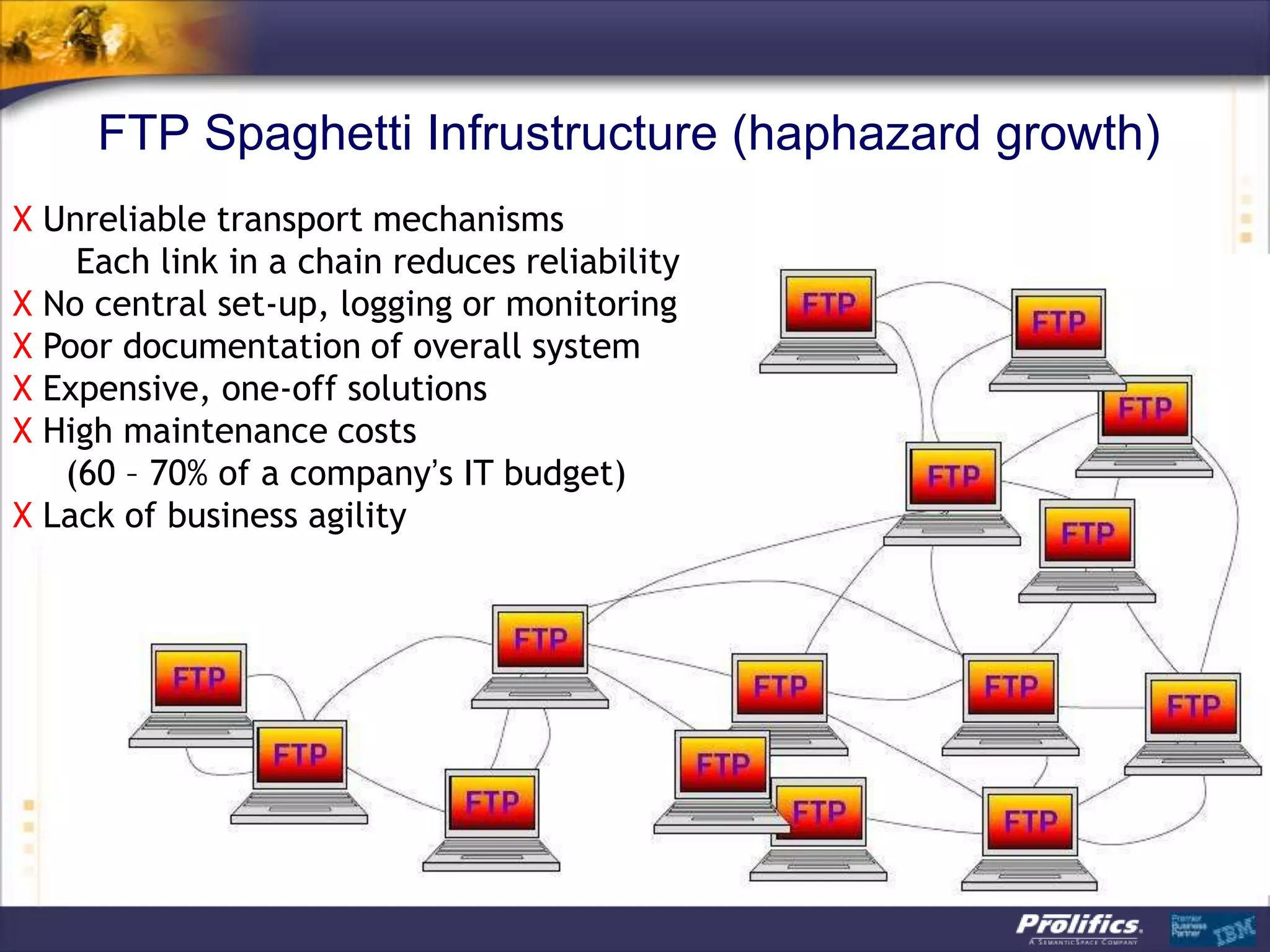
FTP Spaghetti Infrustructure (haphazard growth)
X Unreliable transport mechanisms
    Each link in a chain reduces reliability
X No central set-up, logging or monitoring
X Poor documentation of overall system
X Expensive, one-off solutions
X High maintenance costs
   (60 – 70% of a company’s IT budget)
X Lack of business agility
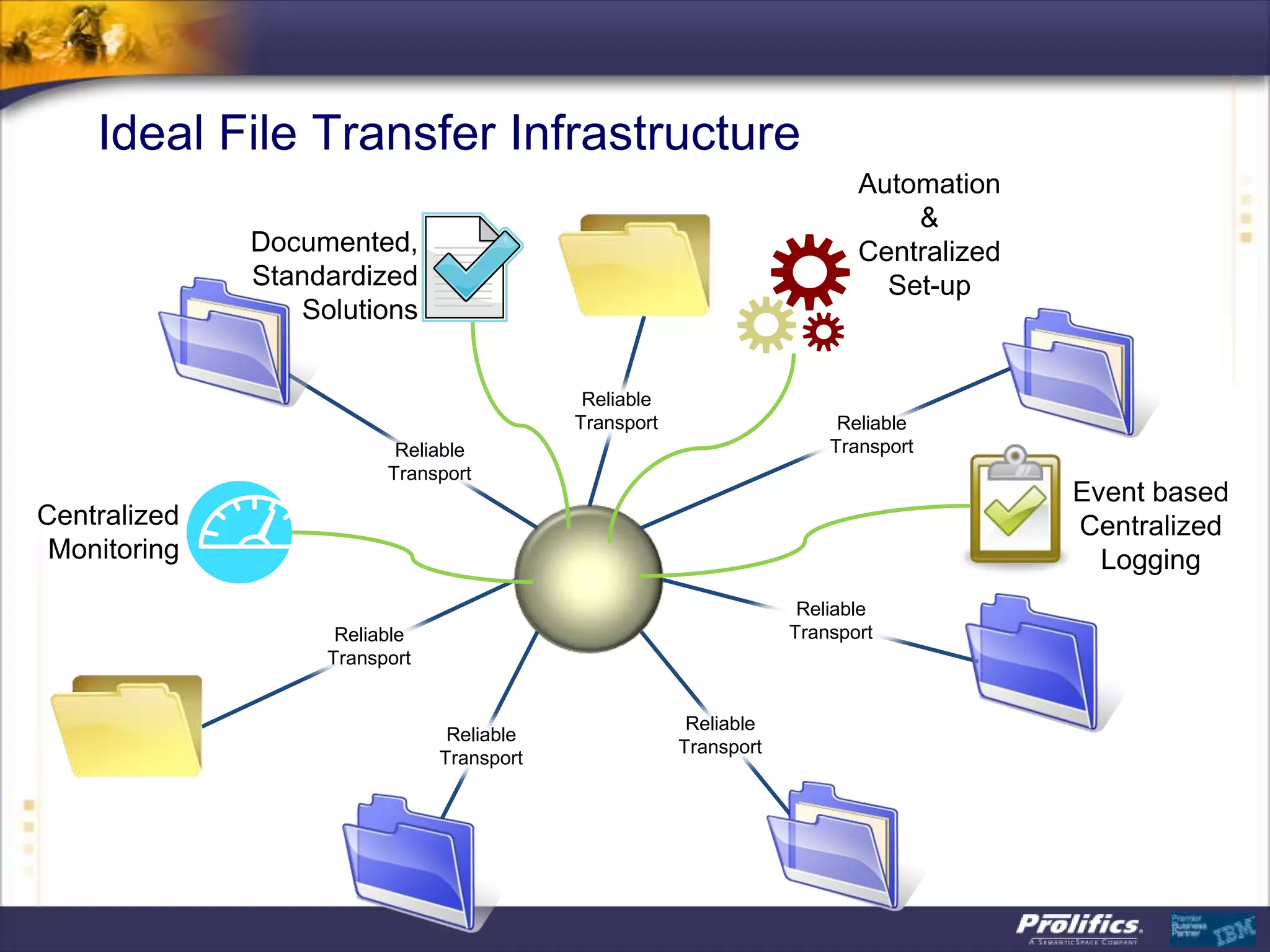
Ideal File Transfer Infrastructure
                                                                          Automation
                                                                              &
              Documented,                                                 Centralized
              Standardized                                                  Set-up
                 Solutions


                                            Reliable
                                           Transport                    Reliable
                          Reliable                                     Transport
                         Transport
                                                                                        Event based
Centralized                                                                             Centralized
 Monitoring                                                                               Logging
                                                                    Reliable
                    Reliable                                       Transport
                   Transport


                                                        Reliable
                                Reliable
                                                       Transport
                               Transport
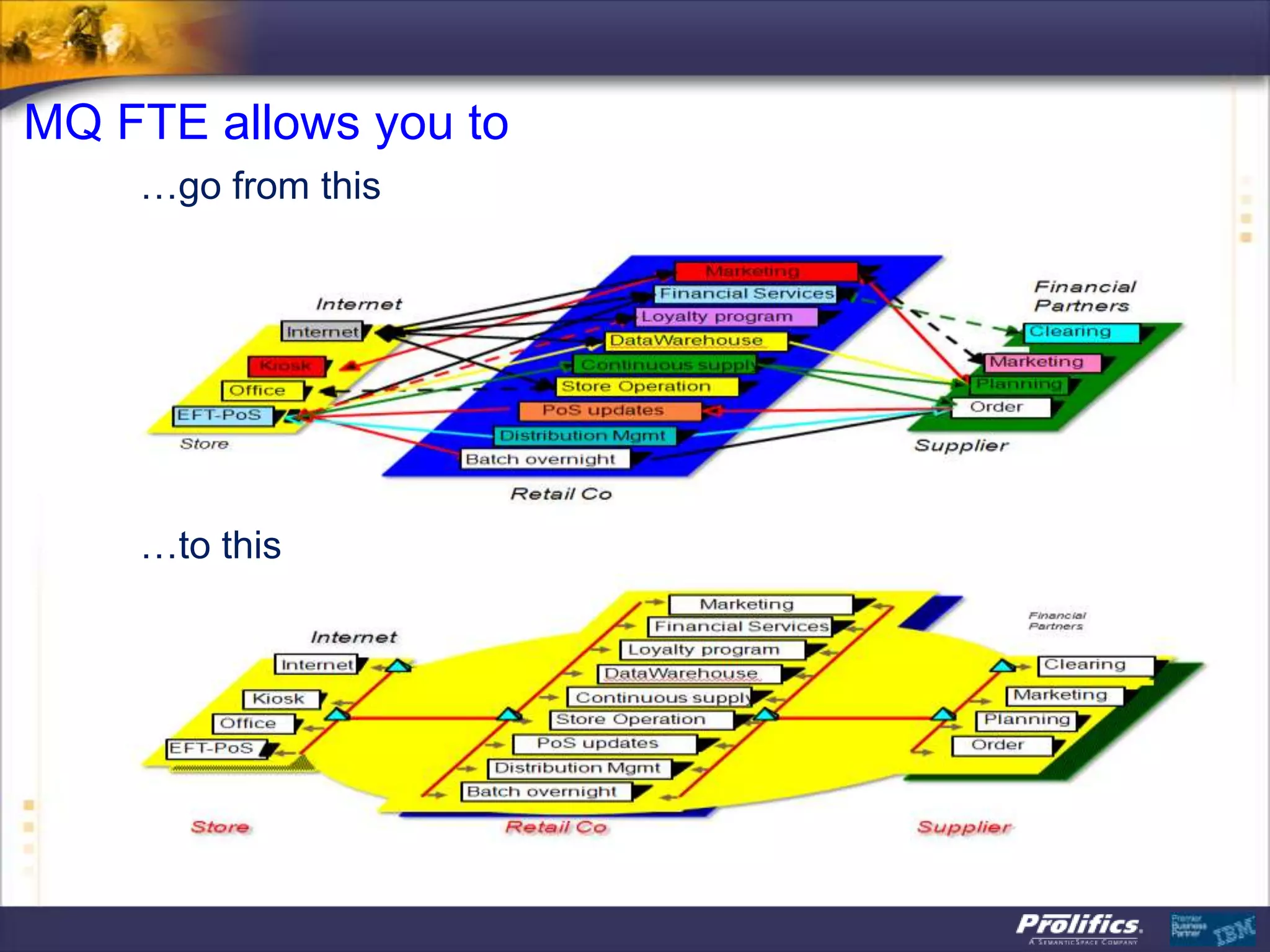
MQ FTE allows you to
    …go from this


    …to this
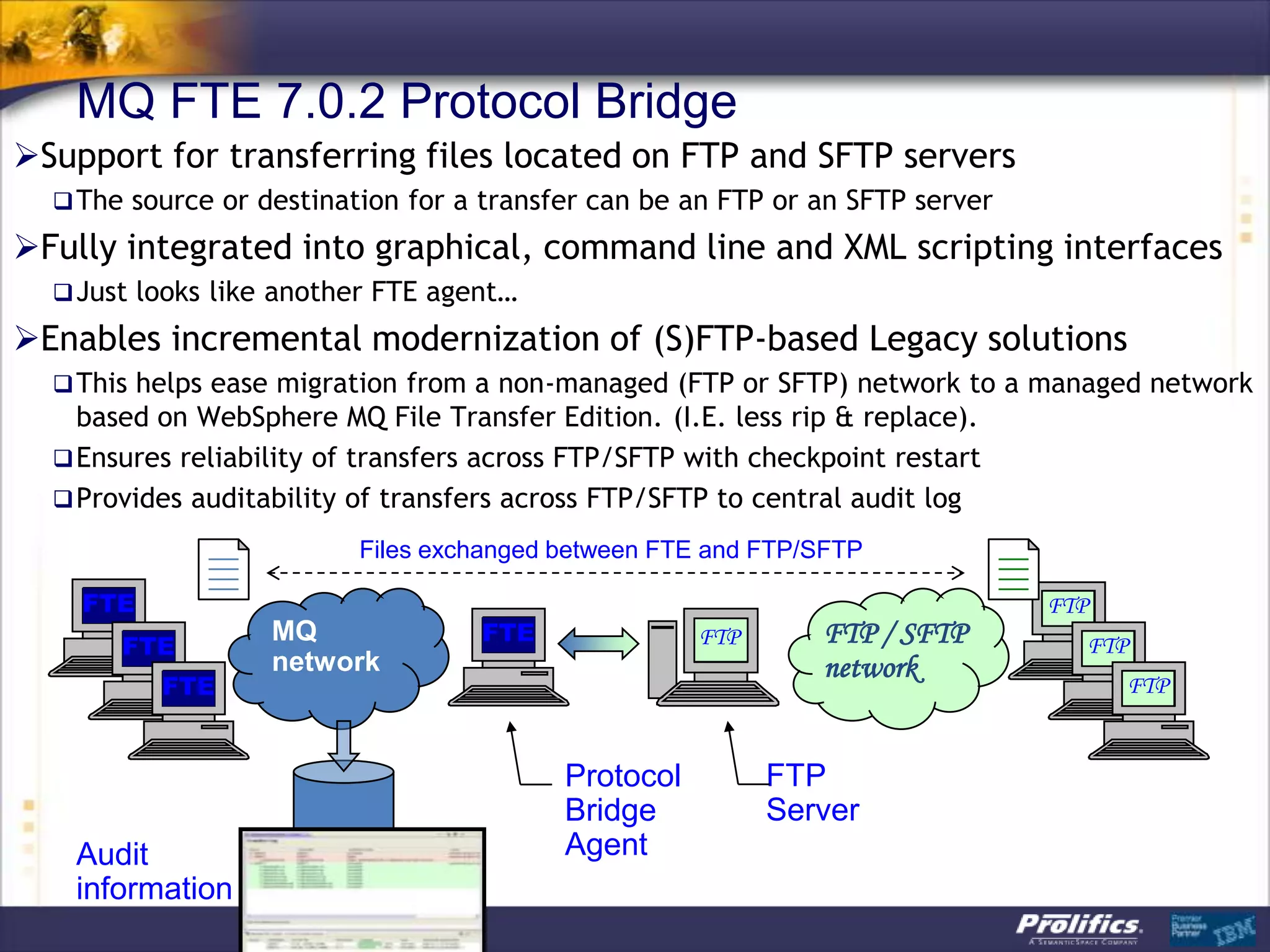
MQ FTE 7.0.2 Protocol Bridge
Support for transferring files located on FTP and SFTP servers
   The source or destination for a transfer can be an FTP or an SFTP server

Fully integrated into graphical, command line and XML scripting interfaces
   Just looks like another FTE agent…

Enables incremental modernization of (S)FTP-based Legacy solutions
   This helps ease migration from a non-managed (FTP or SFTP) network to a managed network
    based on WebSphere MQ File Transfer Edition. (I.E. less rip & replace).
   Ensures reliability of transfers across FTP/SFTP with checkpoint restart
   Provides auditability of transfers across FTP/SFTP to central audit log

                          Files exchanged between FTE and FTP/SFTP

    FTE                                                                        FTP
                   MQ               FTE                 FTP      FTP / SFTP
       FTE                                                                       FTP
                   network                                       network
          FTE                                                                        FTP
                                  Bridging         FTP/SFTP
                                  Agent            Server
                                             Protocol         FTP
                                             Bridge           Server
   Audit                                     Agent
   information
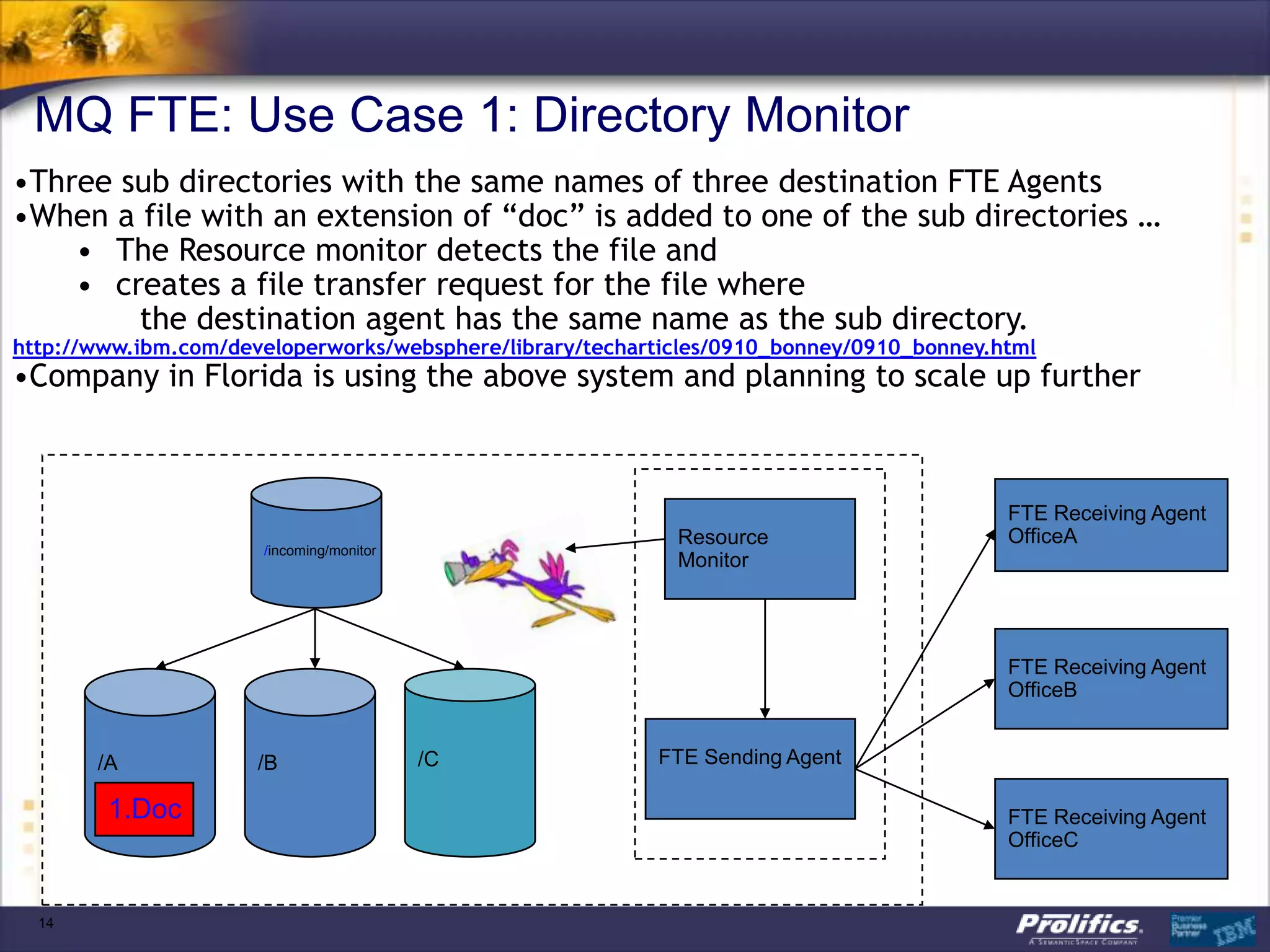
MQ FTE: Use Case 1: Directory Monitor
•Three sub directories with the same names of three destination FTE Agents
•When a file with an extension of “doc” is added to one of the sub directories …
    • The Resource monitor detects the file and
    • creates a file transfer request for the file where
        the destination agent has the same name as the sub directory.
http://www.ibm.com/developerworks/websphere/library/techarticles/0910_bonney/0910_bonney.html
•Company in Florida is using the above system and planning to scale up further


                                                                                          FTE Receiving Agent
                                                            Resource                      OfficeA
                      /incoming/monitor
                                                            Monitor


                                                                                          FTE Receiving Agent
                                                                                          OfficeB


       /A             /B                  /C              FTE Sending Agent

        1.Doc                                                                             FTE Receiving Agent
                                                                                          OfficeC


  14
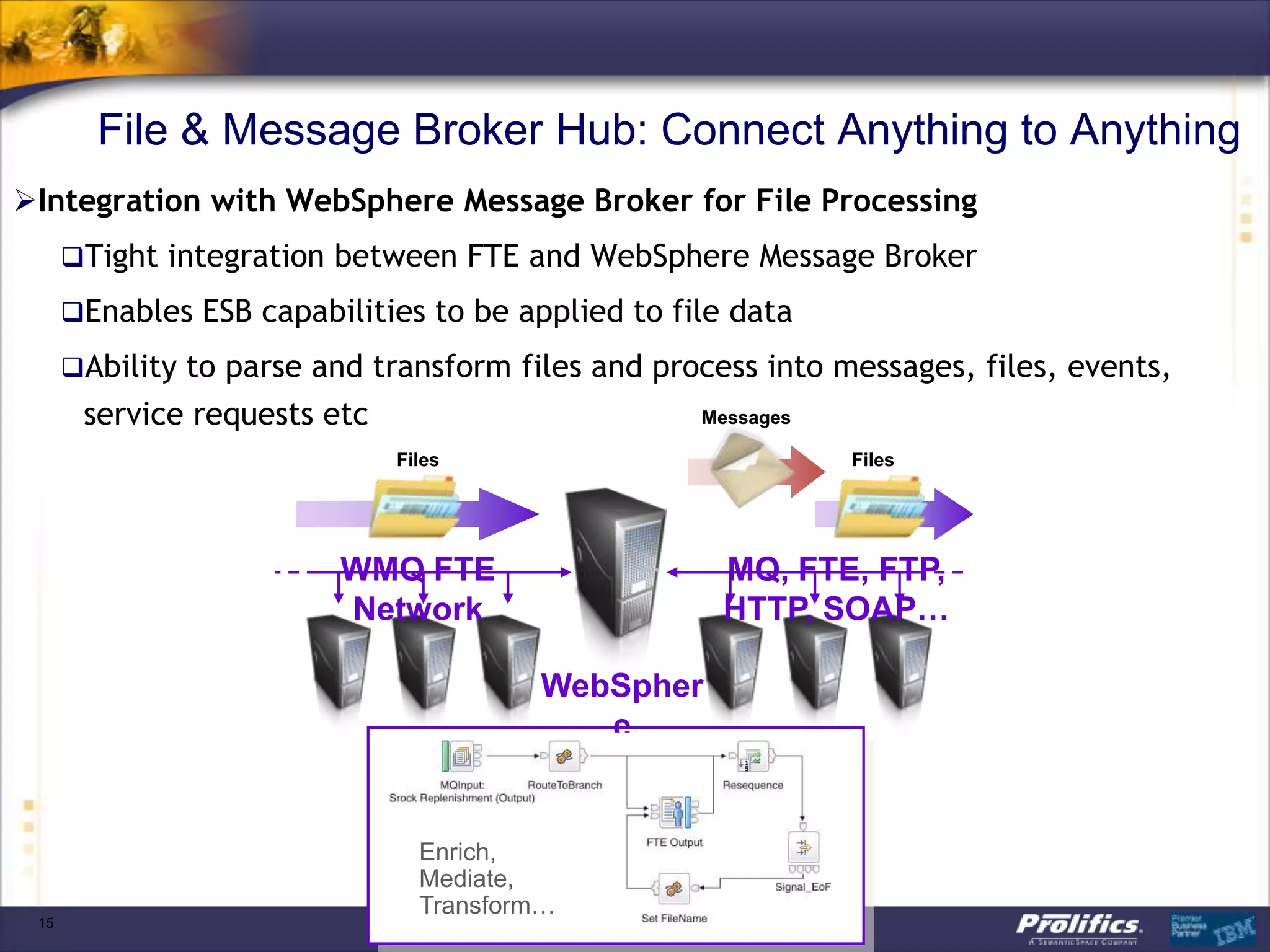
File & Message Broker Hub: Connect Anything to Anything
Integration with WebSphere Message Broker for File Processing
      Tight integration between FTE and WebSphere Message Broker

      Enables ESB capabilities to be applied to file data

      Ability to parse and transform files and process into messages, files, events,
       service requests etc                        Messages

                              Files                           Files


                         WMQ FTE                     MQ, FTE, FTP,
                         Network                     HTTP, SOAP…

                                        WebSpher
                                           e
                                        Message
                                         Broker
                                Enrich,
                                Mediate,
                                Transform…
 15
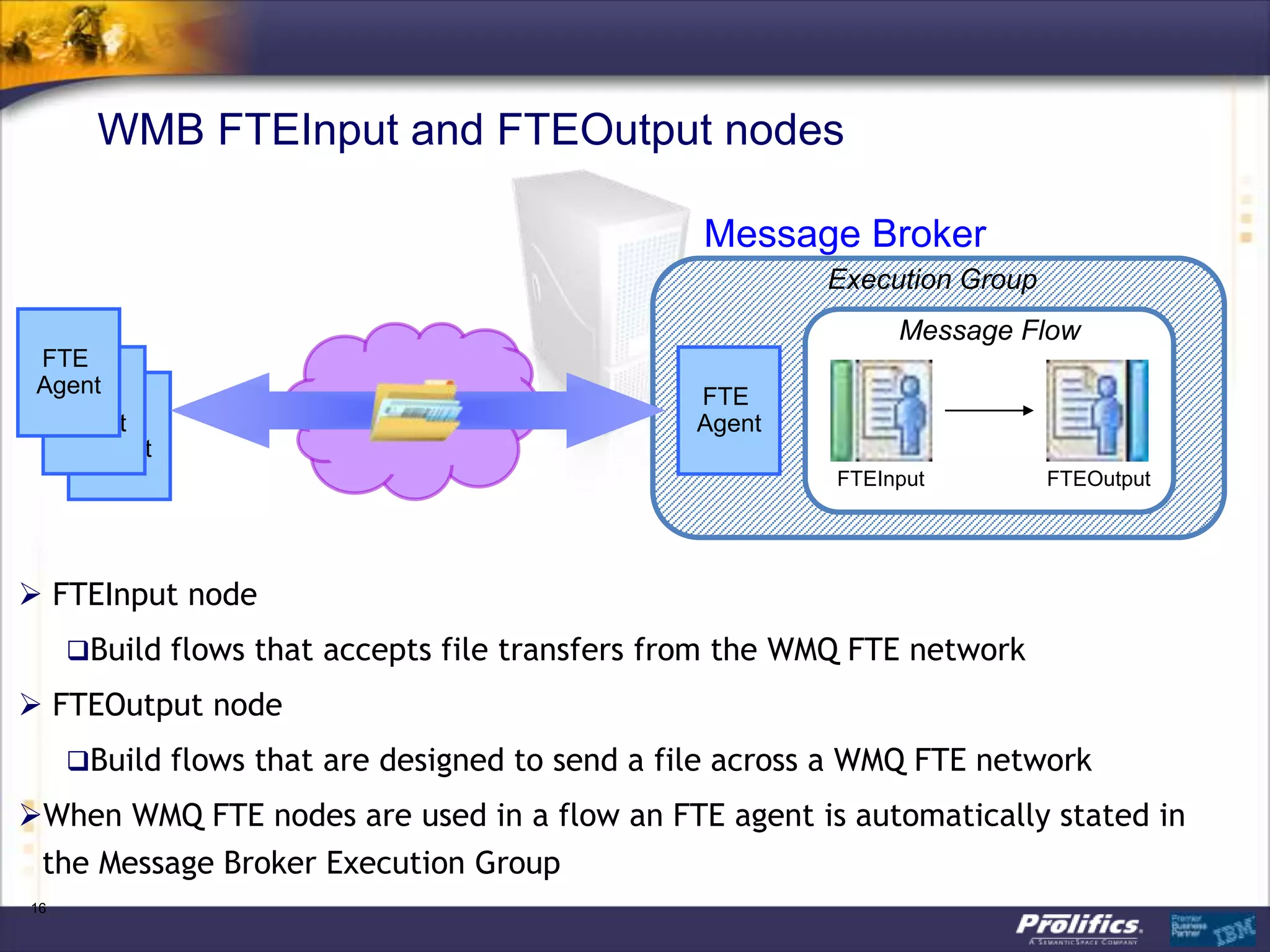
WMB FTEInput and FTEOutput nodes

                                                Message Broker
                                                        Execution Group
                                                              Message Flow
 FTE
 Agent
   FTE                                          FTE
     FTE
   Agent                                        Agent
     Agent
                                                         FTEInput         FTEOutput


 FTEInput node
     Build flows that accepts file transfers from the WMQ FTE network

 FTEOutput node
     Build flows that are designed to send a file across a WMQ FTE network

When WMQ FTE nodes are used in a flow an FTE agent is automatically stated in
 the Message Broker Execution Group
16
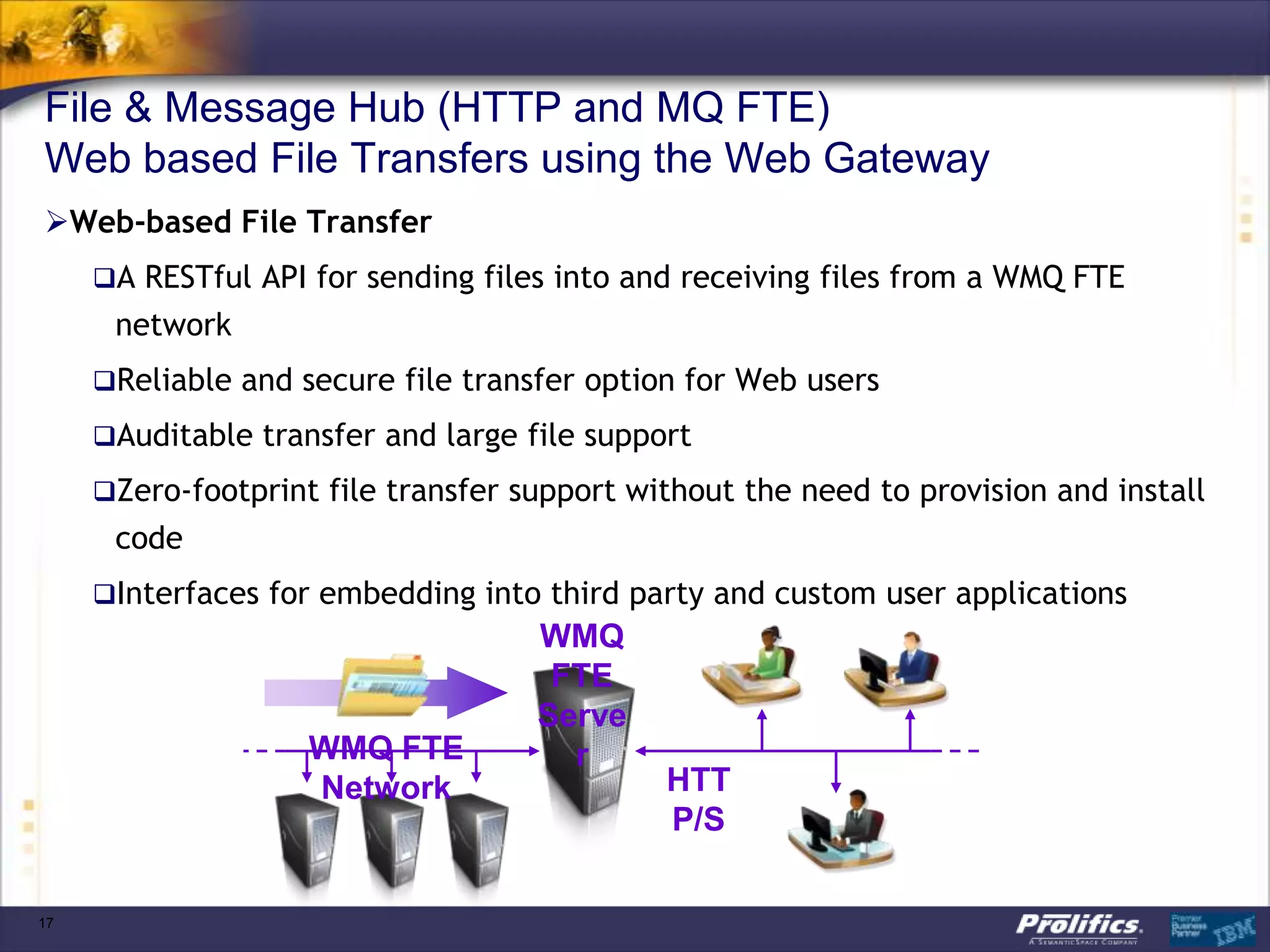
File & Message Hub (HTTP and MQ FTE)
Web based File Transfers using the Web Gateway
Web-based File Transfer
     A RESTful API for sending files into and receiving files from a WMQ FTE
      network
     Reliable and secure file transfer option for Web users

     Auditable transfer and large file support

     Zero-footprint file transfer support without the need to provision and install
      code
     Interfaces for embedding into third party and custom user applications
                                    WMQ
                                     FTE
                                    Serve
                    WMQ FTE           r
                    Network                  HTT
                                             P/S

17
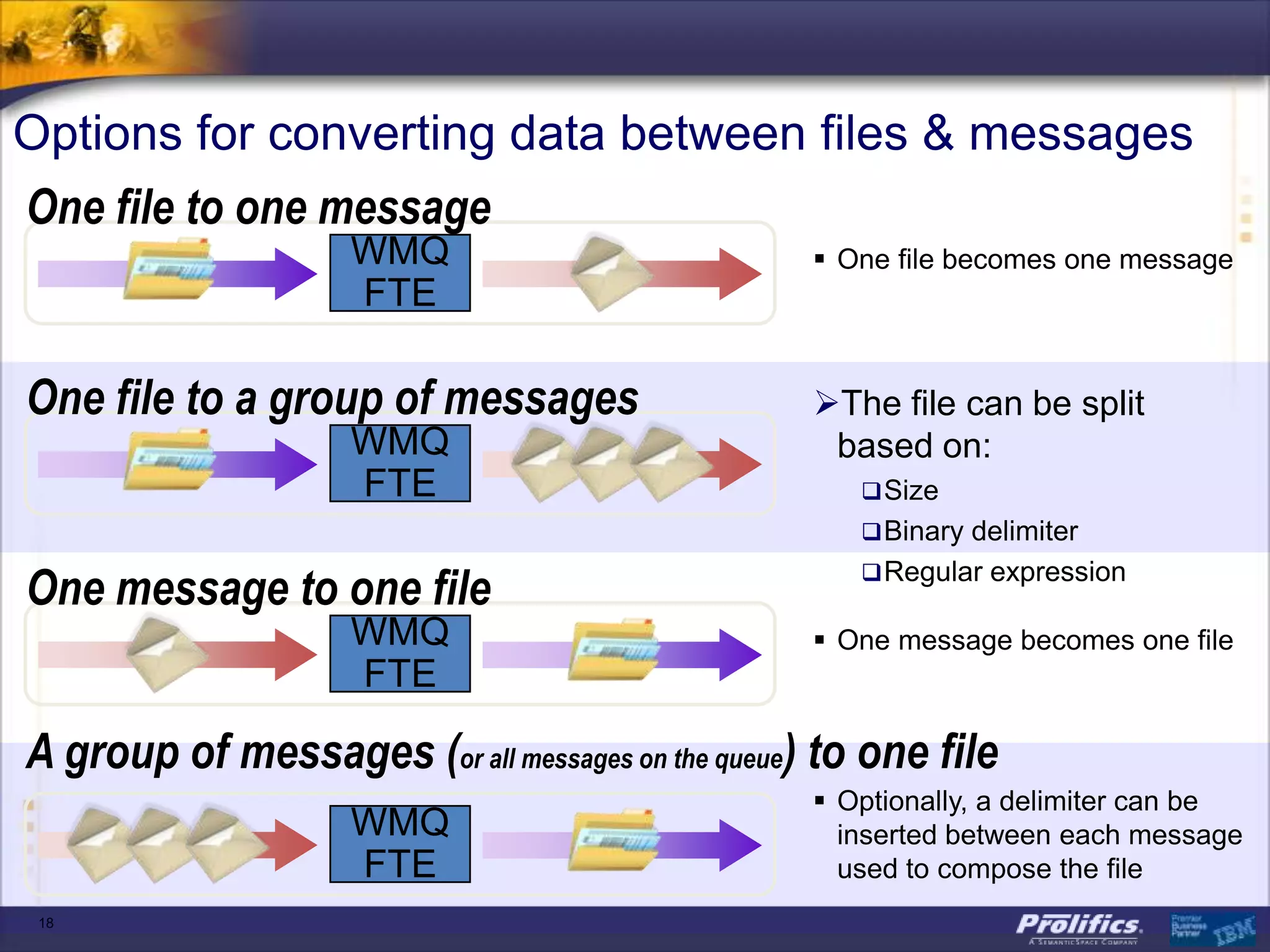
Options for converting data between files & messages
One file to one message
                    WMQ                            One file becomes one message
                    FTE

One file to a group of messages                   The file can be split
                    WMQ                            based on:
                    FTE                               Size
                                                      Binary delimiter

One message to one file                               Regular expression

                    WMQ                            One message becomes one file
                    FTE

A group of messages (or all messages on the queue) to one file
                                                   Optionally, a delimiter can be
                    WMQ                             inserted between each message
                    FTE                             used to compose the file
 18
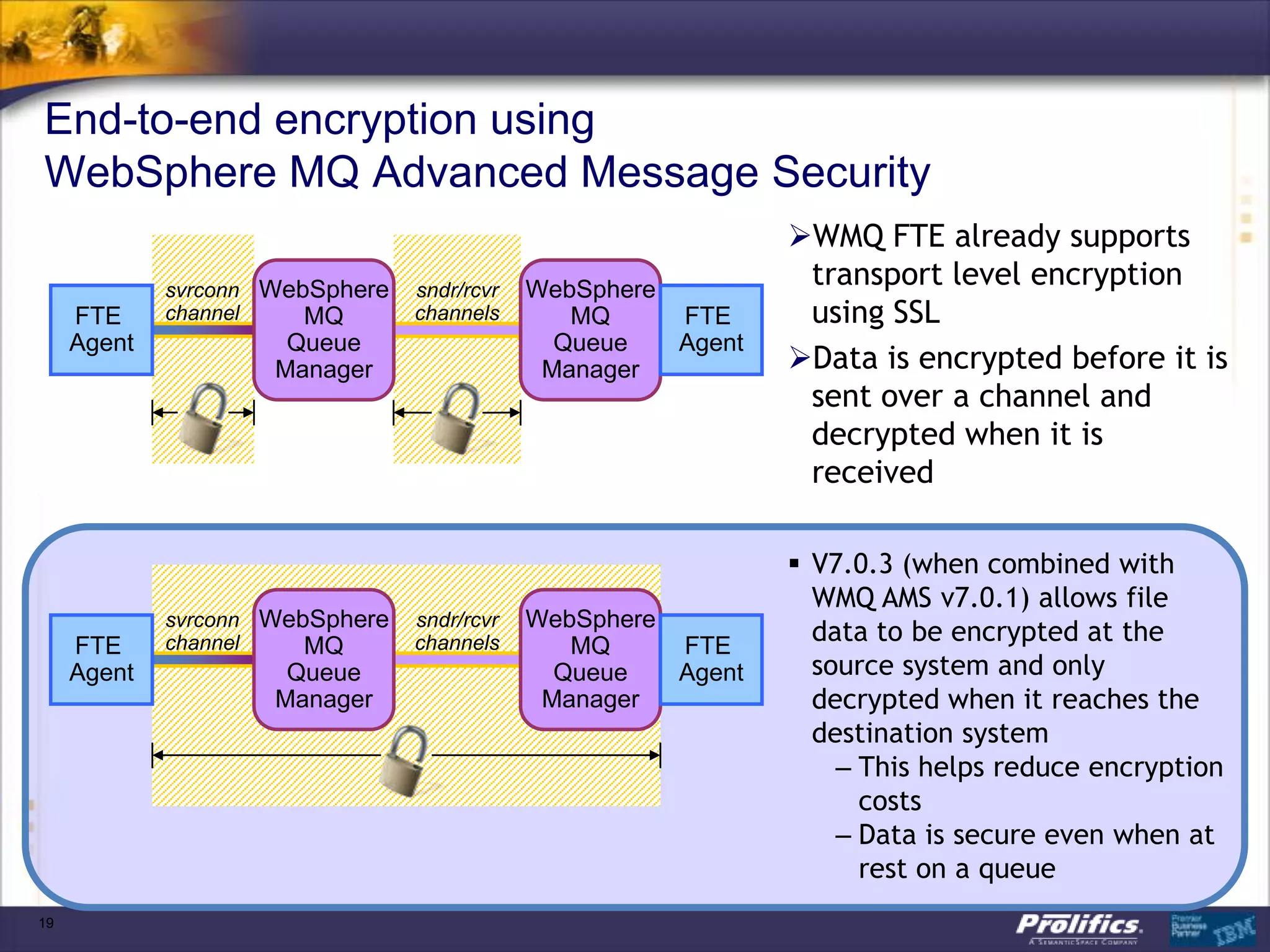
End-to-end encryption using
WebSphere MQ Advanced Message Security
                                                               WMQ FTE already supports
             svrconn WebSphere   sndr/rcvr   WebSphere
                                                                transport level encryption
     FTE     channel    MQ       channels       MQ     FTE      using SSL
     Agent            Queue                    Queue   Agent
                     Manager                  Manager          Data is encrypted before it is
                                                                sent over a channel and
                                                                decrypted when it is
                                                                received

                                                                V7.0.3 (when combined with
                                                                 WMQ AMS v7.0.1) allows file
             svrconn WebSphere   sndr/rcvr   WebSphere
     FTE     channel    MQ       channels       MQ     FTE
                                                                 data to be encrypted at the
     Agent            Queue                    Queue   Agent     source system and only
                     Manager                  Manager            decrypted when it reaches the
                                                                 destination system
                                                                   – This helps reduce encryption
                                                                     costs
                                                                   – Data is secure even when at
                                                                     rest on a queue
19
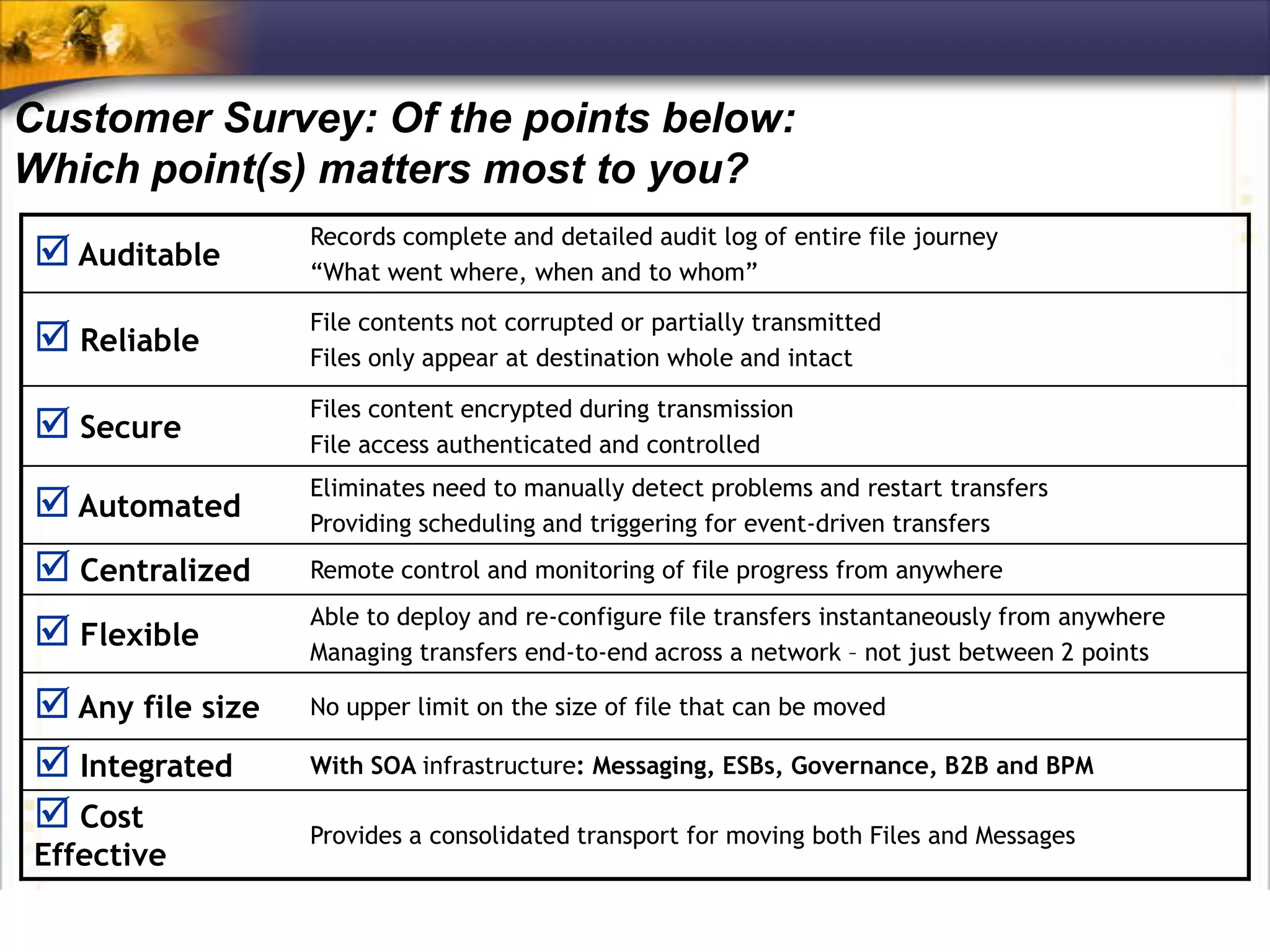
Customer Survey: Of the points below:
Which point(s) matters most to you?
                   Records complete and detailed audit log of entire file journey
  Auditable       “What went where, when and to whom”

                   File contents not corrupted or partially transmitted
  Reliable        Files only appear at destination whole and intact

                   Files content encrypted during transmission
  Secure          File access authenticated and controlled
                   Eliminates need to manually detect problems and restart transfers
  Automated       Providing scheduling and triggering for event-driven transfers
  Centralized     Remote control and monitoring of file progress from anywhere
                   Able to deploy and re-configure file transfers instantaneously from anywhere
  Flexible        Managing transfers end-to-end across a network – not just between 2 points

  Any file size   No upper limit on the size of file that can be moved

  Integrated      With SOA infrastructure: Messaging, ESBs, Governance, B2B and BPM

  Cost            Provides a consolidated transport for moving both Files and Messages
 Effective
Securing the Universal Messaging Bus
MQ AMS
      Quick Overview


      Message Level Protection


      WMQ AMS - Key Features


      Architecture


      Interceptors


      Policies


22
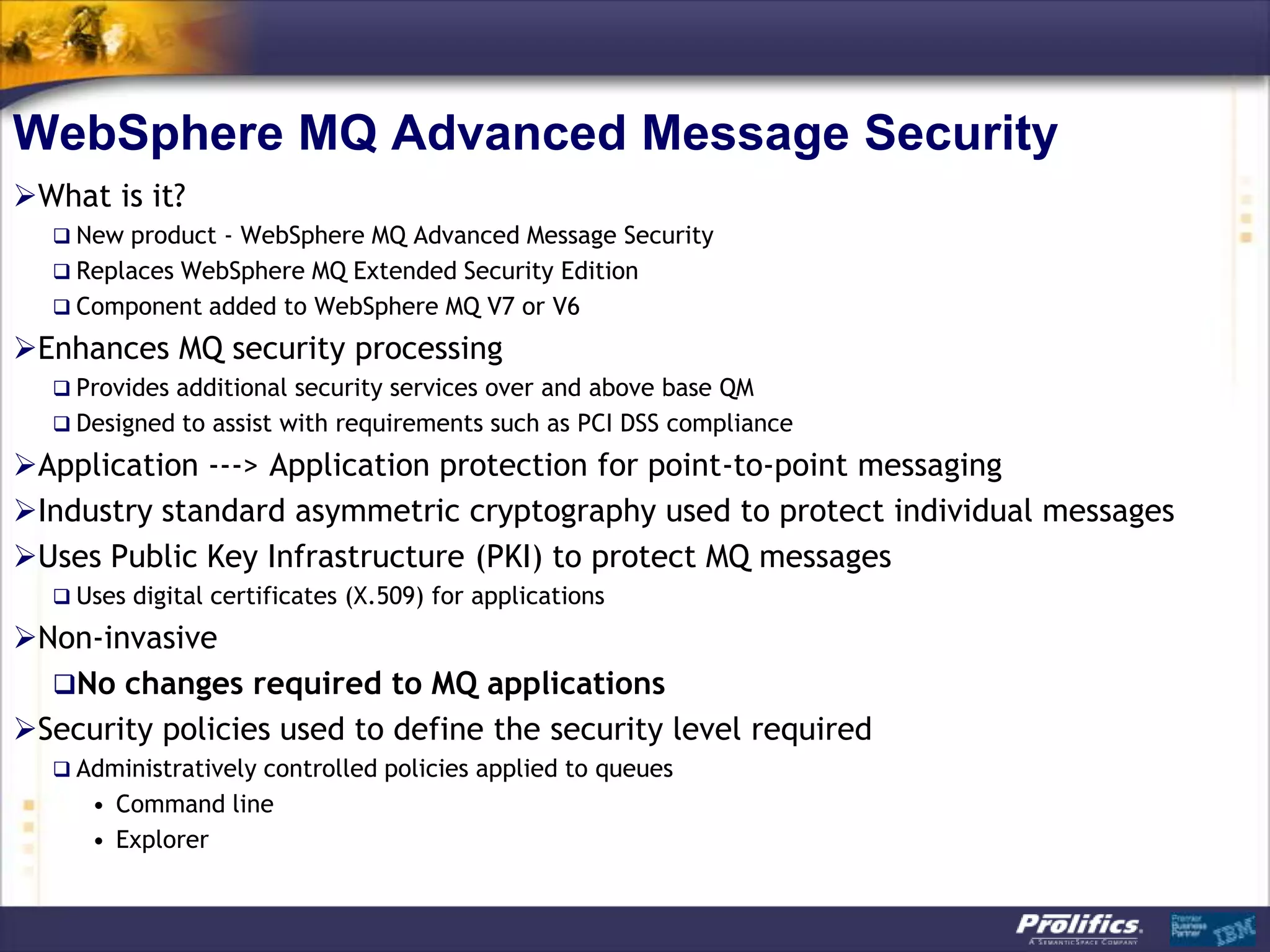
WebSphere MQ Advanced Message Security
What is it?
   New product - WebSphere MQ Advanced Message Security
   Replaces WebSphere MQ Extended Security Edition
   Component added to WebSphere MQ V7 or V6

Enhances MQ security processing
   Provides additional security services over and above base QM
   Designed to assist with requirements such as PCI DSS compliance

Application ---> Application protection for point-to-point messaging
Industry standard asymmetric cryptography used to protect individual messages
Uses Public Key Infrastructure (PKI) to protect MQ messages
   Uses digital certificates (X.509) for applications

Non-invasive
  No changes required to MQ applications
Security policies used to define the security level required
   Administratively controlled policies applied to queues
     • Command line
     • Explorer
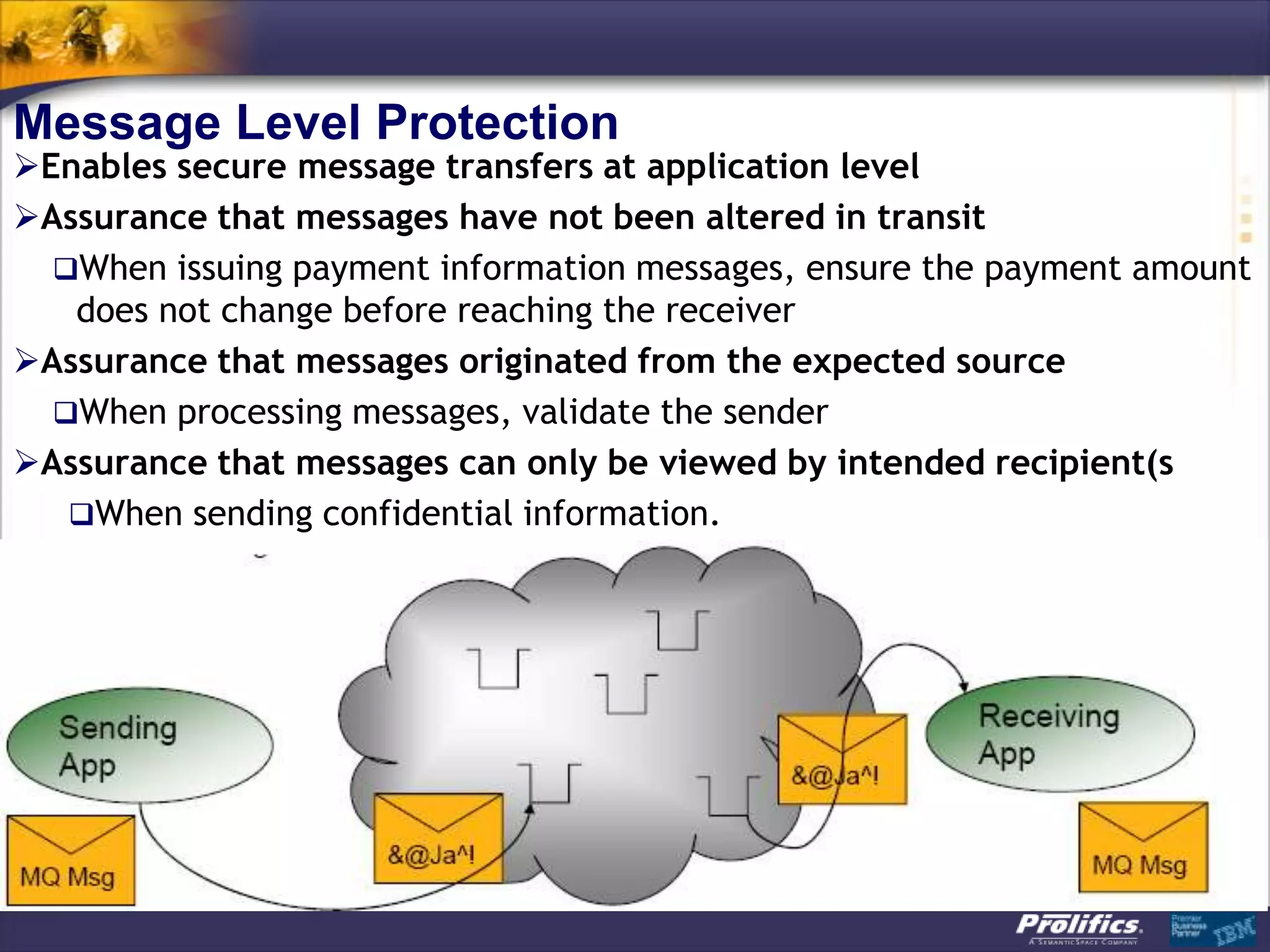
Message Level Protection
Enables secure message transfers at application level
Assurance that messages have not been altered in transit
  When issuing payment information messages, ensure the payment amount
   does not change before reaching the receiver
Assurance that messages originated from the expected source
  When processing messages, validate the sender
Assurance that messages can only be viewed by intended recipient(s
   When sending confidential information.
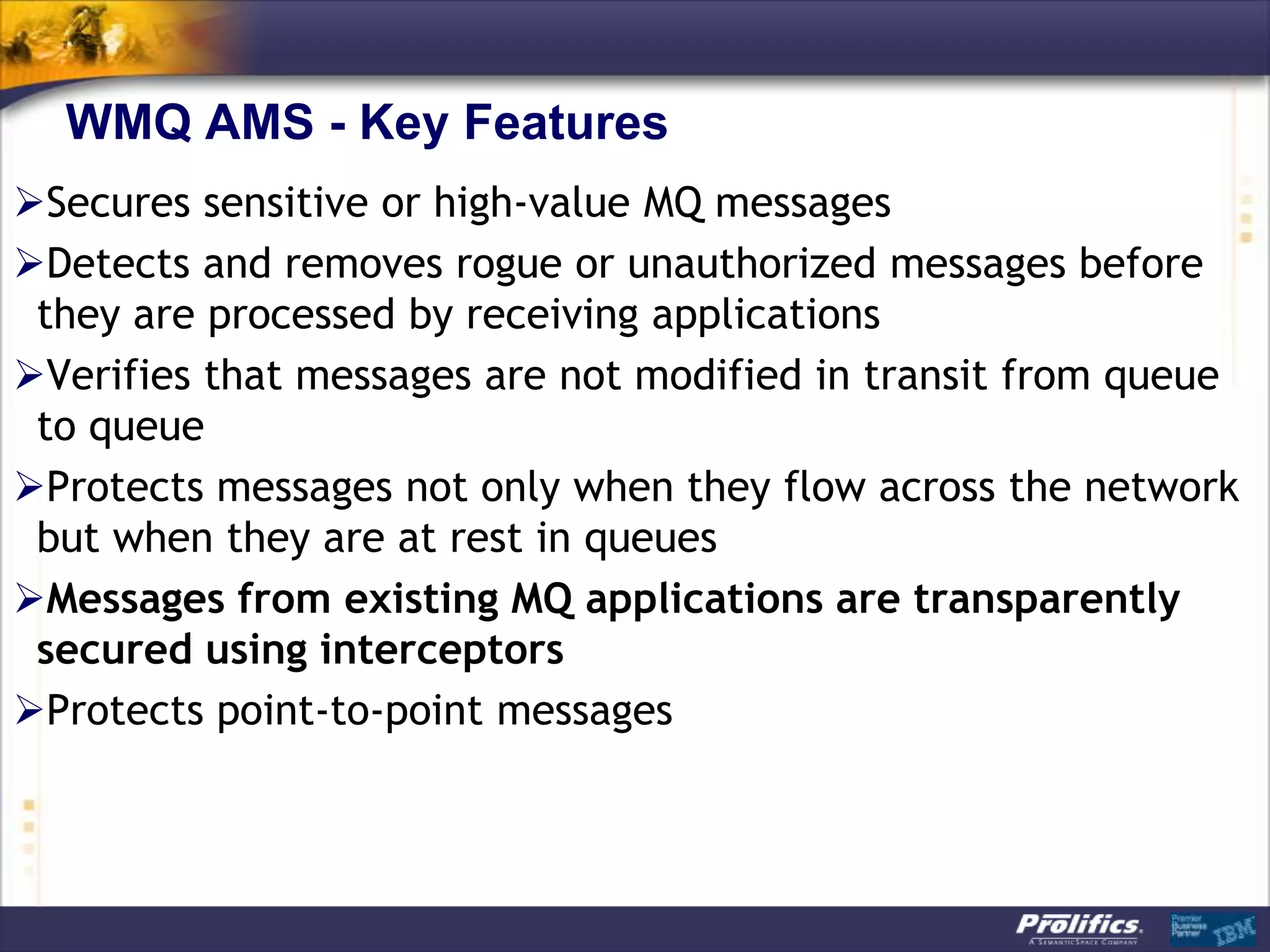
WMQ AMS - Key Features
Secures sensitive or high-value MQ messages
Detects and removes rogue or unauthorized messages before
 they are processed by receiving applications
Verifies that messages are not modified in transit from queue
 to queue
Protects messages not only when they flow across the network
 but when they are at rest in queues
Messages from existing MQ applications are transparently
 secured using interceptors
Protects point-to-point messages
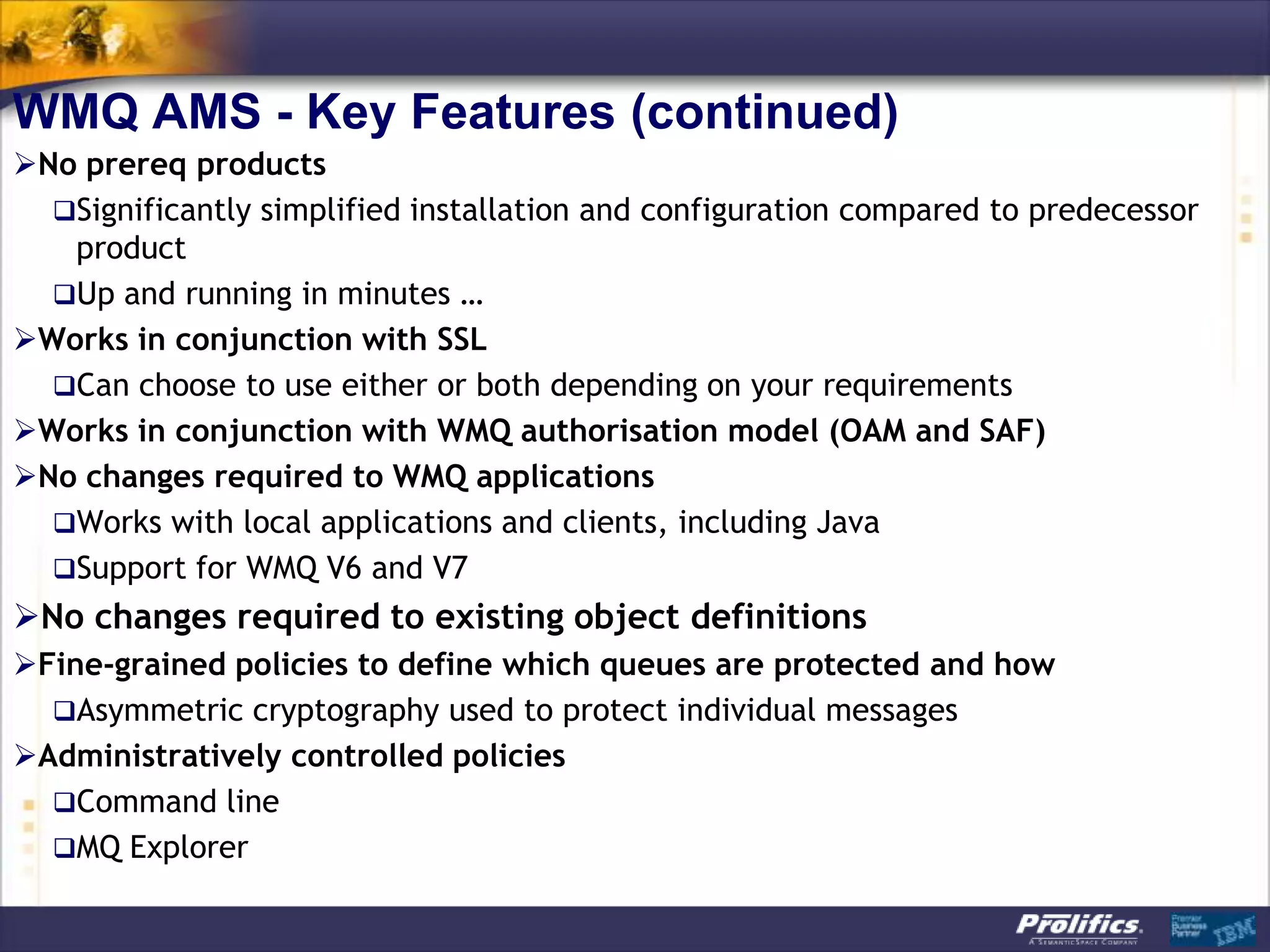
WMQ AMS - Key Features (continued)
No prereq products
  Significantly simplified installation and configuration compared to predecessor
   product
  Up and running in minutes …
Works in conjunction with SSL
  Can choose to use either or both depending on your requirements
Works in conjunction with WMQ authorisation model (OAM and SAF)
No changes required to WMQ applications
  Works with local applications and clients, including Java
  Support for WMQ V6 and V7
No changes required to existing object definitions
Fine-grained policies to define which queues are protected and how
  Asymmetric cryptography used to protect individual messages
Administratively controlled policies
  Command line
  MQ Explorer
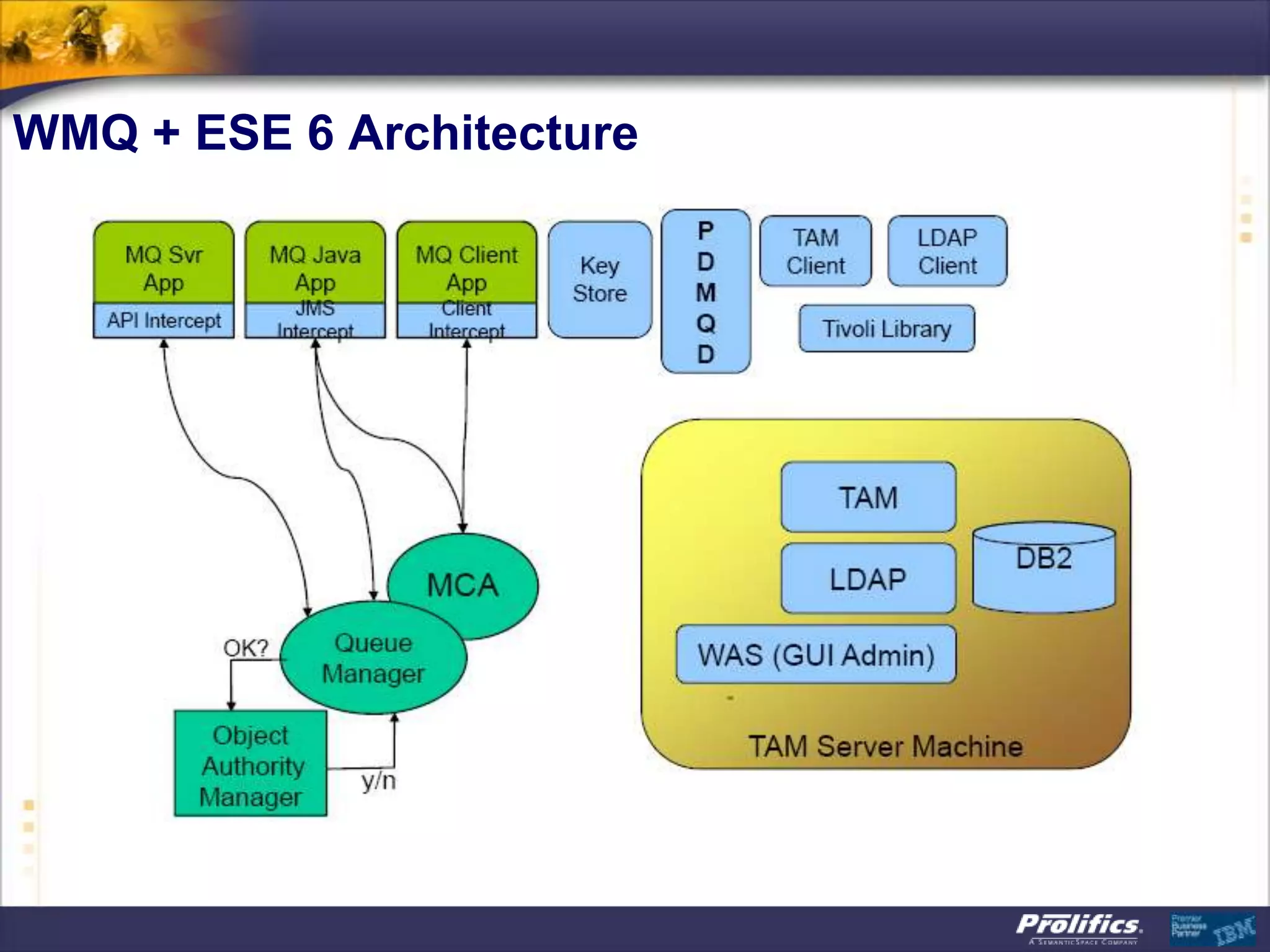
WMQ + ESE 6 Architecture
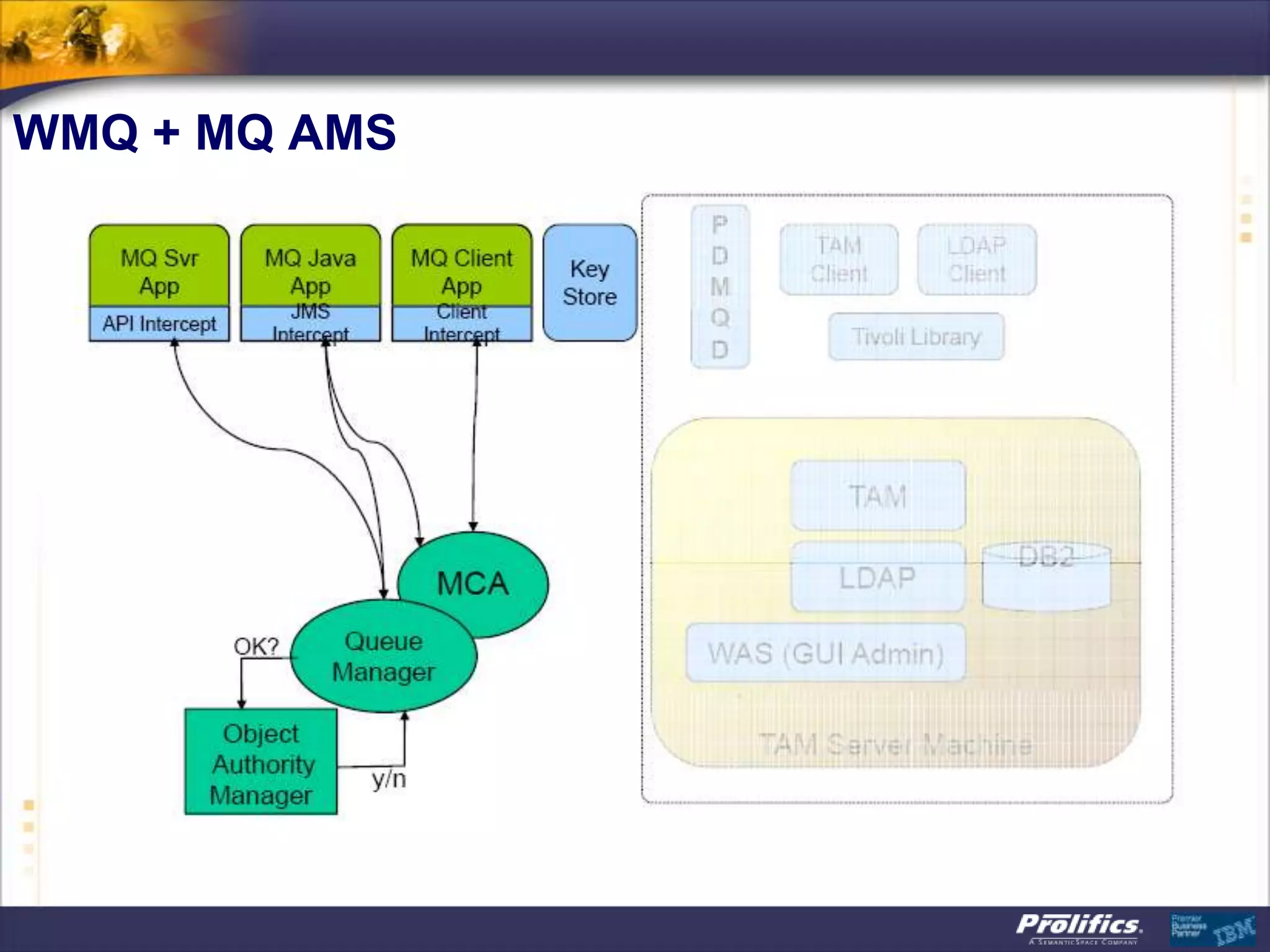
WMQ + MQ AMS
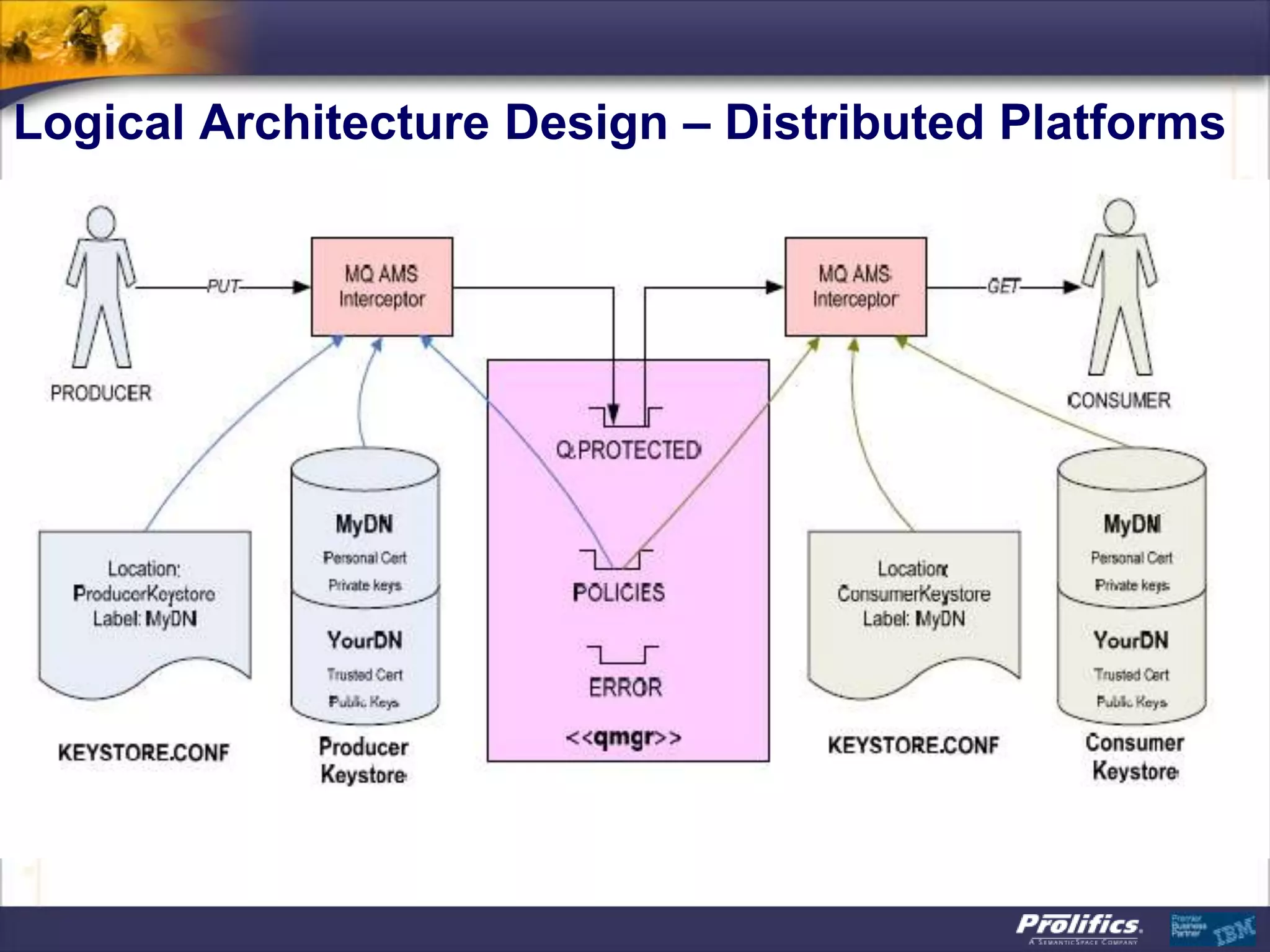
Logical Architecture Design – Distributed Platforms
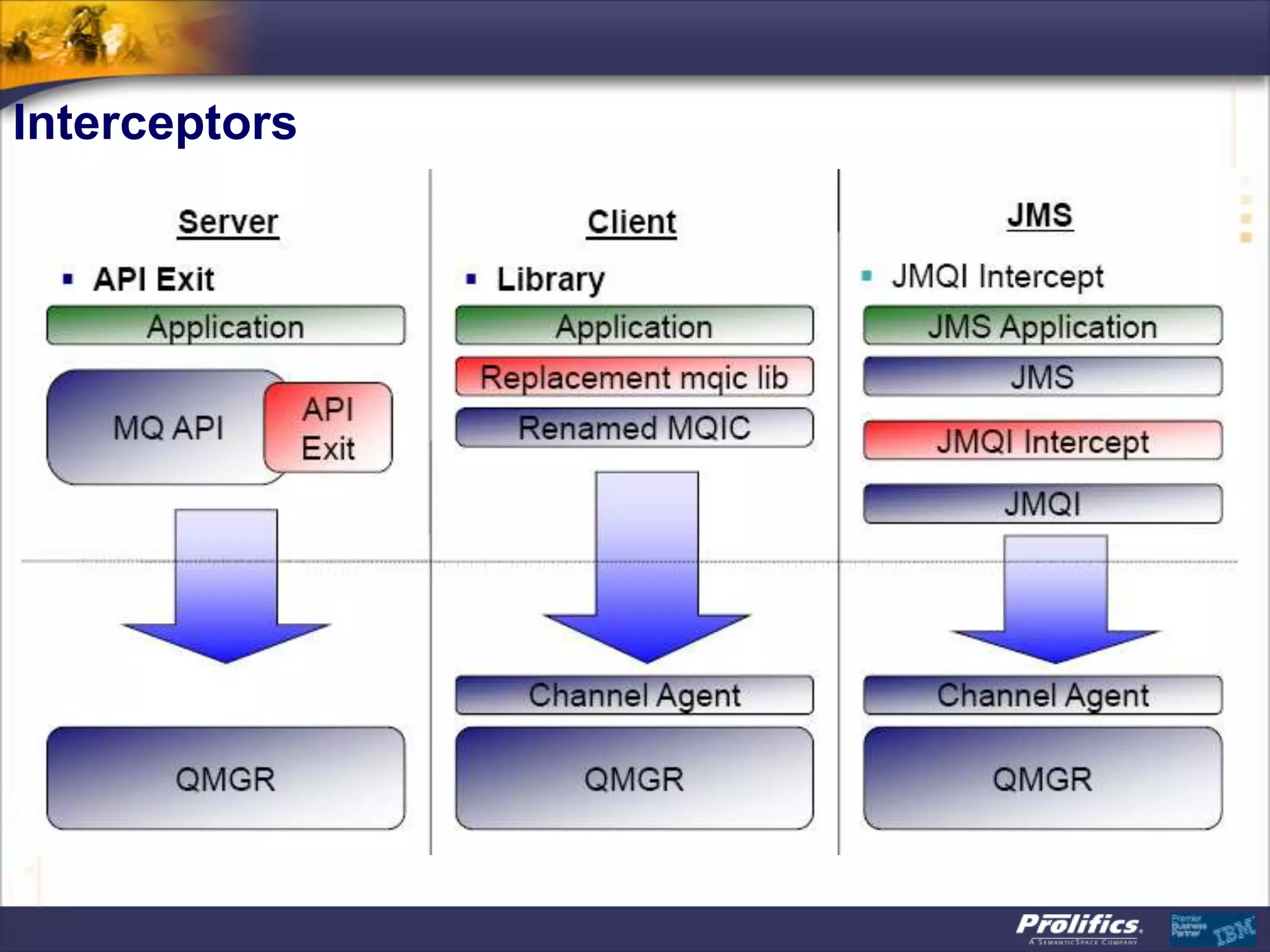
Interceptors
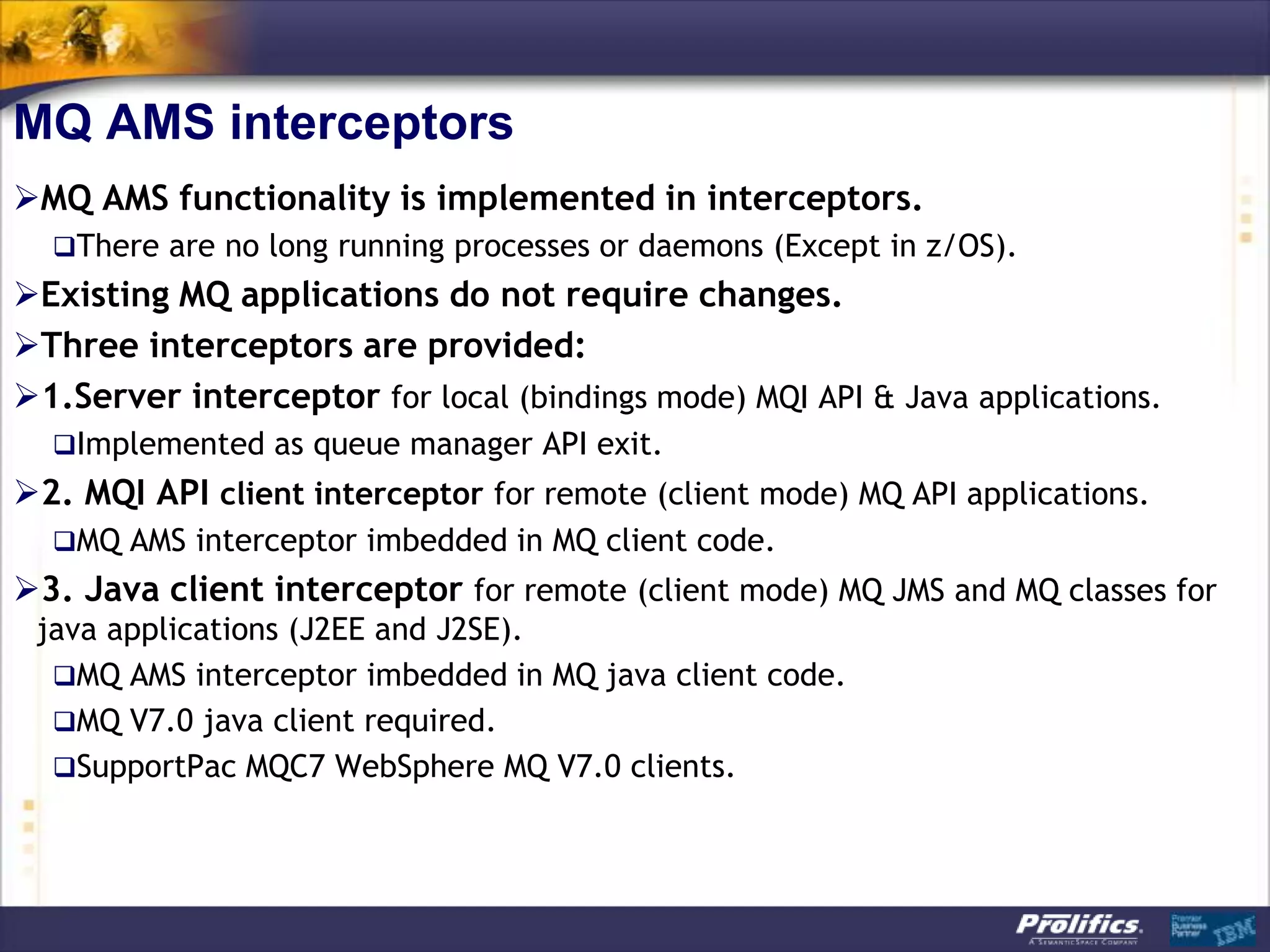
MQ AMS interceptors
MQ AMS functionality is implemented in interceptors.
  There are no long running processes or daemons (Except in z/OS).
Existing MQ applications do not require changes.
Three interceptors are provided:
1.Server interceptor for local (bindings mode) MQI API & Java applications.
  Implemented as queue manager API exit.
2. MQI API client interceptor for remote (client mode) MQ API applications.
  MQ AMS interceptor imbedded in MQ client code.
3. Java client interceptor for remote (client mode) MQ JMS and MQ classes for
 java applications (J2EE and J2SE).
  MQ AMS interceptor imbedded in MQ java client code.
  MQ V7.0 java client required.
  SupportPac MQC7 WebSphere MQ V7.0 clients.
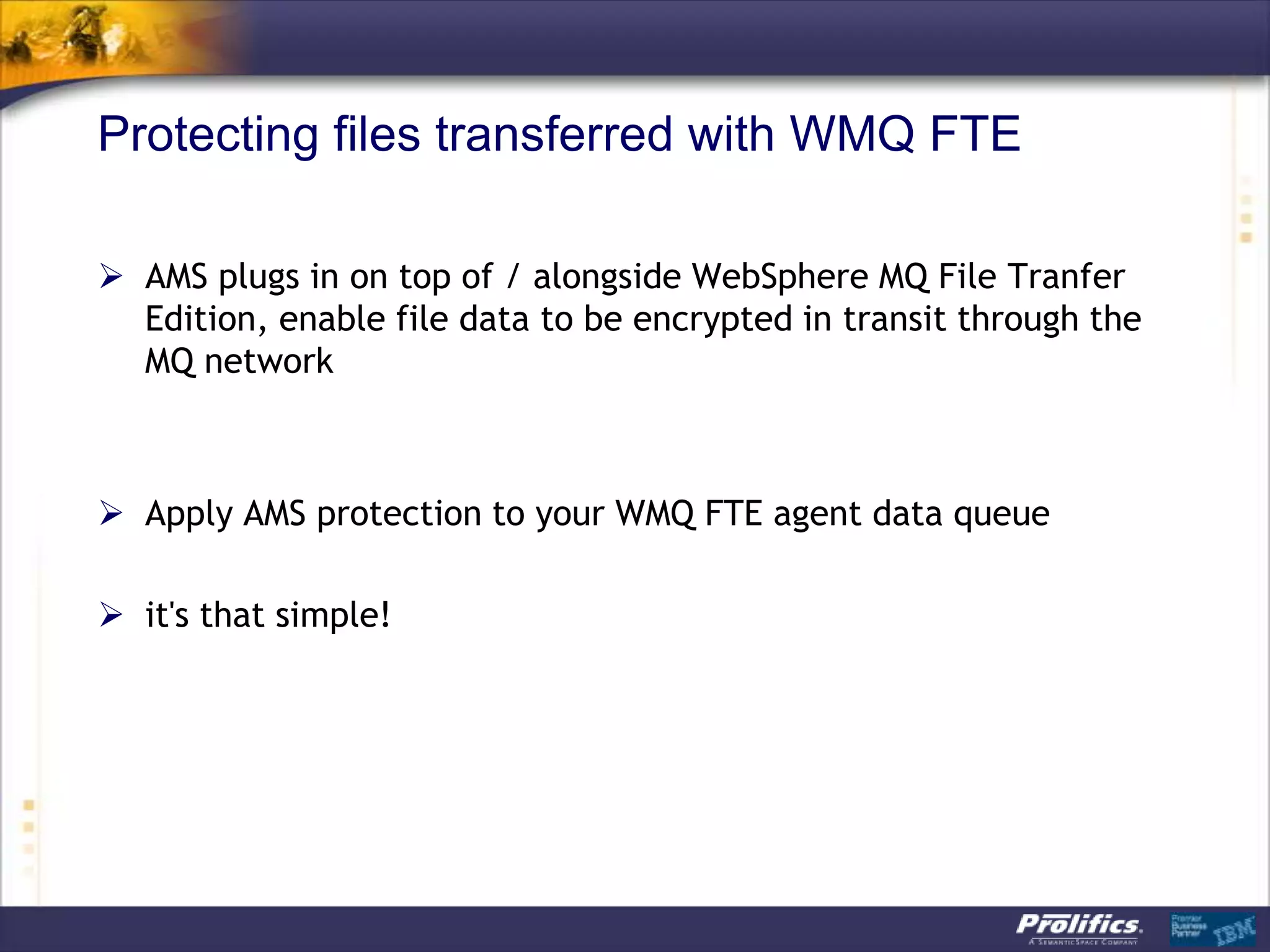
Protecting files transferred with WMQ FTE

 AMS plugs in on top of / alongside WebSphere MQ File Tranfer
  Edition, enable file data to be encrypted in transit through the
  MQ network


 Apply AMS protection to your WMQ FTE agent data queue

 it's that simple!
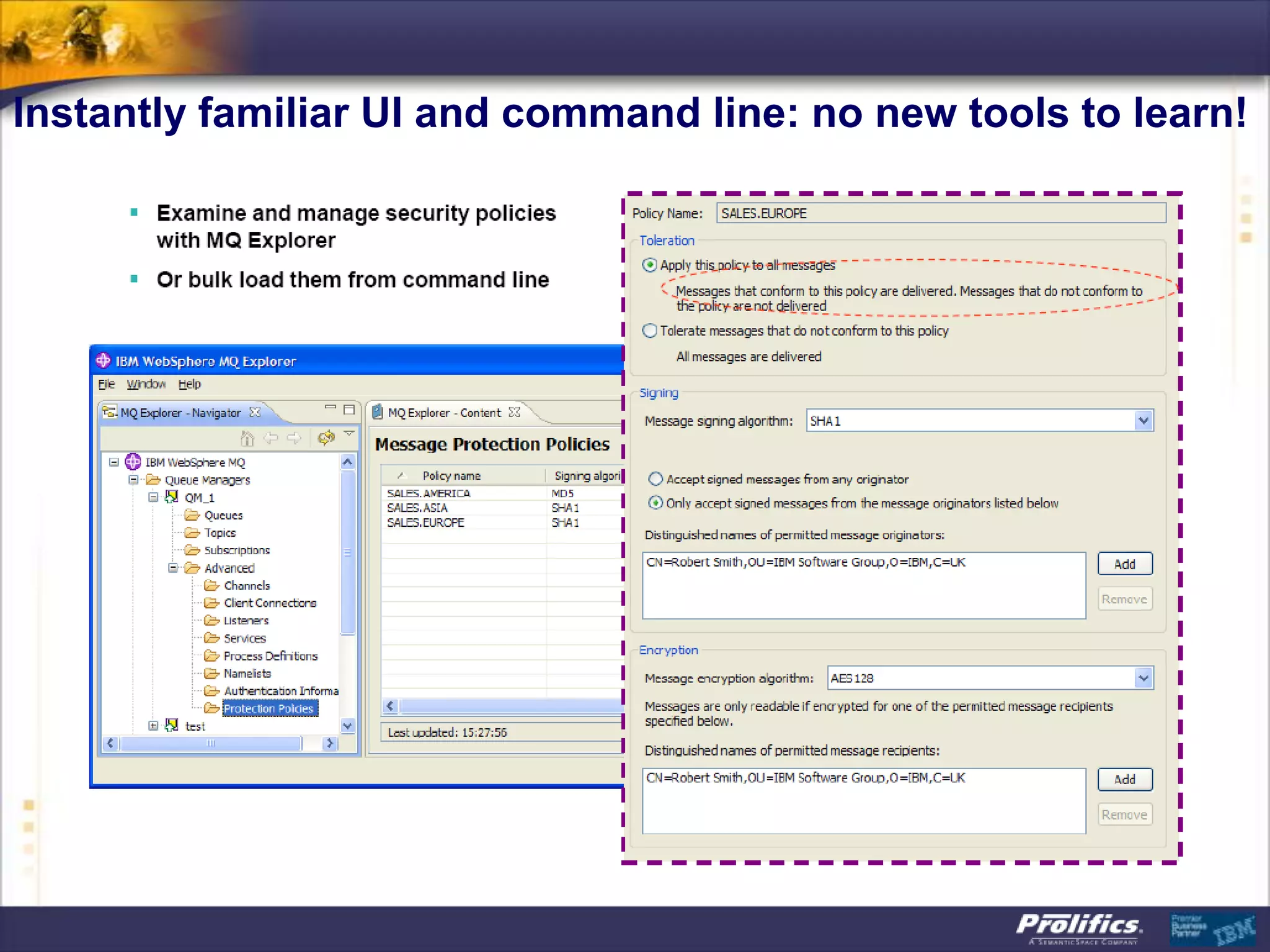
Instantly familiar UI and command line: no new tools to learn!
Message protection policies
Created or updated or removed by command ‘setmqspl’
Or by MQ AMS plug-in for MQ Explorer (GUI).
Policies are stored in queue
 ‘SYSTEM.PROTECTION.POLICY.QUEUE’.
Each protected queue can have only one policy.
Two types of policies:
 Message Integrity policy.
 Message Privacy policy.
Display policies with command ‘dspmqspl’.
Message integrity policy example
                                        setmqspl -m QM
This policy is to enforce integrity
 protection (signature) for
                                        -p Q.INTEGRITY
 messages put on queue
 Q.INTEGRITY in queue manager
                                        -s SHA1
 QM.
The message signing algorithm is       -e NONE
 SHA1.
Messages can only by signed by         -'CN=pdmqss,O=tivoli,C=US'
 one authorized application.
Messages signed by any other
 signer are sent to the
 SYSTEM.PROTECTION.ERROR.QUE
 UE and error returned to the
 receiving application.
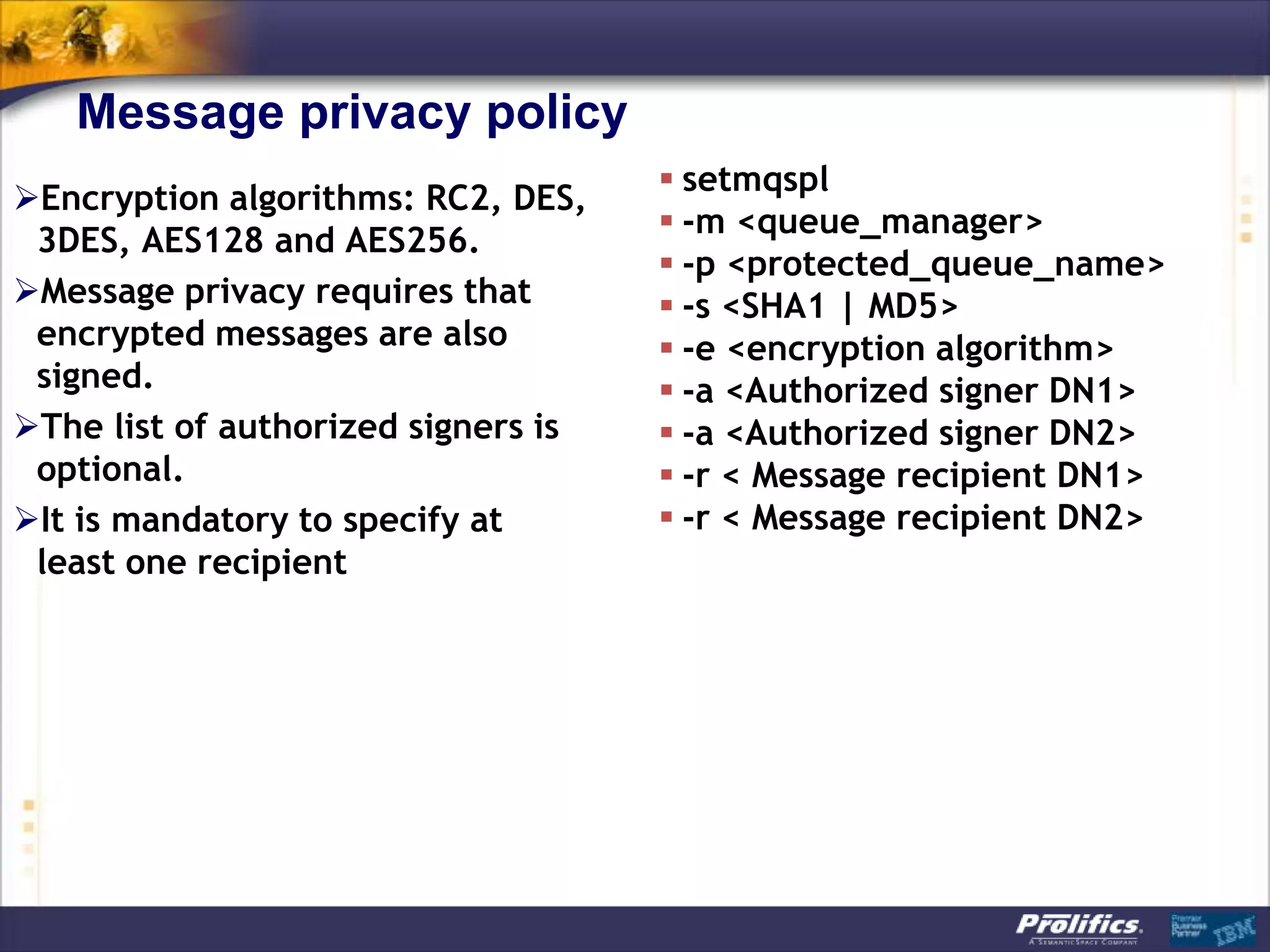
Message privacy policy
                                      setmqspl
Encryption algorithms: RC2, DES,
                                      -m <queue_manager>
 3DES, AES128 and AES256.
                                      -p <protected_queue_name>
Message privacy requires that        -s <SHA1 | MD5>
 encrypted messages are also          -e <encryption algorithm>
 signed.                              -a <Authorized signer DN1>
The list of authorized signers is    -a <Authorized signer DN2>
 optional.                            -r < Message recipient DN1>
It is mandatory to specify at        -r < Message recipient DN2>
 least one recipient
Message privacy policy example
                                        Setmqspl -m QM
This policy enforces privacy
                                        -p Q.PRIVACY
 protection (signature and
                                        -s SHA1
 encryption) for messages put on
                                        -e AES128
 queue Q.PRIVACY in queue
                                        -r ‘-CN=pmqdss,O=tivoli,C=US'
 manager QM.
                                        -r ‘-CN=Vicente
The message signing algorithm is
                                         Suarez,OU=ISSW,O=IBM,L=Hursle
 SHA1.
                                         y,C=GB'
The message encryption
 algorithm is AES128.
Two message recipients are
 listed using their certificates DN.
Messages retrieved by
 unauthorized recipients cause
 messages to be sent to the
 SYSTEM.PROTECTION.ERROR.QUE
 UE.
WebSphere MQ AMS : Integrity Message Format
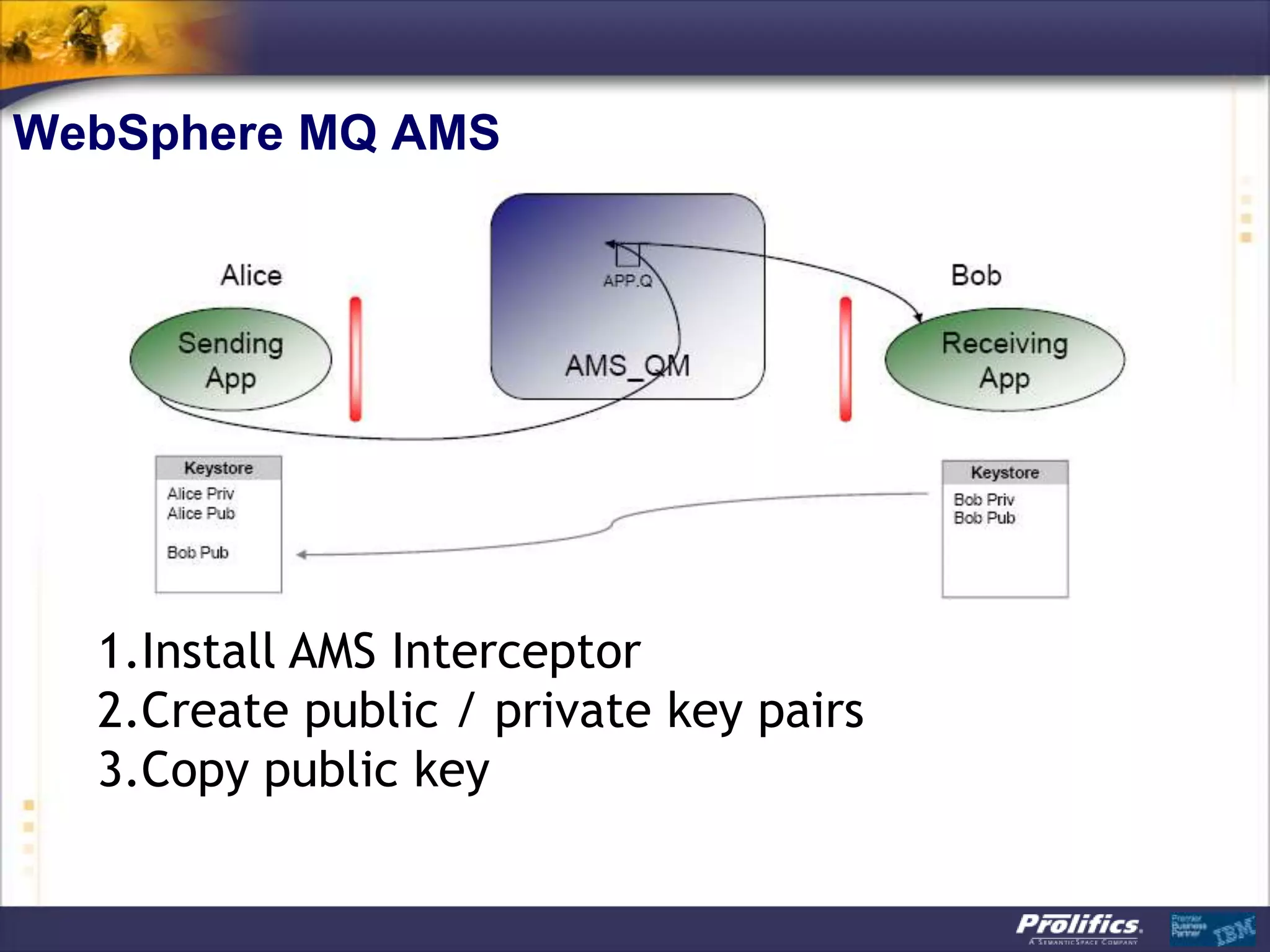
WebSphere MQ AMS


  1.Install AMS Interceptor
  2.Create public / private key pairs
  3.Copy public key
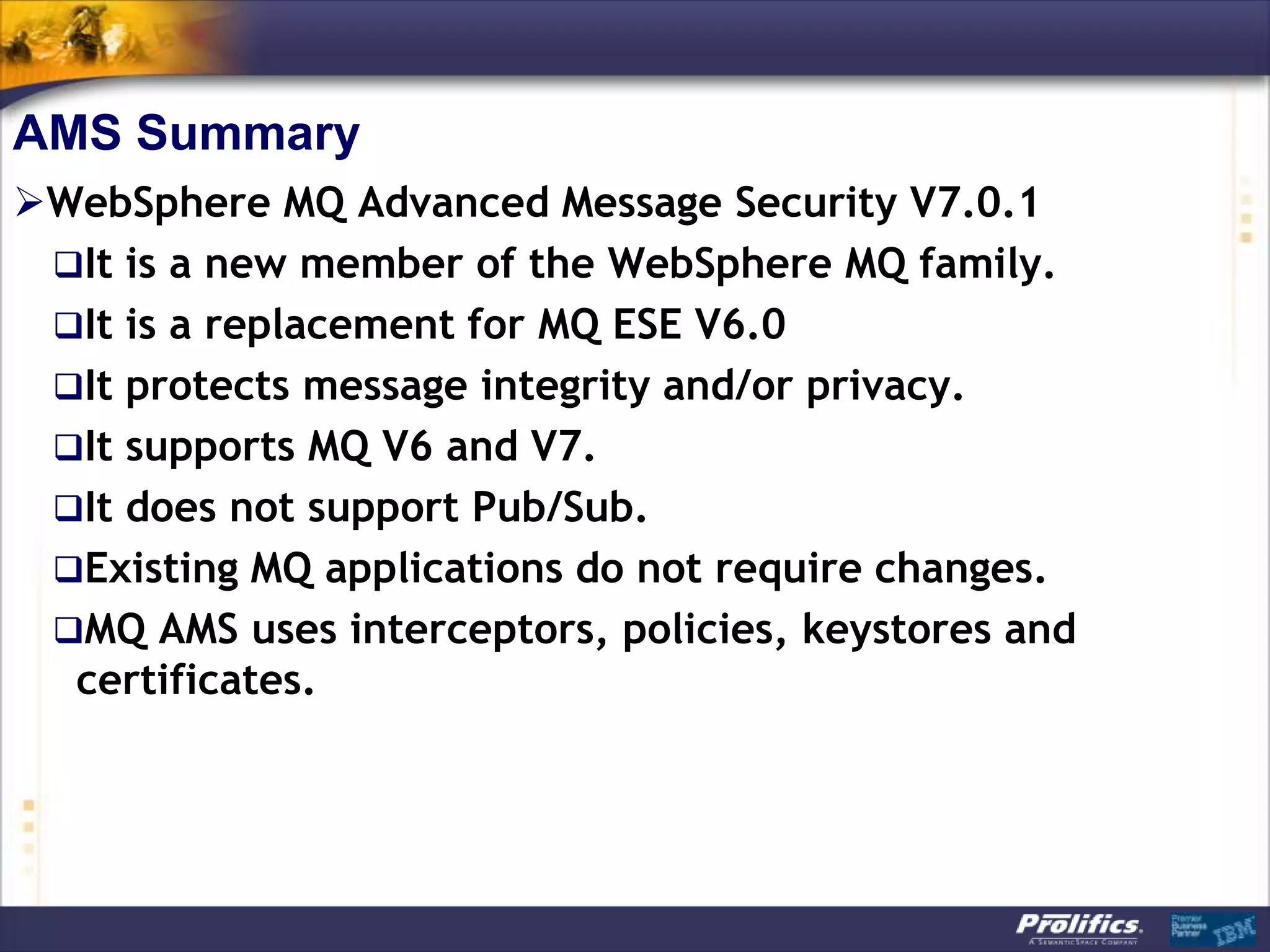
AMS Summary
WebSphere MQ Advanced Message Security V7.0.1
 It is a new member of the WebSphere MQ family.
 It is a replacement for MQ ESE V6.0
 It protects message integrity and/or privacy.
 It supports MQ V6 and V7.
 It does not support Pub/Sub.
 Existing MQ applications do not require changes.
 MQ AMS uses interceptors, policies, keystores and
  certificates.
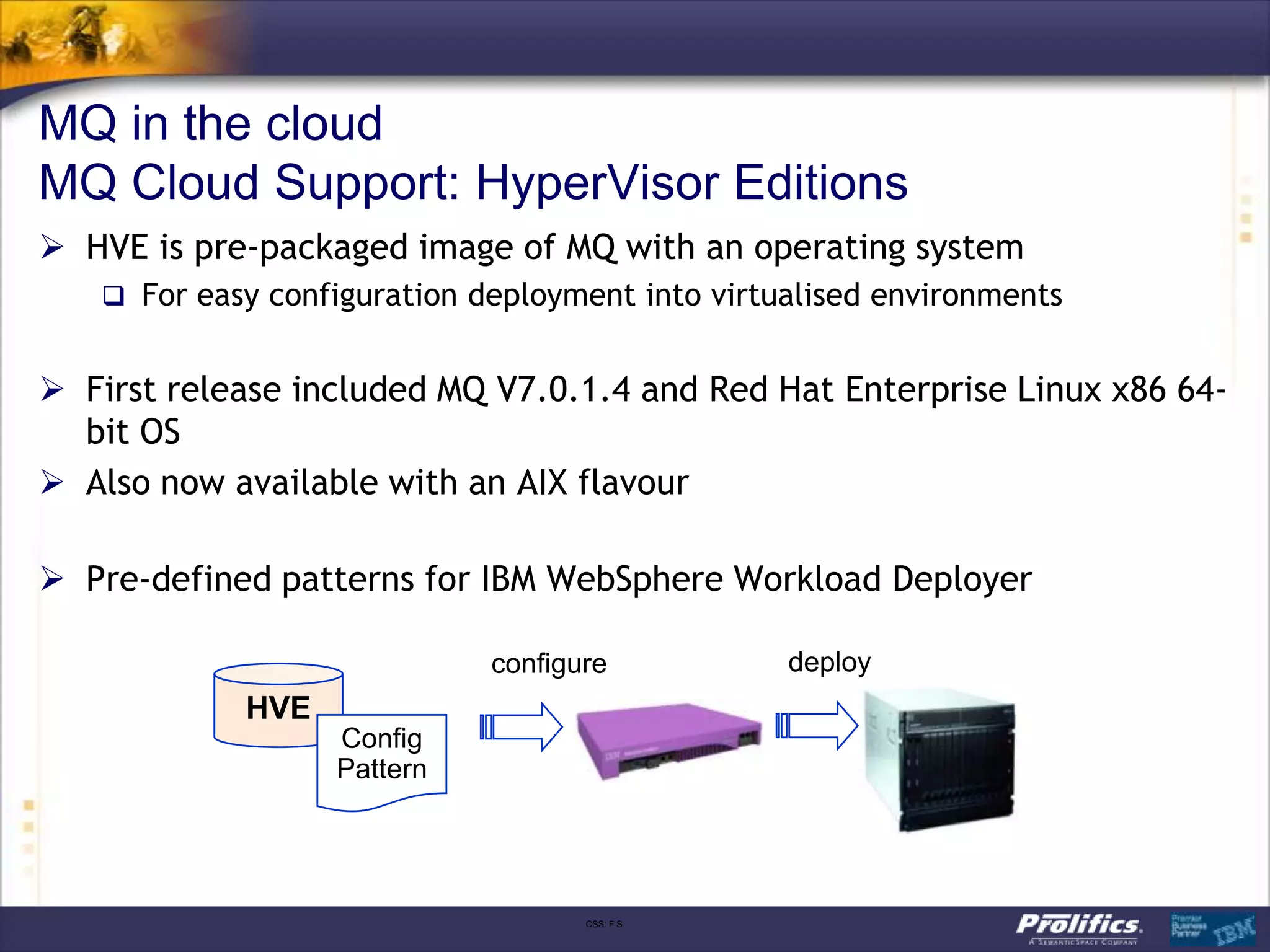
MQ in the cloud
MQ Cloud Support: HyperVisor Editions
 HVE is pre-packaged image of MQ with an operating system
    For easy configuration deployment into virtualised environments


 First release included MQ V7.0.1.4 and Red Hat Enterprise Linux x86 64-
  bit OS
 Also now available with an AIX flavour

 Pre-defined patterns for IBM WebSphere Workload Deployer

                             configure           deploy
            HVE
                  Config
                  Pattern


                                    CSS: F S
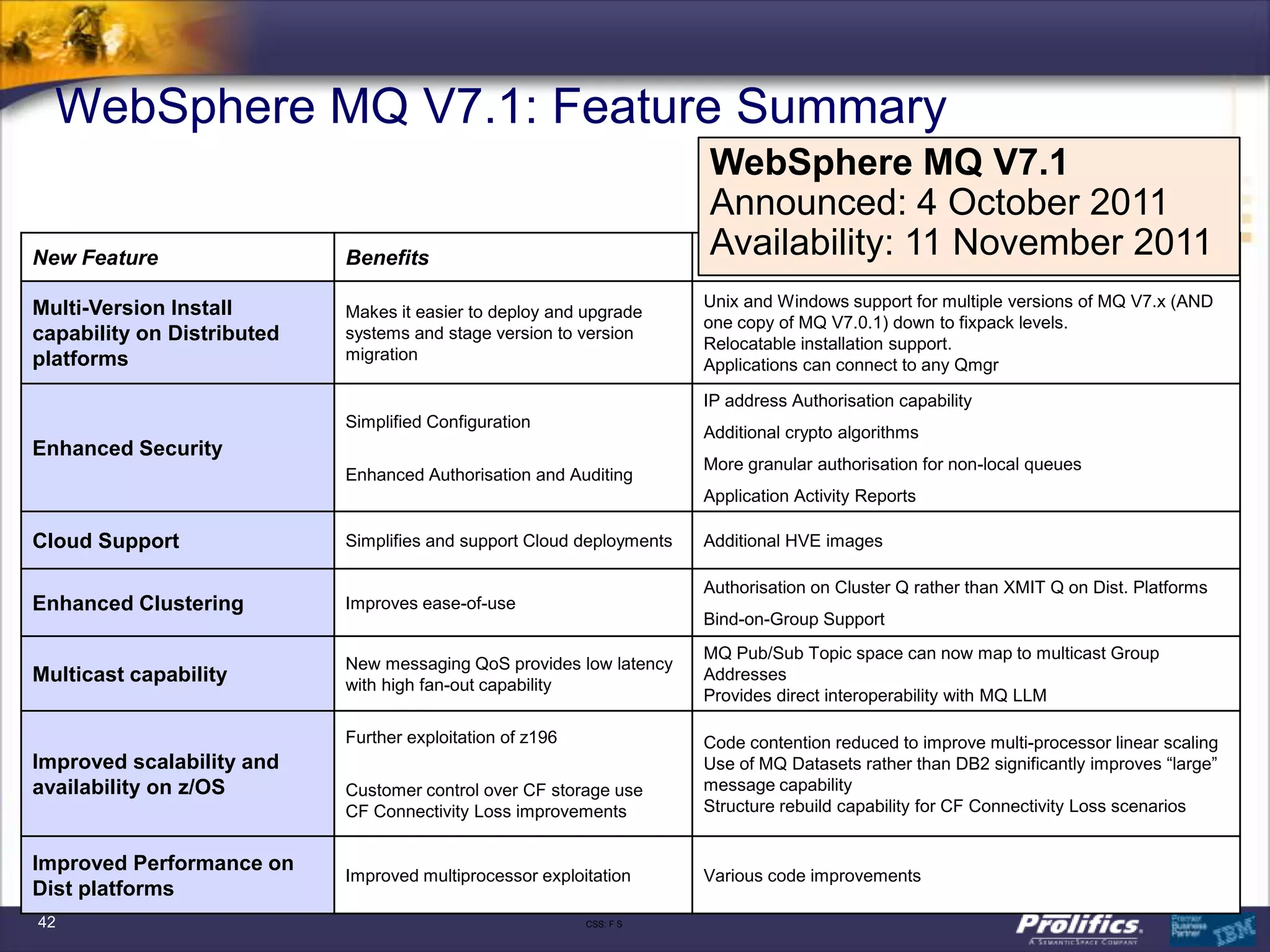
WebSphere MQ V7.1: Feature Summary
                                                                       WebSphere MQ V7.1
                                                                       Announced: 4 October 2011
New Feature                 Benefits                                   Availability: 11 November 2011
                                                                       Details

Multi-Version Install                                                  Unix and Windows support for multiple versions of MQ V7.x (AND
                            Makes it easier to deploy and upgrade
                                                                       one copy of MQ V7.0.1) down to fixpack levels.
capability on Distributed   systems and stage version to version
                                                                       Relocatable installation support.
platforms                   migration
                                                                       Applications can connect to any Qmgr

                                                                       IP address Authorisation capability
                            Simplified Configuration
                                                                       Additional crypto algorithms
Enhanced Security
                                                                       More granular authorisation for non-local queues
                            Enhanced Authorisation and Auditing
                                                                       Application Activity Reports

Cloud Support               Simplifies and support Cloud deployments   Additional HVE images

                                                                       Authorisation on Cluster Q rather than XMIT Q on Dist. Platforms
Enhanced Clustering         Improves ease-of-use
                                                                       Bind-on-Group Support
                                                                       MQ Pub/Sub Topic space can now map to multicast Group
                            New messaging QoS provides low latency
Multicast capability        with high fan-out capability
                                                                       Addresses
                                                                       Provides direct interoperability with MQ LLM

                            Further exploitation of z196               Code contention reduced to improve multi-processor linear scaling
Improved scalability and                                               Use of MQ Datasets rather than DB2 significantly improves “large”
availability on z/OS        Customer control over CF storage use       message capability
                            CF Connectivity Loss improvements          Structure rebuild capability for CF Connectivity Loss scenarios


Improved Performance on
                            Improved multiprocessor exploitation       Various code improvements
Dist platforms
42                                                         CSS: F S
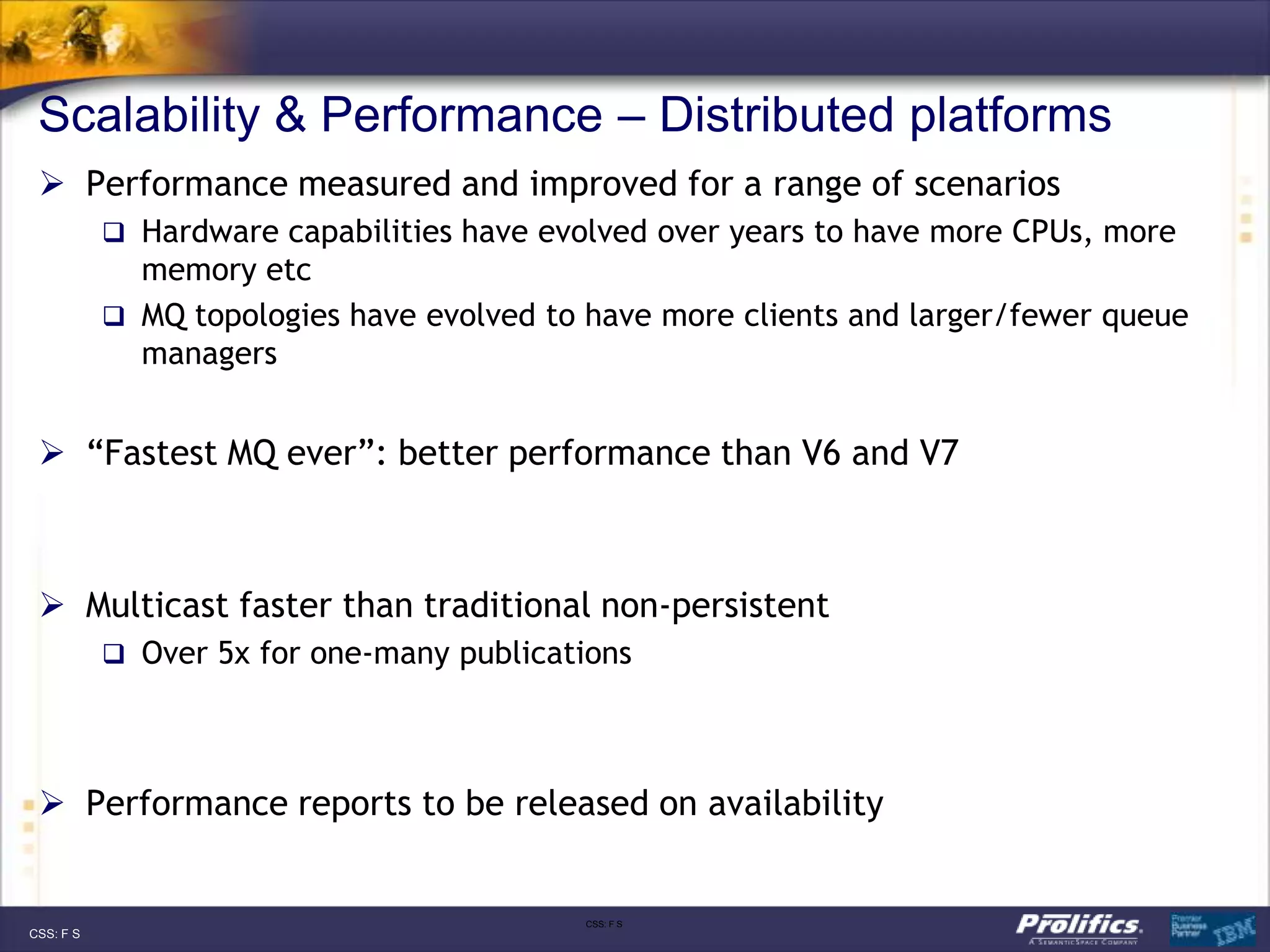
Scalability & Performance – Distributed platforms
  Performance measured and improved for a range of scenarios
            Hardware capabilities have evolved over years to have more CPUs, more
             memory etc
            MQ topologies have evolved to have more clients and larger/fewer queue
             managers


  “Fastest MQ ever”: better performance than V6 and V7


  Multicast faster than traditional non-persistent
            Over 5x for one-many publications


  Performance reports to be released on availability


                                           CSS: F S
CSS: F S
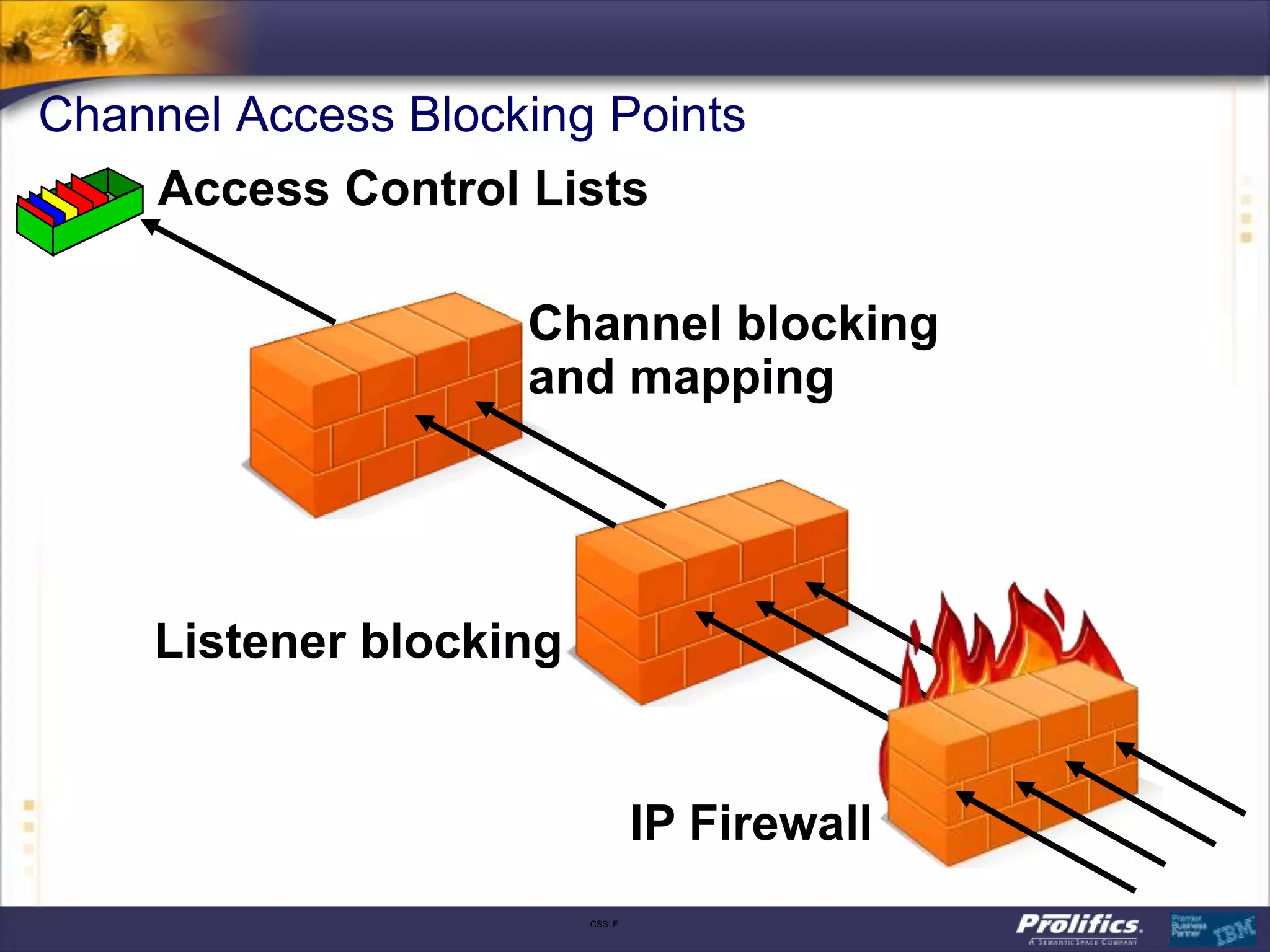
Channel Access Blocking Points
    Access Control Lists

                    Channel blocking
                    and mapping


    Listener blocking


                                 IP Firewall
                        CSS: F
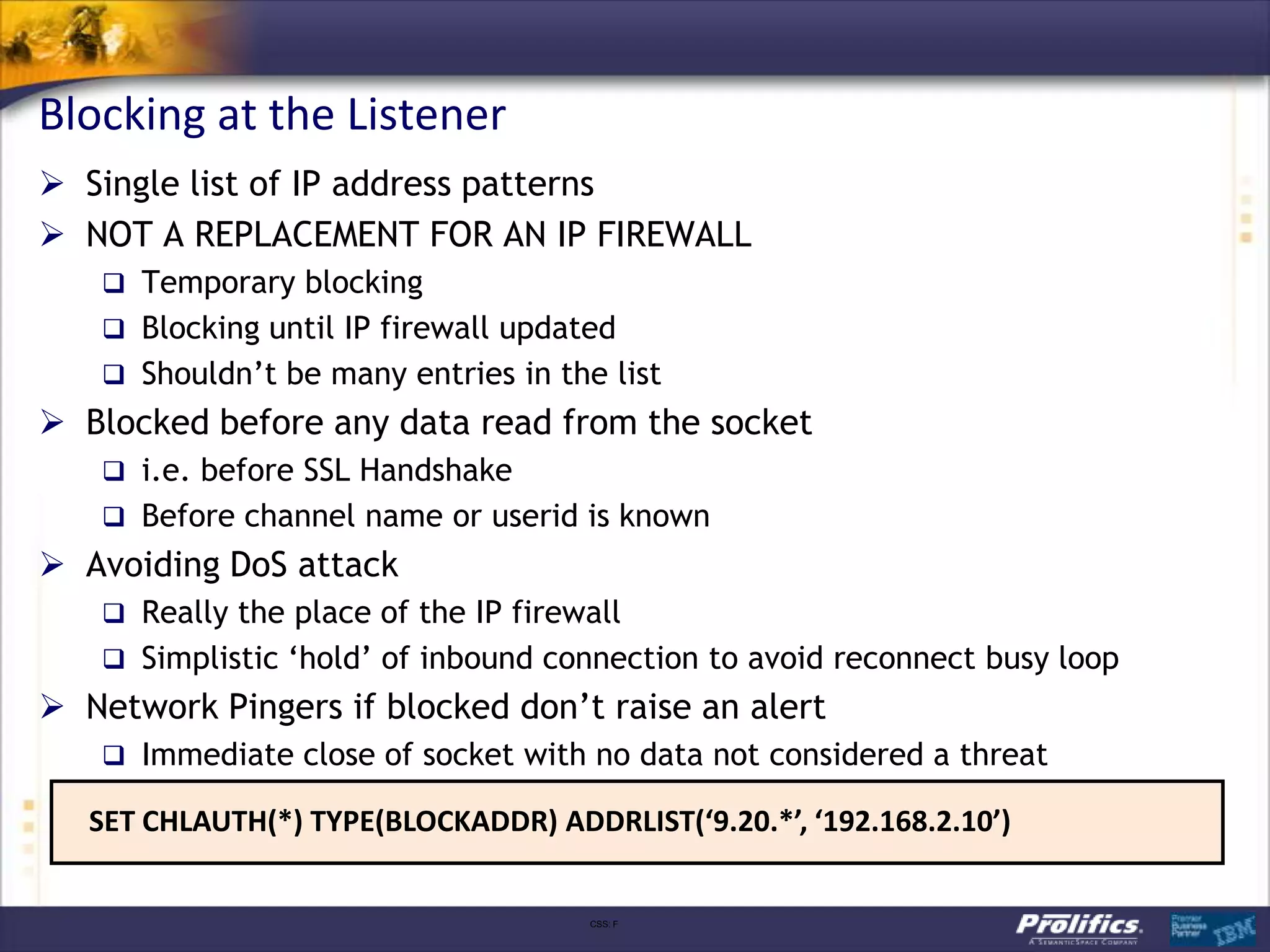
Blocking at the Listener
 Single list of IP address patterns
 NOT A REPLACEMENT FOR AN IP FIREWALL
    Temporary blocking
    Blocking until IP firewall updated
    Shouldn‟t be many entries in the list
 Blocked before any data read from the socket
    i.e. before SSL Handshake
    Before channel name or userid is known
 Avoiding DoS attack
    Really the place of the IP firewall
    Simplistic „hold‟ of inbound connection to avoid reconnect busy loop
 Network Pingers if blocked don‟t raise an alert
    Immediate close of socket with no data not considered a threat

   SET CHLAUTH(*) TYPE(BLOCKADDR) ADDRLIST(‘9.20.*’, ‘192.168.2.10’)


                                      CSS: F
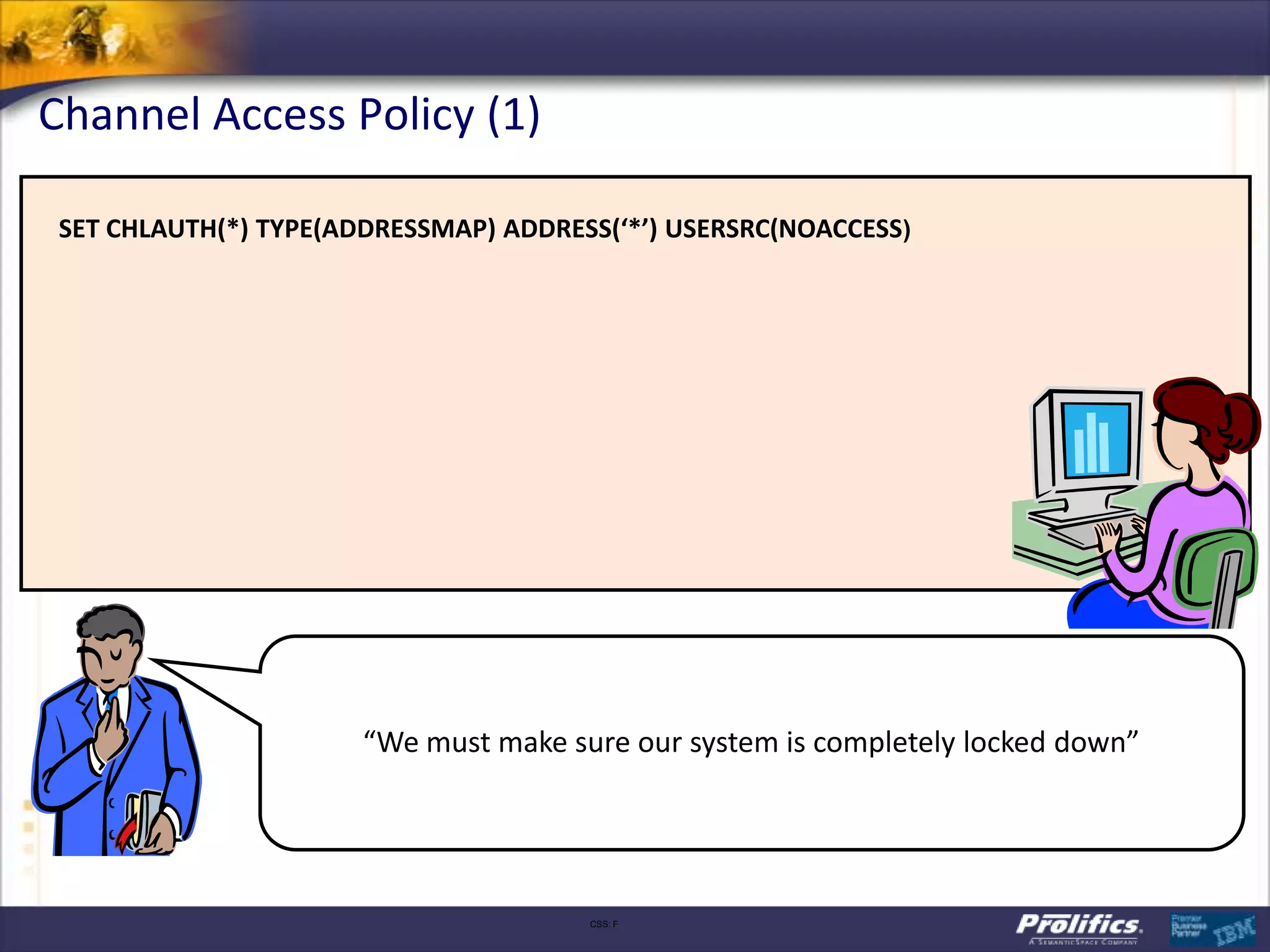
Channel Access Policy (1)

 SET CHLAUTH(*) TYPE(ADDRESSMAP) ADDRESS(‘*’) USERSRC(NOACCESS)


                       “We must make sure our system is completely locked down”


                                       CSS: F
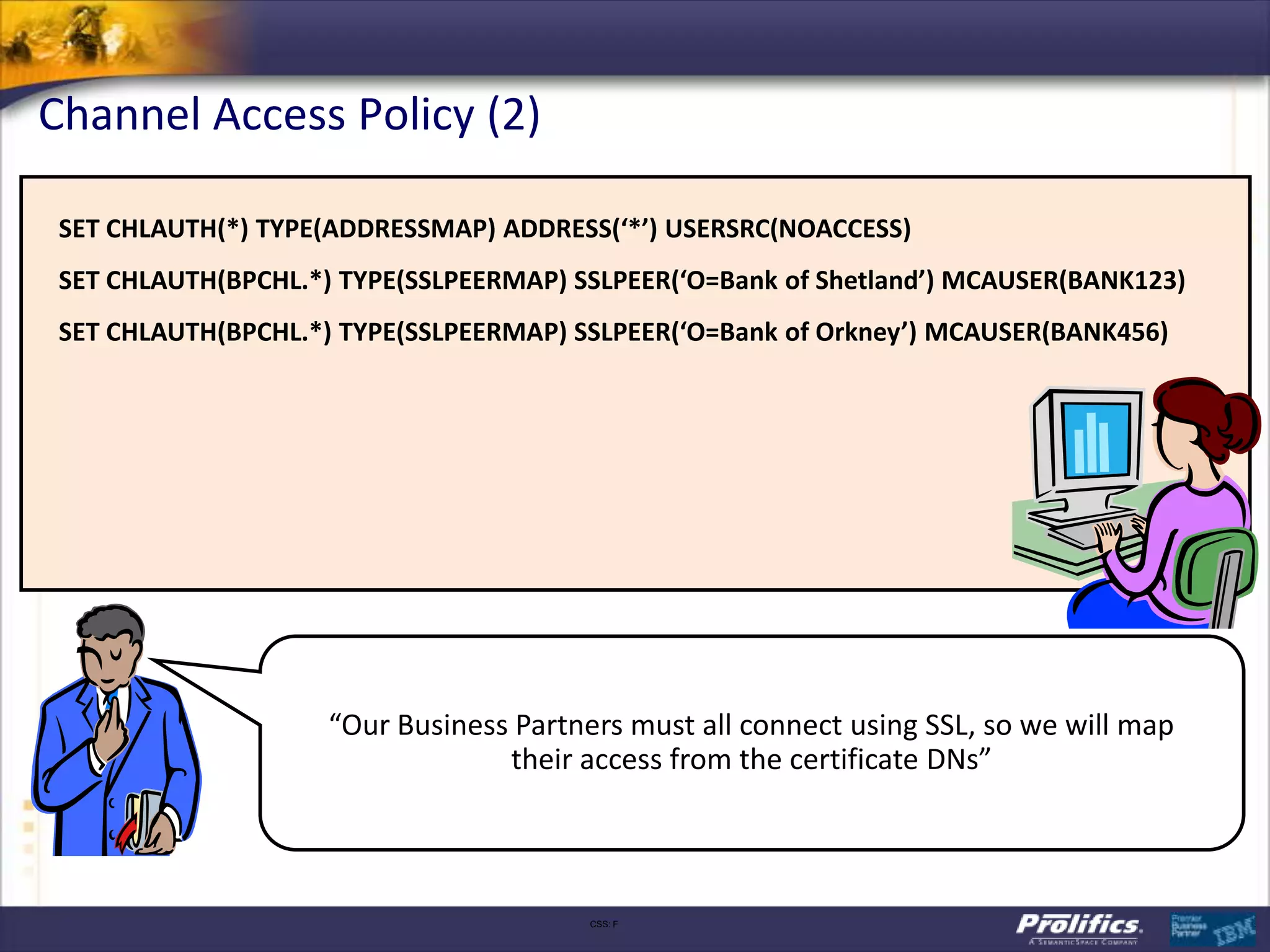
Channel Access Policy (2)

 SET CHLAUTH(*) TYPE(ADDRESSMAP) ADDRESS(‘*’) USERSRC(NOACCESS)
 SET CHLAUTH(BPCHL.*) TYPE(SSLPEERMAP) SSLPEER(‘O=Bank of Shetland’) MCAUSER(BANK123)
 SET CHLAUTH(BPCHL.*) TYPE(SSLPEERMAP) SSLPEER(‘O=Bank of Orkney’) MCAUSER(BANK456)


                     “Our Business Partners must all connect using SSL, so we will map
                                  their access from the certificate DNs”


                                         CSS: F
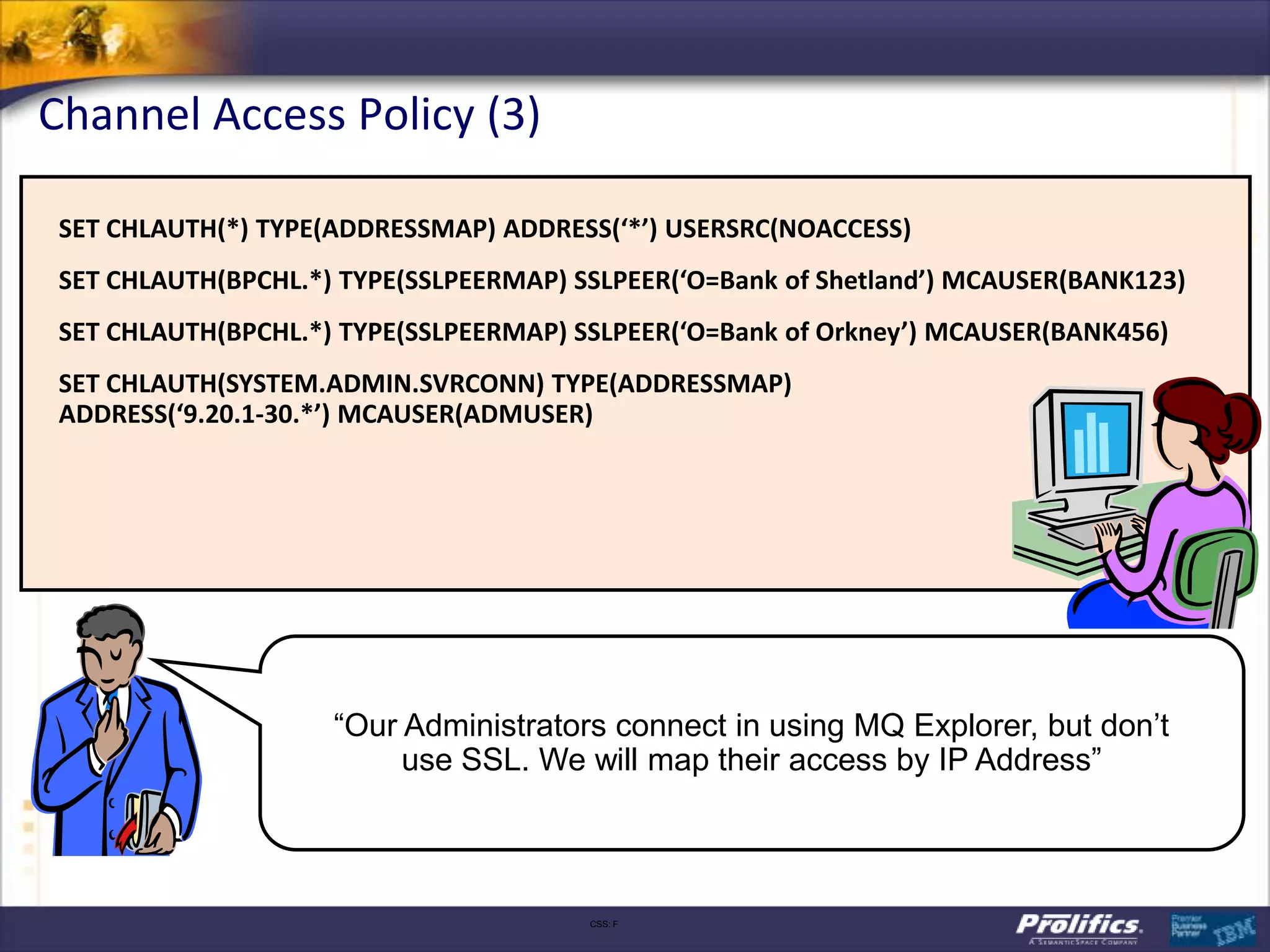
Channel Access Policy (3)

 SET CHLAUTH(*) TYPE(ADDRESSMAP) ADDRESS(‘*’) USERSRC(NOACCESS)
 SET CHLAUTH(BPCHL.*) TYPE(SSLPEERMAP) SSLPEER(‘O=Bank of Shetland’) MCAUSER(BANK123)
 SET CHLAUTH(BPCHL.*) TYPE(SSLPEERMAP) SSLPEER(‘O=Bank of Orkney’) MCAUSER(BANK456)
 SET CHLAUTH(SYSTEM.ADMIN.SVRCONN) TYPE(ADDRESSMAP)
 ADDRESS(‘9.20.1-30.*’) MCAUSER(ADMUSER)


                     “Our Administrators connect in using MQ Explorer, but don’t
                          use SSL. We will map their access by IP Address”


                                        CSS: F
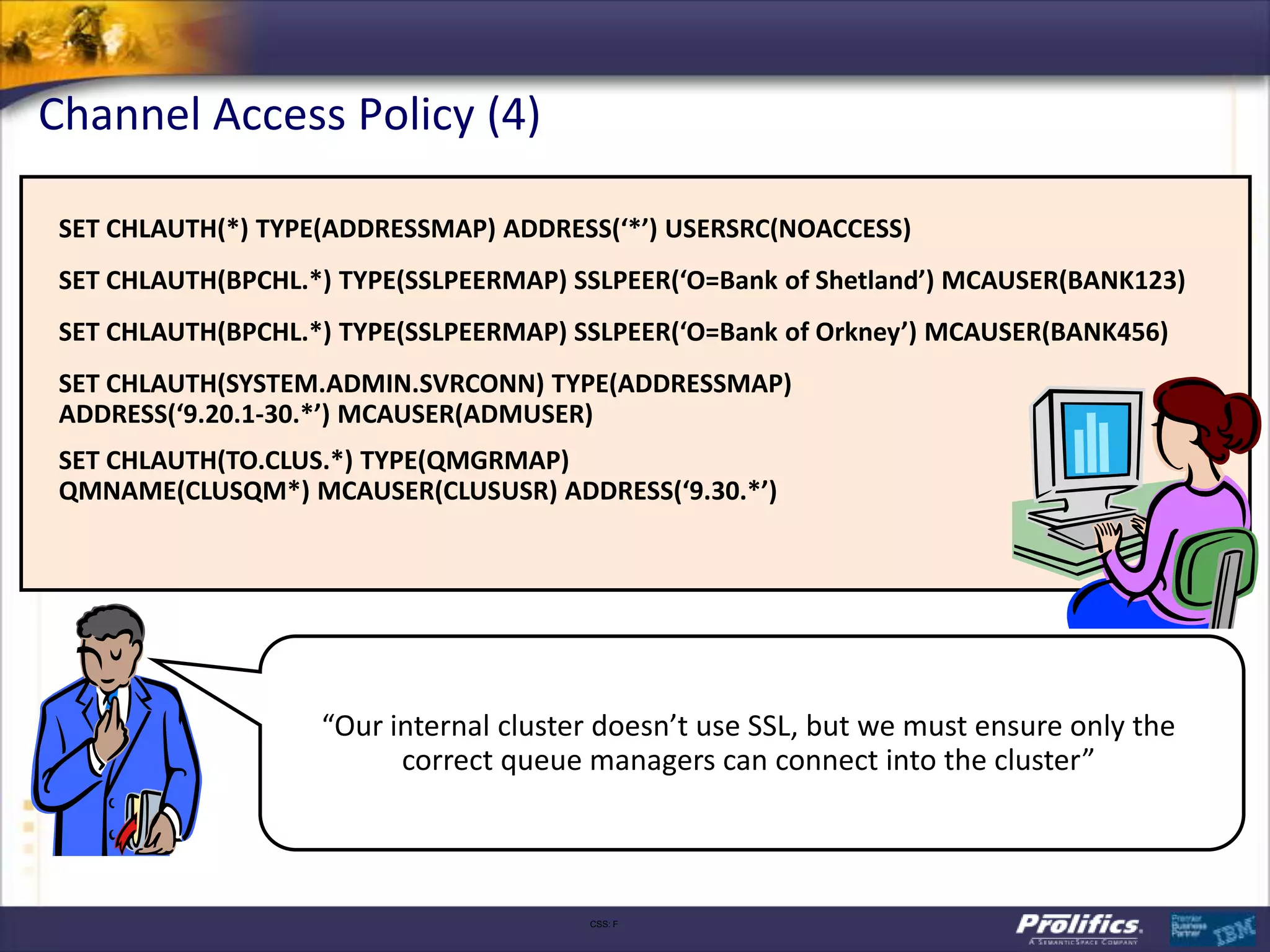
Channel Access Policy (4)

 SET CHLAUTH(*) TYPE(ADDRESSMAP) ADDRESS(‘*’) USERSRC(NOACCESS)
 SET CHLAUTH(BPCHL.*) TYPE(SSLPEERMAP) SSLPEER(‘O=Bank of Shetland’) MCAUSER(BANK123)
 SET CHLAUTH(BPCHL.*) TYPE(SSLPEERMAP) SSLPEER(‘O=Bank of Orkney’) MCAUSER(BANK456)
 SET CHLAUTH(SYSTEM.ADMIN.SVRCONN) TYPE(ADDRESSMAP)
 ADDRESS(‘9.20.1-30.*’) MCAUSER(ADMUSER)
 SET CHLAUTH(TO.CLUS.*) TYPE(QMGRMAP)
 QMNAME(CLUSQM*) MCAUSER(CLUSUSR) ADDRESS(‘9.30.*’)


                    “Our internal cluster doesn’t use SSL, but we must ensure only the
                          correct queue managers can connect into the cluster”


                                        CSS: F
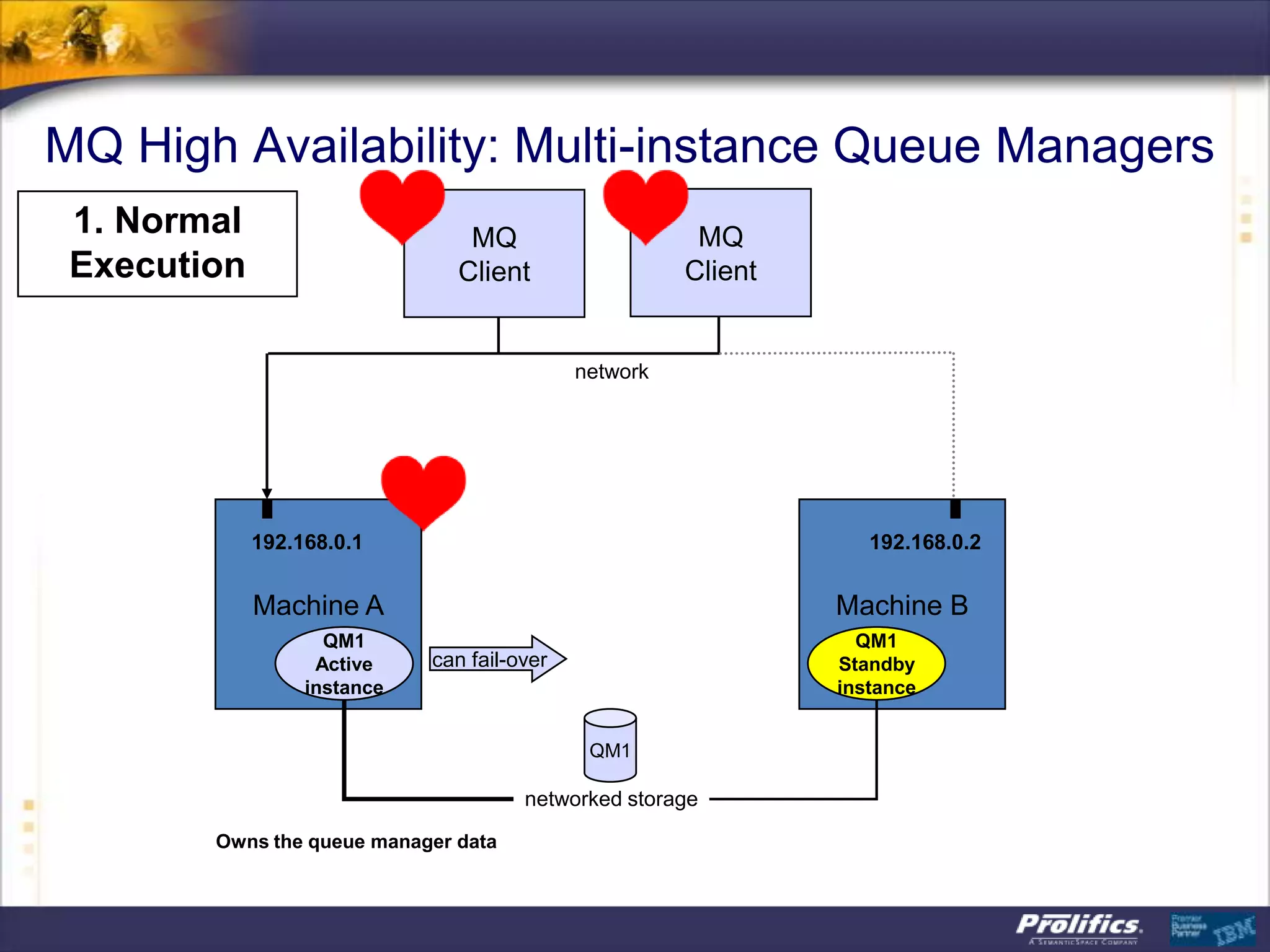
MQ High Availability: Multi-instance Queue Managers
 1. Normal                      MQ                      MQ
 Execution                     Client                  Client


                                             network


             192.168.0.1                                           192.168.0.2


             Machine A                                          Machine B
                    QM1                                           QM1
                   Active    can fail-over                      Standby
                  instance                                      instance


                                              QM1

                                       networked storage
        Owns the queue manager data
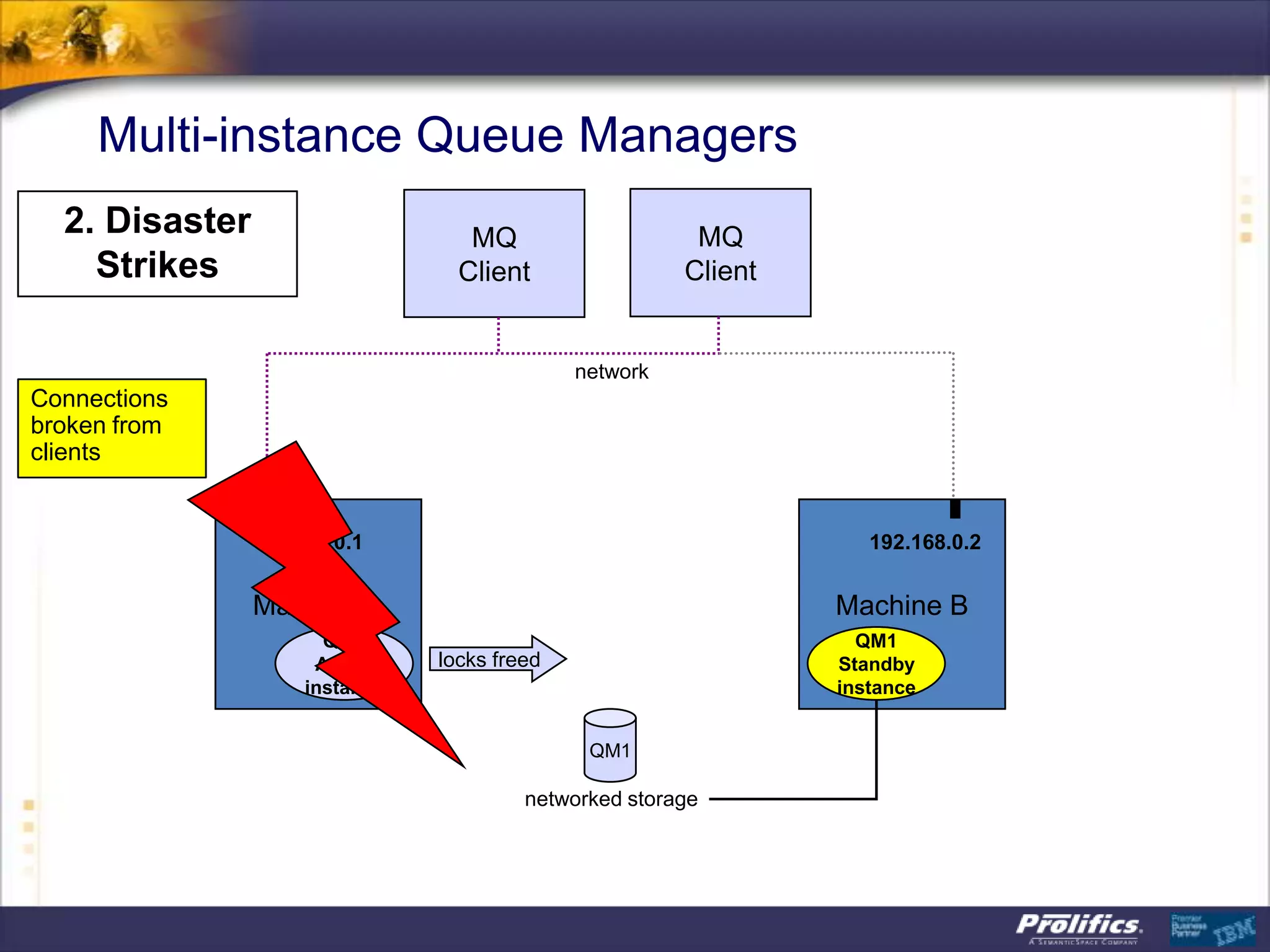
Multi-instance Queue Managers
  2. Disaster                      MQ                    MQ
    Strikes                       Client                Client


                                              network
Connections
broken from
clients


                192.168.0.1                                         192.168.0.2


                Machine A                                        Machine B
                       QM1                                         QM1
                      Active    locks freed                      Standby
                     instance                                    instance


                                               QM1

                                         networked storage
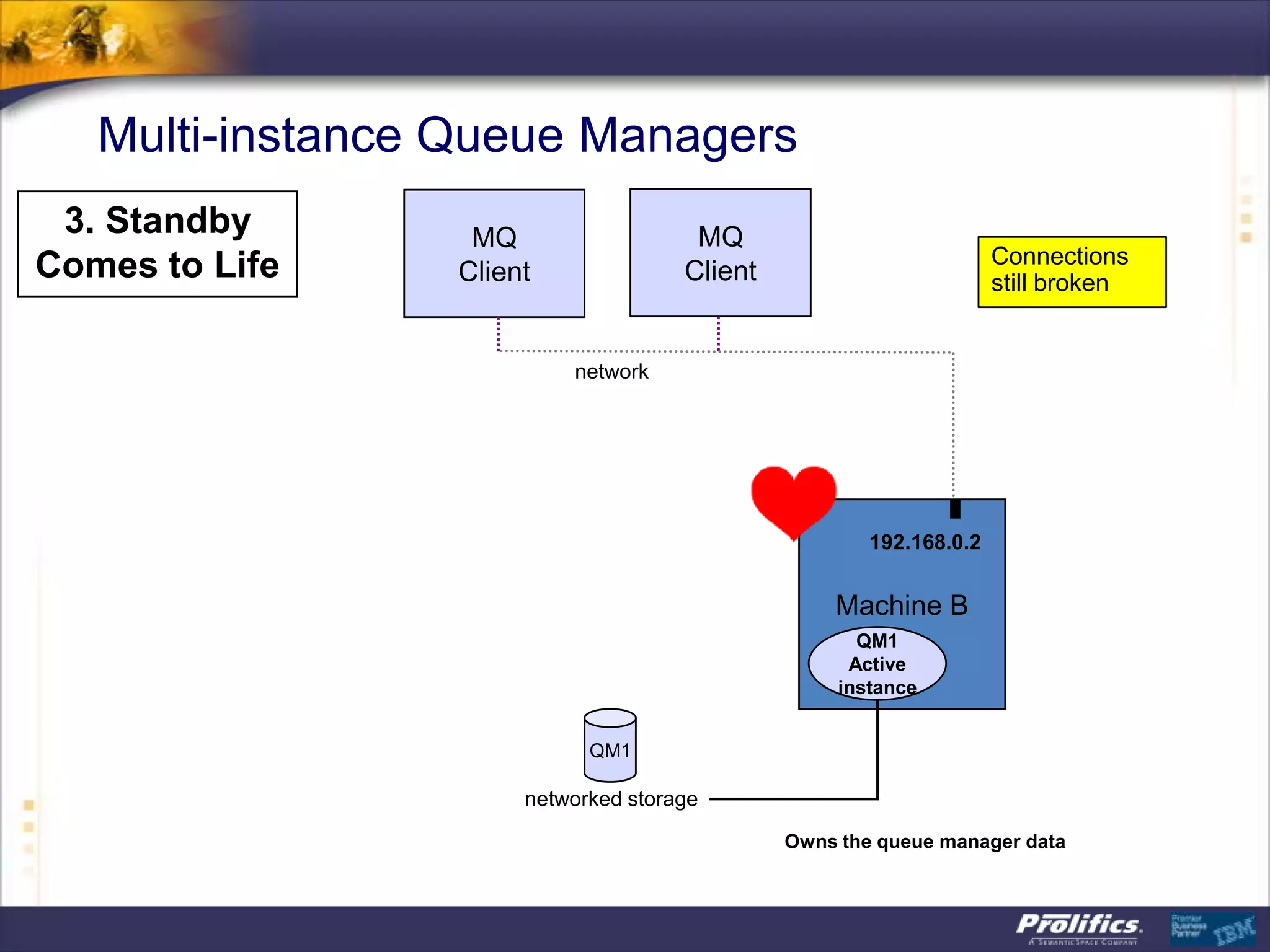
Multi-instance Queue Managers
 3. Standby       MQ                  MQ
                                                                    Connections
Comes to Life    Client              Client                         still broken


                          network


                                                      192.168.0.2


                                                  Machine B
                                                     QM1
                                                    Active
                                                   instance


                            QM1

                      networked storage
                                              Owns the queue manager data
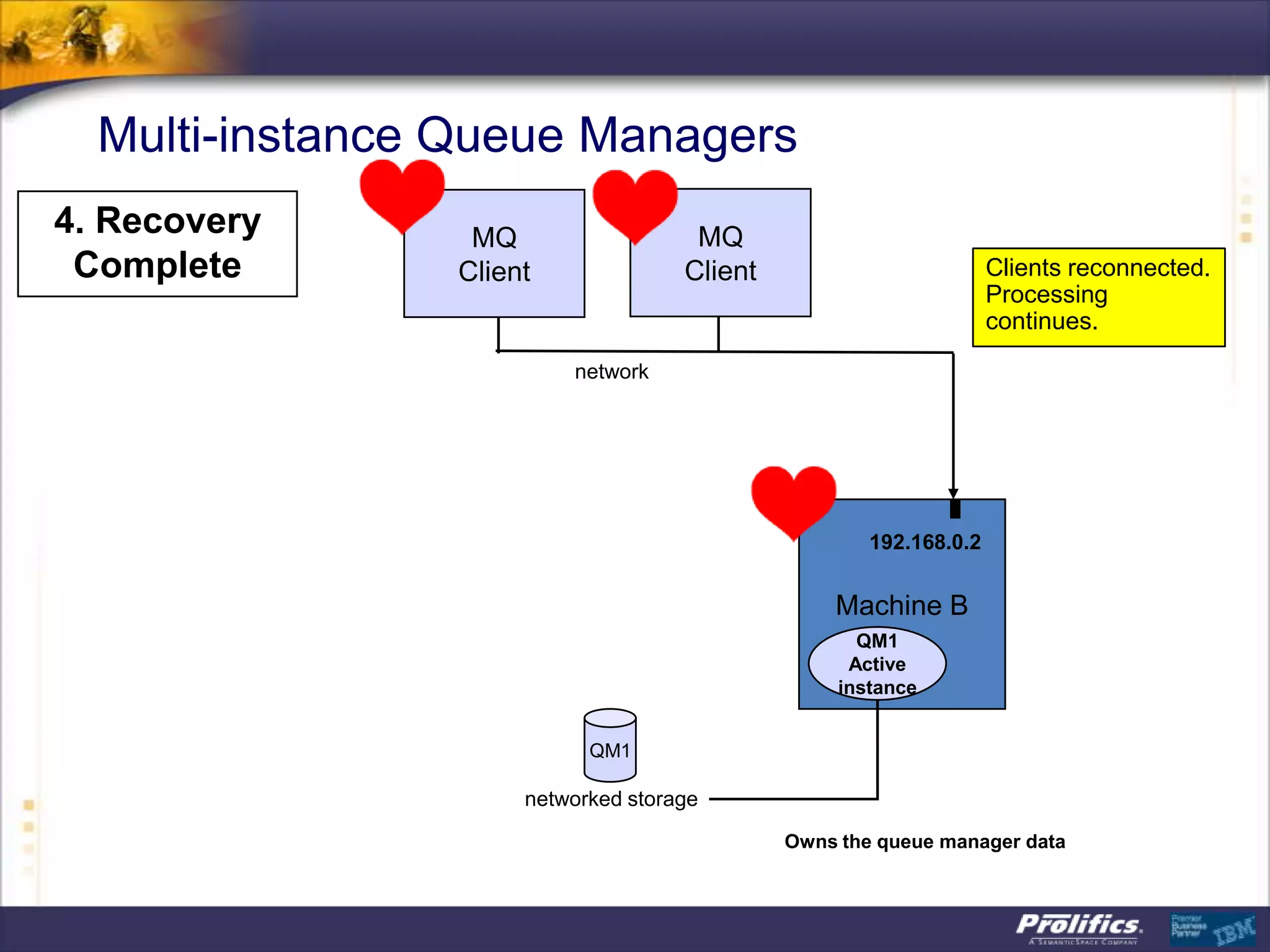
Multi-instance Queue Managers
4. Recovery      MQ                  MQ
 Complete       Client              Client                         Clients reconnected.
                                                                   Processing
                                                                   continues.
                         network


                                                     192.168.0.2


                                                 Machine B
                                                    QM1
                                                   Active
                                                  instance


                           QM1

                     networked storage
                                             Owns the queue manager data
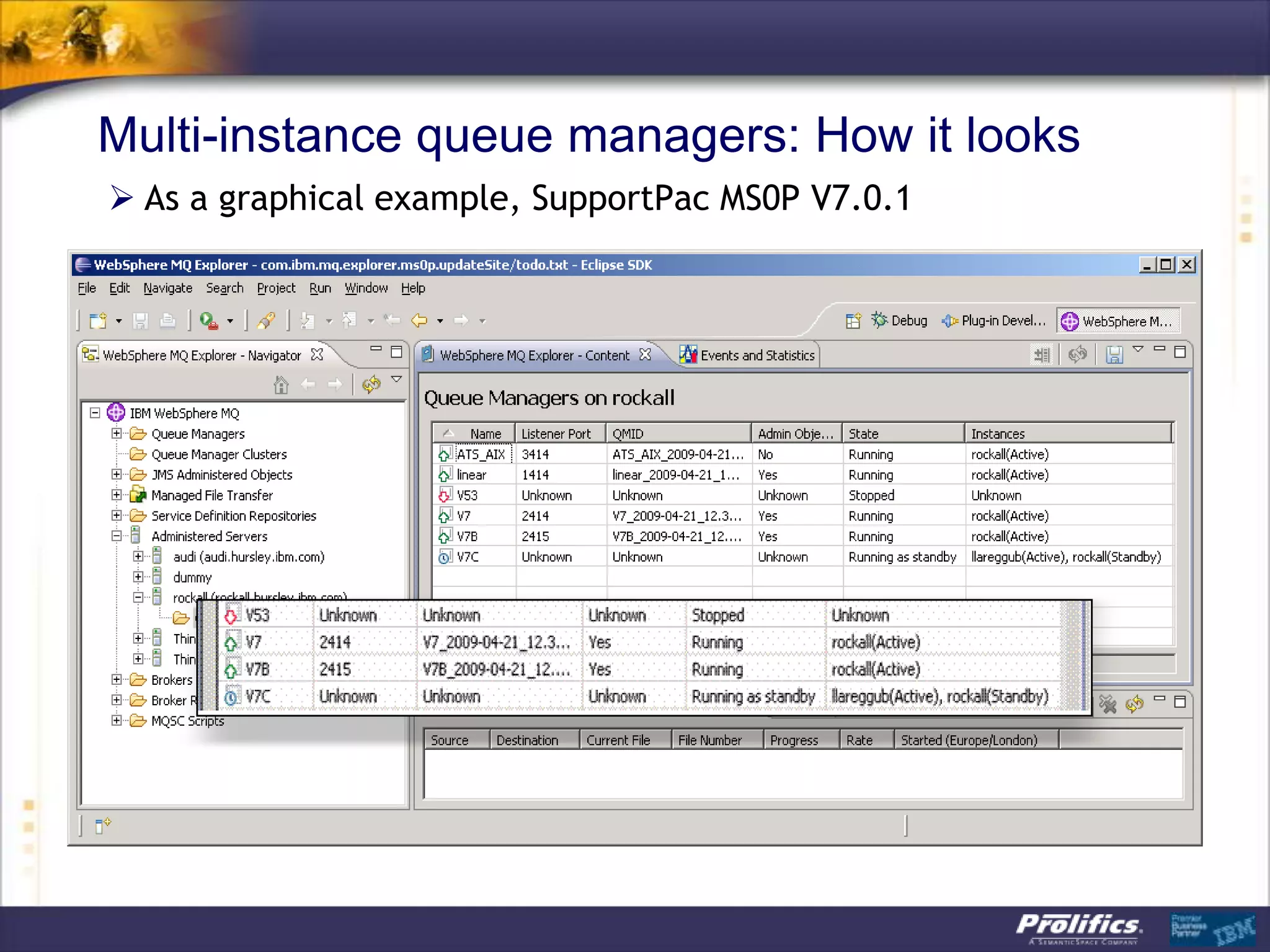
Multi-instance queue managers: How it looks
 As a graphical example, SupportPac MS0P V7.0.1
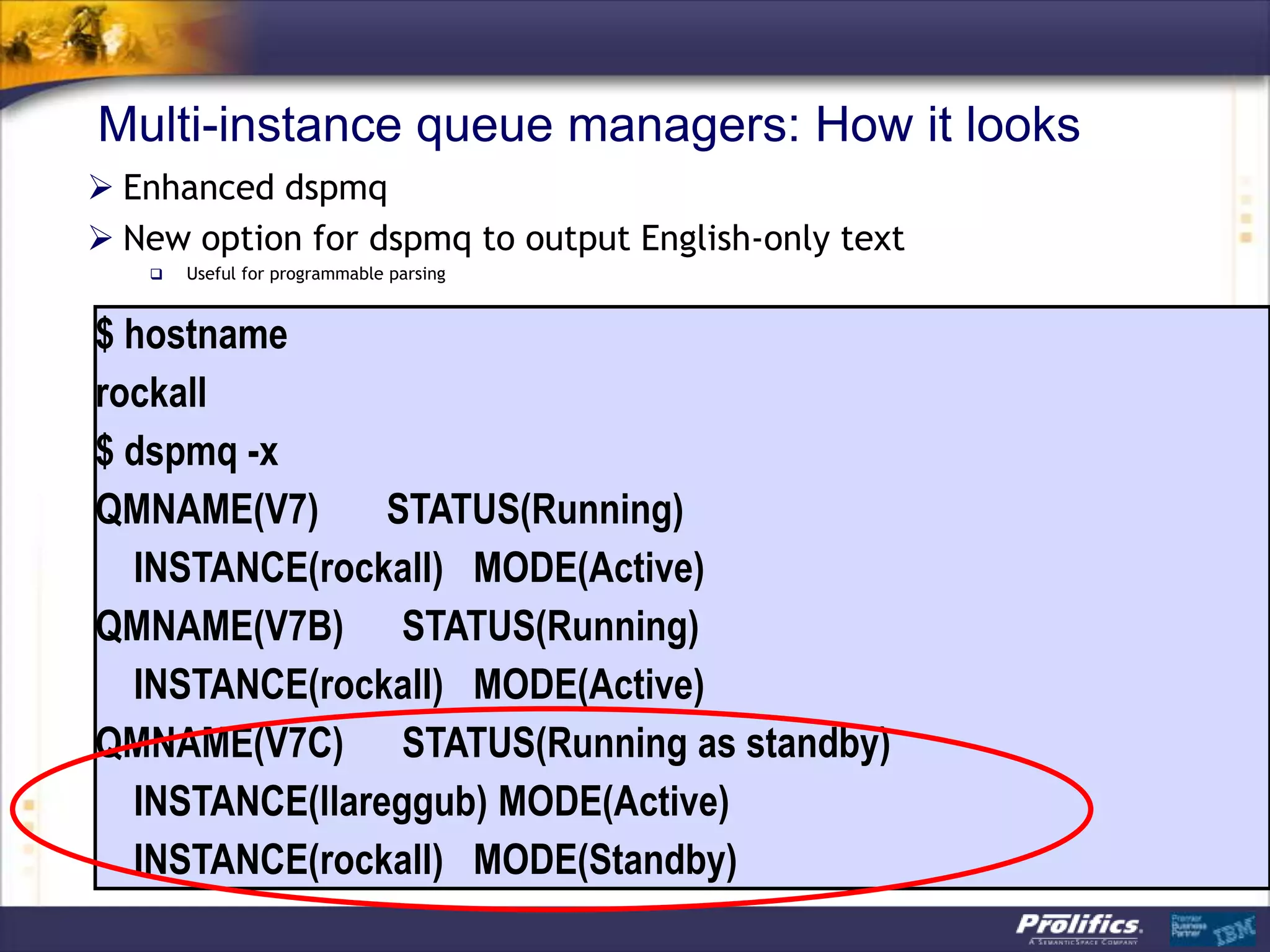
Multi-instance queue managers: How it looks
 Enhanced dspmq
 New option for dspmq to output English-only text
      Useful for programmable parsing


$ hostname
rockall
$ dspmq -x
QMNAME(V7)      STATUS(Running)
  INSTANCE(rockall) MODE(Active)
QMNAME(V7B) STATUS(Running)
  INSTANCE(rockall) MODE(Active)
QMNAME(V7C) STATUS(Running as standby)
  INSTANCE(llareggub) MODE(Active)
  INSTANCE(rockall) MODE(Standby)
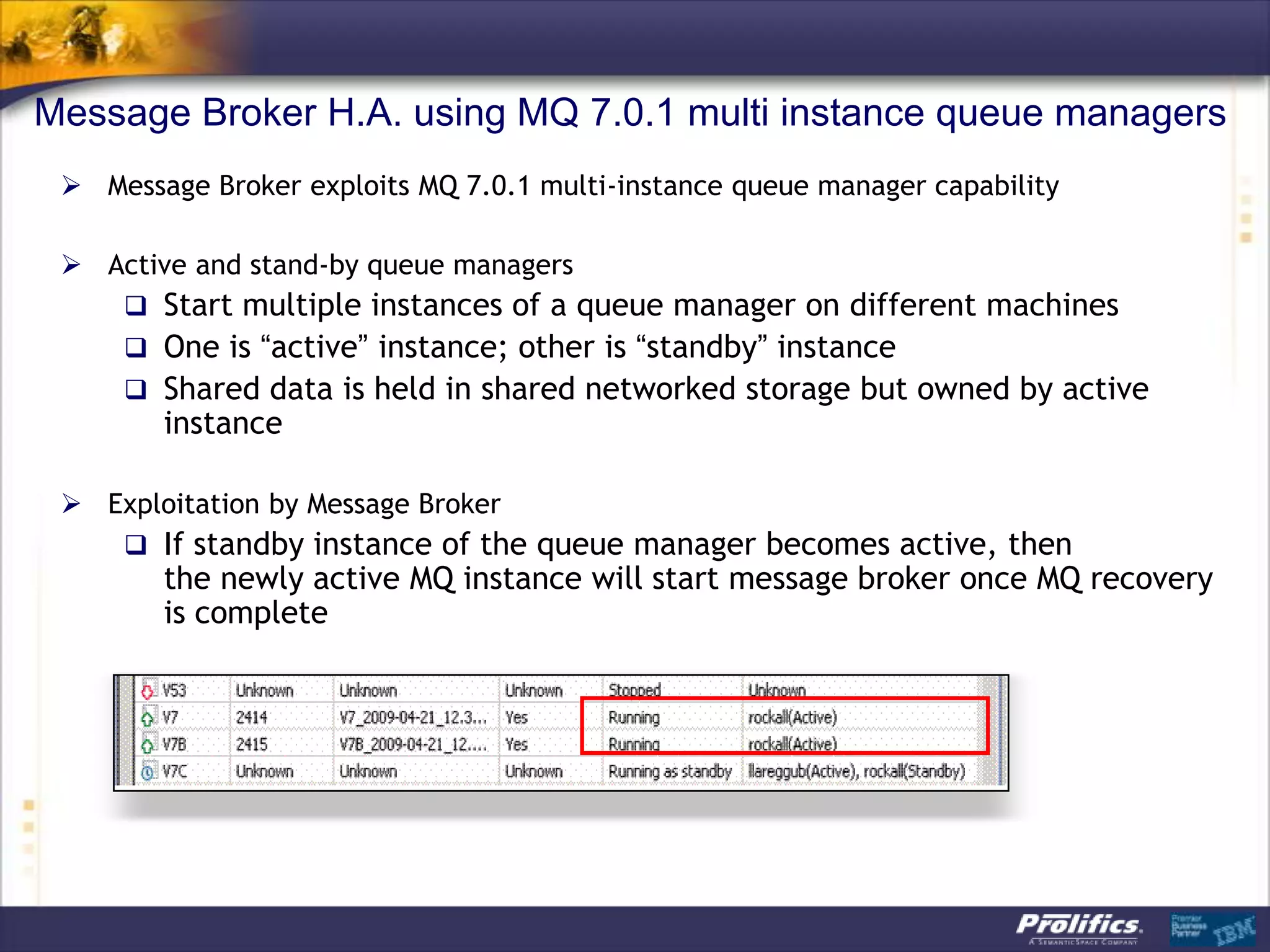
Message Broker H.A. using MQ 7.0.1 multi instance queue managers
  Message Broker exploits MQ 7.0.1 multi-instance queue manager capability

  Active and stand-by queue managers
     Start multiple instances of a queue manager on different machines
     One is “active” instance; other is “standby” instance
     Shared data is held in shared networked storage but owned by active
        instance

  Exploitation by Message Broker
     If standby instance of the queue manager becomes active, then
        the newly active MQ instance will start message broker once MQ recovery
        is complete
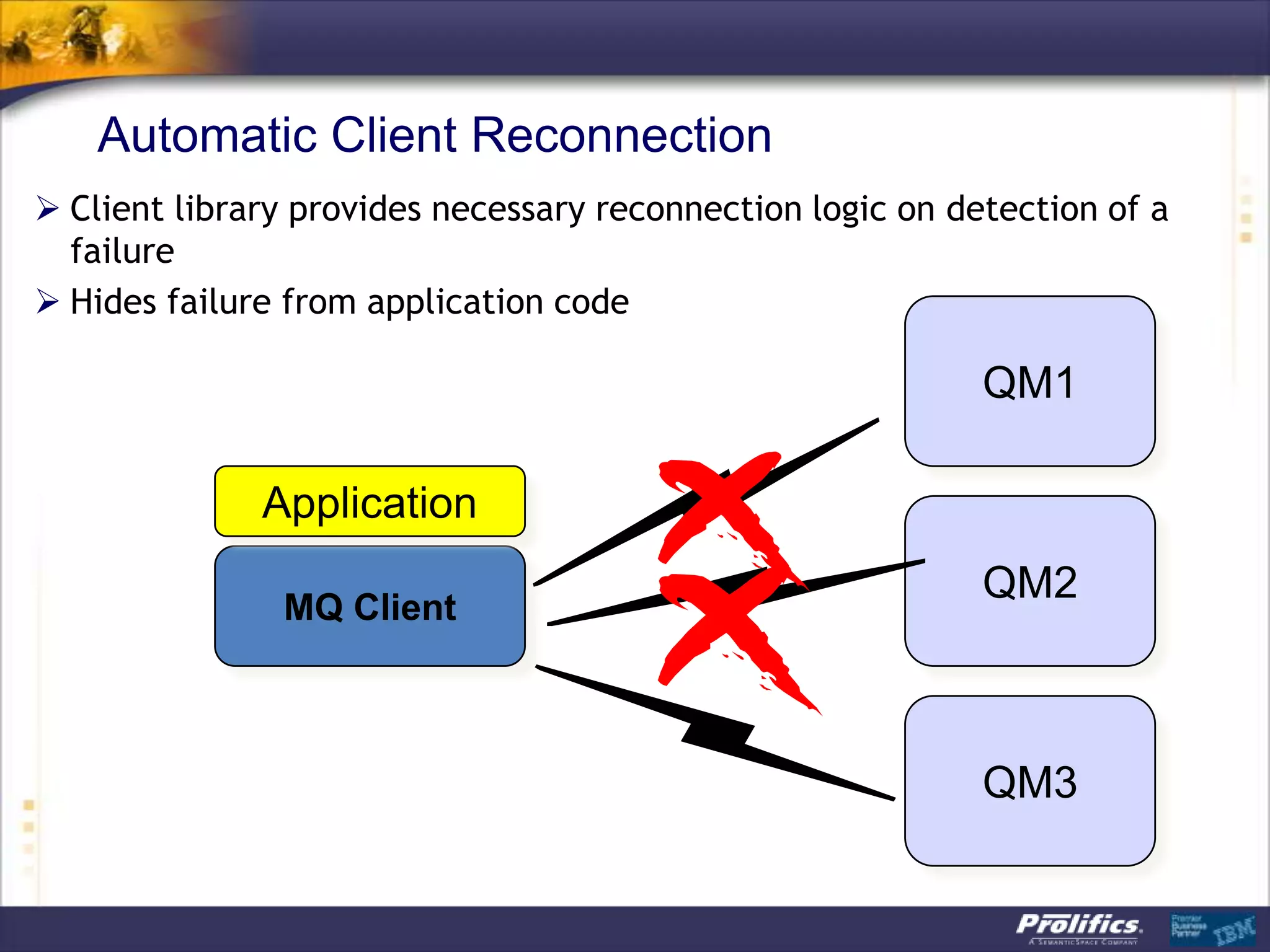
Automatic Client Reconnection
 Client library provides necessary reconnection logic on detection of a
  failure
 Hides failure from application code

                                                            QM1

              Application
                                                            QM2
               MQ Client


                                                            QM3
Automatic Client Reconnection
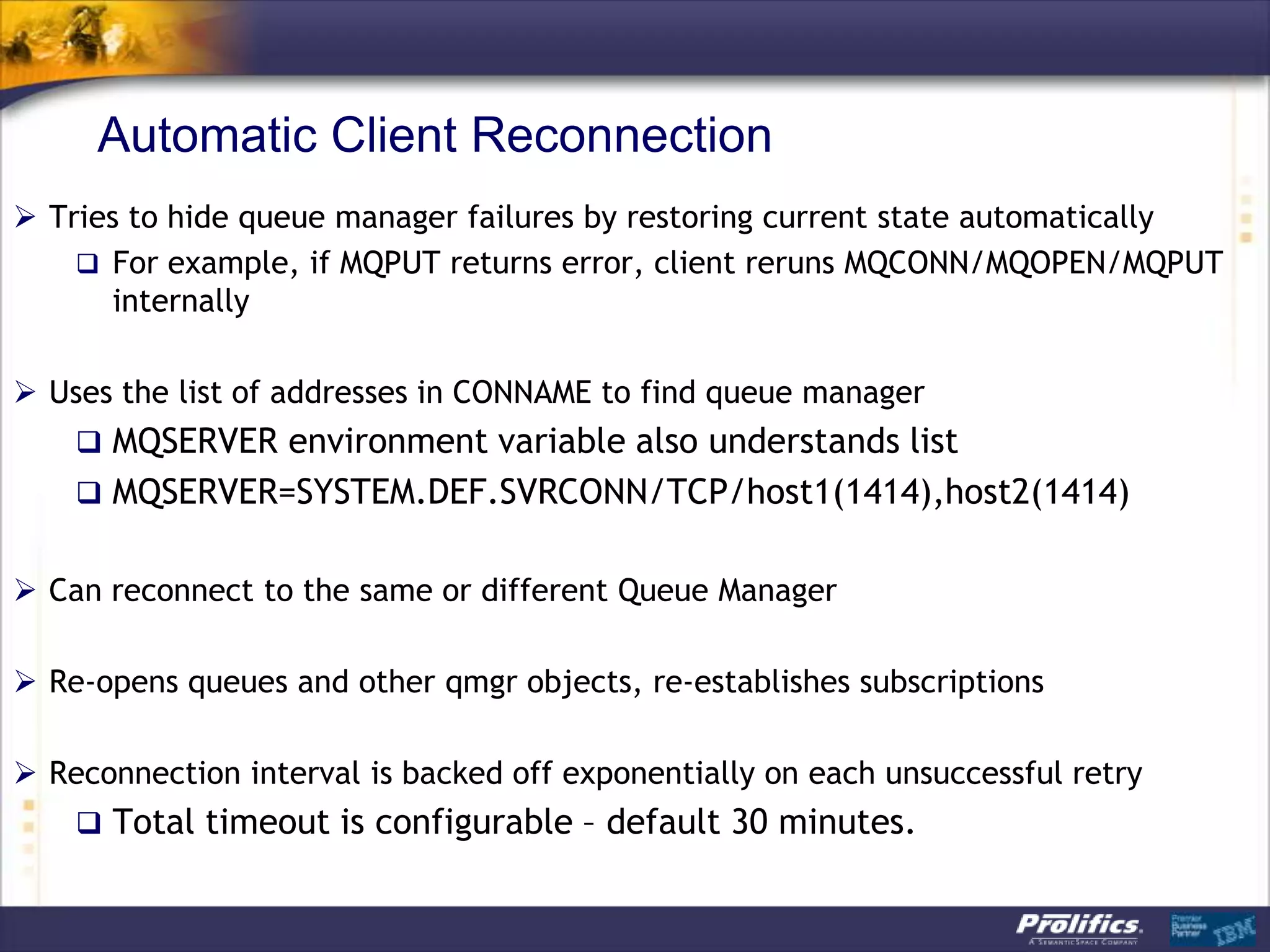
 Tries to hide queue manager failures by restoring current state automatically
     For example, if MQPUT returns error, client reruns MQCONN/MQOPEN/MQPUT
      internally

 Uses the list of addresses in CONNAME to find queue manager
     MQSERVER environment variable also understands list
     MQSERVER=SYSTEM.DEF.SVRCONN/TCP/host1(1414),host2(1414)


 Can reconnect to the same or different Queue Manager

 Re-opens queues and other qmgr objects, re-establishes subscriptions

 Reconnection interval is backed off exponentially on each unsuccessful retry
     Total timeout is configurable – default 30 minutes.
Automatic Client Reconnection: Details
 Enabled in application code or ini file
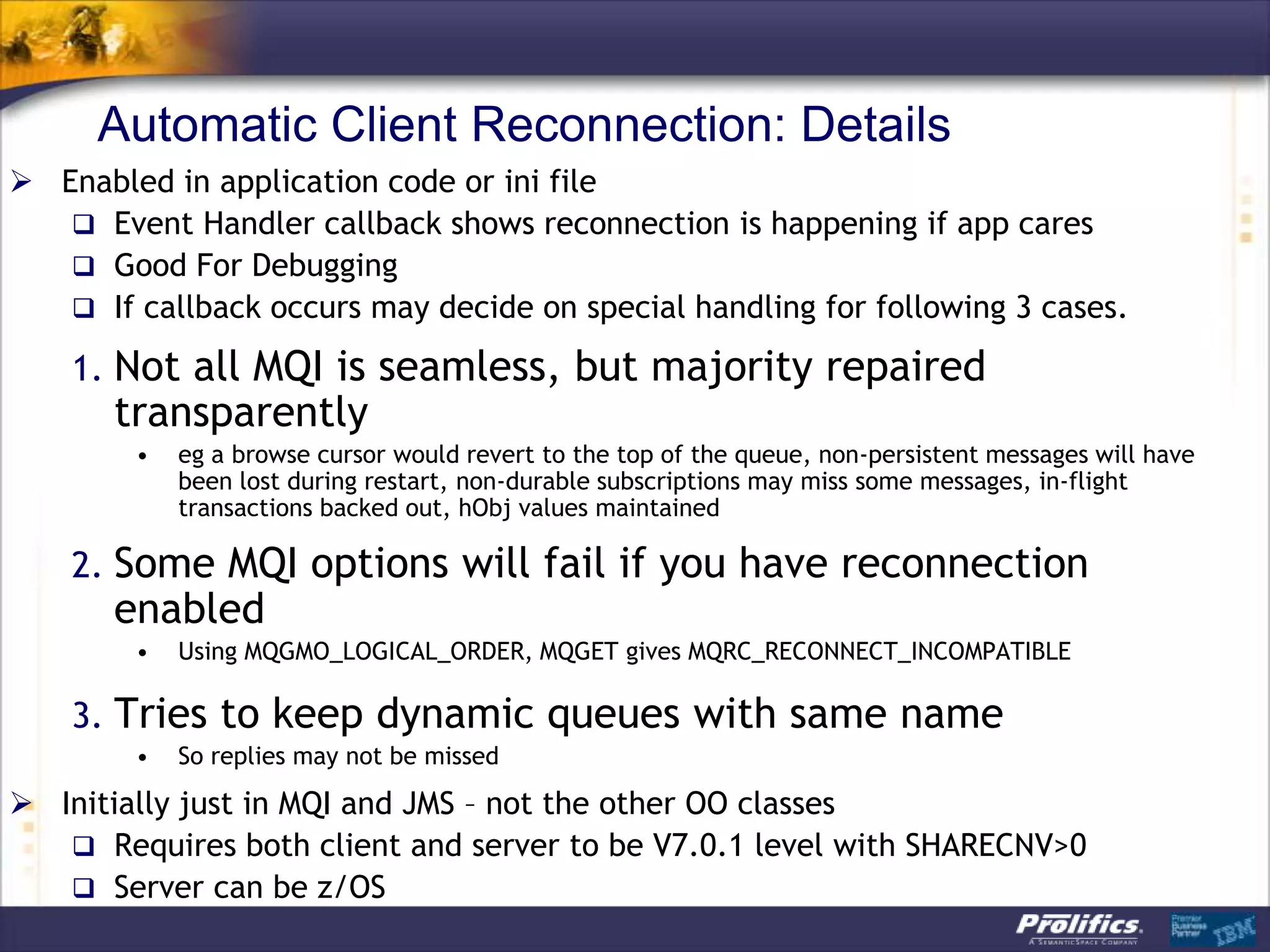
    Event Handler callback shows reconnection is happening if app cares
    Good For Debugging
    If callback occurs may decide on special handling for following 3 cases.

    1. Not all MQI is seamless, but majority repaired
       transparently
        •   eg a browse cursor would revert to the top of the queue, non-persistent messages will have
            been lost during restart, non-durable subscriptions may miss some messages, in-flight
            transactions backed out, hObj values maintained

    2. Some MQI options will fail if you have reconnection
       enabled
        •   Using MQGMO_LOGICAL_ORDER, MQGET gives MQRC_RECONNECT_INCOMPATIBLE

    3. Tries to keep dynamic queues with same name
        •   So replies may not be missed

 Initially just in MQI and JMS – not the other OO classes
    Requires both client and server to be V7.0.1 level with SHARECNV>0
    Server can be z/OS
Resources
 IBM Page:
   http://www.ibm.com/webspheremq/filetransfer


   Getting Started
    • http://ow.ly/uO9e

 Blogs:
   http://cumbers.wordpress.com/tag/wmqfte/


 Twitter
   http://www.twitter.com/ibm_wmq


 Support Pacs
   http://www-
    01.ibm.com/support/docview.wss?rs=171&uid=swg27007197
MQ Infrastructure of Today and Tomorrow

MQ Infrastructure of Today and Tomorrow

  • 1.
    MQ Infrastructure ofToday & Tomorrow Security & High Availability with MQ 7.1, MQ AMS & MQ FTE Author: A.J. Aronoff Connectivity Practice Director Email: aj@prolifics.com Desk: 646-201-4943
  • 2.
    Agenda – MQInfrastructure  Universal Connectivity: The Path to the Future  MQ File Transfer Edition  MQ Security – With MQ AMS  MQ 7.1 – the latest MQ Infrastructure features  Including MQ “Security Policies” 2
  • 3.
    IBM‟s Most AccomplishedSoftware Partner A Long Record Of IBM Honors Technical Innovation Multi Award-winning:  Serviced over 1500 IBM software accounts in the past 8 years; implemented over 300 portals  2012 Outstanding Business Agility Solution Award  Conducted over 60 migrations to WebSphere from other technologies  2012 ICS Award for Best Industry Oriented Social  Prolifics boasts over 400 J2EE, WebSphere, Lotus, Information Business Solution Management, Tivoli, Rational certifications for architecture,  2010 Impact Best BPM Solution Award development, administration, and project management  2010 Lotus Best End-User Solution Award  IBM’s highest technical rating (Level 5)  Highly Accredited - IBM Tivoli “AAA Accredited;” IBM Cloud  2010 Lotus Best Industry Solution Award Certified; Accredited with Ready for Rational; IBM  2009 Rational Solution Award Authorizations for Security, Social Business and ECM; IBM Authorizations for Insurance, Finance, Healthcare & Life  2008 Outstanding SOA Solution Award Sciences, Banking, Energy & Utilities  2008 Overall Technical Excellence Award  Prolifics has worked with internal development teams  2007 Overall Technical Excellence Award multiple times for the development of IBM technologies.  Strategic relationship gains internal access to IBM’s resources,  2007 Impact SOA Process Solution Award labs, and product development teams  2006 Best Portal Solution Lotus Award  2005 5-Star Partner Award demonstrating Prolifics’ cross-brand sales expertise and certifications. One of only 5 partners worldwide to receive the distinction. 3
  • 4.
    by doing greatwork with Great Customers Financial Services Healthcare Government Retail & Distribution Utilities Insurance Education 4
  • 5.
    WebSphere MQ Value:Connectivity to, from & within an Enterprise The path to the future Enterprise  A Universal Message Bus for access to data Regional Office wherever it exists to support your business  Provides a comprehensive range of Messaging capabilities to support your Business requirements for data integration  Managed File Transfer  Messaging integration patterns Sensor e.g. RFID  Reliability and availability QoS Branch  SOA foundation Outlet  Provides appropriate data access and data privacy controls to help Retail meet audit and regulatory requirements Store  WMQ Telemetry is one step in extending the reach of WMQ to a wider world of data relevant to your business  Recent technology demonstration of MQ Pervasive Device Web Messaging using HTML5 WebSockets Refinery continues this progress Petrol Mobile Forecourt Phone 5 CSS: F S
  • 6.
  • 7.
    IBM Universal Messaging Proven, Flexible, Robust business data delivery from anywhere to everywhere IBM UNIVERSAL MESSAGING Business Sense and Respond Transactions MQ MQ Telemetry Leveraging System z Web applications MQ for z/OS MQ HTTP Bridge Managed File Transfer Real-time Awareness MQ File Transfer Edition MQ Low Latency Messaging Extra Data Protection Cloud Platform-as-a-Service MQ Advanced Message Security MQ Hypervisor Edition 7
  • 8.
    WMQ Family Roadmap– continual delivery of customer value (4Q/09) (2Q/10) (4Q/10) (2Q/11) () MQ LLM V2.3 MQ LLM V2.4 MQ LLM V2.5 MQ LLM V2.6 MQ LLM V2.x msg store late join self-managing improved perf. (4Q/09) (4Q/10) (2Q/11) () MQ FTE V7.0.2 MQ FTE V7.0.3 MQ FTE V7.0.4 MQ FTE V7.x FTP Bridging end-to-end security C:D Integration (4Q/11 ) (1Q/11) MQ V7.1 with (3Q/09) MQ V7.0.1.4 Multi-version Install, MQ V7.0.1 with Pre-Connect Exit Out-of-the-box security, (3Q/10) Multicast capability, Multi-Instance QMgrs, MQ Telemetry V7.0.1 Automatic Client Reconnect, Improved Performance, z/OS Availability, Capacity and z/OS Shared Q enhancements Performance improvements (2Q/11) (1Q/10) MQ WebSockets Tech Preview. Security SupportPacs and MQ HVE for RHEL ESX and Wizards IBM Workload Deployer (4Q/10) MQ Advanced Message Security () V7.0.1 MQ AMS V7.x 200 201 201 201 9 0 1 2 Early Access Programs 8 CSS: F S
  • 9.
    MQ FTE  Quick Overview  Directory Monitoring  File to Message - Message to File  FTP & SFTP Bridging agents 9
  • 10.
    FTP Spaghetti Infrustructure(haphazard growth) X Unreliable transport mechanisms Each link in a chain reduces reliability X No central set-up, logging or monitoring X Poor documentation of overall system X Expensive, one-off solutions X High maintenance costs (60 – 70% of a company’s IT budget) X Lack of business agility
  • 11.
    Ideal File TransferInfrastructure Automation & Documented, Centralized Standardized Set-up Solutions Reliable Transport Reliable Reliable Transport Transport Event based Centralized Centralized Monitoring Logging Reliable Reliable Transport Transport Reliable Reliable Transport Transport
  • 12.
    MQ FTE allowsyou to …go from this …to this
  • 13.
    MQ FTE 7.0.2Protocol Bridge Support for transferring files located on FTP and SFTP servers  The source or destination for a transfer can be an FTP or an SFTP server Fully integrated into graphical, command line and XML scripting interfaces  Just looks like another FTE agent… Enables incremental modernization of (S)FTP-based Legacy solutions  This helps ease migration from a non-managed (FTP or SFTP) network to a managed network based on WebSphere MQ File Transfer Edition. (I.E. less rip & replace).  Ensures reliability of transfers across FTP/SFTP with checkpoint restart  Provides auditability of transfers across FTP/SFTP to central audit log Files exchanged between FTE and FTP/SFTP FTE FTP MQ FTE FTP FTP / SFTP FTE FTP network network FTE FTP Bridging FTP/SFTP Agent Server Protocol FTP Bridge Server Audit Agent information
  • 14.
    MQ FTE: UseCase 1: Directory Monitor •Three sub directories with the same names of three destination FTE Agents •When a file with an extension of “doc” is added to one of the sub directories … • The Resource monitor detects the file and • creates a file transfer request for the file where the destination agent has the same name as the sub directory. http://www.ibm.com/developerworks/websphere/library/techarticles/0910_bonney/0910_bonney.html •Company in Florida is using the above system and planning to scale up further FTE Receiving Agent Resource OfficeA /incoming/monitor Monitor FTE Receiving Agent OfficeB /A /B /C FTE Sending Agent 1.Doc FTE Receiving Agent OfficeC 14
  • 15.
    File & MessageBroker Hub: Connect Anything to Anything Integration with WebSphere Message Broker for File Processing Tight integration between FTE and WebSphere Message Broker Enables ESB capabilities to be applied to file data Ability to parse and transform files and process into messages, files, events, service requests etc Messages Files Files WMQ FTE MQ, FTE, FTP, Network HTTP, SOAP… WebSpher e Message Broker Enrich, Mediate, Transform… 15
  • 16.
    WMB FTEInput andFTEOutput nodes Message Broker Execution Group Message Flow FTE Agent FTE FTE FTE Agent Agent Agent FTEInput FTEOutput  FTEInput node Build flows that accepts file transfers from the WMQ FTE network  FTEOutput node Build flows that are designed to send a file across a WMQ FTE network When WMQ FTE nodes are used in a flow an FTE agent is automatically stated in the Message Broker Execution Group 16
  • 17.
    File & MessageHub (HTTP and MQ FTE) Web based File Transfers using the Web Gateway Web-based File Transfer A RESTful API for sending files into and receiving files from a WMQ FTE network Reliable and secure file transfer option for Web users Auditable transfer and large file support Zero-footprint file transfer support without the need to provision and install code Interfaces for embedding into third party and custom user applications WMQ FTE Serve WMQ FTE r Network HTT P/S 17
  • 18.
    Options for convertingdata between files & messages One file to one message WMQ  One file becomes one message FTE One file to a group of messages The file can be split WMQ based on: FTE  Size  Binary delimiter One message to one file  Regular expression WMQ  One message becomes one file FTE A group of messages (or all messages on the queue) to one file  Optionally, a delimiter can be WMQ inserted between each message FTE used to compose the file 18
  • 19.
    End-to-end encryption using WebSphereMQ Advanced Message Security WMQ FTE already supports svrconn WebSphere sndr/rcvr WebSphere transport level encryption FTE channel MQ channels MQ FTE using SSL Agent Queue Queue Agent Manager Manager Data is encrypted before it is sent over a channel and decrypted when it is received  V7.0.3 (when combined with WMQ AMS v7.0.1) allows file svrconn WebSphere sndr/rcvr WebSphere FTE channel MQ channels MQ FTE data to be encrypted at the Agent Queue Queue Agent source system and only Manager Manager decrypted when it reaches the destination system – This helps reduce encryption costs – Data is secure even when at rest on a queue 19
  • 20.
    Customer Survey: Ofthe points below: Which point(s) matters most to you? Records complete and detailed audit log of entire file journey  Auditable “What went where, when and to whom” File contents not corrupted or partially transmitted  Reliable Files only appear at destination whole and intact Files content encrypted during transmission  Secure File access authenticated and controlled Eliminates need to manually detect problems and restart transfers  Automated Providing scheduling and triggering for event-driven transfers  Centralized Remote control and monitoring of file progress from anywhere Able to deploy and re-configure file transfers instantaneously from anywhere  Flexible Managing transfers end-to-end across a network – not just between 2 points  Any file size No upper limit on the size of file that can be moved  Integrated With SOA infrastructure: Messaging, ESBs, Governance, B2B and BPM  Cost Provides a consolidated transport for moving both Files and Messages Effective
  • 21.
  • 22.
    MQ AMS  Quick Overview  Message Level Protection  WMQ AMS - Key Features  Architecture  Interceptors  Policies 22
  • 23.
    WebSphere MQ AdvancedMessage Security What is it?  New product - WebSphere MQ Advanced Message Security  Replaces WebSphere MQ Extended Security Edition  Component added to WebSphere MQ V7 or V6 Enhances MQ security processing  Provides additional security services over and above base QM  Designed to assist with requirements such as PCI DSS compliance Application ---> Application protection for point-to-point messaging Industry standard asymmetric cryptography used to protect individual messages Uses Public Key Infrastructure (PKI) to protect MQ messages  Uses digital certificates (X.509) for applications Non-invasive No changes required to MQ applications Security policies used to define the security level required  Administratively controlled policies applied to queues • Command line • Explorer
  • 24.
    Message Level Protection Enablessecure message transfers at application level Assurance that messages have not been altered in transit When issuing payment information messages, ensure the payment amount does not change before reaching the receiver Assurance that messages originated from the expected source When processing messages, validate the sender Assurance that messages can only be viewed by intended recipient(s When sending confidential information.
  • 25.
    WMQ AMS -Key Features Secures sensitive or high-value MQ messages Detects and removes rogue or unauthorized messages before they are processed by receiving applications Verifies that messages are not modified in transit from queue to queue Protects messages not only when they flow across the network but when they are at rest in queues Messages from existing MQ applications are transparently secured using interceptors Protects point-to-point messages
  • 26.
    WMQ AMS -Key Features (continued) No prereq products Significantly simplified installation and configuration compared to predecessor product Up and running in minutes … Works in conjunction with SSL Can choose to use either or both depending on your requirements Works in conjunction with WMQ authorisation model (OAM and SAF) No changes required to WMQ applications Works with local applications and clients, including Java Support for WMQ V6 and V7 No changes required to existing object definitions Fine-grained policies to define which queues are protected and how Asymmetric cryptography used to protect individual messages Administratively controlled policies Command line MQ Explorer
  • 27.
    WMQ + ESE6 Architecture
  • 28.
  • 29.
    Logical Architecture Design– Distributed Platforms
  • 30.
  • 31.
    MQ AMS interceptors MQAMS functionality is implemented in interceptors. There are no long running processes or daemons (Except in z/OS). Existing MQ applications do not require changes. Three interceptors are provided: 1.Server interceptor for local (bindings mode) MQI API & Java applications. Implemented as queue manager API exit. 2. MQI API client interceptor for remote (client mode) MQ API applications. MQ AMS interceptor imbedded in MQ client code. 3. Java client interceptor for remote (client mode) MQ JMS and MQ classes for java applications (J2EE and J2SE). MQ AMS interceptor imbedded in MQ java client code. MQ V7.0 java client required. SupportPac MQC7 WebSphere MQ V7.0 clients.
  • 32.
    Protecting files transferredwith WMQ FTE  AMS plugs in on top of / alongside WebSphere MQ File Tranfer Edition, enable file data to be encrypted in transit through the MQ network  Apply AMS protection to your WMQ FTE agent data queue  it's that simple!
  • 33.
    Instantly familiar UIand command line: no new tools to learn!
  • 34.
    Message protection policies Createdor updated or removed by command ‘setmqspl’ Or by MQ AMS plug-in for MQ Explorer (GUI). Policies are stored in queue ‘SYSTEM.PROTECTION.POLICY.QUEUE’. Each protected queue can have only one policy. Two types of policies: Message Integrity policy. Message Privacy policy. Display policies with command ‘dspmqspl’.
  • 35.
    Message integrity policyexample  setmqspl -m QM This policy is to enforce integrity protection (signature) for  -p Q.INTEGRITY messages put on queue Q.INTEGRITY in queue manager  -s SHA1 QM. The message signing algorithm is  -e NONE SHA1. Messages can only by signed by  -'CN=pdmqss,O=tivoli,C=US' one authorized application. Messages signed by any other signer are sent to the SYSTEM.PROTECTION.ERROR.QUE UE and error returned to the receiving application.
  • 36.
    Message privacy policy  setmqspl Encryption algorithms: RC2, DES,  -m <queue_manager> 3DES, AES128 and AES256.  -p <protected_queue_name> Message privacy requires that  -s <SHA1 | MD5> encrypted messages are also  -e <encryption algorithm> signed.  -a <Authorized signer DN1> The list of authorized signers is  -a <Authorized signer DN2> optional.  -r < Message recipient DN1> It is mandatory to specify at  -r < Message recipient DN2> least one recipient
  • 37.
    Message privacy policyexample  Setmqspl -m QM This policy enforces privacy  -p Q.PRIVACY protection (signature and  -s SHA1 encryption) for messages put on  -e AES128 queue Q.PRIVACY in queue  -r ‘-CN=pmqdss,O=tivoli,C=US' manager QM.  -r ‘-CN=Vicente The message signing algorithm is Suarez,OU=ISSW,O=IBM,L=Hursle SHA1. y,C=GB' The message encryption algorithm is AES128. Two message recipients are listed using their certificates DN. Messages retrieved by unauthorized recipients cause messages to be sent to the SYSTEM.PROTECTION.ERROR.QUE UE.
  • 38.
    WebSphere MQ AMS: Integrity Message Format
  • 39.
    WebSphere MQ AMS 1.Install AMS Interceptor 2.Create public / private key pairs 3.Copy public key
  • 40.
    AMS Summary WebSphere MQAdvanced Message Security V7.0.1 It is a new member of the WebSphere MQ family. It is a replacement for MQ ESE V6.0 It protects message integrity and/or privacy. It supports MQ V6 and V7. It does not support Pub/Sub. Existing MQ applications do not require changes. MQ AMS uses interceptors, policies, keystores and certificates.
  • 41.
    MQ in thecloud MQ Cloud Support: HyperVisor Editions  HVE is pre-packaged image of MQ with an operating system  For easy configuration deployment into virtualised environments  First release included MQ V7.0.1.4 and Red Hat Enterprise Linux x86 64- bit OS  Also now available with an AIX flavour  Pre-defined patterns for IBM WebSphere Workload Deployer configure deploy HVE Config Pattern CSS: F S
  • 42.
    WebSphere MQ V7.1:Feature Summary WebSphere MQ V7.1 Announced: 4 October 2011 New Feature Benefits Availability: 11 November 2011 Details Multi-Version Install Unix and Windows support for multiple versions of MQ V7.x (AND Makes it easier to deploy and upgrade one copy of MQ V7.0.1) down to fixpack levels. capability on Distributed systems and stage version to version Relocatable installation support. platforms migration Applications can connect to any Qmgr IP address Authorisation capability Simplified Configuration Additional crypto algorithms Enhanced Security More granular authorisation for non-local queues Enhanced Authorisation and Auditing Application Activity Reports Cloud Support Simplifies and support Cloud deployments Additional HVE images Authorisation on Cluster Q rather than XMIT Q on Dist. Platforms Enhanced Clustering Improves ease-of-use Bind-on-Group Support MQ Pub/Sub Topic space can now map to multicast Group New messaging QoS provides low latency Multicast capability with high fan-out capability Addresses Provides direct interoperability with MQ LLM Further exploitation of z196 Code contention reduced to improve multi-processor linear scaling Improved scalability and Use of MQ Datasets rather than DB2 significantly improves “large” availability on z/OS Customer control over CF storage use message capability CF Connectivity Loss improvements Structure rebuild capability for CF Connectivity Loss scenarios Improved Performance on Improved multiprocessor exploitation Various code improvements Dist platforms 42 CSS: F S
  • 43.
    Scalability & Performance– Distributed platforms  Performance measured and improved for a range of scenarios  Hardware capabilities have evolved over years to have more CPUs, more memory etc  MQ topologies have evolved to have more clients and larger/fewer queue managers  “Fastest MQ ever”: better performance than V6 and V7  Multicast faster than traditional non-persistent  Over 5x for one-many publications  Performance reports to be released on availability CSS: F S CSS: F S
  • 44.
    Channel Access BlockingPoints Access Control Lists Channel blocking and mapping Listener blocking IP Firewall CSS: F
  • 45.
    Blocking at theListener  Single list of IP address patterns  NOT A REPLACEMENT FOR AN IP FIREWALL  Temporary blocking  Blocking until IP firewall updated  Shouldn‟t be many entries in the list  Blocked before any data read from the socket  i.e. before SSL Handshake  Before channel name or userid is known  Avoiding DoS attack  Really the place of the IP firewall  Simplistic „hold‟ of inbound connection to avoid reconnect busy loop  Network Pingers if blocked don‟t raise an alert  Immediate close of socket with no data not considered a threat SET CHLAUTH(*) TYPE(BLOCKADDR) ADDRLIST(‘9.20.*’, ‘192.168.2.10’) CSS: F
  • 46.
    Channel Access Policy(1) SET CHLAUTH(*) TYPE(ADDRESSMAP) ADDRESS(‘*’) USERSRC(NOACCESS) “We must make sure our system is completely locked down” CSS: F
  • 47.
    Channel Access Policy(2) SET CHLAUTH(*) TYPE(ADDRESSMAP) ADDRESS(‘*’) USERSRC(NOACCESS) SET CHLAUTH(BPCHL.*) TYPE(SSLPEERMAP) SSLPEER(‘O=Bank of Shetland’) MCAUSER(BANK123) SET CHLAUTH(BPCHL.*) TYPE(SSLPEERMAP) SSLPEER(‘O=Bank of Orkney’) MCAUSER(BANK456) “Our Business Partners must all connect using SSL, so we will map their access from the certificate DNs” CSS: F
  • 48.
    Channel Access Policy(3) SET CHLAUTH(*) TYPE(ADDRESSMAP) ADDRESS(‘*’) USERSRC(NOACCESS) SET CHLAUTH(BPCHL.*) TYPE(SSLPEERMAP) SSLPEER(‘O=Bank of Shetland’) MCAUSER(BANK123) SET CHLAUTH(BPCHL.*) TYPE(SSLPEERMAP) SSLPEER(‘O=Bank of Orkney’) MCAUSER(BANK456) SET CHLAUTH(SYSTEM.ADMIN.SVRCONN) TYPE(ADDRESSMAP) ADDRESS(‘9.20.1-30.*’) MCAUSER(ADMUSER) “Our Administrators connect in using MQ Explorer, but don’t use SSL. We will map their access by IP Address” CSS: F
  • 49.
    Channel Access Policy(4) SET CHLAUTH(*) TYPE(ADDRESSMAP) ADDRESS(‘*’) USERSRC(NOACCESS) SET CHLAUTH(BPCHL.*) TYPE(SSLPEERMAP) SSLPEER(‘O=Bank of Shetland’) MCAUSER(BANK123) SET CHLAUTH(BPCHL.*) TYPE(SSLPEERMAP) SSLPEER(‘O=Bank of Orkney’) MCAUSER(BANK456) SET CHLAUTH(SYSTEM.ADMIN.SVRCONN) TYPE(ADDRESSMAP) ADDRESS(‘9.20.1-30.*’) MCAUSER(ADMUSER) SET CHLAUTH(TO.CLUS.*) TYPE(QMGRMAP) QMNAME(CLUSQM*) MCAUSER(CLUSUSR) ADDRESS(‘9.30.*’) “Our internal cluster doesn’t use SSL, but we must ensure only the correct queue managers can connect into the cluster” CSS: F
  • 50.
    MQ High Availability:Multi-instance Queue Managers 1. Normal MQ MQ Execution Client Client network 192.168.0.1 192.168.0.2 Machine A Machine B QM1 QM1 Active can fail-over Standby instance instance QM1 networked storage Owns the queue manager data
  • 51.
    Multi-instance Queue Managers 2. Disaster MQ MQ Strikes Client Client network Connections broken from clients 192.168.0.1 192.168.0.2 Machine A Machine B QM1 QM1 Active locks freed Standby instance instance QM1 networked storage
  • 52.
    Multi-instance Queue Managers 3. Standby MQ MQ Connections Comes to Life Client Client still broken network 192.168.0.2 Machine B QM1 Active instance QM1 networked storage Owns the queue manager data
  • 53.
    Multi-instance Queue Managers 4.Recovery MQ MQ Complete Client Client Clients reconnected. Processing continues. network 192.168.0.2 Machine B QM1 Active instance QM1 networked storage Owns the queue manager data
  • 54.
    Multi-instance queue managers:How it looks  As a graphical example, SupportPac MS0P V7.0.1
  • 55.
    Multi-instance queue managers:How it looks  Enhanced dspmq  New option for dspmq to output English-only text  Useful for programmable parsing $ hostname rockall $ dspmq -x QMNAME(V7) STATUS(Running) INSTANCE(rockall) MODE(Active) QMNAME(V7B) STATUS(Running) INSTANCE(rockall) MODE(Active) QMNAME(V7C) STATUS(Running as standby) INSTANCE(llareggub) MODE(Active) INSTANCE(rockall) MODE(Standby)
  • 56.
    Message Broker H.A.using MQ 7.0.1 multi instance queue managers  Message Broker exploits MQ 7.0.1 multi-instance queue manager capability  Active and stand-by queue managers  Start multiple instances of a queue manager on different machines  One is “active” instance; other is “standby” instance  Shared data is held in shared networked storage but owned by active instance  Exploitation by Message Broker  If standby instance of the queue manager becomes active, then the newly active MQ instance will start message broker once MQ recovery is complete
  • 57.
    Automatic Client Reconnection Client library provides necessary reconnection logic on detection of a failure  Hides failure from application code QM1 Application QM2 MQ Client QM3
  • 58.
    Automatic Client Reconnection Tries to hide queue manager failures by restoring current state automatically  For example, if MQPUT returns error, client reruns MQCONN/MQOPEN/MQPUT internally  Uses the list of addresses in CONNAME to find queue manager  MQSERVER environment variable also understands list  MQSERVER=SYSTEM.DEF.SVRCONN/TCP/host1(1414),host2(1414)  Can reconnect to the same or different Queue Manager  Re-opens queues and other qmgr objects, re-establishes subscriptions  Reconnection interval is backed off exponentially on each unsuccessful retry  Total timeout is configurable – default 30 minutes.
  • 59.
    Automatic Client Reconnection:Details  Enabled in application code or ini file  Event Handler callback shows reconnection is happening if app cares  Good For Debugging  If callback occurs may decide on special handling for following 3 cases. 1. Not all MQI is seamless, but majority repaired transparently • eg a browse cursor would revert to the top of the queue, non-persistent messages will have been lost during restart, non-durable subscriptions may miss some messages, in-flight transactions backed out, hObj values maintained 2. Some MQI options will fail if you have reconnection enabled • Using MQGMO_LOGICAL_ORDER, MQGET gives MQRC_RECONNECT_INCOMPATIBLE 3. Tries to keep dynamic queues with same name • So replies may not be missed  Initially just in MQI and JMS – not the other OO classes  Requires both client and server to be V7.0.1 level with SHARECNV>0  Server can be z/OS
  • 60.
    Resources  IBM Page:  http://www.ibm.com/webspheremq/filetransfer  Getting Started • http://ow.ly/uO9e  Blogs:  http://cumbers.wordpress.com/tag/wmqfte/  Twitter  http://www.twitter.com/ibm_wmq  Support Pacs  http://www- 01.ibm.com/support/docview.wss?rs=171&uid=swg27007197