WebSphere MQ Introduction     Presented by Mikhail Vladimirov  (Leximera, Inc.  http://www.leximera.com)
A bit of history  IBM WebSphere MQ product was first released in 1992 and was previously known as MQSeries; re-branded to WebSphere MQ in 2002 to join the WebSphere product line. Normally is referred to simply as “MQ”.
To see the technology proposition of MQ, let’s review an example of EAI (Enterprise application integration) technology
Enterprise Application Integration example:  FTP service
Limitations of FTP as an EAI service FTP transfer is not recoverable.  If the Server or Client goes down, the in-flight transfer will have to be re-run (manually or by means of a custom script) FTP is not transactional  FTP does simple point-to-point transfer with no routing  support No clustering support Note: MQ has a File Transfer facility and  it can be used to implement reliable delivery of large files as a substitute for FTP (e.g. MQ 5.3  works with data up to 100M)
Other integration technologies What about  CORBA, DCOM, RMI, Web Services,   … , XMPP PubSub?
Enter the MQ World MQ is an IBM’s Message Oriented Middleware (MOM) offering in the Enterprise area that provides the universal messaging backbone across 80 different platforms. Competition: TIBCO Oracle Microsoft Progress
MQ messaging benefits Reliable cross-platform communication: you can add message persistence for mission critical business applications  Asynchronous communication mode (one-way or a “request | wait for | response on a reply [call-back] queue” pattern) that provides a mechanism for building non-time-dependent architecture Transaction support: MQ can be enlisted in an XA compliant (2PC) transaction as either a transaction coordinator or resource manager Application location transparency Request routing Spiky message traffic absorption
Simplified MQ Objects diagram
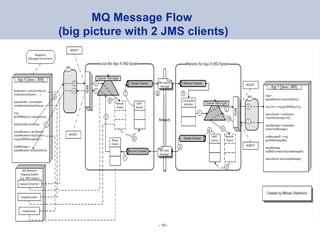
MQ Message Flow  (big picture with 2 JMS clients)
Queue Manager The focal point of an MQ system is a Queue Manager (MQM or QM).  The QM provides messaging services to outside applications (clients) via Message Queue Interface (MQI).  Libraries exist for C, COBOL, PL/I, Java,  System 390 Assembler, Tandem, Visual Basic,  Java (via JMS) MQM performs the following tasks: Controls access/routing to queues (MQI’s put / get) Provide administration services to MQ System (objects delete, create) Serves as transaction (syncpoint) coordinator for all queue operations Local clients (running on the same physical machine as the target QM) communicate with QM via "binding-mode" connections; remote clients use "client-mode" connection links (authentication is required)
Queue Types Local Queue  - a queue defined under the QM Remote Queue  - definition of a queue hosted by a different QM Transmission Queue - a local [staging] queue used for messages destined to a remote queue (used by sender channel’s agent) Alias Queue  - helps to make name changes of physical queues transparent to users Dead-Letter Queue - "Addressee Not Known"; one per QM
The MQ Message MQ messages consist of: Header (MQMD) User Data (payload) Message properties: Destination Queue (used by the Queue Manager for routing) Reply Queue name (where to reply to, if at all) Time-to-live (message expiry time) Format (text, binary) Correlation ID (to help sender find the response) Persistence Addition and removal of messages to/from queues is atomic (is handled by Queue Manager as a single unit of work)  If an application wants to have more than 1 message to be treated as a unit of work, than it itself will be responsible for starting this transaction.
Channels Communication between queue managers is done via channels. A channel provides uni-directional communication link; a second channel is required to return data.  The names of the of both (sender and receiver) channels must be the same. Main types of message channels: Sender  - initiates connection to the receiver and acts as the "transaction coordinator" Receiver  – the listener counterpart on the remote QM A sending channel has a defined destination on the remote QM and is linked with a specific transmission queue to hold in-flight messages Message Channels are implemented by programs called  Message Channel Agents (MCA)
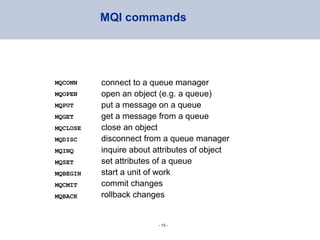
MQI commands MQCONN  MQOPEN MQPUT  MQGET MQCLOSE MQDISC MQINQ MQSET MQBEGIN MQCMIT MQBACK connect to a queue manager open an object (e.g. a queue) put a message on a queue get a message from a queue close an object disconnect from a queue manager inquire about attributes of object set attributes of a queue start a unit of work commit changes rollback changes
Command line interface Show QMs on the system: $ dspmq QMNAME(QM2)  STATUS(Ended immediately) QMNAME(WBRK61_DEFAULT_QUEUE_MANAGER)  STATUS(Running) ------------------------------------------------- Start/stop QM $ strmqm <QMName> / endmqm –i <QMName>
MQSC command line processor runmqsc [QMGR name if not default] –  invoke command line processor dis queue(*)  – show all queues dis ql(*)   - show all local queues dis qr(*) - remote queues There is a great deal of commands for creating/defining MQ objects (queues, channels, etc.), manipulating their state (stop/start) as well as inquiring about their statuses
MQSC command line processor   (cont’d) DISPLAY  CHSTATUS ('UX.TO.WIN.CHA01') START  CHANNEL('UX.TO.WIN.CHA01') DISPLAY  QUEUE(LAB.IN)  CURDEPTH   //#of msg in queue // Local name definition (creation) DEFINE  QLOCAL  (ORANGE.LOCAL.QUEUE) [USAGE (NORMAL)] // not an xmit queue // Remote queue definition (creation) DEFINE  QREMOTE (LOCAL.QUEUE.NAME.HERE)  RNAME (LOCAL.QUEUE.NAME.THERE) RQMNAME(QM2)  XMITQ (MY.XMITQ)
UI-based Tools: MQ Explorer Browser is Eclipse-based for MQ 6+, previously, on Windows it was Windows Management Console (mmc) – based amqsput  LAB.IN WBRK61_DEFAULT_QUEUE_MANAGER Your message comes here, enter to continue next line Control+C to finish ^C 1 2 3
Queue length (depth) threshold check points

WebSphere MQ introduction

  • 1.
    WebSphereMQ Introduction Presented by Mikhail Vladimirov (Leximera, Inc. http://www.leximera.com)
  • 2.
    A bit ofhistory IBM WebSphere MQ product was first released in 1992 and was previously known as MQSeries; re-branded to WebSphere MQ in 2002 to join the WebSphere product line. Normally is referred to simply as “MQ”.
  • 3.
    To see thetechnology proposition of MQ, let’s review an example of EAI (Enterprise application integration) technology
  • 4.
  • 5.
    Limitations of FTPas an EAI service FTP transfer is not recoverable. If the Server or Client goes down, the in-flight transfer will have to be re-run (manually or by means of a custom script) FTP is not transactional FTP does simple point-to-point transfer with no routing support No clustering support Note: MQ has a File Transfer facility and it can be used to implement reliable delivery of large files as a substitute for FTP (e.g. MQ 5.3 works with data up to 100M)
  • 6.
    Other integration technologiesWhat about CORBA, DCOM, RMI, Web Services, … , XMPP PubSub?
  • 7.
    Enter the MQWorld MQ is an IBM’s Message Oriented Middleware (MOM) offering in the Enterprise area that provides the universal messaging backbone across 80 different platforms. Competition: TIBCO Oracle Microsoft Progress
  • 8.
    MQ messaging benefitsReliable cross-platform communication: you can add message persistence for mission critical business applications Asynchronous communication mode (one-way or a “request | wait for | response on a reply [call-back] queue” pattern) that provides a mechanism for building non-time-dependent architecture Transaction support: MQ can be enlisted in an XA compliant (2PC) transaction as either a transaction coordinator or resource manager Application location transparency Request routing Spiky message traffic absorption
  • 9.
  • 10.
    MQ Message Flow (big picture with 2 JMS clients)
  • 11.
    Queue Manager Thefocal point of an MQ system is a Queue Manager (MQM or QM). The QM provides messaging services to outside applications (clients) via Message Queue Interface (MQI). Libraries exist for C, COBOL, PL/I, Java, System 390 Assembler, Tandem, Visual Basic, Java (via JMS) MQM performs the following tasks: Controls access/routing to queues (MQI’s put / get) Provide administration services to MQ System (objects delete, create) Serves as transaction (syncpoint) coordinator for all queue operations Local clients (running on the same physical machine as the target QM) communicate with QM via &quot;binding-mode&quot; connections; remote clients use &quot;client-mode&quot; connection links (authentication is required)
  • 12.
    Queue Types LocalQueue - a queue defined under the QM Remote Queue - definition of a queue hosted by a different QM Transmission Queue - a local [staging] queue used for messages destined to a remote queue (used by sender channel’s agent) Alias Queue - helps to make name changes of physical queues transparent to users Dead-Letter Queue - &quot;Addressee Not Known&quot;; one per QM
  • 13.
    The MQ MessageMQ messages consist of: Header (MQMD) User Data (payload) Message properties: Destination Queue (used by the Queue Manager for routing) Reply Queue name (where to reply to, if at all) Time-to-live (message expiry time) Format (text, binary) Correlation ID (to help sender find the response) Persistence Addition and removal of messages to/from queues is atomic (is handled by Queue Manager as a single unit of work) If an application wants to have more than 1 message to be treated as a unit of work, than it itself will be responsible for starting this transaction.
  • 14.
    Channels Communication betweenqueue managers is done via channels. A channel provides uni-directional communication link; a second channel is required to return data. The names of the of both (sender and receiver) channels must be the same. Main types of message channels: Sender - initiates connection to the receiver and acts as the &quot;transaction coordinator&quot; Receiver – the listener counterpart on the remote QM A sending channel has a defined destination on the remote QM and is linked with a specific transmission queue to hold in-flight messages Message Channels are implemented by programs called Message Channel Agents (MCA)
  • 15.
    MQI commands MQCONN MQOPEN MQPUT MQGET MQCLOSE MQDISC MQINQ MQSET MQBEGIN MQCMIT MQBACK connect to a queue manager open an object (e.g. a queue) put a message on a queue get a message from a queue close an object disconnect from a queue manager inquire about attributes of object set attributes of a queue start a unit of work commit changes rollback changes
  • 16.
    Command line interfaceShow QMs on the system: $ dspmq QMNAME(QM2) STATUS(Ended immediately) QMNAME(WBRK61_DEFAULT_QUEUE_MANAGER) STATUS(Running) ------------------------------------------------- Start/stop QM $ strmqm <QMName> / endmqm –i <QMName>
  • 17.
    MQSC command lineprocessor runmqsc [QMGR name if not default] – invoke command line processor dis queue(*) – show all queues dis ql(*) - show all local queues dis qr(*) - remote queues There is a great deal of commands for creating/defining MQ objects (queues, channels, etc.), manipulating their state (stop/start) as well as inquiring about their statuses
  • 18.
    MQSC command lineprocessor (cont’d) DISPLAY CHSTATUS ('UX.TO.WIN.CHA01') START CHANNEL('UX.TO.WIN.CHA01') DISPLAY QUEUE(LAB.IN) CURDEPTH //#of msg in queue // Local name definition (creation) DEFINE QLOCAL (ORANGE.LOCAL.QUEUE) [USAGE (NORMAL)] // not an xmit queue // Remote queue definition (creation) DEFINE QREMOTE (LOCAL.QUEUE.NAME.HERE) RNAME (LOCAL.QUEUE.NAME.THERE) RQMNAME(QM2) XMITQ (MY.XMITQ)
  • 19.
    UI-based Tools: MQExplorer Browser is Eclipse-based for MQ 6+, previously, on Windows it was Windows Management Console (mmc) – based amqsput LAB.IN WBRK61_DEFAULT_QUEUE_MANAGER Your message comes here, enter to continue next line Control+C to finish ^C 1 2 3
  • 20.
    Queue length (depth)threshold check points