IBM WebSphere Application Server
traditional and Docker
David Currie | david_currie@uk.ibm.com | @dcurrie
Tom Banks | tom.banks@uk.ibm.com | @tomwillbanks
Agenda
• Overview of Docker
• Docker and IBM
• WebSphere Application Server traditional and Docker
Overview of Docker
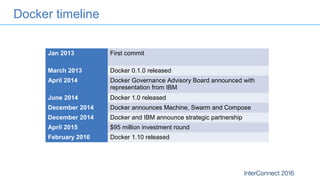
Docker timeline
Jan 2013 First commit
March 2013 Docker 0.1.0 released
April 2014 Docker Governance Advisory Board announced with
representation from IBM
June 2014 Docker 1.0 released
December 2014 Docker announces Machine, Swarm and Compose
December 2014 Docker and IBM announce strategic partnership
April 2015 $95 million investment round
February 2016 Docker 1.10 released
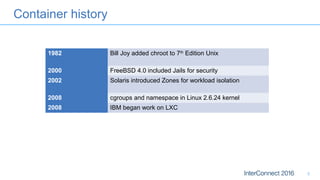
Container history
5
1982 Bill Joy added chroot to 7th
Edition Unix
2000 FreeBSD 4.0 included Jails for security
2002 Solaris introduced Zones for workload isolation
2008 cgroups and namespace in Linux 2.6.24 kernel
2008 IBM began work on LXC
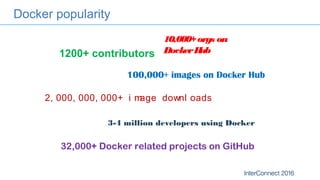
Docker popularity
1200+ contributors
100,000+ images on Docker Hub
3-4 million developers using Docker
2, 000, 000, 000+ i mage downl oads
32,000+ Docker related projects on GitHub
10,000+orgs on
DockerHub
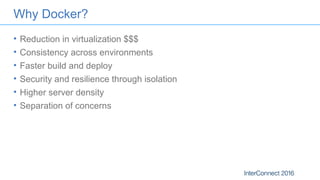
Why Docker?
• Reduction in virtualization $$$
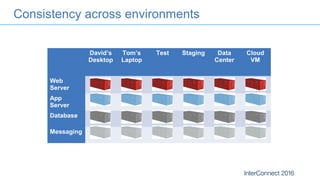
• Consistency across environments
• Faster build and deploy
• Security and resilience through isolation
• Higher server density
• Separation of concerns
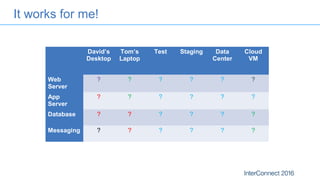
It works for me!
David’s
Desktop
Tom’s
Laptop
Test Staging Data
Center
Cloud
VM
Web
Server
? ? ? ? ? ?
App
Server
? ? ? ? ? ?
Database ? ? ? ? ? ?
Messaging ? ? ? ? ? ?
Consistency across environments
David’s
Desktop
Tom’s
Laptop
Test Staging Data
Center
Cloud
VM
Web
Server
App
Server
Database
Messaging
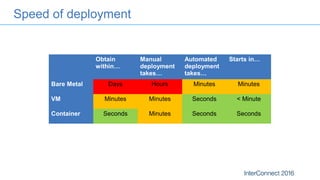
Speed of deployment
Obtain
within…
Manual
deployment
takes…
Automated
deployment
takes…
Starts in…
Bare Metal Days Hours Minutes Minutes
VM Minutes Minutes Seconds < Minute
Container Seconds Minutes Seconds Seconds
Building Docker images
• Dockerfile: build script that defines:
– an existing image as the starting point
– a set of instructions to augment that image
– meta-data such as the ports exposed
– the command to execute when the image is run
FROM ubuntu:14.04
RUN … # download and install JRE
RUN … # download and install Liberty
EXPOSE 9080 9443
CMD ["server", "run“]
COPY app.war /config/dropins
• Docker build executes the build script creating a layer in the file system for each
instruction and saving the resultant image in a local registry
– docker build -t app .
• Layers are cached and only rebuilt when needed
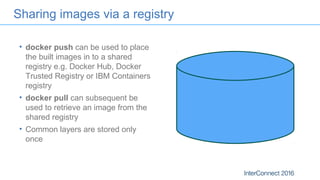
Sharing images via a registry
• docker push can be used to place
the built images in to a shared
registry e.g. Docker Hub, Docker
Trusted Registry or IBM Containers
registry
• docker pull can subsequent be
used to retrieve an image from the
shared registry
• Common layers are stored only
once
Running a Docker image
• docker run creates a running instance of an image: a container
– Mounts the layers in the image read-only plus a read-write layer for the container
– Defines Linux namespaces for process, the network stack and filesystem
– Executes the command defines in the image meta-data as a process isolated via those
namespaces
• Ability to restrict resource usage (CPU and memory) through Linux control groups
• Dependency only on Kernel APIs gives portability across Linux distributions
• Consistent management and monitoring APIs across disparate container content
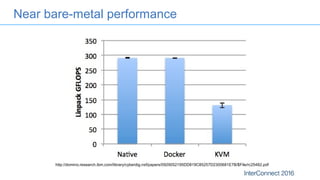
Near bare-metal performance
http://domino.research.ibm.com/library/cyberdig.nsf/papers/0929052195DD819C85257D2300681E7B/$File/rc25482.pdf
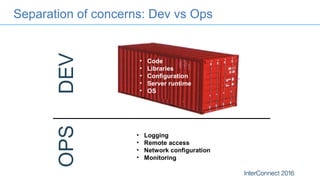
Separation of concerns: Dev vs Ops
DEVOPS
• Code
• Libraries
• Configuration
• Server runtime
• OS
• Logging
• Remote access
• Network configuration
• Monitoring
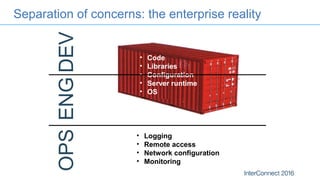
Separation of concerns: the enterprise reality
• Code
• Libraries
• Configuration
• Server runtime
• OS
DEVOPSENG
• Logging
• Remote access
• Network configuration
• Monitoring
Docker and IBM
Docker and IBM
• Committed to open governance
– Docker Governance Advisory Board (https://docs.docker.com/opensource/governance/)
– Open Container Initiative (https://www.opencontainers.org/)
– Cloud Native Computing Foundation (https://cncf.io/)
• Contributors on Docker projects
• Strategic partnership with Docker (https://www.docker.com/IBM)
– IBM will deliver Docker Trusted Registry as an on-premise solution
– IBM will provide L1 and L2 support for Docker
• Docker ports to Linux on Power and System z
– http://www.ibm.com/developerworks/linux/linux390/docker.html
– https://www.ibm.com/developerworks/library/d-docker-on-power-linux-platform/
• Exploitation by IBM products and services
IBM Container Runtime on Bluemix
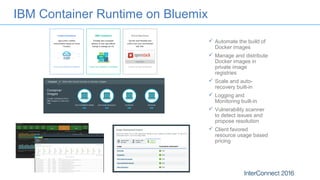
 Automate the build of
Docker images
 Manage and distribute
Docker images in
private image
registries
 Scale and auto-
recovery built-in
 Logging and
Monitoring built-in
 Vulnerability scanner
to detect issues and
propose resolution
 Client favored
resource usage based
pricing
IBM UrbanCode solution for Docker Containers
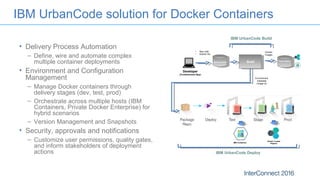
• Delivery Process Automation
– Define, wire and automate complex
multiple container deployments
• Environment and Configuration
Management
– Manage Docker containers through
delivery stages (dev, test, prod)
– Orchestrate across multiple hosts (IBM
Containers, Private Docker Enterprise) for
hybrid scenarios
– Version Management and Snapshots
• Security, approvals and notifications
– Customize user permissions, quality gates,
and inform stakeholders of deployment
actions
Developer
(Containerized App)
Source Control
• App code
• Docker file
Build Image Registry
Docker
Images
Environment
metadata
(image id)
Docker Trusted
RegistryIBM Containers
IBM UrbanCode Deploy
IBM UrbanCode Build
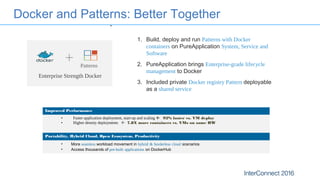
1. Build, deploy and run Patterns with Docker
containers on PureApplication System, Service and
Software
2. PureApplication brings Enterprise-grade lifecycle
management to Docker
3. Included private Docker registry Pattern deployable
as a shared service
+
Enterprise Strength Docker
Improved Performance
• Faster application deployment, start-up and scaling  92% faster vs. VM deploy
• Higher density deployments  7.8X more containers vs. VMs on same HW
Portability, Hybrid Cloud, Open Ecosystem, Productivity
• More seamless workload movement in hybrid & borderless cloud scenarios
• Access thousands of pre-built applications on DockerHub
Docker and Patterns: Better Together
Patterns
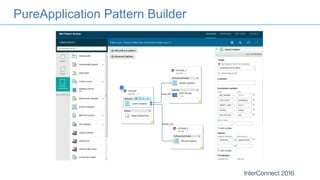
PureApplication Pattern Builder
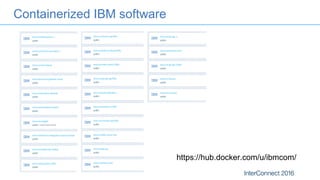
Containerized IBM software
https://hub.docker.com/u/ibmcom/
WebSphere and Docker
WebSphere Application Server Liberty and Docker
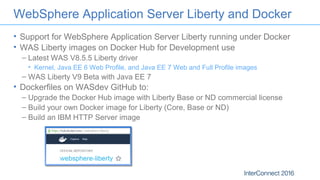
• Support for WebSphere Application Server Liberty running under Docker
• WAS Liberty images on Docker Hub for Development use
– Latest WAS V8.5.5 Liberty driver
• Kernel, Java EE 6 Web Profile, and Java EE 7 Web and Full Profile images
– WAS Liberty V9 Beta with Java EE 7
• Dockerfiles on WASdev GitHub to:
– Upgrade the Docker Hub image with Liberty Base or ND commercial license
– Build your own Docker image for Liberty (Core, Base or ND)
– Build an IBM HTTP Server image
WAS traditional and Docker
• Support for WebSphere Application Server traditional under Docker
• Dockerfiles/scripts on WASdev GitHub to:
– Build an IBM HTTP server image (https://github.com/WASdev/ci.docker.ibm-
http-server)
– Build a WAS traditional images
(https://github.com/WASdev/ci.docker.websphere-traditional) for
• Developer
• Base
• ND
– Deployment manager
– Application server
– Custom node
26
Building a WAS traditional base or developer image
1. Obtain Installation Manager and WAS binaries from Fix Central and
developerWorks or Passport Advantage
2. Host binaries on an HTTP/FTP server
3. Use Dockerfile.prereq to build prereq image
4. Run prereq image to output a TAR file containing the product install
5. Use Dockerfile.install to build install image from TAR file
6. Optionally use Dockerfile.profile to add profile to image
Final image size is around 1.5 GB
27
Docker Quick Start
• Linux – run natively e.g. on Ubuntu
– sudo apt-get install docker.io # From distribution repo
– curl -sSL https://get.docker.com/ubuntu/ | sudo sh
– sudo apt-get install docker-engine # From apt.dockerproject.org/repo
• Windows/Mac
– Docker Toolbox (https://www.docker.com/docker-toolbox)
– Run in VM (based on Tiny Core Linux) under VirtualBox
• Docker Machine (https://github.com/docker/machine)
– Create VM with Docker installed
• docker-machine -d virtualbox dev
• docker-machine -d openstack … test
• docker-machine -d softlayer … prod
– Set environment variables to configure docker CLI to use machine
• eval $(docker-machine env dev)
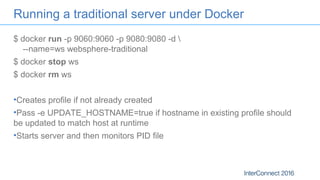
Running a traditional server under Docker
$ docker run -p 9060:9060 -p 9080:9080 -d 
--name=ws websphere-traditional
$ docker stop ws
$ docker rm ws
•Creates profile if not already created
•Pass -e UPDATE_HOSTNAME=true if hostname in existing profile should
be updated to match host at runtime
•Starts server and then monitors PID file
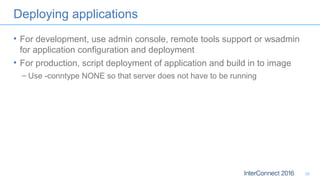
Deploying applications
• For development, use admin console, remote tools support or wsadmin
for application configuration and deployment
• For production, script deployment of application and build in to image
– Use -conntype NONE so that server does not have to be running
30
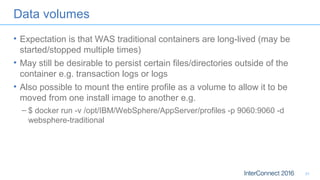
Data volumes
• Expectation is that WAS traditional containers are long-lived (may be
started/stopped multiple times)
• May still be desirable to persist certain files/directories outside of the
container e.g. transaction logs or logs
• Also possible to mount the entire profile as a volume to allow it to be
moved from one install image to another e.g.
– $ docker run -v /opt/IBM/WebSphere/AppServer/profiles -p 9060:9060 -d
websphere-traditional
31
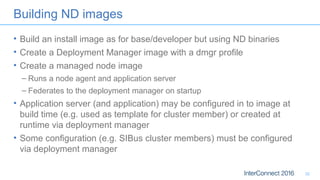
Building ND images
• Build an install image as for base/developer but using ND binaries
• Create a Deployment Manager image with a dmgr profile
• Create a managed node image
– Runs a node agent and application server
– Federates to the deployment manager on startup
• Application server (and application) may be configured in to image at
build time (e.g. used as template for cluster member) or created at
runtime via deployment manager
• Some configuration (e.g. SIBus cluster members) must be configured
via deployment manager
32
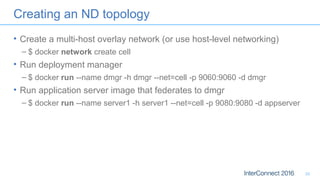
Creating an ND topology
• Create a multi-host overlay network (or use host-level networking)
– $ docker network create cell
• Run deployment manager
– $ docker run --name dmgr -h dmgr --net=cell -p 9060:9060 -d dmgr
• Run application server image that federates to dmgr
– $ docker run --name server1 -h server1 --net=cell -p 9080:9080 -d appserver
33
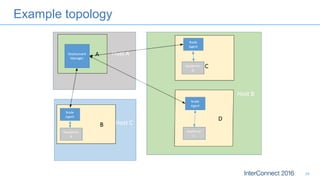
Example topology
34
Summary
• Overview of Docker
• Docker and IBM
• WebSphere Application Server traditional and Docker
Notices and Disclaimers
37
Copyright © 2016 by International Business Machines Corporation (IBM). No part of this document may be reproduced or transmitted in any form without written permission
from IBM.
U.S. Government Users Restricted Rights - Use, duplication or disclosure restricted by GSA ADP Schedule Contract with IBM.
Information in these presentations (including information relating to products that have not yet been announced by IBM) has been reviewed for accuracy as of the date of
initial publication and could include unintentional technical or typographical errors. IBM shall have no responsibility to update this information. THIS DOCUMENT IS
DISTRIBUTED "AS IS" WITHOUT ANY WARRANTY, EITHER EXPRESS OR IMPLIED. IN NO EVENT SHALL IBM BE LIABLE FOR ANY DAMAGE ARISING FROM THE
USE OF THIS INFORMATION, INCLUDING BUT NOT LIMITED TO, LOSS OF DATA, BUSINESS INTERRUPTION, LOSS OF PROFIT OR LOSS OF OPPORTUNITY. IBM
products and services are warranted according to the terms and conditions of the agreements under which they are provided.
Any statements regarding IBM's future direction, intent or product plans are subject to change or withdrawal without notice.
Performance data contained herein was generally obtained in a controlled, isolated environments. Customer examples are presented as illustrations of how those
customers have used IBM products and the results they may have achieved. Actual performance, cost, savings or other results in other operating environments may vary.
References in this document to IBM products, programs, or services does not imply that IBM intends to make such products, programs or services available in all countries
in which IBM operates or does business.
Workshops, sessions and associated materials may have been prepared by independent session speakers, and do not necessarily reflect the views of IBM. All materials
and discussions are provided for informational purposes only, and are neither intended to, nor shall constitute legal or other guidance or advice to any individual participant
or their specific situation.
It is the customer’s responsibility to insure its own compliance with legal requirements and to obtain advice of competent legal counsel as to the identification and
interpretation of any relevant laws and regulatory requirements that may affect the customer’s business and any actions the customer may need to take to comply with such
laws. IBM does not provide legal advice or represent or warrant that its services or products will ensure that the customer is in compliance with any law
Notices and Disclaimers Con’t.
38
Information concerning non-IBM products was obtained from the suppliers of those products, their published announcements or other publicly available sources. IBM has not
tested those products in connection with this publication and cannot confirm the accuracy of performance, compatibility or any other claims related to non-IBM products.
Questions on the capabilities of non-IBM products should be addressed to the suppliers of those products. IBM does not warrant the quality of any third-party products, or the
ability of any such third-party products to interoperate with IBM’s products. IBM EXPRESSLY DISCLAIMS ALL WARRANTIES, EXPRESSED OR IMPLIED, INCLUDING BUT
NOT LIMITED TO, THE IMPLIED WARRANTIES OF MERCHANTABILITY AND FITNESS FOR A PARTICULAR PURPOSE.
The provision of the information contained h erein is not intended to, and does not, grant any right or license under any IBM patents, copyrights, trademarks or other
intellectual property right.
IBM, the IBM logo, ibm.com, Aspera®, Bluemix, Blueworks Live, CICS, Clearcase, Cognos®, DOORS®, Emptoris®, Enterprise Document Management System™, FASP®,
FileNet®, Global Business Services ®, Global Technology Services ®, IBM ExperienceOne™, IBM SmartCloud®, IBM Social Business®, Information on Demand, ILOG,
Maximo®, MQIntegrator®, MQSeries®, Netcool®, OMEGAMON, OpenPower, PureAnalytics™, PureApplication®, pureCluster™, PureCoverage®, PureData®,
PureExperience®, PureFlex®, pureQuery®, pureScale®, PureSystems®, QRadar®, Rational®, Rhapsody®, Smarter Commerce®, SoDA, SPSS, Sterling Commerce®,
StoredIQ, Tealeaf®, Tivoli®, Trusteer®, Unica®, urban{code}®, Watson, WebSphere®, Worklight®, X-Force® and System z® Z/OS, are trademarks of International Business
Machines Corporation, registered in many jurisdictions worldwide. Other product and service names might be trademarks of IBM or other companies. A current list of IBM
trademarks is available on the Web at "Copyright and trademark information" at: www.ibm.com/legal/copytrade.shtml.
Thank You
Your Feedback is Important!
Access the InterConnect 2016 Conference Attendee
Portal to complete your session surveys from your
smartphone,
laptop or conference kiosk.

IBM WebSphere Application Server traditional and Docker

  • 1.
    IBM WebSphere ApplicationServer traditional and Docker David Currie | david_currie@uk.ibm.com | @dcurrie Tom Banks | tom.banks@uk.ibm.com | @tomwillbanks
  • 2.
    Agenda • Overview ofDocker • Docker and IBM • WebSphere Application Server traditional and Docker
  • 3.
  • 4.
    Docker timeline Jan 2013First commit March 2013 Docker 0.1.0 released April 2014 Docker Governance Advisory Board announced with representation from IBM June 2014 Docker 1.0 released December 2014 Docker announces Machine, Swarm and Compose December 2014 Docker and IBM announce strategic partnership April 2015 $95 million investment round February 2016 Docker 1.10 released
  • 5.
    Container history 5 1982 BillJoy added chroot to 7th Edition Unix 2000 FreeBSD 4.0 included Jails for security 2002 Solaris introduced Zones for workload isolation 2008 cgroups and namespace in Linux 2.6.24 kernel 2008 IBM began work on LXC
  • 6.
    Docker popularity 1200+ contributors 100,000+images on Docker Hub 3-4 million developers using Docker 2, 000, 000, 000+ i mage downl oads 32,000+ Docker related projects on GitHub 10,000+orgs on DockerHub
  • 7.
    Why Docker? • Reductionin virtualization $$$ • Consistency across environments • Faster build and deploy • Security and resilience through isolation • Higher server density • Separation of concerns
  • 8.
    It works forme! David’s Desktop Tom’s Laptop Test Staging Data Center Cloud VM Web Server ? ? ? ? ? ? App Server ? ? ? ? ? ? Database ? ? ? ? ? ? Messaging ? ? ? ? ? ?
  • 9.
    Consistency across environments David’s Desktop Tom’s Laptop TestStaging Data Center Cloud VM Web Server App Server Database Messaging
  • 10.
    Speed of deployment Obtain within… Manual deployment takes… Automated deployment takes… Startsin… Bare Metal Days Hours Minutes Minutes VM Minutes Minutes Seconds < Minute Container Seconds Minutes Seconds Seconds
  • 11.
    Building Docker images •Dockerfile: build script that defines: – an existing image as the starting point – a set of instructions to augment that image – meta-data such as the ports exposed – the command to execute when the image is run FROM ubuntu:14.04 RUN … # download and install JRE RUN … # download and install Liberty EXPOSE 9080 9443 CMD ["server", "run“] COPY app.war /config/dropins • Docker build executes the build script creating a layer in the file system for each instruction and saving the resultant image in a local registry – docker build -t app . • Layers are cached and only rebuilt when needed
  • 12.
    Sharing images viaa registry • docker push can be used to place the built images in to a shared registry e.g. Docker Hub, Docker Trusted Registry or IBM Containers registry • docker pull can subsequent be used to retrieve an image from the shared registry • Common layers are stored only once
  • 13.
    Running a Dockerimage • docker run creates a running instance of an image: a container – Mounts the layers in the image read-only plus a read-write layer for the container – Defines Linux namespaces for process, the network stack and filesystem – Executes the command defines in the image meta-data as a process isolated via those namespaces • Ability to restrict resource usage (CPU and memory) through Linux control groups • Dependency only on Kernel APIs gives portability across Linux distributions • Consistent management and monitoring APIs across disparate container content
  • 14.
  • 15.
    Separation of concerns:Dev vs Ops DEVOPS • Code • Libraries • Configuration • Server runtime • OS • Logging • Remote access • Network configuration • Monitoring
  • 16.
    Separation of concerns:the enterprise reality • Code • Libraries • Configuration • Server runtime • OS DEVOPSENG • Logging • Remote access • Network configuration • Monitoring
  • 17.
  • 18.
    Docker and IBM •Committed to open governance – Docker Governance Advisory Board (https://docs.docker.com/opensource/governance/) – Open Container Initiative (https://www.opencontainers.org/) – Cloud Native Computing Foundation (https://cncf.io/) • Contributors on Docker projects • Strategic partnership with Docker (https://www.docker.com/IBM) – IBM will deliver Docker Trusted Registry as an on-premise solution – IBM will provide L1 and L2 support for Docker • Docker ports to Linux on Power and System z – http://www.ibm.com/developerworks/linux/linux390/docker.html – https://www.ibm.com/developerworks/library/d-docker-on-power-linux-platform/ • Exploitation by IBM products and services
  • 19.
    IBM Container Runtimeon Bluemix  Automate the build of Docker images  Manage and distribute Docker images in private image registries  Scale and auto- recovery built-in  Logging and Monitoring built-in  Vulnerability scanner to detect issues and propose resolution  Client favored resource usage based pricing
  • 20.
    IBM UrbanCode solutionfor Docker Containers • Delivery Process Automation – Define, wire and automate complex multiple container deployments • Environment and Configuration Management – Manage Docker containers through delivery stages (dev, test, prod) – Orchestrate across multiple hosts (IBM Containers, Private Docker Enterprise) for hybrid scenarios – Version Management and Snapshots • Security, approvals and notifications – Customize user permissions, quality gates, and inform stakeholders of deployment actions Developer (Containerized App) Source Control • App code • Docker file Build Image Registry Docker Images Environment metadata (image id) Docker Trusted RegistryIBM Containers IBM UrbanCode Deploy IBM UrbanCode Build
  • 21.
    1. Build, deployand run Patterns with Docker containers on PureApplication System, Service and Software 2. PureApplication brings Enterprise-grade lifecycle management to Docker 3. Included private Docker registry Pattern deployable as a shared service + Enterprise Strength Docker Improved Performance • Faster application deployment, start-up and scaling  92% faster vs. VM deploy • Higher density deployments  7.8X more containers vs. VMs on same HW Portability, Hybrid Cloud, Open Ecosystem, Productivity • More seamless workload movement in hybrid & borderless cloud scenarios • Access thousands of pre-built applications on DockerHub Docker and Patterns: Better Together Patterns
  • 22.
  • 23.
  • 24.
  • 25.
    WebSphere Application ServerLiberty and Docker • Support for WebSphere Application Server Liberty running under Docker • WAS Liberty images on Docker Hub for Development use – Latest WAS V8.5.5 Liberty driver • Kernel, Java EE 6 Web Profile, and Java EE 7 Web and Full Profile images – WAS Liberty V9 Beta with Java EE 7 • Dockerfiles on WASdev GitHub to: – Upgrade the Docker Hub image with Liberty Base or ND commercial license – Build your own Docker image for Liberty (Core, Base or ND) – Build an IBM HTTP Server image
  • 26.
    WAS traditional andDocker • Support for WebSphere Application Server traditional under Docker • Dockerfiles/scripts on WASdev GitHub to: – Build an IBM HTTP server image (https://github.com/WASdev/ci.docker.ibm- http-server) – Build a WAS traditional images (https://github.com/WASdev/ci.docker.websphere-traditional) for • Developer • Base • ND – Deployment manager – Application server – Custom node 26
  • 27.
    Building a WAStraditional base or developer image 1. Obtain Installation Manager and WAS binaries from Fix Central and developerWorks or Passport Advantage 2. Host binaries on an HTTP/FTP server 3. Use Dockerfile.prereq to build prereq image 4. Run prereq image to output a TAR file containing the product install 5. Use Dockerfile.install to build install image from TAR file 6. Optionally use Dockerfile.profile to add profile to image Final image size is around 1.5 GB 27
  • 28.
    Docker Quick Start •Linux – run natively e.g. on Ubuntu – sudo apt-get install docker.io # From distribution repo – curl -sSL https://get.docker.com/ubuntu/ | sudo sh – sudo apt-get install docker-engine # From apt.dockerproject.org/repo • Windows/Mac – Docker Toolbox (https://www.docker.com/docker-toolbox) – Run in VM (based on Tiny Core Linux) under VirtualBox • Docker Machine (https://github.com/docker/machine) – Create VM with Docker installed • docker-machine -d virtualbox dev • docker-machine -d openstack … test • docker-machine -d softlayer … prod – Set environment variables to configure docker CLI to use machine • eval $(docker-machine env dev)
  • 29.
    Running a traditionalserver under Docker $ docker run -p 9060:9060 -p 9080:9080 -d --name=ws websphere-traditional $ docker stop ws $ docker rm ws •Creates profile if not already created •Pass -e UPDATE_HOSTNAME=true if hostname in existing profile should be updated to match host at runtime •Starts server and then monitors PID file
  • 30.
    Deploying applications • Fordevelopment, use admin console, remote tools support or wsadmin for application configuration and deployment • For production, script deployment of application and build in to image – Use -conntype NONE so that server does not have to be running 30
  • 31.
    Data volumes • Expectationis that WAS traditional containers are long-lived (may be started/stopped multiple times) • May still be desirable to persist certain files/directories outside of the container e.g. transaction logs or logs • Also possible to mount the entire profile as a volume to allow it to be moved from one install image to another e.g. – $ docker run -v /opt/IBM/WebSphere/AppServer/profiles -p 9060:9060 -d websphere-traditional 31
  • 32.
    Building ND images •Build an install image as for base/developer but using ND binaries • Create a Deployment Manager image with a dmgr profile • Create a managed node image – Runs a node agent and application server – Federates to the deployment manager on startup • Application server (and application) may be configured in to image at build time (e.g. used as template for cluster member) or created at runtime via deployment manager • Some configuration (e.g. SIBus cluster members) must be configured via deployment manager 32
  • 33.
    Creating an NDtopology • Create a multi-host overlay network (or use host-level networking) – $ docker network create cell • Run deployment manager – $ docker run --name dmgr -h dmgr --net=cell -p 9060:9060 -d dmgr • Run application server image that federates to dmgr – $ docker run --name server1 -h server1 --net=cell -p 9080:9080 -d appserver 33
  • 34.
  • 36.
    Summary • Overview ofDocker • Docker and IBM • WebSphere Application Server traditional and Docker
  • 37.
    Notices and Disclaimers 37 Copyright© 2016 by International Business Machines Corporation (IBM). No part of this document may be reproduced or transmitted in any form without written permission from IBM. U.S. Government Users Restricted Rights - Use, duplication or disclosure restricted by GSA ADP Schedule Contract with IBM. Information in these presentations (including information relating to products that have not yet been announced by IBM) has been reviewed for accuracy as of the date of initial publication and could include unintentional technical or typographical errors. IBM shall have no responsibility to update this information. THIS DOCUMENT IS DISTRIBUTED "AS IS" WITHOUT ANY WARRANTY, EITHER EXPRESS OR IMPLIED. IN NO EVENT SHALL IBM BE LIABLE FOR ANY DAMAGE ARISING FROM THE USE OF THIS INFORMATION, INCLUDING BUT NOT LIMITED TO, LOSS OF DATA, BUSINESS INTERRUPTION, LOSS OF PROFIT OR LOSS OF OPPORTUNITY. IBM products and services are warranted according to the terms and conditions of the agreements under which they are provided. Any statements regarding IBM's future direction, intent or product plans are subject to change or withdrawal without notice. Performance data contained herein was generally obtained in a controlled, isolated environments. Customer examples are presented as illustrations of how those customers have used IBM products and the results they may have achieved. Actual performance, cost, savings or other results in other operating environments may vary. References in this document to IBM products, programs, or services does not imply that IBM intends to make such products, programs or services available in all countries in which IBM operates or does business. Workshops, sessions and associated materials may have been prepared by independent session speakers, and do not necessarily reflect the views of IBM. All materials and discussions are provided for informational purposes only, and are neither intended to, nor shall constitute legal or other guidance or advice to any individual participant or their specific situation. It is the customer’s responsibility to insure its own compliance with legal requirements and to obtain advice of competent legal counsel as to the identification and interpretation of any relevant laws and regulatory requirements that may affect the customer’s business and any actions the customer may need to take to comply with such laws. IBM does not provide legal advice or represent or warrant that its services or products will ensure that the customer is in compliance with any law
  • 38.
    Notices and DisclaimersCon’t. 38 Information concerning non-IBM products was obtained from the suppliers of those products, their published announcements or other publicly available sources. IBM has not tested those products in connection with this publication and cannot confirm the accuracy of performance, compatibility or any other claims related to non-IBM products. Questions on the capabilities of non-IBM products should be addressed to the suppliers of those products. IBM does not warrant the quality of any third-party products, or the ability of any such third-party products to interoperate with IBM’s products. IBM EXPRESSLY DISCLAIMS ALL WARRANTIES, EXPRESSED OR IMPLIED, INCLUDING BUT NOT LIMITED TO, THE IMPLIED WARRANTIES OF MERCHANTABILITY AND FITNESS FOR A PARTICULAR PURPOSE. The provision of the information contained h erein is not intended to, and does not, grant any right or license under any IBM patents, copyrights, trademarks or other intellectual property right. IBM, the IBM logo, ibm.com, Aspera®, Bluemix, Blueworks Live, CICS, Clearcase, Cognos®, DOORS®, Emptoris®, Enterprise Document Management System™, FASP®, FileNet®, Global Business Services ®, Global Technology Services ®, IBM ExperienceOne™, IBM SmartCloud®, IBM Social Business®, Information on Demand, ILOG, Maximo®, MQIntegrator®, MQSeries®, Netcool®, OMEGAMON, OpenPower, PureAnalytics™, PureApplication®, pureCluster™, PureCoverage®, PureData®, PureExperience®, PureFlex®, pureQuery®, pureScale®, PureSystems®, QRadar®, Rational®, Rhapsody®, Smarter Commerce®, SoDA, SPSS, Sterling Commerce®, StoredIQ, Tealeaf®, Tivoli®, Trusteer®, Unica®, urban{code}®, Watson, WebSphere®, Worklight®, X-Force® and System z® Z/OS, are trademarks of International Business Machines Corporation, registered in many jurisdictions worldwide. Other product and service names might be trademarks of IBM or other companies. A current list of IBM trademarks is available on the Web at "Copyright and trademark information" at: www.ibm.com/legal/copytrade.shtml.
  • 39.
    Thank You Your Feedbackis Important! Access the InterConnect 2016 Conference Attendee Portal to complete your session surveys from your smartphone, laptop or conference kiosk.