MongoDB Indexing and Query Optimizer Details Antoine Girbal Mongo FR March 23, 2011
What will we cover? Many details of how indexing and the query optimizer work
A full understanding of these details is not required to use mongo, but this knowledge can be helpful when making optimizations.
We’ll discuss functionality of Mongo 1.8 (for our purposes pretty similar to 1.6 and almost identical to 1.7 edge).
Much of the material will be presented through examples.
Diagrams are to aid understanding – some details will be left out.
Btree (conceptual diagram) 1 2 3 4 5 6 7 8 9 {_id:4,x:6}
Find One Document db.c.find( {x:6} ).limit( 1 )
Index {x:1}
Find One Document 1 2 3 4 5 6 7 8 9 6 ? {_id:4,x:6}
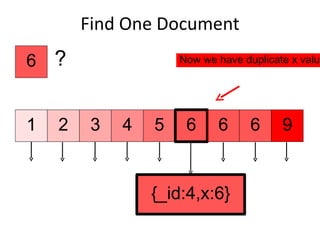
Find One Document > db.c.find( {x:6} ).limit( 1 ).explain() { "cursor" : "BtreeCursor x_1", "nscanned" : 1, "nscannedObjects" : 1, "n" : 1, "millis" : 1, "nYields" : 0, "nChunkSkips" : 0, "isMultiKey" : false, "indexOnly" : false, "indexBounds" : { "x" : [ [ 6, 6 ] ] } } Uses a btree cursor to find the object. Index ranges are around a single value.
Find One Document 1 2 3 4 5 6 7 8 9 6 ? {_id:4,x:6}
Find One Document 1 2 3 4 5 6 6 6 9 6 ? {_id:4,x:6} Now we have duplicate x values
Find One Document 1 2 3 4 5 6 6 6 9 6 ? {_id:4,x:6}
Equality Match db.c.find( {x:6} )
Index {x:1}
Several documents to be returned
Equality Match 9 1 2 3 4 5 6 6 6 6 ? {_id:4,x:6} {_id:5,x:6} {_id:1,x:6}
Equality Match > db.c.find( {x:6} ).explain() { "cursor" : "BtreeCursor x_1", "nscanned" : 3, "nscannedObjects" : 3, "n" : 3, "millis" : 1, "nYields" : 0, "nChunkSkips" : 0, "isMultiKey" : false, "indexOnly" : false, "indexBounds" : { "x" : [ [ 6, 6 ] ] } }
Equality Match 1 2 3 4 5 6 6 6 9 6 ?
Full Document Matcher db.c.find( {x:6,y:1} )
Index {x:1}
Object content needs to be checked
Full Document Matcher 9 1 2 3 4 5 6 6 6 6 ? {y:4,x:6} {y:5,x:6} {y:1,x:6}
Full Document Matcher > db.c.find( {x:6,y:1} ).explain() { "cursor" : "BtreeCursor x_1", "nscanned" : 3, "nscannedObjects" : 3, "n" : 1, "millis" : 1, "nYields" : 0, "nChunkSkips" : 0, "isMultiKey" : false, "indexOnly" : false, "indexBounds" : { "x" : [ [ 6, 6 ] ] } } Documents for all matching index keys are scanned, but only one document matched on non index keys.
Range Match db.c.find( {x:{$gte:4,$lte:7}} )
Index {x:1}
Range Match 8 1 2 3 4 5 6 7 9 4 <= ? <= 7
Range Match > db.c.find( {x:{$gte:4,$lte:7}} ).explain() { &quot;cursor&quot; : &quot;BtreeCursor x_1&quot;, &quot;nscanned&quot; : 4, &quot;nscannedObjects&quot; : 4, &quot;n&quot; : 4, &quot;millis&quot; : 1, &quot;nYields&quot; : 0, &quot;nChunkSkips&quot; : 0, &quot;isMultiKey&quot; : false, &quot;indexOnly&quot; : false, &quot;indexBounds&quot; : { &quot;x&quot; : [ [ 4, 7 ] ] } }
Range Match 1 2 3 4 5 6 7 8 9
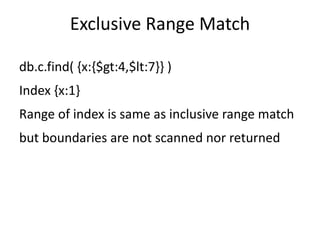
Exclusive Range Match db.c.find( {x:{$gt:4,$lt:7}} )
Index {x:1}
Range of index is same as inclusive range match
but boundaries are not scanned nor returned
Multikeys db.c.find( {x:{$gt:7}} )
Index {x:1}
documents contain lists with several values like [8,9].
Multikeys 1 2 3 4 5 6 7 9 ? > 7 {_id:4,x:[8,9]} 8
Multikeys > db.c.find( {x:{$gt:7}} ).explain() { &quot;cursor&quot; : &quot;BtreeCursor x_1&quot;, &quot;nscanned&quot; : 2, &quot;nscannedObjects&quot; : 2, &quot;n&quot; : 1, &quot;millis&quot; : 1, &quot;nYields&quot; : 0, &quot;nChunkSkips&quot; : 0, &quot;isMultiKey&quot; : true, &quot;indexOnly&quot; : false, &quot;indexBounds&quot; : { &quot;x&quot; : [ [ 7, 1.7976931348623157e+308 ] ] } } All keys in valid range are scanned, but the matcher rejects duplicate documents making n == 1.
Multikeys 1 2 3 4 5 6 7 8 9
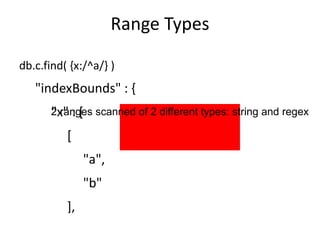
Range Types Explicit inequality db.c.find( {x:{$gt:4,$lt:7}} )
db.c.find( {x:{$gt:4}} )
db.c.find( {x:{$ne:4}} ) Regular expression prefix db.c.find( {x:/^a/} ) Data type db.c.find( {x:/a/} )
Range Types db.c.find( {x:/^a/} ) &quot;indexBounds&quot; : { &quot;x&quot; : [ [ &quot;a&quot;, &quot;b&quot; ], [ /^a/, /^a/ ] ] } 2 ranges scanned of 2 different types: string and regex
Range Types db.c.find( {x:/a/} ) &quot;indexBounds&quot; : { &quot;x&quot; : [ [ &quot;&quot;, { } ], [ /a/, /a/ ] ] } Here the index only helps to restrict type, not efficient in practice
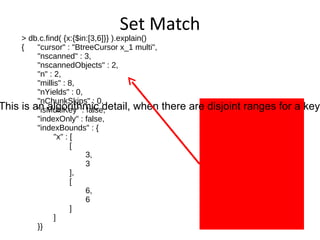
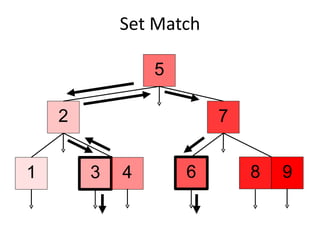
Set Match db.c.find( {x:{$in:[3,6]}} )
Index {x:1}
Set Match 8 1 2 3 4 5 6 7 9 3 , 6
Set Match > db.c.find( {x:{$in:[3,6]}} ).explain() { &quot;cursor&quot; : &quot;BtreeCursor x_1 multi&quot;, &quot;nscanned&quot; : 3, &quot;nscannedObjects&quot; : 2, &quot;n&quot; : 2, &quot;millis&quot; : 8, &quot;nYields&quot; : 0, &quot;nChunkSkips&quot; : 0, &quot;isMultiKey&quot; : false, &quot;indexOnly&quot; : false, &quot;indexBounds&quot; : { &quot;x&quot; : [ [ 3, 3 ], [ 6, 6 ] ] }} Why is nscanned 3?  This is an algorithmic detail, when there are disjoint ranges for a key nscanned may be higher than the number of matching keys.
Set Match 1 2 3 4 5 6 7 8 9
All Match db.c.find( {x:{$all:[3,6]}} )
Index {x:1}
All Match 8 1 2 3 4 5 6 7 9 3 ? {_id:4,x:[3,6]}
All Match > db.c.find( {x:{$all:[3,6]}} ).explain() { &quot;cursor&quot; : &quot;BtreeCursor x_1&quot;, &quot;nscanned&quot; : 1, &quot;nscannedObjects&quot; : 1, &quot;n&quot; : 1, &quot;millis&quot; : 0, &quot;nYields&quot; : 0, &quot;nChunkSkips&quot; : 0, &quot;isMultiKey&quot; : true, &quot;indexOnly&quot; : false, &quot;indexBounds&quot; : { &quot;x&quot; : [ [ 3, 3 ] ] } } The first entry in the $all match array is always used for index bounds.  Note this may not be the least numerous indexed value in the $all array.
All Match 1 2 3 4 5 6 7 8 9
Limit db.c.find( {x:{$lt:6},y:3} ).limit( 3 )
Index {x:1}
Limit 8 1 2 3 4 5 6 7 9 6 ? < y:3 y:1 y:3 y:3 y:3
Limit > db.c.find( {x:{$lt:6},y:3} ).limit( 3 ).explain() { &quot;cursor&quot; : &quot;BtreeCursor x_1&quot;, &quot;nscanned&quot; : 4, &quot;nscannedObjects&quot; : 4, &quot;n&quot; : 3, &quot;millis&quot; : 1, &quot;nYields&quot; : 0, &quot;nChunkSkips&quot; : 0, &quot;isMultiKey&quot; : true, &quot;indexOnly&quot; : false, &quot;indexBounds&quot; : { &quot;x&quot; : [ [ -1.7976931348623157e+308, 6 ] ] } } Scan until three matches are found, then stop.
Skip db.c.find( {x:{$lt:6},y:3} ).skip( 3 )
Index {x:1}
Skip 8 1 2 3 4 5 6 7 9 6 ? < y:3 y:1 y:3 y:3 y:3
Skip > db.c.find( {x:{$lt:6},y:3} ).skip( 3 ).explain() { &quot;cursor&quot; : &quot;BtreeCursor x_1&quot;, &quot;nscanned&quot; : 5, &quot;nscannedObjects&quot; : 5, &quot;n&quot; : 1, &quot;millis&quot; : 1, &quot;nYields&quot; : 0, &quot;nChunkSkips&quot; : 0, &quot;isMultiKey&quot; : true, &quot;indexOnly&quot; : false, &quot;indexBounds&quot; : { &quot;x&quot; : [ [ -1.7976931348623157e+308, 6 ] ] } } All skipped documents are scanned.
Sort db.c.find( {x:{$lt:6}} ).sort( {x:1} )
Index {x:1}
Sorting along index key uses index btree ordering
Sort 8 1 2 3 4 5 6 7 9 6 ? < y:3 y:1 y:3 y:3 y:3
Sort > db.c.find( {x:{$lt:6},y:3} ).sort( {x:1} ).explain() { &quot;cursor&quot; : &quot;BtreeCursor x_1&quot;, &quot;nscanned&quot; : 5, &quot;nscannedObjects&quot; : 5, &quot;n&quot; : 4, &quot;millis&quot; : 1, &quot;nYields&quot; : 0, &quot;nChunkSkips&quot; : 0, &quot;isMultiKey&quot; : true, &quot;indexOnly&quot; : false, &quot;indexBounds&quot; : { &quot;x&quot; : [ [ -1.7976931348623157e+308, 6 ] ] } } Find uses the btree cursor to easily sort data
Sort db.c.find( {x:{$lt:6}} ).sort( {y:1} )
Index {x:1}
Using non-indexed key to sort data will need to scan & order
Sort 8 1 2 3 4 5 6 7 9 6 ? < y:3 y:1 y:3 y:3 y:3
Sort Results are sorted on the fly to match requested order.  The scanAndOrder field is only printed when its value is true. > db.c.find( {x:{$lt:6},y:3} ).sort( {y:1} ).explain() { &quot;cursor&quot; : &quot;BtreeCursor x_1&quot;, &quot;nscanned&quot; : 5, &quot;nscannedObjects&quot; : 5, &quot;n&quot; : 4, &quot;scanAndOrder&quot; : true, &quot;millis&quot; : 1, &quot;nYields&quot; : 0, &quot;nChunkSkips&quot; : 0, &quot;isMultiKey&quot; : true, &quot;indexOnly&quot; : false, &quot;indexBounds&quot; : { &quot;x&quot; : [ [ -1.7976931348623157e+308, 6 ] ] } }
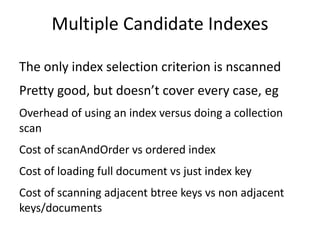
Sort and scanAndOrder With “scanAndOrder” sort, all documents must be touched even if there is a limit spec.
With scanAndOrder, sorting is performed in memory and the memory footprint is constrained by the limit spec if present.
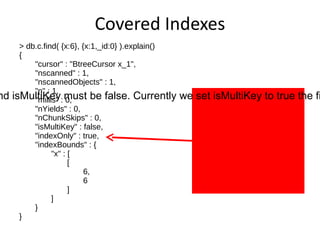
Count Count uses the same indexed but only scans in the index, not the object data in storage
With some operators the full document must be checked.  Some of these cases: $all

2011 Mongo FR - Indexing in MongoDB

  • 1.
    MongoDB Indexing andQuery Optimizer Details Antoine Girbal Mongo FR March 23, 2011
  • 2.
    What will wecover? Many details of how indexing and the query optimizer work
  • 3.
    A full understandingof these details is not required to use mongo, but this knowledge can be helpful when making optimizations.
  • 4.
    We’ll discuss functionalityof Mongo 1.8 (for our purposes pretty similar to 1.6 and almost identical to 1.7 edge).
  • 5.
    Much of thematerial will be presented through examples.
  • 6.
    Diagrams are toaid understanding – some details will be left out.
  • 7.
    Btree (conceptual diagram)1 2 3 4 5 6 7 8 9 {_id:4,x:6}
  • 8.
    Find One Documentdb.c.find( {x:6} ).limit( 1 )
  • 9.
  • 10.
    Find One Document1 2 3 4 5 6 7 8 9 6 ? {_id:4,x:6}
  • 11.
    Find One Document> db.c.find( {x:6} ).limit( 1 ).explain() { &quot;cursor&quot; : &quot;BtreeCursor x_1&quot;, &quot;nscanned&quot; : 1, &quot;nscannedObjects&quot; : 1, &quot;n&quot; : 1, &quot;millis&quot; : 1, &quot;nYields&quot; : 0, &quot;nChunkSkips&quot; : 0, &quot;isMultiKey&quot; : false, &quot;indexOnly&quot; : false, &quot;indexBounds&quot; : { &quot;x&quot; : [ [ 6, 6 ] ] } } Uses a btree cursor to find the object. Index ranges are around a single value.
  • 12.
    Find One Document1 2 3 4 5 6 7 8 9 6 ? {_id:4,x:6}
  • 13.
    Find One Document1 2 3 4 5 6 7 8 9 6 ? {_id:4,x:6}
  • 14.
    Find One Document1 2 3 4 5 6 6 6 9 6 ? {_id:4,x:6} Now we have duplicate x values
  • 15.
    Find One Document1 2 3 4 5 6 6 6 9 6 ? {_id:4,x:6}
  • 16.
  • 17.
  • 18.
  • 19.
    Equality Match 91 2 3 4 5 6 6 6 6 ? {_id:4,x:6} {_id:5,x:6} {_id:1,x:6}
  • 20.
    Equality Match >db.c.find( {x:6} ).explain() { &quot;cursor&quot; : &quot;BtreeCursor x_1&quot;, &quot;nscanned&quot; : 3, &quot;nscannedObjects&quot; : 3, &quot;n&quot; : 3, &quot;millis&quot; : 1, &quot;nYields&quot; : 0, &quot;nChunkSkips&quot; : 0, &quot;isMultiKey&quot; : false, &quot;indexOnly&quot; : false, &quot;indexBounds&quot; : { &quot;x&quot; : [ [ 6, 6 ] ] } }
  • 21.
    Equality Match 12 3 4 5 6 6 6 9 6 ?
  • 22.
    Full Document Matcherdb.c.find( {x:6,y:1} )
  • 23.
  • 24.
    Object content needsto be checked
  • 25.
    Full Document Matcher9 1 2 3 4 5 6 6 6 6 ? {y:4,x:6} {y:5,x:6} {y:1,x:6}
  • 26.
    Full Document Matcher> db.c.find( {x:6,y:1} ).explain() { &quot;cursor&quot; : &quot;BtreeCursor x_1&quot;, &quot;nscanned&quot; : 3, &quot;nscannedObjects&quot; : 3, &quot;n&quot; : 1, &quot;millis&quot; : 1, &quot;nYields&quot; : 0, &quot;nChunkSkips&quot; : 0, &quot;isMultiKey&quot; : false, &quot;indexOnly&quot; : false, &quot;indexBounds&quot; : { &quot;x&quot; : [ [ 6, 6 ] ] } } Documents for all matching index keys are scanned, but only one document matched on non index keys.
  • 27.
    Range Match db.c.find({x:{$gte:4,$lte:7}} )
  • 28.
  • 29.
    Range Match 81 2 3 4 5 6 7 9 4 <= ? <= 7
  • 30.
    Range Match >db.c.find( {x:{$gte:4,$lte:7}} ).explain() { &quot;cursor&quot; : &quot;BtreeCursor x_1&quot;, &quot;nscanned&quot; : 4, &quot;nscannedObjects&quot; : 4, &quot;n&quot; : 4, &quot;millis&quot; : 1, &quot;nYields&quot; : 0, &quot;nChunkSkips&quot; : 0, &quot;isMultiKey&quot; : false, &quot;indexOnly&quot; : false, &quot;indexBounds&quot; : { &quot;x&quot; : [ [ 4, 7 ] ] } }
  • 31.
    Range Match 12 3 4 5 6 7 8 9
  • 32.
    Exclusive Range Matchdb.c.find( {x:{$gt:4,$lt:7}} )
  • 33.
  • 34.
    Range of indexis same as inclusive range match
  • 35.
    but boundaries arenot scanned nor returned
  • 36.
  • 37.
  • 38.
    documents contain listswith several values like [8,9].
  • 39.
    Multikeys 1 23 4 5 6 7 9 ? > 7 {_id:4,x:[8,9]} 8
  • 40.
    Multikeys > db.c.find({x:{$gt:7}} ).explain() { &quot;cursor&quot; : &quot;BtreeCursor x_1&quot;, &quot;nscanned&quot; : 2, &quot;nscannedObjects&quot; : 2, &quot;n&quot; : 1, &quot;millis&quot; : 1, &quot;nYields&quot; : 0, &quot;nChunkSkips&quot; : 0, &quot;isMultiKey&quot; : true, &quot;indexOnly&quot; : false, &quot;indexBounds&quot; : { &quot;x&quot; : [ [ 7, 1.7976931348623157e+308 ] ] } } All keys in valid range are scanned, but the matcher rejects duplicate documents making n == 1.
  • 41.
    Multikeys 1 23 4 5 6 7 8 9
  • 42.
    Range Types Explicitinequality db.c.find( {x:{$gt:4,$lt:7}} )
  • 43.
  • 44.
    db.c.find( {x:{$ne:4}} )Regular expression prefix db.c.find( {x:/^a/} ) Data type db.c.find( {x:/a/} )
  • 45.
    Range Types db.c.find({x:/^a/} ) &quot;indexBounds&quot; : { &quot;x&quot; : [ [ &quot;a&quot;, &quot;b&quot; ], [ /^a/, /^a/ ] ] } 2 ranges scanned of 2 different types: string and regex
  • 46.
    Range Types db.c.find({x:/a/} ) &quot;indexBounds&quot; : { &quot;x&quot; : [ [ &quot;&quot;, { } ], [ /a/, /a/ ] ] } Here the index only helps to restrict type, not efficient in practice
  • 47.
    Set Match db.c.find({x:{$in:[3,6]}} )
  • 48.
  • 49.
    Set Match 81 2 3 4 5 6 7 9 3 , 6
  • 50.
    Set Match >db.c.find( {x:{$in:[3,6]}} ).explain() { &quot;cursor&quot; : &quot;BtreeCursor x_1 multi&quot;, &quot;nscanned&quot; : 3, &quot;nscannedObjects&quot; : 2, &quot;n&quot; : 2, &quot;millis&quot; : 8, &quot;nYields&quot; : 0, &quot;nChunkSkips&quot; : 0, &quot;isMultiKey&quot; : false, &quot;indexOnly&quot; : false, &quot;indexBounds&quot; : { &quot;x&quot; : [ [ 3, 3 ], [ 6, 6 ] ] }} Why is nscanned 3? This is an algorithmic detail, when there are disjoint ranges for a key nscanned may be higher than the number of matching keys.
  • 51.
    Set Match 12 3 4 5 6 7 8 9
  • 52.
    All Match db.c.find({x:{$all:[3,6]}} )
  • 53.
  • 54.
    All Match 81 2 3 4 5 6 7 9 3 ? {_id:4,x:[3,6]}
  • 55.
    All Match >db.c.find( {x:{$all:[3,6]}} ).explain() { &quot;cursor&quot; : &quot;BtreeCursor x_1&quot;, &quot;nscanned&quot; : 1, &quot;nscannedObjects&quot; : 1, &quot;n&quot; : 1, &quot;millis&quot; : 0, &quot;nYields&quot; : 0, &quot;nChunkSkips&quot; : 0, &quot;isMultiKey&quot; : true, &quot;indexOnly&quot; : false, &quot;indexBounds&quot; : { &quot;x&quot; : [ [ 3, 3 ] ] } } The first entry in the $all match array is always used for index bounds. Note this may not be the least numerous indexed value in the $all array.
  • 56.
    All Match 12 3 4 5 6 7 8 9
  • 57.
  • 58.
  • 59.
    Limit 8 12 3 4 5 6 7 9 6 ? < y:3 y:1 y:3 y:3 y:3
  • 60.
    Limit > db.c.find({x:{$lt:6},y:3} ).limit( 3 ).explain() { &quot;cursor&quot; : &quot;BtreeCursor x_1&quot;, &quot;nscanned&quot; : 4, &quot;nscannedObjects&quot; : 4, &quot;n&quot; : 3, &quot;millis&quot; : 1, &quot;nYields&quot; : 0, &quot;nChunkSkips&quot; : 0, &quot;isMultiKey&quot; : true, &quot;indexOnly&quot; : false, &quot;indexBounds&quot; : { &quot;x&quot; : [ [ -1.7976931348623157e+308, 6 ] ] } } Scan until three matches are found, then stop.
  • 61.
  • 62.
  • 63.
    Skip 8 12 3 4 5 6 7 9 6 ? < y:3 y:1 y:3 y:3 y:3
  • 64.
    Skip > db.c.find({x:{$lt:6},y:3} ).skip( 3 ).explain() { &quot;cursor&quot; : &quot;BtreeCursor x_1&quot;, &quot;nscanned&quot; : 5, &quot;nscannedObjects&quot; : 5, &quot;n&quot; : 1, &quot;millis&quot; : 1, &quot;nYields&quot; : 0, &quot;nChunkSkips&quot; : 0, &quot;isMultiKey&quot; : true, &quot;indexOnly&quot; : false, &quot;indexBounds&quot; : { &quot;x&quot; : [ [ -1.7976931348623157e+308, 6 ] ] } } All skipped documents are scanned.
  • 65.
  • 66.
  • 67.
    Sorting along indexkey uses index btree ordering
  • 68.
    Sort 8 12 3 4 5 6 7 9 6 ? < y:3 y:1 y:3 y:3 y:3
  • 69.
    Sort > db.c.find({x:{$lt:6},y:3} ).sort( {x:1} ).explain() { &quot;cursor&quot; : &quot;BtreeCursor x_1&quot;, &quot;nscanned&quot; : 5, &quot;nscannedObjects&quot; : 5, &quot;n&quot; : 4, &quot;millis&quot; : 1, &quot;nYields&quot; : 0, &quot;nChunkSkips&quot; : 0, &quot;isMultiKey&quot; : true, &quot;indexOnly&quot; : false, &quot;indexBounds&quot; : { &quot;x&quot; : [ [ -1.7976931348623157e+308, 6 ] ] } } Find uses the btree cursor to easily sort data
  • 70.
  • 71.
  • 72.
    Using non-indexed keyto sort data will need to scan & order
  • 73.
    Sort 8 12 3 4 5 6 7 9 6 ? < y:3 y:1 y:3 y:3 y:3
  • 74.
    Sort Results aresorted on the fly to match requested order. The scanAndOrder field is only printed when its value is true. > db.c.find( {x:{$lt:6},y:3} ).sort( {y:1} ).explain() { &quot;cursor&quot; : &quot;BtreeCursor x_1&quot;, &quot;nscanned&quot; : 5, &quot;nscannedObjects&quot; : 5, &quot;n&quot; : 4, &quot;scanAndOrder&quot; : true, &quot;millis&quot; : 1, &quot;nYields&quot; : 0, &quot;nChunkSkips&quot; : 0, &quot;isMultiKey&quot; : true, &quot;indexOnly&quot; : false, &quot;indexBounds&quot; : { &quot;x&quot; : [ [ -1.7976931348623157e+308, 6 ] ] } }
  • 75.
    Sort and scanAndOrderWith “scanAndOrder” sort, all documents must be touched even if there is a limit spec.
  • 76.
    With scanAndOrder, sortingis performed in memory and the memory footprint is constrained by the limit spec if present.
  • 77.
    Count Count usesthe same indexed but only scans in the index, not the object data in storage
  • 78.
    With some operatorsthe full document must be checked. Some of these cases: $all