Molecular DockingMolecular Docking
using Autodock 4.2.6using Autodock 4.2.6
• Presented by/
Mariam Abdelrasoul
Teaching assistant
Medicinal Chemistry Department - Faculty of Pharmacy - Assiut University
AutoDock
A software for predicting the optimal bound conformations of
ligands to proteins developed by the Scripps institute of
technology
A software for docking
Why AutoDock?
Free
Credibility
Why not?
Command lines, no user friendly interface in all steps
Lengthy steps
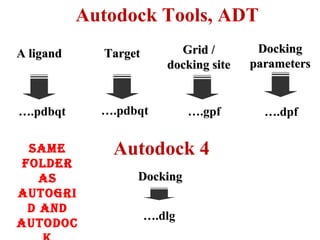
A ligandA ligand TargetTarget Grid /Grid /
docking sitedocking site
Autodock Tools, ADT
….pdbqt ….pdbqt ….gpf
DockingDocking
parametersparameters
….dpf
Autodock 4
DockingDocking
….dlg
Same
folder
aS
autogri
d and
autodoc
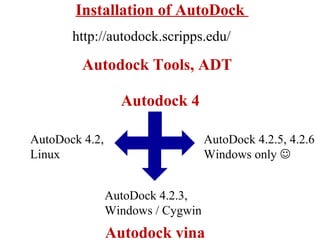
Installation of AutoDock
Autodock Tools, ADT
Autodock 4
AutoDock 4.2,
Linux
AutoDock 4.2.3,
Windows / Cygwin
AutoDock 4.2.5, 4.2.6
Windows only 
Autodock vina
http://autodock.scripps.edu/
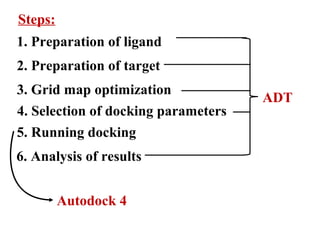
Steps:
1. Preparation of ligand
2. Preparation of target
3. Grid map optimization
4. Selection of docking parameters
5. Running docking
6. Analysis of results
ADT
Autodock 4
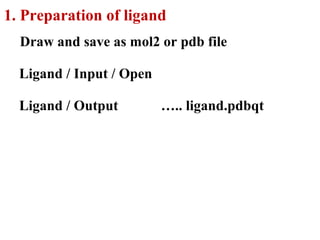
Ligand / Input / Open
1. Preparation of ligand
Draw and save as mol2 or pdb file
Ligand / Output ….. ligand.pdbqt
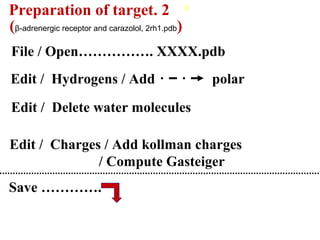
2.Preparation of target
File / Open……………. XXXX.pdb
Edit / Charges / Add kollman charges
/ Compute Gasteiger
Edit / Hydrogens / Add polar
Save ………….
Edit / Delete water molecules
(β-adrenergic receptor and carazolol, 2rh1.pdb)
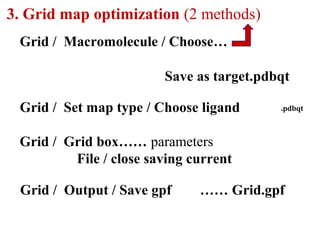
3. Grid map optimization (2 methods)
Grid / Macromolecule / Choose…
Save as target.pdbqt
Grid / Set map type / Choose ligand .pdbqt
Grid / Grid box…… parameters
File / close saving current
Grid / Output / Save gpf …… Grid.gpf
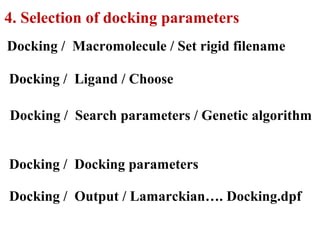
4. Selection of docking parameters
Docking / Macromolecule / Set rigid filename
Docking / Ligand / Choose
Docking / Search parameters / Genetic algorithm
Docking / Docking parameters
Docking / Output / Lamarckian…. Docking.dpf
5. Running Docking
Start menu / Run ….. cmd.exe
Command lines:
cd folder name/ path
autogrid4 –p grid.gpf [-l grid.glg]
autodock4 –p dock.dpf [-l dock.dlg]
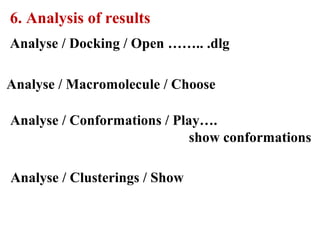
6. Analysis of results
Analyse / Docking / Open …….. .dlg
Analyse / Conformations / Play….
show conformations
Analyse / Clusterings / Show
Analyse / Macromolecule / Choose
Thank you

Molecular Docking using Autodock 4.2.6

  • 1.
    Molecular DockingMolecular Docking usingAutodock 4.2.6using Autodock 4.2.6 • Presented by/ Mariam Abdelrasoul Teaching assistant Medicinal Chemistry Department - Faculty of Pharmacy - Assiut University
  • 2.
    AutoDock A software forpredicting the optimal bound conformations of ligands to proteins developed by the Scripps institute of technology A software for docking Why AutoDock? Free Credibility Why not? Command lines, no user friendly interface in all steps Lengthy steps
  • 3.
    A ligandA ligandTargetTarget Grid /Grid / docking sitedocking site Autodock Tools, ADT ….pdbqt ….pdbqt ….gpf DockingDocking parametersparameters ….dpf Autodock 4 DockingDocking ….dlg Same folder aS autogri d and autodoc
  • 4.
    Installation of AutoDock AutodockTools, ADT Autodock 4 AutoDock 4.2, Linux AutoDock 4.2.3, Windows / Cygwin AutoDock 4.2.5, 4.2.6 Windows only  Autodock vina http://autodock.scripps.edu/
  • 5.
    Steps: 1. Preparation ofligand 2. Preparation of target 3. Grid map optimization 4. Selection of docking parameters 5. Running docking 6. Analysis of results ADT Autodock 4
  • 6.
    Ligand / Input/ Open 1. Preparation of ligand Draw and save as mol2 or pdb file Ligand / Output ….. ligand.pdbqt
  • 7.
    2.Preparation of target File/ Open……………. XXXX.pdb Edit / Charges / Add kollman charges / Compute Gasteiger Edit / Hydrogens / Add polar Save …………. Edit / Delete water molecules (β-adrenergic receptor and carazolol, 2rh1.pdb)
  • 8.
    3. Grid mapoptimization (2 methods) Grid / Macromolecule / Choose… Save as target.pdbqt Grid / Set map type / Choose ligand .pdbqt Grid / Grid box…… parameters File / close saving current Grid / Output / Save gpf …… Grid.gpf
  • 9.
    4. Selection ofdocking parameters Docking / Macromolecule / Set rigid filename Docking / Ligand / Choose Docking / Search parameters / Genetic algorithm Docking / Docking parameters Docking / Output / Lamarckian…. Docking.dpf
  • 10.
    5. Running Docking Startmenu / Run ….. cmd.exe Command lines: cd folder name/ path autogrid4 –p grid.gpf [-l grid.glg] autodock4 –p dock.dpf [-l dock.dlg]
  • 11.
    6. Analysis ofresults Analyse / Docking / Open …….. .dlg Analyse / Conformations / Play…. show conformations Analyse / Clusterings / Show Analyse / Macromolecule / Choose
  • 12.