Email: shah.sapan@rediffmail.com
Molecular Docking using
Autodock 4
Sapan K. Shah
Asst. Prof.
Priyadarshini J. L. College
of Pharmacy, Nagpur
Email: shah.sapan@rediffmail.com
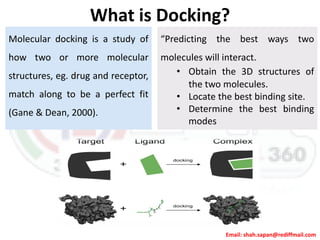
What is Docking?
Molecular docking is a study of
how two or more molecular
structures, eg. drug and receptor,
match along to be a perfect fit
(Gane & Dean, 2000).
“Predicting the best ways two
molecules will interact.
• Obtain the 3D structures of
the two molecules.
• Locate the best binding site.
• Determine the best binding
modes
Email: shah.sapan@rediffmail.com
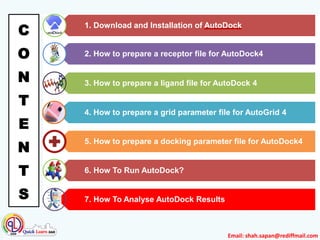
1. Download and Installation of AutoDock
3. How to prepare a ligand file for AutoDock 4
2. How to prepare a receptor file for AutoDock4
4. How to prepare a grid parameter file for AutoGrid 4
5. How to prepare a docking parameter file for AutoDock4
6. How To Run AutoDock?
7. How To Analyse AutoDock Results
C
O
N
T
E
N
T
S
Email: shah.sapan@rediffmail.com
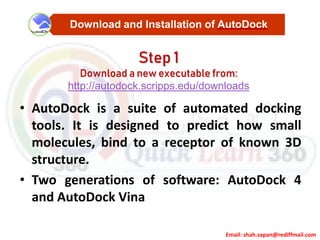
• AutoDock is a suite of automated docking
tools. It is designed to predict how small
molecules, bind to a receptor of known 3D
structure.
• Two generations of software: AutoDock 4
and AutoDock Vina
Download and Installation of AutoDock
Step 1
Download a new executable from:
http://autodock.scripps.edu/downloads
Email: shah.sapan@rediffmail.com
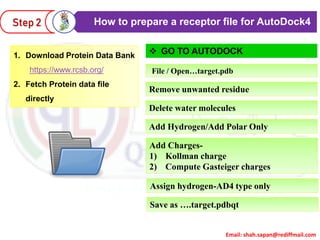
How to prepare a receptor file for AutoDock4Step 2
1. Download Protein Data Bank
https://www.rcsb.org/
2. Fetch Protein data file
directly
File / Open…target.pdb
Delete water molecules
 GO TO AUTODOCK
Add Hydrogen/Add Polar Only
Remove unwanted residue
Add Charges-
1) Kollman charge
2) Compute Gasteiger charges
Assign hydrogen-AD4 type only
Save as ….target.pdbqt
Email: shah.sapan@rediffmail.com
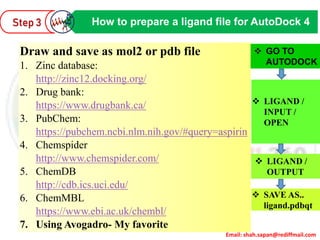
How to prepare a ligand file for AutoDock 4
Draw and save as mol2 or pdb file
1. Zinc database:
http://zinc12.docking.org/
2. Drug bank:
https://www.drugbank.ca/
3. PubChem:
https://pubchem.ncbi.nlm.nih.gov/#query=aspirin
4. Chemspider
http://www.chemspider.com/
5. ChemDB
http://cdb.ics.uci.edu/
6. ChemMBL
https://www.ebi.ac.uk/chembl/
7. Using Avogadro- My favorite
 LIGAND /
INPUT /
OPEN
 SAVE AS..
ligand.pdbqt
 LIGAND /
OUTPUT
 GO TO
AUTODOCK
Step 3
Email: shah.sapan@rediffmail.com
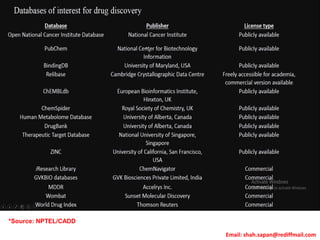
*Source: NPTEL/CADD
Email: shah.sapan@rediffmail.com
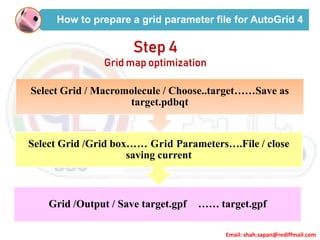
How to prepare a grid parameter file for AutoGrid 4
Step 4
Grid map optimization
Select Grid / Macromolecule / Choose..target……Save as
target.pdbqt
Select Grid /Grid box…… Grid Parameters….File / close
saving current
Grid /Output / Save target.gpf …… target.gpf
Email: shah.sapan@rediffmail.com
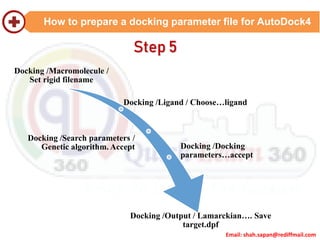
How to prepare a docking parameter file for AutoDock4
Docking /Macromolecule /
Set rigid filename
Docking /Ligand / Choose…ligand
Docking /Search parameters /
Genetic algorithm. Accept Docking /Docking
parameters…accept
Docking /Output / Lamarckian…. Save
target.dpf
Step 5
Email: shah.sapan@rediffmail.com
How To Run AutoDock?Step 6
Run Autogrid
•Select tab RUN>>RUN AUTOGRID>>Click BROWSE>>Select AUTOGRID APPLICATION FILE in PROGRAM PATH
NAME>>Click BROWSE>>Select TARGET.GPF in PARAMET FILE NAME>>Click LAUNCH
Run Autodock
•Select tab RUN>>RUN AUTODOCK>>Click BROWSE>>Select AUTODOCK APPLICATION FILE in PROGRAM PATH
NAME>>Click BROWSE>>Select TARGET.DPF in PARAMET FILE NAME>>Click LAUNCH
Run Autodock Vina
• OPEN COMMAND PROMPT
• Type “C: foldername“ for selecting path
• Type "C:Program Files (x86)The Scripps Research InstituteVinaVina.exe" --
receptor target.pdbqt --ligand ligand.pdbqt --config conf.txt --log log.txt --out
output.pdbqtxt]
Email: shah.sapan@rediffmail.com
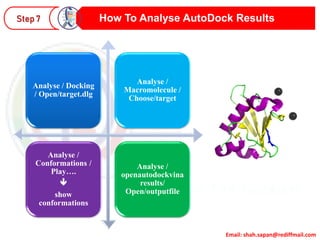
How To Analyse AutoDock ResultsStep 7
Analyse / Docking
/ Open/target.dlg
Analyse /
Macromolecule /
Choose/target
Analyse /
Conformations /
Play….

show
conformations
Analyse /
openautodockvina
results/
Open/outputfile
Email: shah.sapan@rediffmail.com13

Molecular Docking Using Autodock

  • 1.
    Email: shah.sapan@rediffmail.com Molecular Dockingusing Autodock 4 Sapan K. Shah Asst. Prof. Priyadarshini J. L. College of Pharmacy, Nagpur
  • 2.
    Email: shah.sapan@rediffmail.com What isDocking? Molecular docking is a study of how two or more molecular structures, eg. drug and receptor, match along to be a perfect fit (Gane & Dean, 2000). “Predicting the best ways two molecules will interact. • Obtain the 3D structures of the two molecules. • Locate the best binding site. • Determine the best binding modes
  • 3.
  • 4.
    Email: shah.sapan@rediffmail.com 1. Downloadand Installation of AutoDock 3. How to prepare a ligand file for AutoDock 4 2. How to prepare a receptor file for AutoDock4 4. How to prepare a grid parameter file for AutoGrid 4 5. How to prepare a docking parameter file for AutoDock4 6. How To Run AutoDock? 7. How To Analyse AutoDock Results C O N T E N T S
  • 5.
    Email: shah.sapan@rediffmail.com • AutoDockis a suite of automated docking tools. It is designed to predict how small molecules, bind to a receptor of known 3D structure. • Two generations of software: AutoDock 4 and AutoDock Vina Download and Installation of AutoDock Step 1 Download a new executable from: http://autodock.scripps.edu/downloads
  • 6.
    Email: shah.sapan@rediffmail.com How toprepare a receptor file for AutoDock4Step 2 1. Download Protein Data Bank https://www.rcsb.org/ 2. Fetch Protein data file directly File / Open…target.pdb Delete water molecules  GO TO AUTODOCK Add Hydrogen/Add Polar Only Remove unwanted residue Add Charges- 1) Kollman charge 2) Compute Gasteiger charges Assign hydrogen-AD4 type only Save as ….target.pdbqt
  • 7.
    Email: shah.sapan@rediffmail.com How toprepare a ligand file for AutoDock 4 Draw and save as mol2 or pdb file 1. Zinc database: http://zinc12.docking.org/ 2. Drug bank: https://www.drugbank.ca/ 3. PubChem: https://pubchem.ncbi.nlm.nih.gov/#query=aspirin 4. Chemspider http://www.chemspider.com/ 5. ChemDB http://cdb.ics.uci.edu/ 6. ChemMBL https://www.ebi.ac.uk/chembl/ 7. Using Avogadro- My favorite  LIGAND / INPUT / OPEN  SAVE AS.. ligand.pdbqt  LIGAND / OUTPUT  GO TO AUTODOCK Step 3
  • 8.
  • 9.
    Email: shah.sapan@rediffmail.com How toprepare a grid parameter file for AutoGrid 4 Step 4 Grid map optimization Select Grid / Macromolecule / Choose..target……Save as target.pdbqt Select Grid /Grid box…… Grid Parameters….File / close saving current Grid /Output / Save target.gpf …… target.gpf
  • 10.
    Email: shah.sapan@rediffmail.com How toprepare a docking parameter file for AutoDock4 Docking /Macromolecule / Set rigid filename Docking /Ligand / Choose…ligand Docking /Search parameters / Genetic algorithm. Accept Docking /Docking parameters…accept Docking /Output / Lamarckian…. Save target.dpf Step 5
  • 11.
    Email: shah.sapan@rediffmail.com How ToRun AutoDock?Step 6 Run Autogrid •Select tab RUN>>RUN AUTOGRID>>Click BROWSE>>Select AUTOGRID APPLICATION FILE in PROGRAM PATH NAME>>Click BROWSE>>Select TARGET.GPF in PARAMET FILE NAME>>Click LAUNCH Run Autodock •Select tab RUN>>RUN AUTODOCK>>Click BROWSE>>Select AUTODOCK APPLICATION FILE in PROGRAM PATH NAME>>Click BROWSE>>Select TARGET.DPF in PARAMET FILE NAME>>Click LAUNCH Run Autodock Vina • OPEN COMMAND PROMPT • Type “C: foldername“ for selecting path • Type "C:Program Files (x86)The Scripps Research InstituteVinaVina.exe" -- receptor target.pdbqt --ligand ligand.pdbqt --config conf.txt --log log.txt --out output.pdbqtxt]
  • 12.
    Email: shah.sapan@rediffmail.com How ToAnalyse AutoDock ResultsStep 7 Analyse / Docking / Open/target.dlg Analyse / Macromolecule / Choose/target Analyse / Conformations / Play….  show conformations Analyse / openautodockvina results/ Open/outputfile
  • 13.