
Mobile Processing:
The Perfect Storm
for Data Compromise
Currently 1 mobile device
for every 5 people on the planet. }{
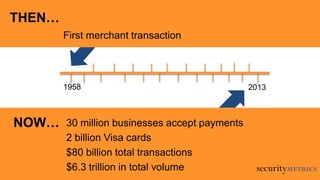
30 million businesses accept payments
2 billion Visa cards
$80 billion total transactions
$6.3 trillion in total volume
1958 2013
First merchant transaction
THEN…
NOW…
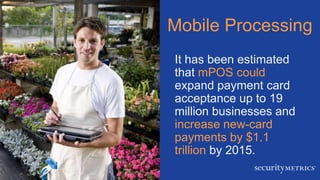
Mobile Processing
It has been estimated
that mPOS could
expand payment card
acceptance up to 19
million businesses and
increase new-card
payments by $1.1
trillion by 2015.
Micromerchants love mobile
processing (mPOS)
– Convenient
– Cost effective
– Easy implementation
– Low barrier of entry
Of the small
businesses that use
mobile devices, 1/5
use them to accept
payments
Let me explain…
…our definition of
mobile processing.
Mobile
Wallets
Mobile
Processing
THE PROBLEMMOBILE POS
Card Reader Dongle + App{ }
Sled/Keypad + App}{
App Only }{
Picture/Video/Scanning App}{
THE PROBLEMPROBLEM: HACKERS
Usernames
Internet history
Security question answers
Bank account number
Passwords
Health data
PIN numbers
Credit card number
What Data Do People Store On Their Device?
Hackers Want Data
They…
• Steal data
• Sell it to other
cybercriminals
for a profit
• Use it to create
fake credit cards
32% of mobile
malware created in
2012 was
designed to steal
information from
your device.
THE PROBLEMPROBLEM: TECHNOLOGY
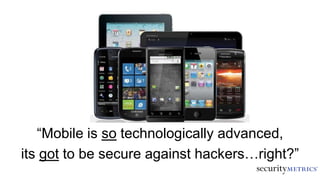
“Mobile is so technologically advanced,
its got to be secure against hackers…right?”
Mobile vs. POS
• POS terminal
– Firewall-controlled
environment
– Limited access to
Internet
– Built for payments
Mobile vs. POS
• Smartphone/tablet
– No firewalls
– Internet always
available
– Built for convenience
– Insecure OS
– Mobile malware
– SMS threats
In a nutshell,
phone operating systems have
less security than computers
or typical POS terminals
THE PROBLEMPROBLEM: THREATS
Apple and Google are about
to reach 50 billion total unique
app downloads.
Malicious App
Malware
• Write code into new
apps
• Or write code into old
apps and repackage
• Collect personal
data, change
settings, read from card
readers
Open source
development
• Good for app creation
• Bad for security
Susceptible to malware
in other ways
• URLs redirect users to
malicious sites
In 2012, 97% of
malware was
designed specifically
to attack Android &
32.8 million devices
were infected.
Meet Tom
• Uses smartphone
to process cards
• Downloads
flashlight app
• App has malware
• Customer’s data
stolen
THE PROBLEMBEST PRACTICES
A more secure
processing future…
• Process cards on one
chip
• Browse
Internet, text, use
apps on the other
Dual processing
Who is Responsible for Mobile Security?
• Regulated by PCI Council
• Mobile Payment Acceptance Security
Guidelines
6 Best Practices
Encrypt at
type/swipe
1 2 3No manual card
entry
Update apps
and OS
{ }
6 Best Practices
Install apps via
official sources
4 5 6Employee
mobile training
Mobile scans
}{
• Android & iOS app
• Scans for threats that
originate from:
– Mobile malware
– Wi-Fi networks
– Account data access
– NFC
– Bluetooth
Malware will target
cardholder data
Don’t wait for PCI DSS
mobile requirements
Make mobile processing
safer by following best
practices
Acquirers and vendors must
offer secure solutions
THE PROBLEMQUESTIONS?
mobilescan@securitymetrics.com

Mobile Processing: The Perfect Storm for Data Compromise

Editor's Notes

  • #2 Mobile Processing: The Perfect Storm for Data CompromiseMobile device payment processing (e.g., dongles and apps that process credit cards) is a double-edged sword. It has been hyped as the future of consumer and business transactions in every industry, but as the number of businesses using mobile point-of-sale (mPOS) options escalates, so does the challenge of securing mobile devices. The problem is: smartphones weren't made for security or payment processing, and hackers know it. Every day, thousands of malicious apps are downloaded through app stores, putting numerous merchant smartphones and tablets at risk for payment card theft. This presentation will explain the risks of processing via mobile devices, help attendees understand the implications to both business and consumer data security, and provide best practice solutions to securely fortify mPOS solutions.
  • #3 We define mobile device as smartphones, internet connected phones, and tablets
  • #4 1958 was when the first BankAmericard (now Visa) credit card. Until 1958, no one had been able to create a working revolving credit financial instrument issued by a third party bank that was generally accepted by a large number of merchants.
  • #5 Every smartphone/tablet a cash register.Mobile processing has been hyped as the future of consumer and business transactions, but as the number of businesses using mobile point-of-sale (mPOS) solutions increase, so does the challenge of securing mobile devices.
  • #6 Mobile processing is great for dog groomers, tradesmen, and photographers because its convenient, cost effective, easy to implement, and anyone can buy a smartphone or tablet
  • #9 We’re not going to focus on mobile wallets, because that’s not even remotely related to what we do. It’s all consumer facing, not merchant facing.
  • #11 There are 4 main ways of accepting cards via mobile devices.
  • #17 Data theft has been profitable in the past via computers, so why not with mobile?
  • #20 People think this…and its totally wrong.Only 28% of consumers consider mobile processing to be secure.
  • #21 Mobile devices were built for convenience, NOT security or payments
  • #22 Mobile devices were built for convenience, NOT security or paymentsTexting, internet browsing, all these things are insecure communication threats
  • #24 How are mobile devices become infected?
  • #26 Examples of MalwareDroid Dream (2011) – infected legitimate apps on Android market, root access gained, affects 50,000 usersDroid Deluxe (2011) – root access to Android phone, all files accessibleiOS Code Signing Vulnerability (2011) – allowed unreviewed application into app storeFinSpy Mobile (2012)– mobile variant of Finfisher device “wire-tap”Works on iPhone, Android, Blackberry, Windows Mobile, SymbianMonitors calls, texts, emails, captures keystrokes, controls microphone, tracks GPS, etc.
  • #27 Malicious URLS are easier to hide on a mobile screen because screen is smaller
  • #28 How big is this problem? Because of its mammoth market share and open source development, Android is the #1 target for cybercriminals looking to infect mobile devices.The year 2012 saw a 163% jump in mobile malware with over 65,227 new varieties.
  • #29 Tom owns a plumbing company and he’s always on the road. He loves the fact that he can just download an app that processes people’s credit cards on the go. So he thought, hey it’d be cool if I used a flashlight app instead of a real flashlight. So he downloaded a flashlight app. Unbeknownst to him, there was secret malware inside the flashlight app’s code that captured credit card data for the malware owner. The card brands get wind of it and they narrow it down to Tom. Poor Tom is nailed with forensic fees, payment card brand, and fines. Tom was not prepared.
  • #32 Who is responsible for protecting users? Carriers? Operating system providers? App makers? Nobody.
  • #33 Encrypt at swipe/type readersNever manually enter data (unless encrypt at type)Upgrade your apps and OS to fix bugs. People don’t update OS or apps partly because they’re lazyAnd partly because some smartphone manufacturers don’t require users to be alerted of security updates, so the user is simply unaware it needs to be done. But its really important to fix any security vulnerabilities.
  • #34 Only install apps from official sources (aka the well known stores). No third party app vendorsEnsure everyone who comes into ontact with device (employees, waitresses, etc) is educated on mobile security!Use a mobile vulnerability scanner (aka SM MobileScan!)