Áine Curry 08406804
Brian Flaherty 12232197
Reggie Sugrue 12231292
Introduction
Mobile devices have become more technical in recent years.
• Wireless connectivity
• Short range connections via Bluetooth
• Mobile Applications


• This has lead to the increased vulnerability of mobile device
Mobile Malware 2012
Attacks increased by 185 %
• increased number of mobile devices


99% of these attacks related to Android Mobile devices
What makes Android vulnerable to
Attacks?
Android is the most popular operating system
• 75% of the market share

Android Applications widely available
• Anyone can post App’s to Google’s Android Market

Android is slow in fixing detected flaw
Recent Malware Attacks
March 2013 – First discovered mobile malware attack
• Stole SMS messages, call logs, contacts and phone data

December 2012 – Malware used to steal €36 million from 30,000 bank accounts
Main Types of Malware
• Collect device data - 28%
• Spies on user - 25%
• Send content - 24%


SMishing, Fake Apps, Stealing Information such
as bank details – major threats
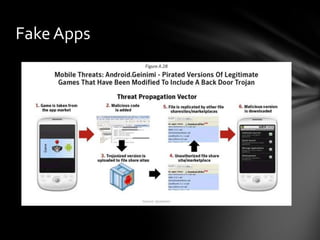
Fake Apps
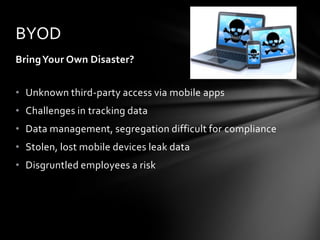
BYOD
Bring Your Own Disaster?


• Unknown third-party access via mobile apps
• Challenges in tracking data
• Data management, segregation difficult for compliance
• Stolen, lost mobile devices leak data
• Disgruntled employees a risk
Motives
• Financial
  • Main reason for malware
• Social
  • Boosting image as a hacker
• Political Agendas
  • Trojan implanted in a popular app supporting
    “Arab Spring”
How to detect mobile malware
2 methods of detection:

• Simple detection techniques


• Technical detection technique
Simple detection techniques
Symptoms of Mobile malware
• Slow performance
• Quick battery consumption
• Applications refusing to open or work
• Automatic sending of text message to contacts
• GPS active even when a program is not running
Technical Detection Techniques
Static Analysis
• Detects malware in operating systems by dissembling mobile device

Dynamic Analysis
• Mobile device is isolated into a virtual machine and behaviour is monitored

Application Permission Analysis
• Performs permission checks on installed applications
•   Defence against Malware & Viruses
•   Smarthphones can be attacked in two mediums
•   Corporate level
•   Everyday Users
Organizations
Organizations need security because member of enterprise are accessing
information on their mobile devices.
National Institute of Standards and Technology provide security guidelines.
4 different categories of security that organizations should fall under
according with NIST guidelines.
4 Categories
1) General Policy – enforce enterprise security like monitoring when policy
violations occur.
2) Encryptions Policy – making sure that there is strong encryption to
prevent attacks.
3) Authentication – making sure that users must pass security breaches to
get access.
4) Restriction – restricting people who you don’t want to have access to your
resources.
BYOD
Abbreviated for Bring Your Own Devices to Work.
People bring these devices to work but there must be security policies for
these devices as well as the organization original hardware.
Organizations should specify what devices are allowed.
Define what sites are allowed to be used and companies should have a
employee exit strategy.
Everyday Users
Users use smartphones everyday carrying out transactions with sensitive
information like e-mails and bill payments.
Current day users are blissfully unaware of the malware and viruses that can
possible interact with their devices.
Users should gain education of what malicious kinds of attacks are out there
and what security is available.
Helpful Tips for Users
Install anti-virus software on their mobile devices.
Do not connect to unusual Wi-Fi network.
Avoid clicking links that come from unsecure sources as this can forward
users on to harmful sites.
Avoid geo-tagging if people you don’t know will have access to the
information.
Make sure there is encryption system in your device.
Future of Mobile Malware & Viruses
Going to get worse before it gets better because Users are only getting to
grips with mobile security.
Mobile devices are less protected than computers.
More sophisticated methods be introduced so it will be harder to pin down.
Examples of future threats are SMS phishing and NFC pay-service
corruption.

Ms810 assignment viruses and malware affecting moblie devices

  • 1.
    Áine Curry 08406804 BrianFlaherty 12232197 Reggie Sugrue 12231292
  • 2.
    Introduction Mobile devices havebecome more technical in recent years. • Wireless connectivity • Short range connections via Bluetooth • Mobile Applications • This has lead to the increased vulnerability of mobile device
  • 3.
    Mobile Malware 2012 Attacksincreased by 185 % • increased number of mobile devices 99% of these attacks related to Android Mobile devices
  • 4.
    What makes Androidvulnerable to Attacks? Android is the most popular operating system • 75% of the market share Android Applications widely available • Anyone can post App’s to Google’s Android Market Android is slow in fixing detected flaw
  • 5.
    Recent Malware Attacks March2013 – First discovered mobile malware attack • Stole SMS messages, call logs, contacts and phone data December 2012 – Malware used to steal €36 million from 30,000 bank accounts
  • 6.
    Main Types ofMalware • Collect device data - 28% • Spies on user - 25% • Send content - 24% SMishing, Fake Apps, Stealing Information such as bank details – major threats
  • 7.
  • 8.
    BYOD Bring Your OwnDisaster? • Unknown third-party access via mobile apps • Challenges in tracking data • Data management, segregation difficult for compliance • Stolen, lost mobile devices leak data • Disgruntled employees a risk
  • 9.
    Motives • Financial • Main reason for malware • Social • Boosting image as a hacker • Political Agendas • Trojan implanted in a popular app supporting “Arab Spring”
  • 10.
    How to detectmobile malware 2 methods of detection: • Simple detection techniques • Technical detection technique
  • 11.
    Simple detection techniques Symptomsof Mobile malware • Slow performance • Quick battery consumption • Applications refusing to open or work • Automatic sending of text message to contacts • GPS active even when a program is not running
  • 12.
    Technical Detection Techniques StaticAnalysis • Detects malware in operating systems by dissembling mobile device Dynamic Analysis • Mobile device is isolated into a virtual machine and behaviour is monitored Application Permission Analysis • Performs permission checks on installed applications
  • 13.
    Defence against Malware & Viruses • Smarthphones can be attacked in two mediums • Corporate level • Everyday Users
  • 14.
    Organizations Organizations need securitybecause member of enterprise are accessing information on their mobile devices. National Institute of Standards and Technology provide security guidelines. 4 different categories of security that organizations should fall under according with NIST guidelines.
  • 15.
    4 Categories 1) GeneralPolicy – enforce enterprise security like monitoring when policy violations occur. 2) Encryptions Policy – making sure that there is strong encryption to prevent attacks. 3) Authentication – making sure that users must pass security breaches to get access. 4) Restriction – restricting people who you don’t want to have access to your resources.
  • 16.
    BYOD Abbreviated for BringYour Own Devices to Work. People bring these devices to work but there must be security policies for these devices as well as the organization original hardware. Organizations should specify what devices are allowed. Define what sites are allowed to be used and companies should have a employee exit strategy.
  • 17.
    Everyday Users Users usesmartphones everyday carrying out transactions with sensitive information like e-mails and bill payments. Current day users are blissfully unaware of the malware and viruses that can possible interact with their devices. Users should gain education of what malicious kinds of attacks are out there and what security is available.
  • 18.
    Helpful Tips forUsers Install anti-virus software on their mobile devices. Do not connect to unusual Wi-Fi network. Avoid clicking links that come from unsecure sources as this can forward users on to harmful sites. Avoid geo-tagging if people you don’t know will have access to the information. Make sure there is encryption system in your device.
  • 19.
    Future of MobileMalware & Viruses Going to get worse before it gets better because Users are only getting to grips with mobile security. Mobile devices are less protected than computers. More sophisticated methods be introduced so it will be harder to pin down. Examples of future threats are SMS phishing and NFC pay-service corruption.