Mobile devices:
the new learning platform
for Higher Education
Lynda.com and LinkedIn Learning education authors
2
Aaron Quigley
LinkedIn Learning, Content Manager
The mobile world
Today’s
agenda
• Introductions
• The mobile world
• A fresh perspective on mobile
• Mobile learning: research and
practice; accessibility
• Using mobile devices
• Q&A
3
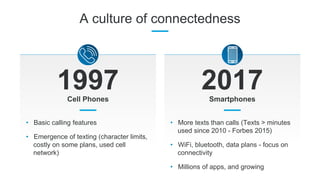
A culture of connectedness
1997 2017
• Basic calling features
• Emergence of texting (character limits,
costly on some plans, used cell
network)
Cell Phones Smartphones
• More texts than calls (Texts > minutes
used since 2010 - Forbes 2015)
• WiFi, bluetooth, data plans - focus on
connectivity
• Millions of apps, and growing
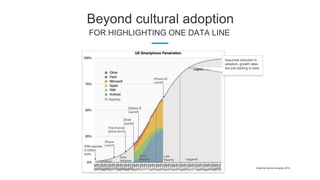
Beyond cultural adoption
FOR HIGHLIGHTING ONE DATA LINE
Assumed reduction in
adoption, growth rates
are just starting to slow.
Graph by Asymco company, 2014.
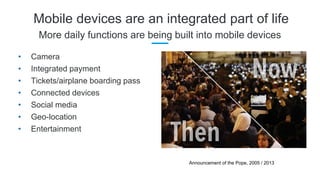
Mobile devices are an integrated part of life
More daily functions are being built into mobile devices
• Camera
• Integrated payment
• Tickets/airplane boarding pass
• Connected devices
• Social media
• Geo-location
• Entertainment
Announcement of the Pope, 2005 / 2013
7
Oliver Schinkten
LinkedIn Learning, Staff Author
A fresh perspective on mobile
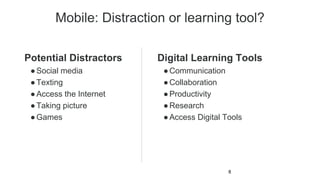
Mobile: Distraction or learning tool?
Potential Distractors
●Social media
●Texting
●Access the Internet
●Taking picture
●Games

Digital Learning Tools
●Communication
●Collaboration
●Productivity
●Research
●Access Digital Tools
8
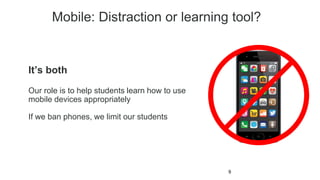
Mobile: Distraction or learning tool?
9
It’s both
Our role is to help students learn how to use
mobile devices appropriately
If we ban phones, we limit our students
10
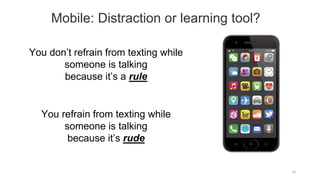
You don’t refrain from texting while
someone is talking
because it’s a rule
You refrain from texting while
someone is talking
because it’s rude
Mobile: Distraction or learning tool?
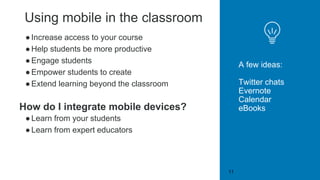
Using mobile in the classroom
●Increase access to your course
●Help students be more productive
●Engage students
●Empower students to create
●Extend learning beyond the classroom
How do I integrate mobile devices?
●Learn from your students
●Learn from expert educators
A few ideas:
Twitter chats
Evernote
Calendar
eBooks
11
12
Kevin Kelly
Consultant - Education, Technology, Organizational Change
Faculty - San Francisco State University
Mobile learning:
Research and practice; accessibility
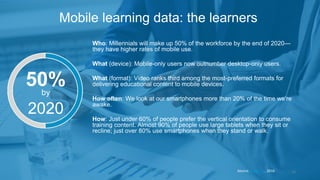
Who: Millennials will make up 50% of the workforce by the end of 2020—
they have higher rates of mobile use.
What (device): Mobile-only users now outnumber desktop-only users.
What (format): Video ranks third among the most-preferred formats for
delivering educational content to mobile devices.
How often: We look at our smartphones more than 20% of the time we’re
awake.
How: Just under 60% of people prefer the vertical orientation to consume
training content. Almost 90% of people use large tablets when they sit or
recline; just over 80% use smartphones when they stand or walk.
13
Mobile learning data: the learners
Source: Gutierrez, 2016
50%by
2020
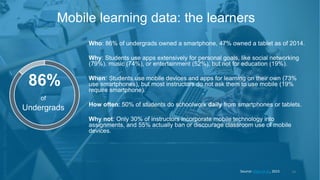
Who: 86% of undergrads owned a smartphone, 47% owned a tablet as of 2014.
Why: Students use apps extensively for personal goals, like social networking
(79%), music (74%), or entertainment (52%), but not for education (19%).
When: Students use mobile devices and apps for learning on their own (73%
use smartphones), but most instructors do not ask them to use mobile (19%
require smartphone).
How often: 50% of students do schoolwork daily from smartphones or tablets.
Why not: Only 30% of instructors incorporate mobile technology into
assignments, and 55% actually ban or discourage classroom use of mobile
devices.
14
Mobile learning data: the learners
Source: Chen et al., 2015
of
Undergrads
86%
Debunking myths of mobile learning
Source: Chen et al., 2015
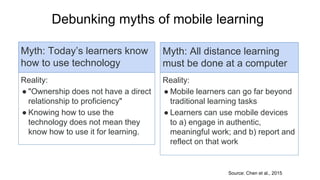
Myth: Today’s learners know
how to use technology
Reality:
● "Ownership does not have a direct
relationship to proficiency"
● Knowing how to use the
technology does not mean they
know how to use it for learning.
Myth: All distance learning
must be done at a computer
Reality:
● Mobile learners can go far beyond
traditional learning tasks
● Learners can use mobile devices
to a) engage in authentic,
meaningful work; and b) report and
reflect on that work
Pros and cons of mobile learning
Pros
●Improved motivation
●Increased engagement
●Easier access
●Increased communication
●Faster course completion
●Improved work quality
Cons
● Lack of consistent access
● Need for support &
encouragement
● Need digital literacy skills
16
Mobile learning is changing how we deliver instruction
and how learners fill knowledge and skill gaps
Trainers’ view of mobile learning
17
● 47% of organizations use mobile devices for online training
● 1/3 of learning managers use mobile for compliance and tech skills training
● Mobile learning will be a $70 Billion industry by 2020
Source: Pappas (2016) and Gutierrez (2016)
Future of untethered learning
Content: Video → Interactive video
Learners: Consumers → Producers
Learners: Engaged → Engaged in real-
world settings and projects
Higher education must
better prepare students
for both learning and
working in professional
settings.
18
Corporate Trainers will:
●Use app analytics to adjust curriculum
●Use geo-location to customize learning situations
●Incorporate wearable techs into interactive learning
Source: Pappas, 2016; Kochattil, 2016
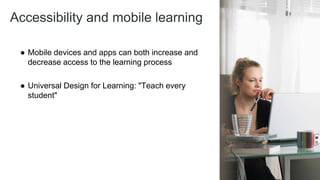
Accessibility and mobile learning
● Mobile devices and apps can both increase and
decrease access to the learning process
● Universal Design for Learning: "Teach every
student"
19
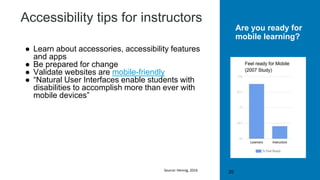
Accessibility tips for instructors
● Learn about accessories, accessibility features
and apps
● Be prepared for change
● Validate websites are mobile-friendly
● “Natural User Interfaces enable students with
disabilities to accomplish more than ever with
mobile devices”
20
Are you ready for
mobile learning?
Source: Hennig, 2016
Accessibility tips for developers
21
• Strategic:
– Start with basics (content) and enhance progressively, test early and
often
• Visually clear:
– Easy to read, zooming, color contrast, no images of text
• Flexible:
– Mobile user access a desktop version (and vice-versa), non-
overreliance on touch events, larger touch targets
• Designed effectively:
– Semantic markup, jQuery Mobile framework, alternate input
methods, no autoplay for A/V media
Source: Babar, 2017; MobiForge, 2012
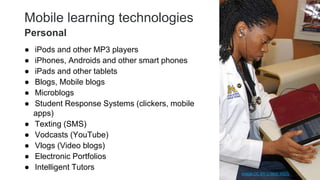
Mobile learning technologies
● iPods and other MP3 players
● iPhones, Androids and other smart phones
● iPads and other tablets
● Blogs, Mobile blogs
● Microblogs
● Student Response Systems (clickers, mobile
apps)
● Texting (SMS)
● Vodcasts (YouTube)
● Vlogs (Video blogs)
● Electronic Portfolios
● Intelligent Tutors 22
Personal
Image CC BY U Mich MSIS
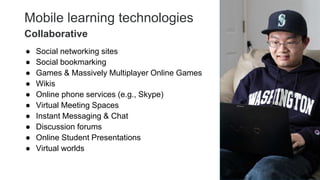
Mobile learning technologies
● Social networking sites
● Social bookmarking
● Games & Massively Multiplayer Online Games
● Wikis
● Online phone services (e.g., Skype)
● Virtual Meeting Spaces
● Instant Messaging & Chat
● Discussion forums
● Online Student Presentations
● Virtual worlds
23
Collaborative
Mobile learning technologies
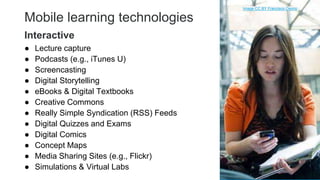
● Lecture capture
● Podcasts (e.g., iTunes U)
● Screencasting
● Digital Storytelling
● eBooks & Digital Textbooks
● Creative Commons
● Really Simple Syndication (RSS) Feeds
● Digital Quizzes and Exams
● Digital Comics
● Concept Maps
● Media Sharing Sites (e.g., Flickr)
● Simulations & Virtual Labs 24
Interactive
Image CC BY Francisco Osorio
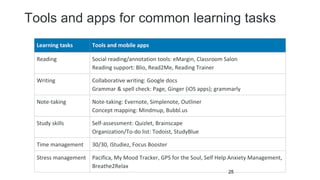
Tools and apps for common learning tasks
25
Learning tasks Tools and mobile apps
Reading Social reading/annotation tools: eMargin, Classroom Salon
Reading support: Blio, Read2Me, Reading Trainer
Writing Collaborative writing: Google docs
Grammar & spell check: Page, Ginger (iOS apps); grammarly
Note-taking Note-taking: Evernote, Simplenote, Outliner
Concept mapping: Mindmup, Bubbl.us
Study skills Self-assessment: Quizlet, Brainscape
Organization/To-do list: Todoist, StudyBlue
Time management 30/30, iStudiez, Focus Booster
Stress management Pacifica, My Mood Tracker, GPS for the Soul, Self Help Anxiety Management,
Breathe2Relax
26
Chris Mattia
Callinectes Training
Using Mobile Devices
27
Get Connected
28
Physical Computing Tools
29
Media Capture & Production
30
Creative Tools
31
Write, Calculate, Present
32
Real Time Assessment
33
34
Chris Mattia
Callinectes Training
Demo App List
http://go.mattia.us/mobileresources
Lynda.com courses by our presenters
Oliver Schinkten
www.lynda.com/OliverSchinkten
@schink10
35
Kevin Kelly
www.lynda.com/KevinKelly
@kevinkelly0
Chris Mattia
www.lynda.com/ChrisMattia
@csmattia
Questions & Answers
36

Mobile devices: the new learning platform for Higher Education

  • 1.
    Mobile devices: the newlearning platform for Higher Education Lynda.com and LinkedIn Learning education authors
  • 2.
    2 Aaron Quigley LinkedIn Learning,Content Manager The mobile world
  • 3.
    Today’s agenda • Introductions • Themobile world • A fresh perspective on mobile • Mobile learning: research and practice; accessibility • Using mobile devices • Q&A 3
  • 4.
    A culture ofconnectedness 1997 2017 • Basic calling features • Emergence of texting (character limits, costly on some plans, used cell network) Cell Phones Smartphones • More texts than calls (Texts > minutes used since 2010 - Forbes 2015) • WiFi, bluetooth, data plans - focus on connectivity • Millions of apps, and growing
  • 5.
    Beyond cultural adoption FORHIGHLIGHTING ONE DATA LINE Assumed reduction in adoption, growth rates are just starting to slow. Graph by Asymco company, 2014.
  • 6.
    Mobile devices arean integrated part of life More daily functions are being built into mobile devices • Camera • Integrated payment • Tickets/airplane boarding pass • Connected devices • Social media • Geo-location • Entertainment Announcement of the Pope, 2005 / 2013
  • 7.
    7 Oliver Schinkten LinkedIn Learning,Staff Author A fresh perspective on mobile
  • 8.
    Mobile: Distraction orlearning tool? Potential Distractors ●Social media ●Texting ●Access the Internet ●Taking picture ●Games Digital Learning Tools ●Communication ●Collaboration ●Productivity ●Research ●Access Digital Tools 8
  • 9.
    Mobile: Distraction orlearning tool? 9 It’s both Our role is to help students learn how to use mobile devices appropriately If we ban phones, we limit our students
  • 10.
    10 You don’t refrainfrom texting while someone is talking because it’s a rule You refrain from texting while someone is talking because it’s rude Mobile: Distraction or learning tool?
  • 11.
    Using mobile inthe classroom ●Increase access to your course ●Help students be more productive ●Engage students ●Empower students to create ●Extend learning beyond the classroom How do I integrate mobile devices? ●Learn from your students ●Learn from expert educators A few ideas: Twitter chats Evernote Calendar eBooks 11
  • 12.
    12 Kevin Kelly Consultant -Education, Technology, Organizational Change Faculty - San Francisco State University Mobile learning: Research and practice; accessibility
  • 13.
    Who: Millennials willmake up 50% of the workforce by the end of 2020— they have higher rates of mobile use. What (device): Mobile-only users now outnumber desktop-only users. What (format): Video ranks third among the most-preferred formats for delivering educational content to mobile devices. How often: We look at our smartphones more than 20% of the time we’re awake. How: Just under 60% of people prefer the vertical orientation to consume training content. Almost 90% of people use large tablets when they sit or recline; just over 80% use smartphones when they stand or walk. 13 Mobile learning data: the learners Source: Gutierrez, 2016 50%by 2020
  • 14.
    Who: 86% ofundergrads owned a smartphone, 47% owned a tablet as of 2014. Why: Students use apps extensively for personal goals, like social networking (79%), music (74%), or entertainment (52%), but not for education (19%). When: Students use mobile devices and apps for learning on their own (73% use smartphones), but most instructors do not ask them to use mobile (19% require smartphone). How often: 50% of students do schoolwork daily from smartphones or tablets. Why not: Only 30% of instructors incorporate mobile technology into assignments, and 55% actually ban or discourage classroom use of mobile devices. 14 Mobile learning data: the learners Source: Chen et al., 2015 of Undergrads 86%
  • 15.
    Debunking myths ofmobile learning Source: Chen et al., 2015 Myth: Today’s learners know how to use technology Reality: ● "Ownership does not have a direct relationship to proficiency" ● Knowing how to use the technology does not mean they know how to use it for learning. Myth: All distance learning must be done at a computer Reality: ● Mobile learners can go far beyond traditional learning tasks ● Learners can use mobile devices to a) engage in authentic, meaningful work; and b) report and reflect on that work
  • 16.
    Pros and consof mobile learning Pros ●Improved motivation ●Increased engagement ●Easier access ●Increased communication ●Faster course completion ●Improved work quality Cons ● Lack of consistent access ● Need for support & encouragement ● Need digital literacy skills 16 Mobile learning is changing how we deliver instruction and how learners fill knowledge and skill gaps
  • 17.
    Trainers’ view ofmobile learning 17 ● 47% of organizations use mobile devices for online training ● 1/3 of learning managers use mobile for compliance and tech skills training ● Mobile learning will be a $70 Billion industry by 2020 Source: Pappas (2016) and Gutierrez (2016)
  • 18.
    Future of untetheredlearning Content: Video → Interactive video Learners: Consumers → Producers Learners: Engaged → Engaged in real- world settings and projects Higher education must better prepare students for both learning and working in professional settings. 18 Corporate Trainers will: ●Use app analytics to adjust curriculum ●Use geo-location to customize learning situations ●Incorporate wearable techs into interactive learning Source: Pappas, 2016; Kochattil, 2016
  • 19.
    Accessibility and mobilelearning ● Mobile devices and apps can both increase and decrease access to the learning process ● Universal Design for Learning: "Teach every student" 19
  • 20.
    Accessibility tips forinstructors ● Learn about accessories, accessibility features and apps ● Be prepared for change ● Validate websites are mobile-friendly ● “Natural User Interfaces enable students with disabilities to accomplish more than ever with mobile devices” 20 Are you ready for mobile learning? Source: Hennig, 2016
  • 21.
    Accessibility tips fordevelopers 21 • Strategic: – Start with basics (content) and enhance progressively, test early and often • Visually clear: – Easy to read, zooming, color contrast, no images of text • Flexible: – Mobile user access a desktop version (and vice-versa), non- overreliance on touch events, larger touch targets • Designed effectively: – Semantic markup, jQuery Mobile framework, alternate input methods, no autoplay for A/V media Source: Babar, 2017; MobiForge, 2012
  • 22.
    Mobile learning technologies ●iPods and other MP3 players ● iPhones, Androids and other smart phones ● iPads and other tablets ● Blogs, Mobile blogs ● Microblogs ● Student Response Systems (clickers, mobile apps) ● Texting (SMS) ● Vodcasts (YouTube) ● Vlogs (Video blogs) ● Electronic Portfolios ● Intelligent Tutors 22 Personal Image CC BY U Mich MSIS
  • 23.
    Mobile learning technologies ●Social networking sites ● Social bookmarking ● Games & Massively Multiplayer Online Games ● Wikis ● Online phone services (e.g., Skype) ● Virtual Meeting Spaces ● Instant Messaging & Chat ● Discussion forums ● Online Student Presentations ● Virtual worlds 23 Collaborative
  • 24.
    Mobile learning technologies ●Lecture capture ● Podcasts (e.g., iTunes U) ● Screencasting ● Digital Storytelling ● eBooks & Digital Textbooks ● Creative Commons ● Really Simple Syndication (RSS) Feeds ● Digital Quizzes and Exams ● Digital Comics ● Concept Maps ● Media Sharing Sites (e.g., Flickr) ● Simulations & Virtual Labs 24 Interactive Image CC BY Francisco Osorio
  • 25.
    Tools and appsfor common learning tasks 25 Learning tasks Tools and mobile apps Reading Social reading/annotation tools: eMargin, Classroom Salon Reading support: Blio, Read2Me, Reading Trainer Writing Collaborative writing: Google docs Grammar & spell check: Page, Ginger (iOS apps); grammarly Note-taking Note-taking: Evernote, Simplenote, Outliner Concept mapping: Mindmup, Bubbl.us Study skills Self-assessment: Quizlet, Brainscape Organization/To-do list: Todoist, StudyBlue Time management 30/30, iStudiez, Focus Booster Stress management Pacifica, My Mood Tracker, GPS for the Soul, Self Help Anxiety Management, Breathe2Relax
  • 26.
  • 27.
  • 28.
  • 29.
  • 30.
    Media Capture &Production 30
  • 31.
  • 32.
  • 33.
  • 34.
    34 Chris Mattia Callinectes Training DemoApp List http://go.mattia.us/mobileresources
  • 35.
    Lynda.com courses byour presenters Oliver Schinkten www.lynda.com/OliverSchinkten @schink10 35 Kevin Kelly www.lynda.com/KevinKelly @kevinkelly0 Chris Mattia www.lynda.com/ChrisMattia @csmattia
  • 36.