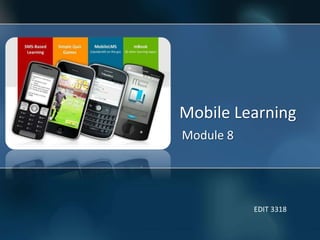
Mobile Learning
Module 8
EDIT 3318
Digital Shift
‘Our students have changed radically. Today’s
students are no longer the people our
educational system was designed to teach
(Marc Prensky, 2001)’
Digital Shift
• Rapid development of mobile devices
• Growth of the digital generation
• Government support for education using
technology
• Increasing number of mobile applications for
education
• New classes requiring a device for every
student
What is m-learning?
Learning that happens across locations, or that
takes advantage of learning opportunities
offered by portable technologies
M-learning = ubiquitous learning
“Anytime, anywhere learning”
Interaction with tutors, learners, and content
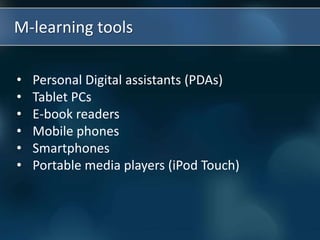
• Personal Digital assistants (PDAs)
• Tablet PCs
• E-book readers
• Mobile phones
• Smartphones
• Portable media players (iPod Touch)
M-learning tools
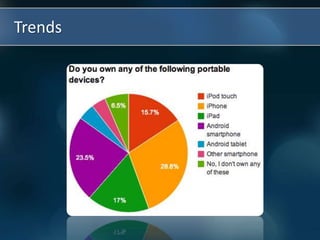
Trends
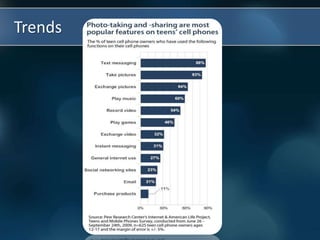
Trends
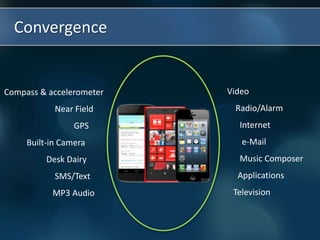
Convergence
Video
Radio/Alarm
Internet
e-Mail
Music Composer
Applications
Television
Compass & accelerometer
Near Field
GPS
Built-in Camera
Desk Dairy
SMS/Text
MP3 Audio
Advantages
• Anytime, anywhere learning
• Enjoyment, motivation to learn
• Student-centered learning process
• Synchronize with students preferred learning
style
• Change passive to active learning
• Less expensive than laptops or other
technologies
Challenges
• Potential for cheating and distraction
(e.g., ringing cell phones – the biggest
distraction in classrooms)
• Academic misconduct (e.g., pictures, texting,
etc.)
• Filtering inappropriate material
• Less interpersonal relationship
• OS compatibility (iOS, Android), battery life,
durability
• Professional development for teachers
How can m-learning work in schools?
Need to establish clear pedagogical guidelines,
cost analysis, teacher & staff training, and
continued tech support.
• Audience response systems (feedback)
• Camera: stills/videos
• Voice recorders: podcast, etc.
• Research via the internet (Google, Wiki’s, blogs)
• Applications
Ways of m-learning
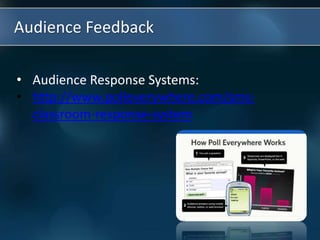
• Audience Response Systems:
• http://www.polleverywhere.com/sms-
classroom-response-system
Audience Feedback
Photos/videos
http://flickr.com
http://www.hipcast.com/
Podcasting
Applications
• E-book readers examples
• Learning Management Systems (LMS) examples
• Educational games examples
• Collaboration tools examples
• Adaptive assessment services examples
• Distance tutoring and homework support examples
• Social networking examples
Self-questions to choose educational apps
• What do I expect to teach with the app?
• What learning do I want to occur?
• Is the app really educational?
• What is the value in the classroom, for my
child/student/client?
• Can the app be used for cooperative learning
activities, turn taking and group learning?
• What is the cost of the app? If it is free, does it
have advertising or a link that a student could
easily be distracted by?
Discussion
• Are there areas of your own teaching in
which mobile learning could play a part?
• If yes, what would you need to know in
order to implement it?
• If not, why not? (Identify reasons mobile
learning might be inappropriate or
unusable)
Hands-on activities
1. Socrative
2. Mentimeter
3. Myclasstalk
4. Edmodo
5. QuizCast

M8 presentation

  • 1.
  • 2.
    Digital Shift ‘Our studentshave changed radically. Today’s students are no longer the people our educational system was designed to teach (Marc Prensky, 2001)’
  • 3.
    Digital Shift • Rapiddevelopment of mobile devices • Growth of the digital generation • Government support for education using technology • Increasing number of mobile applications for education • New classes requiring a device for every student
  • 4.
    What is m-learning? Learningthat happens across locations, or that takes advantage of learning opportunities offered by portable technologies M-learning = ubiquitous learning “Anytime, anywhere learning” Interaction with tutors, learners, and content
  • 5.
    • Personal Digitalassistants (PDAs) • Tablet PCs • E-book readers • Mobile phones • Smartphones • Portable media players (iPod Touch) M-learning tools
  • 6.
  • 7.
  • 8.
    Convergence Video Radio/Alarm Internet e-Mail Music Composer Applications Television Compass &accelerometer Near Field GPS Built-in Camera Desk Dairy SMS/Text MP3 Audio
  • 9.
    Advantages • Anytime, anywherelearning • Enjoyment, motivation to learn • Student-centered learning process • Synchronize with students preferred learning style • Change passive to active learning • Less expensive than laptops or other technologies
  • 10.
    Challenges • Potential forcheating and distraction (e.g., ringing cell phones – the biggest distraction in classrooms) • Academic misconduct (e.g., pictures, texting, etc.) • Filtering inappropriate material • Less interpersonal relationship • OS compatibility (iOS, Android), battery life, durability • Professional development for teachers
  • 11.
    How can m-learningwork in schools? Need to establish clear pedagogical guidelines, cost analysis, teacher & staff training, and continued tech support.
  • 12.
    • Audience responsesystems (feedback) • Camera: stills/videos • Voice recorders: podcast, etc. • Research via the internet (Google, Wiki’s, blogs) • Applications Ways of m-learning
  • 13.
    • Audience ResponseSystems: • http://www.polleverywhere.com/sms- classroom-response-system Audience Feedback
  • 14.
  • 15.
  • 16.
    Applications • E-book readersexamples • Learning Management Systems (LMS) examples • Educational games examples • Collaboration tools examples • Adaptive assessment services examples • Distance tutoring and homework support examples • Social networking examples
  • 17.
    Self-questions to chooseeducational apps • What do I expect to teach with the app? • What learning do I want to occur? • Is the app really educational? • What is the value in the classroom, for my child/student/client? • Can the app be used for cooperative learning activities, turn taking and group learning? • What is the cost of the app? If it is free, does it have advertising or a link that a student could easily be distracted by?
  • 18.
    Discussion • Are thereareas of your own teaching in which mobile learning could play a part? • If yes, what would you need to know in order to implement it? • If not, why not? (Identify reasons mobile learning might be inappropriate or unusable)
  • 19.
    Hands-on activities 1. Socrative 2.Mentimeter 3. Myclasstalk 4. Edmodo 5. QuizCast

Editor's Notes

  • #9 Combination of multiple services from a single provider
  • #14 Also: www.wiffiti.com Use to assess student understanding, receive feedback, etc.
  • #15 Students can upload photos and edit them to create projects from home or on school grounds. Kids can gather data for science experiments, take photos for a social studies, or document a trip, etc.
  • #16 Also: www.gabcast.com, www.gcast.com Students can record podcast on a cellphone and upload it to the site. These can create a truly unique assignment for students.