A Database for RoboBoys
MIS405-1301A-01 Database Systems
Phase 3 Group Project
Chad Davis, Jedidiah Harrison, and Sabrina Mergenthaler
Colorado Technical University
Professor Anita Arceneaux
January 28, 2013
Table of Contents
Table Structure and Fields
By Chad Davis
Primary Keys and Relationships
By Chad Davis
Business Rules
By Sabrina Mergenthaler
 Logical and Physical Models
By Jedidiah Harrison
Collective References
MIS405-1301A-01
Phase 3 Group Project Slides
Table Structures and Fields
Chad Davis
Colorado Technical University Online
Professor: Anita Arceneaux
January 28, 2013
Introduction to Table Structures
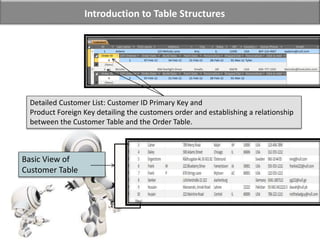
Detailed Customer List: Customer ID Primary Key and
Product Foreign Key detailing the customers order and establishing a relationship
between the Customer Table and the Order Table.
Basic View of
Customer Table
Table and Field Structure Breakdown
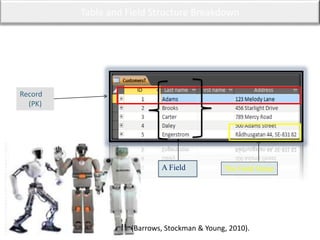
Record
(PK)
A Field
(Barrows, Stockman & Young, 2010).
The Field Value
Field Characters and Properties Design View
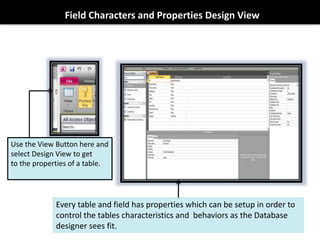
Every table and field has properties which can be setup in order to
control the tables characteristics and behaviors as the Database
designer sees fit.
Use the View Button here and
select Design View to get
to the properties of a table.
Renaming Field Values
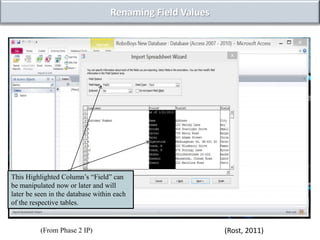
This Highlighted Column’s “Field” can
be manipulated now or later and will
later be seen in the database within each
of the respective tables.
(Rost, 2011)(From Phase 2 IP)
Data / Entity Relationships
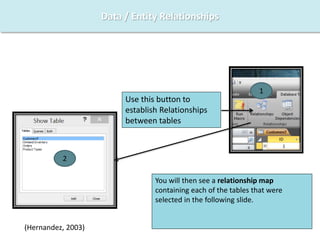
Use this button to
establish Relationships
between tables
1
2
You will then see a relationship map
containing each of the tables that were
selected in the following slide.
(Hernandez, 2003)
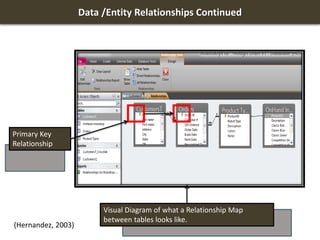
Data /Entity Relationships Continued
Visual Diagram of what a Relationship Map
between tables looks like.
(Hernandez, 2003)
Primary Key
Relationship
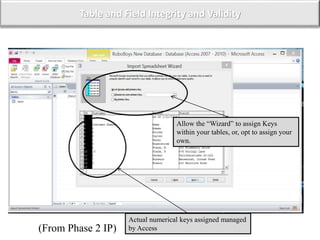
Table and Field Integrity and Validity
Actual numerical keys assigned managed
by Access
Allow the “Wizard” to assign Keys
within your tables, or, opt to assign your
own.
(From Phase 2 IP)
Business Rules
MIS405-1301A-01: Database Systems
Phase 3 Group Project
Sabrina Mergenthaler
Colorado Technical University Online
Professor: Anita Arceneaux
January 28, 2013
Business Rules
Piece By: Sabrina Mergenthaler
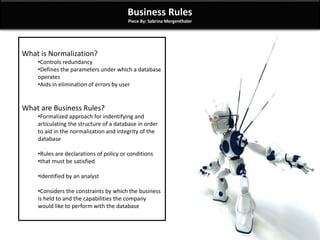
What is Normalization?
•Controls redundancy
•Defines the parameters under which a database
operates
•Aids in elimination of errors by user
What are Business Rules?
•Formalized approach for indentifying and
articulating the structure of a database in order
to aid in the normalization and integrity of the
database
•Rules are declarations of policy or conditions
•that must be satisfied
•Identified by an analyst
•Considers the constraints by which the business
is held to and the capabilities the company
would like to perform with the database
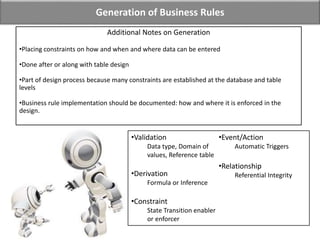
Generation of Business Rules
•Validation
Data type, Domain of
values, Reference table
•Derivation
Formula or Inference
•Constraint
State Transition enabler
or enforcer
•Event/Action
Automatic Triggers
•Relationship
Referential Integrity
Additional Notes on Generation
•Placing constraints on how and when and where data can be entered
•Done after or along with table design
•Part of design process because many constraints are established at the database and table
levels
•Business rule implementation should be documented: how and where it is enforced in the
design.
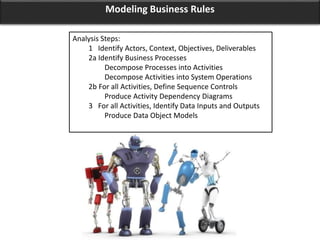
Modeling Business Rules
Analysis Steps:
1 Identify Actors, Context, Objectives, Deliverables
2a Identify Business Processes
Decompose Processes into Activities
Decompose Activities into System Operations
2b For all Activities, Define Sequence Controls
Produce Activity Dependency Diagrams
3 For all Activities, Identify Data Inputs and Outputs
Produce Data Object Models
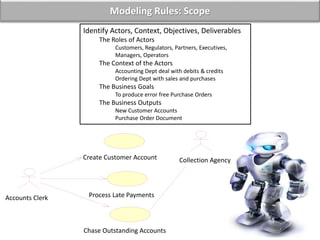
Modeling Rules: Scope
Identify Actors, Context, Objectives, Deliverables
The Roles of Actors
Customers, Regulators, Partners, Executives,
Managers, Operators
The Context of the Actors
Accounting Dept deal with debits & credits
Ordering Dept with sales and purchases
The Business Goals
To produce error free Purchase Orders
The Business Outputs
New Customer Accounts
Purchase Order Document
Create Customer Account Collection Agency
Chase Outstanding Accounts
Accounts Clerk Process Late Payments
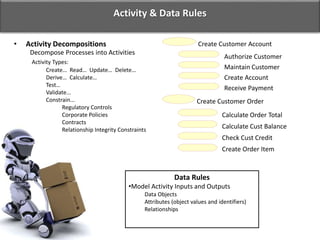
Activity & Data Rules
Decompose Processes into Activities
Activity Types:
Create… Read… Update… Delete…
Derive… Calculate…
Test…
Validate...
Constrain...
Regulatory Controls
Corporate Policies
Contracts
Relationship Integrity Constraints
• Activity Decompositions Create Customer Account
Authorize Customer
Maintain Customer
Create Account
Receive Payment
Create Customer Order
Calculate Order Total
Calculate Cust Balance
Check Cust Credit
Create Order Item
Data Rules
•Model Activity Inputs and Outputs
Data Objects
Attributes (object values and identifiers)
Relationships
Testing of Business Rules
• Always test business rule implementation
– What happens when rule is met?
– What happens when rule is violated?
• Not much good as a data entry constraint if it fails to constrain properly
• Good application or interface design will provide feedback when user
violates a constraint or rule
Levels of Enforcement
• Referential Integrity enforced at
database level because it affects
relationship between two tables.
• Many other business rules enforced at
field and table level to ensure data
integrity.
• Some rules cannot be enforced at table
or field level; must be enforced in the
application level.
Field Level Integrity
• Constraining by use of field
properties
– Data type: text, number,
Yes/No, Date/Time
– Field size
– Formats
• Entry and editing constraints
– Required
– Indexed, with or without
duplicates
– Input masks
– Default value
– Validation Rule
Table Level Integrity
• Field Comparisons
– Compare value in one field
to value in another
– Comparison performed
before record is saved
– Violations could display an
error message or force
constraint of available values
• Validation or Lookup Tables
– Store generally static set of
values
– Stored values used to
populate new records to
ensure accuracy of data
entry
Integrity & Rules
Logical and Physical Design
MIS405-1301A-01: Database Systems
Phase 3 Group Project
Jedidiah Harrison
Colorado Technical University Online
Professor: Anita Arceneaux
January 28, 2013
Logical Design Concepts
• Illustrate entities with tables
• Eliminate redundancies
• Create table access models,
transactions.
• Data is arranged into Objects
• Tables are Entities
• Rows are Tuples, aka Records
• Fields / Cell-values are Attributes in each Column.
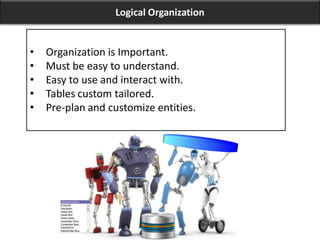
Logical Organization
• Organization is Important.
• Must be easy to understand.
• Easy to use and interact with.
• Tables custom tailored.
• Pre-plan and customize entities.
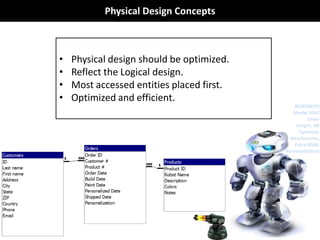
Physical Design Concepts
• Physical design should be optimized.
• Reflect the Logical design.
• Most accessed entities placed first.
• Optimized and efficient.
ROBOBOYS
Model 4567
Silver
Height: 4ft
Optional:
Attachments,
Extra RAM,
Personalization
References
Arceneaux, A. (2012). Live Chat. Database Systems. Colorado Technical University.
Creating and Managing Databases. (n.d.). M.U.S.E. Database Systems. Colorado Technical University.
Retrieved from https://campus.ctuonline.edu/courses/MIS405/p3/hub1/4312.pdf
Hernandez, M. J. (2003). Database Design for Mere Mortals™: A Hands-On Guide to Relational Database
Design (Second ed.). Boston, MA: Addison-Wesley Professional.
Kroenke, D. (2010). MIS Essentials. Upper Saddle River, New Jersey: Prentice Hall.
Rost, R. (Designer) (2011). Learning access 101 [Web]. Retrieved from
http://599cd.com/Access/Microsoft-Access-101-FREE-
Preview/?key=YOUTUBE_AC2010B1_FREE_ORGANIC&QCode=X0DIZX
Oracle (1997). Guide to Database Design and Definition. Retrieved from:
http://preview.tinyurl.com/OracleGuideDBDesign.
Barrows, A., Stockman, J., & Young, M. (2010). Access 2010 all-in- one for dummies. (1st ed., pp. 67-179).
Hoboken, NJ: Wiley Publishing Inc.

Mis405 1301 a-01 ph 3 gp final draft for grading

  • 1.
    A Database forRoboBoys MIS405-1301A-01 Database Systems Phase 3 Group Project Chad Davis, Jedidiah Harrison, and Sabrina Mergenthaler Colorado Technical University Professor Anita Arceneaux January 28, 2013
  • 2.
    Table of Contents TableStructure and Fields By Chad Davis Primary Keys and Relationships By Chad Davis Business Rules By Sabrina Mergenthaler  Logical and Physical Models By Jedidiah Harrison Collective References
  • 3.
    MIS405-1301A-01 Phase 3 GroupProject Slides Table Structures and Fields Chad Davis Colorado Technical University Online Professor: Anita Arceneaux January 28, 2013
  • 5.
    Introduction to TableStructures Detailed Customer List: Customer ID Primary Key and Product Foreign Key detailing the customers order and establishing a relationship between the Customer Table and the Order Table. Basic View of Customer Table
  • 6.
    Table and FieldStructure Breakdown Record (PK) A Field (Barrows, Stockman & Young, 2010). The Field Value
  • 7.
    Field Characters andProperties Design View Every table and field has properties which can be setup in order to control the tables characteristics and behaviors as the Database designer sees fit. Use the View Button here and select Design View to get to the properties of a table.
  • 8.
    Renaming Field Values ThisHighlighted Column’s “Field” can be manipulated now or later and will later be seen in the database within each of the respective tables. (Rost, 2011)(From Phase 2 IP)
  • 9.
    Data / EntityRelationships Use this button to establish Relationships between tables 1 2 You will then see a relationship map containing each of the tables that were selected in the following slide. (Hernandez, 2003)
  • 10.
    Data /Entity RelationshipsContinued Visual Diagram of what a Relationship Map between tables looks like. (Hernandez, 2003) Primary Key Relationship
  • 11.
    Table and FieldIntegrity and Validity Actual numerical keys assigned managed by Access Allow the “Wizard” to assign Keys within your tables, or, opt to assign your own. (From Phase 2 IP)
  • 12.
    Business Rules MIS405-1301A-01: DatabaseSystems Phase 3 Group Project Sabrina Mergenthaler Colorado Technical University Online Professor: Anita Arceneaux January 28, 2013
  • 13.
    Business Rules Piece By:Sabrina Mergenthaler What is Normalization? •Controls redundancy •Defines the parameters under which a database operates •Aids in elimination of errors by user What are Business Rules? •Formalized approach for indentifying and articulating the structure of a database in order to aid in the normalization and integrity of the database •Rules are declarations of policy or conditions •that must be satisfied •Identified by an analyst •Considers the constraints by which the business is held to and the capabilities the company would like to perform with the database
  • 14.
    Generation of BusinessRules •Validation Data type, Domain of values, Reference table •Derivation Formula or Inference •Constraint State Transition enabler or enforcer •Event/Action Automatic Triggers •Relationship Referential Integrity Additional Notes on Generation •Placing constraints on how and when and where data can be entered •Done after or along with table design •Part of design process because many constraints are established at the database and table levels •Business rule implementation should be documented: how and where it is enforced in the design.
  • 15.
    Modeling Business Rules AnalysisSteps: 1 Identify Actors, Context, Objectives, Deliverables 2a Identify Business Processes Decompose Processes into Activities Decompose Activities into System Operations 2b For all Activities, Define Sequence Controls Produce Activity Dependency Diagrams 3 For all Activities, Identify Data Inputs and Outputs Produce Data Object Models
  • 16.
    Modeling Rules: Scope IdentifyActors, Context, Objectives, Deliverables The Roles of Actors Customers, Regulators, Partners, Executives, Managers, Operators The Context of the Actors Accounting Dept deal with debits & credits Ordering Dept with sales and purchases The Business Goals To produce error free Purchase Orders The Business Outputs New Customer Accounts Purchase Order Document Create Customer Account Collection Agency Chase Outstanding Accounts Accounts Clerk Process Late Payments
  • 17.
    Activity & DataRules Decompose Processes into Activities Activity Types: Create… Read… Update… Delete… Derive… Calculate… Test… Validate... Constrain... Regulatory Controls Corporate Policies Contracts Relationship Integrity Constraints • Activity Decompositions Create Customer Account Authorize Customer Maintain Customer Create Account Receive Payment Create Customer Order Calculate Order Total Calculate Cust Balance Check Cust Credit Create Order Item Data Rules •Model Activity Inputs and Outputs Data Objects Attributes (object values and identifiers) Relationships
  • 18.
    Testing of BusinessRules • Always test business rule implementation – What happens when rule is met? – What happens when rule is violated? • Not much good as a data entry constraint if it fails to constrain properly • Good application or interface design will provide feedback when user violates a constraint or rule Levels of Enforcement • Referential Integrity enforced at database level because it affects relationship between two tables. • Many other business rules enforced at field and table level to ensure data integrity. • Some rules cannot be enforced at table or field level; must be enforced in the application level.
  • 19.
    Field Level Integrity •Constraining by use of field properties – Data type: text, number, Yes/No, Date/Time – Field size – Formats • Entry and editing constraints – Required – Indexed, with or without duplicates – Input masks – Default value – Validation Rule Table Level Integrity • Field Comparisons – Compare value in one field to value in another – Comparison performed before record is saved – Violations could display an error message or force constraint of available values • Validation or Lookup Tables – Store generally static set of values – Stored values used to populate new records to ensure accuracy of data entry Integrity & Rules
  • 20.
    Logical and PhysicalDesign MIS405-1301A-01: Database Systems Phase 3 Group Project Jedidiah Harrison Colorado Technical University Online Professor: Anita Arceneaux January 28, 2013
  • 21.
    Logical Design Concepts •Illustrate entities with tables • Eliminate redundancies • Create table access models, transactions. • Data is arranged into Objects • Tables are Entities • Rows are Tuples, aka Records • Fields / Cell-values are Attributes in each Column.
  • 22.
    Logical Organization • Organizationis Important. • Must be easy to understand. • Easy to use and interact with. • Tables custom tailored. • Pre-plan and customize entities.
  • 23.
    Physical Design Concepts •Physical design should be optimized. • Reflect the Logical design. • Most accessed entities placed first. • Optimized and efficient. ROBOBOYS Model 4567 Silver Height: 4ft Optional: Attachments, Extra RAM, Personalization
  • 24.
    References Arceneaux, A. (2012).Live Chat. Database Systems. Colorado Technical University. Creating and Managing Databases. (n.d.). M.U.S.E. Database Systems. Colorado Technical University. Retrieved from https://campus.ctuonline.edu/courses/MIS405/p3/hub1/4312.pdf Hernandez, M. J. (2003). Database Design for Mere Mortals™: A Hands-On Guide to Relational Database Design (Second ed.). Boston, MA: Addison-Wesley Professional. Kroenke, D. (2010). MIS Essentials. Upper Saddle River, New Jersey: Prentice Hall. Rost, R. (Designer) (2011). Learning access 101 [Web]. Retrieved from http://599cd.com/Access/Microsoft-Access-101-FREE- Preview/?key=YOUTUBE_AC2010B1_FREE_ORGANIC&QCode=X0DIZX Oracle (1997). Guide to Database Design and Definition. Retrieved from: http://preview.tinyurl.com/OracleGuideDBDesign. Barrows, A., Stockman, J., & Young, M. (2010). Access 2010 all-in- one for dummies. (1st ed., pp. 67-179). Hoboken, NJ: Wiley Publishing Inc.

Editor's Notes

  • #3 Welcome and Introduction I’d like to welcome you gentlemen to another installment of Getting to Know Your Database with my team as your host. Today’s presentation is mildly lengthy. However, we’re going to be going to be covering some material we’ve previously spoken about—like a refresher course if you will. We’ll also expand upon those ideas and demonstrate how they all tie into creating the foundations and structures of the database; and stabilize the system to function with speed, accuracy, and integrity. By the end of this presentation, my team will bring you to the clearest understanding of what we have in mind for RoboBoy’s database.
  • #5  The following slides briefly contain information and diagrams regarding the structural designs of tables, fields, and even touches up on Relationships between these Tables and Fields (i.e. entities and attributes). Furthermore, although the subject is related specifically to Tables and Fields, it is impossible to not emphasize on the importance of Primary Keys and Foreign Keys. These are discussed, at a minimum, within this presentation as well.
  • #6 When utilizing a database, the data is stored within tables. These tables are subject-based attributes or listings which comprise of data that is displayed within records. As an example, one of the most popular tables in a database; especially for a business, is the Contact Table. This particular Table would consist of a number of customer names, e-mail addresses, physical addresses, business addresses, and telephone numbers(Barrows, Stockman & Young, 2010). Of course tables are not just used for customers. Other tables can be created within the database utilized in storing data regarding specific business subjects, like employees or product tables for instance. Each of these records contains data about one instance of the table subject, such as a particular employee. A record is characterized as a row or instance, and each field contains data about one characteristic of the table subject, such as a first name, phone number, or e-mail address. The field of a table is ordinarily called a column or attribute. A record consists of field values, such as a name or someone@example.com email. Such field values are considered as fact (Barrows, Stockman & Young, 2010).
  • #7 As mentioned before, databases can contain a large amount of data through the use of tables which can all be linked together; also known as relationships. This is done through the use of connecting Primary Keys with that of Foreign Keys. Each table can contain many fields of different types of datum like the example above (albeit, it is simply a fraction of a table), like text, numerals or mathematics, dates, as well as hyperlinks and macros(Barrows, Stockman & Young, 2010). As with Excel, in order to resize column widths or row heights, simply click on the edge of either the row or column and drag it up, down, left or right. The table above, with the fields and the field values, define a tables structure. With each of these tables maintaining a primary key, also known as an identifier, it allows Access to do simple to complex queries regardless of the size of the database itself or how many tables there may be (Arceneaux, 2013). This is classified as a relationship within access and the PK’s and FK’s are what makes relationships take place between the tables. Examples of this are shown in later slides.
  • #8 The above visual aid is located by simply opening up a table and within the upper right corner (under the File Tab), simply select the view icon and scroll down to the bottom to where it says Design View in order to get to the properties section.
  • #9 This screen allows for you to modify or manipulate the column field names (like the black highlighted one). This can also be skipped by hitting NEXT to move on to completing the conversion. Once the Table is completed, and had you skipped this step, you can always go back into the Table after it is setup and double-click on the “Fields” tab to rename it (Rost, 2011).
  • #10 Click the Relationships command in the Show/Hide group on the Database Tools tab in the Ribbon (Tables must be closed in order to establish relationships). When the Show Table dialog box appears: Decide on each table name and click Add for the tables you want to relate. When you are done, Close the Show Table dialog box. (Hernandez, 2003)
  • #11 Even though every individual table holds data about a different subject, tables in a database usually store data about subjects that are related to each other. For example, a database might contain: A customers table that displays your company’s customers, as well as addresses. Products table which catalogues products your company may sell. This includes not only prices, but pictures as well. An orders table that tracks customer orders. Because you store data about different subjects in separate tables, you need some way to tie the data together so that you can easily combine related data from those separate tables. To connect the data stored in different tables, you create relationships. A relationship is a logical connection between two tables that specifies fields that the tables have in common. This is done through the use of Primary Keys as shown above. The relationship map lists all of the tables that were selected to relate with each other, and all of the fields or attributes that were previously set up for that specific table. (Hernandez, 2003)
  • #12 This is to define relationships between your tables which is an association established between common fields (columns) within two different tables, as talked about before. By using Primary Keys and Foreign Keys, you establish a relationship between tables to ensure that the Integrity of the data within those tables are complete and uncorrupted. Access has a great ability in automatically validating any and all attributes, queries, and tables to ensure that the database is functioning at optimal performance (Arceneaux, 2013). To reiterate, this consists of the Primary Key and the Foreign Key; in Layman's terms, it is a Customer ID # that either you or Access can generate. Once the ID # is generated, it cannot be generated again. However, Access will always keep track of it no matter what kind of changes you do to the table or database (Rost, 2011). These identifiers are simply what makes Access do its job when something is queried and the information queried resides within different tables, yet needs to be brought up instantly within a makeshift form, or just within the tables themselves (i.e. Customer Table + Shipping Table + Quantity Ordered Table). The relationships' between the PK’s and FK’s jobs are based on the Client ID # provided by the company. This would allow a relationship within Access and between tables on a one-to-one, one-to-many, or many-to-many relations between tables and attributes (Barrows, Stockman & Young, 2013). Furthermore, this also validates the data integrity from corrupted data files in the database and/or any redundancies that would hinder the functionality of the database working properly.
  • #14  As you have most likely begun to see, building a database is a process that occurs over a series of steps to ensure the efficiency of the database (Arceneaux, 2012). When the time is taken to identify the goals of the company and the capabilities they wish to achieve with their database, we can create a normalized database that makes doing business in general much easier and effective (Kroenk, 2010). Normalization is when we take the tables of your spreadsheet, and make more, smaller tables that accurately identify the attributes of a particular field. This aids in eliminating repetition and duplicate data within the system, while incorporating the rules of the database. Ultimately, these concepts will define the capabilities and integrity of the database (Hernandez, 2003). When properly incorporated with the support of business rules, the structure for the database is supported by a foundation of rules which provide a formal approach for validating data in the database (Hernandez, 2003). Business rules are not unlike anything you are already familiar with. They are made of the policies and constraints of a company and determine how the database will perform in accordance with the company’s needs (Arceneaux, 2012). Because these rules are built into the system by the designer, an analyst is often necessary to indicate the rules for the database (Creating and Managing Databases , n.d.).
  • #15 Generation of Business Rules While many rules can be derived from the company itself, the generation of the business rules of the database will undergo another series up steps to define, test, and modify rules as they relate to the database. Because these rules place constraints on the manners in which data can be entered, they are typically established at the database and table levels and documented at the time of the relative table’s design (Hernandez, 2003). In order to generate the business rules, the analyst must first consider the validation for business rules to be applied. This validation step considers the data type, value of fields, and a reference table from which to pull its rules. Once those concepts are applied, a formula can be coded to reference the data being entered to ensure it follows rules and meets normalization standards. To better understand how formulas are designed around tables and their relationships, we must first understand the constraints of the table. Simply put—we need to know what we can or cannot do. Once we know the constraints, we can indicate the actions that should take place when certain details are applied. These actions identify what is being done and how it should be done. Finally, these steps are analyzed to ensure the accuracy of the relationships and what effects will occur for proper actions and errors. At this level, referential integrity is obtained in the database to make a functioning system capable of expanding the goals of RoboBoys (Creating and Managing the Database, n.d.).
  • #16 Modeling Business Rules Once the analyst defines the parameters under which the tables should operate, it is time to begin modeling the business rules that will affect each table. In order to do this, the analyst will identify the actors, context, objectives, and business processes. These will require being decomposed into activities, which will include the means by which the user can manage the table. Basically, at this stage we are defining the activities that can occur, how they occur, what they rely on, and what they take in or put out (Hernandez, 2003). We will look at these steps more closely in the following slides.
  • #17 Identifying the Scope The first piece in modeling the database include indentifying the actors, context, objectives, and deliverables. The actors are made up of customers, partners, executives, managers, operators, and any user who may require to utilize the database system. Their context includes what types of interactions they require having with the database. For example, a person in the accounting department should have access to documenting orders and accounting information, among other things. The objectives identify the goals which should be achieved with the interaction, while the deliverables indicate what the success or failure of the attempt should result in (Kroenk, 2010). In our sample flow chart, you can visualize the actor (Accounts clerk), what the context of the accounting clerk’s responsibility (Chase outstanding accounts), and the output of their actions (account sent to Collection agency).
  • #18 Activity & Data Rules Activities are simply decomposed processes. For example, what occurs stage-by-stage within a single process. These activities can include (but are not limited to): creating, reading, updating, deleting, calculating, testing, and constraining. For instance, the process of creating a customer order goes through a series of steps to authorize the client for purchase, calculate the balance due, and finalizing the order creation. Throughout this single process there are many activities that occur, and at each of these activity stages the constraints of the business rules will be applied by the system to ensure accuracy and relation within the database (Hernandez, 2003).
  • #19 Testing of Business Rules However, not much good comes if the constraints fail to be applied properly. Therefore, testing of the business rules is important. For this reason, enforcement and integrity are carried out on a variety of levels. You may recall that we have previously discussed this levels of integrity as table, field, and database. Each level is responsible for a series of rules that apply to either a specific field, table, or entire database (Hernandez, 2003).
  • #20  You can see on this slide the level of integrity as it is applied and the types of rules which make up the particular level. Examples of rules which may be applied to our particular database include: --Order dates must occur before ship date --Orders must contain a product for purchase --Customer record includes last name --Painting cannot occur before a robot is built… and so on. With specific rules like this in place, we can ensure that orders are appropriately placed and shipped in a manner that coordinates with RoboBoys policies. For example, if RoboBoy’s places a standard for delivery within 72 hours, we can establish a set of business rules that applies to order dates and shipping dates. With the rule in place, orders not shipped within the timeframe will be pulled and a notification can be sent to the appropriate users (Arceneaux, 2012).
  • #22 Logical Design is the arrangement of objects of data into the logical relationships that we can work with. These entities are commonly called tables, and are made up of the data parsed into attributes. All entities are tables. These tables are composed of data items along the columns and data sets along the rows. Rows are records in the table, and sometimes called by their original name “tuples” (Hernandex, 2003). A tuple simply means a structure containing multiple parts. The individual fields in a row (tuple) – in Excel terminology of a table would be “cells” – is the specific data or attribute for that record. This is the basis for a table. And anyone with any experience with a spreadsheet application is intimately familiar with this logical data structure. Once you have the logical entities mapped out as tables, you want to eliminate redundancies. This will create useful and productive data representations. Then models are created to understand and explain which tables are accessed, by whom, and in what order. “These are referred to as transactions. It is important to understand what the typical transactions are, as well as which ones are most important” (Oracle, 1997). [next slide]
  • #23 Organization is important as the data is input into your database, in order to build useful information from this. It need to be easy and understandable for the users that need to interact with the database. Many different people and departments will need to access the data, and they will all have various needs and expectations. And the output from the database should be tailored to these department’s needs. As you collect, arrangement becomes paramount and dependent on the needs of the organization. Before staking out the data items (column attributes) one must consider all the needs of various users so that their custom requirements are taken into account. [next slide]
  • #24 “Physical design consists of converting the information gathered during the logical design phase into a description of the physical database” (Oracle, 1997). This encourages the placement of physical structures that reflect the logical structure (which you can see at the bottom of this slide), in order to maximize database performance as much as possible. In example of this would be placing the most used, referenced, and important transactions at the first sectors of a drive so that optimum seek times can be achieved. This will “ensure optimal placement and guarantee the best performance” (Oracle, 1997). In order to accomplish this, the database designer and the Information Technology (IT) staff will have to have in-depth knowledge of the tables, relationships, and transactions, and how those indexes will be physically stored on the disk. Because the physical database description is the result of the integration of all the information about the tables and columns, relationships between tables, and transactions that may add or update rows for a database application, the description is created with a knowledge of how Oracle Rdb stores tables and other structures, such as indexes, on disk. [next slide]
  • #25 Conclusion Gentlement, my team and I understand the significance of a functioning database for supporting the growth of businesses large and small. Together we have built a system that will embrace where RoboBoy’s stands today, and carry the company into it’s future place. In achieving the goals you have set forth for yourselves and the company, the team has designed a system that will support you in accomplishing those goals. I hope this presentation has provided you a clear definition of our design and encourages you to pursue your goals a little less fearlessly. Please let us know if you have questions or concerns; and thank you for your time.