C
DATA TYPES
Lesson 5
In this Lesson
REVIEW THE MOST
COMMON DATATYPES
FURTHER UNDERSTAND
RELATIONSHIPS AND 3NF
CREATE A PHYSICAL
DATA MODEL
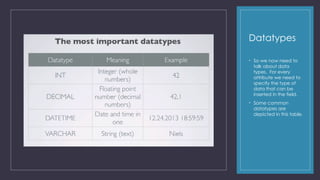
Datatypes
• So we now need to
talk about data
types. For every
attribute we need to
specify the type of
data that can be
inserted in the field.
• Some common
datatypes are
depicted in this table.
Datatypes
• Dependent upon the database software you
are using there are many other datatypes
and these datatypes are broken down even
further (ex. small integer, tiny integer, big
integer)
• When we use Varchar we need to identify
how many characters or text we will allow to
be entered.
• Note, Id’s will always be Integers when
assigned by the database.
• So back to our models. We have our students
entity, we have our classes entity, and our
zip_city entity. We now need to put our data
types next to each attribute.
Datatypes
• On our foreign key, class_id, it needs to
have the same datatype as the id or
primary key in the class table.
• For our name and address we’re entering
text, so a string of characters that are
letters and numbers. So we’re using
Varchar and we need to set the length or
limit to the number of characters, here
we’re saying we can enter or store 100
characters for each.
• Then again in zip, we created a lookup to
our zip_city entity, and it needs to be the
same as the unique id used in zip_city.
Relations
• So we’ve seen you can have a one to many
relationship, there are instances where you
could have what they call a many to many
relationship.
• Let’s change the example. Say instead of our
tables capturing data about the class each
student is currently in, let’s say the student is
selecting their classes, classes are elective
classes and we get to choose the ones we
want to attend and at what time. So more like
a university than a college.
• So in our new example a student can select or
take many classes, and a class can have
many students in it. So now we have a many
to many relationship.
From
modeling to
design
• Now that we have
modeled out our db
and tables, we can
create our tables
and our foreign keys,
enter our datatypes,
and link our tables in
an intermediate
table.
• So back to our new
example where
students can select
among different
types of classes.
From modeling to
design
• A student can participate in 3 classes
and a class can have different students,
so we have a many to many relation.
• We resolve this into an intermediate table
by putting an intermediate entity or table
that has a primary key or unique key of
it’s own (it runs faster to have this id), and
two foreign keys, or the primary keys from
students, and classes.
From modeling to design
• It’s much more efficient and the db will run
faster as we eliminate it processing
through the many to many relationships.
• So let’s put in our new relationships to see
how it works.
• One student can participate in many
classes, and one class can have many
students.
So now we have a relation from the student and the classes through this intermediate table or entity.
From modeling to
design
• Let’s look at what that would look like
with data in our tables.
• So our student Anna has the id of 1, and
she is taking PHP, which has the class id
of 1.
• She is also taking Javascript, we see she
has the student if of 1, and the class id of
2 which is Javascript.
From modeling to
design
• When we query our database to find
out which students are taking which
courses, the data itself can come
back like this as the database has
made the relationships for us from the
intermediate entity.
Assignment 7
Case 7:
• Follow the instructions in the document named:
Physical Data Model Creation
• Grab a screen capture of the physical data
model and place it in a Word document with a
cover page and a brief description of the
model for reader comprehension.
• Submit the Word document to Brightspace in
the dropbox folder named: Assignment 7
Assignment 8
Case 8:
• Now that you have a full comprehension of relations,
normalization, data types and creating a physical
data model, create an accurate physical data
model used everything learned for your Video game
or home book library using all of the techniques
learned to date that apply.
• You can use sqldbm like the instructions in the last
exercises, or use any tool that you wish, but the tool
must allow you to model the entities (tables), the
attributes, the primary and foreign keys, the
relationships between the tables, and the datatypes
• Grab screen captures of your Physical model, place
in a Word document with a cover page and a
description of the model for reader comprehension.
• Upload the Word document to Brightspace in the
folder named: Assignment 8.
MS Access –
Practice
• Follow the instructions in the following
PowerPoints:
• 5.1 – Well Designed Databases
• 5.2 – Defining Relationships
C
HOMEWORK
Further Reading to Understand Physical Models
Physical
Model
Components
• The physical design is implanted in the ANSI/SPARC physical layer.
• We create a physical data model and use it to implement the
physical layer using the DBMS. For example, when we create a
table in the database, we include a clause in the Create Table
command that tells the DBMS where we want to place it.
• The DBMS then automatically allocates space for the table in the
requested operating system file(s).
• Because so much of the physical implementation is buried in the
DBMS definitions of the logical structures, it can be difficult to
separate them in your mind.
• Ideally, the logical model should not contain any physical
implementation details.
• As the physical model is created, physical storage properties (file
or tablespace name, storage location, and sizing information)
can be assigned to each database object as we map them from
the logical model, or they can be omitted at first and added
later.
• In some organizations, data modelers turn over initial physical
models to DBAs, and it is the DBAs who add the physical
implementation details.
• For time efficiency, many data modelers build the logical and
physical models in parallel, and many data modeling tools
support a combined logical/physical data model to assist with
that alternative.
The Physical Model
• Our Earlier Logical Model • Our now Physical Model
Tables
• The primary unit of storage in the relational
model is the table, which is a 2-D structure
composed of rows and columns.
• Each row corresponds to one occurrence of
the entity that the table represents, and each
column corresponds to one attribute for that
entity.
• The process of mapping the entities in the
conceptual design to tables in the logical
design is called normalization.
• Often, an entity in the conceptual model maps
to exactly one table in the logical model, but
this is not always the case.
• For reasons you will learn with the normalization
process, entities are commonly split into
multiple tables, and in rare cases, multiple
entities can be combined into one table.
Tables
• Physical Model • Physical Model
Relational
Tables
• You must remember that a relational table is a
logical storage structure and usually does not
exist in tabular form in the physical layer.
• When the DBA assigns a table to operating
system files in the physical layer (called
tablespaces in most DBMSs), it is common for
multiple tables to be placed in a single
tablespace.
• However, large tables can be placed in their
own tablespace or split across multiple
tablespaces, and this is called partitioning.
• This flexibility typically does not exist in personal
computer–based DBMSs such as Microsoft
Access.
Tables
Continued
• Each table must be given a unique name by the DBA who
creates it.
• The maximum length for these names varies a lot among DBMS
products, from as few as 18 characters to as many as 255. Table
names should be descriptive and should reflect the name of the
real-world entity they represent.
• By convention, some DBAs always name entities in the singular
and tables in the plural. I prefer that both be named in the
singular.
• The point here is that you should establish naming standards at
the outset so that names are not assigned in a haphazard
manner, as this leads to confusion later.
• As a case in point, Microsoft Access permits embedded spaces in
table and column names, which is counter to industry standards.
Moreover, Microsoft Access, Sybase, and Microsoft SQL Server
allow mixed-case names, such as MovieCopy, whereas Oracle,
DB2, MySQL on Windows, and others force all names to be
uppercase letters unless they are enclosed in double quotes.
• Because table names such as MOVIECOPY are not very readable,
the use of an underscore to separate words, per industry
standards, is a much better choice.
• You may want to set standards that forbid the use of names with
embedded spaces and names in mixed case because such
names are nonstandard and make any conversion between
database vendors that much more difficult.
Columns and
Data Types
• As mentioned, each column in a relational table represents
an attribute from the conceptual model. The column is the
smallest named unit of data that can be referenced in a
relational database. Each column must be assigned a
unique name (within the table) and a data type. A data
type is a category for the format of a particular column.
Data types provide several valuable benefits:
• Restricting the data in the column to characters that make
sense for the data type (for example, only numeric digits or
only valid calendar dates).
• Providing a set of behaviors useful to the database user. For
example, if you subtract a number from another number,
you get a number as a result; but if you subtract a date from
another date, you get a number representing the elapsed
time (usually measured in days) between the two dates as a
result.
• Assisting the DBMS in efficiently storing the column data. For
example, numbers can often be stored in an internal
numeric format that saves space, compared with merely
storing the numeric digits as a string of characters.
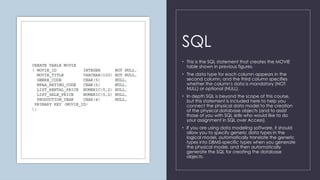
SQL
• This is the SQL statement that creates the MOVIE
table shown in previous figures.
• The data type for each column appears in the
second column, and the third column specifies
whether the column's data is mandatory (NOT
NULL) or optional (NULL).
• In depth SQL is beyond the scope of this course,
but this statement is included here to help you
connect the physical data model to the creation
of the physical database objects (and to assist
those of you with SQL skills who would like to do
your assignment in SQL over Access).
• If you are using data modeling software, it should
allow you to specify generic data types in the
logical model, automatically translate the generic
types into DBMS-specific types when you generate
the physical model, and then automatically
generate the SQL for creating the database
objects.
Data Types
• It is most unfortunate that industry standards lagged behind
DBMS development. Most vendors did their own thing for
many years before collaborating with other vendors to
develop standards, and this is clearly evident in the wide
variation of data type options across the major DBMS
products.
• Today the ANSI/ISO SQL standard covers relational data
types, and the major vendors support all or most of the
standard types.
• However, each vendor has its own "extensions" to the
standards, largely in support of data types it developed
before standards existed, but also to add features that
differentiate its product from competitors’ offerings.
• One could say (in jest) that the greatest thing about
database standards is that there are so many from which to
choose.
• In terms of industry standards for relational databases,
Microsoft Access is probably the least compliant of the most
popular products, and MySQL the most compliant.
• Given the many levels of standards compliance and all the
vendor extensions, the DBA must have a detailed knowledge
of the data types available on the particular DBMS that is in
use to deploy the database successfully. And, of course,
great care must be taken when converting physical designs
from one vendor's product to another's.
Data Types
• This figure shows data types from different
DBMS vendors that are roughly equivalent.
• As always, the devil is in the details,
meaning that these are not identical data
types, merely equivalent.
• For example, the VARCHAR type in Oracle
can be up to 4,000 characters in length
(2,000 characters in versions prior to
Oracle8i), but the equivalent MEMO type
in Microsoft Access can be up to a
gigabyte of characters (roughly 1 billion
characters)!
Constraints
• A constraint is a rule placed on a database
object (typically a table or column) that
restricts the allowable data values for that
database object in some way.
• These are most important in relational
databases in that constraints are the way we
implement both the relationships and business
rules specified in the logical design.
• Each constraint is assigned a unique name to
permit it to be referenced in error messages
and subsequent database commands.
• It is a good habit for DBAs to supply the
constraint names because names generated
automatically by the DBMS are never very
descriptive.
Primary Key Constraints
• A primary key is a column or a set of columns that uniquely identifies each row in a table.
• A unique identifier in the conceptual and logical data models is thus implemented as a primary key in the physical model and ultimately in the
database.
• Recall that in the models shown thus far, the primary key column(s) are shown above the horizontal line within the rectangles that depict each
entity.
• In the previous SQL example, you may have noticed the PRIMARY KEY clause used to define the primary key to the DBMS.
• When you define a primary key, the DBMS implements it as a primary key constraint to guarantee that no two rows in the table will ever have
duplicate values in the primary key column(s).
• Note that for primary keys composed of multiple columns, each column by itself may have duplicate values in the table, but the combination
of the values for all the primary key columns must be unique among all rows in the table.
• Primary key constraints are nearly always implemented by the DBMS using an index, which is a special type of database object that permits
fast searches of column values.
• As new rows are inserted into the table, the DBMS automatically searches the index to make sure the value for the primary key of the new row
is not already in use in the table, rejecting the insert request if it is.
• Indexes can be searched much faster than tables; therefore, the index on the primary key is essential in tables of any size, so that the search for
duplicate keys on every insert doesn't create a performance bottleneck.
Referential
Constraints
• To understand how the DBMS enforces relationships using referential
constraints, you must first understand the concept of foreign keys. Recall
that when one-to-many relationships are implemented in tables, the
column or set of columns that is stored in the child table (the table on the
"many" side of the relationship), to associate it with the parent table (the
table on the "one" side), is called a foreign key. It gets its name from the
column(s) copied from another (foreign) table. For example, in the
TRANSACTION table previously shown, the EMPLOYEE_ID column is a foreign
key to the EMPLOYEE table, and the CUSTOMER_ID column is a foreign key
to the CUSTOMER table.
• In most relational databases, the foreign key must either be the primary key
of the parent table, or a column or set of columns for which a unique index
is defined. This again is for efficiency.
• Most people prefer that the foreign key column(s) have names identical to
the corresponding primary key column(s), but again there are counter
opinions, especially because like-named columns are a little more difficult
to use in query languages. It is best to set some standards up front and to
stick with them throughout your database project.
• Each relationship between entities in the conceptual design becomes a
referential constraint in the logical design.
• A referential constraint (sometimes called a referential integrity constraint) is
a constraint that enforces a relationship among tables in a relational
database.
• Enforces means that the DBMS automatically checks to ensure that each
foreign key value in a child table always has a corresponding primary key
value in the parent table.
• As we update the data in the database tables, the DBMS must enforce the
referential constraints we have defined on the table. The beauty of
database constraints is that they are automatic and therefore cannot be
circumvented unless the DBA removes or disables them.
Enforcing Referential Constraints
Here are the particular events that the DBMS must handle when enforcing referential constraints:
• When you try to insert a new row into the child table, the insert request is rejected if the corresponding
parent table row does not exist. For example, if you insert a row into the TRANSACTION table with an
EMPLOYEE_ID value of 12345, the DBMS must check the EMPLOYEE table to see if a row for EMPLOYEE_ID
12345 already exists. If it doesn't exist, the insert request is rejected.
• When you try to update a foreign key value in the child table, the update request is rejected if the new
value for the foreign key does not already exist in the parent table. For example, if you attempt to change
the EMPLOYEE_ID for TRANSACTION 48 from 4 to 12345, the DBMS must again check the EMPLOYEE table
to see if a row for EMPLOYEE_ID 12345 already exists. If it doesn't exist, the update request is rejected.
• When you try to delete a row from a parent table and that parent row has related rows in one or more
child tables, either the child table rows must be deleted along with the parent row or the delete request
must be rejected. Most DBMSs provide the option of automatically deleting the child rows, called a
cascading delete. You probably wondered why anyone would ever want automatic deletion of child
rows. Consider the TRANSACTION and MOVIE_RENTAL tables. If a transaction is to be deleted, why not
delete the rentals that belong to it in one easy step? However, with the EMPLOYEE table, you clearly
would not want that option. If you attempt to delete employee 4 from the EMPLOYEE table (perhaps
because the person is no longer an employee), the DBMS must check for rows assigned to EMPLOYEE_ID 4
in the TRANSACTION table and reject the delete request if any is found. It would make no business sense
to have orders automatically deleted when an employee left the company.
Defining
Referential
Constraints
• In most relational databases, an SQL statement
is used to define a referential constraint.
• Many vendors also provide graphical user
interface (GUI) panels for defining database
objects such as referential constraints.
• In SQL Server, for example, these GUI panels are
located within the SQL Server Management Studio
tool, and in Oracle, a tool named SQL Developer
has these capabilities.
• For Microsoft Access, the Relationships panel is
used for defining referential constraints.
Integrity
Constraints
As mentioned, many of the business rules from the
conceptual design become constraints in the
logical model. An integrity constraint is a constraint
that promotes the accuracy of the data in the
database.
The key benefit is that these constraints are invoked
automatically by the DBMS and cannot be
circumvented (unless you are a DBA)
no matter how you connect to the database.
The major types of integrity constraints are NOT
NULL constraints, CHECK constraints, and
constraints enforced
with triggers.
Not Null Constraints
• As you define columns in database tables, you have the option of specifying whether null values are permitted for the
column.
• A null value in a relational database is a special code that can be placed in a column that indicates that the value for
that column in that row is unknown. A null value is not the same as a blank, an empty string, or a zero—it is indeed a
special code that has no other meaning in the database.
• A uniform way to treat null values is specified in the ANSI/ISO SQL Standard. However, there has been much debate over
the usefulness of the option because the database cannot tell you why the value is unknown. If you leave the value for
Job Title null in the Employees table, for example, you don't know whether it is null because it is truly unknown (you know
employees must have a title, but you do not know what it is), it doesn't apply (perhaps some employees do not get titles),
or it is unassigned (they will get a title eventually, but the title their manager wants to use hasn't been approved yet). The
other dilemma is that null values are not equal to anything, including other null values, which introduces three-valued
logic into database searches. With nulls in use, a search can return the condition true (the column value matches), false
(the column value does not match), or unknown (the column value is null). The developers who write the application
programs have to handle null values as a special case.
• In SQL definitions of tables, you simply include the keyword NULL or NOT NULL in the column definition. Watch out for
defaults! In Oracle, if you skip the specification, the default is NULL, which means the column may contain null values. But
in some implementations of DB2, Microsoft SQL Server, and Sybase, it is just the opposite: if you skip the specification, the
default is NOT NULL, meaning the column may not contain null values.
Check
Constraints
• A CHECK constraint uses a simple logic
statement to validate a column value.
• The outcome of the statement must be a
logical true or false, with an outcome of true
allowing the column value to be placed in the
table, and a value of false causing the column
value to be rejected with an appropriate error
message.
• For example, we could prevent the list rental
price in the MOVIE table from ever being zero
or a negative number by adding a clause like
this one to the SQL definition of the table:
• CHECK (LIST_RENTAL_PRICE >=0)
Constraint Enforcement Using Triggers
• Some constraints are too complicated to be enforced using the declarations. For example, the business
rule contained in Figure 2-1 (Customers with overdue amounts may not book new orders) falls into this
category because it involves more than one table.
• We need to prevent new rows from being added to the TRANSACTION table if the
CUSTOMER_ACCOUNT row for the customer has an overdue amount that is greater than zero.
• As mentioned, it may be best to implement business rules such as this one in the application logic.
• However, if we want to add a constraint that will be enforced no matter how the database is updated,
a trigger will do the job.
• A trigger is a module of programming logic that "fires" (executes) when a particular event in the
database takes place.
• In this example, we want the trigger to fire whenever a new row is inserted into the TRANSACTION table.
The trigger obtains the overdue amount for the customer from the CUSTOMER_ACCOUNT table (or
wherever the column is physically stored). If this amount is greater than zero, the trigger will raise a
database error that stops the insert request and causes an appropriate error message to be displayed.
You the
Data
Modeler
• As a data modeler and/or database designer,
you can expect resistance to the notion of
placing constraints in the database.
• Developers always want unfettered control over
data content, arguing they need the flexibility of
enforcing all constraints in application code.
• However, constraints in application logic are
bypassed when data enters the database via
other means, such as bulk loads of data from flat
files and other databases.
• The trick is to find the proper balance and to know
which constraints are too restrictive or inflexible
when enforced in the database.
• Some DBMSs provide a special language for
writing program modules such as triggers: PL/SQL
in Oracle, Transact SQL in Microsoft SQL Server
and Sybase, and Microsoft Visual Basic for
Applications (VBA) in Microsoft Access. In other
DBMSs, such as DB2, a generic programming
language such as C may be used.
Views
• A view is a stored database query that provides a database user with a customized subset of the data from one or more
tables in the database. Said another way, a view is a virtual table, because it looks like a table and for the most part
behaves like a table, yet it stores no data (only the defining query is stored). The user views form the external layer in the
ANSI/SPARC model.
• In physical databases, views serve a number of useful functions:
•  Hiding columns that the user does not need to see (or should not be allowed to see)
•  Hiding rows from tables that a user does not need to see (or should not be allowed to see)
•  Hiding complex database operations such as table joins
•  Improving query performance (in some DBMSs, such as Microsoft SQL Server)
• Views play two roles in data modeling:
• First, requirements for views (that is, specifications of the data that business users want to get from proposed new or
enhanced databases) form a primary input source for modelers during logical design.
• Second, views can be included in physical models as a means of documentation. Creating these views is a good test of
the quality of a data model. If the model in an automated modeling tool can be used to generate the definitions of the
views required by the business users (the ones they specified when they gave us their requirements), we can be
reasonably certain that our design covers all of their requirements.

Data Types and Physical Data Models v 123

  • 1.
  • 2.
    In this Lesson REVIEWTHE MOST COMMON DATATYPES FURTHER UNDERSTAND RELATIONSHIPS AND 3NF CREATE A PHYSICAL DATA MODEL
  • 3.
    Datatypes • So wenow need to talk about data types. For every attribute we need to specify the type of data that can be inserted in the field. • Some common datatypes are depicted in this table.
  • 4.
    Datatypes • Dependent uponthe database software you are using there are many other datatypes and these datatypes are broken down even further (ex. small integer, tiny integer, big integer) • When we use Varchar we need to identify how many characters or text we will allow to be entered. • Note, Id’s will always be Integers when assigned by the database. • So back to our models. We have our students entity, we have our classes entity, and our zip_city entity. We now need to put our data types next to each attribute.
  • 5.
    Datatypes • On ourforeign key, class_id, it needs to have the same datatype as the id or primary key in the class table. • For our name and address we’re entering text, so a string of characters that are letters and numbers. So we’re using Varchar and we need to set the length or limit to the number of characters, here we’re saying we can enter or store 100 characters for each. • Then again in zip, we created a lookup to our zip_city entity, and it needs to be the same as the unique id used in zip_city.
  • 6.
    Relations • So we’veseen you can have a one to many relationship, there are instances where you could have what they call a many to many relationship. • Let’s change the example. Say instead of our tables capturing data about the class each student is currently in, let’s say the student is selecting their classes, classes are elective classes and we get to choose the ones we want to attend and at what time. So more like a university than a college. • So in our new example a student can select or take many classes, and a class can have many students in it. So now we have a many to many relationship.
  • 7.
    From modeling to design • Nowthat we have modeled out our db and tables, we can create our tables and our foreign keys, enter our datatypes, and link our tables in an intermediate table. • So back to our new example where students can select among different types of classes.
  • 8.
    From modeling to design •A student can participate in 3 classes and a class can have different students, so we have a many to many relation. • We resolve this into an intermediate table by putting an intermediate entity or table that has a primary key or unique key of it’s own (it runs faster to have this id), and two foreign keys, or the primary keys from students, and classes.
  • 9.
    From modeling todesign • It’s much more efficient and the db will run faster as we eliminate it processing through the many to many relationships. • So let’s put in our new relationships to see how it works. • One student can participate in many classes, and one class can have many students. So now we have a relation from the student and the classes through this intermediate table or entity.
  • 10.
    From modeling to design •Let’s look at what that would look like with data in our tables. • So our student Anna has the id of 1, and she is taking PHP, which has the class id of 1. • She is also taking Javascript, we see she has the student if of 1, and the class id of 2 which is Javascript.
  • 11.
    From modeling to design •When we query our database to find out which students are taking which courses, the data itself can come back like this as the database has made the relationships for us from the intermediate entity.
  • 12.
    Assignment 7 Case 7: •Follow the instructions in the document named: Physical Data Model Creation • Grab a screen capture of the physical data model and place it in a Word document with a cover page and a brief description of the model for reader comprehension. • Submit the Word document to Brightspace in the dropbox folder named: Assignment 7
  • 13.
    Assignment 8 Case 8: •Now that you have a full comprehension of relations, normalization, data types and creating a physical data model, create an accurate physical data model used everything learned for your Video game or home book library using all of the techniques learned to date that apply. • You can use sqldbm like the instructions in the last exercises, or use any tool that you wish, but the tool must allow you to model the entities (tables), the attributes, the primary and foreign keys, the relationships between the tables, and the datatypes • Grab screen captures of your Physical model, place in a Word document with a cover page and a description of the model for reader comprehension. • Upload the Word document to Brightspace in the folder named: Assignment 8.
  • 14.
    MS Access – Practice •Follow the instructions in the following PowerPoints: • 5.1 – Well Designed Databases • 5.2 – Defining Relationships
  • 15.
    C HOMEWORK Further Reading toUnderstand Physical Models
  • 16.
    Physical Model Components • The physicaldesign is implanted in the ANSI/SPARC physical layer. • We create a physical data model and use it to implement the physical layer using the DBMS. For example, when we create a table in the database, we include a clause in the Create Table command that tells the DBMS where we want to place it. • The DBMS then automatically allocates space for the table in the requested operating system file(s). • Because so much of the physical implementation is buried in the DBMS definitions of the logical structures, it can be difficult to separate them in your mind. • Ideally, the logical model should not contain any physical implementation details. • As the physical model is created, physical storage properties (file or tablespace name, storage location, and sizing information) can be assigned to each database object as we map them from the logical model, or they can be omitted at first and added later. • In some organizations, data modelers turn over initial physical models to DBAs, and it is the DBAs who add the physical implementation details. • For time efficiency, many data modelers build the logical and physical models in parallel, and many data modeling tools support a combined logical/physical data model to assist with that alternative.
  • 17.
    The Physical Model •Our Earlier Logical Model • Our now Physical Model
  • 18.
    Tables • The primaryunit of storage in the relational model is the table, which is a 2-D structure composed of rows and columns. • Each row corresponds to one occurrence of the entity that the table represents, and each column corresponds to one attribute for that entity. • The process of mapping the entities in the conceptual design to tables in the logical design is called normalization. • Often, an entity in the conceptual model maps to exactly one table in the logical model, but this is not always the case. • For reasons you will learn with the normalization process, entities are commonly split into multiple tables, and in rare cases, multiple entities can be combined into one table.
  • 19.
    Tables • Physical Model• Physical Model
  • 20.
    Relational Tables • You mustremember that a relational table is a logical storage structure and usually does not exist in tabular form in the physical layer. • When the DBA assigns a table to operating system files in the physical layer (called tablespaces in most DBMSs), it is common for multiple tables to be placed in a single tablespace. • However, large tables can be placed in their own tablespace or split across multiple tablespaces, and this is called partitioning. • This flexibility typically does not exist in personal computer–based DBMSs such as Microsoft Access.
  • 21.
    Tables Continued • Each tablemust be given a unique name by the DBA who creates it. • The maximum length for these names varies a lot among DBMS products, from as few as 18 characters to as many as 255. Table names should be descriptive and should reflect the name of the real-world entity they represent. • By convention, some DBAs always name entities in the singular and tables in the plural. I prefer that both be named in the singular. • The point here is that you should establish naming standards at the outset so that names are not assigned in a haphazard manner, as this leads to confusion later. • As a case in point, Microsoft Access permits embedded spaces in table and column names, which is counter to industry standards. Moreover, Microsoft Access, Sybase, and Microsoft SQL Server allow mixed-case names, such as MovieCopy, whereas Oracle, DB2, MySQL on Windows, and others force all names to be uppercase letters unless they are enclosed in double quotes. • Because table names such as MOVIECOPY are not very readable, the use of an underscore to separate words, per industry standards, is a much better choice. • You may want to set standards that forbid the use of names with embedded spaces and names in mixed case because such names are nonstandard and make any conversion between database vendors that much more difficult.
  • 22.
    Columns and Data Types •As mentioned, each column in a relational table represents an attribute from the conceptual model. The column is the smallest named unit of data that can be referenced in a relational database. Each column must be assigned a unique name (within the table) and a data type. A data type is a category for the format of a particular column. Data types provide several valuable benefits: • Restricting the data in the column to characters that make sense for the data type (for example, only numeric digits or only valid calendar dates). • Providing a set of behaviors useful to the database user. For example, if you subtract a number from another number, you get a number as a result; but if you subtract a date from another date, you get a number representing the elapsed time (usually measured in days) between the two dates as a result. • Assisting the DBMS in efficiently storing the column data. For example, numbers can often be stored in an internal numeric format that saves space, compared with merely storing the numeric digits as a string of characters.
  • 23.
    SQL • This isthe SQL statement that creates the MOVIE table shown in previous figures. • The data type for each column appears in the second column, and the third column specifies whether the column's data is mandatory (NOT NULL) or optional (NULL). • In depth SQL is beyond the scope of this course, but this statement is included here to help you connect the physical data model to the creation of the physical database objects (and to assist those of you with SQL skills who would like to do your assignment in SQL over Access). • If you are using data modeling software, it should allow you to specify generic data types in the logical model, automatically translate the generic types into DBMS-specific types when you generate the physical model, and then automatically generate the SQL for creating the database objects.
  • 24.
    Data Types • Itis most unfortunate that industry standards lagged behind DBMS development. Most vendors did their own thing for many years before collaborating with other vendors to develop standards, and this is clearly evident in the wide variation of data type options across the major DBMS products. • Today the ANSI/ISO SQL standard covers relational data types, and the major vendors support all or most of the standard types. • However, each vendor has its own "extensions" to the standards, largely in support of data types it developed before standards existed, but also to add features that differentiate its product from competitors’ offerings. • One could say (in jest) that the greatest thing about database standards is that there are so many from which to choose. • In terms of industry standards for relational databases, Microsoft Access is probably the least compliant of the most popular products, and MySQL the most compliant. • Given the many levels of standards compliance and all the vendor extensions, the DBA must have a detailed knowledge of the data types available on the particular DBMS that is in use to deploy the database successfully. And, of course, great care must be taken when converting physical designs from one vendor's product to another's.
  • 25.
    Data Types • Thisfigure shows data types from different DBMS vendors that are roughly equivalent. • As always, the devil is in the details, meaning that these are not identical data types, merely equivalent. • For example, the VARCHAR type in Oracle can be up to 4,000 characters in length (2,000 characters in versions prior to Oracle8i), but the equivalent MEMO type in Microsoft Access can be up to a gigabyte of characters (roughly 1 billion characters)!
  • 26.
    Constraints • A constraintis a rule placed on a database object (typically a table or column) that restricts the allowable data values for that database object in some way. • These are most important in relational databases in that constraints are the way we implement both the relationships and business rules specified in the logical design. • Each constraint is assigned a unique name to permit it to be referenced in error messages and subsequent database commands. • It is a good habit for DBAs to supply the constraint names because names generated automatically by the DBMS are never very descriptive.
  • 27.
    Primary Key Constraints •A primary key is a column or a set of columns that uniquely identifies each row in a table. • A unique identifier in the conceptual and logical data models is thus implemented as a primary key in the physical model and ultimately in the database. • Recall that in the models shown thus far, the primary key column(s) are shown above the horizontal line within the rectangles that depict each entity. • In the previous SQL example, you may have noticed the PRIMARY KEY clause used to define the primary key to the DBMS. • When you define a primary key, the DBMS implements it as a primary key constraint to guarantee that no two rows in the table will ever have duplicate values in the primary key column(s). • Note that for primary keys composed of multiple columns, each column by itself may have duplicate values in the table, but the combination of the values for all the primary key columns must be unique among all rows in the table. • Primary key constraints are nearly always implemented by the DBMS using an index, which is a special type of database object that permits fast searches of column values. • As new rows are inserted into the table, the DBMS automatically searches the index to make sure the value for the primary key of the new row is not already in use in the table, rejecting the insert request if it is. • Indexes can be searched much faster than tables; therefore, the index on the primary key is essential in tables of any size, so that the search for duplicate keys on every insert doesn't create a performance bottleneck.
  • 28.
    Referential Constraints • To understandhow the DBMS enforces relationships using referential constraints, you must first understand the concept of foreign keys. Recall that when one-to-many relationships are implemented in tables, the column or set of columns that is stored in the child table (the table on the "many" side of the relationship), to associate it with the parent table (the table on the "one" side), is called a foreign key. It gets its name from the column(s) copied from another (foreign) table. For example, in the TRANSACTION table previously shown, the EMPLOYEE_ID column is a foreign key to the EMPLOYEE table, and the CUSTOMER_ID column is a foreign key to the CUSTOMER table. • In most relational databases, the foreign key must either be the primary key of the parent table, or a column or set of columns for which a unique index is defined. This again is for efficiency. • Most people prefer that the foreign key column(s) have names identical to the corresponding primary key column(s), but again there are counter opinions, especially because like-named columns are a little more difficult to use in query languages. It is best to set some standards up front and to stick with them throughout your database project. • Each relationship between entities in the conceptual design becomes a referential constraint in the logical design. • A referential constraint (sometimes called a referential integrity constraint) is a constraint that enforces a relationship among tables in a relational database. • Enforces means that the DBMS automatically checks to ensure that each foreign key value in a child table always has a corresponding primary key value in the parent table. • As we update the data in the database tables, the DBMS must enforce the referential constraints we have defined on the table. The beauty of database constraints is that they are automatic and therefore cannot be circumvented unless the DBA removes or disables them.
  • 29.
    Enforcing Referential Constraints Hereare the particular events that the DBMS must handle when enforcing referential constraints: • When you try to insert a new row into the child table, the insert request is rejected if the corresponding parent table row does not exist. For example, if you insert a row into the TRANSACTION table with an EMPLOYEE_ID value of 12345, the DBMS must check the EMPLOYEE table to see if a row for EMPLOYEE_ID 12345 already exists. If it doesn't exist, the insert request is rejected. • When you try to update a foreign key value in the child table, the update request is rejected if the new value for the foreign key does not already exist in the parent table. For example, if you attempt to change the EMPLOYEE_ID for TRANSACTION 48 from 4 to 12345, the DBMS must again check the EMPLOYEE table to see if a row for EMPLOYEE_ID 12345 already exists. If it doesn't exist, the update request is rejected. • When you try to delete a row from a parent table and that parent row has related rows in one or more child tables, either the child table rows must be deleted along with the parent row or the delete request must be rejected. Most DBMSs provide the option of automatically deleting the child rows, called a cascading delete. You probably wondered why anyone would ever want automatic deletion of child rows. Consider the TRANSACTION and MOVIE_RENTAL tables. If a transaction is to be deleted, why not delete the rentals that belong to it in one easy step? However, with the EMPLOYEE table, you clearly would not want that option. If you attempt to delete employee 4 from the EMPLOYEE table (perhaps because the person is no longer an employee), the DBMS must check for rows assigned to EMPLOYEE_ID 4 in the TRANSACTION table and reject the delete request if any is found. It would make no business sense to have orders automatically deleted when an employee left the company.
  • 30.
    Defining Referential Constraints • In mostrelational databases, an SQL statement is used to define a referential constraint. • Many vendors also provide graphical user interface (GUI) panels for defining database objects such as referential constraints. • In SQL Server, for example, these GUI panels are located within the SQL Server Management Studio tool, and in Oracle, a tool named SQL Developer has these capabilities. • For Microsoft Access, the Relationships panel is used for defining referential constraints.
  • 31.
    Integrity Constraints As mentioned, manyof the business rules from the conceptual design become constraints in the logical model. An integrity constraint is a constraint that promotes the accuracy of the data in the database. The key benefit is that these constraints are invoked automatically by the DBMS and cannot be circumvented (unless you are a DBA) no matter how you connect to the database. The major types of integrity constraints are NOT NULL constraints, CHECK constraints, and constraints enforced with triggers.
  • 32.
    Not Null Constraints •As you define columns in database tables, you have the option of specifying whether null values are permitted for the column. • A null value in a relational database is a special code that can be placed in a column that indicates that the value for that column in that row is unknown. A null value is not the same as a blank, an empty string, or a zero—it is indeed a special code that has no other meaning in the database. • A uniform way to treat null values is specified in the ANSI/ISO SQL Standard. However, there has been much debate over the usefulness of the option because the database cannot tell you why the value is unknown. If you leave the value for Job Title null in the Employees table, for example, you don't know whether it is null because it is truly unknown (you know employees must have a title, but you do not know what it is), it doesn't apply (perhaps some employees do not get titles), or it is unassigned (they will get a title eventually, but the title their manager wants to use hasn't been approved yet). The other dilemma is that null values are not equal to anything, including other null values, which introduces three-valued logic into database searches. With nulls in use, a search can return the condition true (the column value matches), false (the column value does not match), or unknown (the column value is null). The developers who write the application programs have to handle null values as a special case. • In SQL definitions of tables, you simply include the keyword NULL or NOT NULL in the column definition. Watch out for defaults! In Oracle, if you skip the specification, the default is NULL, which means the column may contain null values. But in some implementations of DB2, Microsoft SQL Server, and Sybase, it is just the opposite: if you skip the specification, the default is NOT NULL, meaning the column may not contain null values.
  • 33.
    Check Constraints • A CHECKconstraint uses a simple logic statement to validate a column value. • The outcome of the statement must be a logical true or false, with an outcome of true allowing the column value to be placed in the table, and a value of false causing the column value to be rejected with an appropriate error message. • For example, we could prevent the list rental price in the MOVIE table from ever being zero or a negative number by adding a clause like this one to the SQL definition of the table: • CHECK (LIST_RENTAL_PRICE >=0)
  • 34.
    Constraint Enforcement UsingTriggers • Some constraints are too complicated to be enforced using the declarations. For example, the business rule contained in Figure 2-1 (Customers with overdue amounts may not book new orders) falls into this category because it involves more than one table. • We need to prevent new rows from being added to the TRANSACTION table if the CUSTOMER_ACCOUNT row for the customer has an overdue amount that is greater than zero. • As mentioned, it may be best to implement business rules such as this one in the application logic. • However, if we want to add a constraint that will be enforced no matter how the database is updated, a trigger will do the job. • A trigger is a module of programming logic that "fires" (executes) when a particular event in the database takes place. • In this example, we want the trigger to fire whenever a new row is inserted into the TRANSACTION table. The trigger obtains the overdue amount for the customer from the CUSTOMER_ACCOUNT table (or wherever the column is physically stored). If this amount is greater than zero, the trigger will raise a database error that stops the insert request and causes an appropriate error message to be displayed.
  • 35.
    You the Data Modeler • Asa data modeler and/or database designer, you can expect resistance to the notion of placing constraints in the database. • Developers always want unfettered control over data content, arguing they need the flexibility of enforcing all constraints in application code. • However, constraints in application logic are bypassed when data enters the database via other means, such as bulk loads of data from flat files and other databases. • The trick is to find the proper balance and to know which constraints are too restrictive or inflexible when enforced in the database. • Some DBMSs provide a special language for writing program modules such as triggers: PL/SQL in Oracle, Transact SQL in Microsoft SQL Server and Sybase, and Microsoft Visual Basic for Applications (VBA) in Microsoft Access. In other DBMSs, such as DB2, a generic programming language such as C may be used.
  • 36.
    Views • A viewis a stored database query that provides a database user with a customized subset of the data from one or more tables in the database. Said another way, a view is a virtual table, because it looks like a table and for the most part behaves like a table, yet it stores no data (only the defining query is stored). The user views form the external layer in the ANSI/SPARC model. • In physical databases, views serve a number of useful functions: •  Hiding columns that the user does not need to see (or should not be allowed to see) •  Hiding rows from tables that a user does not need to see (or should not be allowed to see) •  Hiding complex database operations such as table joins •  Improving query performance (in some DBMSs, such as Microsoft SQL Server) • Views play two roles in data modeling: • First, requirements for views (that is, specifications of the data that business users want to get from proposed new or enhanced databases) form a primary input source for modelers during logical design. • Second, views can be included in physical models as a means of documentation. Creating these views is a good test of the quality of a data model. If the model in an automated modeling tool can be used to generate the definitions of the views required by the business users (the ones they specified when they gave us their requirements), we can be reasonably certain that our design covers all of their requirements.

Editor's Notes

  • #3 Assigning data types ensure that all data being entered is consistent in format.
  • #4 You can investigate further datatypes dependent upon the database you will use for upcoming assignments and the final project (SQL Server or Access). Personally I keep a “cheat sheet”, or a printed list of the datatypes at my desk. You can find the datatypes you need and create a list by performing a quick google search. If you had id’s that were not integers you should change them to integers now for the next assignments. Having the database auto assign the number cuts down on manual entry errors.
  • #5 When determining how many characters to make the filed length, you need to look at historical data (the data you already collected) and also consider future data needs. Try to make the field length nice round numbers, so you wouldn’t say 102, you might instead round up to the nearest 10 and would say 110.
  • #6 We could also have a one to one relationship, one person has one social insurance number or social security number. But typically we do not use one to one relationships, we simply use the unique attribute in the same table.