MIS Classification
MIS Classification
 The discipline of MIS is at its evolutionary stage and
is a matter of degree rather than an absolute one.
 For the sake of clarity we can categorize
information systems on the basis of their roles in
the operations & management of a business.
 Accordingly information systems are categorized
as:
 Operations Support Systems
 Management Support Systems
Operations Support Systems
 As and when any transaction takes place in an
organization, data is generated.
 Business operations are carried out using this
data.
 Information systems that process such data
are called as operations support systems.
 Some of the various operations support
systems are:
 Transaction Processing Systems.
 Process Control Systems.
 Office Automation Systems.
Operations Support Systems
 Transaction Processing Systems:
 TPS records and processes data.
 Produces reports.
 Represents the automation of fundamental & routine
processes used to support business operations.
 Does not provide any information for decision making.
 They process transactions either in batch or in real time.
 For example, Point-of-Sale systems at many retail stores
use electronic cash register to capture & transmit sales
data to the head office computer centre for immediate or
weekly processing.
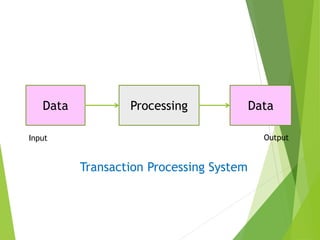
Data Processing Data
Input Output
Transaction Processing System
Operations Support Systems
 Process Control Systems:
 The systems which monitor and control
physical processes are known as process
control systems.
 They monitor a manufacturing environment
and electronically control the process or
manufacturing flow based on limits set by the
user.
 For example, pharmaceutical manufacturing
company uses electronic sensors linked to
computers to monitor chemical processes and
make required adjustments.
Operations Support Systems
 Office Automation Systems:
 Refers to the application of computer and
communication technology to office functions.
 They are meant to improve the productivity of
managers at various levels of management.
 Office activities may be grouped under two
classes:
 Activities performed by clerical personnel
 Activities performed by executives.
Operations Support Systems
 Some of the applications of office
automation systems are:
 Word Processing
 Electronic Filing
 Electronic Mail
 Electronic Presentations, etc.
Management Support Systems
 These are the information systems that focus
on providing information and decision support
for effective decision making by managers.
 Some of the examples of Management Support
systems are:
 Management information Systems
 Decision Support Systems
 Executive Support Systems
 Enterprise Systems
Management Support Systems
 Management Information System:
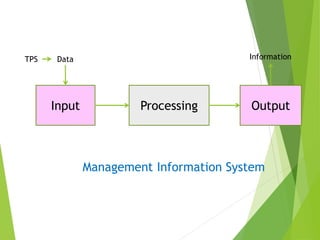
 Is an information system that processes data & converts it
into information.
 It uses TPS for its data inputs.
 The information generated may be used for control of
operations, strategic and long range planning, short range
planning, and other managerial problem solving.
 The domain of MIS is mainly management control level.
 It is capable of providing analysis, planning and decision
making support.
Input Processing Output
Data Information
Management Information System
TPS
Management Support Systems
 Decision Support System:
 Is an information system application that assists in
decision making.
 It tends to be used in planning, analysing
alternatives, and trial & error search for solutions.
 Incorporates a variety of decision models.
 They are capable of performing “what-if” analysis.
 It is tailor made for every manager according to
their task.
Management Support Systems
 Decision Support System:
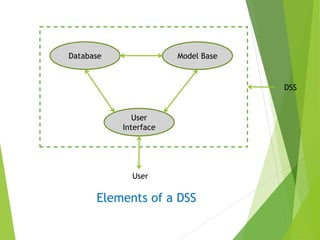
 The elements of a DSS include
 A database
 A model base
 A software providing interactive dialogue
 The data in the database typically is a combination of
master files and data from external sources.
 The library of models is used to analyse the data in
desired ways.
 The model base might include econometric models,
simulation models etc.
Management Support Systems
 Decision Support System:
 The user interface is used t communicate with the
DSS.
 It generally consists of a terminal connected to the
network with help of modem.
Database Model Base
User
Interface
DSS
User
Elements of a DSS
Information from MIS
Decision
(most appropriate
alternative)
A1
A2
A3
A4
A5
Alternative Processing
Decision Support System
Management Support Systems
 Decision Support System:
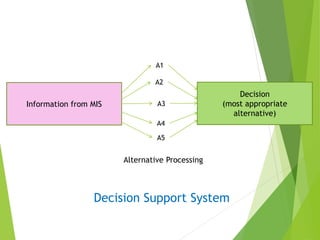
 DSS helps choose among alternatives.
 For example:
 A salary information system provides information to every
employee regarding his basic salary, allowances and
deductions.
 If an employee wants to make deposits in some schemes for
availing income tax rebates, he can make use of DSS.
 DSS helps the user decide in which scheme and how much
he should invest to get maximum benefits.
Management Support Systems
 Decision Support System:
 DSS provides an interactive dialogue with the
environment.
 Through this the user can interact with the system
to add/alter data as per his requirements.
 The main application areas of DSS are production,
finance, and marketing.
Management Support Systems
 Executive Support System:
 ESS is an extension of MIS.
 It provides critical information from various internal
and external sources.
 An ESS is specially tailored for the use of Chief
Executive of an organization to support his decision
making.
 It is a comprehensive information system which
includes various types of decision support systems
but is more specific and person oriented.
Management Support Systems
 Executive Support System:
 It is designed to fulfil the information needs of a
chief executive keeping in mind not only his
requirements but also his personality and style of
functioning.
Management Support Systems
 Enterprise Systems:
 Are the systems that integrate all facets of an
organization including:
 Planning
 Manufacturing
 Sales
 Human Resource Management
 Customer Relations
 Inventory Control
 Customer order Tracking
 Financial Management
 Marketing, etc.
Management Support Systems
 Enterprise Systems:
 Generally, in business organizations, there are
several systems for several functional areas like
 Production information system
 Marketing information system
 Financial & Accounting information system
 Etc.
 Alternatively there may be a common structure
useful to each of these, i.e., an integrated system.
Management Support Systems
 Enterprise Systems:
 Integration of information may be:
 Hierarchical
 Horizontal, and
 Cross-Functional
 In hierarchical integration, operational level system feed
data into higher level systems.
 Horizontal integration refers to integration within a
functional area.
 For example, a product may pass through several production
processes in the production department.
 The information system for all these sub systems are
integrated in a departmental information system.
Management Support Systems
 Enterprise Systems:
 Cross-Functional information system associates with
different functional areas.
 For example a marketing information system may
transmit information regarding loss of sales because
of inventory shortage to the inventory control
information system.
Management Support Systems
 Enterprise Systems:
 With the emergence of Business process
Reengineering (BPR),emphasis is being given to
business processes and their integration.
 Different software vendors have termed such system
differently.
 Most commonly used terms are:
 Customer Relationship Management (CRM)
 Supply Chain Management (SCM)
 Enterprise Resource Planning (ERP)

Mis classification By Ram K Paliwal

  • 1.
  • 2.
    MIS Classification  Thediscipline of MIS is at its evolutionary stage and is a matter of degree rather than an absolute one.  For the sake of clarity we can categorize information systems on the basis of their roles in the operations & management of a business.  Accordingly information systems are categorized as:  Operations Support Systems  Management Support Systems
  • 3.
    Operations Support Systems As and when any transaction takes place in an organization, data is generated.  Business operations are carried out using this data.  Information systems that process such data are called as operations support systems.  Some of the various operations support systems are:  Transaction Processing Systems.  Process Control Systems.  Office Automation Systems.
  • 4.
    Operations Support Systems Transaction Processing Systems:  TPS records and processes data.  Produces reports.  Represents the automation of fundamental & routine processes used to support business operations.  Does not provide any information for decision making.  They process transactions either in batch or in real time.  For example, Point-of-Sale systems at many retail stores use electronic cash register to capture & transmit sales data to the head office computer centre for immediate or weekly processing.
  • 5.
    Data Processing Data InputOutput Transaction Processing System
  • 6.
    Operations Support Systems Process Control Systems:  The systems which monitor and control physical processes are known as process control systems.  They monitor a manufacturing environment and electronically control the process or manufacturing flow based on limits set by the user.  For example, pharmaceutical manufacturing company uses electronic sensors linked to computers to monitor chemical processes and make required adjustments.
  • 7.
    Operations Support Systems Office Automation Systems:  Refers to the application of computer and communication technology to office functions.  They are meant to improve the productivity of managers at various levels of management.  Office activities may be grouped under two classes:  Activities performed by clerical personnel  Activities performed by executives.
  • 8.
    Operations Support Systems Some of the applications of office automation systems are:  Word Processing  Electronic Filing  Electronic Mail  Electronic Presentations, etc.
  • 9.
    Management Support Systems These are the information systems that focus on providing information and decision support for effective decision making by managers.  Some of the examples of Management Support systems are:  Management information Systems  Decision Support Systems  Executive Support Systems  Enterprise Systems
  • 10.
    Management Support Systems Management Information System:  Is an information system that processes data & converts it into information.  It uses TPS for its data inputs.  The information generated may be used for control of operations, strategic and long range planning, short range planning, and other managerial problem solving.  The domain of MIS is mainly management control level.  It is capable of providing analysis, planning and decision making support.
  • 11.
    Input Processing Output DataInformation Management Information System TPS
  • 12.
    Management Support Systems Decision Support System:  Is an information system application that assists in decision making.  It tends to be used in planning, analysing alternatives, and trial & error search for solutions.  Incorporates a variety of decision models.  They are capable of performing “what-if” analysis.  It is tailor made for every manager according to their task.
  • 13.
    Management Support Systems Decision Support System:  The elements of a DSS include  A database  A model base  A software providing interactive dialogue  The data in the database typically is a combination of master files and data from external sources.  The library of models is used to analyse the data in desired ways.  The model base might include econometric models, simulation models etc.
  • 14.
    Management Support Systems Decision Support System:  The user interface is used t communicate with the DSS.  It generally consists of a terminal connected to the network with help of modem.
  • 15.
  • 16.
    Information from MIS Decision (mostappropriate alternative) A1 A2 A3 A4 A5 Alternative Processing Decision Support System
  • 17.
    Management Support Systems Decision Support System:  DSS helps choose among alternatives.  For example:  A salary information system provides information to every employee regarding his basic salary, allowances and deductions.  If an employee wants to make deposits in some schemes for availing income tax rebates, he can make use of DSS.  DSS helps the user decide in which scheme and how much he should invest to get maximum benefits.
  • 18.
    Management Support Systems Decision Support System:  DSS provides an interactive dialogue with the environment.  Through this the user can interact with the system to add/alter data as per his requirements.  The main application areas of DSS are production, finance, and marketing.
  • 19.
    Management Support Systems Executive Support System:  ESS is an extension of MIS.  It provides critical information from various internal and external sources.  An ESS is specially tailored for the use of Chief Executive of an organization to support his decision making.  It is a comprehensive information system which includes various types of decision support systems but is more specific and person oriented.
  • 20.
    Management Support Systems Executive Support System:  It is designed to fulfil the information needs of a chief executive keeping in mind not only his requirements but also his personality and style of functioning.
  • 21.
    Management Support Systems Enterprise Systems:  Are the systems that integrate all facets of an organization including:  Planning  Manufacturing  Sales  Human Resource Management  Customer Relations  Inventory Control  Customer order Tracking  Financial Management  Marketing, etc.
  • 22.
    Management Support Systems Enterprise Systems:  Generally, in business organizations, there are several systems for several functional areas like  Production information system  Marketing information system  Financial & Accounting information system  Etc.  Alternatively there may be a common structure useful to each of these, i.e., an integrated system.
  • 23.
    Management Support Systems Enterprise Systems:  Integration of information may be:  Hierarchical  Horizontal, and  Cross-Functional  In hierarchical integration, operational level system feed data into higher level systems.  Horizontal integration refers to integration within a functional area.  For example, a product may pass through several production processes in the production department.  The information system for all these sub systems are integrated in a departmental information system.
  • 24.
    Management Support Systems Enterprise Systems:  Cross-Functional information system associates with different functional areas.  For example a marketing information system may transmit information regarding loss of sales because of inventory shortage to the inventory control information system.
  • 25.
    Management Support Systems Enterprise Systems:  With the emergence of Business process Reengineering (BPR),emphasis is being given to business processes and their integration.  Different software vendors have termed such system differently.  Most commonly used terms are:  Customer Relationship Management (CRM)  Supply Chain Management (SCM)  Enterprise Resource Planning (ERP)