SAJAN SINGH RATHORE
Roll No. :- MCA/25019/18
 In Windows platform there are many disk file
system.
 Microsoft Windows employs two major file
systems : NTFS(New Technology File System) the
primary format most modern versions of this os
use by default , and FAT(File Allocation Table) ,
which was inherited from old DOS and has
ExFAT(Extended File Allocation Table)as its later
extension.
 In addition the ReFS(Resilient File System ) file
system was developed by Microsoft as a new
generation file system for server computers
starting from windows server 2012.
 In the early days of computing, Microsoft
developed a file system, in collaboration with
IBM ,which was named as FAT file system.
 FAT file system was developed to meet the
requirements of storage devices at that time,
which used to be very limited in size.
 Later on as the size of storage devices grew,
FAT file system encountered many problems,
so NTFS came into existence.
 FAT is one of the simplest file system types, which has been
around since the 1980s.
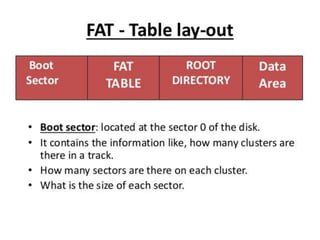
 It consists of the file system boot sector or superblock , the file
system block allocation table (referred as the File Allocation
Table)and plain storage space for storing files and folders.
 Files in FAT are stored in directories , each defining a file or
extended attributes of a file (example  a long file name ). A file
record attributes the first block of a file . Any text block can be
found through the block allocation table by using it as a linked
list.
 FAT was used in MSDOS and in early versions of windows such as
95 and 98.it stores the information about all the files on the disk.
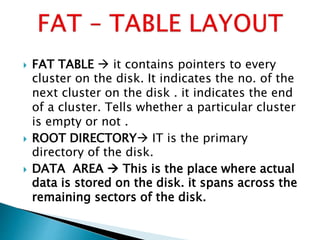
 FAT TABLE  it contains pointers to every
cluster on the disk. It indicates the no. of the
next cluster on the disk . it indicates the end
of a cluster. Tells whether a particular cluster
is empty or not .
 ROOT DIRECTORY IT is the primary
directory of the disk.
 DATA AREA  This is the place where actual
data is stored on the disk. it spans across the
remaining sectors of the disk.
 Fat file system was designed for disk of small
size(up to few GBs),but later on the as the
high capacity disks came into use, FAT file
system could not support them.
 FAT file system could not support the
application required Recoverability, fault
tolerance and file security.
 Especially in corporate world, where
recoverability and reliability was of great
importance, FAT file system loose it ways to
NTFS
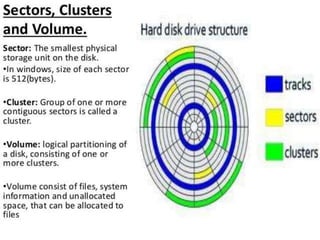
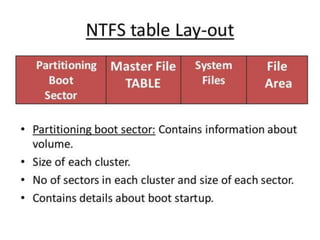
 In NTFS every sector is of 512 bytes.
 Each cluster consist of 2 sectors.
 Size of each cluster =2*512Bytes 1024 Bytes or
1KB •
 Let the size of the file = 2000Bytes.
 So NTFS will allocate 2 clusters(or 4 sectors).
 The NTFS file system is not applicable for MS DOS,
Windows 95, and Windows 98.
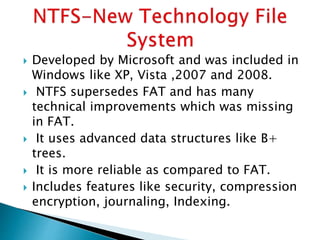
 Developed by Microsoft and was included in
Windows like XP, Vista ,2007 and 2008.
 NTFS supersedes FAT and has many
technical improvements which was missing
in FAT.
 It uses advanced data structures like B+
trees.
 It is more reliable as compared to FAT.
 Includes features like security, compression
encryption, journaling, Indexing.
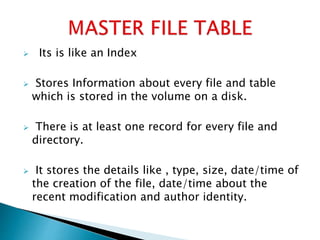
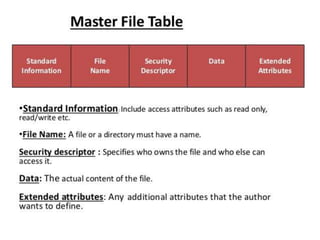
 Its is like an Index
 Stores Information about every file and table
which is stored in the volume on a disk.
 There is at least one record for every file and
directory.
 It stores the details like , type, size, date/time of
the creation of the file, date/time about the
recent modification and author identity.
 File system employ five techniques to provide high
file access performance –
 Use of efficient data structures  Directories
are organized by using data structures that
facilitate fast search.
 Effective disk allocation  Disk space is
allocated to a file in such a manner that little disk
head movement and rotational delays are involved
in processing of a sequential file.
 Caching  part of memory is used as a cache for
data stored on an I/O device.
 Buffering A buffer is a memory area that is used
to store data temporarily . the file system loads
data from an I/O device into a buffer before a
process needs it so that the process can access the
data without having to wait for an I/O operation to
complete. Converse actions are performed when a
process wishes to write data in a file.
 Disk scheduling  I/O operations on a disk are
performed in an order that reduce disk head
movement it ensures high throughput of a disk.
Microsoft Windows File System in Operating System

Microsoft Windows File System in Operating System

  • 1.
    SAJAN SINGH RATHORE RollNo. :- MCA/25019/18
  • 2.
     In Windowsplatform there are many disk file system.  Microsoft Windows employs two major file systems : NTFS(New Technology File System) the primary format most modern versions of this os use by default , and FAT(File Allocation Table) , which was inherited from old DOS and has ExFAT(Extended File Allocation Table)as its later extension.  In addition the ReFS(Resilient File System ) file system was developed by Microsoft as a new generation file system for server computers starting from windows server 2012.
  • 3.
     In theearly days of computing, Microsoft developed a file system, in collaboration with IBM ,which was named as FAT file system.  FAT file system was developed to meet the requirements of storage devices at that time, which used to be very limited in size.  Later on as the size of storage devices grew, FAT file system encountered many problems, so NTFS came into existence.
  • 5.
     FAT isone of the simplest file system types, which has been around since the 1980s.  It consists of the file system boot sector or superblock , the file system block allocation table (referred as the File Allocation Table)and plain storage space for storing files and folders.  Files in FAT are stored in directories , each defining a file or extended attributes of a file (example  a long file name ). A file record attributes the first block of a file . Any text block can be found through the block allocation table by using it as a linked list.  FAT was used in MSDOS and in early versions of windows such as 95 and 98.it stores the information about all the files on the disk.
  • 7.
     FAT TABLE it contains pointers to every cluster on the disk. It indicates the no. of the next cluster on the disk . it indicates the end of a cluster. Tells whether a particular cluster is empty or not .  ROOT DIRECTORY IT is the primary directory of the disk.  DATA AREA  This is the place where actual data is stored on the disk. it spans across the remaining sectors of the disk.
  • 8.
     Fat filesystem was designed for disk of small size(up to few GBs),but later on the as the high capacity disks came into use, FAT file system could not support them.  FAT file system could not support the application required Recoverability, fault tolerance and file security.  Especially in corporate world, where recoverability and reliability was of great importance, FAT file system loose it ways to NTFS
  • 9.
     In NTFSevery sector is of 512 bytes.  Each cluster consist of 2 sectors.  Size of each cluster =2*512Bytes 1024 Bytes or 1KB •  Let the size of the file = 2000Bytes.  So NTFS will allocate 2 clusters(or 4 sectors).  The NTFS file system is not applicable for MS DOS, Windows 95, and Windows 98.
  • 10.
     Developed byMicrosoft and was included in Windows like XP, Vista ,2007 and 2008.  NTFS supersedes FAT and has many technical improvements which was missing in FAT.  It uses advanced data structures like B+ trees.  It is more reliable as compared to FAT.  Includes features like security, compression encryption, journaling, Indexing.
  • 12.
     Its islike an Index  Stores Information about every file and table which is stored in the volume on a disk.  There is at least one record for every file and directory.  It stores the details like , type, size, date/time of the creation of the file, date/time about the recent modification and author identity.
  • 14.
     File systememploy five techniques to provide high file access performance –  Use of efficient data structures  Directories are organized by using data structures that facilitate fast search.  Effective disk allocation  Disk space is allocated to a file in such a manner that little disk head movement and rotational delays are involved in processing of a sequential file.  Caching  part of memory is used as a cache for data stored on an I/O device.
  • 15.
     Buffering Abuffer is a memory area that is used to store data temporarily . the file system loads data from an I/O device into a buffer before a process needs it so that the process can access the data without having to wait for an I/O operation to complete. Converse actions are performed when a process wishes to write data in a file.  Disk scheduling  I/O operations on a disk are performed in an order that reduce disk head movement it ensures high throughput of a disk.