Technologies and WebsitesWe have used a variety of different technologies, programs and websites throughout the process of creating our thriller opening.
Mini DV Digital CamcorderMini DV digital camcorder; We used the camera to do all of our filming over the coursework, including our preliminary task and our interviews. We have over time developed our filming quality, and have learned how to upload our videos and filming onto the computers.Still Digital CameraA still digital camera; We used a digital camera in order to take pictures of us working, in order to demonstrate what work we have done, to put on his blog, for example taking pictures of us filming.
Camera on a phone Phone (Camera); We also used the camera on Tom's phone to take photo's and video’s of what we are doing, and then blue toothed them onto the computers.
TripodA tripod; We were taught in lesson how to use a tripod, to improve the quality of our filming. It meant that we were able to film panning shots and tilt shots, as well as hold a steady shot. Again we were able to develop our ability of using the tripod to get more original and interesting shots as time went on.
Apple Mac ComputerAn Apple Mac computer; Using the layout of the Mac was one thing on top of everything else that we had to learn. It isn't too dissimilar from a normal computer; the worst thing was the mouse! But like everything else, over time, our skills developed and it became easier.
www.blogger.comBlogger is the site on which each member of our group made our online blog to demonstrate our understanding of film language, specifically in reference to thrillers, and to keep a constant 'online diary' about the creation of our thriller opening. My blog address is as follows; www.bethberrettrc.blogspot.com and it can be accessed by anyone anywhere around the world, and i can view the blogs of other people for inspiration. I feel personally that i have done a good job with my blog, posting on it regularly with detailed analysis and explanation in a variety of forms of multimedia.
www.onetruemedia.comI used one true media on a number of occasions to create several montages demonstrating a variety of things. Examples include a montage of images associated with thrillers, a montage of film industries and companies, a montage of pictures taken of us filming, and a montage to demonstrate varieties of film language. It was a very useful tool when information could be displayed like this rather than through essays of writing.www.slideshare.comSlideshare is a website used to create slideshows, with images and information, as another way to deliver information. Its easy to use, however it only lets a certain format of images and documents be uploaded, meaning I couldn't upload a number of photos that I wanted to, so I used one true media, which was just as good, but it meant I couldn't vary my types of multimedia to display information as much.
www.surveymonkey.comWe used survey monkey to create an online survey, which we posted onto facebook for our friends and family to answer, in order to gain an idea of who our target audience are. It was quick and simple, and allowed us to find out information which influenced how we made our film.
www.youtube.com All members of our group have used Youtube before on a number of occasions, so using it was no problem. We used it to find demonstrations of topics we were discussing on our blog, as well as to gain inspiration. We also uploaded our own videos on to our own channel, such as the preliminary task and bloopers onto Youtube for other people to watch.
www.mobygratis.comThis was the site from which we obtained our main soundtracks. From the 7 tracks we asked permission for we only used 2 of them; the ones we thought provided the best atmosphere. The site was easy enough to use and we were able to find suitable music.www.freesound.orgWe only discovered this website by chance, earlier this week. We found a variety of sounds and sound effects which we added to our film, which gave it that extra edge. It was really easy to use, and good because we didn't have to wait for permission to use them, meaning we could try as many as we wanted easily.www.wordle.comThis was probably my favourite website to use. We used wordle primary as an alternative way to display our results from our target audience survey. It was a great way of differentiating between the answers that got lots of feedback and the ones that were less popular. It was straightforward to use and fun to design and personalize.
www.nces.ed.gov/nceskids/createagraph/default.aspx I only discovered this website within the last week, but it proved to be a good tool. Its a website on which i could create free bar, line and pie charts, to display information. It was another alternative method to get information across to people.
LivetypeTom was the main member of our group to use this program, to make our ident, credits and title. This was one of the harder programs to use, and it took us quite a while to get used to- trial and error was the way to work out how to use it and produce the best credits.
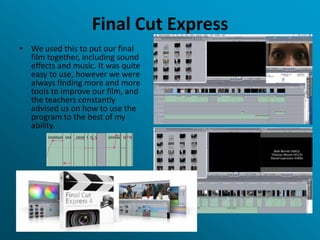
Final Cut ExpressWe used this to put our final film together, including sound effects and music. It was quite easy to use, however we were always finding more and more tools to improve our film, and the teachers constantly advised us on how to use the program to the best of my ability.
Skills I Have Gained?In my opinion, I have gained a number of skills through the creation of my coursework. This includes the use of Apple Mac Computers and programs such as Livetype and final cut express. I have also discovered several alternative ways of displaying information such as graphs, charts, wordles, slideshows and montages. I have furthermore developed my teamwork and communication skills through the project, and have learnt how to compromise ideas with other people to make a better product.
Media presentation q6

Media presentation q6

  • 1.
    Technologies and WebsitesWehave used a variety of different technologies, programs and websites throughout the process of creating our thriller opening.
  • 2.
    Mini DV DigitalCamcorderMini DV digital camcorder; We used the camera to do all of our filming over the coursework, including our preliminary task and our interviews. We have over time developed our filming quality, and have learned how to upload our videos and filming onto the computers.Still Digital CameraA still digital camera; We used a digital camera in order to take pictures of us working, in order to demonstrate what work we have done, to put on his blog, for example taking pictures of us filming.
  • 3.
    Camera on aphone Phone (Camera); We also used the camera on Tom's phone to take photo's and video’s of what we are doing, and then blue toothed them onto the computers.
  • 4.
    TripodA tripod; Wewere taught in lesson how to use a tripod, to improve the quality of our filming. It meant that we were able to film panning shots and tilt shots, as well as hold a steady shot. Again we were able to develop our ability of using the tripod to get more original and interesting shots as time went on.
  • 5.
    Apple Mac ComputerAnApple Mac computer; Using the layout of the Mac was one thing on top of everything else that we had to learn. It isn't too dissimilar from a normal computer; the worst thing was the mouse! But like everything else, over time, our skills developed and it became easier.
  • 6.
    www.blogger.comBlogger is thesite on which each member of our group made our online blog to demonstrate our understanding of film language, specifically in reference to thrillers, and to keep a constant 'online diary' about the creation of our thriller opening. My blog address is as follows; www.bethberrettrc.blogspot.com and it can be accessed by anyone anywhere around the world, and i can view the blogs of other people for inspiration. I feel personally that i have done a good job with my blog, posting on it regularly with detailed analysis and explanation in a variety of forms of multimedia.
  • 7.
    www.onetruemedia.comI used onetrue media on a number of occasions to create several montages demonstrating a variety of things. Examples include a montage of images associated with thrillers, a montage of film industries and companies, a montage of pictures taken of us filming, and a montage to demonstrate varieties of film language. It was a very useful tool when information could be displayed like this rather than through essays of writing.www.slideshare.comSlideshare is a website used to create slideshows, with images and information, as another way to deliver information. Its easy to use, however it only lets a certain format of images and documents be uploaded, meaning I couldn't upload a number of photos that I wanted to, so I used one true media, which was just as good, but it meant I couldn't vary my types of multimedia to display information as much.
  • 8.
    www.surveymonkey.comWe used surveymonkey to create an online survey, which we posted onto facebook for our friends and family to answer, in order to gain an idea of who our target audience are. It was quick and simple, and allowed us to find out information which influenced how we made our film.
  • 9.
    www.youtube.com All membersof our group have used Youtube before on a number of occasions, so using it was no problem. We used it to find demonstrations of topics we were discussing on our blog, as well as to gain inspiration. We also uploaded our own videos on to our own channel, such as the preliminary task and bloopers onto Youtube for other people to watch.
  • 10.
    www.mobygratis.comThis was thesite from which we obtained our main soundtracks. From the 7 tracks we asked permission for we only used 2 of them; the ones we thought provided the best atmosphere. The site was easy enough to use and we were able to find suitable music.www.freesound.orgWe only discovered this website by chance, earlier this week. We found a variety of sounds and sound effects which we added to our film, which gave it that extra edge. It was really easy to use, and good because we didn't have to wait for permission to use them, meaning we could try as many as we wanted easily.www.wordle.comThis was probably my favourite website to use. We used wordle primary as an alternative way to display our results from our target audience survey. It was a great way of differentiating between the answers that got lots of feedback and the ones that were less popular. It was straightforward to use and fun to design and personalize.
  • 11.
    www.nces.ed.gov/nceskids/createagraph/default.aspx I onlydiscovered this website within the last week, but it proved to be a good tool. Its a website on which i could create free bar, line and pie charts, to display information. It was another alternative method to get information across to people.
  • 12.
    LivetypeTom was themain member of our group to use this program, to make our ident, credits and title. This was one of the harder programs to use, and it took us quite a while to get used to- trial and error was the way to work out how to use it and produce the best credits.
  • 13.
    Final Cut ExpressWeused this to put our final film together, including sound effects and music. It was quite easy to use, however we were always finding more and more tools to improve our film, and the teachers constantly advised us on how to use the program to the best of my ability.
  • 14.
    Skills I HaveGained?In my opinion, I have gained a number of skills through the creation of my coursework. This includes the use of Apple Mac Computers and programs such as Livetype and final cut express. I have also discovered several alternative ways of displaying information such as graphs, charts, wordles, slideshows and montages. I have furthermore developed my teamwork and communication skills through the project, and have learnt how to compromise ideas with other people to make a better product.