An Introduction to
Cloud Computing
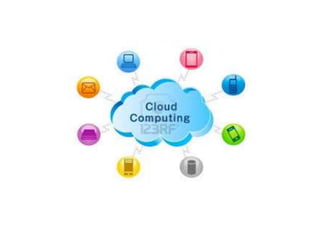
What is the cloud?
• IT as a service
• Cloud allows access to services without user technical knowledge or
control of supporting infrastructure
• Best described in terms of what happened to mechanical power over
100 yrs ago
• Now computers are simple devices connected to the larger cloud
• Data processing, storage and software applications that used to run
locally are now being supplied by big central computing stations. They're
becoming, in essence, computing utilities.
What is
Cloud Computing?
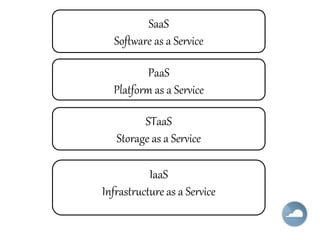
IaaS
Infrastructure as a Service
PaaS
Platform as a Service
STaaS
Storage as a Service
SaaS
Software as a Service
Software delivery model
• Also known as On-demand
service.
• No hardware or software to
manage.
• Service delivered through a
browser.
SaaS
Advantages
• Pay per use
• Instant Scalability
• Security
• Reliability
• APIs
SaaS
Examples
• CRM
• Financial Planning
• Human Resources
• Yahoo mail
Commercial Services:
• Salesforce.com
• emailcloud
SaaS
Platform delivery model
• Category of cloud computing
service that provides a platform
and a solution stack as a
service.
• Estimating demand is not a
science!
• Platform management is not
fun!
PaaS
Popular services
• Storage
• Database
• Scalability
PaaS
Advantages
• Pay per use
• Instant Scalability
• Security
• Reliability
• APIs
PaaS
Examples
• Google App Engine
• Mosso
• AWS: S3
PaaS
Computer infrastructure
delivery model
Access to infrastructure stack:
– Full OS access
– Firewalls
– Routers
– Load balancing
IaaS
Advantages
• Pay per use
• Instant Scalability
• Security
• Reliability
• APIs
IaaS
Examples
• Flexi scale
• AWS: EC2
IaaS
Common Factors
• Pay per use
• Instant Scalability
• Security
• Reliability
• APIsIaaS
PaaS
SaaS
MODES OF CLOUDS
1. Public Cloud:
 Can be accessed by any subscriber
with an internet connection and access
to the cloud space.
 Can be shared by various
organizations.
 E.g. : Amazon, Google, etc….
2. Private cloud:
 Is established for a specific group or an
organizations and limits access to just
that group.
 It is not shared with other
organizations.
 It is more expensive and more secure.
 E.g.: HP data centre, IBM, 3tera.
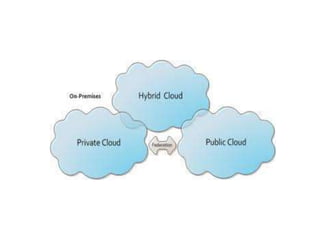
3. Hybrid Cloud:
 It is essentially a combination or usage
of both public and private cloud.
 Organizations may host critical
applications on private clouds.
 Where as relatively less security
concerns on public cloud.
CLOUD OPERATING
SYSTEM
• Eye OS
• Amoeba OS
• Glide OS
• Start force
• my Goya
• Corneli OS
• Cloudo, Ghost, Zimdesk
Advantages:
• Is Eco-Friendly.
• Can reduce E-waste.
• Helps to accelerate Green IT.
• Can reduce Global Warming.
• Reduce cost and Increase
storage.
• Allows focus on any topic.
IaaS
PaaS
SaaS
DISADVANTAGE:
• Requires a constant internet connection.
• Security and Privacy.
• A dead internet connection means no
work and in areas where internet
connections are few or inherently
unreliable, this cloud be a deal-breaker.
• When you are offline, cloud computing
simply does not work.
CONCLUSION
• It is a powerful new abstraction for large
scale data processing system.
• Also it is a new emerging architecture
needed to expand the internet to
become the computing platform of the
future.
Introduction to Cloud Computing

Introduction to Cloud Computing

  • 1.
  • 2.
    What is thecloud? • IT as a service • Cloud allows access to services without user technical knowledge or control of supporting infrastructure • Best described in terms of what happened to mechanical power over 100 yrs ago • Now computers are simple devices connected to the larger cloud • Data processing, storage and software applications that used to run locally are now being supplied by big central computing stations. They're becoming, in essence, computing utilities. What is Cloud Computing?
  • 3.
    IaaS Infrastructure as aService PaaS Platform as a Service STaaS Storage as a Service SaaS Software as a Service
  • 4.
    Software delivery model •Also known as On-demand service. • No hardware or software to manage. • Service delivered through a browser. SaaS
  • 5.
    Advantages • Pay peruse • Instant Scalability • Security • Reliability • APIs SaaS
  • 6.
    Examples • CRM • FinancialPlanning • Human Resources • Yahoo mail Commercial Services: • Salesforce.com • emailcloud SaaS
  • 7.
    Platform delivery model •Category of cloud computing service that provides a platform and a solution stack as a service. • Estimating demand is not a science! • Platform management is not fun! PaaS
  • 8.
    Popular services • Storage •Database • Scalability PaaS
  • 10.
    Advantages • Pay peruse • Instant Scalability • Security • Reliability • APIs PaaS
  • 11.
    Examples • Google AppEngine • Mosso • AWS: S3 PaaS
  • 12.
    Computer infrastructure delivery model Accessto infrastructure stack: – Full OS access – Firewalls – Routers – Load balancing IaaS
  • 13.
    Advantages • Pay peruse • Instant Scalability • Security • Reliability • APIs IaaS
  • 14.
  • 15.
    Common Factors • Payper use • Instant Scalability • Security • Reliability • APIsIaaS PaaS SaaS
  • 17.
    MODES OF CLOUDS 1.Public Cloud:  Can be accessed by any subscriber with an internet connection and access to the cloud space.  Can be shared by various organizations.  E.g. : Amazon, Google, etc….
  • 18.
    2. Private cloud: Is established for a specific group or an organizations and limits access to just that group.  It is not shared with other organizations.  It is more expensive and more secure.  E.g.: HP data centre, IBM, 3tera.
  • 19.
    3. Hybrid Cloud: It is essentially a combination or usage of both public and private cloud.  Organizations may host critical applications on private clouds.  Where as relatively less security concerns on public cloud.
  • 21.
    CLOUD OPERATING SYSTEM • EyeOS • Amoeba OS • Glide OS • Start force • my Goya • Corneli OS • Cloudo, Ghost, Zimdesk
  • 22.
    Advantages: • Is Eco-Friendly. •Can reduce E-waste. • Helps to accelerate Green IT. • Can reduce Global Warming. • Reduce cost and Increase storage. • Allows focus on any topic. IaaS PaaS SaaS
  • 23.
    DISADVANTAGE: • Requires aconstant internet connection. • Security and Privacy. • A dead internet connection means no work and in areas where internet connections are few or inherently unreliable, this cloud be a deal-breaker. • When you are offline, cloud computing simply does not work.
  • 24.
    CONCLUSION • It isa powerful new abstraction for large scale data processing system. • Also it is a new emerging architecture needed to expand the internet to become the computing platform of the future.

Editor's Notes

  • #13 Sometimes called Utility computing
  • #14 Sometimes called Utility computing
  • #15 Sometimes called Utility computing