CLOUD COMPUTING
Cloud Computing 
 Distributed computing on internet Or delivery of computing 
service over the internet. 
 Instead of keeping data on your own hard drive you use a 
service over the Internet, at another location, to store your 
information or use its applications. 
 Cloud services are popular because they can reduce the 
cost and complexity of owning and operating computers 
and networks. 
 Cloud benefits to users include scalability, reliability, and 
efficiency.
HISTORY 
 "cloud computing" gradually evolved in 1950’s when large-scale 
mainframes were made available . 
 The real implementation of virtual machines came in the 70s 
when IBM released an operating system called VM. 
 In the 1990s, telecommunications companies began offering 
virtual private network (VPN) services with comparable quality 
of service, but at a lower cost.
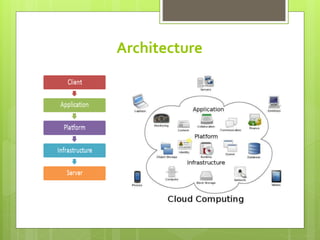
Architecture
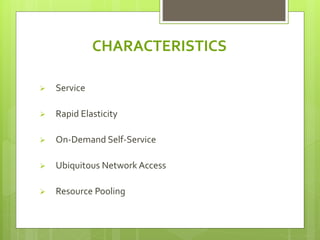
CHARACTERISTICS 
 Service 
 Rapid Elasticity 
 On-Demand Self-Service 
 Ubiquitous Network Access 
 Resource Pooling
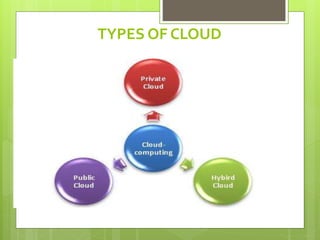
TYPES OF CLOUD
Public Cloud 
 Public clouds are owned and operated by third 
parties, they deliver superior economies of scale 
to customers, as the infrastructure costs are 
spread among a mix of users, giving each 
individual client an attractive low-cost, “Pay-as-you- 
go” model. y third parties; they deliver 
superior economies of scale.
Private Cloud 
 Private clouds are built exclusively for a single 
enterprise. 
 They aim to address concerns on data security 
and offer greater control, which is typically 
lacking in a public cloud.
Hybrid Cloud 
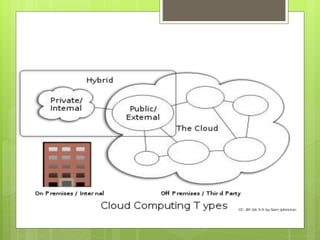
 Hybrid Clouds combine both public and private cloud 
models. 
 With a Hybrid Cloud, service providers can utilize 3rd 
party Cloud Providers in a full or partial manner thus 
increasing the flexibility of computing. 
 The Hybrid cloud environment is capable of providing 
on-demand, externally provisioned scale
Cloud Computing Services 
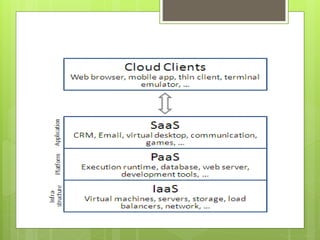
 SaaS (Software as a service): Required 
software, Operating system & network is 
provided. 
 PaaS (Platform as service): Operating system 
and network is provided. 
 IaaS (Infrastructure as a service): just Network 
is provided.
Cloud Computing Services
Saas (Software As a Service ) 
 We can access this cloud hosted application 
without any additional hardware or software. 
 E.g. : G-mail, Yahoo mail, Hotmail etc.,
Paas (Platform As a Service ) 
 Give us nice API (Application Programming 
Interface) and take care of the implementation. 
 It is a platform for developers to write and create 
their own SaaS. i.e. applications.
Iaas (Infrastucture As a Service ) 
 It is also known as hardware as a service. 
 Iaas is a computing power that you can rent for a 
limited period of time. 
 allows existing applications to be run on a cloud 
suppliers hardware.
ADVANTAGES 
 Software as a Subscription 
 Reduced Software Maintenance 
 Increased Reliability 
 Environmentally Friendly 
 Cost Reduction 
 Portability/Accessibility
DISADVANTAGES 
 Bandwidth could bust your budget 
 App performance could suffer 
 Data might not be cloud-worthy 
 Too big to scale
Conclusion 
 Cloud Computing is the fastest growing part of IT. 
 Tremendous benefits to customers of all sizes 
storage space. 
 Cloud services are simpler to acquire and scale 
up or down
conclusion 
 Public clouds work great for some but not for all 
applications. 
 Private clouds offer many benefits for internal 
applications. 
 Public and private clouds can be used in 
combination.
Real Time Application 
 Google -Network 
Made up of millions of servers, which stores 
amounts of data. 
 Amazon’s Elastic Compute Cloud-Amazon 
It provides resizable computing capacity on cloud, 
Developer’s only pay for capacity they use.
Cloud Computing

Cloud Computing

  • 1.
  • 2.
    Cloud Computing Distributed computing on internet Or delivery of computing service over the internet.  Instead of keeping data on your own hard drive you use a service over the Internet, at another location, to store your information or use its applications.  Cloud services are popular because they can reduce the cost and complexity of owning and operating computers and networks.  Cloud benefits to users include scalability, reliability, and efficiency.
  • 3.
    HISTORY  "cloudcomputing" gradually evolved in 1950’s when large-scale mainframes were made available .  The real implementation of virtual machines came in the 70s when IBM released an operating system called VM.  In the 1990s, telecommunications companies began offering virtual private network (VPN) services with comparable quality of service, but at a lower cost.
  • 4.
  • 5.
    CHARACTERISTICS  Service  Rapid Elasticity  On-Demand Self-Service  Ubiquitous Network Access  Resource Pooling
  • 6.
  • 7.
    Public Cloud Public clouds are owned and operated by third parties, they deliver superior economies of scale to customers, as the infrastructure costs are spread among a mix of users, giving each individual client an attractive low-cost, “Pay-as-you- go” model. y third parties; they deliver superior economies of scale.
  • 8.
    Private Cloud Private clouds are built exclusively for a single enterprise.  They aim to address concerns on data security and offer greater control, which is typically lacking in a public cloud.
  • 9.
    Hybrid Cloud Hybrid Clouds combine both public and private cloud models.  With a Hybrid Cloud, service providers can utilize 3rd party Cloud Providers in a full or partial manner thus increasing the flexibility of computing.  The Hybrid cloud environment is capable of providing on-demand, externally provisioned scale
  • 11.
    Cloud Computing Services  SaaS (Software as a service): Required software, Operating system & network is provided.  PaaS (Platform as service): Operating system and network is provided.  IaaS (Infrastructure as a service): just Network is provided.
  • 12.
  • 13.
    Saas (Software Asa Service )  We can access this cloud hosted application without any additional hardware or software.  E.g. : G-mail, Yahoo mail, Hotmail etc.,
  • 14.
    Paas (Platform Asa Service )  Give us nice API (Application Programming Interface) and take care of the implementation.  It is a platform for developers to write and create their own SaaS. i.e. applications.
  • 15.
    Iaas (Infrastucture Asa Service )  It is also known as hardware as a service.  Iaas is a computing power that you can rent for a limited period of time.  allows existing applications to be run on a cloud suppliers hardware.
  • 16.
    ADVANTAGES  Softwareas a Subscription  Reduced Software Maintenance  Increased Reliability  Environmentally Friendly  Cost Reduction  Portability/Accessibility
  • 17.
    DISADVANTAGES  Bandwidthcould bust your budget  App performance could suffer  Data might not be cloud-worthy  Too big to scale
  • 18.
    Conclusion  CloudComputing is the fastest growing part of IT.  Tremendous benefits to customers of all sizes storage space.  Cloud services are simpler to acquire and scale up or down
  • 19.
    conclusion  Publicclouds work great for some but not for all applications.  Private clouds offer many benefits for internal applications.  Public and private clouds can be used in combination.
  • 20.
    Real Time Application  Google -Network Made up of millions of servers, which stores amounts of data.  Amazon’s Elastic Compute Cloud-Amazon It provides resizable computing capacity on cloud, Developer’s only pay for capacity they use.